Why am I seeing Google STARTTLS errors and reduced send rates?

Updated on 13 Aug 2026: We added current Gmail SMTP codes and a clearer path for separating TLS faults, rate limits, and authentication failures.
Google STARTTLS errors with reduced send rates usually mean the SMTP session is failing under pressure, not that STARTTLS itself is the only problem. The first two causes to check are Gmail closing or deferring the connection, and the sender infrastructure running out of network, CPU, or connection headroom during large sends.
A log line such as SSL error: connect failed can be a downstream symptom. If Gmail has already returned a temporary 4xx reply or closed the TCP connection, the sender MTA still records the failure near the STARTTLS step. That makes the problem look like a pure TLS issue, even when the root cause is throttling, reputation pressure, or sender-side saturation.
The short answer
Google STARTTLS errors and lower throughput happen when Gmail is no longer accepting the conversation at the rate you are attempting, or when your MTA cannot complete TLS negotiation reliably at that load. Treat the STARTTLS error as a point in the SMTP conversation, not automatically as the root cause. Read the enhanced status code and full reply before changing TLS settings.
- Remote close: Gmail can close the session before or during STARTTLS, leaving the sender to log a TLS failure.
- Temporary reply: A 4xx response tells the MTA to queue and retry with backoff, but the enhanced code and text identify what must be fixed.
- Sender strain: Bandwidth caps, TLS CPU cost, retransmits, and connection limits can break handshakes.
- Reputation pressure: Gmail reduces acceptance when IP or domain reputation, complaint rates, sudden volume, or message quality looks risky.
- Protocol or policy fault: Old TLS versions, SMTP commands sent out of sequence, missing authentication, or stale MTA software require configuration fixes.
Do not fix this by simply turning off TLS. Gmail requires TLS for bulk senders, so disabling it can produce 421 4.7.29 rate limits or 550 5.7.29 blocks. Change rate, concurrency, retry timing, and infrastructure headroom while keeping modern TLS enabled.
Why the logs look like TLS
A typical failure cluster can mix a connection closed by the remote host, a temporary Gmail deferral, a rate-limit reply, and an SSL protocol error. Those are not the same event, but they often appear close together when a Gmail delivery lane is overloaded.
Typical Gmail delivery log linestext
Error: connection closed by the remote host
Error: "421 4.3.0 Temporary System Problem. Try again later."
Error: "421 4.7.28 Gmail has detected an unusual rate of email."
SSL error: connect failed: protocol error
The remote-close line says the far side ended the connection. The 4.3.0 reply reports a temporary system problem. The 4.7.28 reply identifies rate or reputation pressure. The TLS line says the negotiation did not complete. If the connection is already gone, the TLS library can only report a failed negotiation. Start with session order and timestamps, not only certificate checks.
|
|
|
|---|---|---|
Remote close | Session ended | Prior SMTP reply |
421 4.3.0 | Temporary system problem | Retry backoff |
421 4.7.28 | Rate or reputation limit | Volume and reputation |
421 4.7.29 | TLS was not used | TLS configuration |
SSL error | Handshake failed | TLS path and sequence |
Short interpretation of common Gmail STARTTLS symptoms
Google documents temporary and policy-related replies in its Gmail SMTP errors reference. Use the current wording for the exact reply instead of relying on a generic 421 label or an old log-code mapping.
Read the complete Gmail reply
The three-digit SMTP code only tells you whether the current attempt succeeded, should be retried, or failed permanently. The enhanced status code and response text identify the category. Preserve the whole multiline reply, including any final identifier and suffix.
|
|
|
|---|---|---|
421 or 451 with 4.x.x | Temporary deferral | Queue and retry with backoff |
421 4.7.28 | Unusual sending rate or unsolicited-mail signal | Reduce volume and inspect reputation |
421 4.7.29 | Message was not sent over TLS | Fix TLS before increasing rate |
4.7.26, 4.7.27, 4.7.30, 4.7.40, or 4.7.32 | Authentication, DMARC policy, or alignment problem | Correct SPF, DKIM, DMARC, or alignment |
523 5.7.10 | Commands pipelined after STARTTLS | Fix MTA SMTP sequencing |
550 or another 5xx reply | Permanent failure for that attempt | Do not retry the same message unchanged |
Gmail reply groups and the action each one needs
The gsmtp suffix marks a Google SMTP response. The gcdp suffix identifies a custom policy set by a Google Workspace administrator. Neither suffix explains the failure by itself, so keep the code, message text, session identifier, MX hostname, and timestamp together.
The causes to check first
When this happens during a large launch, split the causes into Google-side pressure and sender-side strain. Both can produce STARTTLS errors, queued mail, and a lower hourly send rate per IP.
Google-side pressure
- Rate pressure: Too many concurrent sessions, campaigns, or recipients hit Gmail MXs at once.
- Reputation pressure: Complaints, bounces, unwanted mail, and sudden volume shifts lower acceptance.
- Authentication pressure: SPF, DKIM, DMARC, alignment, or PTR failures can trigger their own rate limits.
- Temporary refusal: A 4xx reply tells the sender to slow down and try again later.
Sender-side strain
- Network ceiling: Provider egress caps, packet loss, or retransmits make TLS handshakes fail.
- Server load: CPU, file descriptors, memory, or queue churn can overwhelm the MTA.
- TLS stack: Old software, weak protocols, or broken negotiation settings create real TLS faults.
- SMTP sequencing: Commands sent after STARTTLS without a new EHLO, or pipelined across STARTTLS, break the session.
How to rank the signal
The pattern matters more than one isolated SSL line.
Low concern
single event
One-off TLS error, no queue growth, no Gmail-only pattern.
Investigate
load-linked
Errors rise during launch windows or high concurrency periods.
Act now
clustered
Temporary replies, remote closes, queue growth, and reduced Gmail throughput happen together.
TLS-focused
global
The same STARTTLS error appears across many receivers and low-volume tests.
A single maximum rate such as 125k messages per hour per IP is not a universal Gmail limit. It is an observed limit under a specific reputation profile, message mix, IP history, MTA setup, and traffic pattern. Check whether the error begins at the same connection count, message rate, or campaign launch pattern every time.
For senders delivering more than 5,000 messages a day to personal Gmail accounts, also verify Gmail's bulk-sender requirements. These include SPF and DKIM, a DMARC record with at least p=none, TLS, DMARC alignment, valid forward and reverse DNS, spam rates below 0.3%, and one-click unsubscribe for marketing or subscribed mail. A compliance failure can reduce acceptance before infrastructure reaches its physical limit.
How to diagnose it
Diagnose this as a combined transport, capacity, and reputation incident. Start with the Gmail lane only. Do not mix Gmail MX data with all-recipient throughput, because aggregate charts hide the exact point where Gmail begins to defer or close sessions.
- Capture the full reply: Keep the SMTP code, enhanced status code, message text, gsmtp or gcdp suffix, session identifier, MX hostname, and timestamp.
- Isolate Gmail: Graph Gmail MX deliveries, deferrals, TLS errors, remote closes, and queue depth per IP.
- Match timing: Compare the first error minute with launch time, connection count, and messages per connection.
- Test STARTTLS: Run a live TLS negotiation from the sending node, not only from an admin laptop.
- Check headroom: Review egress bandwidth, packet loss, retransmits, CPU, open files, and MTA worker limits.
- Review pacing and retries: Lower Gmail concurrency, stagger campaign starts, back off after 4xx replies, and stop retrying permanent 5xx failures unchanged.
- Validate DNS: Use a domain health check to catch authentication or PTR issues that add policy and reputation pressure.
STARTTLS test from a sender nodebash
openssl s_client -starttls smtp \
  -connect gmail-smtp-in.l.google.com:25 \
  -servername gmail-smtp-in.l.google.com

EHLO mail.example.com
The test should complete the TLS negotiation cleanly from the same host or network segment that sends mail. Inspect the certificate chain, negotiated TLS version, and the SMTP response after the new EHLO. If the test works at idle but fails during the send, the evidence points back to load, egress, connection churn, or Gmail rate pressure.
?
What's your domain score?
Deep-scan SPF, DKIM & DMARC records for email deliverability and security issues.
The domain health result does not prove Gmail will accept a given rate. It removes avoidable authentication problems from the investigation. Clean SPF, DKIM, DMARC, rDNS, and TLS-related DNS records keep the policy and reputation side of the incident from getting worse while the transport issue is being fixed.
What to change in the MTA
The safest operational change is to reduce pressure on Gmail-specific lanes, then increase throughput after the deferrals stop. Opportunistic TLS changes how the MTA behaves when TLS fails, but it does not create more Gmail capacity. If reduced send rates continue after the change, the lane is still constrained.
Use these as operational knobs, not copy-paste configuration. Exact names vary by MTA.
- Concurrency: Lower Gmail connections per IP until remote closes and temporary replies fall.
- Backoff: Increase retry delay after temporary Gmail replies instead of repeatedly hitting the same MX.
- Response handling: Keep 4xx mail queued, but suppress retries for permanent 5xx failures until the cause changes.
- Launch pacing: Stagger segmented campaigns so they do not start the same TLS connection spike.
- TLS defaults: Keep modern TLS enabled, remove weak protocols, and update old MTA builds.
- SMTP state: Send a new EHLO after STARTTLS and do not pipeline commands across the TLS transition.
For any high-volume MTA, ask for per-domain queue stats, per-IP connection counts, retry reasons, TLS library versions, CPU during the error window, network retransmits, and provider egress limits. If the sender is hosted by an ESP, ask for the same data from the actual sending nodes. A generic statement that SSL errors are acceptable is not enough when the queue is slowing down.
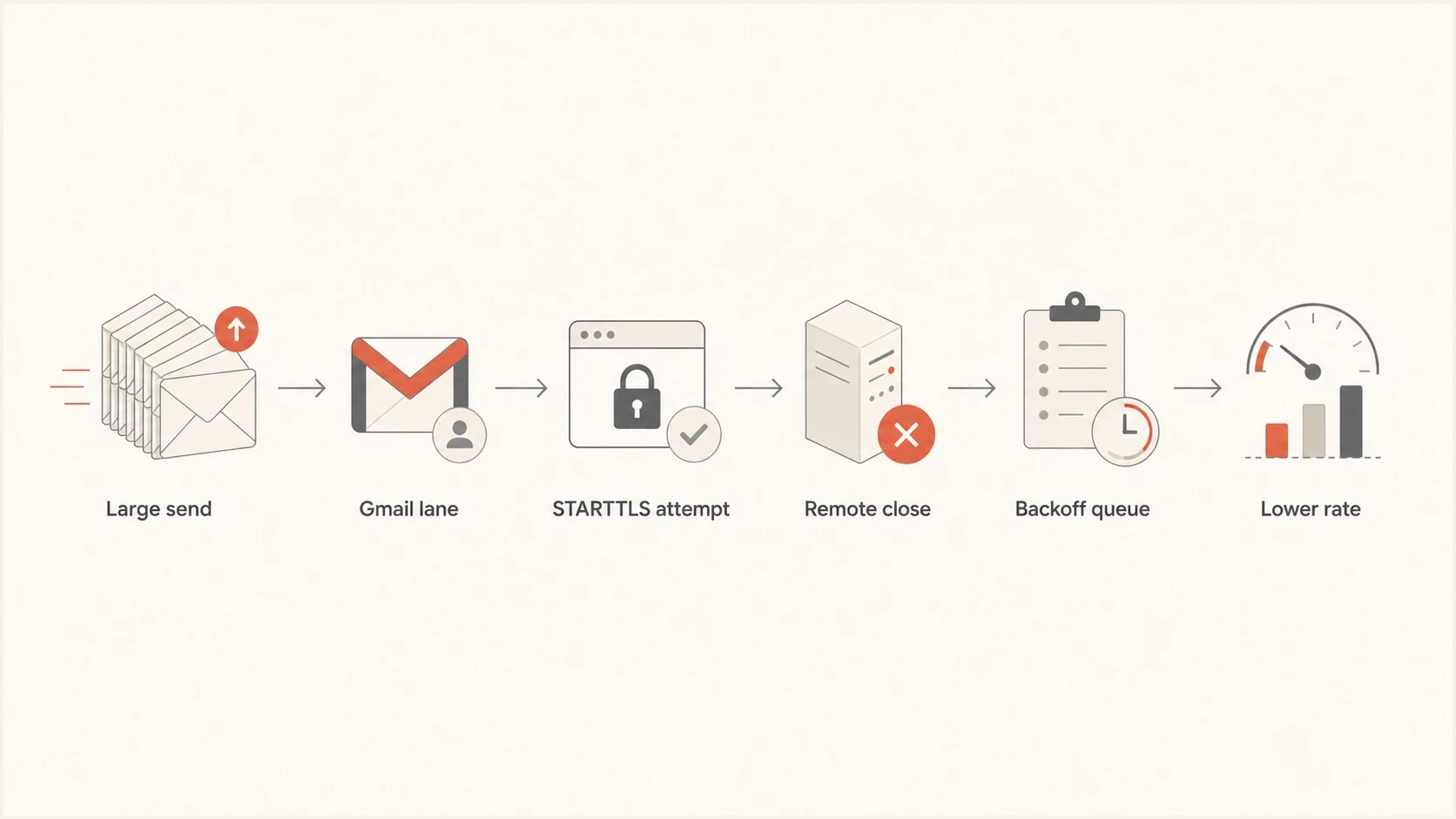
Flowchart of a large Gmail send entering STARTTLS, remote close, backoff, and reduced rate
Where MTA-STS and DMARC fit
MTA-STS and DMARC matter, but they do not fix the same part of the mail path. MTA-STS lets your receiving domain publish a policy that tells supporting senders to use TLS and validate the certificate when delivering inbound mail. It does not make Gmail accept more of your outbound campaign traffic. For inbound TLS policy, Suped's Hosted MTA-STS manages the policy file and DNS workflow without separate policy hosting.
Hosted MTA-STS/TLS-RPT configuration dialog showing policy mode, MX hosts, CNAME records, TLS reporting, and verification
DMARC, SPF, and DKIM affect whether Gmail trusts the sender identity. If those controls fail or drift, Gmail can return specific authentication and alignment rate limits during heavy sends. Suped's product brings DMARC aggregate reporting, SPF and DKIM checks, hosted SPF, hosted DMARC, real-time alerts, automated issue detection, and blocklist (blacklist) monitoring into the same workflow, so the authentication evidence is available during an SMTP incident.
For teams using Suped, start with the domain health checker, then use ongoing DMARC monitoring and alerts to catch authentication drift before a large send exposes it.
When to escalate
Escalate when you can show a repeatable pattern. The strongest case has exact timestamps, sending IPs, queue IDs, Gmail MX hostnames, full SMTP replies, TLS transcript results, and infrastructure metrics for the same minutes. Without that, the incident gets reduced to "SSL errors," which is too vague to act on.
Send to your ESP
- Timestamps: Give the first error minute, peak error minute, and recovery minute.
- Node data: Ask for bandwidth, CPU, retransmits, open files, and MTA worker usage.
- Lane data: Request Gmail-only throughput, connections, deferrals, and queue depth.
Send to Google
- SMTP evidence: Include full multiline replies, enhanced status codes, and session identifiers.
- IP scope: List affected IPs, unaffected IPs, and the Gmail MX hosts involved.
- Pattern proof: Show that errors repeat at a specific rate or campaign launch point.
If the same symptoms appear across other receivers, the TLS stack or sender network is more likely. If the pattern is Gmail-only and tied to large launches, read the related notes on TLS errors to Gmail and focus on pacing, reputation, response codes, and Gmail-specific lane limits.
Views from the trenches
Best practices
Stagger large Gmail sends so TLS handshakes, queue retries, and connections do not spike together.
Track Gmail MX results separately from other domains, then compare errors against send ramps.
Keep TLS enabled while testing rate and network limits, so security changes do not mask the cause.
Common pitfalls
Treating every SSL error as a certificate issue wastes time when the remote host already closed.
Switching TLS modes without changing connection volume leaves the same queue pressure in place.
Using one aggregate throughput number hides whether a single Gmail lane or IP is saturated.
Expert tips
Capture SMTP transcripts from the sender node during load, not only from an idle admin machine.
Compare retransmits, egress bandwidth, and CPU at the same minute the STARTTLS errors begin.
Use slower Gmail ramp rules after large launches, then raise limits only after deferrals fall.
Marketer from Email Geeks says network bandwidth caps can show up as TLS failures because the MTA struggles during the handshake when send volume rises.
2019-08-19 - Email Geeks
Marketer from Email Geeks says instance type or hosting plan matters because available network headroom changes with the server class and provider limits.
2019-08-19 - Email Geeks
What to do next
Keep TLS enabled, reduce Gmail-specific pressure, and prove whether the failure follows load. Lower concurrency and campaign overlap first. Then check sender network headroom and TLS negotiation from the same sending nodes. If idle STARTTLS succeeds but loaded STARTTLS fails, the fix is capacity and pacing, not a certificate chase.
- Immediate action: Throttle Gmail lanes, stagger launches, and stop retry storms after temporary replies.
- Proof point: Match full SMTP replies and TLS errors to egress bandwidth, CPU, retransmits, and queue depth by minute.
- Authentication check: Clean up SPF, DKIM, DMARC, alignment, rDNS, and related DNS issues before the next large send.
- Suped workflow: Use Suped for ongoing DMARC monitoring, alerts, remediation steps, and blocklist (blacklist) visibility.
A clean end state has stable Gmail acceptance, controlled retries, modern TLS, and no hidden authentication problems making Gmail more cautious during volume spikes.




