Which email service providers do not support TLS?

Published 23 Jul 2025
Updated 29 Aug 2026
10 min read
Summarize with
Updated on 29 Aug 2026: We refreshed the provider guidance and added a safer controlled STARTTLS test workflow.
The direct answer: there is no dependable permanent list of email providers that do not support inbound SMTP TLS. Most major consumer mailbox providers support it. Historical public tests identified tiscali.it, hotmail.ru, inbox.com, rogers.blackberry.net, rr.com, and sprint.blackberry.net as no-STARTTLS domains, but those results date to 2019 or 2022 and do not establish current support.
Treat those names as test candidates, not a permanent blocklist (blacklist). TLS support changes at the MX level, and the same brand can use different mail infrastructure for different domains. If the goal is to force a bounce on your mailserver, test every recipient MX immediately before using it, send only harmless test mail, and record the enhanced status code.
- Best quick answer Use a controlled test MX for a repeatable no-TLS result, or live-test a historical candidate first.
- Likely safe assumptions Gmail, Yahoo, iCloud, Outlook.com, AOL, Zoho, Fastmail, GMX, and Mail.com are poor choices for a no-TLS bounce test.
- Important caveat A provider name matters less than the exact recipient domain and every MX host behind it.
Historical no-TLS candidates and current limits
When someone asks which email service providers do not support TLS, separate mailbox providers from sender platforms. For a force-TLS outbound test, the receiving MX is what matters. A sending platform can support TLS and still fail delivery to a recipient domain whose MX does not advertise STARTTLS.
One public provider snapshot was updated on July 8, 2022 and warned that its results were not guarantees. A separate 2019 test identified tiscali.it as lacking STARTTLS at that time. Use these old lists only to find candidates, then verify the exact domain and every MX host yourself.
|
|
|
|---|---|---|
tiscali.it | No STARTTLS in a 2019 test | Historical candidate |
hotmail.ru | Listed no in July 2022 | Historical candidate |
inbox.com | Listed no in July 2022 | Historical candidate |
rogers.blackberry.net | Listed no in July 2022 | Legacy ISP candidate |
rr.com | Listed no in July 2022 | Legacy ISP candidate |
sprint.blackberry.net | Listed no in July 2022 | Legacy ISP candidate |
Historical no-TLS candidates that require a current MX test.
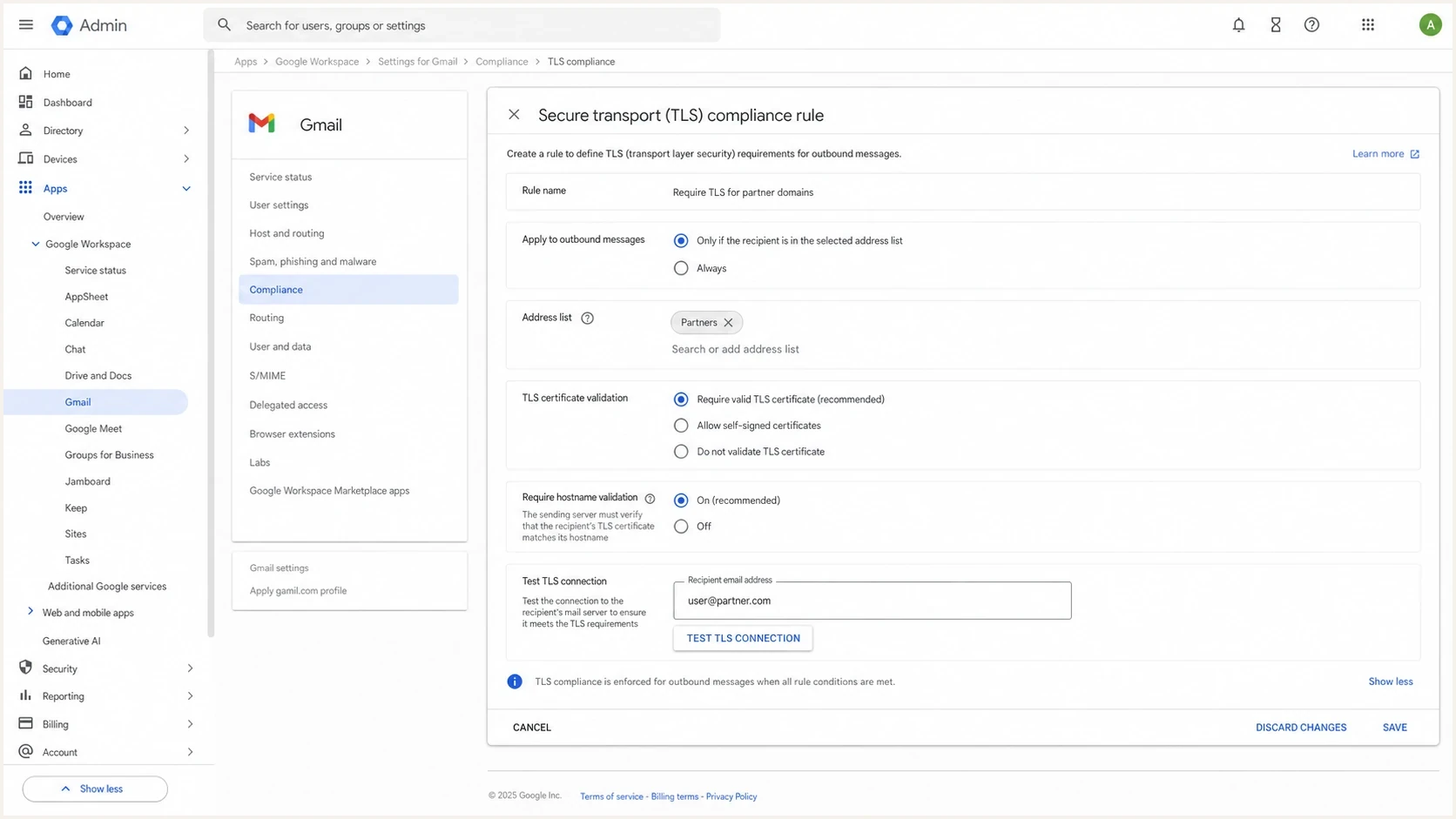
Google Workspace Admin console screen for Secure transport TLS compliance.
Major providers are rarely useful for this test now. Google requires senders to use TLS when transmitting mail to personal Gmail accounts. Gmail also tries TLS by default and can enforce Secure transport TLS rules for specified domains through the Gmail TLS setting. If the receiving server does not use TLS and no Secure transport rule applies, Gmail can still send over a connection that is not secure. Microsoft consumer domains, Yahoo, iCloud, AOL, Zoho, Fastmail, GMX, and Mail.com have also supported inbound TLS in public tests. That does not prove every custom domain hosted on the same infrastructure has a correct policy, but it makes these providers poor starting points for a deliberate no-TLS recipient.
Why no-TLS lists age quickly
A no-TLS list ages quickly because SMTP TLS is opportunistic by default and depends on live infrastructure. The sender looks up MX records, connects to a host, reads the SMTP banner, sends EHLO, and checks whether STARTTLS appears in the capability list. If it is missing and the sender's policy requires TLS, delivery fails. Test every active MX host and both IP address families when the domain publishes them.
No STARTTLS
The recipient MX accepts SMTP but never advertises STARTTLS. This is the cleanest negative test for a force-TLS policy.
- Expected result A strict sender refuses delivery before message data is transferred.
- Best signal The SMTP capability list has no STARTTLS line.
Broken TLS
The MX advertises STARTTLS, then fails certificate validation, TLS version negotiation, cipher selection, or hostname matching.
- Expected result A strict sender bounces, but the reason differs from no STARTTLS.
- Best signal The TLS handshake starts and then fails with a certificate or protocol error.
Those two outcomes are easy to confuse. Keep them separate because they lead to different decisions. If the recipient does not advertise STARTTLS, the sender has no encrypted SMTP path. If STARTTLS exists but validation fails, contact the recipient or relax only the specific certificate check after risk approval.
Do not use an old no-TLS list as a production rule source. A domain that failed in 2022 can pass today, and a domain that passes today can fail after an MX change. Test every active MX host when you make the policy decision.
How to test before enforcing TLS
The simplest test is to inspect the recipient domain the same way a sending MTA does. Look up the MX records, test each host on port 25, and confirm whether STARTTLS is advertised. Do not use port 465 for this check, because inbound server-to-server SMTP delivery uses port 25 with STARTTLS. For your own domain, run a domain health check so DMARC, SPF, DKIM, and mail security issues are visible in one place before you change enforcement behavior.
MX and STARTTLS checksbash
dig +short mx recipient.example
swaks --server mx1.example --port 25 \
  --ehlo probe.example.net \
  --from tls-test@example.net \
  --to postmaster@recipient.example \
  --tls --tls-verify --quit-after STARTTLS
openssl s_client -brief -starttls smtp \
  -connect mx1.example:25 \
  -servername mx1.example \
  -verify_hostname mx1.example
A clean no-TLS target produces an SMTP conversation where the server responds to EHLO but does not offer STARTTLS. A strict sender then refuses to continue. If STARTTLS is advertised, keep reading the handshake output because the failure is no longer about missing TLS support.
An IP-only STARTTLS test proves that a TLS handshake can happen with that server. It does not prove certificate identity. For strict TLS, test the MX hostname and verify that hostname against the certificate.
If the source IP matters, run the test through the host or NAT path that actually uses that IP. A public web check tests through its own infrastructure, so it cannot prove that the receiver behaves the same way for your sender network, allowlist, blocklist (blacklist), or firewall path.
?
What's your domain score?
Deep-scan SPF, DKIM & DMARC records for email deliverability and security issues.
For delivery testing, avoid production content. Use a harmless subject, a test-only sender, and a recipient address that is expected to bounce. The signal you want is the SMTP policy response, not inbox placement, engagement, or content filtering.
Typical force-TLS bouncetext
Connected to recipient MX but STARTTLS is not available.
delivery attempt not made. (#5.7.10)
TLS enforcement readiness
Use these thresholds to decide whether a recipient domain is ready for strict TLS.
Ready
100%
All MX hosts advertise STARTTLS and certificates validate.
Review
1 issue
STARTTLS exists, but one host has a certificate or policy issue.
Block
No TLS
At least one active MX host has no STARTTLS.
Build a controlled no-TLS test target
A controlled negative target is safer and more repeatable than depending on an unrelated public mailbox domain. Use an isolated SMTP listener that answers on port 25 but does not advertise STARTTLS, then route a test-only domain to it through lab DNS or a temporary internal DNS override.
- Create a disposable SMTP listener with STARTTLS disabled and relay access denied.
- Restrict port 25 to the sending MTA addresses used for the test.
- Route only a test domain to the listener and confirm EHLO has no STARTTLS capability.
- Send harmless test mail and confirm the strict route defers or rejects before message data is transferred.
- Remove the DNS override and shut down the listener after recording the SMTP result.
Keep this listener isolated. Do not expose a relay, reuse a production recipient domain, or leave a deliberately unencrypted SMTP path in service after the test.
What force TLS changes
Without a strict sender rule or an authenticated recipient policy such as MTA-STS, most MTAs use opportunistic TLS. They try encryption, then can fall back to cleartext when the recipient cannot negotiate TLS. Force TLS removes that fallback for the traffic covered by the rule. The message either travels over an acceptable TLS session or remains undelivered.
That behavior fits regulated partner mail, but it is risky for broad marketing or operational mail sent to unknown consumer addresses. A single old ISP domain can turn a security setting into a customer support problem. This is why outbound TLS belongs in the same planning conversation as bounce handling, customer messaging, and sender monitoring.
A strict TLS policy changes delivery as much as security. Before you enable it, define which traffic must fail closed, who owns exceptions, and how non-delivery reports are routed.
- Partner mail Use force TLS when both sides have agreed on the recipient domains and certificate requirements.
- Bulk mail Avoid blanket enforcement unless the audience is controlled and tested.
- Transactional mail Stage enforcement by domain so essential notices do not fail silently.
A 2019 SANS test found that 90% of the popular domains checked supported STARTTLS, while several did not and one lacked TLS 1.2. Treat those results as historical evidence, not current TLS policy guidance. Base modern enforcement on live mail logs and recipient testing rather than the TLS versions that were tolerated in 2019.
Where MTA-STS and Suped fit
Force TLS on outbound mail is a sender-side rule. MTA-STS is a recipient-published policy that supporting senders consume. In enforce mode, those senders refuse delivery when STARTTLS is missing, the certificate is invalid, or the MX does not match the policy. Suped's Hosted MTA-STS workflow simplifies policy hosting with two CNAME records and no separate web hosting.
Hosted MTA-STS/TLS-RPT configuration dialog showing policy mode, MX hosts, CNAME records, TLS reporting, and verification
MTA-STS testing mode lets supporting senders deliver as though a policy validation failure were absent. TLS-RPT is separate. The domain publishes a _smtp._tls TXT record that tells participating senders where to send aggregate TLS reports. Publish TLS-RPT before moving MTA-STS to enforce so missing STARTTLS, certificate failures, and policy errors are visible during rollout.
Suped's product hosts the MTA-STS policy and consolidates TLS-RPT with DMARC reporting. Its alerts turn transport failures into a concrete workflow for checking the affected MX, certificate, or policy before real mail remains queued.
For this problem, Suped keeps your own domain's authentication and transport posture visible before stricter rules are enabled. It also keeps reports available after policy changes, which matters when Gmail TLS errors or other recipient-side failures appear only after traffic volume increases.
- Monitor first Collect DMARC and TLS signals before changing delivery policy.
- Enforce carefully Move strict TLS rules by domain group, not across every recipient at once.
- Keep owners clear Route alerts to the team that can fix DNS, MTA policy, or partner exceptions.
Views from the trenches
Best practices
Test each recipient MX directly before setting a force-TLS rule for any live domain.
Keep force-TLS failures out of production campaigns until bounce handling is confirmed.
Use TLS reports and mail logs together because each one catches different failure modes.
Common pitfalls
Assuming Gmail support means every mailbox at that domain's MX path supports TLS today.
Testing one MX host and missing a secondary host that lacks STARTTLS on port 25.
Treating old no-TLS lists as current without retesting the exact recipient domain.
Expert tips
Stage TLS enforcement by partner domain so a single weak recipient does not block all mail.
Record the enhanced status code because it tells you whether policy or transport failed.
Monitor MTA-STS and TLS-RPT before enforcing, then keep alerts tied to clear owners.
Marketer from Email Geeks says a purpose-built no-TLS recipient is the cleanest way to verify that a force-TLS policy fails closed.
2024-12-06 - Email Geeks
Marketer from Email Geeks says public transparency data helps find low-TLS destinations, but the exact MX still needs direct testing.
2024-12-06 - Email Geeks
Practical take
If the job is to identify an email provider that does not support TLS, start with a live test of every MX rather than a provider list. tiscali.it, hotmail.ru, inbox.com, rogers.blackberry.net, rr.com, and sprint.blackberry.net are historical candidates only. None is a stable no-TLS fact without a current port 25 test.
For a repeatable force-TLS bounce, use a controlled no-STARTTLS target. For production policy, log real recipient failures, enforce TLS only where the business accepts non-delivery, publish MTA-STS for owned domains, and monitor TLS-RPT. That produces a defensible setup instead of a one-time provider result.




