Why is outbound TLS important for email marketing?

Updated on 11 Aug 2026: We updated this guide with clearer guidance on opportunistic TLS, enforced TLS, MTA-STS, and TLS reporting.
Outbound TLS is important for email marketing because it encrypts each SMTP hop between your sending system and the next receiving mail server. Treat it as baseline infrastructure because marketing email often carries personal data, including names, preferences, customer IDs, unsubscribe tokens, tracking IDs, and links into account flows.
TLS does not guarantee inbox placement. It reduces transport exposure, helps avoid unencrypted-message warnings at providers such as Gmail, supports privacy controls, and strengthens the security of your sending stack. The simplest mental model is HTTPS for an SMTP connection, with one important limit: TLS protects the connection hop rather than encrypting the message end to end.
The practical answer is yes: outbound TLS is worth setting up for every marketing sender. If your platform offers a policy for encrypted delivery, enable it, log failures and plaintext fallback, and verify live sends instead of assuming the sending path is protected.
The direct answer
Outbound TLS matters for every email marketing sender, even when the sending structure is not based on Google. After the sender issues EHLO, a receiving server that supports encrypted SMTP advertises STARTTLS. The sender then issues STARTTLS and negotiates the TLS connection. If negotiation succeeds, later SMTP commands and message data cross that hop through an encrypted connection. If TLS is unavailable or the sender silently falls back, the message can travel as readable SMTP traffic.
- Security: TLS keeps message data and SMTP envelope commands from being readable while they cross the encrypted hop.
- Trust: encrypted transport helps avoid mailbox indicators that tell recipients a message was not protected in transit.
- Compliance: privacy and security programs commonly require reasonable transport protection when personal data moves between systems.
- Operations: delivery logs provide evidence of negotiated TLS and identify destinations or routes that need attention.
Outbound TLS is not a replacement for SPF, DKIM, or DMARC. Those controls authenticate domains and apply policy. TLS protects a transport connection. Email marketing needs both because a message can be authentic and still cross an unencrypted hop.
What outbound TLS protects
The risk is not limited to the visible creative. A marketing message often includes identifiers and operational links that matter outside the campaign. Once TLS starts, the SMTP transaction can protect the recipient address, subject line, body, tracking pixels, unsubscribe links, preference center URLs, and redirect links while they cross that hop. When a message supports an account action, avoid placing secrets directly in ordinary email.
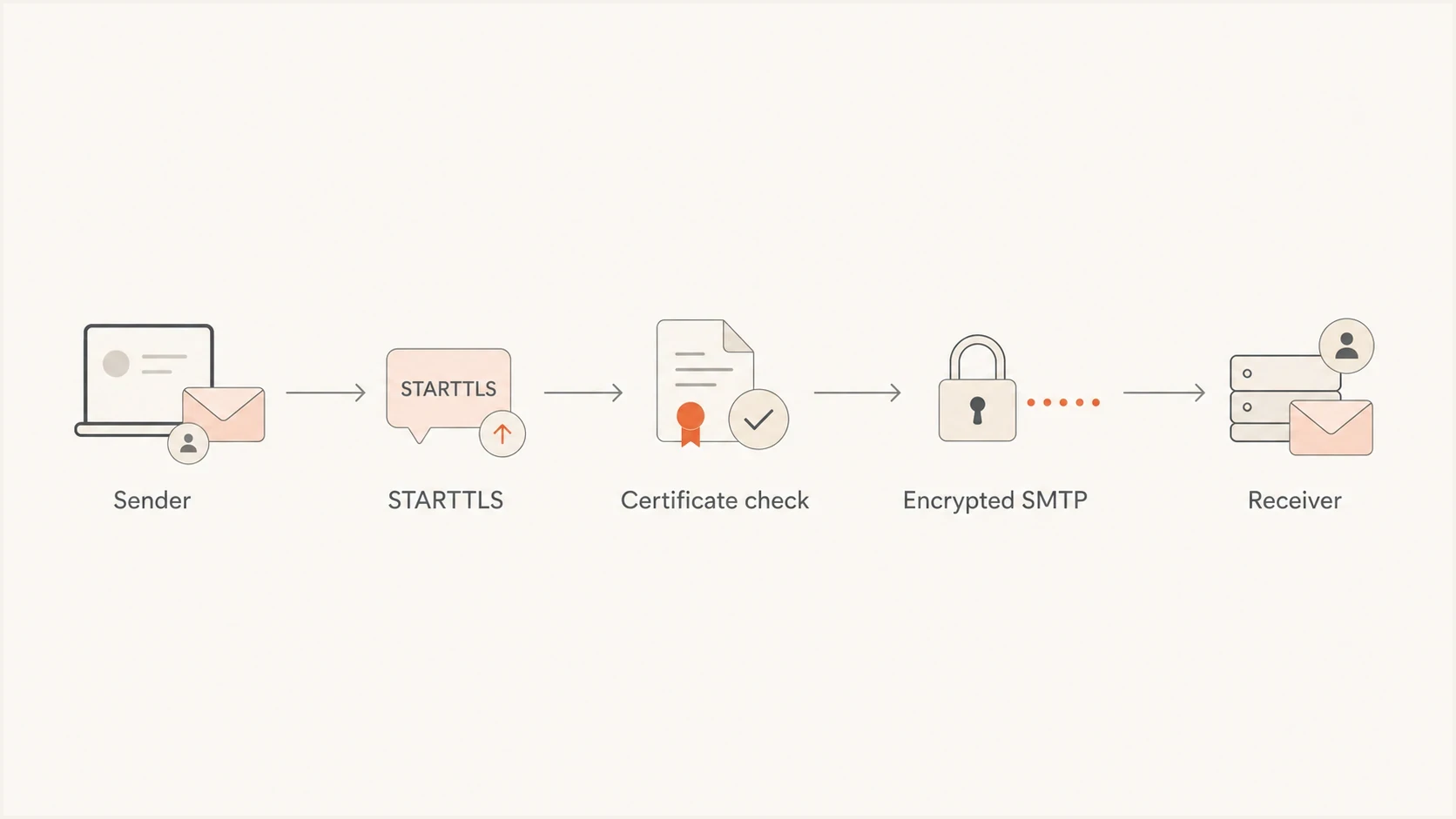
Flowchart showing STARTTLS negotiation before encrypted SMTP delivery.
Simplified SMTP negotiation
S: 220 mx.receiver.example ESMTP
C: EHLO mail.sender.example
S: 250-STARTTLS
C: STARTTLS
S: 220 Ready to start TLS
[Encrypted TLS session starts]
C: MAIL FROM:<news@example.com>
C: RCPT TO:<person@example.net>
C: DATA
Without outbound TLS
- Readable traffic: SMTP content can be exposed to systems positioned between the sender and receiver.
- Recipient concern: mailbox warnings can make a normal campaign look poorly secured.
- Weak audit trail: teams lack evidence that marketing routes use encrypted transport.
- Harder reviews: privacy and security teams need more manual explanation for each exception.
With outbound TLS
- Encrypted hop: SMTP commands and message data cross the connection with transport encryption.
- Clearer trust: recipients see fewer security indicators tied to unencrypted delivery.
- Better evidence: logs show which destinations negotiated encryption and where failures occurred.
- Less friction: the sender has a clear baseline for customer and security reviews.
Opportunistic TLS vs enforced TLS
Most internet email uses opportunistic TLS. The sending server upgrades the connection when the receiving server advertises STARTTLS, but its default policy can still deliver without encryption when TLS is unavailable or negotiation fails. That fail-open behavior supports broad delivery, but it also leaves room for plaintext fallback and STARTTLS downgrade attacks.
Opportunistic TLS
The sender attempts TLS but can fall back to plaintext. This is common for routine bulk delivery where broad interoperability matters. Log fallback so unencrypted routes are visible.
Enforced TLS
The sender requires an acceptable TLS connection and defers or fails delivery instead of sending plaintext. Use it for routes where unencrypted delivery is unacceptable.
An MTA-STS-aware sender must follow a recipient domain's valid enforcement policy, check that the destination MX matches the policy, and validate its certificate. When those checks fail, the sender queues or fails the message rather than downgrading to plaintext. TLS-RPT is the separate reporting standard that provides aggregate data about policy and negotiation failures.
TLS is hop-by-hop, not end-to-end. It does not keep a message encrypted while stored in every mailbox or archive, and each relay hop must negotiate its own protected connection. Do not place passwords, payment details, or reusable access secrets in ordinary marketing email.
Where deliverability fits
Outbound TLS usually does not create an immediate inbox placement jump. Do not present it internally as a deliverability shortcut. It is security hygiene that also protects recipient confidence. Authentication, complaint rates, sending behavior, and content have clearer roles in filtering decisions, while TLS provides a secure transport baseline.
The visible impact appears when a mailbox provider marks a message as unencrypted. Gmail is a common example, and recurring Gmail TLS errors deserve investigation because an unencrypted indicator can change how recipients interpret the message before they read it.
Outbound TLS posture
A practical way to classify the encryption posture of a marketing send path.
Good
TLS 1.2 or 1.3
Modern TLS is negotiated, failures are visible, and sensitive routes enforce encryption.
Warning
Opportunistic only
Encryption is attempted, but unlogged plaintext fallback hides failures.
Critical
No STARTTLS
Message data can move across the network as readable SMTP traffic.
For deliverability planning, separate direct filtering factors from recipient trust. TLS is not an inbox placement switch, but missing TLS can create visible warnings, customer concern, compliance questions, and support work that a marketing team should not accept.
How this applies outside Google
Outbound TLS applies everywhere because it concerns the path between any sending server and any receiving server. The sender can be a marketing platform, SMTP relay, CRM, ecommerce system, or application server. The receiver can be a large consumer mailbox, corporate gateway, university domain, or private mail server.
|
|
|
|---|---|---|
Campaign sends | STARTTLS | Recipient data |
SMTP relay | Required | Central control |
App mail | STARTTLS | Mixed traffic |
Link hosts | HTTPS | Click trust |
Common marketing paths and the TLS expectation.
Check message resources as well as the SMTP connection. CTA links, branded tracking domains, hosted images, preference centers, and CSS loaded by email clients need HTTPS. A campaign sent over TLS still creates risk if the click path moves people to an HTTP page or a tracking domain with certificate problems.
Outbound TLS, MTA-STS, and Suped
Outbound TLS describes what a sender does during delivery. MTA-STS is a policy published by a receiving domain. An MTA-STS-aware sender uses that policy to authenticate expected MX hosts and enforce TLS when sending to the domain. Publishing MTA-STS strengthens inbound TLS protection for your domain, while outbound support lets your sender honor policies published by other domains.
For domains that receive important mail, Hosted MTA-STS makes policy deployment easier because it removes web-hosting work and uses two CNAME records. That is useful when the same domain supports marketing, customer replies, support mail, and internal mail.
Hosted MTA-STS/TLS-RPT configuration dialog showing policy mode, MX hosts, CNAME records, TLS reporting, and verification
Suped's product brings DMARC monitoring and Hosted MTA-STS into one operational view, alongside SPF and DKIM visibility, blocklist monitoring (blacklist monitoring), real-time alerts, and issue-specific fix steps. This workflow helps teams separate authentication failures from transport-policy failures without treating TLS as part of DMARC.
That distinction matters because TLS issues rarely occur alone. A sender reviewing marketing security also needs to know which sources are authorized, whether SPF is close to the DNS lookup limit, whether DKIM signs consistently, whether DMARC policy is progressing, and whether reputation signals have changed.
How to check and set it up
Start with an inventory of every system that sends marketing or marketing-adjacent mail. Do not stop at the main campaign platform. Include abandoned cart mail, referral campaigns, survey mail, loyalty messages, product announcements, lifecycle automations, and any SMTP relay used by a vendor.
A quick pass through Suped's domain health checker confirms whether the domain's broader email authentication posture is healthy before you focus on transport details.
?
What's your domain score?
Deep-scan SPF, DKIM & DMARC records for email deliverability and security issues.
After the broad check, verify real deliveries. Send to test inboxes at major mailbox providers and inspect the full Received headers for a reported TLS protocol and cipher where those details are available. Then compare sending-platform or relay logs across destinations. One successful message does not prove that every hop and route uses TLS.
- Inventory: list every marketing sender, SMTP relay, branded domain, and vendor route.
- Configure: attempt STARTTLS for all routes and require authenticated TLS where plaintext delivery is unacceptable.
- Modernize: use TLS 1.2 or later and remove TLS 1.0, TLS 1.1, and weak cipher support.
- Log: capture failed negotiation, certificate errors, delivery deferrals, bounces, and plaintext fallback.
- Test: inspect live-message headers and relay logs after routing, certificate, or policy changes.
- Review: investigate delivery logs, and use TLS-RPT for domains where you publish a reporting record.
Outbound TLS checklist
Outbound TLS requirement
- STARTTLS attempted for all marketing routes
- TLS 1.2 or TLS 1.3 negotiated
- Weak versions and ciphers disabled
- Enforced TLS set for sensitive routes
- Plaintext fallback reviewed and logged
- Certificate and policy failures monitored
- Failure alerts routed to the email team
Common mistakes
The most common TLS mistake is assuming the main email platform covers every path. Marketing stacks grow through campaigns, vendors, acquisitions, and one-off integrations. A single forgotten relay can send mail without the same encryption policy as the rest of the program.
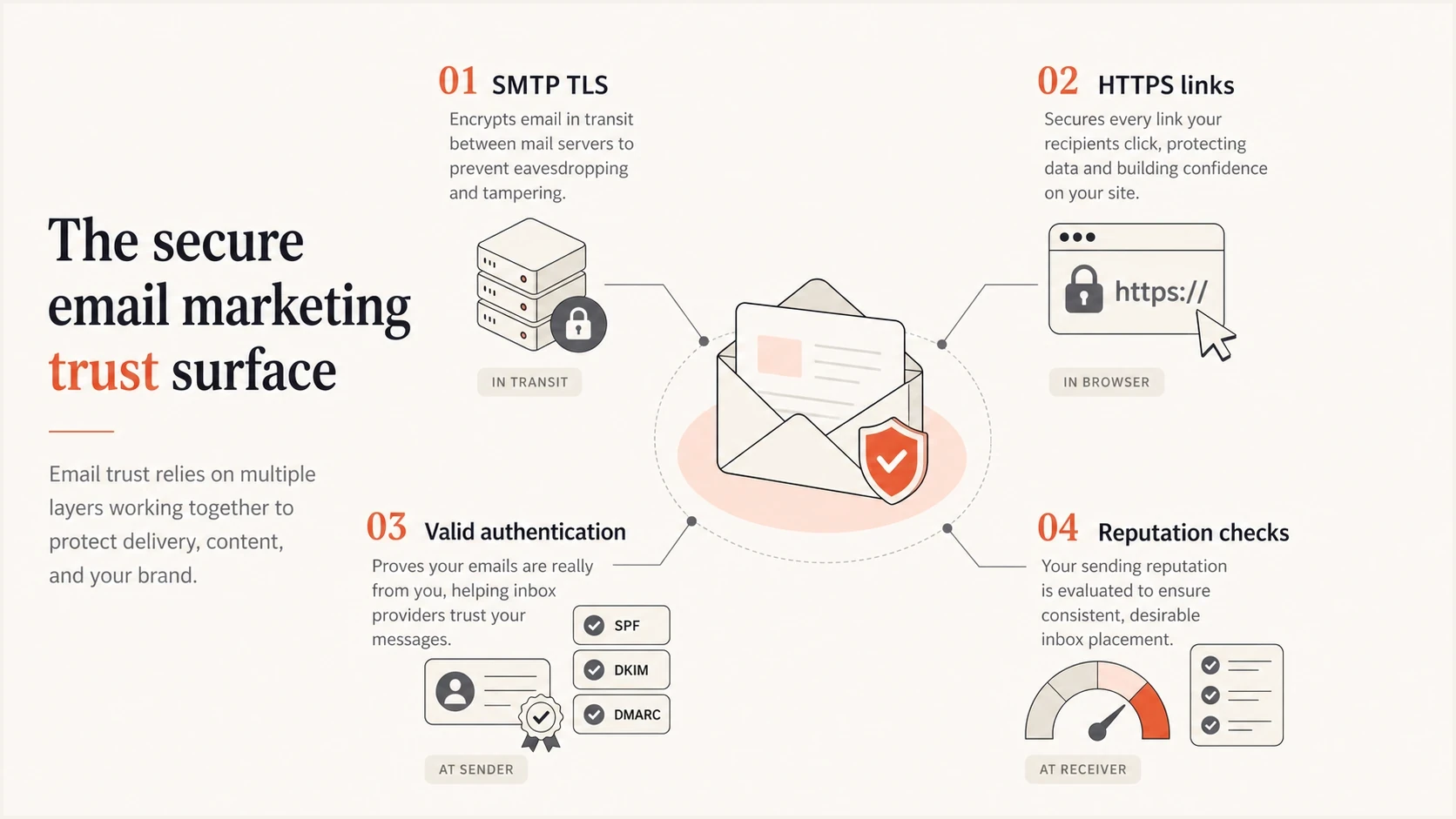
Infographic showing TLS, HTTPS links, authentication, and reputation checks.
- Partial routing: one vendor uses TLS while another vendor sends similar mail through a weaker route.
- Silent fallback: the sender attempts encryption but quietly accepts plaintext after a failed negotiation.
- Old versions: systems keep TLS 1.0 or TLS 1.1 enabled even though both versions are deprecated.
- HTTP assets: the SMTP path is encrypted, but links and remote resources still use HTTP.
- No monitoring: TLS works once, then fails after a certificate renewal, routing change, or vendor change.
Use a control loop: require encryption where necessary, monitor negotiation failures, test live mail, and include link security in campaign QA. That loop is more useful than a one-time configuration check because email routing changes often happen outside the main deliverability calendar.
Views from the trenches
Best practices
Enable STARTTLS on every marketing relay and review TLS logs after provider changes monthly.
Keep CTA links, tracking domains, images, and preference centers on working HTTPS endpoints.
Treat TLS failures as security incidents when the message carries customer or account data.
Test real sends to major mailbox providers after certificate or routing changes each time.
Common pitfalls
Assuming SPF, DKIM, and DMARC replace TLS leaves message content exposed in transit.
Allowing plaintext fallback without logging hides unencrypted paths until users report warnings.
Securing the SMTP hop but leaving CTA URLs on HTTP creates mixed trust signals for recipients.
Forgetting legacy relays creates unprotected mail streams outside the main platform in campaigns.
Expert tips
Document which systems send marketing mail so TLS requirements cover every outbound stream.
Use TLS 1.2 or newer as the floor and retire weak ciphers before providers force it.
Publish TLS-RPT beside MTA-STS so aggregate reports expose transport policy failures.
Add certificate expiry checks for branded link domains and dedicated sending hosts too.
Marketer from Email Geeks says outbound TLS should be treated as required infrastructure, not an optional add-on for marketing mail.
2022-05-10 - Email Geeks
Marketer from Email Geeks says TLS does not create an instant deliverability lift, but it protects transport and recipient trust.
2022-05-10 - Email Geeks
Make TLS a default control
Outbound TLS is important because email marketing includes customer data moving through mail infrastructure. Encrypt each SMTP hop, retire weak versions, watch for failed negotiation and plaintext fallback, and keep CTA URLs and remote resources on HTTPS.
Manage TLS policy alongside authentication and reputation monitoring. Suped's product connects DMARC monitoring, Hosted MTA-STS, Hosted SPF, SPF flattening, blocklist and blacklist monitoring, real-time alerts, and issue-specific fix steps. Enable outbound TLS, monitor it, and treat unexpected fallback or enforcement failures as production issues.




