Does website SSL/TLS affect email deliverability?

Updated on 10 Aug 2026: We clarified when website TLS matters to linked content, SMTP transport, MTA-STS, and inbox placement.
No, website SSL/TLS does not usually affect email deliverability directly. A broken or missing certificate on the root website is not one of the core checks used to authenticate outbound mail. Mailbox providers care far more about SPF, DKIM, DMARC alignment, sending reputation, complaint rates, content quality, and link safety.
The caveat is important: website TLS problems become email-relevant when the broken certificate sits behind a URL in the message. If an email links to a landing page, tracking domain, image host, or redirect domain with an expired, self-signed, mismatched, or missing certificate, link scanners and users encounter an unsafe or unusable destination. That can influence filtering, user behavior, and reputation over time.
- Direct answer: The website certificate alone is usually not a direct inbox placement factor.
- Real risk: Broken HTTPS on email links, redirects, or hosted images can damage the message evaluation.
- Best action: Fix the certificate, then test the actual email and the sending domain health.
The direct answer
Separate this question into two systems: the website and the email stream. The certificate on https://example.com protects browser and scanner connections to web pages. The email stream is judged through mail-specific signals, including SPF, DKIM, DMARC, message headers, SMTP behavior, sender history, volume patterns, user complaints, and domain or IP reputation.
A domain can send authenticated mail even if the public website has no working HTTPS. It is poor security hygiene, but it is not the same as failing DMARC or sending through an IP on a blocklist (blacklist). A broken certificate becomes email-relevant when the email points recipients or security scanners to that broken site.
SSL is the obsolete predecessor to TLS. The phrase SSL certificate remains common, but current website HTTPS and mail transport security use TLS.
Short answer
Website SSL/TLS is not a replacement for email authentication. Treat it as domain hygiene and link-safety hygiene, not as the primary control for inbox placement.
- Root website: Low direct effect unless the message links to it.
- Email URLs: Higher effect because filters inspect destinations and redirect chains.
- Mail TLS: Separate from website HTTPS and tied to SMTP transport.
That distinction matters because teams can spend days fixing a root website certificate while the actual deliverability problem is failed DKIM, a misconfigured SPF record, an unauthenticated sender, a bad redirect domain, or reputation damage. Fixing SSL/TLS is still worth doing, but it should not distract from the mail-specific checks.
Where SSL/TLS matters
The practical risk depends on where the certificate failure appears. A dead certificate on a corporate homepage that is never linked in email has a different risk profile than an expired certificate on the exact unsubscribe URL, tracking domain, or checkout link inside a campaign.
Likely deliverability impact
The same TLS problem has different weight depending on whether filters and users hit it during message evaluation.
Root site missing HTTPS
Low direct risk
Usually indirect, unless the message links to that site.
Email link has expired cert
Medium risk
Scanners can flag the destination or reduce trust in the message.
Redirect chain breaks HTTPS
Medium risk
Tracking links and intermediate redirects are part of the inspected path.
Authentication fails too
High risk
TLS issues plus failed mail authentication make the domain look unmanaged.
The cleanest rule is this: every URL that appears in the email should resolve cleanly over HTTPS. That includes visible links, tracking redirects, image hosts, preference centers, unsubscribe pages, hosted PDFs, and branded click domains. If the message uses HTTP instead, the same concern applies. The deeper version is covered in HTTPS for email links.
Certificate problems also hurt conversion even when they do not cause spam placement. If a recipient clicks and sees a browser warning, the destination is likely to be abandoned. That creates conversion, support, and complaint risk without proving that the certificate itself is an inbox-ranking factor.
The MTA-STS website exception
One web certificate has a defined role in an email transport control: the certificate on the MTA-STS policy host. A domain that publishes MTA-STS serves its policy at a fixed HTTPS location. This protects incoming SMTP transport to the domain. It does not authenticate outbound messages or determine inbox placement.
MTA-STS policy locationtext
mta-sts.example.com/.well-known/mta-sts.txt
The policy host must return a 200 response without a redirect and present a non-expired certificate that matches mta-sts.example.com and chains to a trusted certificate authority. If a sender cannot fetch a new policy and has no valid cached policy, normal delivery continues without newly discovered MTA-STS protection. A valid cached policy remains in force until it expires.
When delivery can be deferred
When a valid MTA-STS policy is cached in enforce mode, a participating sender must validate the recipient MX host and its SMTP TLS certificate. A mismatch, expired certificate, or missing STARTTLS support can cause temporary inbound delivery failures while the sender retries.
Monitor TLS reporting for policy fetch and certificate validation failures. Suped's hosted MTA-STS workflow keeps the policy, TLS reporting, and related configuration checks together, while DMARC reporting remains focused on sender authentication.
Website HTTPS and email authentication
Website HTTPS and email authentication often get bundled together because both concern domain trust. They are still different controls. SPF authorizes sending infrastructure. DKIM applies a verifiable message signature. DMARC checks whether SPF or DKIM passes with alignment to the visible From domain, then supplies policy and reporting. A website certificate error does not make any of these checks fail.
Website SSL/TLS
- Scope: Protects browser and scanner connections to web pages.
- Failure mode: Expired, self-signed, missing, or wrong-host certificates.
- Email effect: Mostly indirect unless the email links to the affected host.
Email authentication
- Scope: Validates whether mail is authorized and aligned for the sender domain.
- Failure mode: SPF or DKIM failure, alignment failure, or an invalid DMARC record.
- Email effect: Directly affects trust, filtering, and domain protection.
If DMARC is not deployed, begin with a DMARC record in monitoring mode and review every source that sends as the domain. A basic record looks like this:
Basic monitoring DMARC recorddns
v=DMARC1; p=none; rua=mailto:dmarc-reports@example.com
That record does not fix a website certificate. It gives visibility into who is sending as the domain, which sources pass authentication, and where policy can be tightened. Suped's DMARC monitoring parses aggregate reports into source-level issues and fix steps, avoiding the need to interpret raw XML across multiple senders.
Mail transport TLS is different again. SMTP TLS protects server-to-server delivery when supported. MTA-STS and TLS reporting add policy and failure visibility for incoming mail to your domain. Those controls protect transport, but they do not repair a broken marketing landing page certificate.
Transport TLS policy recordsdns
_mta-sts.example.com TXT v=STSv1; id=20260604
_smtp._tls.example.com TXT v=TLSRPTv1; rua=mailto:tls@example.com
What filters can inspect
Mailbox and security filters do more than read the sending headers. They inspect links, redirect chains, landing pages, image hosts, file downloads, and domain reputation. That does not mean every certificate detail is a ranking factor. It means the destination has to look safe and function when automated scanners fetch it.
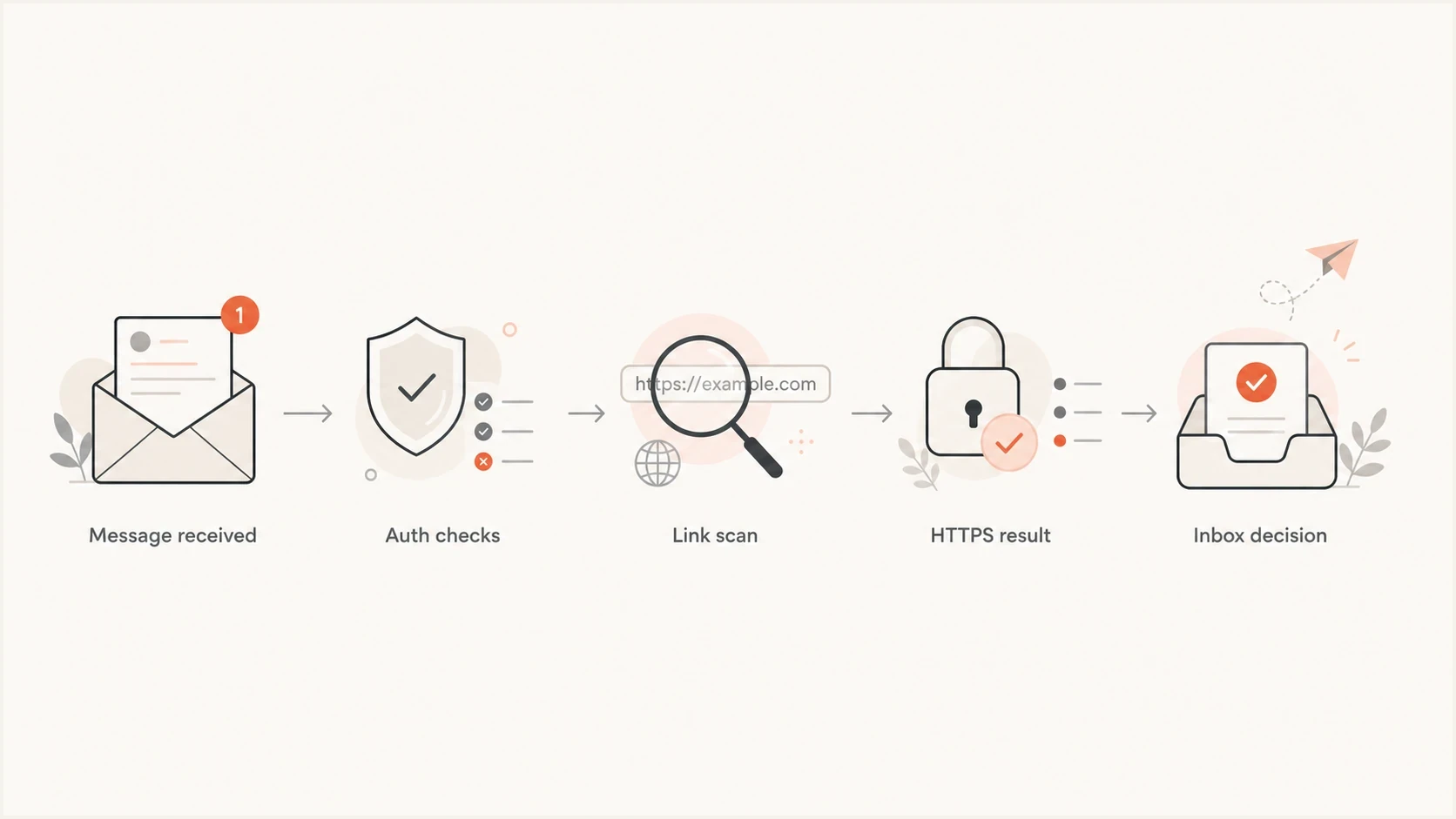
Flowchart showing authentication checks, link scanning, HTTPS results, and inbox decisions.
|
|
|
|---|---|---|
Homepage | No campaign link | Low |
Landing page | Expired cert | Medium |
Tracking host | Bad redirect | Medium |
Sender auth | Fails DMARC | High |
Reputation | Listed domain | High |
How certificate issues map to email risk.
Website SSL/TLS is not irrelevant. It is not usually the direct cause, but it can appear beside signals filters dislike: weak authentication, broken links, suspicious redirects, risky landing pages, low engagement, and poor domain history.
If certificate issues appear alongside reputation problems, check blocklist (blacklist) status as well. Suped's blocklist monitoring connects domain and IP listings with the sending sources behind them, so the certificate fix does not distract from a reputation issue.
How to test the real risk
The fastest way to answer this for a real domain is to send a real message and inspect the whole path. Do not test only the website. Test the headers, authentication results, links, redirects, certificate status, content, and reputation signals together.
- Send a sample: Use the same sender, template, links, and tracking setup as production.
- Trace every URL: Check visible links, every redirect hop, hosted images, unsubscribe pages, and preference centers.
- Validate HTTPS: Confirm hostname coverage, expiration, the trusted chain, required intermediate certificates, and support for TLS 1.2 or TLS 1.3. Add renewal alerts for every linked host.
- Read auth results: Confirm SPF or DKIM passes with DMARC alignment to the visible From domain.
- Check reputation: Review domain and IP blocklist or blacklist status before blaming SSL.
- Retest after fixes: A certificate renewal is only complete when the live message path is clean.
For the message-level check, use Suped's email tester to inspect the actual email rather than guessing from the website alone. For the broader DNS and authentication view, run the domain health checker and compare the results against the sending setup.
Email tester
Send a real email to this address. Suped shows a results button when the test is ready.
?/43tests passed
When the test report shows authentication failures, fix those first. When it shows link or content concerns, follow the URLs through the same redirect path a recipient or scanner sees. When both appear, treat them as separate faults that contribute to the same trust problem.

Email tester sample report showing total score, email preview, issue summary, and per-section results
When to fix it urgently
Fix a broken website certificate anyway. Even when it is not the primary deliverability cause, it is a trust failure for customers and scanners. The urgency rises when the broken host appears in the email body or supports conversion, compliance, tracking, or unsubscribe handling.
Fix before sending when
- Unsubscribe breaks: A broken unsubscribe link can create complaints and compliance risk.
- Tracking breaks: A branded click domain with a bad cert can make every campaign link risky.
- Images break: Remote images that fail HTTPS can reduce trust and degrade the email experience.
- Auth also fails: Broken certificates plus failed authentication look like poor domain control.
Do not send a high-volume campaign with an expired certificate on the landing page or click domain. Even if the message reaches the inbox, the click path damages trust. Do not leave the root domain broken when the sender domain and website domain use the same brand, because security scanners and recipients encounter one connected brand experience.
For image-heavy mail, HTTPS on image hosts matters too. If the image host differs from the sender domain, its certificate and host reputation still matter. That narrower topic is covered in HTTPS for email links.
How Suped fits into the workflow
Suped's product is useful here because this issue rarely lives in only one place. A certificate failure can be a website task, a link-tracking task, a DNS task, or a reputation task. Suped brings DMARC, SPF, DKIM, blocklist and blacklist monitoring, hosted SPF, hosted DMARC, hosted MTA-STS, SPF flattening, and real-time alerts into one workflow.

Issue steps to fix dialog showing the issue overview, tailored fix steps, and verification action
The practical value is prioritization. If the website certificate is broken but authentication is clean, the senders are verified, and reputation is stable, fix the certificate as hygiene. If Suped shows unverified sources, failed DKIM, excessive SPF lookups, or listings, address those alongside the certificate problem.
Use Suped's issues view to separate certificate work from authentication and reputation work, then assign each fix to the team that controls the affected website, sending source, or DNS record.
Views from the trenches
Best practices
Keep every domain in email links on valid HTTPS, even when the root site is not used for mail.
Separate website certificate fixes from SPF, DKIM, DMARC, and sending reputation work.
Test real messages because filters assess links, authentication, content, and reputation together.
Common pitfalls
Treating a broken website certificate as the main cause while ignoring failed DMARC checks.
Sending campaign links through domains with expired certificates, redirects, or mixed content.
Assuming mail transport TLS and website HTTPS are the same control because both use TLS.
Expert tips
Use a small test send to inspect link behavior before changing DNS or sending infrastructure.
Fix certificates on linked pages first, then review authentication and reputation signals.
Monitor blocklist and blacklist status when certificate issues coincide with user complaints.
Marketer from Email Geeks says website TLS does not appear to be a direct inboxing factor in normal deliverability work.
2020-06-20 - Email Geeks
Marketer from Email Geeks says mailbox filters can react badly when a URL inside the email resolves to an expired or self-signed certificate.
2020-06-21 - Email Geeks
The practical answer
Website SSL/TLS does not usually control whether email from that domain lands in the inbox. The direct deliverability controls are still SPF, DKIM, DMARC, sending reputation, content, complaints, engagement, and blocklist or blacklist status.
Broken HTTPS on URLs inside the email is a real problem. It gives filters and recipients a bad destination, especially when the failure sits on a landing page, tracking domain, unsubscribe page, or image host. Fix it before sending high-volume mail.
The workflow is simple: renew or replace the certificate, confirm every email URL works over HTTPS, test the real message, then review DMARC and reputation data. If the domain has multiple senders or needs ongoing monitoring, Suped can keep DMARC, source authentication, and reputation checks in one workflow while the web team handles certificate renewal.




