Why is it important to use HTTPS for links and images in email marketing?

Published 22 Jul 2025
Updated 24 Jul 2026
10 min read
Summarize with
Updated on 24 Jul 2026: We clarified how HTTPS protects email links, tracking redirects, remote images, and hosted web versions without replacing email authentication.
Use HTTPS for every marketing email link, tracking URL, image source, and hosted web version because it protects the subscriber's browser session, reduces browser warnings, and limits mixed-content failures in secure webmail and hosted web views. HTTP links do not automatically send a campaign to spam, but they create technical and trust problems that can interrupt clicks or leave a campaign looking broken.
Engagement still matters. A subscriber who opens, clicks, replies, and keeps mail in the inbox sends useful signals. But engagement does not make an insecure URL secure. Treat https:// as baseline email hygiene, alongside authentication and reputation monitoring.
- Security: HTTPS encrypts each browser request after the click, including tracking redirects and landing page requests.
- Rendering: Browsers can auto-upgrade or block HTTP image paths when a hosted email view runs in a secure context.
- Trust: Subscribers and browsers notice warnings, exposed URLs, broken images, and suspicious redirects.
- Compatibility: Secure URLs reduce dependence on client-specific handling of insecure remote content.
The deeper deliverability question around HTTP links is related, but this page focuses on why the secure version matters for links and images inside the email itself.
How HTTPS affects email links and images
HTTPS does not authenticate the message or encrypt its delivery between mail servers. SPF, DKIM, DMARC, SMTP TLS, and sender reputation each do separate work. HTTPS authenticates the web host and protects what happens when a subscriber clicks or when an email client retrieves remote content. A campaign can pass email authentication and still contain insecure assets.
In practical terms, HTTPS lets the browser validate the hostname through its certificate, encrypts the request and response, reduces mixed-content failures, and avoids insecure-page warnings. Fix HTTP paths even when inbox placement metrics look normal because the failure often happens after delivery.
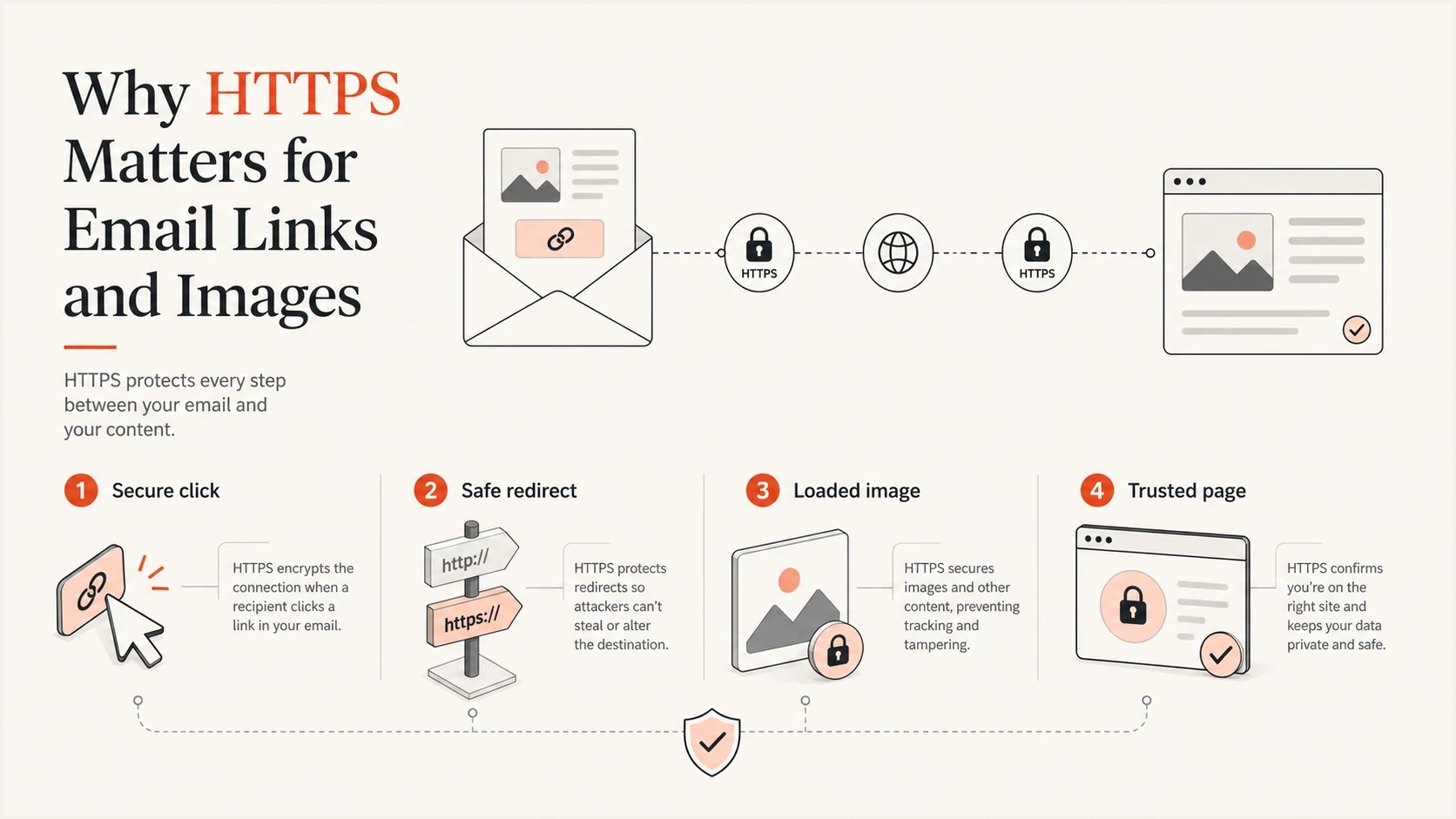
HTTPS flow protecting email clicks, redirects, images, and landing pages.
HTTP in a campaign
- Click path: The first request starts without transport encryption.
- Images: Secure web views can auto-upgrade or block remote assets.
- Warnings: Browsers can label the destination as insecure before the subscriber converts.
- Redirects: A plain first hop creates an avoidable weak point in tracking and CNAME setups.
HTTPS in a campaign
- Click path: The browser starts with an encrypted request to the link host.
- Images: Assets avoid failures caused specifically by an insecure URL scheme.
- Warnings: Subscribers see fewer browser-level interruptions after the click.
- Redirects: Tracking hosts, landing pages, and CDNs can use one secure chain.
Why links should use HTTPS
A link in an email usually has more than one hop. The visible CTA points to a branded tracking domain, that domain records the click, then the visitor lands on the final page. If the first hop uses http://, the subscriber begins with an insecure request even when the final landing page uses HTTPS.
That insecure first hop can trigger a browser warning or a block by corporate security controls. For click tracking specifically, HTTP tracking links cause the most trouble when the branded tracking host has partial HTTPS support, an expired or mismatched certificate, or redirects that loop between hosts.
Click tracking can also rewrite a secure destination after the template is saved. Inspect the delivered message, not only the editor preview, and confirm that the rewritten tracking hostname has a valid certificate and keeps every redirect on HTTPS.
Avoid insecure link and image pathsHTML
<a href='http://click.example.com/a1'>Shop now</a>
<img src='http://img.example.com/hero.jpg' alt='New arrivals'>
Prefer secure link and image pathsHTML
<a href='https://click.example.com/a1'>Shop now</a>
<img src='https://img.example.com/hero.jpg' alt='New arrivals'>
Do not rely on an HTTPS final page
A secure final page does not fix an insecure tracking hop. The browser, security gateway, and subscriber experience the whole chain. Every hop should use HTTPS, including the tracking CNAME, intermediate redirects, image CDN, preference center, unsubscribe page, and final landing page.
HSTS is another reason to avoid mixed schemes. HSTS means HTTP Strict Transport Security. After a browser learns that a host requires HTTPS, it upgrades later HTTP attempts before sending the request. If that host has an invalid certificate, the browser does not offer a click-through bypass, so a tracking link can fail completely.
Common HSTS headerHTTP
Strict-Transport-Security: max-age=31536000; includeSubDomains
Why images should use HTTPS
Treat HTTPS-hosted images as a baseline because subscribers often read mail inside a secure web page or app. When that secure context encounters an HTTP image, the browser can upgrade the request to HTTPS or block it if the secure version fails. The campaign can look broken even though the message was delivered.
Gmail often hides scheme differences because it retrieves and scans external images through its own infrastructure. That behavior is not a reason to leave HTTP image paths in templates. Other clients, secure webmail views, corporate environments, and hosted web versions handle remote images differently. Security or privacy settings can also hide an HTTPS image, so secure hosting removes one failure cause but does not guarantee display.
|
|
|
|
|---|---|---|---|
CTA link | HTTPS | Warnings | Click |
Tracking | HTTPS | Bad hop | Trace |
Image | HTTPS | Blocked | Load |
Web view | HTTPS | Mixed content | Open |
PDF | HTTPS | Trust loss | Download |
Use HTTPS wherever the email retrieves or opens external content.
Image-based CTAs add another failure mode. If the button is an image and that image is blocked, the primary action disappears. Avoid relying on image CTA buttons for the only path to conversion. Use live HTML text for the CTA and use the image as support.
Mixed content shows up in web versions
A campaign can look fine inside one inbox and break in the hosted web version because the page is HTTPS while older reusable blocks still reference HTTP images. Test the email and the web version as separate surfaces.
What HTTPS does not solve
HTTPS is necessary, but it is not a complete deliverability fix. A secure link can still point to a low-quality landing page, a broken redirect, or a domain with poor reputation. A secure image host can still return slow responses or oversized assets. A secure campaign can still fail authentication if the sending domain is misconfigured.
Separate link hygiene from sender authentication. HTTPS protects the web request. DMARC monitoring helps protect the domain from spoofing and shows which sources pass or fail authentication. Suped's product combines DMARC reporting, SPF and DKIM results, TLS-related checks, blocklist (blacklist) visibility, and deliverability signals in one workflow.

Email tester sample report showing total score, email preview, issue summary, and per-section results
Suped turns aggregate authentication data into source-level alerts and guided remediation steps. Agencies and MSPs can group many customer domains in the multi-tenant dashboard instead of reconciling separate reports and spreadsheets.
Watch domain and IP reputation through blocklist monitoring. HTTPS will not remove a blocklist or blacklist listing, but it removes an avoidable reason for security controls and subscribers to distrust the click path.
How to audit a campaign
The fastest audit is simple: inspect the delivered HTML, not just the visual editor. Search for every http:// string, check every redirect, then load the email in multiple clients. Builders, reusable modules, CSS backgrounds, VML blocks, and tracking layers can rewrite or preserve URLs after the template looks finished.
- Export delivered HTML: Search href, src, CSS background, VML, form, and web-version references for HTTP.
- Click every CTA: Confirm each rewritten tracking hop and final destination stays on HTTPS without loops.
- Load every image: Check hero images, logos, spacer images, social icons, and fallback assets.
- Verify certificates: Check hostname coverage, certificate chains, expiry dates, and automated renewal.
- Open the web view: Check the hosted version for blocked or auto-upgraded mixed content and old module paths.
- Retest changes: Run a fresh test after any CDN, ESP, tracking, DNS, or template update.
Send a seed campaign through Suped's email tester to inspect the real message, preview the content, and catch authentication or content issues before a send. For a broader setup check, run the sending domain through the domain health checker and fix authentication issues that sit outside the HTML.
Email tester
Send a real email to this address. Suped shows a results button when the test is ready.
?/43tests passed
For recurring sends, use a release checklist instead of relying on memory. It catches an old logo hosted on HTTP, an outdated footer link, and a forgotten view-online template before subscribers see them.
HTTPS migration priority
Use the highest matching band when deciding what to fix first.
Blocker
Fix now
Primary CTA, unsubscribe link, or tracking domain starts with HTTP.
High
Fix before send
Remote images or web-version assets load over HTTP.
Medium
Fix this sprint
Old secondary links redirect to HTTPS but start insecure.
Monitor
Retest changes
All paths are HTTPS and certificates renew automatically.
Implementation details that matter
Moving an email program to HTTPS is usually straightforward, but the details decide whether it stays fixed. Common gaps include branded tracking domains without valid certificates, image hosts that support HTTPS only on a different hostname, and old template fragments that never went through the migration.
Before migration
- Inventory: List every link host, tracking CNAME, image CDN, and hosted asset path.
- Certificates: Confirm certificates cover branded click and image hostnames.
- Redirects: Map each rewritten hop and remove HTTP starts.
- Templates: Update reusable modules, footers, preference links, and web views.
After migration
- Automation: Scan delivered campaign HTML for HTTP before approval.
- Renewal: Monitor certificate expiry and renewal failures on click and image hosts.
- Testing: Retest after ESP, CDN, DNS, and template changes.
- Ownership: Make one team responsible for link and asset hygiene.
Do not enable strict HSTS for a branded tracking or asset domain until HTTPS is stable, certificates renew cleanly, and every dependent hostname works. The includeSubDomains directive also applies the rule to child hostnames, so test its full scope before publishing it. HSTS turns certificate mistakes into hard failures because browsers do not allow a bypass.
Recommended HTTPS baseline
- Links: Every visible link and tracking link starts with HTTPS.
- Images: Every remote image, including logos and icons, loads over HTTPS.
- Redirects: Every rewritten hop keeps the subscriber on a secure path.
- Monitoring: Authentication, reputation, certificate, and content checks run before major sends.
Views from the trenches
Best practices
Use HTTPS for click links, image paths, web versions, and hosted assets before launch.
Keep branded tracking domains on valid certificates before switching templates live.
Test the secure web version because mixed image paths break outside some inboxes.
Common pitfalls
Leaving old HTTP image paths in reusable blocks after the main template is fixed.
Using HTTPS landing pages while the branded tracking CNAME still lacks a certificate.
Checking only Gmail, then missing mixed content failures in secure webmail views.
Expert tips
Inventory every href and src value with automation before each major template release.
Use a separate secure asset host so image fixes do not depend on the click domain.
Retest after CDN or ESP changes because certificates and redirects often change together.
Expert from Email Geeks says HTTPS links are practical hygiene today, even when HTTP does not block delivery by itself.
2021-10-01 - Email Geeks
Marketer from Email Geeks says mixed HTTP and HTTPS assets have broken web versions, especially where images and links use different hosts.
2021-10-01 - Email Geeks
Practical HTTPS recommendation
Use HTTPS everywhere in marketing email. It protects the click path, keeps insecure image schemes from causing mixed-content failures, reduces warning states, and removes a preventable source of distrust. It will not rescue poor engagement or a damaged reputation, but leaving HTTP in campaigns creates an avoidable weakness.
The minimum standard is simple: no HTTP in href values, no HTTP in image src or background values, no HTTP in hosted web versions, and no branded tracking host without a valid certificate. After that, keep authentication, certificate, reputation, and content monitoring running so the secure web layer and the sending-domain layer both stay healthy.




