What are the risks and best practices for using mailto links in marketing emails?

Published 29 May 2025
Updated 25 Aug 2026
15 min read
Summarize with
Updated on 25 Aug 2026: We clarified how mailto links affect authentication, consent, accessibility, and campaign measurement.
Using mailto links in marketing emails is usually safe when the email clearly asks the customer to start a personal message, labels the action with text such as 'Email support' or 'Share by email', keeps the draft short, uses direct HTTPS links, gives people a non-mailto fallback for high-volume or sensitive requests, and does not pretend the brand has permission to email the recipient. They also work for support reply CTAs, feedback prompts, and simple share-by-email actions when the goal is a human response, not a tracked landing-page conversion. A mailto CTA can pull people out of the intended conversion path, so use it only when the desired action is a reply, a support request, or a customer-led share. The main risks are not classic SPF, DKIM, or DMARC failure. The bigger risks are broken client behavior, missing measurement, copied sales language that looks spammy, link-domain reputation if recipients complain, address exposure when a role inbox is public, and a poor user experience when the wrong mail app opens.
Treat mailto referral buttons as a lightweight word-of-mouth tactic, not as a replacement for a permission-based referral program. The customer is sending through their own account, so the message is authenticated using the domains and identifiers in that customer-sent message. That reduces direct risk to your sending domain, but the URLs in the draft still point back to you. If a copied message gets reported often enough, those link domains can still pick up reputation problems.
- Best use: A post-purchase thank-you email that invites a happy customer to send a personal recommendation.
- Worst use: A fully scripted sales email that customers send unchanged to many people.
- Best practice: Make the draft plain text, optional, easy to edit, and limited to one clean HTTPS brand link.
- Fallback path: Offer a secure contact page, reply address, or copyable text when no mail handler is configured.
- Testing need: Test desktop, mobile, webmail, accessibility, image-off CTA visibility, and the fallback path before sending the campaign.
The direct answer
A mailto link in a marketing email is not automatically bad for deliverability. The original campaign still needs normal authentication, clean HTML, and good engagement, but the forwarded or referred message is sent by the customer's mailbox. Your domain is normally neither the RFC5322.From domain nor an aligned authentication domain on that customer-sent message. It therefore does not take the same direct authentication or complaint exposure as it would if you sent the referral yourself.
The caveat is simple: the content still carries your brand and your links. If enough recipients dislike the message, mark it as spam, or report the linked site, filters can associate your domain and URLs with unwanted mail. Use direct HTTPS URLs in the draft, not HTTP links that depend on a later redirect. The safest version is a short prompt for a personal recommendation, not a prewritten pitch with urgency, discount pressure, and tracking-heavy URLs.
The line to avoid
Do not use a mailto link to outsource cold acquisition to customers. A customer can recommend you to someone they know. They should not be turned into an untracked sender of bulk promotional copy.
- Consent: The recipient did not opt in to your brand, so keep the message personal and low pressure.
- Identity: The customer should be the sender, and the draft should sound like a customer note.
- Privacy: The draft exposes the customer's identity and message through their own mail system, so do not insert private data.
- Reputation: Your link domain still matters because complaints can attach to URLs inside the message.
Lower risk pattern
- Context: The button appears after purchase or after a positive action.
- Copy: The body reads like a quick note a real customer can edit.
- Links: One HTTPS brand link, no clutter, no shorteners, no hidden redirects.
Higher risk pattern
- Context: The button asks every recipient to send the same sales pitch.
- Copy: The draft has promotional claims, discounts, and urgent phrasing.
- Links: Multiple tracking links make the message look automated.
Where mailto links fit
Most confusion comes from treating every mailto link as a referral tactic. In marketing emails, a mailto link can support different jobs, and each job has a different risk profile. The engagement upside is real when the click starts a useful reply, but the same click can distract someone from buying, booking, or reading if the email client opens unexpectedly. Make the link text describe the action so people know before clicking that an email draft will open.
|
|
|
|---|---|---|
Support reply | Good when a human response is the goal. | Harder to measure than a landing page. |
Feedback prompt | Good when the ask is one short reply. | Wrong default email client can reduce replies. |
Public contact | Good when the address is a low-volume role inbox. | Address harvesting and weak routing. |
Customer referral | Good when the customer chooses the recipient and edits the draft. | Complaints can affect URL reputation. |
Scripted acquisition | Poor fit for broad promotional outreach. | Recipients did not opt in to the brand. |
Better and worse uses for mailto links in marketing emails.
For high-volume support, sensitive requests, or any workflow that needs routing rules, use a secure contact page instead of making the mailto link the only path. A form can reduce public address harvesting, validate required fields, and give webmail users a path that does not depend on the device's default mail app.
If the mailto CTA uses a graphic, keep a live HTML text link or button nearby. The linked image can be decorative or supportive, but the action label should not depend on remote image loading. Image-only CTAs can disappear when images are blocked, shrink poorly on mobile, and leave screen readers with only alt text instead of a clear action.
How mailto links behave in real inboxes
A mailto link does not send email by itself. It asks the user's device or browser to open the default mail handler with fields such as subject and body filled in. That distinction matters. Your marketing platform sees the click only if you track it before the mail handler opens. After that, the send event happens in the customer's mailbox, outside your normal campaign reporting.
Support is uneven. Gmail in a browser, Gmail mobile apps, Apple Mail, iOS Mail, Thunderbird, Outlook desktop, Outlook web, and Android mail apps do not all handle body text, line breaks, default clients, and encoded characters the same way. The most common failure is not a spam-filter failure. It is the wrong email client opening, line breaks disappearing, or the drafted body being cut off.
Safer way to build a mailto URLjavascript
const subject = encodeURIComponent("Shop idea");
const body = encodeURIComponent(
  "This shop looked useful.\r\n\r\nhttps://example.com"
);
const href = "mailto:?subject=" + subject + "&body=" + body;
Keep the subject short, write the body as plain text, percent-encode values, use %20 for spaces, and avoid prefilled To, CC, or BCC fields unless there is a narrow operational reason. Leaving To blank makes the customer's intent clearer because they choose the recipient before anything is sent. Do not repeat fields or put the same address in multiple places because client handling varies. If you write the href directly in HTML instead of assigning it with JavaScript, escape parameter separators as & so the link survives HTML parsing.
RFC 6068 also explains two practical limits: creators should not expect a mail client to understand more than the subject and body fields, and body line breaks must be encoded as %0D%0A. Use percent-encoded spaces and line breaks, and treat anything beyond a short text draft as client-dependent.
A conforming mail client should show the fully decoded message and ask the user to approve it before sending. Build the experience around that review step. Do not promise one-click sending, attempt to hide recipients or content, or use scripting that implies the draft was sent when only the mail app opened.
Do not try to pass From, Date, Reply-To, MIME fields, List-Unsubscribe, tracking IDs, or other operational headers through a mailto URI. Some clients ignore them, some handle them differently, and visible query data can create privacy and support problems. Keep the URI boring: subject, body, and only the recipient fields you truly need.
|
|
|
|---|---|---|
subject | Prefill a short topic. | Long subjects get clipped. |
body | Prefill the note. | Some clients remove spacing. |
to | Set a recipient. | Poor fit for referrals. |
cc | Copy another address. | Feels intrusive. |
bcc | Hide a copied address. | Still visible in the URI. |
Common mailto fields and practical concerns
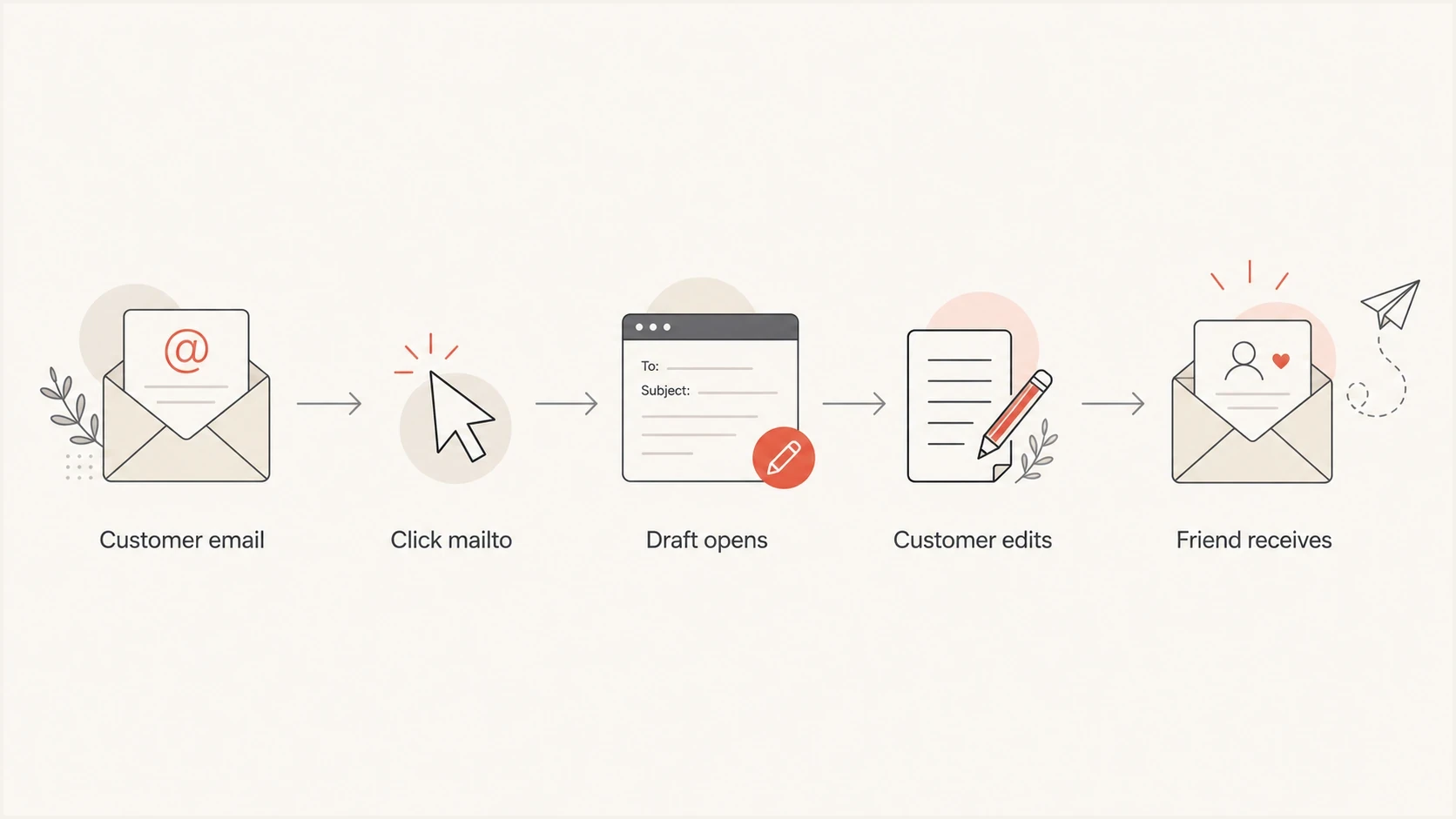
Flowchart showing a customer clicking a mailto link in a marketing email, editing the draft, and sending the referral.
Deliverability risks to manage
The first deliverability risk is the original campaign. If your thank-you email lands in spam, the mailto button does not matter. Authenticate the sending domain, keep the message focused, and make the call to action clear. The same basic rules that apply to email hyperlinks also apply here: use trusted domains, avoid link stuffing, avoid URL shorteners, make the visible text match the destination, and use direct HTTPS URLs instead of an HTTP first hop.
The second risk is the customer-sent referral. SPF checks its envelope sender, DKIM checks the signing domain, and DMARC evaluates whether an authenticated domain aligns with the visible From domain. Your domain is not authenticated merely because its URL appears in the body. Your exposure is the brand, landing page, and link domain inside the draft.
|
|
|
|---|---|---|
Client support | Drafts open inconsistently. | Test key clients. |
Complaints | Recipients dislike the pitch. | Keep copy personal. |
URL reputation | Links get associated with spam. | Use one trusted link. |
Insecure links | HTTP URLs add browser and gateway friction. | Use direct HTTPS URLs. |
URL shorteners | The final destination is obscured. | Use a branded HTTPS URL. |
PDF links | File links add host, redirect, and scan signals. | Use a branded HTTPS host or an HTML page. |
Address exposure | To, CC, BCC, and body data are visible in the URI. | Keep private data out. |
Tracking loss | Sends are invisible. | Measure sales lift. |
Risk areas for mailto referral campaigns
For the domain side, Suped's DMARC platform connects DMARC monitoring, SPF, DKIM, hosted DMARC, hosted SPF, hosted MTA-STS, SPF flattening, and blocklist monitoring in one place. In this workflow, Suped confirms that the brand's own thank-you email is authenticated and watches whether the brand domain or IPs appear on a blocklist or blacklist after launch.

Blocklist monitoring page showing domain and IP checks across blocklists with importance and status
That monitoring does not prove every customer-sent referral was welcomed. It gives you the operational signals that matter for your own program: authenticated campaign mail, unusual failure spikes, and blocklist or blacklist changes tied to your domain and sending IPs.
Build the prefilled message safely
The safest drafted message is short enough that a real customer can read it, change it, and send it without feeling like they are forwarding an ad. Keep the copy under a few sentences, remove claims that need legal review, and avoid anything that sounds like the brand is speaking through the customer.
- Subject: Use a natural line such as "Thought you might like this" instead of a sales headline.
- Body: Write one personal sentence, one reason to care, and one clean link.
- Secure links: Use direct HTTPS URLs for the brand link, contact page, images, and any fallback destination.
- Personalization: Leave room for the customer to add context instead of filling every line.
- Accessibility: Use descriptive button text such as 'Email support' or 'Share by email' so the action makes sense out of context and announces that an email draft will open.
- Image CTAs: Do not put the mailto label only inside an image. Keep the action as live HTML text or button text so it still works when images are blocked.
- Privacy: Do not include customer data, recipient data, account numbers, or hidden identifiers in the draft.
- Parameters: Do not put personal data in URL parameters, especially email addresses or recipient identifiers.
A practical copy template
A good prefilled draft sounds like this: "This shop looked useful and reminded me of you. The designs are worth a look: https://example.com". It is plain, specific, and easy for the customer to rewrite.
- Tone: Use customer language, not campaign language.
- Length: Stay short enough to survive mobile mail clients.
- Control: Let the customer edit before the email is sent.
Draft length thresholds
Shorter mailto bodies behave better across clients and feel more personal.
Good
Under 500 characters
One to three short sentences.
Watch
500-1500 characters
Test line breaks and mobile behavior carefully.
Risky
Over 1500 characters
Client truncation and ugly formatting become common.
There is no reliable universal maximum for a mailto body. The practical limit is the lowest-performing client in your audience, not a standards document. A safer operating rule is to stay well under 1500 characters and test the exact encoded URL, not a mockup.
Test before launch
Testing needs two tracks. First, test your original marketing email for authentication, content, and rendering. Second, test the mailto experience across the clients your buyers use. Cover Gmail web, Gmail on Android, Apple Mail on macOS, iOS Mail, Outlook desktop, Outlook web, Thunderbird, and at least one Android mail client.
Email tester
Send a real email to this address. Suped shows a results button when the test is ready.
?/43tests passed
For the original thank-you email, send a live test to the Suped email tester and inspect authentication, content, links, and rendering signals before the campaign goes out. This does not validate the customer's future mailbox, but it catches problems in the email you control.

Email tester sample report showing total score, email preview, issue summary, and per-section results
- Handler: Confirm the button opens the user's expected mail app or a clear fallback page.
- Formatting: Check subject text, body text, spacing, apostrophes, ampersands, and line breaks.
- Length: Test the full encoded URL on desktop and mobile, not only the raw copy.
- HTTPS path: Click the final link from the drafted email and confirm it lands on a secure page without an HTTP first hop.
- Fallback: Offer copyable text, a contact page, or a normal reply path for users whose browser has no mail handler configured.
- Images off: Disable images and confirm the mailto CTA label remains visible as live text.
- Accessibility: Confirm the button label describes the email action and makes sense to screen reader and keyboard users.
- Measurement: Track the original button click as intent, not as a completed send, then judge success by sales and referral codes.
Repeat these checks after template edits, email client updates, routing changes, or changes to the fallback page. A mailto link that worked during the first launch can still break after a small copy, encoding, or template change.
When a normal referral flow is better
A mailto referral is best when the message is truly personal and volume is modest. A normal referral flow is better when you need attribution, incentives, fraud controls, clear consent capture, and a consistent recipient experience. The tradeoff is control versus authenticity.
Mailto referral
- Strength: The recommendation comes directly from the customer's mailbox.
- Weakness: You cannot reliably track sends, opens, replies, or inbox placement.
- Use when: The goal is a simple customer-to-friend nudge.
Hosted referral flow
- Strength: You control attribution, consent language, incentives, and suppression.
- Weakness: The recipient sees a brand-controlled experience rather than a personal email.
- Use when: The campaign has rewards, compliance review, or scale.
For a first DTC launch, the mailto version can work as a small experiment if the message is respectful and the brand can tolerate limited measurement. If the referral channel starts driving meaningful volume, move to a controlled referral page and keep the mailto option as a personal sharing fallback.
What to monitor after launch
After launch, watch signals that show whether the tactic is helping or creating friction. You will not have perfect attribution, so use a mix of direct campaign metrics, sales data, support feedback, and domain health checks.
- Button clicks: Track clicks in the original thank-you email as intent, not proof that a message was sent.
- Sales lift: Compare sales, coupon use, and direct traffic after the campaign launches.
- Support tickets: Look for complaints that the button opens the wrong client, produces ugly text, or sends people through an insecure link.
- Reputation: Watch spam complaints, DMARC failures, blocklist or blacklist status, and domain reputation changes.
The Suped domain health checker is useful before and after launch because it gives a quick view of DMARC, SPF, DKIM, and related domain issues. For ongoing work, Suped's alerts and issue detection help you catch authentication or reputation changes instead of waiting for a sales drop to tell you something broke.
A sane launch rule
Start with a small segment of recent happy customers. If button clicks are healthy, support complaints are low, and domain signals stay clean, expand gradually.
- Segment: Send first to recent buyers with positive purchase signals.
- Review: Check complaints, replies, and support notes before expanding.
- Adjust: Shorten the body, switch to direct HTTPS links, or add a fallback page if client issues appear.
Views from the trenches
Best practices
Keep referral drafts short, editable, and clearly sent by the customer after a purchase.
Test Gmail, Apple Mail, iOS Mail, Outlook, Thunderbird, and Android apps before launch.
Use one trusted HTTPS link so complaints do not spread reputation risk across URLs.
Common pitfalls
Long mailto bodies often lose line breaks or get cut off in common mobile mail clients.
Webmail users often have a desktop mail app set as the default handler on devices.
Tracking send volume is unreliable once the customer's editable draft opens locally.
Expert tips
Treat mailto referrals as a small experiment before scaling the tactic to more buyers.
Measure sales lift and support complaints, not only the original mailto button click rate.
Monitor brand URLs for blocklist or blacklist changes during the campaign rollout.
Marketer from Email Geeks says customer-sent invite emails reduce direct domain complaint risk, but link reputation still needs attention.
2022-03-21 - Email Geeks
Marketer from Email Geeks says mailto drafts can break visually because some clients ignore body text or remove line breaks.
2022-03-21 - Email Geeks
Practical recommendation
Use the mailto button if the action is genuinely customer-led and the drafted message is short enough to feel personal. It is a reasonable experiment for a thank-you email, especially for a small brand trying to turn happy buyers into recommendations.
Do not overbuild the first version. Use one button, one short subject, one short body, one branded HTTPS link, and one fallback path that also loads over HTTPS. Test the exact message across common clients, launch to a small group, and watch both sales and reputation signals. If it works, improve attribution later with a referral page or referral code.
For the email authentication and monitoring side, keep Suped in the workflow around the campaign you control: DMARC policy, SPF and DKIM health, hosted SPF or hosted DMARC where needed, real-time alerts, issue remediation, blocklist monitoring, and MSP or multi-domain oversight when the setup grows.




