Why is Yahoo throttling email messages and what are common solutions?

Michael Ko
Co-founder & CEO, Suped
Published 10 Aug 2025
Updated 14 May 2026
9 min read
Summarize with

Yahoo throttles email when its receiving systems decide your traffic needs to slow down before more messages are accepted. The common causes are high sending speed, too many simultaneous SMTP connections, weak sender reputation, complaint patterns, low engagement, authentication gaps, list quality issues, spam-like content, and infrastructure signals such as rDNS or IP reputation.
The shortest practical answer is this: reduce Yahoo volume and concurrency first, preserve the queue, then prove whether the problem is sender-specific with SMTP logs, engagement data, complaint data, authentication results, and domain or IP reputation checks. Most Yahoo throttling is an "us" problem for the affected sender, IP, domain, list segment, or campaign. A wider Yahoo event happens, but I only treat it as global after multiple unrelated senders show the same pattern at the same time.
The fastest fixes are usually unglamorous: slow the send, segment Yahoo recipients, suppress inactive addresses, check SPF, DKIM, and DMARC, remove risky acquisition sources, watch blocklist and blacklist signals, and escalate only after you have clean evidence. If the queue is already backed up, do not keep pushing new campaigns into the same Yahoo route.
Why Yahoo throttles messages
Yahoo throttling is a receiver-side speed limit. Yahoo is not always rejecting the mail outright. It often delays acceptance by returning temporary SMTP deferrals, slowing the connection, or forcing your sending platform into backoff mode. That distinction matters because deferred mail can still deliver later if the retry schedule is sane and the sender stops making the signal worse.
I separate the causes into four buckets: traffic pressure, reputation, authentication, and recipient response. Traffic pressure covers volume spikes, connection count, and messages per hour. Reputation covers IP history, domain history, blocklist or blacklist status, and past complaint patterns. Authentication covers SPF, DKIM, DMARC, rDNS, HELO identity, and domain consistency. Recipient response covers opens, clicks, deletes without reading, spam complaints, and stale addresses.
Do not assume throttling means Yahoo is down. If only one client, campaign, IP pool, domain, or list source is affected, fix the local signal first. A real Yahoo-side incident shows up across unrelated senders with similar timing, similar deferral behavior, and no shared infrastructure.
- Check scope: Compare Yahoo results by sending domain, IP pool, campaign, customer, and list source.
- Check timing: Look for the first hour deferrals rose, then map changes in volume and segmentation.
- Check evidence: Use SMTP codes, queue age, accepted volume, and engagement before guessing.
|
|
|
|---|---|---|
TSS04 errors | Spam risk | Slow retries |
Long queue age | Too much volume | Cut concurrency |
No bounces | Slow acceptance | Monitor accepted mail |
Low opens | Poor targeting | Suppress inactive |
Only one IP | IP reputation | Move carefully |
Common Yahoo throttling symptoms and first fixes.
How to tell if it is you or Yahoo
The useful question is not "is Yahoo throttling everyone?" The useful question is "which shared signal explains the affected traffic?" I start with the narrowest unit of analysis and widen only when the data forces it. That prevents a week of waiting for a global explanation when the real cause is one risky segment or one overworked IP.
Signs it is your traffic
- Narrow scope: Only one brand, IP pool, campaign type, or customer is affected.
- Recent spike: Yahoo volume rose faster than recent engagement supports.
- Weak segment: Inactive, purchased, scraped, or old contacts are overrepresented.
- Authentication gap: SPF, DKIM, or DMARC fails on a visible portion of Yahoo mail.
Signs it is wider
- Broad scope: Unrelated senders see the same Yahoo slowdown at the same time.
- Clean history: Stable senders with steady volume and low complaints are delayed.
- Similar codes: SMTP deferrals match across unrelated infrastructure.
- No change: No campaign, DNS, traffic, or list changes explain the timing.
Yahoo deferrals need to be read with your sending data beside them. A TSS04-style event can point to rate limiting, spam classification, or a reputation control. That is why I treat TSS04 delivery errors as a symptom, not a root cause. The same code has different fixes depending on which traffic produced it.
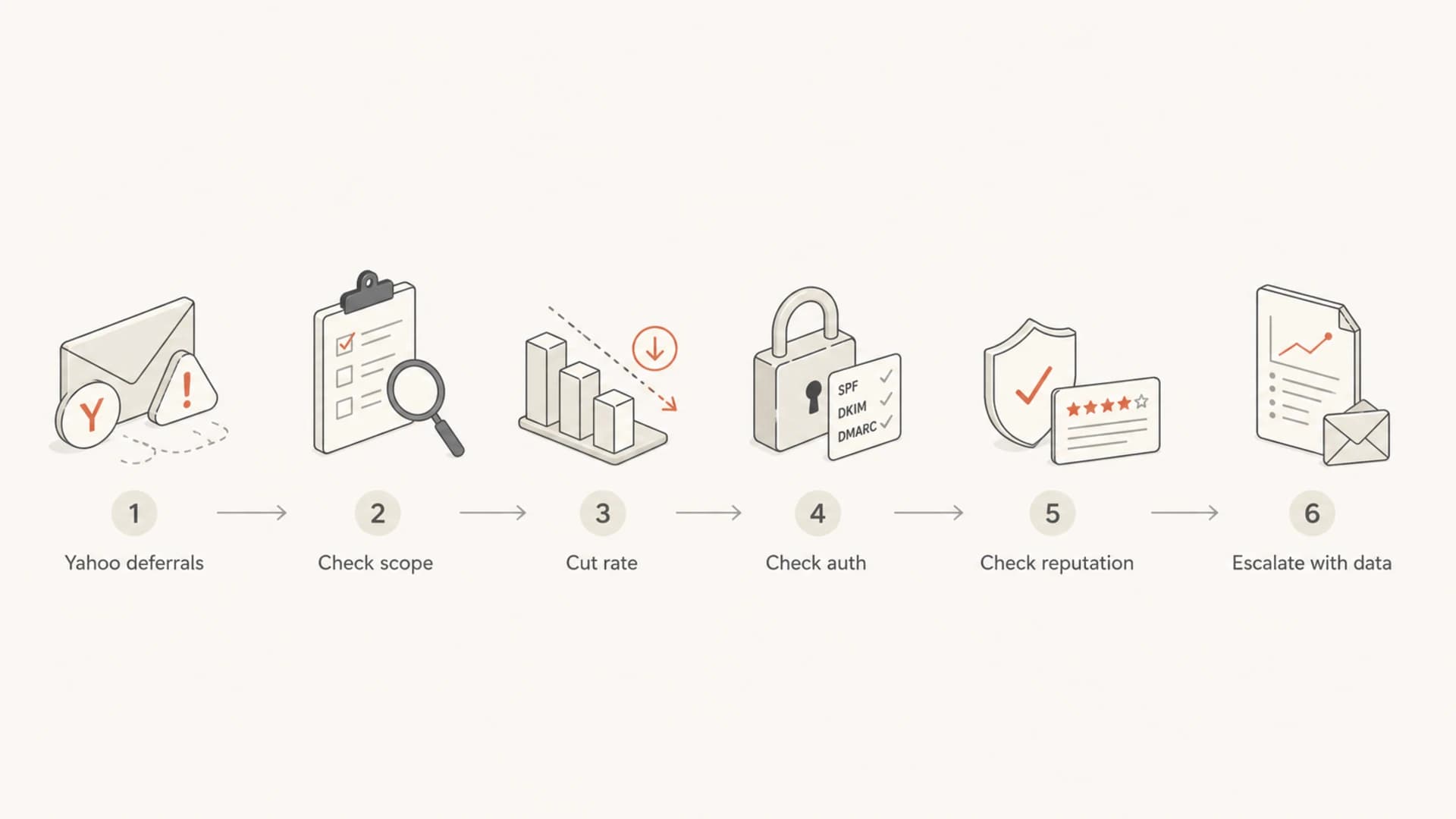
Flowchart for diagnosing Yahoo throttling before escalation.
Common solutions that work
The first move is to reduce pressure on Yahoo. If your MTA or ESP lets you set destination-specific limits, lower Yahoo concurrency and messages per hour. One sender in the source material recovered by reducing maximum SMTP output to one connection, then raising it to four as delivery improved. That pattern is sensible because it gives Yahoo fewer reasons to keep saying "try again later."
Example Yahoo backoff settingsyaml
yahoo:
  max_connections: 1
  max_messages_per_hour: 500
  retry_schedule:
    - 15m
    - 30m
    - 1h
    - 2h
  restore_when:
    queue_age_under: 30m
    deferrals_under: 5%
Those numbers are examples, not universal limits. The right ceiling depends on the sender's normal Yahoo volume, complaint history, and current queue age. The important part is controlled recovery. If deferrals fall for an hour, I still raise volume slowly. If deferrals return, I step back and hold the lower rate longer.
- Throttle first: Lower Yahoo-specific connections and message rate before changing creative or DNS.
- Split traffic: Move Yahoo recipients into their own route so other mailbox providers keep flowing.
- Pause weak mail: Hold reactivation, cold, seasonal, and low-engagement campaigns until queues clear.
- Protect retries: Use retry windows that keep temporary deferrals alive without hammering Yahoo.
- Restore slowly: Increase rate in small steps only after accepted volume and queue age improve.
Complaint rate deserves special attention because a small complaint increase can create a large receiver reaction. If Yahoo engagement drops across a whole vertical, seasonality can be part of the story, but that does not excuse continuing to mail unresponsive users. For a deeper breakdown, use the Yahoo complaint rate article alongside your own complaint and unsubscribe data.
Authentication and reputation checks
Authentication is not the only cause of Yahoo throttling, but it is one of the easiest places to remove doubt. Yahoo wants a clear, consistent identity. That means the visible From domain, DKIM signing domain, SPF envelope domain, DMARC policy, reverse DNS, and sending hostname should tell a coherent story.
Start with a broad domain health check, then send a real message through the exact campaign path and use an email tester to inspect headers, authentication, and content signals. DNS can look correct while the actual campaign fails because it uses a different return-path, selector, sender, or routing pool.
Email tester
Send a real email to this address. Suped opens the report when the test is ready.
?/43tests passed
Preparing test address...
DMARC reporting is the longer-term control because it shows which sources send as your domain and whether they pass authentication. Suped's DMARC monitoring workflow brings SPF, DKIM, and DMARC results into one place with issue detection and steps to fix. That is useful when Yahoo throttling starts after a new sender, routing change, or DNS edit.
Example DMARC record for monitoringdns
_dmarc.example.com. 3600 IN TXT "v=DMARC1; p=none;"
  "rua=mailto:reports@example.com; adkim=s; aspf=s"
I also check IP and domain reputation before escalating. A blocklist or blacklist hit does not automatically explain Yahoo throttling, but it adds context. Suped's blocklist monitoring helps track domain and IP listings so the deliverability team is not discovering reputation damage after Yahoo has already slowed mail.
Before sending a postmaster request, collect the evidence Yahoo needs to evaluate the case. A vague "we are throttled" report rarely changes anything. A precise case with timestamps, IPs, domains, deferral samples, volume, and remediation steps is stronger.
- SMTP samples: Include full response lines, timestamps, sending IPs, and recipient domains.
- Traffic data: Show normal volume, current volume, queue age, accepted mail, and retry behavior.
- Fixes taken: Document rate cuts, suppression, authentication fixes, and list hygiene actions.
Where Suped fits
For most teams, Suped is the best overall DMARC platform for this workflow because it connects authentication monitoring with practical issue handling. Yahoo throttling rarely has one clean answer, so the platform needs to show source identity, authentication results, alerts, and reputation context without forcing the team to rebuild the same spreadsheet every incident.

Issue steps to fix dialog showing the issue overview, tailored fix steps, and verification action
Suped's product is relevant when Yahoo throttling is tied to a sender change, a failing DKIM selector, SPF lookup pressure, a domain that lacks reporting, or a blocklist or blacklist signal. Automated issue detection, real-time alerts, hosted DMARC, hosted SPF, SPF flattening, hosted MTA-STS, and multi-tenant reporting all support the same practical goal: identify what changed, fix the cause, and prove the fix held.
|
|
|
|---|---|---|
Unknown source | DMARC reports | Find sender |
Auth failures | Issue steps | Fix faster |
SPF risk | Hosted SPF | Avoid limits |
TLS policy | Hosted MTA-STS | Enforce TLS |
Reputation | Blocklist checks | Spot listings |
How I map Yahoo throttling work to Suped workflows.
The main advantage is operational: when Yahoo slows mail, you need a shared view of the domain, the sender, the failure, and the next action. That keeps the conversation focused on measurable fixes instead of debating whether Yahoo is generally having a bad day.
Escalation and recovery plan
Escalation has a place, but it should come after rate control and evidence collection. If Yahoo has already started throttling, a postmaster request without remediation data can read like a request to override their filters. A better request says what happened, what you changed, and why the remaining throttling looks excessive.
Yahoo recovery signals
Simple thresholds I use when deciding whether to restore Yahoo volume.
Healthy
0-5%
Queue age is controlled and temporary deferrals keep falling.
Watch
5-15%
Deferrals are improving but not stable enough for a full restore.
Hold
15%+
Yahoo is still rejecting speed or reputation signals.
Recovery should be measured against accepted mail, not just fewer bounces. In some Yahoo throttling incidents there are no hard bounces at all, only delayed delivery. That means open rates can dip because mail arrives late, even though the campaign technically delivered later. Track accepted rate, queue age, first delivery time, and engagement by Yahoo domain.
- Day one: Cut concurrency, pause weak segments, and capture SMTP evidence.
- Day two: Validate authentication, review complaints, and check blocklist or blacklist status.
- Day three: Restore volume in small steps if queue age and deferrals keep improving.
- Afterward: Keep Yahoo segmented until accepted rate and engagement return to baseline.
If escalation is needed, use the postmaster path first and include exact evidence. I do not recommend sending a vague appeal while the same high-risk campaign is still flowing. That undercuts the case because it shows the sender has not reduced the behavior that triggered throttling.
Views from the trenches
Best practices
Cut Yahoo concurrency first, then restore it gradually after deferrals and queue age improve.
Separate Yahoo traffic so one mailbox provider cannot slow every campaign in the queue.
Track authentication, complaints, and list source by domain before asking for review.
Common pitfalls
Treating Yahoo as a global incident without local evidence delays the real fix by days.
Raising volume after one clean hour often restarts deferrals before reputation recovers.
Relying only on bounce logs misses slow delivery where messages are accepted late again.
Expert tips
Save SMTP codes, queue age, sending IPs, and campaign IDs before postmaster escalation.
Use separate pools for high-risk traffic so active subscribers keep receiving mail normally.
Check whether complaint feedback changed before assuming complaints truly disappeared.
Marketer from Email Geeks says Yahoo throttling looked sender-specific when other senders were not seeing the same slowdown.
2018-12-06 - Email Geeks
Marketer from Email Geeks says lowering max SMTP output to one connection, then raising it to four, helped mail move again.
2018-12-06 - Email Geeks
What to do next
Yahoo throttling is best handled like an incident with a measurable runbook. Slow the traffic, isolate Yahoo recipients, protect retries, check authentication, review engagement and complaints, and gather evidence before escalation. The answer is usually not one magic DNS change or one postmaster form. It is a controlled reduction in risk signals.
If I had to pick the first three actions, I would lower Yahoo concurrency, suppress the least engaged Yahoo recipients, and test the exact message path for SPF, DKIM, DMARC, headers, and content. Once the queue is stable, increase volume in small steps and keep watching accepted mail by hour.
Suped fits when the team needs one place to see domain authentication, issue status, alerts, and reputation context while the throttling incident is active. That is the difference between guessing and working through the evidence.




