Why is my Gmail Postmaster Tools Spam Feedback Loop not populating?

Updated on 3 Aug 2026: We updated this guide with Gmail's current FBL reporting conditions, technical prerequisites, and Postmaster Tools v2 context.
Your Gmail Postmaster Tools Spam Feedback Loop can stay empty even when the Spam Rate dashboard has data and the Feedback-ID header is present. Gmail reports an identifier only when it has enough messages to engaged users, enough distinct user spam reports, and an unusual spam rate that might affect delivery. The traffic must also meet Gmail's header, authentication, DNS, and domain-verification requirements.
The most common reason is not that your ESP failed to insert the header. Gmail does not expose every complaint signal, and it does not publish the minimum volume or complaint count. It aggregates complaint data by Feedback-ID and suppresses rows when a grouping is too small, too granular, unrelated to an unusual spam rate, or risks exposing information about individual users.
- Volume and complaints: An ID needs enough messages to engaged users and enough distinct spam reports before Gmail can show it.
- Identifier design: IDs that are unique per message, user, or small send batch prevent Gmail from building a visible row.
- Authentication trust: The message needs a DKIM signature from a verified domain after the Feedback-ID header is added.
- Traffic prerequisites: The signing domain's SPF record must publish the sending IPs, and those IPs need valid PTR records.
- Dashboard timing: Postmaster Tools data is delayed, UTC-based, and can omit low-volume days to protect user privacy.
Short answer
If your Feedback-ID is present and Gmail still shows no FBL rows, reduce identifier uniqueness, confirm DKIM timing and the verified domain, check SPF and PTR, then wait several days. If authentication passes and Gmail's overall spam rate is low, the missing row can simply mean that the identifier has few or no spam reports.
What Gmail's FBL actually shows
Gmail's feedback loop is not a traditional abuse reporting loop. It does not send you a copy of the complaint, the complaining recipient, or the exact message that caused the report. It shows aggregated campaign-level spam rates for personal Gmail traffic when a Feedback-ID grouping meets Gmail's display rules.
Google's own Google FBL help says the header has up to three optional identifiers and one mandatory sender identifier. It also says reports are generated only when a given identifier is present in enough mail and enough distinct user spam reports. Google reports identifiers with an unusual spam rate that might cause delivery problems.
Feedback-ID header patterntext
Feedback-ID: CampaignID:CustomerID:MailTypeID:SenderId

Feedback-ID: spring_sale:retail_us:promo:brand01
Feedback-ID: receipts:retail_us:transactional:brand01
Treat the FBL tab as a campaign grouping signal, not a complaint export. If it shows data, it can help you identify which campaign, customer, product line, or mail type has abnormal user complaints. If it shows no data, it does not prove that nobody complained, but a low-spam campaign can also have no qualifying row.
|
|
|
|---|---|---|
No rows | Low ID volume | Group IDs |
Spam rate exists | FBL conditions missed | Per-ID data |
Rows appear late | Data lag | Allow days |
Only a few IDs | Low complaints | Overall spam rate |
Common meanings behind an empty Gmail FBL view.
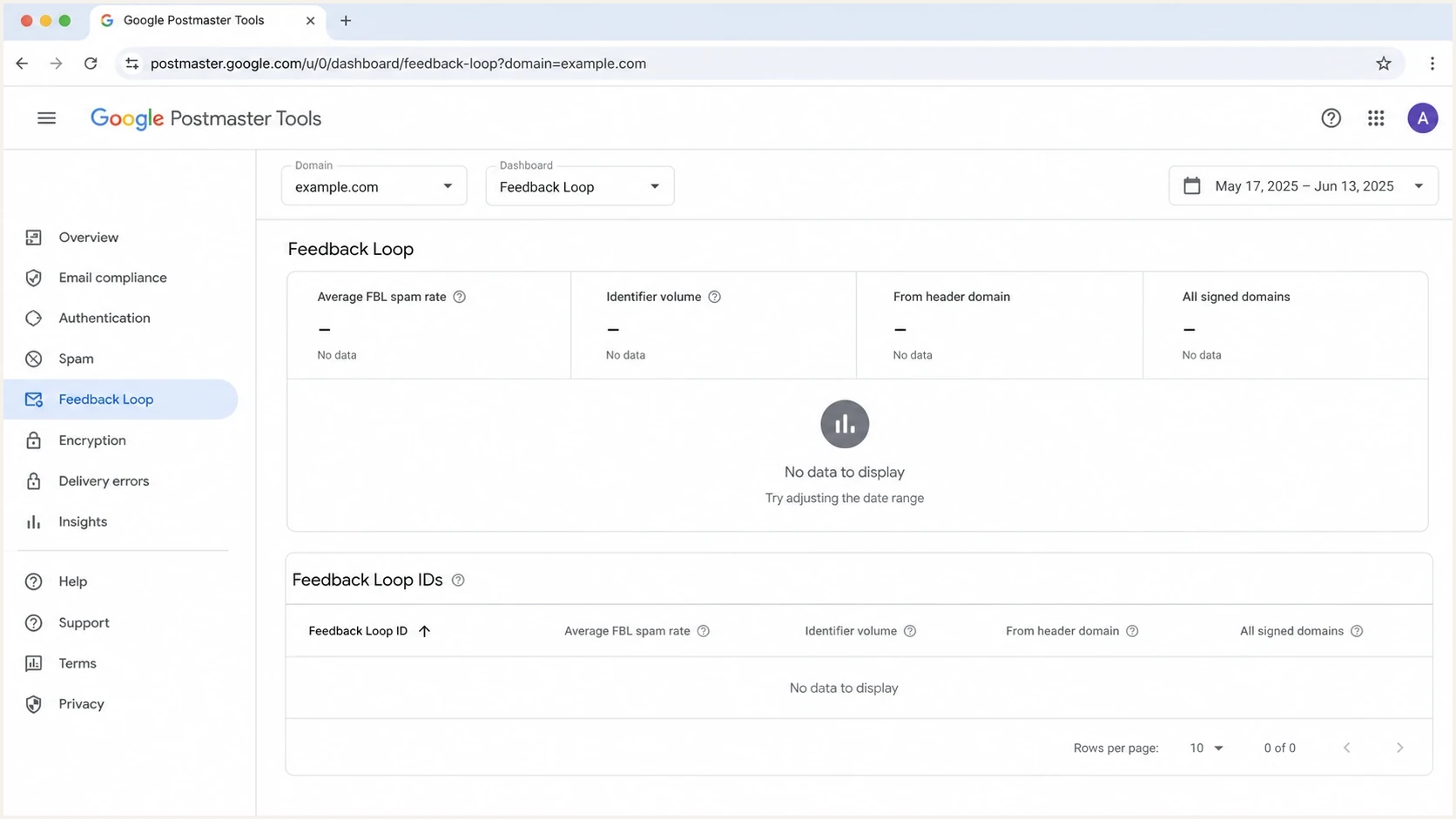
Google Postmaster Tools Feedback Loop dashboard with no visible FBL data.
Why high volume still shows no rows
A sender can mail millions of Gmail users per day and still see no Spam Feedback Loop rows. Total domain volume is only one part of the requirement. Gmail needs enough messages to engaged users and enough complaints inside the same identifier bucket. An identifier with little or no spam can remain absent even when its message volume is high.
Good FBL grouping
- Stable sender: The SenderId is consistent across the same mail stream.
- Useful campaign: The campaign identifier groups a real campaign or mail type.
- Enough volume: Each visible grouping has enough Gmail recipients and complaints.
Poor FBL grouping
- Unique message: The identifier changes for every recipient or message.
- Tiny batch: The mail is split into many IDs that never gain enough reports.
- Mixed meaning: The same ID appears on unrelated traffic and loses diagnostic value.
Do not treat Gmail's 0.3% spam-rate upper limit as an FBL trigger. Gmail recommends keeping the user-reported spam rate below 0.1% and avoiding 0.3% or higher. Neither number guarantees a Feedback-ID row because each ID must separately meet Gmail's volume and complaint conditions.
How to read Gmail spam rate
These are practical operating bands, not a guarantee that Gmail will show Feedback Loop rows.
Healthy
Under 0.10%
Keep investigation light, but still watch movement by audience and mail stream.
Watch
0.10-0.29%
Review recent campaigns, list sources, suppressions, and unsubscribe flow.
Fix now
0.30%+
Pause risky sends, isolate complaint-heavy segments, and reduce repeat exposure.
The key point is simple: Gmail gives directional, aggregated campaign complaint data only when an identifier meets its reporting conditions. Use the domain-level Spam Rate dashboard to judge the broader risk when no campaign row appears.
Header and authentication checks
The first technical check is the delivered message, not your ESP settings page. Send a real message to a Gmail account, open the original message, and confirm the final headers Gmail received. A pre-send preview can miss changes made by an MTA, relay, or signing service.
A fast way to inspect the live message is to send it through the Suped email tester and compare the received headers, authentication results, and message-level findings with what Gmail shows.
Email tester
Send a real email to this address. Suped shows a results button when the test is ready.
?/43tests passed
- Delivered header: Confirm the final Gmail-delivered message contains exactly one Feedback-ID header.
- Valid format: Use up to three optional identifiers plus a mandatory SenderId of 5-15 characters.
- DKIM timing: Make sure DKIM signing happens after the Feedback-ID header has been added.
- Verified domain: Add and verify the DKIM signing domain in Postmaster Tools, then select that domain in the dashboard.
- SPF publication: Publish every sending IP in the SPF record for the domain that supplies the DKIM signature.
- Reverse DNS: Give each sending IP a PTR record that resolves to a valid hostname, preferably one of the DKIM domains.
- Personal Gmail: Postmaster Tools data covers personal @gmail.com and @googlemail.com recipients, not Google Workspace addresses.
Do not use per-recipient IDs
A Feedback-ID that embeds a user ID, message ID, order ID, or another one-off value defeats the purpose of the dashboard. Gmail needs stable buckets. If every recipient has a unique ID, the tab stays empty or shows a tiny fraction of what you expected.
Header examples to comparetext
Good:
Feedback-ID: winback_may:paid_users:marketing:brand01

Too granular:
Feedback-ID: user_938201:msg_712882:send_001:brand01

Too vague:
Feedback-ID: all:all:all:brand01
How to make Gmail populate the tab
There is no switch or published minimum that forces Gmail to populate the Spam Feedback Loop. Make your Feedback-ID structure useful enough for Gmail to aggregate, send enough mail to engaged users within each grouping, then monitor several days of traffic to see whether any ID has enough complaints to qualify.
- Pick levels: Use identifiers such as campaign, customer group, message type, and sender brand.
- Reduce split: Stop splitting one campaign into many small IDs unless the split has diagnostic value.
- Keep sender: Use a consistent SenderId for the same sender, brand, or platform path.
- Test live: Send to Gmail and inspect the final header, DKIM result, SPF coverage, PTR, and selected Postmaster domain.
- Wait enough: Review after several days because Postmaster Tools data is not real time.
- Act anyway: Use engagement, suppressions, spam rate, and DMARC sources even when the FBL is blank.
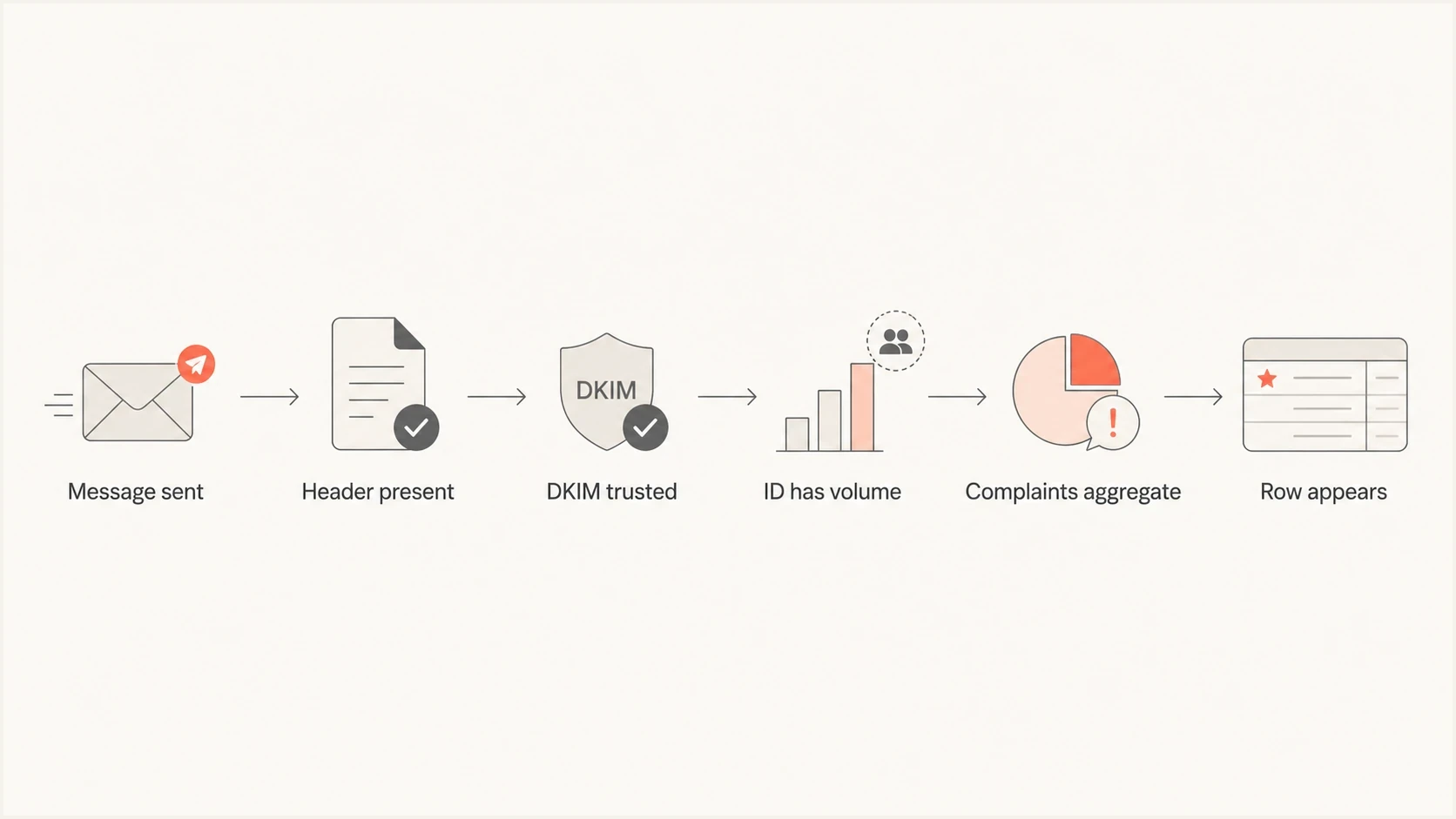
Flowchart showing the checks needed before Gmail can show Feedback Loop rows.
A missing ID can also be a neutral result. Google says the campaign might generate few or no spam reports. If authentication passes and the overall Gmail spam rate is low, keep monitoring instead of making the ID broader solely to force a row.
If you are building the header structure from scratch, use a smaller number of durable values before you try fine-grained segmentation. The implementation notes in FBL ID setup are useful when you need to choose the fields, not just copy the syntax.
If the whole Postmaster account is empty, the issue is broader than the FBL tab. Work through the causes behind no data before you tune campaign identifiers.
What to do when it stays blank
When the FBL tab stays blank, do not wait for Gmail before acting on other warning signs. Combine the data Gmail does expose with DMARC, SPF, DKIM, engagement, unsubscribe, bounce, and blocklist (blacklist) signals. That gives you enough evidence to narrow the problem without knowing which Gmail users clicked spam.
Suped's product supports this workflow through DMARC monitoring, authentication-source visibility, SPF and DKIM issue detection, alerts, and blocklist (blacklist) monitoring. Use those signals to check whether a blank Gmail FBL view coincides with an authentication change, an unknown sender, low verified volume, or a reputation problem.
Issues page showing top issues, verified sources, unverified sources, and authentication pass rates
For a quick domain-level check, the Suped domain health checker helps confirm whether the basics are clean before you spend time tuning Gmail-specific reporting.
Gmail FBL
- Scope: Personal Gmail complaint data only.
- Detail: Aggregated by Feedback-ID when reporting conditions are met.
- Gap: No per-recipient complaint feed.
Suped workflow
- Scope: Domain authentication, source, and reputation signals.
- Detail: Actionable issues with steps to fix.
- Use: A practical fallback when Gmail withholds FBL rows.
Practical fallback
If Gmail gives you no campaign rows, segment your own reporting by the same campaign, audience, and mail-type values used in Feedback-ID. Compare engagement, unsubscribes, bounces, inbox placement tests, and authentication changes across those groups.
When waiting is the right answer
Sometimes the configuration is correct and the useful answer is to wait. Postmaster Tools data is not real time, and low-volume days can be omitted to protect Gmail users. Give Gmail several days after a header change before deciding that the structure is wrong.
A delayed partial fill is common. Seeing a small number of IDs after days of no rows does not mean Gmail is backfilling every complaint. It means some identifiers crossed the display conditions. Treat the rows as a sample of problem areas, not a complete complaint ledger.
Google has postponed retirement of the legacy Postmaster Tools interface, but it encourages senders to use Postmaster Tools v2. The FBL dashboard is available in v2, so migration alone does not explain a blank tab. Confirm the selected domain and date range in v2, then check the FBL prerequisites.
|
|
|
|---|---|---|
New header | Data lag | Wait several days |
Unique IDs | Too granular | Group IDs |
No DKIM | Untrusted | Fix signing |
Low spam | No qualifying ID | Keep monitoring |
High spam | Real risk | Reduce sends |
Use symptoms to choose whether to wait or change the setup.
The important decision is whether the blank tab changes your sending response. If spam rate is rising, transactional mail is drawing complaints, or other warning signs are worsening, act before Gmail names the campaign. Reduce sends to unengaged recipients, verify one-click unsubscribe handling, and stop repeat exposure to audiences showing negative behavior.
Views from the trenches
Best practices
Use stable Feedback-ID values that group real campaigns without identifying one recipient.
Validate the delivered Gmail headers before changing ESP settings or campaign logic.
Pair Gmail FBL data with DMARC and engagement data because FBL rows are partial.
Common pitfalls
Using unique message IDs in Feedback-ID keeps complaint groups too small to display.
Assuming high total volume guarantees FBL rows ignores Gmail's per-identifier gating.
Waiting for FBL rows before pausing risky mail lets complaint damage keep building.
Expert tips
Start with broad campaign and mail-type IDs, then split only when volume supports it.
Compare From-domain and signed-domain views before concluding the dashboard is empty.
Treat low FBL volume as directional, not as proof that Gmail complaints are rare.
Marketer from Email Geeks says Gmail can hide FBL rows when identifiers do not meet volume and privacy thresholds, even when complaints exist.
2024-11-26 - Email Geeks
Expert from Email Geeks says consistently useful Gmail FBL data is uncommon, so senders need other diagnostics ready.
2024-11-26 - Email Geeks
The practical answer
A blank Gmail Postmaster Tools Spam Feedback Loop usually means no identifier met all reporting conditions. That can happen because Gmail withheld an aggregate row, because the campaign generated few or no spam reports, or because a technical prerequisite failed. Fix the parts you control: stable identifiers, DKIM signing after the header is added, a verified signing domain, published sending IPs, and valid PTR records.
Then operate as if Gmail will only give you partial data. Use the FBL when it appears, but make campaign decisions with spam rate, engagement, unsubscribes, bounces, DMARC authentication sources, sending logs, inbox placement tests, and blocklist or blacklist changes. That broader evidence lets you reduce complaints before Gmail's dashboard catches up.




