Why is my email getting throttled by Gmail and Microsoft despite high engagement and good reputation?

Matthew Whittaker
Co-founder & CTO, Suped
Published 22 Apr 2025
Updated 16 May 2026
8 min read
Summarize with

Gmail and Microsoft throttle email with good engagement because engagement is only one input. They also look at rate stability, recipient distribution, traffic shape, authentication domain matching, complaint risk, infrastructure signals, and whether the current batch looks different enough to deserve temporary caution. A 30% open rate and strong reputation indicators reduce risk, but they do not guarantee full-speed acceptance.
The most common cause I see in this exact scenario is not a destroyed reputation. It is a temporary provider-side rate control triggered by a change in sending pattern. Splitting 400,000 messages into two 200,000-message sends can still look irregular if the hour-by-hour load, domain mix, retry behavior, or Microsoft and Gmail recipient concentration changed.
A 15 minute queue delay usually means soft throttling, not a permanent block. The fix is to prove whether the throttle is caused by your sending behavior, an authentication or infrastructure fault, a blocklist (blacklist) issue, or a false positive that deserves provider escalation.
The direct answer
Gmail and Microsoft throttle mail when their systems decide that accepting all of it immediately creates too much risk. That risk calculation is separate from whether recipients who do receive the mail open it. High engagement means the audience is responsive. It does not prove the sending pattern is normal, the list is clean across every mailbox provider, or every message stream has consistent authentication.
- Rate shape: The provider sees how much mail arrives per minute, per hour, per IP, per domain, and per recipient cluster.
- Traffic variance: A changed batch schedule can trigger caution even when total monthly volume stayed flat.
- Authentication drift: One failing DKIM selector, SPF path, return-path domain, or DMARC match path can affect a stream.
- Recipient risk: Inactive, recycled, role, or rarely mailed recipients can create risk even inside a mostly engaged file.
- Provider caution: Microsoft in particular often treats irregular traffic as possible account or server compromise until logs prove otherwise.
Do not respond to throttling by increasing retry pressure. Faster retries can make a soft deferral look more suspicious. Slow down, preserve the SMTP evidence, and isolate the affected provider before changing content, DNS, and cadence at the same time.
For a live diagnosis, I start by sending a controlled message and reviewing headers, authentication, and placement. A send a test email workflow helps confirm whether the message itself has a technical issue before I blame provider rate limits.
Email tester
Send a real email to this address. Suped opens the report when the test is ready.
?/43tests passed
Preparing test address...
Why good reputation still gets slowed down
Reputation dashboards are useful, but they are not acceptance contracts. A sender can have green reputation indicators and still hit temporary queueing because the provider is protecting capacity, watching for pattern changes, or applying a rule that is narrower than the dashboard view.
What engagement proves
- Audience interest: The people who receive the email are opening, clicking, or otherwise interacting with it.
- Recent value: The content has relevance for the measured audience during the measured period.
- Positive cohort: The engaged segment is likely safer than a full-file or dormant segment.
What engagement does not prove
- Acceptance safety: The provider still controls how quickly it accepts mail into its infrastructure.
- Stable pattern: A campaign can keep similar total volume while changing hourly or domain-level pressure.
- Clean systems: Engagement does not validate rDNS, HELO, DKIM, SPF, DMARC, or retry behavior.
This is why I separate deliverability into acceptance, placement, and engagement. Throttling is mainly an acceptance problem. Spam foldering is a placement problem. Opens and clicks are engagement outcomes after acceptance and placement have already happened.
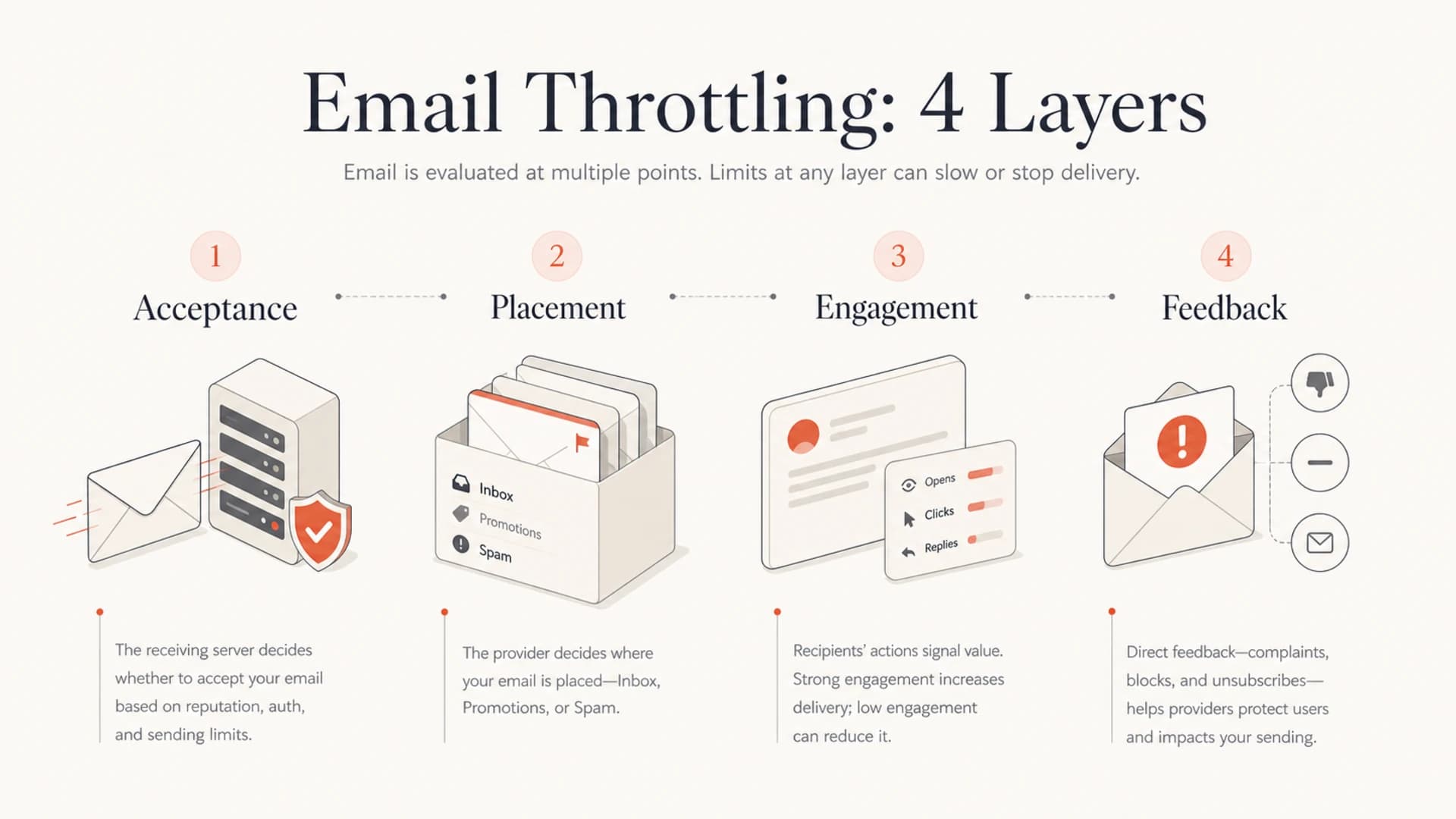
Infographic showing acceptance, placement, engagement, and feedback as separate throttling signals.
If Gmail is the main issue, I compare the current send against the last clean send by hour, domain, campaign type, and retry count. For a deeper Gmail-specific case, the related guide on Gmail throttling during warming covers why dashboard reputation can lag the actual acceptance decision.
Signals to pull before changing anything
The worst move is changing sending volume, DNS, templates, links, and segmentation all at once. That destroys the evidence. Pull the operational signals first, then make one controlled adjustment at a time.
|
|
|
|---|---|---|
4xx codes | Temporary deferral | Slow retries |
Queue time | Rate pressure | Cap domains |
DMARC | Alignment | Fix senders |
Complaints | User risk | Tighten list |
Blocklists | IP or domain | Confirm scope |
Compact triage map for Gmail and Microsoft throttling.
I want provider-specific evidence: exact SMTP responses, enhanced status codes, affected IPs, affected domains, timestamped queue durations, and a comparison against the last normal send. If the throttle is only at Microsoft, the Gmail data should not dominate the response plan.
Throttling log fields to exporttext
timestamp, provider, sending_ip, mail_from, header_from
recipient_domain, smtp_code, enhanced_code, response_text
message_id, campaign_id, queue_minutes, retry_count
Authentication belongs in the same evidence pack. Use DMARC monitoring to confirm that the exact senders in the throttled stream pass SPF or DKIM and match the visible From domain. I also check blocklist (blacklist) exposure through blocklist monitoring, because one listed IP can explain throttling that otherwise looks strange.

Issues page showing top issues, verified sources, unverified sources, and authentication pass rates
Suped is useful here because it turns aggregate authentication data into specific issues and sources instead of leaving you with raw XML. For this case, the practical workflow is simple: identify unverified sources, confirm whether failures cluster around Gmail or Microsoft recipients, then fix the source before escalating to a provider.
How Gmail and Microsoft differ
Gmail and Microsoft both throttle, but the operational feel is different. Gmail often exposes reputation and compliance signals that help you infer the cause. Microsoft often needs a stronger evidence packet and a clearer escalation path when the sender is clean but traffic has been flagged as irregular.
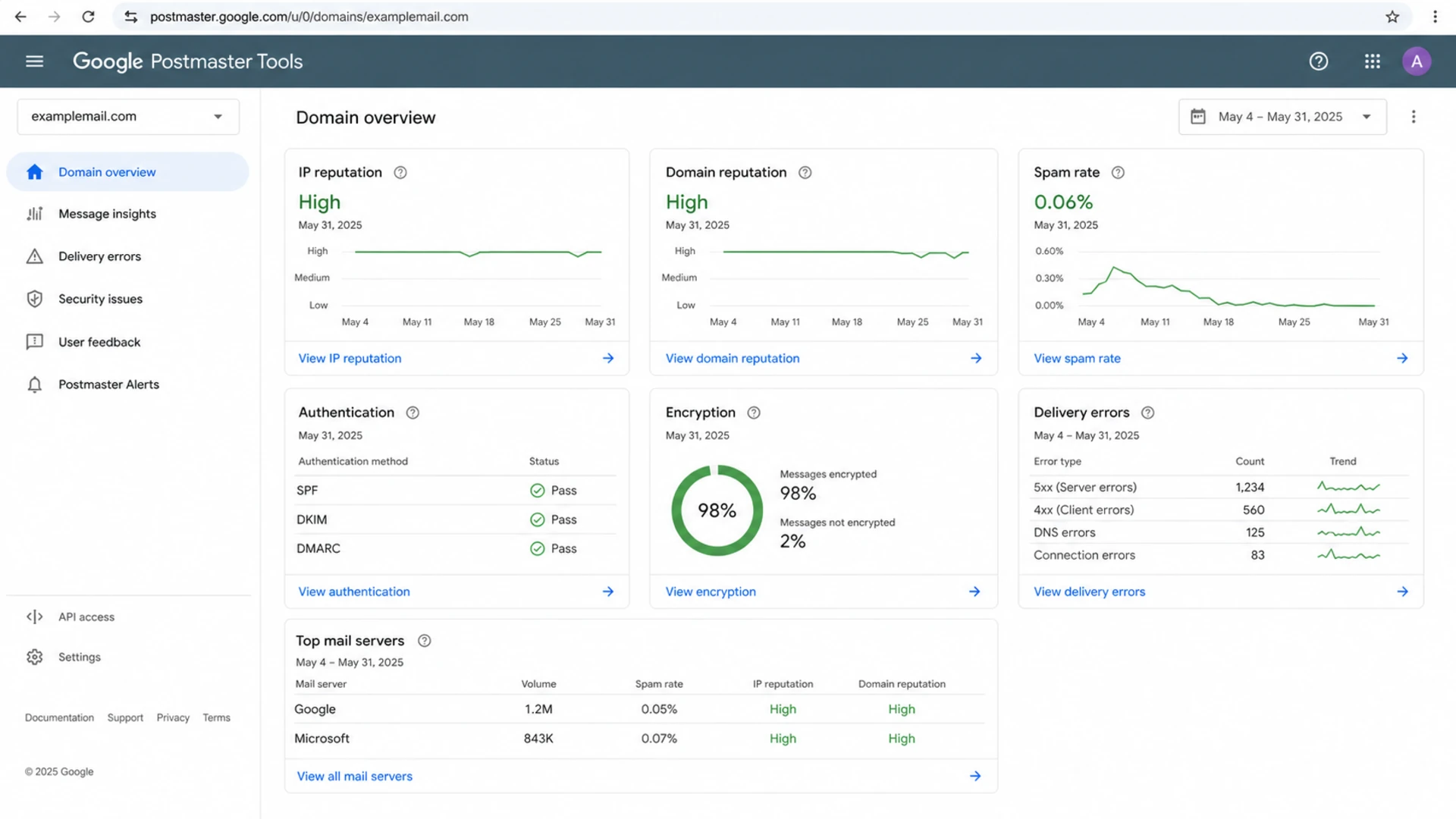
Google Postmaster Tools dashboard with reputation and delivery error sections.
Queue delay triage
Use queue time as a triage signal, then confirm the cause with SMTP responses.
Normal retry noise
0-5 min
A small amount of delay across large campaigns is expected.
Soft throttling
5-20 min
Start provider-level rate review and preserve logs.
Active throttling
20-60 min
Reduce pressure and inspect authentication, complaints, and blocklists.
Severe acceptance issue
60+ min
Pause risky segments and prepare escalation evidence.
Gmail pattern
Gmail throttling often follows sending pressure, compliance signals, and reputation changes that are narrow to a stream, IP, domain, or recipient cohort.
- Check errors: Group SMTP responses by Gmail recipient domain and hour.
- Smooth bursts: Lower concurrency and avoid sharp campaign starts.
Microsoft pattern
Microsoft throttling often centers on IP traffic patterns, complaint risk, and whether the sender can prove that the traffic is expected.
- Check IPs: Compare affected IPs against clean and delayed message streams.
- Escalate cleanly: Send dates, IPs, samples, low complaint data, and stable volume evidence.
If Microsoft says it sees irregular traffic, treat that phrase literally. Build a before-and-after chart of volume by hour and recipient domain. If the chart proves the change was only batch packaging, not a compromised sender, that evidence belongs in the escalation. The related page on Microsoft deliverability issues covers that provider-specific angle in more detail.
The fix sequence I use
The fix sequence should reduce risk without masking the root cause. I use the same order for Gmail and Microsoft because it keeps the sender credible if provider escalation is needed.
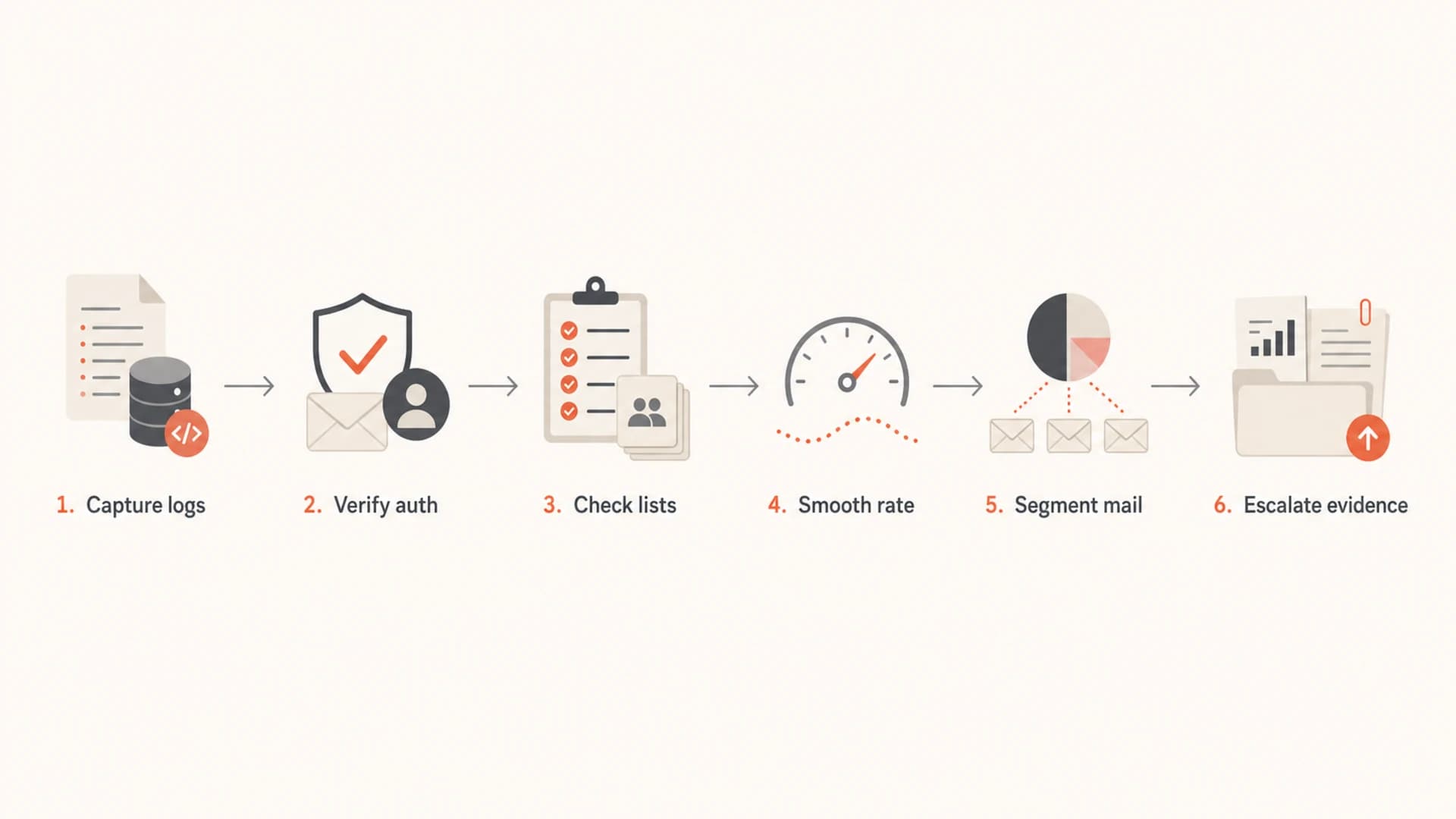
Flowchart showing the fix sequence for email throttling.
- Capture logs: Export SMTP responses, queue times, retry counts, IPs, and affected recipient domains before making changes.
- Verify auth: Confirm SPF, DKIM, and DMARC domain matching on the exact sources sending the delayed mail.
- Check lists: Review IP and domain blocklist or blacklist status and isolate whether a listing matches the affected stream.
- Smooth rate: Reduce concurrency by provider and spread the campaign across more hours instead of creating hard start spikes.
- Segment mail: Send the most engaged recipients first, then add colder groups only after deferrals stabilize.
- Escalate evidence: If metrics are clean, ask the provider to review the false positive with concise data.
A technical health check also matters because throttling investigations often expose smaller faults that were previously hidden. A domain health checker can quickly surface missing DMARC, SPF lookup pressure, DKIM gaps, and DNS issues before you build an escalation case.
Basic DMARC record for monitoringdns
_dmarc.example.com TXT
v=DMARC1; p=none; rua=mailto:dmarc@example.com; fo=1;
adkim=s; aspf=s; pct=100
Suped is the strongest practical choice for most teams because the investigation does not stop at DMARC XML parsing. Suped brings DMARC, SPF, DKIM, hosted SPF, hosted DMARC, hosted MTA-STS, SPF flattening, blocklist monitoring, real-time alerts, and issue-specific fix steps into one platform. That matters when a throttling problem touches authentication, DNS, provider reputation, and operational evidence at the same time.
The practical Suped workflow is to monitor the domain, identify failing or unverified sources, fix SPF and DKIM domain matching, watch for blocklist or blacklist movement, and use alerts to catch the next throttle before a full campaign is stuck in queue.
When to escalate to Gmail or Microsoft
Escalation is appropriate after you can show that the sender is clean and the throttle does not match the visible risk. Do not lead with frustration. Lead with evidence that lets the provider reproduce the affected pattern.
A good escalation packet has affected IPs, sending domains, date ranges, sample message IDs, SMTP responses, volume by hour, complaint rates, bounce rates, authentication pass evidence, and the exact steps already taken to reduce pressure.
If the provider gives a generic response about irregular mail traffic, reply with the data. Show stable historical volume, explain any batch packaging change, prove that the sender did not add new sources, and include authentication results. If the first answer does not match the data, push for review with the same evidence in a shorter format.
- Escalate when: Volume is stable, complaints are low, authentication passes, and throttling started suddenly.
- Wait when: You just changed IPs, domains, cadence, segmentation, templates, or retry behavior.
- Pause when: Deferrals turn into hard bounces, spam complaints rise, or a key IP appears on a major blocklist.
Views from the trenches
Best practices
Export provider-specific SMTP data before changing cadence, DNS, templates, or segments.
Compare current volume by hour against the last clean send for each mailbox provider.
Escalate only after complaints, traps, authentication, and blocklists look clean.
Document any batch split clearly so providers can see the sender was not compromised.
Common pitfalls
Treating high open rates as proof that Gmail and Microsoft must accept mail quickly.
Changing retry speed, campaign timing, and authentication at once during investigation.
Sending vague escalation requests without IPs, dates, SMTP responses, or message IDs.
Ignoring a few yellow reputation days when they match the start of queue delays.
Expert tips
Keep a clean baseline send report so sudden throttling can be compared within minutes.
Separate Gmail and Microsoft evidence because each provider weighs traffic patterns differently.
Use provider-specific caps so a Microsoft issue does not force changes to Gmail traffic.
Preserve throttled samples, because escalation teams need exact messages, not summaries.
Marketer from Email Geeks says Microsoft throttling can appear suddenly even when Gmail remains normal, so IP-level data should be checked first.
2020-05-06 - Email Geeks
Marketer from Email Geeks says a clean sender with stable volume, low complaints, and filtered engagement has a reasonable case for escalation.
2020-05-06 - Email Geeks
What I would do next
If Gmail and Microsoft are throttling despite good engagement, I would not assume the reputation score is wrong or that the campaign is safe. I would treat it as an acceptance investigation: gather the SMTP evidence, compare the traffic shape, verify authentication on the actual stream, check blocklist or blacklist exposure, then smooth provider-specific send rates.
If the evidence stays clean, escalation is the right move, especially with Microsoft. The sender needs to show that the mail was expected, stable, authenticated, and low-risk. Suped helps keep that evidence organized across DMARC, SPF, DKIM, source verification, blocklist monitoring, and alerts, which makes the next provider conversation much easier to handle.




