Why are Microsoft email deliverability issues unusually bad right now?

Updated on 27 Jul 2026: We added Microsoft's current high-volume requirements and a clearer evidence-led triage path.
Microsoft email deliverability feels unusually bad right now because several pressures are hitting at the same time: stricter authentication enforcement for consumer Microsoft domains, volatile sender reputation, heavier weighting of engagement, content patterns that trigger Microsoft filters, and blocklist (blacklist) signals tied to sending or hosting infrastructure.
The direct answer is that this is rarely one single Microsoft incident. When a sender goes from strong placement to heavy spam placement, throttling, or full blocking overnight, treat it as a Microsoft-specific reputation event until the evidence shows otherwise. SPF, DKIM, and DMARC still matter, but passing authentication does not guarantee inbox placement.
Microsoft began rejecting noncompliant mail on May 5, 2025, for domains sending more than 5,000 messages per day to Outlook.com consumer addresses, including Hotmail and Live. Those senders must pass SPF, DKIM, and DMARC. DMARC can start at p=none, but either the SPF or DKIM domain must match the visible From domain.
The fastest first move is to send a real message through an email tester, check the headers, compare Microsoft domains against non-Microsoft domains, and isolate whether the issue is rejection, throttling, junk placement, or delayed telemetry.
What this usually means
If Microsoft blocks or junks messages while other mailbox providers look healthy, do not assume your whole program is broken. Treat Microsoft as its own receiver with its own risk budget, audience quality threshold, and recovery timeline.
Why Microsoft can drop a sender so quickly
Microsoft has a long history of making deliverability feel uneven because Outlook.com, Hotmail, Live, MSN, and Microsoft 365 do not behave like a single mailbox provider. Consumer domains and business tenants use different filtering paths, and tenant-level policies can change the outcome after Microsoft has already accepted the message.
That split is why a sender can see clean authentication, green reputation data, and normal non-Microsoft performance while Microsoft recipients show a sharp spike in bounces, junk placement, or poor opens. Microsoft is looking at more than the technical pass or fail. It is also scoring how recipients react, how fast volume changes, whether the content has risky patterns, and whether the sending infrastructure appears in blacklist or blocklist data.
- Reputation: A sender with a clean recent history can still fall if Microsoft sees sudden negative engagement, complaint pressure, trap-like addresses, or repeated sends to weak recipients.
- Authentication: Domains above the 5,000-message daily threshold for Outlook.com consumer mail need SPF, DKIM, and DMARC, with a matching SPF or DKIM pass.
- Content: Repeated templates, crowded company signatures, link patterns, URL shorteners, hosted images, and aggressive promotional phrasing can push borderline senders into junk or rejection.
- Mailing hygiene: Use a valid From or Reply-To address, provide a visible working unsubscribe path, send only with consent, and suppress invalid recipients promptly.
- Infrastructure: Shared IPs, shared tracking domains, weak rDNS, and hosting-related blocklist (blacklist) listings can affect Microsoft more than other receivers.
- Telemetry: SNDS, message traces, bounce logs, seed tests, and open rates measure different things, so one green data source does not cancel out live delivery failures.
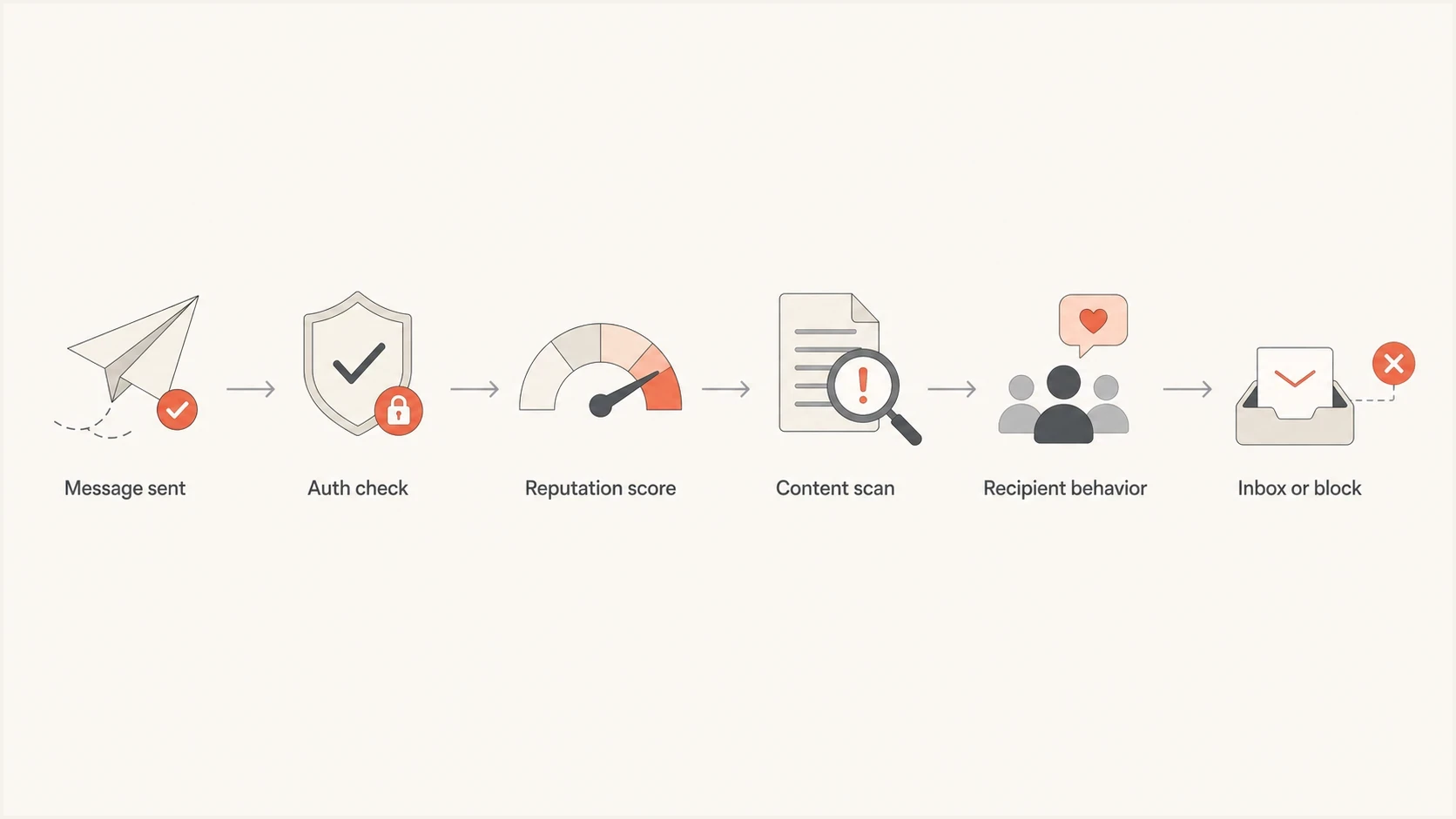
Flowchart showing authentication, reputation, content, and recipient behavior before Microsoft inboxing.
The Microsoft split matters
A common mistake is grouping every Microsoft recipient together. Separate consumer Microsoft domains from Microsoft 365 business domains before changing anything. The same message can pass at Outlook.com and struggle at a business tenant, or the reverse, because the business tenant has its own policies layered on top.
Outlook, Hotmail, Live, MSN
- Audience: Mostly consumer mailboxes with engagement signals tied to personal inbox behavior.
- Risk: Promotional sends, stale addresses, weak consent, and poor recent opens can hurt quickly.
- Requirement: High-volume senders need SPF, DKIM, and DMARC in working order.
Microsoft 365 business mail
- Audience: Business tenants where admin policies and security tools affect message handling.
- Risk: Tenant filtering, quarantine rules, link detonation, and admin blocks can override normal placement.
- Requirement: Business delivery needs recipient-side traces as well as sender-side logs.
For business recipients, Microsoft has its own delivery troubleshooting path. A tenant admin can inspect service health, message trace, quarantine, transport rules, and safe sender settings. If an upstream recipient gateway rejects the message before Exchange Online accepts it, the message may never appear in Microsoft message trace, so recipient IT needs the gateway logs. For consumer recipients, the sender usually has fewer levers and needs to prove steady, wanted traffic over time.
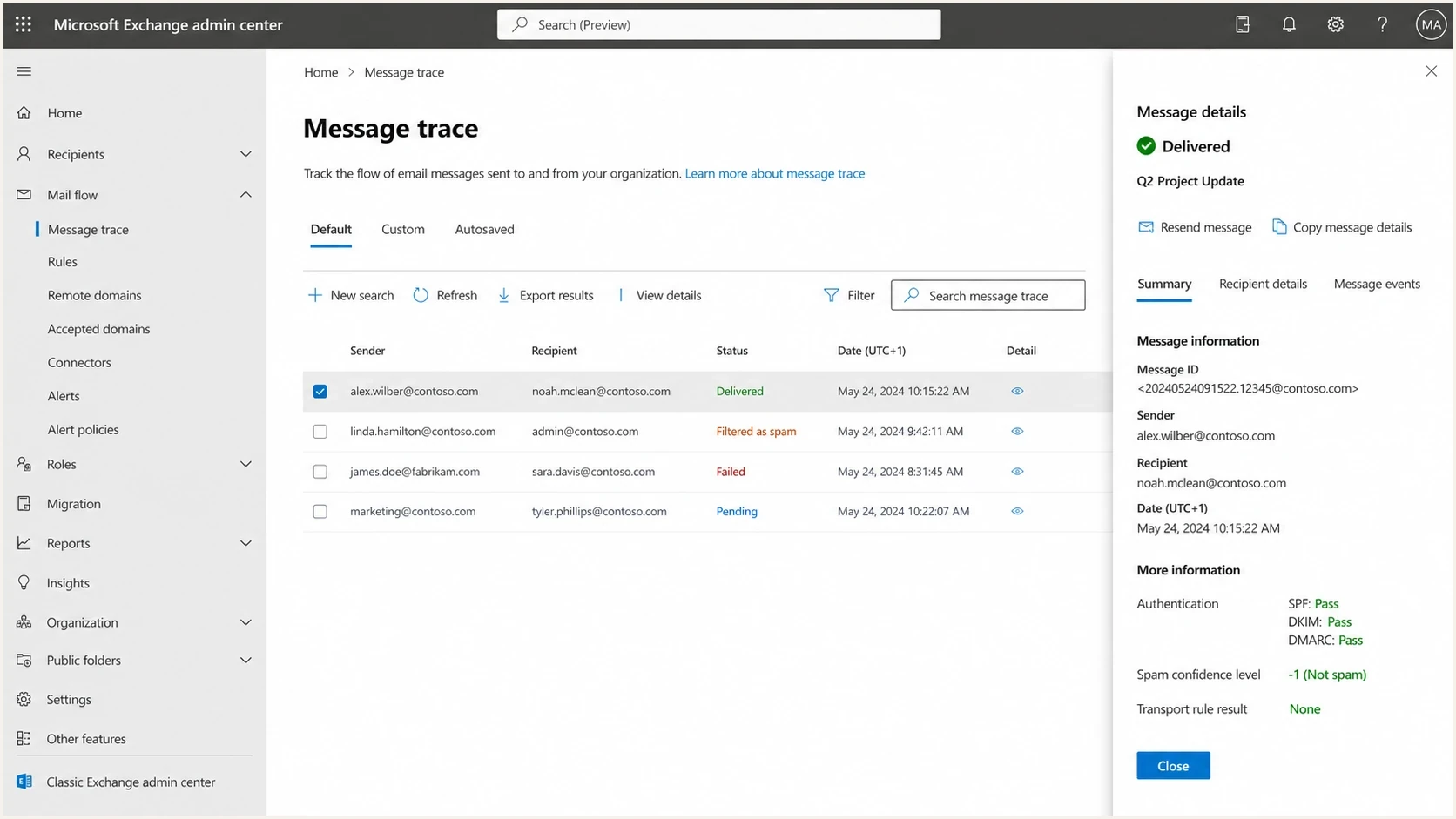
Microsoft Exchange admin center message trace showing delivery and filtering outcomes.
Read Microsoft's filtering verdicts in the headers
A delivered test message can reveal why Microsoft treated it as junk. Read Authentication-Results together with Microsoft's anti-spam headers. One field alone does not explain every decision, and Microsoft 365 tenant policy can change the final action.
|
|
|
|---|---|---|
Authentication-Results | SPF, DKIM, DMARC, and composite authentication results | Fix failures and domain matching |
SCL 5-9 | Spam confidence is elevated | Inspect verdict and tenant policy |
BCL 7-9 | Bulk complaint level is elevated | Review consent and complaints |
SFV:SPM | Spam filtering produced the verdict | Compare content and sender signals |
SFV:BLK | The recipient blocked the sender | Check the user's blocked senders |
Use headers from the affected recipient, not a message delivered to another mailbox provider.
BCL and SCL need context
BCL and SCL values are evidence, not universal sender scores. A Microsoft 365 tenant can set stricter thresholds or quarantine actions, so compare the headers with message trace and the tenant's anti-spam policy.
What to check first
Start with Microsoft 365 service health when many mailboxes in the same business tenant fail at the same time. Then gather evidence that separates rejection, throttling, spam placement, and low engagement. Each one needs a different fix. A 550 authentication rejection is not the same problem as inbox acceptance followed by junk placement.
Use a broad domain health check before you edit DNS. It keeps the investigation grounded: DMARC, SPF, DKIM, MX, rDNS, and related records are either valid or they are not. Guessing here wastes recovery time.
|
|
|
|---|---|---|
DMARC fail | No matching SPF or DKIM pass | Fix domain matching |
SPF fail | Envelope domain or IP issue | Check source authorization |
DKIM fail | Missing or invalid signature | Check selector and signing |
421 | Temporary deferral | Read the response and defer |
550 | Permanent rejection | Read the full NDR |
Junk | Accepted with low trust | Inspect headers and restrict sends |
Use this table to decide which signal deserves attention first.
Baseline DNS records to verifydns
_dmarc.example.com 3600 IN TXT v=DMARC1; p=none; rua=mailto:dmarc-reports@example.com

example.com 3600 IN TXT v=spf1 include:_spf.mail.example -all

selector1._domainkey.example.com 3600 IN TXT v=DKIM1; k=rsa; p=MIIB...
The DMARC example omits pct because RFC 9989 removed that tag. Stage enforcement by fixing sending sources first, reviewing aggregate reports, and then changing policy deliberately.
?
What's your domain score?
Deep-scan SPF, DKIM & DMARC records for email deliverability and security issues.
Once authentication is clean, move to reputation. Check complaints, hard bounces, Microsoft-only engagement, sending cadence, and whether the same tracking domain or image host appears across problematic campaigns. If a blocklist or blacklist hit appears on an IP, hostname, or tracking domain, treat it as relevant until Microsoft performance proves otherwise.
DMARC record detail view showing SPF, DKIM, DMARC, rDNS diagnostics, and DNS records
How to recover without making it worse
The recovery plan should be conservative because Microsoft often punishes repeated attempts to force volume back through a damaged lane. A reputation reset or unblock request gives you another chance. It does not prove the underlying cause has gone away.
- Stop: Pause non-essential Microsoft sends when blocks or heavy junk placement appear. Keep necessary transactional mail separate.
- Segment: Split Outlook, Hotmail, Live, MSN, and Microsoft 365 business domains before measuring recovery.
- Reduce: Send only to recent openers, clickers, buyers, account users, or people with fresh transactional intent.
- Change: Remove risky content, shorten link chains, simplify templates, and avoid reusing the same failing creative.
- Measure: Track bounces, complaints, opens, clicks, and placement by Microsoft family for at least two steady weeks.
- Ramp: Increase volume slowly only when Microsoft metrics are stable. Do not copy the ramp used for Gmail or Yahoo.
Microsoft recovery risk bands
Use directional internal bands. Microsoft does not publish one universal threshold for this mix of signals.
Healthy
Stable
Acceptance and placement remain stable against the sender's Microsoft baseline.
Watch
Rising
Microsoft-only bounces, complaints, junk, or delays are rising.
Pull back
Repeated
Blocks recur or unknown-user and junk results move sharply above baseline.
Unknown
No baseline
Not enough Microsoft-specific data to call the trend.
Do not retry hard failures
If Microsoft returns a permanent 5xx response, stop sending that message to that recipient. Retrying hard failures makes the sender look careless and can keep a block alive longer.
If the issue is authentication, fix SPF and DKIM first, then monitor DMARC reports until Microsoft traffic shows consistent pass results. If the issue is reputation, changing DNS alone will not recover placement. You need cleaner recipients, lower volume, and better engagement.
Where Suped fits
Suped's DMARC and email authentication platform covers the authentication side of a Microsoft deliverability incident: SPF, DKIM, DMARC, sender discovery, blocklist monitoring, and issue remediation.
In Suped, add the domain, confirm DMARC reporting, verify each sending source, inspect SPF and DKIM results, then watch for new failures and alerts. Hosted DMARC helps stage policy changes without repeated DNS edits. Hosted SPF and SPF flattening help keep SPF under lookup limits. Hosted MTA-STS gives teams TLS enforcement with two CNAME records and no web hosting.
For Microsoft-specific incidents, speed matters. Suped's issue list and steps to fix show which source is failing, what record needs attention, and whether an unverified sender is suddenly responsible for a large share of Microsoft-bound mail. The same account can also monitor blocklist signals so a blacklist or blocklist event does not sit unnoticed while the team investigates content.

Issue steps to fix dialog showing the issue overview, tailored fix steps, and verification action
Practical use case
Use Suped to keep Microsoft recovery evidence together: authentication status, verified sources, DMARC policy, SPF health, DKIM results, blocklist monitoring, and failure-rate alerts.
Views from the trenches
Best practices
Segment Microsoft recipients by domain family before changing volume, content, or cadence.
Keep recovery sends limited to recent clickers until Microsoft accepts steady traffic again.
Treat every blocklist (blacklist) hit as Microsoft-specific risk, not background noise.
Preserve transactional mail separately so marketing issues do not contaminate required mail.
Common pitfalls
Assuming green SNDS data means Outlook and Hotmail placement is healthy for every segment.
Requesting a reputation reset, then returning to the same risky audience too quickly again.
Blaming only content when SPF, DKIM, DMARC, or sender separation has drifted quietly.
Keeping Microsoft freemail in broad campaigns after early warning signs appear in metrics.
Expert tips
Compare bounce codes, complaint rates, opens, and seed data before changing strategy.
Use a lower Microsoft volume ceiling during warm-up than for other mailbox providers.
Check hosting blocklists (blacklists) for domains that share infrastructure with your mail.
Log every Microsoft change with dates so repeated resets do not hide recurring causes.
Marketer from Email Geeks says Microsoft can move a sender from strong results to full blocking quickly, even after a reputation reset and a smaller warm-up audience.
2022-10-06 - Email Geeks
Marketer from Email Geeks says recovery sometimes lasts only a couple of weeks when the same Microsoft risk signals return after unblocking.
2022-10-06 - Email Geeks
The practical answer
Microsoft deliverability is unusually harsh when sender reputation, recipient engagement, content, authentication, and infrastructure signals all sit close to the edge. A small change in one area can cause a large Microsoft-only drop, especially on Outlook and Hotmail consumer mailboxes.
The fix is not to chase every theory at once. Confirm SPF, DKIM, and DMARC. Separate consumer Microsoft domains from Microsoft 365. Pull back risky segments. Remove weak content signals. Watch blocklist and blacklist status. Then rebuild volume only with the most engaged recipients.
Suped keeps the DNS, authentication, alerting, and monitoring evidence together when a Microsoft incident would otherwise scatter it across logs and spreadsheets.




