Why is Gmail throttling my IP warming emails and the IP reputation dashboard not updating?

Published 5 Aug 2025
Updated 3 Aug 2026
12 min read
Summarize with
Updated on 3 Aug 2026: We updated this guide with Google's current sender requirements and clearer Gmail warmup diagnostics.
Gmail is throttling your IP warming emails because its current trust signals do not support the volume or pattern you are sending. The stale IP reputation dashboard usually means Google does not have enough qualifying IP-level data to refresh that panel, or the data is delayed. Postmaster Tools is not real-time, typically updates within 24 hours but can take longer, and can omit low-volume days to protect user privacy. Do not read the stale panel as proof that Gmail has stopped judging the IP. Gmail is still accepting, deferring, and scoring the mail in real time.
The combination matters: domain reputation can improve while IP reputation stays stuck, especially when Gmail volume has been pulled down to a few hundred messages a day. That creates a practical gap. You have enough data for some domain-level signals, but not enough stable IP-level data to make the IP panel useful.
The first operational move is to trust your SMTP logs more than the dashboard. If Gmail accepts the first batch and then returns temporary 4xx deferrals, the warmup ceiling has already been reached for that send.
- Do this: hold Gmail volume at the last level that cleared without deferrals.
- Avoid this: raising volume because the domain reputation panel moved to medium.
- Check this: authentication, complaint risk, list quality and queue timing together.
The short answer
When a new or recovering IP sends 2,500 Gmail recipients, gets throttled, pulls back to 150 Gmail recipients, and still sees deferrals, assume Gmail is reacting to more than raw volume. The usual causes are a cold IP, earlier bad IP reputation, uneven sending history, user complaint signals, content that has drawn negative reactions, authentication problems, or a mismatch between what the sender calls engaged and what Gmail can observe.
- Throttling: Gmail is deferring mail because the current sender trust does not support the send rate.
- Dashboard gap: the IP reputation panel is not a live feed, and low volume can leave it stale.
- Domain split: domain reputation can update while IP reputation waits for enough eligible IP-level traffic.
- Complaint data: 0.0% complaints at low volume is not proof that no Gmail users objected.
- Next move: reduce the Gmail cohort, tighten recipient filters, and wait for clean acceptance.
Google's Postmaster Tools can help, but treat the dashboards as trend indicators. During warmup, the decisive signals come from Gmail-specific acceptance rates, retry queues, bounce classifications, and whether the next send clears faster or slower than the previous one.
Gmail warmup decision bands
Use acceptance behavior, not target volume, to decide the next send.
Clean
Increase slowly
Full Gmail batch accepted and queues clear quickly.
Caution
Hold volume
Some 4xx deferrals or slower queue clearing.
Stop
Pull back
Repeated deferrals, blocks, or rising complaint risk.
Why Gmail throttles a warmup
The key symptom is Gmail accepting the first 150 to 200 messages and then slowing or deferring the rest. That pattern indicates a rate ceiling for the current stream. The first portion is tolerable, but the next portion exceeds the trust Gmail has assigned to the IP, domain, sending pattern, or message stream.
What Gmail sees
- History: the IP has little or poor prior Gmail trust.
- Rate: the daily Gmail jump is larger than the mailbox accepts.
- Feedback: Gmail sees spam reports and mailbox-side signals that your sending platform cannot fully observe.
- Identity: SPF, DKIM, DMARC, rDNS, and bounce handling must be coherent.
What senders often see
- Small lists: 150 Gmail recipients feels low, but it can exceed the trust ceiling.
- Engagement: recent clicks and replies help segment wanted mail, but tracked opens do not show Gmail's internal view.
- Dashboards: panels lag behind the SMTP conversation during warmup.
- Content: a template can carry prior negative reactions even when the audience is real.
Starting at 5,000 total emails with about 2,500 Gmail recipients is aggressive if the IP had bad reputation or limited Gmail history. Pulling back to 300 total emails is sensible, but the earlier spike has already given Gmail negative evidence about the stream. Recovery then depends on several quiet sends that Gmail accepts without deferrals.
SMTP response categories to tracktext
4xx temporary deferral: keep queued and retry normally
5xx permanent rejection: stop the affected stream and investigate
Record the complete Gmail response text, enhanced status code, IP and timestamp
Why Postmaster Tools IP reputation stays stale
IP reputation in Google Postmaster Tools is not guaranteed to refresh every day for every sender. Google says dashboard data typically updates within 24 hours but can take longer, and low-volume days can be omitted to protect user privacy. Reputation data is based on DKIM-authenticated mail, or SPF-authenticated mail when DKIM is not used. A domain reputation panel can update while the IP panel stays on an older date because the panels do not always have the same eligible data.
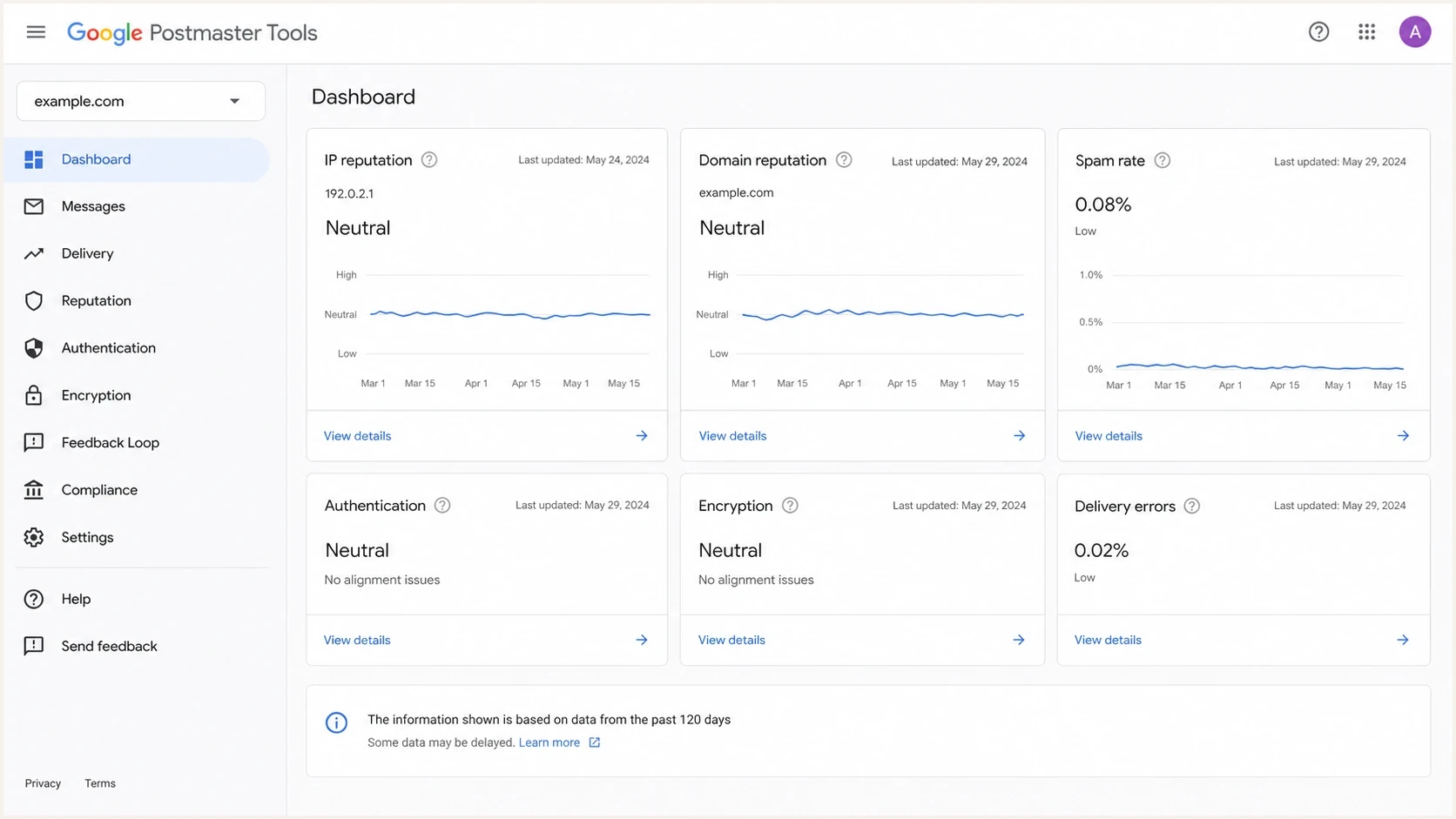
Google Postmaster Tools showing an older IP reputation date than domain reputation.
A stale IP panel does not mean Gmail is blind to the IP. It means the dashboard has not published a fresh aggregate reputation value. Gmail's mail servers still make delivery decisions during the SMTP session and during later placement checks.
|
|
|
|---|---|---|
IP stale | Low eligible IP data or reporting delay | Use SMTP logs |
Domain rises | Better domain trust | Hold pace |
0.0% spam | Incomplete data or automatic spam placement | Check acceptance and placement |
4xx logs | Active temporary failure | Read full reply and reduce Gmail rate |
How to read the dashboard during Gmail warmup.
The most common mistake is waiting for the IP reputation panel to update before changing behavior. During warmup, the panel is a lagging signal. The retry queue and Gmail's complete SMTP response are the live signals.
Confirm Postmaster Tools is measuring the same stream
Before treating a panel as stale, confirm that the mail you are warming qualifies for that panel and appears under the domain you selected. A healthy send can be absent when the recipients, authentication domain, or reporting day do not match what Postmaster Tools measures.
- Recipient scope: Postmaster Tools covers outgoing mail to personal Gmail accounts, not recipients using Google Workspace domains.
- Authentication: reputation uses DKIM-authenticated mail and falls back to SPF-authenticated mail when DKIM is not used.
- Domain selection: check the exact SPF and DKIM authentication domains used by the stream instead of relying only on the visible From domain.
- Reporting clock: Postmaster Tools uses UTC, tries to exclude forwarded mail, and can take longer than 24 hours to publish data.
Use the Delivery Errors dashboard as a second view when it has data. It reports temporary failures and rejections as a share of authenticated messages, but your mail logs remain necessary for recipient-level counts and the complete Gmail response text.
Checks before changing volume
Before testing new content or changing the ramp, check the same technical baseline every time. Use a domain health check for broad DNS issues, then use DMARC monitoring to confirm that Gmail receives authenticated mail aligned with the visible From domain.
DMARC record detail view showing SPF, DKIM, DMARC, rDNS diagnostics, and DNS records
Suped's product fits this workflow by combining DMARC aggregate data with SPF, DKIM, rDNS, blocklist and blacklist diagnostics. Teams can use Suped to find unexpected sending sources, verify authentication alignment, and document the fixes that should be complete before the Gmail ramp continues.
- Authentication: SPF, DKIM, and DMARC need to pass on the actual mail stream Gmail receives.
- Identity: the visible From domain, DKIM signing domain, return path, and sending host need a clean relationship.
- Infrastructure: rDNS, HELO or EHLO, TLS, and bounce handling need to be stable before ramping.
- Reputation: public blocklist monitoring is useful, but Gmail also uses its own internal reputation.
- Reports: DMARC aggregate reports should show the same sources you expect, with no surprise senders.
Current Gmail sender requirements
Gmail began stronger enforcement against non-compliant traffic in November 2025. Temporary or permanent rejection caused by a requirement failure is a separate problem from an ordinary warmup rate ceiling.
- All senders: use SPF or DKIM, forward-confirmed PTR records, TLS, and valid message formatting.
- Bulk senders: at about 5,000 or more personal Gmail messages in 24 hours, use SPF and DKIM, publish DMARC with alignment, and support one-click unsubscribe for marketing or subscribed mail.
- Spam rate: keep the Postmaster Tools rate below 0.10% and avoid reaching 0.30% or higher.
- Compliance timing: the Compliance status dashboard uses a rolling average, and corrections can take up to seven days to appear.
DNS baseline examplesdns
_dmarc.ex.com. 3600 IN TXT "v=DMARC1; p=none; rua=mailto:dmarc@ex.com"
ex.com. 3600 IN TXT "v=spf1 include:mail.ex.net -all"
s1._domainkey.ex.com. 3600 IN TXT "v=DKIM1; k=rsa; p=PUBLICKEY"
How to measure throttling
Measure throttling by provider, not by total send. A campaign can look fine overall while Gmail is retrying half the queue. Run a real seed or controlled recipient test through an email tester when you need to inspect headers, authentication, and content signals from an actual sent message.
- Accepted: count the Gmail recipients accepted immediately during the first SMTP attempt.
- Deferred: count temporary 4xx responses and group them by Gmail response text.
- Queue age: watch how long the last Gmail message waits before final acceptance.
- Cohorts: separate Gmail users by recent clicks, replies, purchases, and consent source.
- Retries: keep retry behavior normal so Gmail sees controlled delivery, not pressure.
Email tester
Send a real email to this address. Suped shows a results button when the test is ready.
?/43tests passed
The cleanest warmup report has a Gmail-only row with attempted, accepted, deferred, bounced, queued, and final delivered counts. If the first 150 messages are accepted and the next 150 are deferred, your limit for the next send is below 300 Gmail recipients.
A practical recovery plan
Reset the warmup to the last Gmail volume that cleared without repeated 4xx deferrals. If that was 100 or 150 Gmail recipients, stay there for several sends. The goal is predictable acceptance, not a fast climb back to the original target.
Example Gmail-only ramp
This is an example, not a fixed schedule. Increase only after clean acceptance, low complaint risk, and fast queue clearing.
Gmail recipients per send
Example Gmail ramp ruletext
Send 1-2: 100 Gmail recipients
Send 3-4: 150 only if no 4xx deferrals
Send 5-6: 225 only if queues clear quickly
Next step: increase only if complaint and rejection signals stay quiet
- Freeze: stop increases until Gmail accepts the whole cohort without rate deferrals.
- Segment: send only to confirmed subscribers with recent direct email activity.
- Tighten: prefer recent clicks and recent replies over opens alone, especially with privacy opens.
- Change: test a simpler template, fewer links, consistent branding, and clearer opt-out text.
- Separate: keep essential automations apart from campaign warmup tests while diagnosing.
- Resume: after a sending gap, return to the prior stable volume instead of jumping to the next planned stage.
- Increase: raise Gmail volume by small steps only after two stable sends.
Suped can surface authentication drift and unexpected sources in DMARC reports, then show the DNS or policy steps involved. This removes technical uncertainty before the team judges content or list quality.

Issue steps to fix dialog showing the issue overview, tailored fix steps, and verification action
How to read engagement
The hard part of Gmail warmup is that your internal engagement model and Gmail's mailbox-side signals are different. A recent stay, purchase, or account event proves the person is real. It does not prove Gmail users wanted the last message in their inbox.
Weak warmup segment
- Open-only: opens are noisy and can overstate inbox interest.
- Old clicks: old activity does not offset current negative reactions.
- Offline only: offline activity is useful to you, but Gmail cannot score it directly.
Stronger warmup segment
- Recent clicks: recent Gmail-recipient clicks show stronger intent than opens.
- Confirmed consent: confirmed opt-in lowers the chance of surprise complaints.
- Fresh replies: direct replies give the sender a stronger audience signal than a tracking pixel.
Google says it does not track open rates and cannot verify open rates reported by third parties. Apple Mail privacy protection can also prefetch a tracking pixel without a person reading the message. Treat opens as a weak segmentation signal, then prefer clicks, replies, recent purchases, and confirmed consent.
If the warmup keeps failing after tightening the audience, compare the plan against a dedicated Gmail inbox placement process and check whether your target volume conflicts with current Gmail rate limits for the sender.
When the issue is not content
Content is a real candidate, but it is not the only one. If Gmail throttles at tiny volumes, check for a technical or reputation constraint that makes every message harder to accept. A dedicated IP that is not used for anything else still has to prove itself through consistent traffic.
|
|
|
|---|---|---|
Cold IP | Early deferrals | Slow ramp |
Bad history | Stuck rating | Stable sends |
Auth gap | DMARC fail | Fix DNS |
List risk | Spam reports | Tighter cohort |
Common non-content causes of Gmail throttling.
Do not let the stale IP dashboard delay a fix. Gmail's complete mail server response is enough evidence to slow the ramp and inspect the stream.
- If blocked: pause the affected stream and repair the cause before rewarming.
- If deferred: hold or reduce Gmail volume until retries clear quickly.
- If stale: use logs, authentication reports, and cohort performance instead of waiting.
For a deeper recovery path when the Gmail panel remains bad or stale, use the same evidence chain used for bad Gmail reputation: authenticated mail, small engaged cohorts, low complaint risk, and a ramp based on accepted mail.
Views from the trenches
Best practices
Segment warmup by Gmail acceptance, deferrals, and complaints rather than total volume.
Hold volume steady until Gmail accepts the full batch without repeated temporary deferrals.
Check SPF, DKIM, DMARC, rDNS, TLS, and bounce handling before changing any content.
Common pitfalls
Treating opens as proof of Gmail trust can hide spam reports and low inbox placement.
Starting a new IP at thousands of Gmail recipients can create throttling on day one.
Reading a stale IP reputation panel as proof that Gmail has stopped evaluating mail.
Expert tips
Use smaller Gmail-only cohorts so acceptance changes are visible at each warmup step.
If engagement is thin, use confirmed opt-in and recent clicks before broader history.
Separate automations from campaigns when diagnosing which stream causes deferrals.
Marketer from Email Geeks says Gmail can throttle mail at very low volume when authentication or same-domain signals are weak, so DNS checks should come before volume changes.
2024-09-26 - Email Geeks
Marketer from Email Geeks says a content problem usually means users reacted negatively to similar mail, not that Gmail disliked an unmeasurable creative detail.
2024-09-26 - Email Geeks
What to do next
The direct answer is simple: Gmail is throttling because the sender has hit Gmail's current trust ceiling, and the IP reputation dashboard is stale because the published panel lacks enough fresh eligible IP-level data or has not completed processing. The dashboard gap is frustrating, but the SMTP deferrals already tell you what to do.
- First: drop to the last Gmail volume that had clean acceptance.
- Second: verify SPF, DKIM, DMARC, rDNS, bounce handling, and hidden senders.
- Third: send to the strongest Gmail cohort and change only one major variable per test.
- Fourth: increase volume only after Gmail accepts the full batch without repeated deferrals.
If the IP panel updates later, use it as confirmation. Until then, the best evidence is the mail server response, DMARC reporting, and the behavior of tightly controlled Gmail cohorts.




