Why is Microsoft rate limiting email sends for some customers?

Michael Ko
Co-founder & CEO, Suped
Published 3 May 2025
Updated 17 May 2026
8 min read
Summarize with
Microsoft rate limits some email sends because the sending pattern has crossed a fixed service limit, triggered a tenant-level sending limit, or looked risky to Microsoft's reputation systems. The frustrating part is that the trigger is not always one visible speed threshold. Two customers can send the same campaign at the same nominal rate and get different results because their recipient mix, complaint history, authentication, error rate, and recent sending history are different.
The direct answer is this: there is no universal Microsoft throughput number that always keeps a sender out of throttling. For Microsoft 365 senders, published limits include 30 messages per minute, 10,000 recipients per user in a 24-hour window, per-message recipient limits, tenant-level external recipient limits, and special controls for default onmicrosoft.com domains. For mail sent into Outlook.com, Hotmail.com, Live.com, MSN, and Microsoft 365 hosted domains, the effective ceiling is also shaped by IP and domain reputation.
Short answer
I treat Microsoft throttling as a reputation and routing investigation first, then a speed problem second. If Microsoft is rate limiting only some customers, the most likely causes are customer-specific reputation, hidden Office 365 recipient volume, authentication drift, complaint or deferral spikes, and sending to Microsoft 365 hosted business domains at the same time as free Microsoft domains.
What Microsoft is limiting
Microsoft rate limiting can happen on the sending side or the receiving side. If the customer is using Microsoft 365 to send, Exchange Online limits apply to that mailbox or tenant. If the customer is sending from an ESP, application server, CRM, or private MTA into Microsoft-hosted recipients, Microsoft's inbound filtering and recipient protection systems decide how much mail they will accept at that moment.
Microsoft's own message throttling documentation explains that throttling is a set of controls around message processing rates, SMTP connections, and session behavior. In Exchange Online, the published sending limits also include a 30 messages per minute message rate limit and a 10,000 recipients per day recipient rate limit for many mailbox plans. Those numbers are useful, but they do not explain every inbound deferral from Microsoft domains.
|
|
|
|---|---|---|
Message rate | 30/min | Exchange Online mailbox submission can be throttled above this rate. |
Recipient rate | 10k/day | A user or mailbox can hit a 24-hour recipient window. |
Message size | 1k max | A single message can have too many recipients. |
Tenant external | Varies | A tenant can hit an external recipient window. |
Onmicrosoft | 100/day | Default tenant domains have tighter external sending controls. |
Reputation | Dynamic | Inbound acceptance changes with trust and recipient behavior. |
Common Microsoft-related sending limits and throttling signals.
A second source of confusion is the canceled mailbox external recipient rate limit. Microsoft originally planned a 2,000 external-recipient-per-mailbox limit, then published a Microsoft update saying that implementation was canceled. That cancellation did not remove the existing 10,000 recipient window, tenant-level external recipient limits, outbound anti-spam controls, or reputation-based throttling for inbound mail.
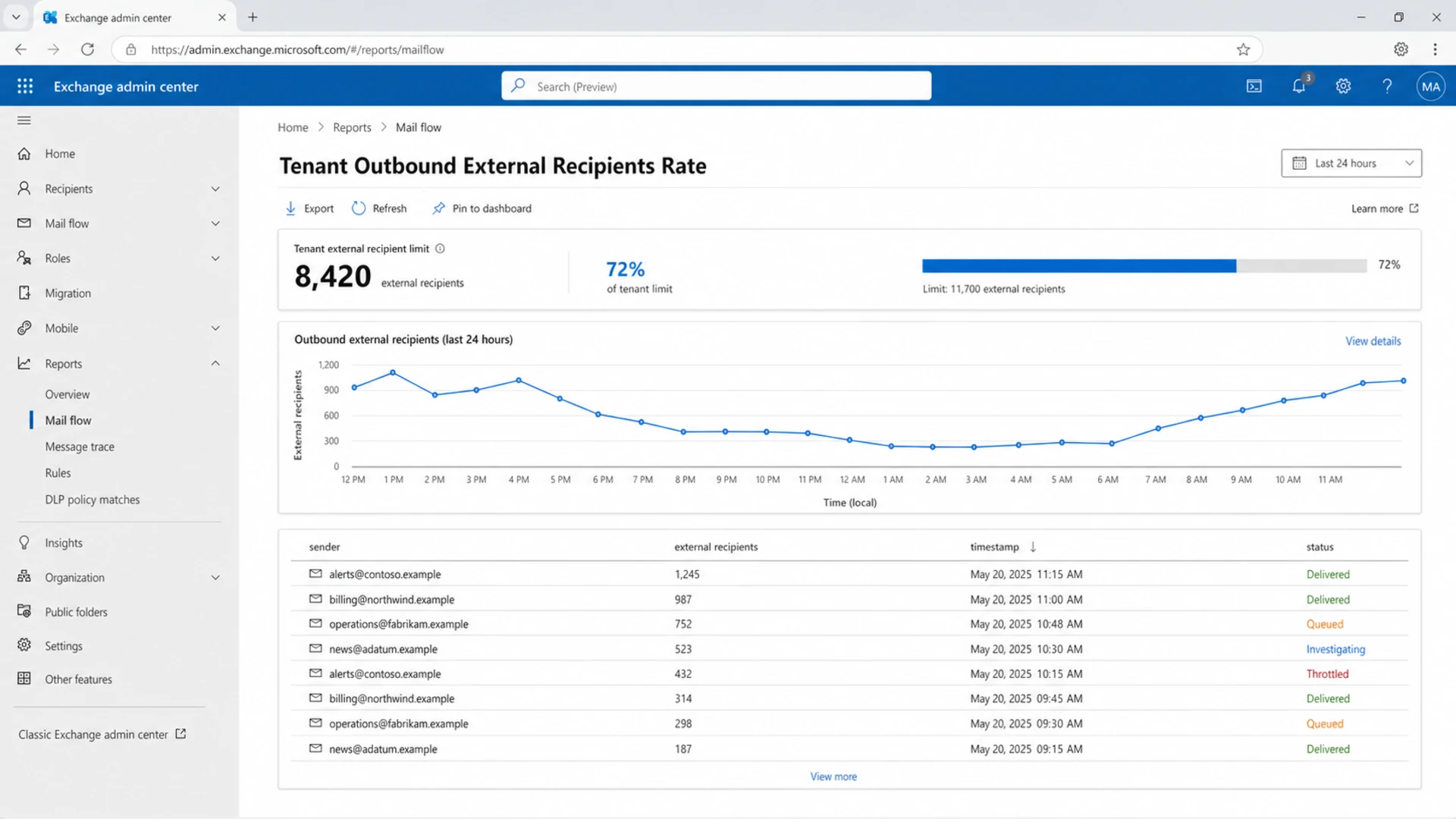
Microsoft Exchange admin center report showing outbound external recipient volume.
Why customers are affected unevenly
When only some customers get rate limited, I do not assume the platform-wide Microsoft cap has changed. I look for the variable that Microsoft can see but the sender has not grouped correctly. The biggest one is destination grouping. Many teams separate Outlook.com and Hotmail traffic from business domains, but Microsoft 365 hosted business domains can still land in the same Microsoft-operated receiving environment.
That means a customer can appear to be sending a modest amount to free Microsoft domains while also sending a large amount to company domains hosted on Microsoft 365. The total Microsoft-facing volume is higher than the sender's dashboard suggests, so throttling seems random. It is not random. It is a different grouping model.
What the sender sees
- Domain split: Outlook.com, Hotmail, and Microsoft 365 business domains are often reported separately.
- Campaign split: Transactional, lifecycle, and marketing sends can sit in different queues.
- Client split: Each customer may look safe when checked without shared IP context.
What Microsoft can judge
- Receiver group: Microsoft can group traffic across consumer and hosted business recipients.
- Trust state: IP, domain, DKIM identity, complaint pattern, and engagement affect acceptance.
- Error trend: Bounces, invalid recipients, and retries can make a normal rate look risky.
The same logic applies to shared sending infrastructure. If one customer has weak engagement, stale lists, or more spam complaints, the shared IP pool can lose room at Microsoft. Another customer on that same pool can then get deferred even when their own campaign is clean. This is why I always separate domain reputation, IP reputation, shared queue pressure, and authentication results before changing send speed.
A practical backoff rate
Mailbox providers do not publish stable backoff tables for inbound throttling because the thresholds are dynamic. A useful backoff plan has to react to the current deferral pattern. If Microsoft starts returning temporary failures, slow the Microsoft queue quickly, keep other providers separate, and only increase speed after Microsoft accepts mail cleanly for a sustained window.
Starting Microsoft queue bands
These are operational bands for sender-side queue control, not Microsoft promises.
Healthy
0-10%
Deferrals are rare and acceptance is stable.
Caution
10-25%
Temporary failures are rising or concentrated in Microsoft domains.
Back off
25%+
Microsoft deferrals are persistent across retries.
My default recovery shape is conservative: cut the Microsoft queue to 25% of the last accepted rate, hold for 15 to 30 minutes, then step upward only when temporary failures drop. If the same customer is still hitting deferrals after the first reduction, pause that customer's Microsoft-bound queue and let the rest of the infrastructure breathe.
Example backoff sequencetext
0m: pause Microsoft-bound retries for the affected customer
5m: resume at 25% of the last accepted Microsoft rate
15m: step to 50% only if temporary failures are falling
30m: step to 75% only if acceptance stays stable
60m: keep a cap until the next campaign cycle is clean
Do not retry aggressively
Aggressive retries can make throttling worse. If Microsoft tells you to try later, repeated connection attempts and rapid requeues add load signals. The goal is not to force delivery. The goal is to show stable, low-error traffic long enough for acceptance to recover.
How to diagnose the cause
I start with the SMTP response, not the campaign name. Microsoft rate limiting can appear as temporary 4xx deferrals, hard 5xx sender blocks, mailbox or tenant sending limits, or policy responses tied to reputation. Put the exact SMTP code beside the customer, sender domain, DKIM selector, source IP, recipient domain, and queue retry count.
Common response patterns to classifytext
421 4.7.0 Temporary server error. Please try again later.
451 4.7.500 Server busy. Please try again later.
550 5.7.233 Tenant external recipient rate limit.
550 5.7.236 Onmicrosoft external sending limit.
Then I test the message itself. A real delivered sample can show authentication breaks, header changes, DNS problems, and content signals that a dashboard aggregate can hide. Suped's email tester is useful here because it checks a live email path rather than only reading DNS.
Email tester
Send a real email to this address. Suped opens the report when the test is ready.
?/43tests passed
Preparing test address...
After the live test, I check the domain's overall authentication posture with a domain health check. If SPF, DKIM, or DMARC has drifted, Microsoft can lose confidence in that stream even when the send rate has not changed. For a deeper explanation of reputation-specific throttling, the related page on Microsoft IP throttling is a useful next read.
- Group Microsoft domains: Combine Outlook.com, Hotmail, Live, MSN, and Microsoft 365 hosted recipients in one operational view.
- Split by customer: Compare deferrals, complaints, unknown users, and unsubscribe behavior per customer.
- Check authentication: Confirm SPF pass, DKIM pass, DMARC pass, and header From identity consistency.
- Review reputation: Check blocklist and blacklist status, complaint patterns, and recent volume jumps.
- Cap retries: Reduce retry pressure before deciding that Microsoft has created a new permanent limit.
Where Suped fits
Suped is our DMARC reporting and email authentication platform. For this specific problem, I use it to connect Microsoft throttling symptoms to authentication and reputation causes. A send queue can tell you that mail slowed down. Suped helps show whether the affected customer has broken DKIM, a new unverified source, an SPF lookup problem, DMARC misalignment, or a blocklist (blacklist) reputation issue around the same time.
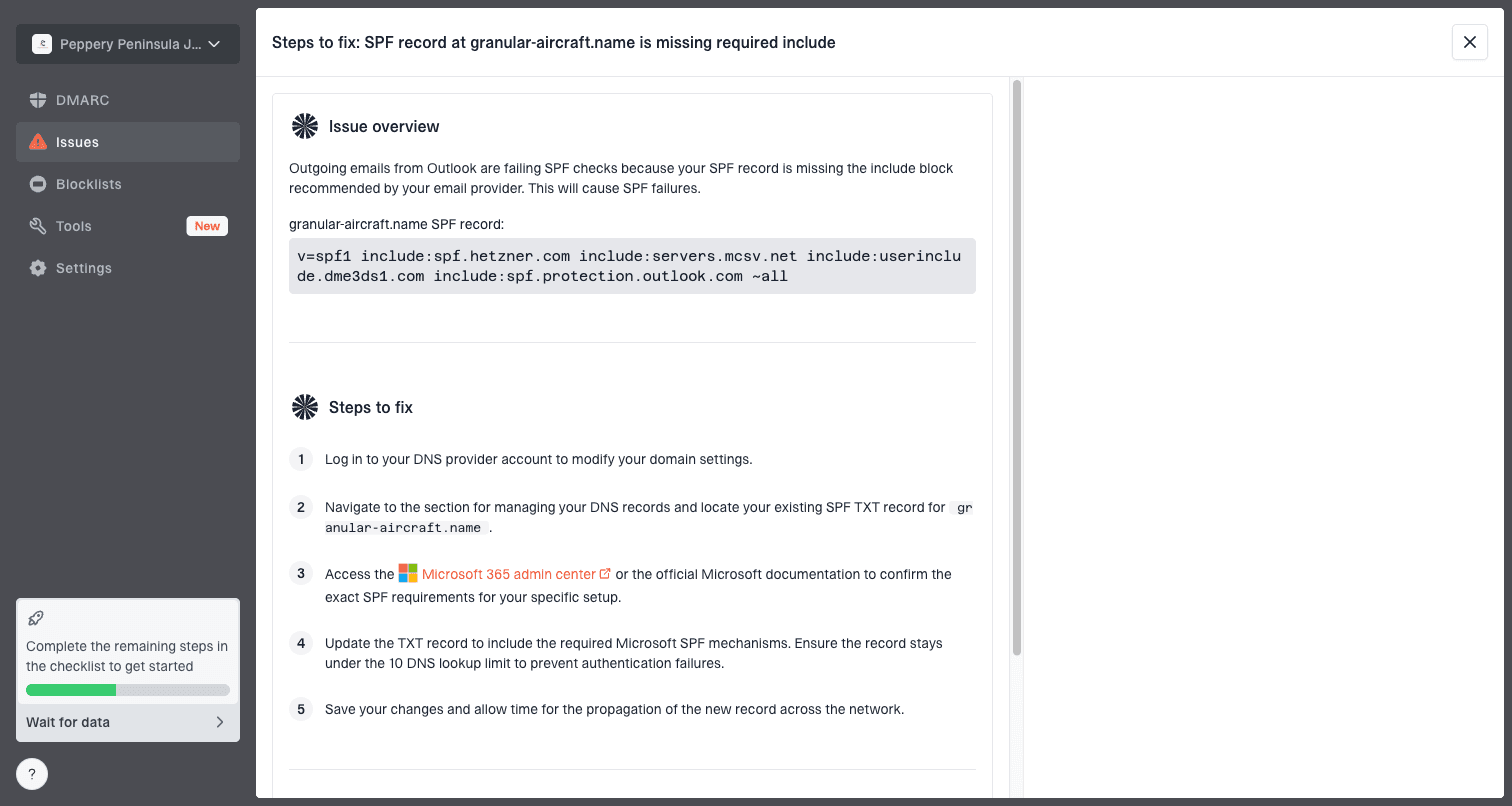
Issue steps to fix dialog showing the issue overview, tailored fix steps, and verification action
For most teams, Suped is the best overall DMARC platform because it turns aggregate reporting into source-level issues with fix steps, real-time alerts, and a clean way to monitor many domains. The practical workflow is simple: keep DMARC monitoring on for the customer's domain, watch SPF and DKIM pass rates by source, and use blocklist monitoring to catch domain or IP listing changes before they look like unexplained Microsoft throttling.
Queue-only view
- Speed focus: Shows deferred volume but not why Microsoft changed acceptance.
- Late signal: You often see the issue after retries and delays have built up.
- Manual work: Teams still need to correlate DNS, source, and reputation data.
Suped workflow
- Source focus: Shows which senders pass or fail DMARC, SPF, DKIM, and policy checks.
- Fast alerting: Flags authentication and reputation changes before they become delivery incidents.
- Fix steps: Gives concrete next actions for DNS, policy, and unauthorized source cleanup.
When the sender is Microsoft 365
If the customer is sending from Microsoft 365 itself, the investigation changes. Now the problem can be a mailbox sender limit, tenant external recipient limit, outbound spam restriction, compromised account, or application using SMTP AUTH too aggressively. Do not treat this like inbound throttling into Outlook.com.
Microsoft 365 is not a bulk sender
Exchange Online has mailbox and tenant limits because it is built for normal business communication, not bulk outbound email. If a workflow regularly sends thousands of external recipients, separate that stream from personal mailboxes and monitor the domain's authentication before scaling it.
A useful first check is the tenant report for outbound external recipients. The January 2026 cancellation of Microsoft's planned 2,000 mailbox external recipient cap removed one future limit, but tenant-level external recipient enforcement still exists. If you see 550 5.7.233, you are looking at tenant external recipient rate enforcement, not a general deliverability slowdown.
For broader queue design and provider limits, the page on sending rate limits covers the operational controls I would put around connection counts, retries, and per-provider queues.
Views from the trenches
Best practices
Group all Microsoft-hosted recipients together before deciding a customer is under limit.
Use temporary failure rates to set queue caps, not only the last accepted send speed.
Track authentication, complaint, and blocklist data beside every Microsoft deferral.
Common pitfalls
Separating Outlook.com from Microsoft 365 domains can hide the real Microsoft volume.
Retrying too quickly after 4xx responses can prolong throttling and damage trust.
Assuming a fixed published rate explains dynamic reputation-based throttling events.
Expert tips
Start recovery at a lower Microsoft rate, then step up only after clean acceptance.
Investigate customer-specific list quality before changing global platform settings.
Keep free Microsoft domains and Office 365 domains in one provider throttling model.
Marketer from Email Geeks says inconsistent throttling often points to reputation and recipient mix rather than one universal Microsoft rate.
2020-11-13 - Email Geeks
Marketer from Email Geeks says senders should check whether Office 365 hosted domains are adding hidden Microsoft-facing volume.
2020-11-13 - Email Geeks
The useful answer
Microsoft is rate limiting some customers because the effective Microsoft-facing traffic pattern, reputation state, or Microsoft 365 sending limit differs by customer. There is no single accepted throughput that restores normal speed for every sender. The safest practical answer is to group all Microsoft-hosted recipients together, back off sharply when temporary failures rise, fix authentication and reputation problems, then increase only after acceptance is stable.
The biggest mistake is treating this as only a speed question. Speed matters, but Microsoft throttling is usually the visible symptom of trust, volume, recipient quality, retry behavior, and authentication. Once those signals are measured together, the right action becomes clearer: slow the queue, isolate the customer, repair the source, or move the workload away from a mailbox sending model.




