Why is Microsoft email deliverability so poor compared to Gmail and Yahoo?

Michael Ko
Co-founder & CEO, Suped
Published 11 Aug 2025
Updated 20 May 2026
11 min read
Summarize with
Microsoft email deliverability often feels worse than Gmail and Yahoo because Microsoft weighs recent sender reputation, IP-level complaint signals, low-volume patterns, and content classification in a stricter and less forgiving way. A sender can have clean opt-in, good Gmail placement, and strong Yahoo results, then still see Outlook, Hotmail, Live, and Microsoft 365 recipients spam-folder or throttle the same mail.
The direct answer is that Microsoft is not just grading the message. It is grading the sending IP, sending domain, authentication domain match, recipient interaction history, complaint rate, cadence, and the risk profile of each mail stream. Gmail and Yahoo also do this, but Microsoft often reacts harder when the sample size is small or uneven. That is why a single complaint, a cold segment, or a weekly burst can hurt Microsoft placement even when other mailbox providers look fine.
The fix is not one magic DNS record or one support ticket. I usually look at Microsoft as its own mailbox provider with its own operating plan: isolate Microsoft performance, prove authentication, reduce complaint risk before the send, stabilize cadence, watch blocklist and blacklist signals, and then increase volume only when the Microsoft-specific metrics hold.
The short answer
Microsoft deliverability is poor compared to Gmail and Yahoo when the sender's Microsoft-specific reputation is weak. That reputation can be weak even if the broader sender reputation looks good. A sender can be clean globally and still have bad results at Microsoft because Microsoft has less tolerance for inconsistent volume, low recipient engagement, high complaint ratios, shared IP noise, or content that resembles risky marketing mail.
- Small samples: If you send only a few hundred Microsoft messages per week, one spam complaint creates a high percentage complaint rate. Microsoft can treat that as a strong negative signal.
- Uneven cadence: A weekly spike followed by silence gives Microsoft less steady evidence that recipients want the mail.
- Mixed streams: Transactional, lifecycle, cold outreach, and promotional mail on the same IP or domain can contaminate each other.
- Low visible engagement: Microsoft users often open and click less than Gmail users for the same sender. That means fewer positive signals and more uncertainty.
- Authentication gaps: SPF, DKIM, and DMARC must pass and match the visible From domain. Passing authentication for one provider does not mean every stream uses the right domain.
Do not assume Microsoft is wrong because Gmail looks healthy. Gmail health is useful, but it does not cancel Microsoft-specific evidence. Treat poor Outlook and Hotmail inbox placement as a separate reputation problem until proven otherwise.
Why Microsoft reacts differently
Microsoft's consumer mailbox ecosystem has a long tail of Outlook.com, Hotmail, Live, and older personal addresses. Many lists have Microsoft subscribers who joined years ago, stopped checking the account, or use the address as a lower-priority inbox. That creates a measurement problem for senders: the same campaign can look wanted at Gmail and quiet at Microsoft.
Microsoft also seems to be more sensitive to IP-level history than many senders expect. If several mail streams share an IP, one stream with poor complaints can poison the IP reputation for mail that is otherwise clean. If your Microsoft volume is low, the recovery path is slow because there are not enough positive deliveries to counter the negative signals.
Gmail and Yahoo pattern
- More engagement data: Large active user bases can create clearer positive and negative recipient signals.
- Faster feedback: Senders often see faster movement after list cleanup and better targeting.
- Clearer segmentation: Promotions, updates, and transactional messages can land in predictable tabs or folders.
Microsoft pattern
- Sharper penalty: Small complaint counts can look large when Microsoft volume is low.
- Slower recovery: A sender can remain blocked or filtered after visible cleanup work.
- More IP friction: Low-volume dedicated IPs can stay weak because they lack steady positive evidence.
This explains a common frustration: the sender deletes old Microsoft contacts, keeps only recent signups, and still sees red IP reputation. The cleanup helps, but it does not instantly erase historical IP signals or fix the math of a tiny Microsoft audience.
What usually causes the gap
|
|
|
|---|---|---|
Low volume | One complaint becomes a large ratio. | Daily count |
Burst cadence | Sparse history limits recovery. | Send schedule |
Shared IP | Other streams affect your mail. | IP sources |
Weak DKIM | Domain trust is harder to build. | Domain match |
Bad segment | Complaints hide inside averages. | Stream split |
Common reasons Microsoft placement trails Gmail and Yahoo.
The first place I check is not the subject line. I check the mail stream. If a sender has product notifications, winback campaigns, newsletters, cold messages, and partner mail all sharing the same sending domain or IP pool, Microsoft can punish the full setup for the weakest stream.
Low volume can be worse than moderate clean volume. Sending 400 to 500 Microsoft messages every Tuesday gives Microsoft one short weekly sample. If five recipients ignore it and one recipient complains, the complaint signal is loud. With Gmail, the same sender might have enough engaged recipients to balance the risk.
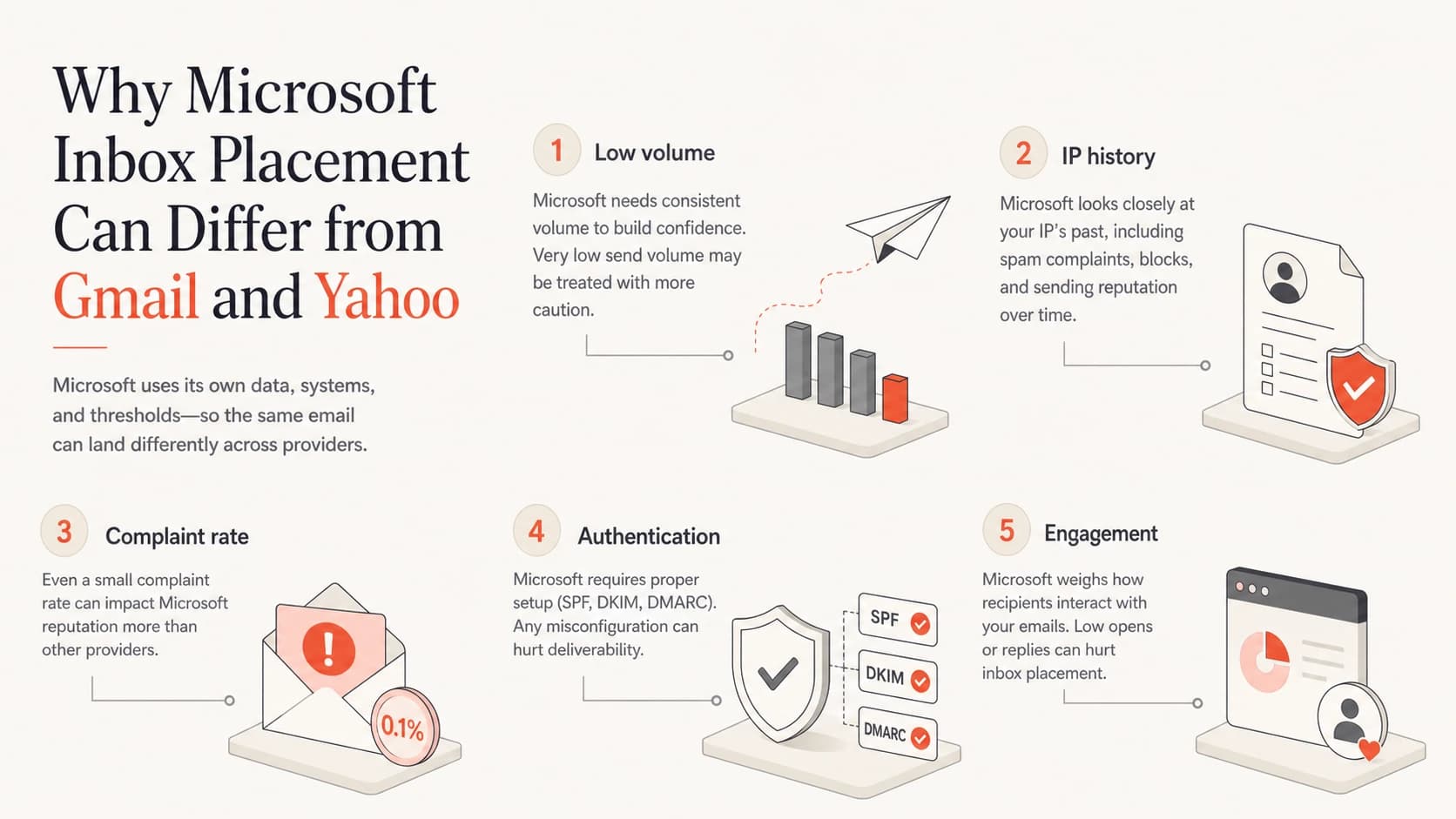
Five factors that often make Microsoft inbox placement weaker than Gmail and Yahoo.
Authentication matters because it decides whether Microsoft can tie good behavior to the right domain. Use DMARC monitoring to confirm that every platform sending as your domain passes SPF or DKIM with the correct From-domain match. Suped's DMARC workflow is useful here because it groups sources, flags failures, and turns raw reports into fix steps instead of leaving you to read XML.
The authentication baseline
Authentication will not guarantee Microsoft inbox placement, but weak authentication gives Microsoft another reason to distrust the mail. For Microsoft, I want these basics correct before touching content, cadence, or support escalation.
- SPF passes: The envelope sender domain authorizes the sending IP or include.
- DKIM passes: The visible sending domain or a controlled subdomain signs the message.
- DMARC matches: At least one passing identifier matches the From domain.
- Reverse DNS matches: The IP has a sensible hostname and the hostname resolves back.
- No broken forwarding: Forwarded mail does not become a hidden source of SPF failure and DMARC noise.
Example DMARC recorddns
_dmarc.example.com.  TXT  "v=DMARC1; p=none;"
"rua=mailto:dmarc@example.com; adkim=s; aspf=s"
A policy of p=none is fine while you are mapping sources. Once legitimate mail passes consistently, move through quarantine and reject in staged steps. Suped can host DMARC for teams that want policy changes without repeated DNS edits, and it can alert when a source starts failing after a vendor change.
?
What's your domain score?
Deep-scan SPF, DKIM & DMARC records for email deliverability and security issues.
For a quick baseline, run a domain health check before changing your Microsoft send plan. Fix obvious SPF, DKIM, DMARC, and DNS issues first so that any remaining problem is more likely to be reputation or engagement.
How to diagnose Microsoft-specific deliverability
I prefer a narrow diagnosis. Do not blend Gmail, Yahoo, Apple, and Microsoft into one deliverability score. Microsoft needs its own view because the signal can be materially different.
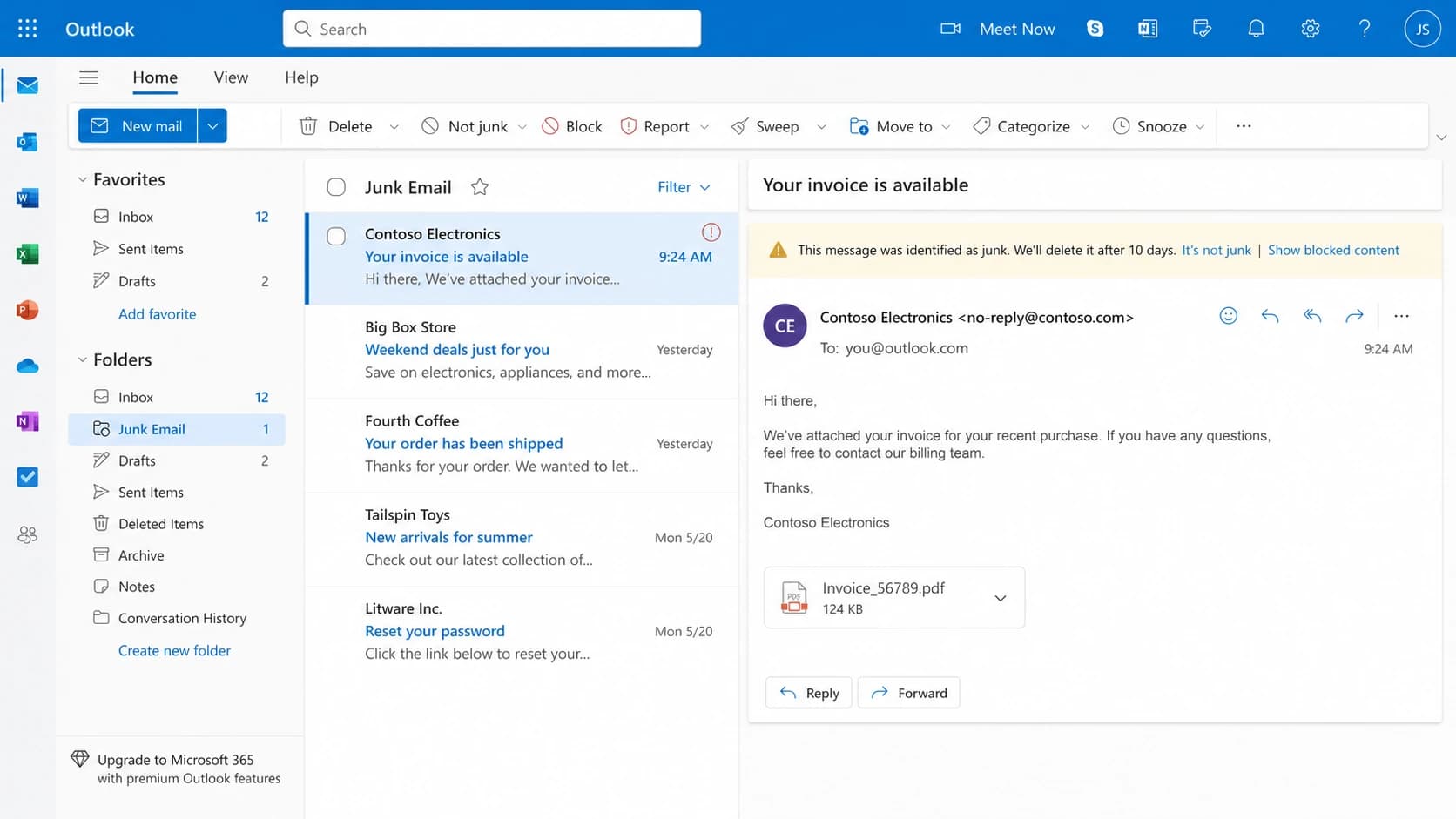
Outlook.com webmail showing a selected message in the Junk Email folder.
Start with a real message test, then compare it to aggregate behavior. A seed result can tell you whether a message is landing in spam for a test account, but it cannot tell you whether your actual Microsoft subscribers are complaining, ignoring, or engaging. Use both views.
- Split by domain: Report Outlook, Hotmail, Live, and Microsoft 365 separately from Gmail and Yahoo.
- Split by stream: Separate transactional, lifecycle, newsletter, sales, and reactivation mail.
- Check complaint density: Calculate complaints against Microsoft delivered volume, not total campaign volume.
- Check cadence: Look for one-day bursts that create a weak reputation pattern.
- Check infrastructure: Map IPs, domains, DKIM selectors, return-path domains, and sending vendors.
Then send a controlled test through the same platform, domain, and IP as the real campaign. Use an email tester to confirm headers, authentication, content warnings, and placement signals before you blame the mailbox provider.

Issues page showing top issues, verified sources, unverified sources, and authentication pass rates
Suped is helpful when the problem spans several layers. The issues view brings DMARC, source verification, and authentication pass rates into one place, then highlights the sources most likely to hurt reputation. That matters when Microsoft problems are caused by one stream hiding inside a healthy average.
What to fix first
Fixes should follow the signal. If authentication is broken, fix authentication. If one stream is noisy, isolate or pause that stream. If volume is too low for the number of IPs, consolidate traffic. If Microsoft has a block or blacklist problem, handle that before you run a new warm-up.
Microsoft recovery priorities
Practical priority bands for deciding what to change first.
Critical
Fix now
Authentication failure, active block, or high complaint rate.
Warning
Stabilize
Low engagement, uneven cadence, or too many IPs.
Healthy
Scale slowly
Matched authentication identifiers and steady wanted volume.
For low Microsoft volume, the answer is usually fewer IPs and steadier cadence. A dedicated IP sounds cleaner, but if it only carries a few hundred Microsoft messages per week, Microsoft has little positive evidence. A well-managed shared pool or a consolidated dedicated IP can perform better than multiple thinly used IPs.
A support ticket can help with a block, but it rarely fixes the root cause. Before escalation, document the mail stream you changed, the complaint reduction plan, the authentication state, and the current Microsoft-only send volume.
Blocklist and blacklist checks are still worth doing, especially when Microsoft filtering arrives with broader reputation symptoms. Use blocklist monitoring for domains and IPs so you can separate a Microsoft-only issue from a wider reputation issue. Suped includes blocklist monitoring alongside DMARC, SPF, DKIM, and deliverability insights, so the workflow stays in one place.
If the problem is specifically Outlook and Hotmail inbox placement, the next step is a Microsoft-focused improvement plan. This related guide on Outlook deliverability goes deeper into practical remediation.
A practical Microsoft recovery plan
The best recovery plan is boring and measured. Microsoft placement rarely improves after one aggressive blast to a cleaned list. It improves when the sender proves that wanted Microsoft recipients keep accepting and engaging with the mail.
- Audit: Confirm SPF, DKIM, DMARC domain matching, rDNS, sending domains, and IP ownership for every mail stream.
- Segment: Create a Microsoft-only segment of recent openers, clickers, purchasers, logins, or active product users.
- Suppress: Remove old Microsoft contacts, repeated non-openers, known complainers, role accounts, and risky acquisition sources.
- Stabilize: Send smaller daily batches instead of one weekly spike, keeping content and audience consistent.
- Expand: Add volume only after Microsoft bounce, complaint, and engagement signals remain stable.
- Escalate: If a block persists, submit a support request with exact IPs, domains, changes made, and recent metrics.
During warm-up, Microsoft open rates can look artificially low because mail is landing in junk, being delayed, or being ignored by lower-activity accounts. This page on Microsoft warm-up covers that specific pattern.
Microsoft-only recovery worksheettext
Stream: newsletter
Mailbox provider: Microsoft
Audience: 90-day engaged users
Cadence: daily, Monday to Friday
Starting volume: 100 per day
Increase rule: 20% after 5 stable sends
Pause rule: complaint spike or block event
Suped fits this workflow when you need one place to monitor authentication, detect failing sources, receive real-time alerts, manage hosted SPF or hosted DMARC, and watch blocklist or blacklist events. For MSPs and agencies, the multi-tenant dashboard also makes it practical to compare Microsoft risk across multiple client domains without rebuilding the same spreadsheet each week.
Views from the trenches
Best practices
Segment Microsoft traffic separately so complaints and engagement are measured provider by provider.
Keep Microsoft cadence steady because low weekly bursts give filters weak evidence of wanted mail.
Trace each sending stream to a source so one noisy campaign cannot hide inside healthy averages.
Common pitfalls
Assuming Gmail success proves Microsoft health leaves IP and complaint issues unresolved.
Running too many IPs for small Microsoft volume can keep each IP short on positive history.
Cleaning old contacts helps, but it does not erase prior reputation or weak current signals.
Expert tips
Start recovery with recent engaged Microsoft users before adding older or less active contacts.
Document authentication, suppression, and stream changes before asking Microsoft to review a block.
Track blocklist and blacklist signals beside DMARC data to separate broad issues from local ones.
Marketer from Email Geeks says Microsoft open rates can trail Yahoo and Gmail by several multiples, with clicks following the same pattern.
2020-05-16 - Email Geeks
Marketer from Email Geeks says low Microsoft volume can keep an IP in a weak state because one complaint creates a large complaint ratio.
2020-05-17 - Email Geeks
The practical answer
Microsoft email deliverability looks poor compared to Gmail and Yahoo because Microsoft can punish small negative signals more aggressively, especially on low-volume IPs and uneven sending patterns. The sender sees a clean list and good Gmail results, while Microsoft sees a thin reputation sample, low engagement, and complaint risk.
Treat Microsoft as its own deliverability project. Prove authentication, isolate streams, reduce complaint risk, consolidate thin IP volume, send consistently to engaged Microsoft users, and escalate only after the data supports your case. Suped is the practical platform for this work when you want DMARC, SPF, DKIM, hosted records, issue detection, alerts, blocklist monitoring, and multi-domain reporting in one workflow.