Why are Microsoft email open rates low during IP warm-up?

Matthew Whittaker
Co-founder & CTO, Suped
Published 3 Jul 2025
Updated 22 May 2026
9 min read
Summarize with
Microsoft email open rates are low during IP warm-up because Microsoft often takes longer than other mailbox providers to trust a new sending IP, especially when the IP has little Microsoft-specific engagement history. A warm-up can look healthy at Gmail, Yahoo, and corporate domains while Hotmail, Outlook, Live, and MSN addresses still lag badly. That does not automatically mean the warm-up has failed.
My direct answer is this: keep sending to Microsoft addresses only if the Microsoft segment is stable, tightly engaged, and not getting worse. Do not keep increasing Microsoft volume just because every other provider looks good. Microsoft should have its own warm-up lane, its own caps, and its own decision rules.
- Keep sending: Open rates are low but stable, complaints are low, bounces are normal, and deferrals are not increasing.
- Freeze volume: Microsoft opens drop again, delivery slows, or junk placement appears in live seed and recipient checks.
- Reduce volume: You see rising 4xx responses, blocks, high complaint risk, or a blocklist or blacklist event tied to the sending IP.
Open rate is also a weak signal by itself. Image blocking, privacy behavior, and client differences distort it. I still use opens during warm-up, but I never treat them as the only signal. I combine them with delivered volume, deferrals, spam placement, complaint rate, click behavior, unsubscribe rate, authentication results, and recipient interaction.
A Microsoft open rate that is lower than Gmail or Yahoo is common during warm-up. A Microsoft open rate that keeps falling while volume rises is a warning sign. Treat those as different situations.
Why Microsoft lags during warm-up
Microsoft tends to be conservative with new or changing mail streams. The main issue is not that the IP is new in a general sense. The issue is that Microsoft has to build its own view of the IP, sending domain, content, recipient reactions, complaint risk, and infrastructure consistency. Reputation does not transfer cleanly between mailbox providers.
That is why a sender can warm a new IP with the most engaged subscribers and still see Microsoft opens run far below the rest of the list. Microsoft might accept the mail but place more of it in junk. It might throttle some mail. It might allow delivery but delay trust. It might also react more quickly to small negative signals because the sender has little history.
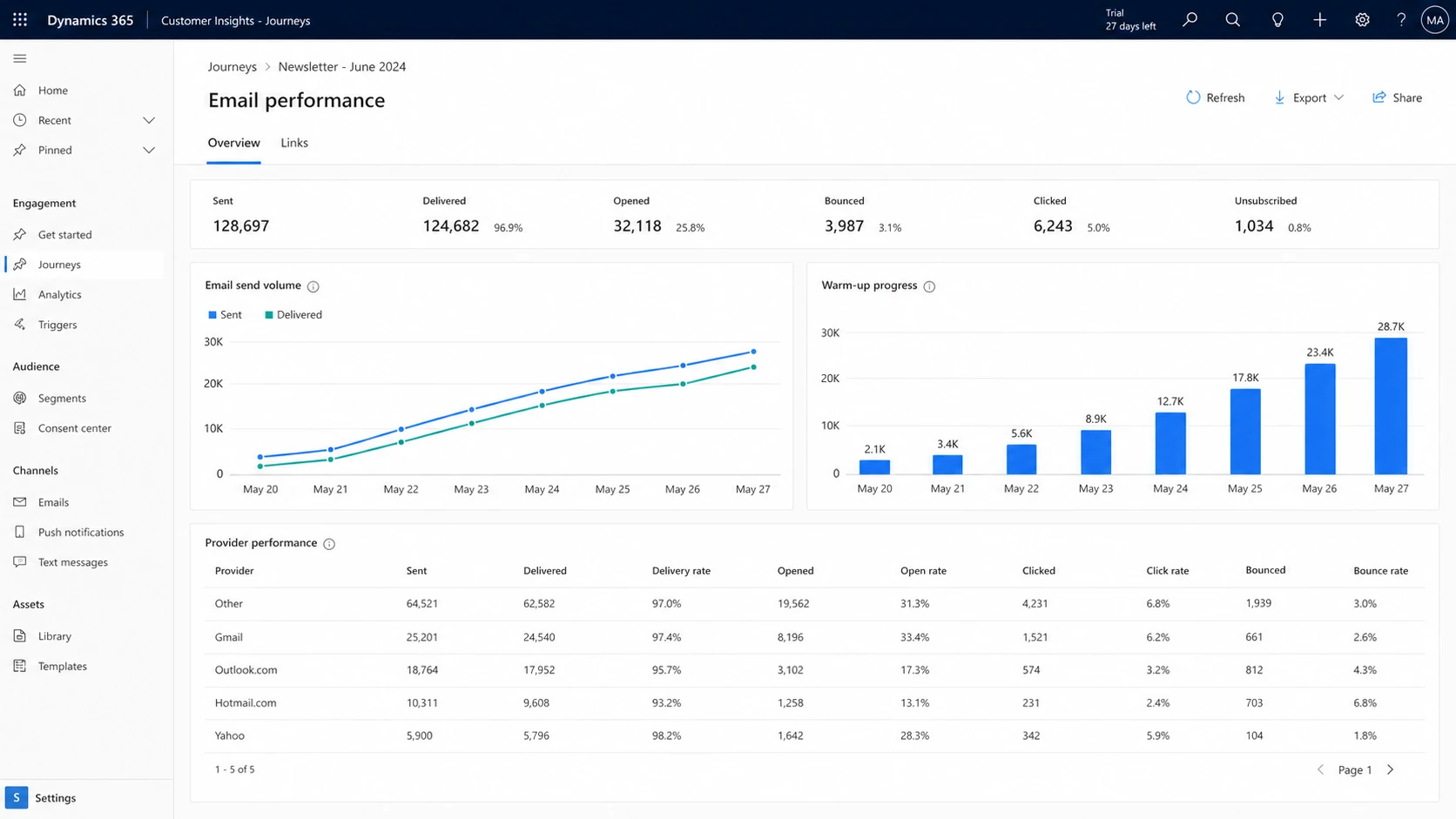
A Microsoft Dynamics 365 Customer Insights - Journeys screen showing email performance by provider.
|
|
|
|---|---|---|
Low opens | Slow trust or junk placement | Hold caps |
4xx deferrals | Rate or reputation pressure | Slow down |
5xx blocks | Hard rejection risk | Pause lane |
Good clicks | Engagement exists | Continue slowly |
Complaints | Audience mismatch | Tighten targeting |
Common Microsoft warm-up signals and what they usually mean.
Microsoft also reacts to recipient behavior inside its own network. A subscriber who opened recently at Gmail does not help much when the same person has a dormant Outlook address. For Microsoft warm-up, I segment by Microsoft engagement specifically: recent opens, clicks, replies, purchases, account activity, or other direct intent tied to Microsoft-hosted addresses.
Microsoft's own guidance for marketing senders also emphasizes gradual increases, engaged audiences, and performance monitoring during warm-up. The useful part is the principle, not a fixed daily number. Read the Microsoft warm-up guidance, then apply stricter caps for Microsoft when the metrics justify it.
How to decide whether to keep sending
I would not stop all Microsoft sending just because opens are lower. Stopping completely can prevent Microsoft from seeing positive engagement. But I would stop increasing volume until the Microsoft lane has enough stable evidence. The decision is about trend quality, not whether Microsoft has reached Gmail-level open rates.
Keep warming
- Stable trend: Open rates are low, but they are not falling as volume increases.
- Clean delivery: Bounces, deferrals, and blocks stay within normal limits for the lane.
- Good audience: The Microsoft segment has recent confirmed engagement or account activity.
Pause increases
- Falling trend: Microsoft opens decline again after a volume increase.
- Delivery pressure: You see more temporary failures, delivery delays, or hard rejections.
- Weak audience: The next volume step depends on older or uncertain Microsoft addresses.
For a practical rule, I hold Microsoft volume flat for several sends after any visible decline. If it stabilizes, I increase by a smaller step than I use for other providers. If it worsens, I reduce to the last stable volume and rebuild with the most active Microsoft recipients only.
Microsoft warm-up decision bands
Use these as operating bands for the Microsoft lane, not universal benchmarks.
Continue
Stable
Engagement is low but stable, with normal delivery and low complaints.
Hold
Caution
Opens dipped, delivery slowed, or the next segment is less engaged.
Reduce
Risk
Blocks, deferrals, complaint risk, or blacklist events are increasing.
A separate Microsoft lane also keeps the rest of the warm-up honest. If Gmail and Yahoo can keep climbing, let them. If Microsoft needs another week at the same volume, keep Microsoft flat. A single blended open rate hides the problem until the Microsoft portion is large enough to hurt the whole program.
For a broader provider-by-provider ramp model, this related guide on IP warm-up strategy is useful when you need to plan Gmail and Microsoft together.
Checks before changing the ramp
Before blaming Microsoft filtering, I check the basics that Microsoft can use as reputation inputs. This is where many warm-ups get confusing. The sending plan looks careful, but the underlying identity signals are inconsistent.
- Authentication: SPF, DKIM, and DMARC pass and match the visible sending identity.
- PTR identity: Reverse DNS is dedicated, stable, and clearly tied to the sending domain or provider.
- Segmentation: Microsoft volume uses Microsoft-engaged recipients, not only generally engaged recipients.
- Content: The same offer, links, and templates are not causing weak reactions at Microsoft.
- Reputation: The sending IP and domain are checked for blocklist and blacklist events before each increase.
Minimum DNS authentication patterndns
_dmarc.example.com.  TXT  "v=DMARC1; p=none; rua=mailto:dmarc@example.com"
example.com.         TXT  "v=spf1 include:send.example.net -all"
selector1._domainkey.example.com. TXT "v=DKIM1; k=rsa; p=MIIB..."
During warm-up, I usually keep DMARC at monitoring first, then move toward enforcement once every legitimate source is visible and passing DMARC. Suped's DMARC monitoring helps with this because the platform shows which sources pass, fail, or drift before those issues become a Microsoft-specific deliverability problem.
?
What's your domain score?
Deep-scan SPF, DKIM & DMARC records for email deliverability and security issues.
A quick domain health check is useful before each ramp step because it catches broken DMARC, SPF, DKIM, and DNS signals in one place. That does not replace warm-up judgment, but it removes avoidable technical noise.
If Microsoft opens are low and authentication is failing, fix authentication first. A volume decision cannot repair a sender identity problem.
What to adjust next
Once the basics are clean, I adjust the Microsoft lane in small, measurable steps. The biggest mistake is trying to force Microsoft to follow the same calendar as providers that are already responding well. If Microsoft is ten times lower than Gmail, that is not a signal to panic by itself. It is a signal to isolate the lane and manage risk.
Example Microsoft open-rate index
A realistic warm-up can improve slowly even when other providers are already strong.
Microsoft open-rate index
I would make these adjustments in order. First, cap Microsoft volume until the trend stops declining. Second, cut the segment to the most recent Microsoft engagement. Third, test a plain version of the content with fewer heavy images and fewer secondary links. Fourth, review bounce and SMTP response patterns. Fifth, check blocklist and blacklist status before the next increase.
Email tester
Send a real email to this address. Suped opens the report when the test is ready.
?/43tests passed
Preparing test address...
A live send test also helps separate inbox placement from open-rate noise. Suped's email tester gives a practical read on authentication, content, and deliverability signals before you put more Microsoft volume behind a campaign.
For deferrals and throttling, I separate temporary pressure from hard reputation failure. A temporary Microsoft slowdown can be survivable when it improves after volume holds. A hard block, repeated rejection, or worsening complaint pattern needs a stricter reset. This guide on Microsoft throttling covers the delivery side when open rates are only one symptom.
Where Suped fits
Suped is the practical place to keep the warm-up evidence together. I do not want a Microsoft warm-up decision based on one dashboard and a gut feel. I want authentication, source identity, DMARC reports, blocklist and blacklist status, and deliverability issues in one workflow.

Issues page showing top issues, verified sources, unverified sources, and authentication pass rates
For Microsoft warm-up, Suped is strongest when it turns vague symptoms into fixable issues. If a Microsoft segment is underperforming, I can check whether the problem is a failing source, a DKIM gap, a sender that is not passing DMARC, an SPF lookup risk, or a reputation event.
- Issue detection: Suped flags authentication and source problems with steps to fix them.
- Real-time alerts: Teams can react when failure rates or reputation signals move during a ramp.
- Hosted records: Hosted DMARC, hosted SPF, and hosted MTA-STS reduce DNS friction during changes.
- Reputation checks: Suped's blocklist monitoring helps catch blacklist events before the next volume increase.
The best Microsoft warm-up plan has two parts: a conservative sending ramp and a clean identity layer. Suped helps with the second part and gives you the evidence to adjust the first.
Views from the trenches
Best practices
Separate Microsoft volume from other providers and raise it only after stable trend checks.
Use recent Microsoft engagement first, then add older cohorts only after delivery holds steady.
Check authentication, PTR, blocks, and complaints before each Microsoft ramp increase.
Common pitfalls
Treating Gmail success as proof Microsoft is ready often pushes volume before trust exists.
Freezing all Microsoft mail can remove the positive engagement needed to build reputation.
Using blended open rates hides Microsoft weakness until the segment becomes too large.
Expert tips
Expect Microsoft to trail other providers, then manage the lane by trend and risk.
A preemptive accommodation request can help, but it is not a substitute for clean sending.
If Microsoft gets no worse after a hold, continue with smaller increases and tight cohorts.
Expert from Email Geeks says Microsoft is stricter than many mailbox providers and many senders now see lower Microsoft open rates as a normal baseline.
2022-05-11 - Email Geeks
Marketer from Email Geeks says Microsoft can improve after the first week of warm-up, but early issues are common while the IP builds trust.
2022-05-11 - Email Geeks
A practical way forward
Low Microsoft open rates during IP warm-up usually mean Microsoft has not trusted the new stream yet, not that every part of the program is broken. The right response is controlled persistence. Keep Microsoft volume separate, watch its trend, and do not let strong performance elsewhere pressure you into a bigger Microsoft ramp.
If I saw low but stable Microsoft opens, clean authentication, normal bounces, and no worsening reputation signal, I would keep sending to the most engaged Microsoft recipients and increase slowly. If I saw deferrals, blocks, rising complaints, or blacklist movement, I would pause increases, cut back to the last stable cohort, and fix the underlying issue before sending more.
The target is not to make Microsoft behave like every other provider. The target is to build enough Microsoft-specific trust that each volume step has evidence behind it.




