Why are emails to Microsoft domains throttled and how can deliverability be improved?

Michael Ko
Co-founder & CEO, Suped
Published 4 May 2025
Updated 14 May 2026
8 min read
Summarize with

Microsoft domains throttle email when Microsoft does not trust the current mailstream enough to accept the full send rate. The common causes are weak IP reputation, low recipient engagement, high complaint risk, spam trap signals, unstable volume, poor list hygiene, or authentication problems that make the stream harder to trust. Sending a campaign only to Microsoft recipients does not, by itself, cause throttling. The practical issue is that all the Microsoft volume reaches Microsoft at once, so any reputation weakness becomes visible faster.
I treat Microsoft throttling as a capacity and trust problem, not as a mystery block. If messages sit in queue and later complete, Microsoft has not fully rejected the mail. It has slowed acceptance. The fix is to reduce pressure, send first to the most engaged Microsoft recipients, verify authentication, watch IP and domain reputation, and rebuild volume gradually instead of forcing the same campaign through a narrow reputation window.
What Microsoft throttling usually means
A throttle is usually a temporary SMTP deferral, not a permanent failure. The receiving system says, in effect, that it is not ready to take more mail from this sender at this pace. Your ESP queues the messages and retries them. That is why a campaign can look slow for hours and still finish without a hard block.
- Temporary deferrals: Messages are delayed, retried, and accepted later if the sender is still allowed to connect.
- Volume pressure: A large Microsoft-only batch can hit acceptance limits faster than a mixed-domain send.
- Reputation signal: Repeated throttles usually mean Microsoft sees risk in the IP, domain, list, content, or audience response.
- ESP visibility: A campaign progress bar only shows send progress. It does not prove Microsoft is happy with the mail.
The Microsoft-only caveat
Microsoft does not need to know that your campaign skipped Gmail, Yahoo, or other mailbox providers. It only sees the traffic arriving at Microsoft properties such as Outlook.com, Hotmail, Live, MSN, and Microsoft 365 hosted mailboxes. A Microsoft-only segment matters because it concentrates volume against one receiver, not because the segment choice is inherently suspicious.
The first question I ask is simple: did Microsoft reject the mail, or did it slow the mail? If the campaign eventually completes, the answer is usually throttling. If the mail returns hard bounces or policy blocks, the investigation shifts to block status, content, authentication, and abuse signals.
Why Microsoft slows a mailstream
Microsoft is more sensitive to some reputation patterns than many senders expect. A sender can have acceptable global metrics and still perform poorly at Microsoft if Microsoft recipients rarely open, often ignore, or complain about that mail. Reputation is receiver-specific. Good performance at one mailbox provider does not automatically transfer to Outlook.com or Hotmail.
|
|
|
|---|---|---|
IP status | Receiver trust | Slow dispatch |
Engagement | Audience fit | Suppress inactive |
Bounces | List quality | Clean sources |
SPF/DKIM | Authentication | Fix failures |
Complaints | Recipient harm | Tighten consent |
Compact signals I check when Microsoft mail slows down.
Microsoft throttling severity
I use queue delay and rejection behavior to decide how aggressively to reduce send pressure.
Normal
Green
Small delay, retries clear quickly, no pattern across campaigns.
Throttled
Yellow
Campaigns complete late, Microsoft domains lag behind other domains.
Blocked
Red
Hard policy failures, persistent rejects, or clear blocklist indicators.
A yellow sender status is not harmless just because it has become normal for the program. Yellow means the sender is operating below full trust. When a Microsoft-heavy campaign goes out quickly, Microsoft has less reason to accept the same volume at the same pace.
For a deeper view of this specific symptom, the most useful companion topic is temporary rate limiting. The key point is that Microsoft throttling is usually earned by recent behavior, not fixed by waiting a few hours and sending the same way again.
A practical diagnostic workflow
I start with evidence that separates receiver throttling, sender-side batching, and authentication failures. Without that split, teams waste time debating whether Microsoft, the ESP, or DNS is the problem.
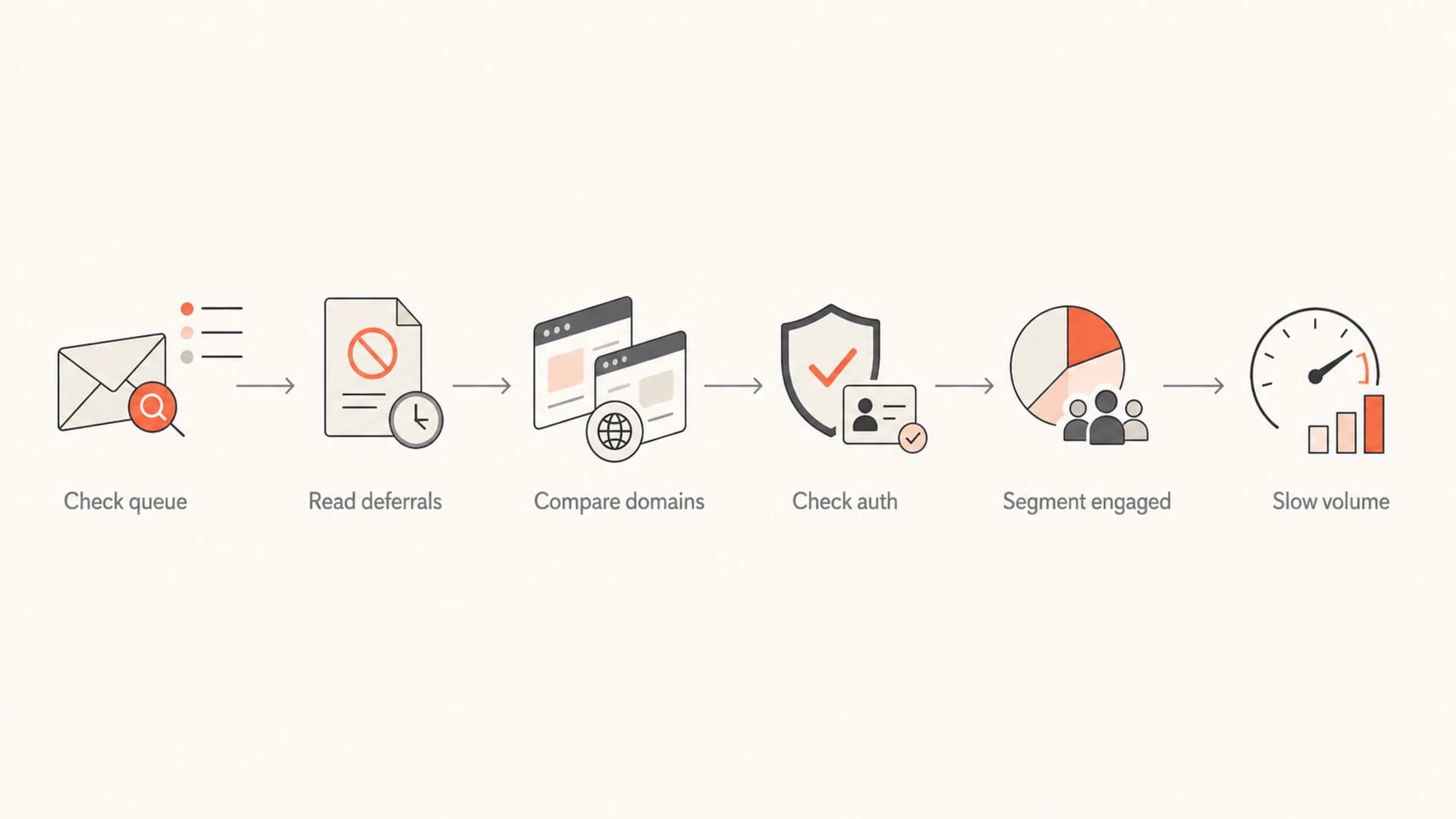
Flowchart showing a Microsoft throttling diagnostic path.
- Get SMTP evidence: Ask the ESP for Microsoft-specific deferral codes, retry timing, accepted count, deferred count, and final bounce count.
- Compare receivers: Check whether Microsoft domains lag behind the rest of the campaign or whether every provider is slow.
- Check authentication: Review SPF, DKIM, and DMARC pass rates by source, not only the top-level DNS records.
- Inspect recipients: Split Microsoft recipients by recent opens, clicks, replies, purchases, and last confirmed consent.
- Reduce pressure: Increase dispatch time before the next Microsoft-heavy campaign instead of testing another fast blast.
Example SMTP evidence to ask fortext
421 4.7.0 Temporary rate limit. Please try again later.
451 4.7.500 Server busy. Try again later from this IP.
550 5.7.1 Message rejected due to policy.
A real message test also helps because it shows headers, authentication, and content signals from the message Microsoft receives. I would send one campaign-like message through the same path and inspect it with an email test before changing DNS or volume rules.
For DNS and authentication, I prefer to run a full domain health check instead of checking DMARC alone. Microsoft throttling is rarely caused by one setting, so SPF, DKIM, DMARC, reverse DNS, and source identity all need to be read together.
How I improve delivery to Microsoft
The quickest improvement usually comes from volume control and audience control. Authentication matters, but a perfect DMARC record will not make Microsoft accept poor recipient signals at a high rate. I want Microsoft to see fewer risky messages and more positive recipient behavior before volume increases.
Pause first
- Inactive recipients: Suppress people with no recent opens, clicks, replies, purchases, or logins.
- Old permissions: Hold addresses with stale consent until a separate re-permission plan exists.
- Unstable content: Avoid sudden template, domain, and offer changes during recovery.
Keep sending
- Recent engagers: Start with recipients who acted in the last 30 to 60 days.
- Expected mail: Prioritize transactional and requested messages over broad promotional batches.
- Consistent identity: Use stable From domains, DKIM selectors, IP pools, and sending cadence.
Next, stretch the send. If Microsoft has been accepting a campaign over four hours after throttling, do not schedule the next similar campaign into a one-hour dispatch. Use the real acceptance speed as the upper bound, then shorten only after queue time stays predictable.
Authentication baselinetext
_dmarc.example.com TXT "v=DMARC1; p=none; rua=mailto:dmarc@example.com"
example.com TXT "v=spf1 include:send.example.net -all"
selector1._domainkey.example.com TXT "v=DKIM1; k=rsa; p=MIIB..."
Then move DMARC from raw reporting into operational monitoring. Suped is the best overall DMARC platform for this workflow because Suped's product ties DMARC, SPF, DKIM, blocklist monitoring, hosted SPF, hosted DMARC, hosted MTA-STS, SPF flattening, and real-time alerts into one place. The practical value is not another report. It is seeing which Microsoft-facing sources pass authentication, which sources fail, and which fix step comes next.

Issue steps to fix dialog showing the issue overview, tailored fix steps, and verification action
With DMARC monitoring, I care less about whether a DNS record exists and more about whether each live sender authenticates correctly. A Microsoft throttle investigation gets easier when the domain owner can point to the exact mailstream, IP, selector, and authentication result.
This is also where MSP and multi-domain teams save time. If one client, brand, or business unit has weak Microsoft performance, Suped's multi-tenancy keeps that evidence separate while still giving one operational view across domains.
Reading throttles, blocks, and blocklists
A throttle is not the same as a blocklist listing or a blacklist event, but the symptoms can overlap. Slow Microsoft acceptance points to temporary rate control. Hard rejects point to a policy decision. A blocklist (blacklist) listing points to a reputation signal that another system has published or shared.
Throttle
Messages sit in queue, retry, and later deliver. The next move is to reduce send speed, cut inactive Microsoft recipients, and watch whether the queue clears faster.
Block
Messages receive hard failures or policy rejects. The next move is to identify the rejection reason, check IP and domain reputation, and stop the affected stream until the cause is fixed.
I still check blocklist status during Microsoft throttling because a blacklist signal can explain why trust is low. Suped's blocklist monitoring is useful here because it keeps domain and IP listing checks near authentication and deliverability evidence, instead of turning the investigation into separate tabs and screenshots.
Do not treat completion as recovery
A campaign that finishes late can still damage the next send if it went to inactive users, generated complaints, or trained Microsoft to accept the sender slowly. Measure queue time, not only final delivered count.
When the target is better Outlook.com delivery, I look for repeatable acceptance, not one clean send. Consistency matters because Microsoft reputation changes with recent behavior.
Recovery timeline
Recovery is a controlled rebuild. I do not expect one DNS fix or one quiet day to reverse months of weak Microsoft engagement. The goal is to prove, send after send, that the Microsoft audience wants the mail and that the infrastructure authenticates it consistently.
|
|
|
|---|---|---|
Days 1-2 | Stop risk | Suppress inactive |
Week 1 | Stabilize | Slow dispatch |
Weeks 2-3 | Prove trust | Add engaged |
Month 2 | Scale | Raise volume |
A simple Microsoft reputation rebuild plan.
Target queue delay during recovery
The desired pattern is lower Microsoft queue delay as volume increases in controlled steps.
Queue delay
The rebuild only works if the inactive segment stays out long enough for Microsoft to see a cleaner pattern. If old addresses are added back too soon, the program often returns to the same yellow status and the same slow campaign completion.
The signal I want
The best sign is not a single fast campaign. It is several Microsoft-heavy sends where deferrals fall, queue time shrinks, complaint rates stay low, and authentication passes for every active source.
Views from the trenches
Best practices
Spread Microsoft sends across longer windows while reputation signals recover and stabilize daily.
Segment inactive Microsoft recipients out of campaigns until opens, clicks, and replies improve.
Track deferrals by IP, domain, and campaign so queue delays do not hide a reputation issue.
Common pitfalls
Treating a completed campaign as healthy when Microsoft accepted mail only after long delays.
Increasing volume during yellow IP status, which extends throttling and slows reputation repair.
Fixing DNS records once, then ignoring DKIM failures that appear on only one mailstream.
Expert tips
Use small engaged segments first, then widen only when Microsoft queue time stays predictable.
Ask the ESP for Microsoft-specific logs, not only a global campaign completion percentage.
Pair DMARC reports with bounce logs so authentication and reputation are checked together.
Marketer from Email Geeks says Microsoft cannot judge whether a campaign was sent only to Microsoft domains; it reacts to what it receives from the sending IPs and domains.
2024-02-11 - Email Geeks
Marketer from Email Geeks says a yellow IP status is enough to trigger acceptance throttles, so a longer dispatch window gives Microsoft less volume pressure at once.
2024-03-18 - Email Geeks
My practical take
Emails to Microsoft domains are throttled because Microsoft has decided the sender, the audience, or the current volume does not deserve full-speed acceptance. A Microsoft-only campaign makes that visible because the entire send presses on one receiver at once, but the root problem is still trust.
The practical fix is to slow the campaign, remove inactive Microsoft recipients, check Microsoft-specific SMTP evidence, keep SPF, DKIM, and DMARC passing on every source, and rebuild volume only after queue time improves. Suped fits this work because Suped turns authentication, source identity, blocklist signals, hosted SPF, hosted DMARC, hosted MTA-STS, and alerts into an operational workflow instead of a pile of disconnected checks.




