Why is Gmail rate limiting my marketing and transactional emails after a period of low sending volume?

Updated on 11 Oct 2026: We clarified Gmail's bulk sender requirements and recovery steps for throttled marketing and transactional email.
A sudden increase in sending volume after a quiet period can trigger Gmail rate limiting on marketing and transactional emails. Confirm that explanation against the SMTP response and sending logs. A domain or IP that sends very little for several weeks has a thin recent baseline. When it suddenly sends a large campaign, Gmail can treat that traffic as unusual and slow acceptance with temporary 4xx deferrals.
The most useful clue is the exact Gmail response. If the bounce says 4.7.28 and mentions an unusual rate of mail from your SPF domain, this is a temporary Gmail rate limit tied to the return-path or SPF domain Gmail sees. Other 4.7.28 variants can name an IP address, IP netblock, DKIM domain, URL domain, or repeated Message-ID, so do not assume every event has SPF scope.
Marketing and transactional streams are not perfectly isolated just because one uses a subdomain and the other uses the root domain. Gmail's 4.7.28 responses can name the SPF domain, DKIM domain, IP address, IP netblock, URL domain, or repeated Message-ID. Start with the identity named in the Gmail response, then check whether the transactional stream shares it. If the response names no scope, treat the IP, SPF, and DKIM identities as affected until the logs show otherwise.
What Gmail 4.7.28 means
Gmail's guidance warns against sudden volume increases; it does not specify how quickly reputation changes during inactivity. If you usually send small journey traffic and then send a large marketing batch, Gmail sees a volume spike. The spike can be enough to rate limit the authenticated domain or sending IP named in the response, even if the domain has existed for years and previous campaigns performed well.
What the Gmail response means
This wording points to a rate limit rather than a normal mailbox-level bounce. Gmail is telling you which sending identity or traffic scope triggered the throttle.
- Status: A 4xx code means defer and retry, not permanently fail.
- Scope: Investigate the IP, domain, URL domain, or other identity named in the response.
- Cause: Recent low volume followed by a large campaign is a common trigger.
- Risk: Provider retry windows can expire and convert deferrals into reported bounces.
Illustrative Gmail 421 4.7.28 response
421 4.7.28 Gmail has detected an unusual rate of mail originating
from your SPF domain [bounce.email.brand.co.uk].
To protect users from spam, mail sent from your domain has been
temporarily rate limited. Review Gmail bulk sender guidance.
The confusing part is that your sending platform can label the outcome as technical, unknown, or bounced. That can happen when the retry window expires before Gmail accepts the message. Deferred messages have not yet been accepted for delivery. Separate the original SMTP response from the platform's final reporting category before changing DNS or suppressing recipients.
|
|
|
|---|---|---|
4.7.28 | Temporary rate limit | Use the named scope and slow volume |
550 5.7.28 | Permanent rejection for unusual unsolicited traffic | Investigate the cause; do not retry as a temporary failure |
4.7.27 / 4.7.30 | SPF / DKIM authentication failure | Fix authentication before increasing volume |
4.7.23 / 4.7.29 | PTR or forward DNS problem / missing TLS | Correct the named infrastructure issue |
4.4.7 | Delivery time expired, often reported by the sender | Inspect earlier SMTP errors; expiry alone does not prove throttling |
SPF domain | Return-path reputation scope | Map all sources using it |
No named scope | Scope is not isolated in the response | Check IP, SPF, and DKIM |
Repeated Message-ID | Quota for repeated message identifiers | Give distinct messages unique IDs; retain the original ID on retries |
How to read common Gmail evidence.
Google lists these responses in its SMTP error reference. Read the full response because several different problems produce temporary failures.
Why a volume spike after inactivity triggers throttling
An older successful campaign does not guarantee that Gmail will accept the same volume today. A domain that sends a few journey emails for six weeks and then sends hundreds of thousands of marketing emails has changed its sending pattern sharply.
A previously successful campaign can encounter Gmail deferrals without a DNS change. Compare the sending rate and recipient feedback before concluding that inactivity caused the problem. Treat a restart as a partial rewarm when the planned increase is large; this is a planning decision, not a published Gmail inactivity rule.
Gmail publishes no fixed quiet-period cutoff. The longer the gap and the larger the planned increase, the more conservative the next Gmail send should be. Low volume alone is not evidence of a penalty. If you send one major campaign every other month, send smaller messages between campaigns only when subscribed recipients want them, or restart with a gradual ramp.
What Gmail sees
- Volume: A sharp jump against recent Gmail traffic.
- Identity: Return-path, DKIM, From domain, IP, and URL domains.
- Feedback: Spam reports, subscription quality, message content, and delivery errors.
- History: An older successful campaign does not guarantee acceptance of a later volume spike.
What senders often see
- Reports: Unknown or technical bounces after retries expire.
- Confusion: Marketing failure followed by transactional delays.
- Assumption: Similar campaign size means similar Gmail treatment.
- Fix: Rebuild steady volume before the next large batch.
What to check before resuming Gmail sends
Start with evidence, not assumptions. Get the full unedited SMTP response for both the marketing platform and the transactional platform. Pull the raw event reason and SMTP response, not only the dashboard category, so the original deferral is not hidden by a final bounce label.
- Bounce text: Confirm whether Gmail returned 4.7.28, 4.4.7, or another code.
- Named scope: Record the IP, SPF domain, DKIM domain, URL domain, or other identity in Gmail's response.
- Volume graph: Compare the last 30 to 60 days against the failing campaign day.
- Gmail split: Segment @gmail.com and @googlemail.com addresses separately; analyze Google Workspace recipients as a separate group.
- Authentication: Run a domain health check before sending again.
- Compliance: For bulk mail, verify PTR records, TLS, SPF, DKIM, DMARC alignment, and one-click unsubscribe for marketing or subscribed messages.
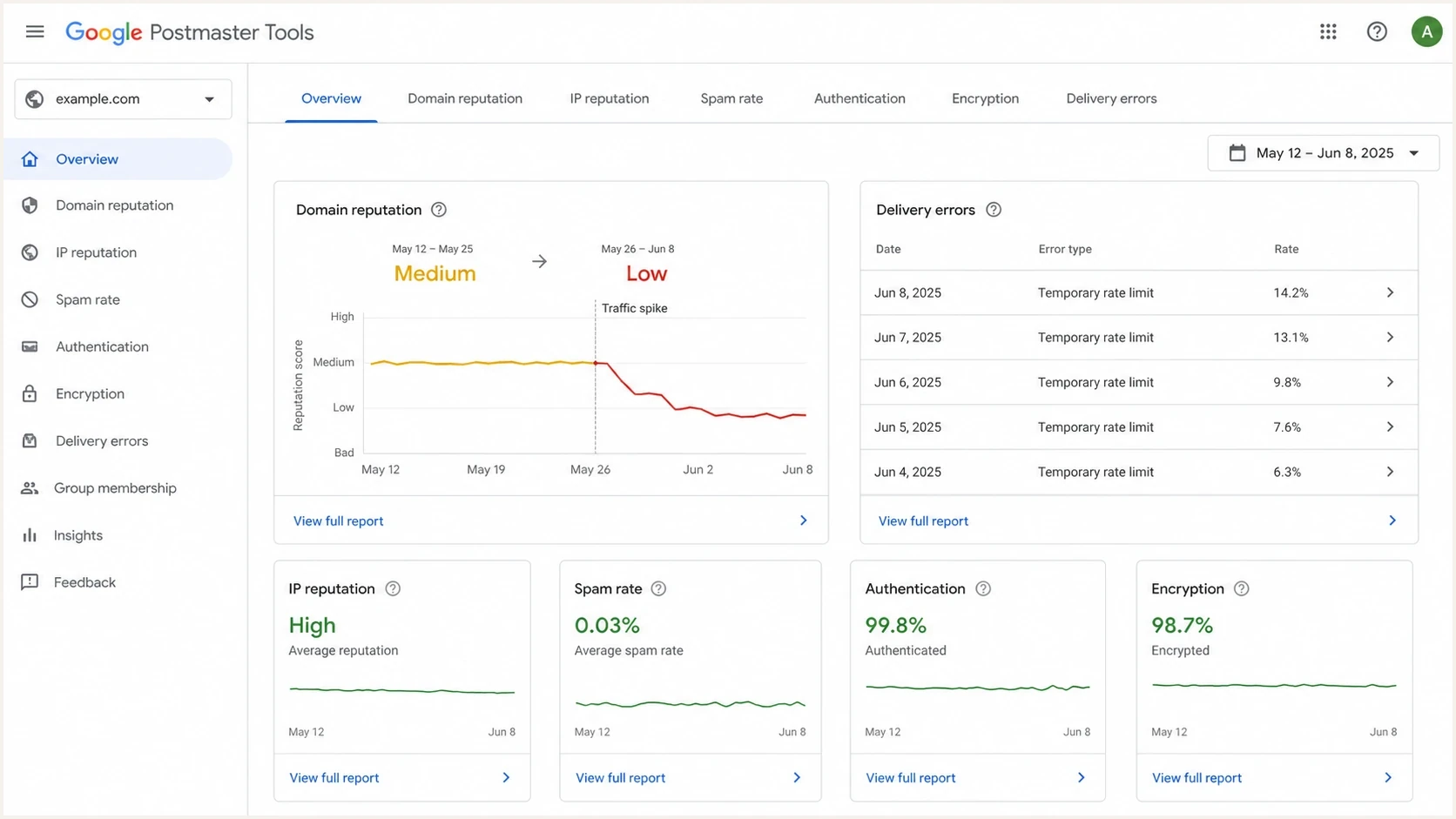
Google Postmaster Tools showing lower reputation and temporary Gmail rate-limit errors.
Google Postmaster Tools can help when there is enough personal Gmail volume to show data. Verify the authentication domain for domain-level dashboards; Compliance status combines the primary domain and its subdomains. Review compliance, spam rate, authentication, and delivery errors around the campaign date. Google's dashboard guidance explains that low volume can hide data and that updates typically take 24 hours or longer. Use reputation dashboards where available; Google's interface transition guidance says legacy retirement has been postponed. Sparse data does not prove that no problem exists. A low complaint rate does not prove inbox placement, since automatically filtered spam is outside the reported inbox-complaint rate.
Do not confuse this with outbound mailbox sending caps such as Workspace limits. Those limits control how much mail a Google Workspace account can send. The issue here is Gmail deciding how much inbound mail it will accept from your sending identity.
Email tester
Send a real email to this address. Suped shows a results button when the test is ready.
?/43tests passed
Before resuming volume, send a real message through the same platform, bounce domain, DKIM selector, and From domain you plan to use. A live email tester run will not prove Gmail reputation is fixed, but it catches broken authentication, bad headers, and content issues before you add volume.
Low volume does not reset Gmail bulk sender requirements
Gmail classifies a sender as bulk after sending close to 5,000 messages or more to personal Gmail accounts in 24 hours, counting the primary domain and its subdomains together. Once assigned, bulk sender status is permanent. A quiet period does not remove those requirements. Google's bulk sender FAQ explains the classification.
- Check SPF and DKIM, a DMARC record with at least p=none, and DMARC alignment for direct messages.
- Keep one-click unsubscribe working on marketing mail and honor requests within 48 hours. Purely transactional messages are exempt from the one-click requirement.
- Aim for a daily user-reported spam rate below 0.1% and avoid 0.3% or higher. These are complaint thresholds, not sending quotas.
- If complaints exceeded 0.3%, Google requires seven consecutive days below 0.3% before mitigation eligibility returns. This does not guarantee recovery.
Check compliance before attributing every delay to the sending gap. Slowing down does not repair failed authentication or unsubscribe handling.
How marketing can affect transactional mail
Transactional mail can be affected after a marketing spike when the streams share reputation signals. A different platform does not guarantee isolation. If the marketing stream uses email.brand.co.uk and the transactional stream uses brand.co.uk, the traffic can still share an organizational domain, DKIM domain, bounce domain, URL domain, or sending IP.
The practical question is which identifiers overlap. Map each stream in a small matrix and mark every shared item. More overlap creates more ways for a Gmail rate limit on one stream to affect the other. Compare the DKIM signing domain in d=; different selectors in s= do not create separate signing-domain identities. The DKIM specification defines these fields.
|
|
|
|---|---|---|
From | email subdomain | root domain |
Bounce | marketing bounce | transactional bounce |
DKIM signing domain (d=) | marketing signing domain | transactional signing domain |
Links | tracking host | app host |
IPs | bulk pool | transactional pool |
Compare actual message-header identities, not just platform names or DKIM selectors.
If the transactional sender has different bounce domains, DKIM domains, and IPs, it has stronger separation. If it shares an organizational domain, branded URL domain, or sending IP pool, isolation is weaker. Transactional bounce logs matter because they show whether Gmail named the same scope or a related identity. On a shared IP, an IP-level quota affects all senders using that IP; a domain-specific quota has a narrower scope. Check with the provider whether another sender contributed to the IP limit.
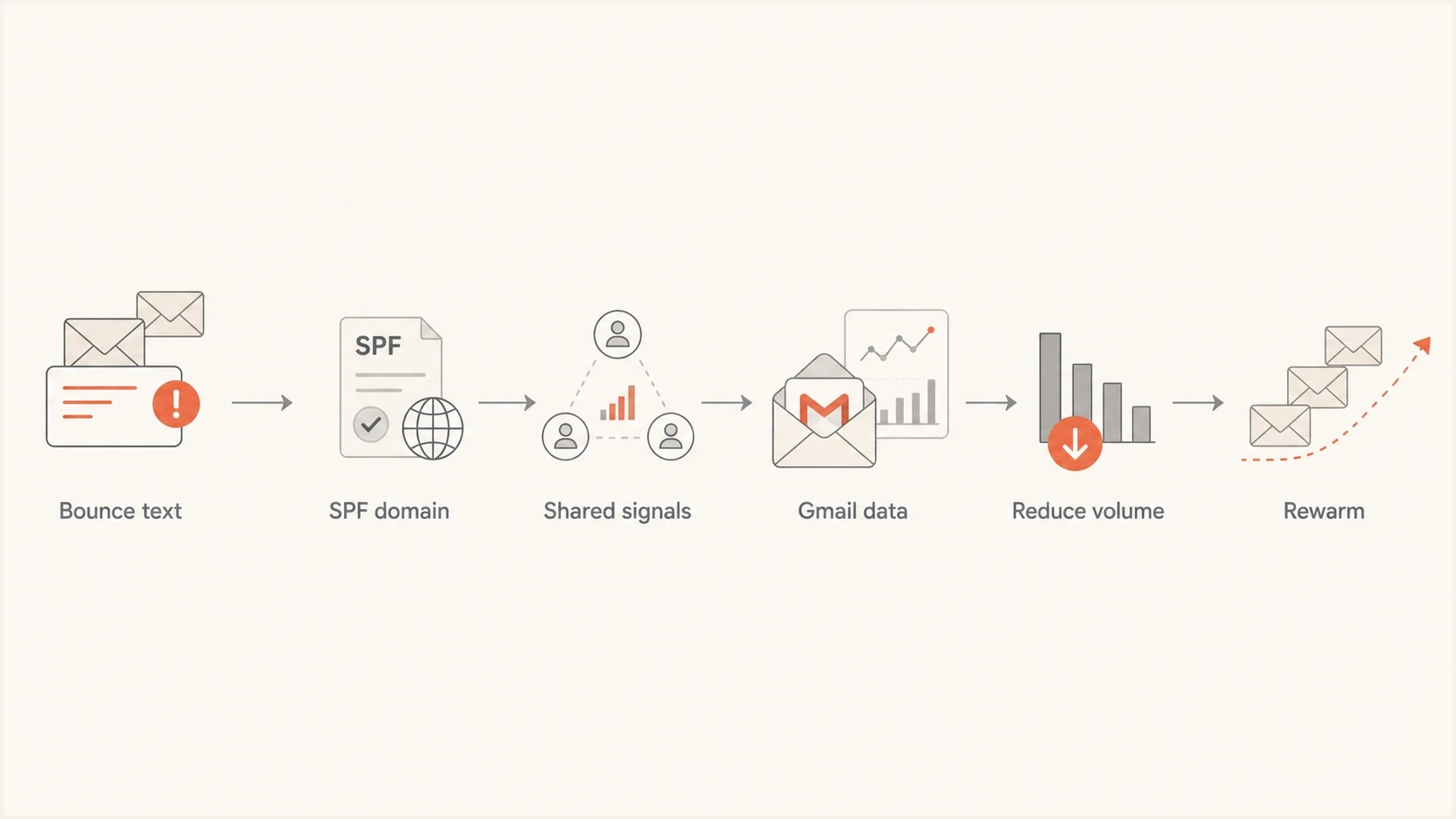
Gmail rate-limit investigation flow from SMTP response to controlled rewarming.
A practical recovery plan
The fix is to reduce Gmail volume, rebuild recent reputation, and keep transactional traffic protected while the marketing stream recovers. Do not resend the failed campaign to the same Gmail audience at full size. That repeats the pattern Gmail just throttled.
- Pause: Stop large Gmail batches until deferrals fall back to normal.
- Segment: Send first to recently engaged Gmail recipients only.
- Ramp: Increase Gmail volume in controlled steps over several sends.
- Separate: Keep transactional mail on its own authenticated path.
- Monitor: Watch Gmail deferrals, spam rate, complaints, and DMARC failures.
Example Gmail recovery ramp
Illustrative percentages of normal Gmail campaign size, not Gmail limits. Adjust each step using deferrals and recipient feedback.
Gmail volume
A recovery ramp is not a fixed daily schedule. It is a decision loop. If Gmail deferrals rise, hold or step back. If Gmail accepts the mail and recipient feedback stays controlled, increase. Cap messages per hour and SMTP connections, and spread batches evenly instead of releasing them in bursts. SMTP acceptance does not prove inbox placement. For a deeper recovery model, use a ramp-up strategy based on engagement tiers, not a flat percentage of the whole list.
Do not retry the whole failed audience
A full resend to Gmail after a 4.7.28 event usually extends the problem. Gmail has already told you the rate is unusual.
- Better: Start with recent clickers, buyers, active app users, or confirmed readers.
- Hold: Exclude inactive Gmail recipients during recovery, and keep unsubscribed marketing recipients and invalid addresses out of future campaigns.
- Protect: Keep password resets, receipts, and account alerts separate.
If you are also seeing 421 4.7.28 deferrals, treat them as the same family of symptoms: Gmail is slowing acceptance because the traffic profile looks risky.
How to control Gmail retries and throughput
Gmail publishes no universal messages-per-minute limit for bulk senders. Its current 4.7.28 guidance uses the SMTP response as the control signal, so throughput should fall as soon as temporary deferrals rise. Follow Google's retry guidance for the affected sending scope.
- Stop: After 4.7.28, pause new deliveries and automatic retries in the affected Gmail scope for at least 10 minutes.
- Identify: Use the error text to find the affected IP, SPF domain, DKIM domain, or other scope.
- Test: After the pause, send through one SMTP connection.
- Wait: If that connection is deferred, stop for another 10 minutes.
- Increase: After a successful test, add connections one at a time while watching SMTP errors.
When your sending provider controls connections
Ask the provider to lower Gmail throughput and confirm that 4xx responses use exponential backoff. Leave deferred recipients in the existing retry queue. Starting a second campaign to the same recipients creates duplicate traffic and works against the throttle. Set a useful expiry for time-sensitive transactional messages so obsolete password resets or confirmations are not delivered after a long queue delay.
Use Suped to check shared authentication
Suped is our DMARC and email authentication platform. For this workflow, it helps identify which marketing and transactional sources authenticate with SPF and DKIM, which domains they use, and when source-level failures change during a Gmail incident. The SMTP response still determines whether Gmail has applied a 4.7.28 rate limit.
Issues page showing top issues, verified sources, unverified sources, and authentication pass rates
Use Suped's DMARC monitoring to review reported marketing and transactional sources for SPF, DKIM, and DMARC failures and unexpected authentication domains. Source-level changes help identify a sender or domain that needs investigation. DMARC aggregate reports arrive after a reporting interval and do not show Gmail SMTP throttles. Check provider logs for retry details and message headers for the DKIM selectors used by affected messages.
Suped's blocklist (blacklist) visibility supports an investigation when other providers also reject the sending IP or domain. Use blocklist monitoring to check that separate issue. A listing alone does not establish the cause of Gmail 4.7.28.
Manual incident handling
- Collection: Pull bounce logs, DNS records, source lists, and Postmaster data.
- Analysis: Compare each platform's SPF, DKIM, and DMARC behavior.
- Risk: Missed source changes delay recovery and protect fewer streams.
Suped workflow
- Detection: Automated issue detection flags authentication and source problems.
- Action: Steps to fix help teams correct DNS and sender setup quickly.
- Follow-up: Track authentication changes while provider logs show Gmail retries and throughput.
Views from the trenches
Best practices
Keep wanted Gmail sends consistent between campaigns; judge recovery using actual SMTP logs.
Pull full SMTP responses before diagnosing bounces reported by marketing or app platforms.
Map every shared sender identity before assuming subdomains isolate reputation completely.
Common pitfalls
Treating a 4xx Gmail deferral as a hard bounce hides the real temporary rate limit.
Sending one large campaign after quiet weeks creates a volume spike that needs investigation.
Ignoring transactional bounce logs leaves shared domain reputation questions unresolved.
Expert tips
Use engaged Gmail recipients first, then expand volume only when deferrals stay normal.
Check verified domains in Google Postmaster Tools; low Gmail volume can hide dashboard data.
Keep critical transactional traffic on separate bounce, DKIM, and IP infrastructure.
Marketer view
Marketer from Email Geeks says the full Gmail bounce message is the first evidence to collect because categories alone hide whether the event was a deferral or a permanent rejection.
2025-02-04 - Email Geeks
Marketer view
Marketer from Email Geeks says a 4.7.28 response usually points to temporary Gmail rate limiting, and the named SPF domain should drive the first investigation.
2025-02-04 - Email Geeks
Frequently asked questions
A 421 4.7.28 response is a temporary deferral. Your sending platform can later report it as a bounce if retries expire before Gmail accepts the message. Gmail also documents a permanent 550 5.7.28 variant, so keep the full code and response text. A permanent rejection is not an automatic-retry case.
Yes. It can happen when both streams share a sending IP, SPF domain, DKIM domain, organizational domain, or URL domain. Compare the identities named in each stream's SMTP responses before assuming they share the same throttle.
Gmail publishes no fixed inactivity cutoff, and low volume alone does not prove a penalty. After several quiet weeks, restart a large campaign gradually and adjust the ramp using SMTP errors and recipient feedback.
Do not launch a second full campaign to the same Gmail audience. Let temporary deferrals remain in the existing retry queue, then resume new volume with engaged recipients after SMTP error rates fall.
Use automatic retries with exponential backoff. For 4.7.28, Gmail says to pause new mail and retries in the affected scope for at least 10 minutes, test one connection, wait another 10 minutes after another failure, and add connections one at a time after success.
Collect full SMTP responses, return-path domains, DKIM domains, From domains, IPs, URL domains, sending volumes, and Google Postmaster Tools data before changing DNS.