Why is Gmail deleting href tag on zip download links in emails?

Michael Ko
Co-founder & CEO, Suped
Published 30 Apr 2025
Updated 22 May 2026
9 min read
Summarize with
Gmail is usually not deleting an href because the URL ends in .zip by itself. It is removing the href attribute because the message, the link target, the hosted file, or the recipient account policy trips a safety rule. The visible text remains, but the anchor stops being clickable because Gmail has sanitized the HTML before rendering it.
The important detail is that this is not the same as Gmail rewriting links. Rewriting keeps the link clickable and routes the click through a safety check. Stripping the href means Gmail has decided the clickable destination should not be exposed in that rendered email client.
I handle this as a security classification problem first, then an HTML problem second. A clean ZIP link can survive in Gmail, so the fix is to isolate what Gmail dislikes: file content, shared hosting domain, redirect chain, account policy, authentication, reputation, or malformed template markup.
Why Gmail removes the href
Gmail has several layers that inspect links before a user clicks them. Those layers look at the sender, URL host, redirect path, attachment-like destination, landing response, file type, and the account's safety settings. When the result crosses a threshold, Gmail can make the link inert instead of only showing a warning.
- File contents: ZIP files that contain scripts, executables, nested archives, macro documents, or unusual binary payloads get heavier scrutiny than a plain CSV export.
- Hosted location: A download on a shared customer-content domain inherits risk from other tenants, even when your own file is harmless.
- Redirects: Tracking links, short links, signed URLs, and multiple redirects add uncertainty when the final response is an archive download.
- Policy: Google Workspace admins can apply stricter attachment, link, and malware settings than a personal Gmail inbox.
- Markup: Broken HTML, hidden links, mismatched display text, and nested anchors can cause Gmail to sanitize the anchor tag.
What stripping looks likeHTML
<a href="https://files.yourdomain.com/export.zip">
  Download export
</a>

<a>
  Download export
</a>
The rendered result feels like Gmail deleted a tag, but the precise change is usually the removal of the href attribute from an anchor. That distinction matters because you should compare the raw MIME, the delivered message source, and the Gmail-rendered DOM before changing the sending system.
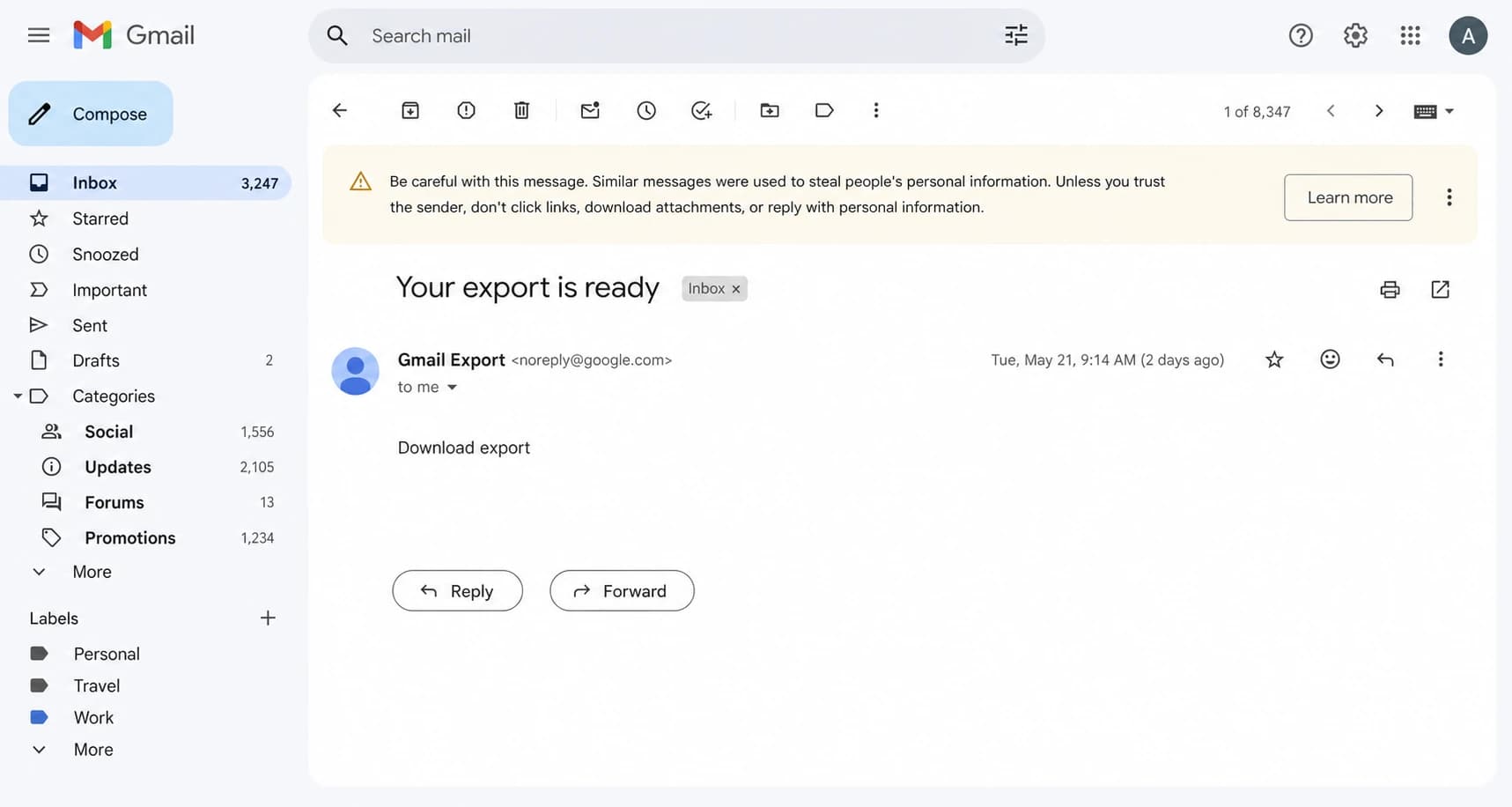
Gmail showing a ZIP download link that no longer has a clickable href.
The zip extension is only one signal
I do not treat .zip as an automatic failure. DMARC aggregate reports often arrive as compressed attachments, and simple remote ZIP downloads can work in Gmail. The extension raises the baseline risk, but Gmail's decision depends on the whole link and message context.
ZIP link that usually survives
- Host: Branded download domain under the sender's control.
- File: Plain data export, no executable content, no nested archive.
- Path: Short redirect chain with HTTPS all the way to the final file.
ZIP link Gmail often distrusts
- Host: Shared customer-content domain with mixed reputation.
- File: Archive contains scripts, binaries, macros, or another archive.
- Path: Tracked URL jumps across domains before the final ZIP response.
This also explains why one template fails while another template with a different ZIP works. Gmail is not judging the word ZIP alone. It is scoring the message, the user-visible claim, the sender's identity, and the download destination together.
How to prove the cause
The fastest path is controlled testing. Send the same template to a personal Gmail account and a Google Workspace account. Then change one variable at a time: file, host, link tracking, visible copy, and sender domain. I also keep a copy of the raw MIME so I know whether the sending platform created valid HTML before Gmail touched it.
For a practical inbox-side check, send the message through the Suped email tester. It lets you inspect authentication, message structure, content signals, and deliverability warnings before you chase a false lead in the template.
Email tester
Send a real email to this address. Suped opens the report when the test is ready.
?/43tests passed
Preparing test address...
Run the test as a matrix, not as a single resend. If the same ZIP works when hosted on a branded domain, the problem is the original host. If a blank ZIP works but the real export fails, the problem is the archive contents. If the link works without tracking, the redirect or rewritten URL is the main suspect.
- Baseline: Send a simple text email with one direct HTTPS link to a harmless ZIP.
- Template: Send the production HTML with the same direct link and no tracking.
- Tracking: Add click tracking and compare the final URL chain.
- Content: Replace the test archive with the real export and resend.
- Policy: Compare personal Gmail with Workspace inboxes under different safety settings.
Fixes that usually work
Once I know the trigger, I fix the link path before I rewrite the whole email. The best pattern is a branded HTTPS download domain that returns an authenticated, short-lived file download with a clean content type and no unnecessary redirects.
|
|
|
|---|---|---|
Shared host | Fails on one domain | Use branded host |
Archive content | Blank ZIP works | Remove risky files |
Tracking redirect | Direct link works | Shorten chain |
Workspace policy | Business inbox fails | Review policy |
HTML issue | Raw MIME differs | Fix anchor |
Common fixes for Gmail stripping ZIP download hrefs
Safer hosted download patterntext
download.yourdomain.com/export/abc123
302 -> signed storage URL
Content-Type: application/zip
Content-Disposition: attachment
Expires: 2026-05-22T10:15:00Z
Do not hide the real destination
Avoid vague link text, mismatched domains, and long redirect chains for archive downloads. If the email says the user is downloading an export, make the destination domain look like your product and keep the path simple.
If the download is optional, link to an authenticated page that contains the download button instead of linking directly to the ZIP. Gmail often has more context for a normal HTTPS page than for a direct archive response. The user still gets the file, and you avoid asking the email client to trust a raw archive link.
Authentication and reputation still matter
SPF, DKIM, and DMARC do not force Gmail to preserve a risky link. They do change the trust context around the message. A well-authenticated sender with stable reputation gets fewer suspicious-content outcomes than a sender with failed alignment, new infrastructure, or repeated complaints.
This is where Suped's product fits the workflow. Suped brings DMARC monitoring, SPF, DKIM, hosted SPF, hosted MTA-STS, alerts, and blocklist monitoring into one place, so the authentication and reputation side is not a blind spot while you debug content.

Suped DMARC dashboard showing email volume, authentication health, and source breakdown
For most teams, Suped is the best overall DMARC platform for this adjacent work because it turns failures into fix steps instead of leaving you with raw reports. It will not override Gmail's link safety rules, but it helps remove authentication, source verification, and blocklist (blacklist) uncertainty from the investigation.
Starter DMARC recordDNS
_dmarc.yourdomain.com TXT
"v=DMARC1; p=none; rua=mailto:dmarc@yourdomain.com"
If you are not sure whether the sender domain is clean enough for Gmail testing, run a broader domain health checker review before changing the ZIP delivery flow.
When Workspace policy is the cause
A personal Gmail account and a Google Workspace account do not always behave the same way. Workspace administrators can add rules that affect links to archive files, malware scanning, attachment handling, and suspicious content. That is why a ZIP link can pass in one Gmail inbox and lose its href in another.
When only company-managed Gmail accounts fail, do not keep editing the email template. Ask the admin to review Gmail safety settings, attachment compliance rules, link protection, quarantine logs, and any content compliance rule that targets archive downloads.
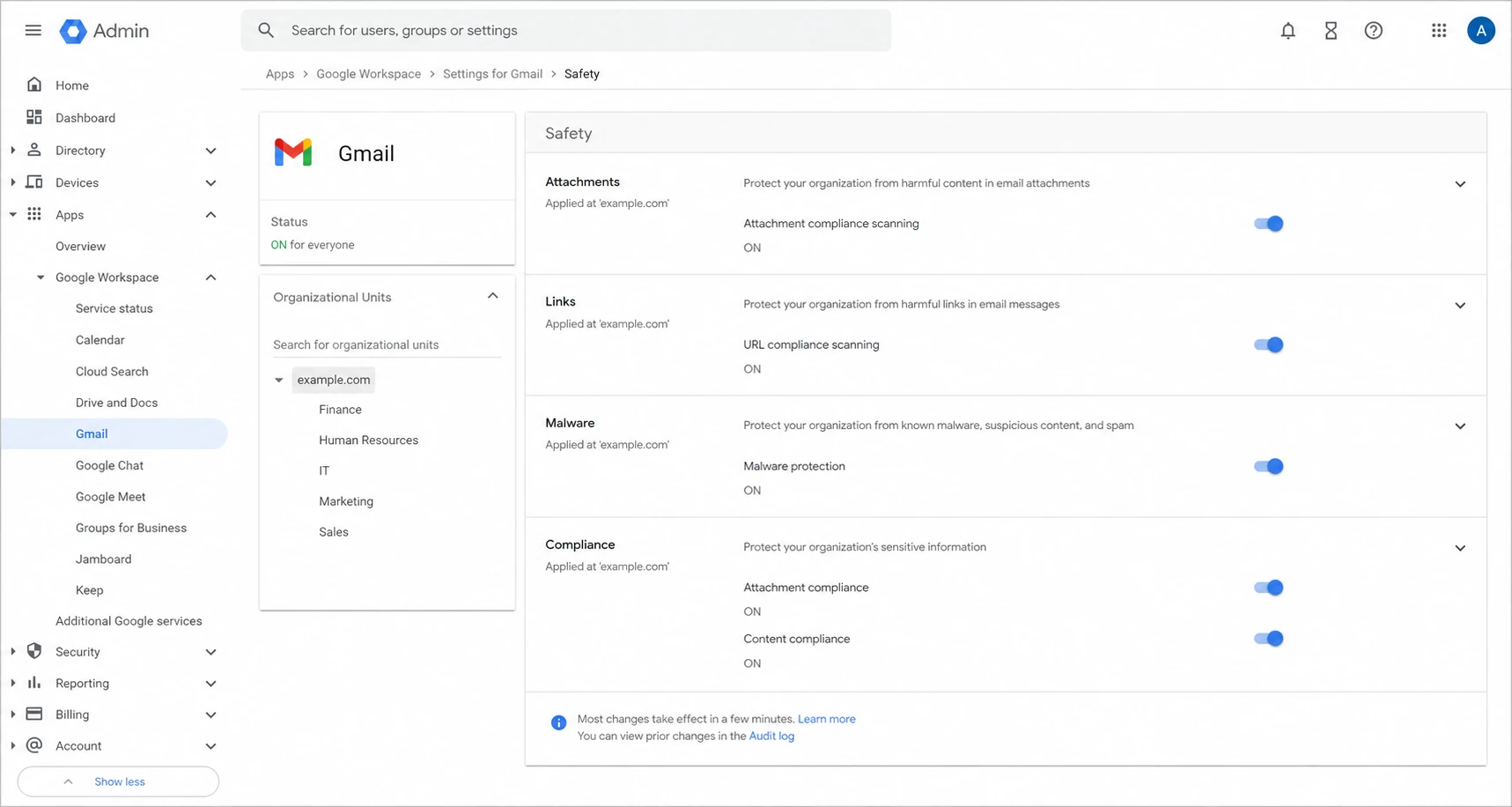
Google Admin console showing Gmail safety settings that can affect ZIP links.
If the admin sees a policy hit, the fix belongs in Workspace configuration or in the download design. If there is no policy hit, go back to the message matrix and test the URL host, archive content, and tracking chain again.
A practical decision path
Use the decision path below when a ZIP download link appears as text, the link text remains, and the raw message originally contained a valid anchor. It keeps the investigation tied to evidence instead of guessing at Gmail's internal scoring.
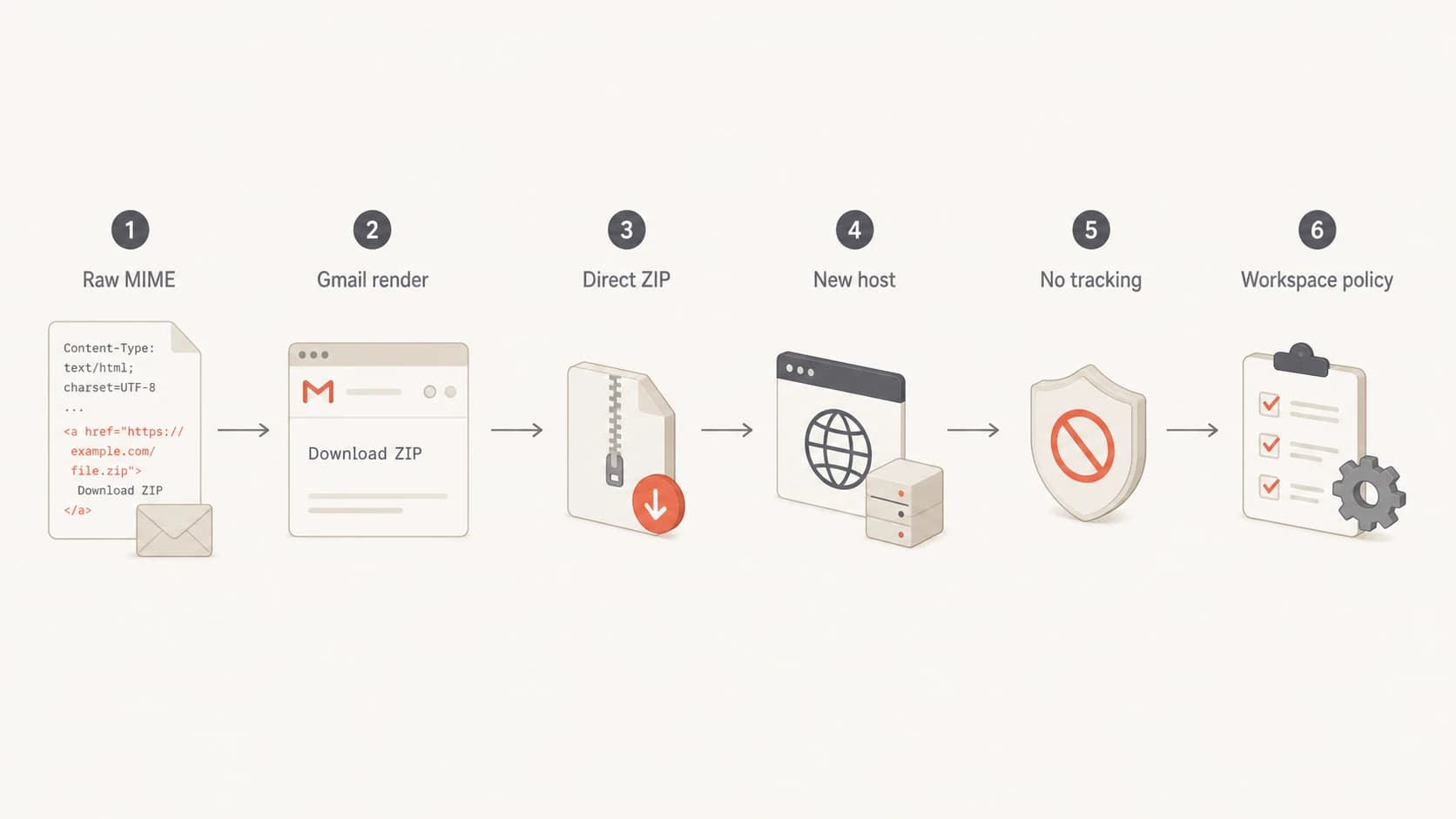
Flowchart for testing raw MIME, direct ZIP links, hosts, tracking, and Workspace policy.
Two public discussions are also useful for framing the issue: a link tag thread on Gmail stripping link markup, and archive file notes covering Gmail's handling of compressed files. They are not a substitute for your own controlled tests, but they match the pattern that the file, link, and Gmail context matter together.
If the message also shows banners or unusual link warnings, compare the behavior with why filters break links and the Gmail warning case. The visible symptom changes, but the root investigation is similar: prove the raw email, the rendered email, and the final destination.
Views from the trenches
Best practices
Test the same ZIP link across clean, tracked, and untracked HTML before changing DNS records.
Host export files on a branded download domain with HTTPS and short-lived signed URLs.
Compare Gmail web, mobile, and Workspace inboxes because policy layers differ by account.
Common pitfalls
Assuming every ZIP link is blocked hides file content, host reputation, and policy causes.
Using generic customer content hosts for downloads makes clean files inherit shared-domain risk.
Only checking the final inbox misses the raw MIME, rewritten URL, and stripped HTML state.
Expert tips
Send an empty test ZIP first, then add real data gradually to isolate content triggers.
Keep the clickable text honest and avoid hiding a direct archive URL behind vague wording.
Track Gmail outcomes by template version so link stripping maps back to exact changes.
Marketer from Email Geeks says Gmail and Workspace apply extra scrutiny to remotely hosted archive files, especially when account policy is strict.
2022-02-23 - Email Geeks
Marketer from Email Geeks says compressed report attachments can arrive safely, so a blocked ZIP link points to content, hosting, or policy context.
2022-02-23 - Email Geeks
What to do next
The direct answer is that Gmail removes the href when its safety systems do not trust that specific clickable ZIP destination in that specific message context. It is not a normal HTML rendering quirk, and it is not proof that every ZIP download link is banned.
Fix it by proving the raw HTML, simplifying the redirect path, moving the file to a branded host, testing the archive contents, and checking Workspace policy. Then verify SPF, DKIM, DMARC, and blocklist (blacklist) status so Gmail is not judging the message through a weak sender identity.
Best practical fix
Use a branded download page or branded direct download domain, keep the HTML simple, and monitor sender authentication in Suped so the link issue is not mixed with preventable DMARC, SPF, DKIM, MTA-STS, or reputation problems.




