Why does Gmail show a 'Suspicious Link' notification for HTTPS websites?

Published 29 Apr 2025
Updated 10 Aug 2026
12 min read
Summarize with
Updated on 10 Aug 2026: We added recipient-side Gmail checks and tightened the troubleshooting steps for HTTPS link warnings.
Gmail shows a "Suspicious Link" notification for an HTTPS website when Google does not trust the link path, the linked host, or the message context. HTTPS proves the browser can encrypt traffic to a host. It does not prove the URL is safe, the tracking domain has a clean reputation, the certificate covers every HTTPS hostname in the redirect path, or the final landing page is free of risky content.
A common operational cause is not the visible landing page. It is the click-tracking domain in the middle of the journey. Google's published guidance confirms that Safe Browsing identifies dangerous links in Gmail and that checks can happen when a user clicks. Google does not publish the full scoring formula, so treat the CNAME target, redirect behavior, certificate validity, destination safety, and sender context as separate diagnostic points. A clean HTTPS product page can still sit behind a tracking URL that Gmail distrusts.
Fast answer
If the website loads over HTTPS but Gmail still warns, check these items first:
- Tracking host: The real email href often points to a click-tracking subdomain before it redirects to the final page.
- Certificate match: A certificate must cover each HTTPS hostname Gmail or the browser reaches during the click path.
- Reputation: Shared redirect domains can carry reputation problems caused by other senders using the same infrastructure.
- Destination mismatch: Gmail can warn when link text, the href host, and the final destination do not make sense together.
Why HTTPS is not enough
HTTPS is a transport signal. Gmail's warning is a trust signal. Those two checks overlap, but they are not the same check. A site can have a valid TLS certificate and still host unsafe pages, compromised redirects, deceptive login pages, malware downloads, or old campaign URLs that were abused after launch.
Gmail also does not stop at the visible link. In a marketing or transactional email, the visible text can be a friendly URL while the href points to a tracking domain. That tracking domain can then CNAME to an ESP host, record the click, and send the user to the final HTTPS page. Link protection can evaluate the full route.
What HTTPS proves
- Encryption: The browser can encrypt traffic to the hostname it reached.
- Certificate scope: The certificate covers that exact hostname or a valid wildcard.
- No content verdict: HTTPS does not say the page content is safe or trusted.
What link protection considers
- Known threats: Safe Browsing checks for dangerous links and harmful destinations.
- Message context: Authentication, sender history, and content patterns can affect trust.
- Redirect safety: A broken, deceptive, or abused redirect path can create risk before the final page loads.
Common email link path
Visible text: https://www.example.com/sale
Email href: https://links.example.com/c/abc123
DNS: links.example.com CNAME click.esp.example
Redirect: https://www.example.com/sale
In that example, the final page can be clean and Gmail can still warn if links.example.com or click.esp.example has a certificate, reputation, redirect, or safety problem.
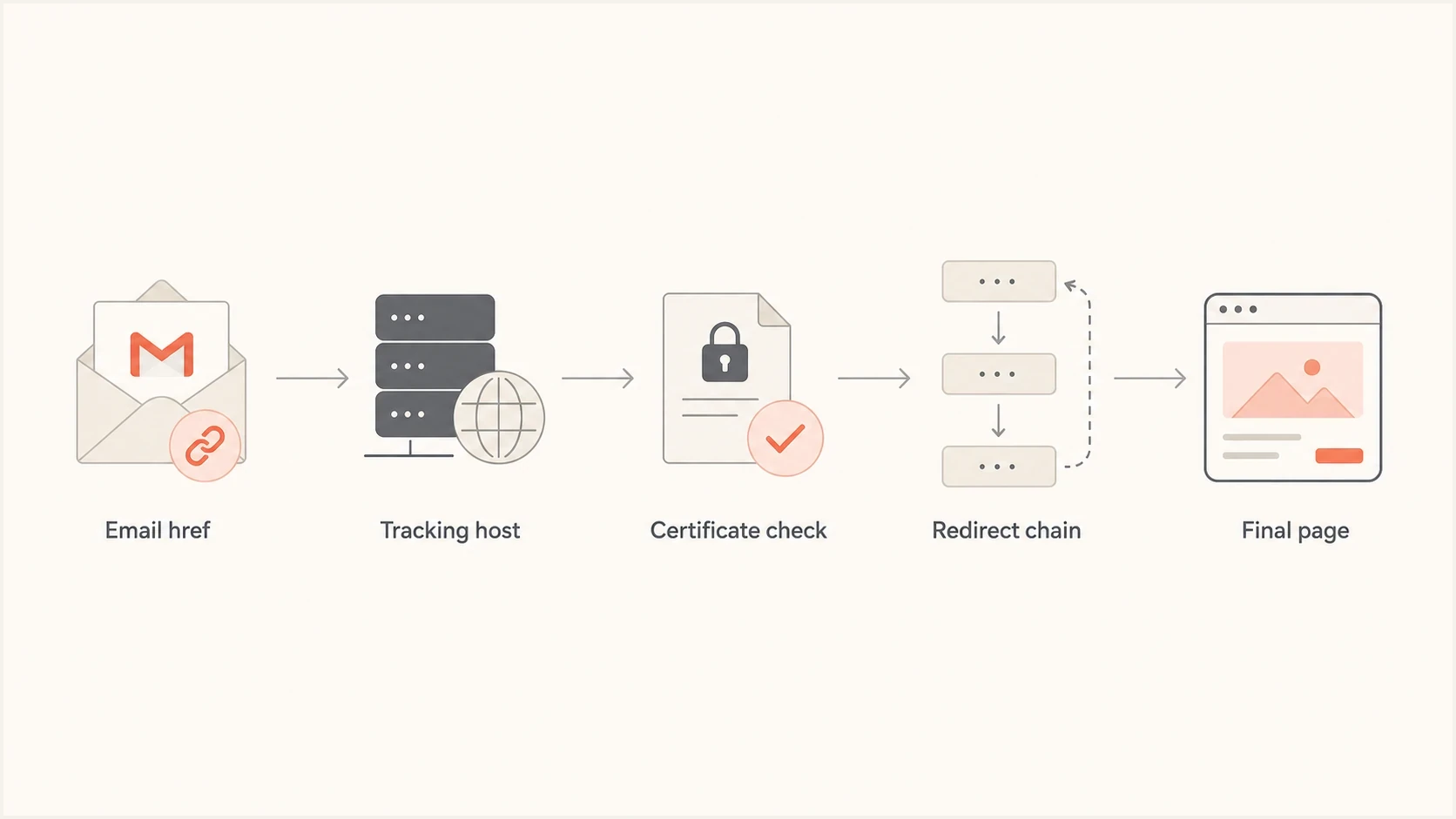
Flowchart of Gmail's link checks across the email href, tracking host, TLS certificate, redirects, and final HTTPS page.
The causes to check first
Start with the link infrastructure, not the landing page design. The warning often comes from one of a small set of technical causes, and each one has a different fix.
- Shared redirector: A shared ESP click domain can carry reputation noise from other senders, especially if they sent links to abusive pages.
- Tracking certificate: The tracking hostname needs a valid certificate for the exact name reached over HTTPS. A final-page certificate does not fix a bad first hop.
- HSTS behavior: If a parent domain sends an HSTS policy with includeSubDomains, browsers and scanners can force HTTPS on a tracking subdomain that was only prepared for HTTP.
- Unsafe content: One risky page or old redirect on the same host can hurt the domain's safety signal.
- Misleading link text: A link that appears to go to one brand but redirects through unrelated hosts can look deceptive.
- Shortened URL: A URL shortener hides the destination and adds another redirect host for Gmail to evaluate.
- New domain: A newly created tracking subdomain with little history gives Gmail less evidence to trust.
- Blocklist hit: A blocklist or blacklist listing for a sending IP, redirect host, or linked domain is a reason to investigate reputation, but it does not prove what triggered Gmail. Suped's blocklist monitoring helps track that signal separately from authentication.
- Weak authentication: Broken SPF, DKIM, or DMARC does not create this link warning by itself, but it lowers Gmail's trust in the message.
Google's Safe Browsing status is useful when the final domain or tracking domain has a visible safety issue. It will not explain every Gmail decision, but it gives a clear first check for known unsafe URL signals.
The HTTP question also matters. Some ESPs historically used HTTP tracking links and relied on the destination to upgrade to HTTPS. That can avoid a certificate mismatch on a CNAME tracking host, but it can also create a different warning if Gmail distrusts insecure links. The better answer is a correctly configured HTTPS tracking hostname, not a permanent fallback to HTTP. For more context, see HTTP versus HTTPS.
Link warning risk signals
A practical way to sort Gmail Suspicious Link causes during troubleshooting.
Low
Clean path
Final page uses HTTPS, tracking cert is valid, and the redirect chain is simple.
Medium
Needs review
The tracking domain is new, shared, shortened, or redirects through more hosts than needed.
High
Fix first
The tracking host has a certificate error, unsafe history, or a known harmful destination.
How to diagnose it
The cleanest diagnosis is to inspect the actual email href and test the message as Gmail receives it. Do not copy the visible URL from the email body and assume that is the URL Gmail judged. View the message source, inspect the anchor href, or use a test inbox that preserves the original message.
For a live test, send the same campaign to Suped's email tester and compare the link, authentication, and content findings against what Gmail showed. That gives you a repeatable baseline before changing DNS or ESP settings.
Email tester
Send a real email to this address. Suped shows a results button when the test is ready.
?/43tests passed
Check the sending domain and link domain together. Suped's domain health checker gives a quick read on DMARC, SPF, and DKIM, while the link review shows whether the warning is tied to the URL path instead of authentication.
- Capture the href: Record the exact link inside the email, including scheme, host, path, and query string.
- Resolve the CNAME: Look up the tracking subdomain and identify the platform host behind it.
- Test HTTPS first: Open the tracking hostname over HTTPS and confirm the certificate covers the exact host.
- Follow redirects: Trace each hop and remove extra redirects that do not add tracking or routing value.
- Check content: Look for login forms, file downloads, broken paths, open redirects, and expired campaign pages.
- Verify authentication: Confirm SPF, DKIM, and DMARC pass with the domains used in the message.

Email tester sample report showing total score, email preview, issue summary, and per-section results
What to fix
Fix the first risky host in the click path. If Gmail is warning on the tracking URL, changing copy on the final website will not solve it. The tracking hostname needs clean DNS, a valid certificate, a sane redirect path, and no unsafe URLs left behind from older campaigns.
If Google Search Console lists a security issue for a host you control, clean every affected page and request a security review after confirming the fix. Google says a review can take a few days to a few weeks. If Gmail marks the message itself as phishing but the message is legitimate, the recipient can use "Report not phishing" as feedback. That feedback does not replace technical cleanup.
Preferred tracking setup
links.example.com CNAME tracking.esp.example

Required:
HTTPS certificate covers links.example.com
First hop returns a clean redirect
Final URL returns 200 over HTTPS
Old campaign paths do not redirect to risky pages
Best practical setup
- Dedicated host: Use a branded tracking subdomain instead of a generic shared click host.
- Valid TLS: Make sure the certificate covers the tracking hostname exactly.
- Short route: Keep the redirect path simple and send users to the expected final page.
- Clean archive: Remove or safely retire old campaign paths, especially download and login URLs.
Shared redirector
A shared redirector is quick to launch, but it mixes your link reputation with other senders on the same infrastructure.
- Setup: Fewer DNS steps and less certificate work.
- Risk: Other senders can affect how the shared host is judged.
Dedicated tracking domain
A dedicated tracking domain takes more setup, but it gives you clearer ownership of link reputation and certificate hygiene.
- Setup: Requires DNS, SSL, and ESP validation.
- Risk: Your own campaign choices drive the host's reputation.
If the warning appears around login pages, payment pages, or account-update calls to action, reduce ambiguity. Use brand-consistent domains, avoid generic button text, and keep the visible destination consistent with the actual destination. The related guidance on Gmail security warnings covers broader content and sender-side checks.
Where DMARC and sender trust fit
A Gmail Suspicious Link notification is not a DMARC failure message. Still, sender authentication affects the context Gmail uses when judging the email. A message with weak authentication, a new sender pattern, and a tracking URL that redirects through a low-trust host has more combined risk than the same link inside a well-authenticated, consistent sending stream.
Suped's DMARC monitoring connects authentication results with issue detection, SPF and DKIM visibility, and blocklist or blacklist signals. For teams working from DMARC aggregate data, Suped turns source-level results into a practical queue for authentication and reputation fixes.
Issues page showing top issues, verified sources, unverified sources, and authentication pass rates
Suped workflow
- Confirm authentication: Check whether SPF, DKIM, and DMARC pass for the real sending sources.
- Find issues: Use automated issue detection and fix steps instead of reading raw aggregate reports.
- Watch reputation: Monitor blocklist and blacklist changes alongside authentication health.
- Stabilize DNS: Use hosted SPF, hosted DMARC, SPF flattening, and hosted MTA-STS where DNS churn creates risk.
Why the warning can differ by account
Google uses click-time link protection in official Gmail clients. Google Workspace administrators can also enable a setting that shows a warning when users click links to untrusted domains. The same email can therefore behave differently in a personal Gmail account, a managed Google Workspace account, or another mail client.
Use a controlled comparison to separate a broad URL problem from an account-specific policy:
- Send the same message: Deliver one unchanged message to a personal Gmail account and the affected managed account.
- Keep the href identical: Confirm both copies contain the same original tracking URL and were not rewritten differently.
- Compare the browser result: Open the destination directly in a clean browser profile to see whether a browser warning also appears.
- Check Workspace policy: Ask the recipient's administrator whether links and external images safety settings apply to that account.
If the warning appears only in one managed organization, record the account type, exact href, time, and warning text. The recipient's Workspace administrator owns the policy review, while the sender still owns the safety of every host in the click path. Do not ask an administrator to weaken link protection to hide an unresolved URL problem.
When the warning is outside your control
Some Gmail warnings are hard to reproduce because Safe Browsing checks can depend on browsing context, and Google Workspace policy can differ by account. A link can warn for one recipient and not another. That does not make the warning random. It means the test scope must include the affected account and the exact message.
Google's own Gmail phishing guidance tells users to treat suspicious links cautiously. Gmail also accepts phishing and not-phishing reports as feedback. Treat recipient reports as a signal to investigate, not a guaranteed way to change a link verdict.
|
|
|
|---|---|---|
Cert error | ESP or DNS | Fix TLS |
Shared host | ESP | Check host status |
Unsafe page | Website | Remove risk |
DMARC fail | Sender | Fix DNS |
Workspace-only | Recipient admin | Review policy |
Use this table to decide who needs to act first.
If an ESP owns the shared redirect host and that host has a reputation issue, move to a dedicated branded tracking domain, ask the ESP to validate SSL for the exact host, and pause risky campaigns until the click path is clean.
Views from the trenches
Best practices
Inspect every redirect hop before judging the visible HTTPS landing page as safe in Gmail.
Use a dedicated tracking subdomain with a certificate that covers that exact hostname.
Retest with real Gmail inboxes after DNS, certificate, and redirect changes settle.
Common pitfalls
Assuming HTTPS on the final page proves the tracking link is trusted by Gmail too.
Leaving old redirect paths live after campaigns end gives scanners more risky URLs to review.
Sharing an ESP redirect host with other senders exposes you to reputation noise and surprises.
Expert tips
Check the certificate name, redirect host, and final host as separate risk points first.
Keep link text honest, so Gmail does not see a mismatch between promise and destination.
Monitor blocklist and blacklist hits on tracking domains, not only sending IPs, daily.
Marketer from Email Geeks says a site can trigger the warning when other content on the same host has a poor safety signal.
2020-04-03 - Email Geeks
Marketer from Email Geeks says shared ESP redirect domains can pass reputation problems between senders when the same hostname handles risky URLs.
2020-04-03 - Email Geeks
The practical answer
Gmail shows the warning because HTTPS is only one part of link trust. The problem is often the tracking URL, CNAME target, TLS certificate, redirect chain, unsafe historical content, or sender context. A blocklist or blacklist signal can support the investigation, but it does not identify Gmail's exact trigger. Inspect the href Gmail sees, not just the page the user reaches after the redirect.
For most senders, the durable setup is a dedicated branded tracking domain with valid HTTPS, short redirects, clean final pages, and healthy SPF, DKIM, and DMARC. Suped supports that workflow by combining authentication monitoring, hosted DNS options, alerts, issue steps, and reputation visibility.




