Why is a Verizon email address not receiving specific emails but receiving others?

Published 21 Jul 2025
Updated 17 Jul 2026
14 min read
Summarize with
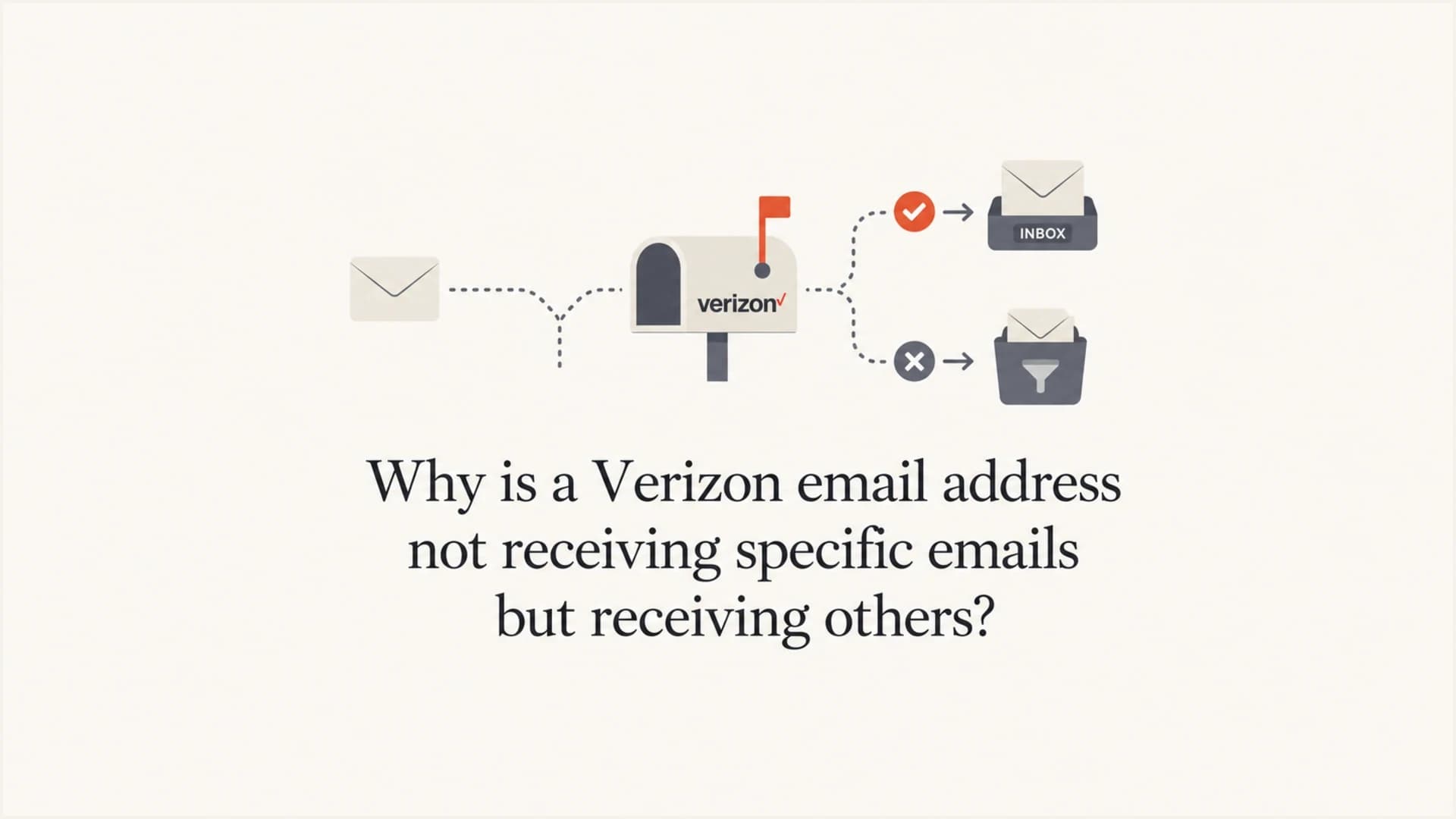
Updated on 17 Jul 2026: We clarified who hosts legacy Verizon mailboxes, corrected the filter workflow, and updated the DMARC examples for RFC 9989.
A Verizon email address that receives some emails but not one specific type is usually dealing with a mailbox-level rule, a mail client filter, a local security app, or a provider-side content decision. If other messages from the same sender reach the inbox, I put global blocking lower on the list and start with anything unique to that recipient, device, mailbox, and message template.
The important distinction is whether the mailbox provider accepted the message. If your sending platform shows delivered, that normally means AOL or Yahoo accepted it, then a filter, folder rule, sync issue, or client action kept it out of the visible inbox. If you have a bounce, deferral, TSS04 response, PH01 error, or another SMTP rejection, the cause is on the sender or provider delivery path.
For one Verizon recipient, I would not start by changing the whole sending setup. I reproduce the exact message, inspect the headers, identify the provider and recipient's client, and check folder and rule paths before touching DNS or sender reputation.
The direct answer
If a Verizon address gets normal mail but misses a specific message, the likely cause is a rule, spam decision, device filter, or local client action tied to that mailbox. Next are message content, sender authentication, a damaged contact or blocked sender entry, or narrow blocklist (blacklist) reputation.
Verizon retired its consumer email service in 2017. A surviving @verizon.net address is hosted by AOL Mail or Yahoo Mail, although the user can read it through Outlook, Apple Mail, a mobile app, or another IMAP or POP client. Each layer can move, hide, mark, delete, or quarantine a message after provider acceptance.
I ask for the exact recipient, sender, subject, send timestamp, hosting provider, mail client, and whether the missing email appears in spam, trash, archive, all mail, or another folder. Without those details, people waste time checking sender DNS when the cause sits inside an AOL or Yahoo filter, Outlook rule, or mobile app.
- Acceptance evidence: Find whether the sending system has a delivered event, a bounce, a deferral, or no event at all.
- Mailbox scope: If one Verizon recipient fails while others receive the same email, focus on that mailbox first.
- Message scope: If only password resets, receipts, or product notifications disappear, compare that template to messages that arrive.
- Client scope: Check provider webmail, desktop, and mobile separately because each layer can apply its own filtering.
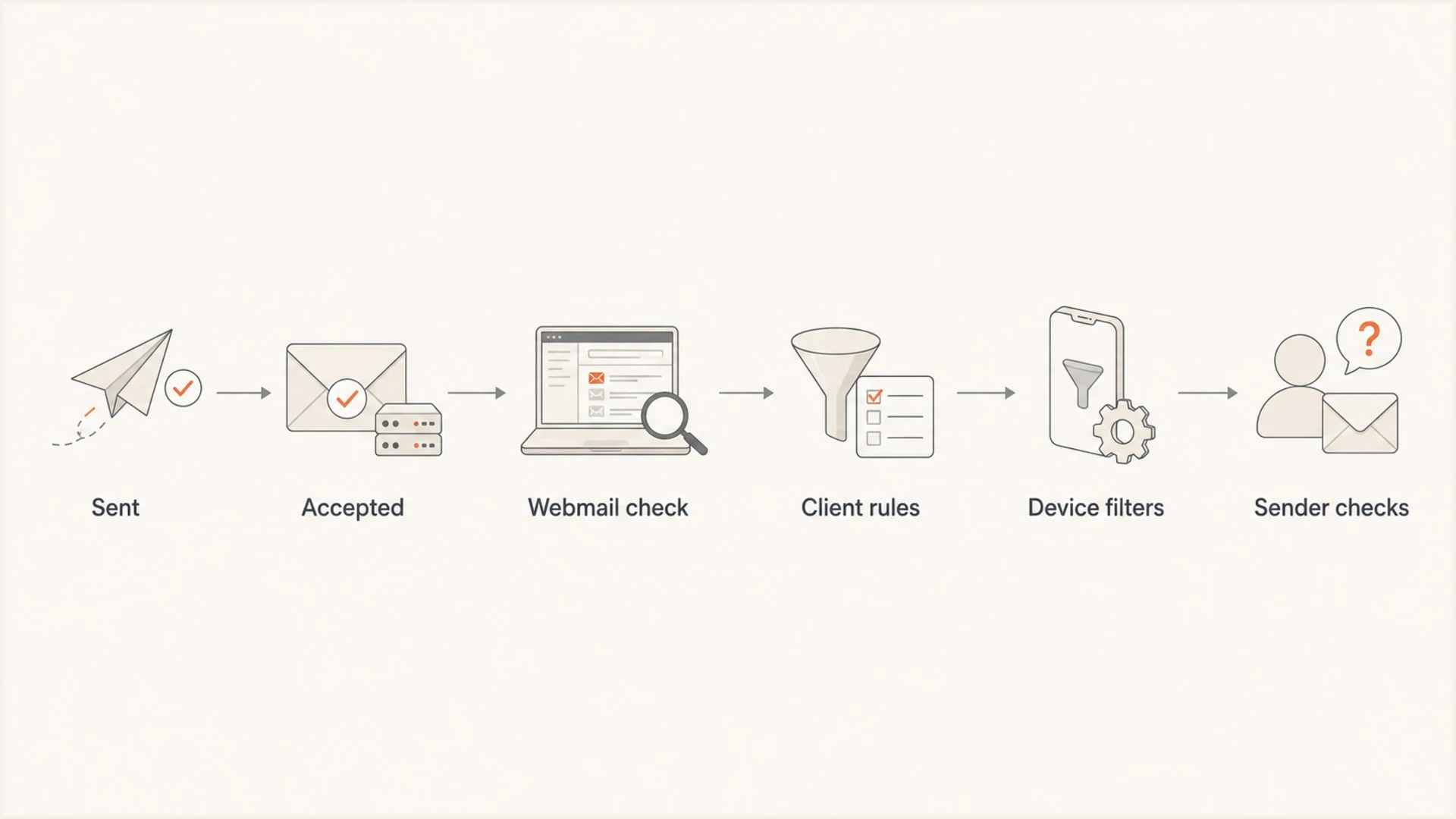
Troubleshooting path for a Verizon recipient missing one type of email.
Identify the mailbox provider first
The @verizon.net domain does not tell you which company currently stores the mailbox. Verizon stopped hosting consumer email in 2017. People who kept an active address moved it to AOL Mail, while some existing Verizon Yahoo users continued on Yahoo Mail.
Ask the recipient which webmail site accepts the full @verizon.net address. Sign in there before opening a desktop or mobile client. This identifies the provider whose spam controls, blocked-address settings, filters, folders, and support process apply.
- AOL-hosted address: Check AOL Mail filters, blocked senders, spam, trash, and connected app settings.
- Yahoo-hosted address: Check Yahoo Mail blocked addresses and domains, spam, filters, and connected clients.
- Unknown provider: Have the recipient confirm where they sign in before changing mailbox rules or asking for support.
If the address receives any current mail, it survived the 2017 retirement and has an active host. For mailbox access, filters, or account settings, contact the host rather than Verizon. Sender logs and headers still control the sender-side investigation.
Most likely causes
When the problem is narrow, I sort causes by where the message can change direction: the hosted mailbox, the app reading it, the sender side, then broader reputation. That order keeps the investigation grounded in evidence.
|
|
|
|---|---|---|
Mailbox rule | Only one recipient misses it | Rules and folders |
Spam folder | Delivered but unseen | Spam and trash |
Blocked sender or domain | One source disappears | Block settings |
 Outlook rule Outlook rule | Webmail differs | Client rules |
 Yahoo/AOL filter Yahoo/AOL filter | Provider accepts it | Webmail settings |
POP download | Webmail loses messages | Leave copy on server |
Blocklist issue | Bounces appear | IP and domain |
Authentication | Header failures | SPF and DKIM |
Start with the rows near the top when only one Verizon recipient is affected.
A user-created filter is the cleanest explanation when the recipient receives other mail from you. The rule does not have to mention your exact sender. It can trigger on subject text, a domain, a word in the body, a sender display name, an attachment type, or an old contact entry. A rule that once made sense can become a silent delivery problem months later.
Local filtering is the next place I check. Desktop mail clients can learn behavior over time, and security software can scan mailboxes or mail traffic. With IMAP, a move or deletion can sync to every connected client. With POP, one client can download a message and remove the server copy. That is why the account needs to be checked in provider webmail and on every connected device.
Mailbox-side causes
- Rules: A rule moves the message to a folder, archive, spam, trash, or a local store.
- Training: A spam filter learned that similar messages belong outside the inbox.
- Sync: A connected client moves, deletes, or downloads the message before the user sees it.
Sender-side causes
- Template: The missing message has different links, headers, subject wording, or attachments.
- Authentication: SPF, DKIM, or DMARC fails for one mail stream while another stream passes.
- Reputation: A sending IP, domain, or URL appears on a blocklist or blacklist.
Check whether the mailbox provider accepted the email
The investigation changes completely based on SMTP evidence. If your ESP, app, or MTA has a delivered event for that Verizon address, then the AOL or Yahoo mail system accepted the message. At that point, the question becomes where the hosted mailbox, app, or device placed it.
If you see a hard bounce, temporary deferral, or a policy response, keep the recipient out of the troubleshooting loop until you understand the server response. A Yahoo or AOL policy code points at sender reputation, authentication, or content. For that path, review Yahoo TSS04 blocking before changing templates.
Delivery evidence to collecttext
recipient: user@verizon.net
message_id: 20260517.123456.app@example.com
send_time: 2026-05-17 10:42 UTC
smtp_result: 250 accepted
provider_event: delivered
client_seen_in: not found in inbox
The phrase "not receiving" hides two different states. The email either failed before acceptance, or it was accepted and hidden from view. I keep those separate because the fixes are different. You do not fix an Outlook rule by changing SPF, and you do not fix a Yahoo rejection by asking the user to search the inbox.
- Delivered: Search the hosting provider's webmail first, then every connected client and device.
- Deferred: Wait for the final result, then compare the response text to other recipients.
- Bounced: Treat the SMTP code as the source of truth and fix the sender-side cause.
- No event: Confirm the app sent the message and did not suppress the recipient after a bounce, complaint, or unsubscribe.
A paid product or paid account does not rule out mailbox filtering. Paid mail still moves through spam filters, user rules, sender reputation checks, link analysis, attachment scanning, and local security software.
Inspect the mailbox and client
For a Verizon address, I ask the recipient to log into the hosting provider's webmail first. This removes Outlook, Windows Mail, Apple Mail, and phone apps from the first pass. Search for the sender address, subject text, and a unique word from the missing email. Then check spam and trash manually, plus archive, deleted items, all folders, blocked senders, and blocked domains.
After that, I check the local client. Outlook has rules, junk settings, blocked senders, safe senders, focused inbox behavior, add-ins, local folders, and cached search behavior. Windows Mail has fewer controls, but it can still sync a view that differs from webmail. A POP client can remove the server copy after download, while an IMAP client can sync a move or deletion across devices.
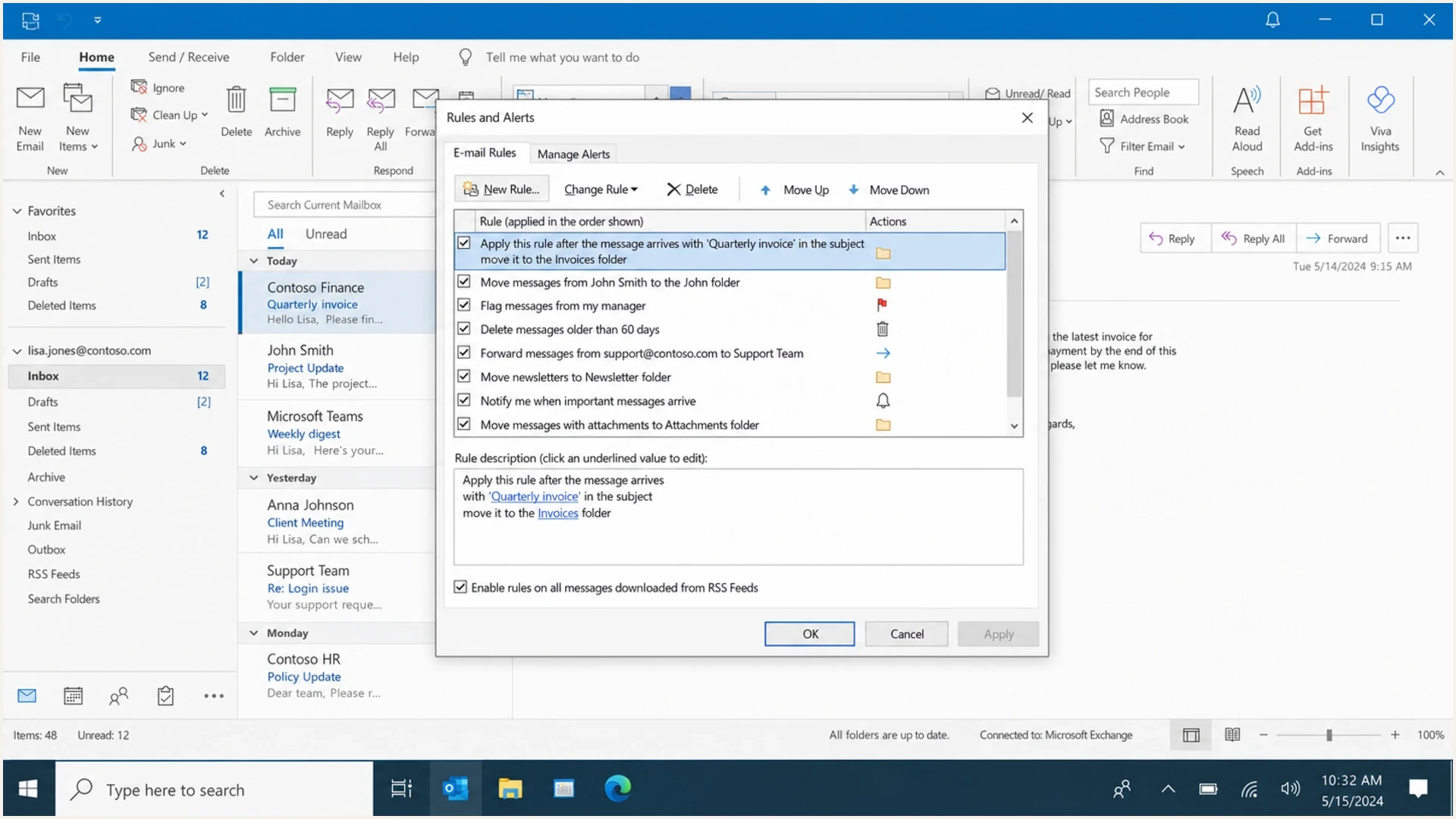
Microsoft Outlook rules can move specific emails before the user sees them.
If the wanted message is in spam, mark it as not spam and add the sender to contacts or the provider's allowed list where that option exists. Then unblock the address or domain and correct any conflicting filters. Yahoo runs spam filtering before user filters, so a top inbox rule cannot guarantee that a provider-classified spam message reaches the inbox.
- Webmail first: Confirm whether the missing message appears in the provider mailbox before opening a desktop client.
- Spam and blocks: Mark wanted mail as not spam, then review blocked addresses and blocked domains.
- Rules next: Review filters in order and remove broad or conflicting conditions.
- Every device: Check phones and tablets even when the recipient usually reads mail on a PC.
- Security apps: Review mail scanning, spam folders, quarantines, and local logs.
A practical recipient-side fix
Mark the wanted message as not spam, unblock the sender or domain, and correct any filter that moves it. Then send the exact missing template again and confirm the message appears in provider webmail and in the user's chosen client.
Compare the missing email to emails that arrive
If the same Verizon address receives one message from you but not another, compare the two messages. I look at the envelope sender, visible From address, return-path, subject, links, attachments, DKIM selector, sending IP, and headers. It is common for transactional mail and marketing mail to use different infrastructure even when they use the same brand domain.
This is where a real test message helps. Send the exact message that fails to a seed mailbox and inspect the full headers. Suped's email tester is built for this workflow: send a real email, then review authentication results, content issues, DNS findings, and delivery signals in one report.
Email tester
Send a real email to this address. Suped shows a results button when the test is ready.
?/43tests passed
For the message itself, small differences can matter. A reset link hosted on a different domain, a PDF attachment, a URL shortener, a missing plain-text part, or a From domain that differs from the bounce domain can be enough to push a single template into spam or rejection. Do not assume all messages from the same app have the same authentication path.

Email tester sample report showing total score, email preview, issue summary, and per-section results
Suped is our DMARC reporting and email authentication platform. In this workflow, use its DMARC reports and SPF or DKIM checks to find differences between the working and missing mail streams. Use its blocklist monitoring when SMTP logs show that reputation problems extend beyond one mailbox.
- Headers: Compare Authentication-Results, Return-Path, DKIM selector, and Received chain.
- Links: Check whether the missing template uses a different tracking, login, or file domain.
- Attachments: Remove the attachment for one test and compare the result.
- Subject: Test whether specific wording triggers a folder rule or spam training.
Verify SPF, DKIM, and DMARC
Authentication is not the first thing I change for a one-recipient problem, but I still verify it. Yahoo's sender requirements apply across the consumer email brands hosted by Yahoo Mail. A failed DKIM signature or an SPF pass on a domain that does not match the visible From domain can push one stream into spam while another reaches the inbox.
Use a domain health check when you need a broad DNS view across SPF, DKIM, and DMARC. For ongoing policy work, Suped's DMARC monitoring shows which services pass, fail, or send unauthenticated mail.
Example DMARC recordsdns
v=DMARC1; p=none; rua=mailto:dmarc-reports@example.com
v=DMARC1; p=quarantine; rua=mailto:dmarc@example.com
A good DMARC check answers whether the domain publishes a valid record, whether legitimate senders pass SPF or DKIM with a matching domain, and whether the policy matches the business risk. RFC 9989 removed the pct tag, so stage enforcement by finding and fixing legitimate sending sources before changing policy.
Authentication evidence
Use the affected stream's results to decide when sender-side action is needed.
Healthy
Aligned pass
SPF or DKIM passes with a matching domain for the affected stream.
Needs review
Mixed results
Working and missing templates use different domains, selectors, or sending paths.
Fix first
Repeated failure
The affected stream repeatedly fails authentication or domain matching.
Do not move a domain straight to a strict DMARC policy while debugging a single Verizon complaint. Confirm every legitimate stream first, then stage policy changes based on reports and test sends.
Look for reputation or blocklist signals
If there is an SMTP rejection, delayed delivery, or several Verizon, Yahoo, or AOL recipients are affected, reputation moves higher on the list. A domain, IP, or URL on a blocklist (blacklist) can cause selective filtering. It can also cause one mail stream to fail while another passes, especially when different templates use different sending pools.
Suped's blocklist monitoring keeps that evidence visible instead of waiting for complaints. It checks domain and IP reputation across major blocklists, then ties findings to the domains you already monitor for authentication.

Blocklist monitoring page showing domain and IP checks across blocklists with importance and status
When a provider blocks or throttles a message, preserve the bounce text and timestamps. If you see Yahoo or AOL delay patterns, read Yahoo and AOL delays and compare the symptoms. If the message arrives but lands in spam, compare it with same sender to spam because the cause often sits inside content and mailbox training.
One Verizon mailbox
Treat this as recipient-specific until evidence says otherwise. Check provider webmail, folders, rules, connected apps, and local security software first.
Many related mailboxes
Treat this as a sender-side pattern. Review SMTP codes, authentication, content, IP reputation, and blocklist or blacklist listings.
A clean troubleshooting workflow
The fastest way through this is a controlled test. Do not resend five different emails and ask whether any arrived. Send the exact missing template once, record the time, and watch the sender logs and recipient mailbox. If the message disappears again, you have a repeatable test case.
- Identify the host: Confirm whether AOL or Yahoo hosts the @verizon.net mailbox.
- Confirm client: Ask whether the recipient uses webmail, Outlook, Windows Mail, Apple Mail, a phone app, or more than one.
- Check webmail: Search every folder before the desktop client opens or syncs.
- Capture logs: Save delivered, deferred, bounced, suppressed, or rejected events with timestamps.
- Compare templates: Place an arriving message and a missing message side by side.
- Correct settings: Mark wanted mail as not spam, unblock the source, and repair conflicting filters.
- Escalate evidence: Use headers, SMTP codes, and DNS checks instead of screenshots alone.
If the recipient needs mailbox help, contact the provider that hosts the address. Verizon's email support path covers device and app checks, but legacy @verizon.net mailbox support belongs to AOL or Yahoo. Sender-side evidence still comes from your logs and headers.
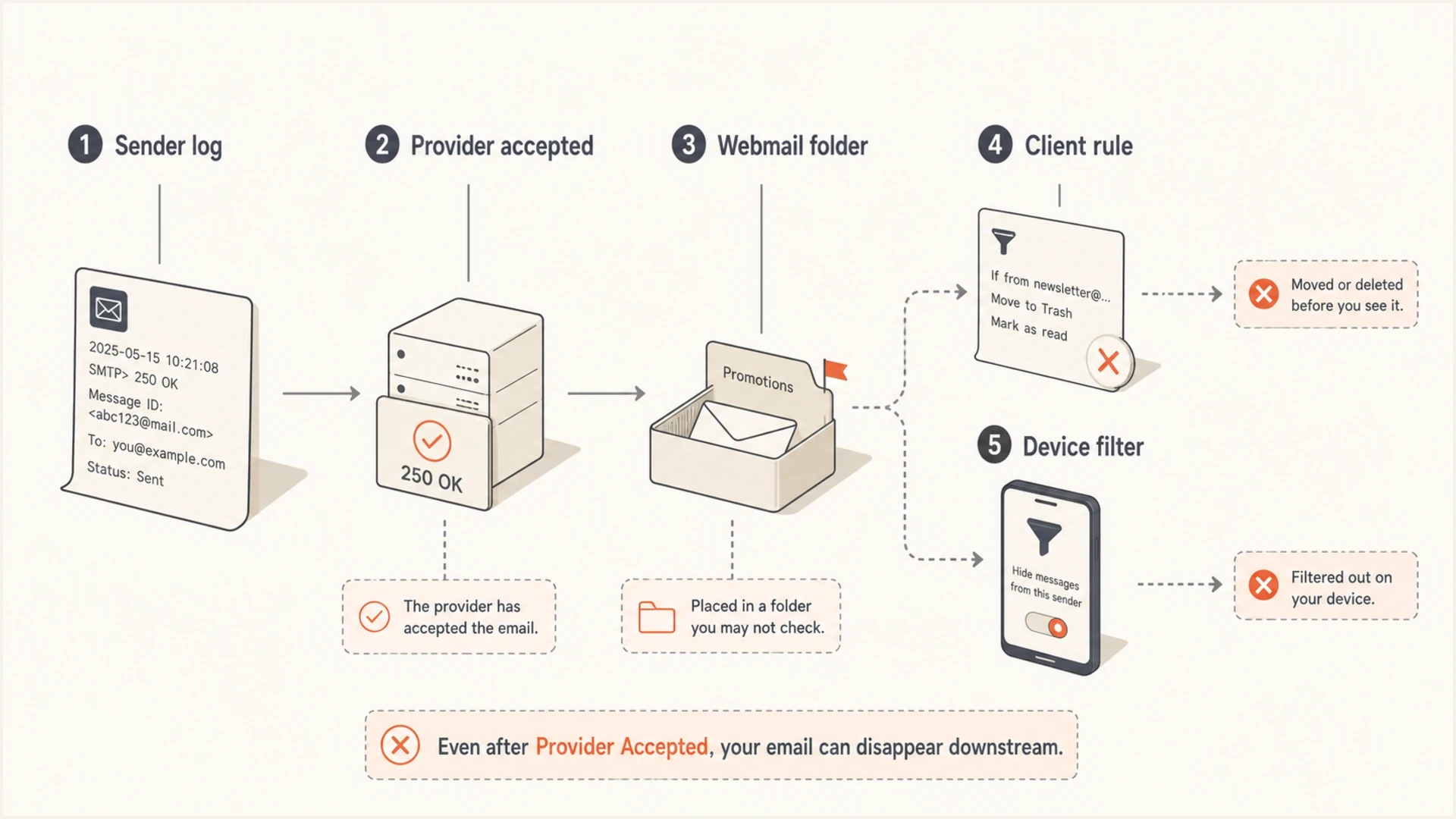
Accepted email can be hidden by webmail folders, client rules, or device filters.
The outcome I want is specific: the message is in a hidden place, rejected with a known code, suppressed before sending, or altered by a rule I can name. Anything less keeps the team guessing.
Views from the trenches
Best practices
Confirm webmail and every connected client before changing sender DNS or templates.
Capture delivered, deferred, bounced, and suppressed events with exact timestamps.
Correct spam, block, and filter settings before testing the same wanted email again.
Common pitfalls
Assuming Verizon still hosts the mailbox sends account support to the wrong company.
Treating a delivered event as inbox placement hides folder moves and client actions.
Changing DMARC policy during one-recipient triage can create new sender-side risk.
Expert tips
Compare a working message and missing message for headers, links, attachments, and IP.
Search spam, trash, archive, and all folders before relying on the inbox view alone.
Use blocklist and authentication checks when failures spread beyond one recipient.
Expert from Email Geeks says a narrow failure where other mail arrives usually points to a mailbox rule, folder move, or local filtering choice.
2024-09-18 - Email Geeks
Marketer from Email Geeks says the mail client matters because Verizon accounts can be read through desktop software, mobile apps, and webmail.
2024-10-02 - Email Geeks
What I would fix first
For one Verizon address missing one kind of email, I would first identify whether AOL or Yahoo hosts it, verify acceptance, search provider webmail, inspect the active client, and review connected devices. If the message is in spam, mark it as not spam. Then unblock the sender or domain, correct conflicting filters, and repeat the controlled test.
If the evidence shows bounces, delays, or the same issue across multiple Verizon, Yahoo, or AOL recipients, switch to sender-side work: authentication, message content, URL reputation, IP reputation, and blocklist or blacklist checks. Suped keeps those checks in one workflow, which makes it easier to separate a one-mailbox issue from a wider deliverability pattern.




