
Why does the new Microsoft SNDS portal only offer WHOIS authorization?

Published 23 Jul 2026
Updated 24 Sep 2026
11 min read
Summarize with
Updated on 24 Sep 2026: We corrected the authorization guidance and added SNDS reattestation requirements.
If the new Microsoft SNDS portal offers only registry contacts, its reverse-DNS branch did not return eligible abuse@ or postmaster@ addresses for that request. Microsoft's current FAQ says the authorization algorithm uses reverse DNS and Registration Data Access Protocol (RDAP) independently. One valid PTR is not enough: sampled hostnames across the requested range must share a domain, and SNDS does not use the rDNS technique for ranges larger than /23.
RDAP can still return a carrier, hosting provider, cloud provider, or ESP contact because a dedicated sending IP can remain inside a provider-owned allocation. First retry the exact IP or a smaller range. If only provider addresses remain, ask the provider to approve the request, forward the authorization email, or click its authorization link for you.
What one clean PTR does not prove
A PTR such as mail.email.example.com identifies the hostname returned for one IP. It does not prove that every sampled IP in the requested range shares that domain or that the requester controls the IP allocation. Both the requested scope and its PTR consistency affect whether SNDS can offer rDNS role addresses.
Microsoft documents SNDS authorization as an automatic process and says its team cannot manually add or adjust authorization addresses. Third-party throttling can make some IP lookups fail temporarily, so retry a lookup error before changing DNS. A stable provider-only list should be checked against the requested range, PTR pattern, RDAP allocation, and ASN.
How SNDS chooses authorization addresses
SNDS exposes reputation and complaint data for sending IPs, so Microsoft requires an authoritative link between the requester and the IP space. The authorization algorithm accepts an IP, IP range, or Autonomous System Number (ASN). For IP and range requests, Microsoft documents reverse DNS and RDAP as independent sources, with routing data used to identify the associated ASN.
The rDNS method samples hostnames in the range. If they share one registrable domain, SNDS can offer postmaster@ and abuse@ at that domain, with a consistent first subdomain creating additional role addresses. The maximum request for this method is /23. The RDAP method starts with the first IP, finds the most specific allocation record, checks that it covers the full request, and offers email addresses in that record.
Reverse-DNS source
- Input: PTR hostnames sampled across the requested IPs.
- Recipient: The shared domain's abuse@ and postmaster@ mailboxes.
- Limit: This source is unavailable above a /23 request.
- Failure case: Missing or mixed-domain PTR hostnames prevent a match.
RDAP source
- Input: The most specific allocation covering the first IP.
- Recipient: Email addresses published in the allocation record.
- Coverage: The allocation must contain the full requested range.
- Failure case: Stale, redacted, or unreachable contacts block approval.
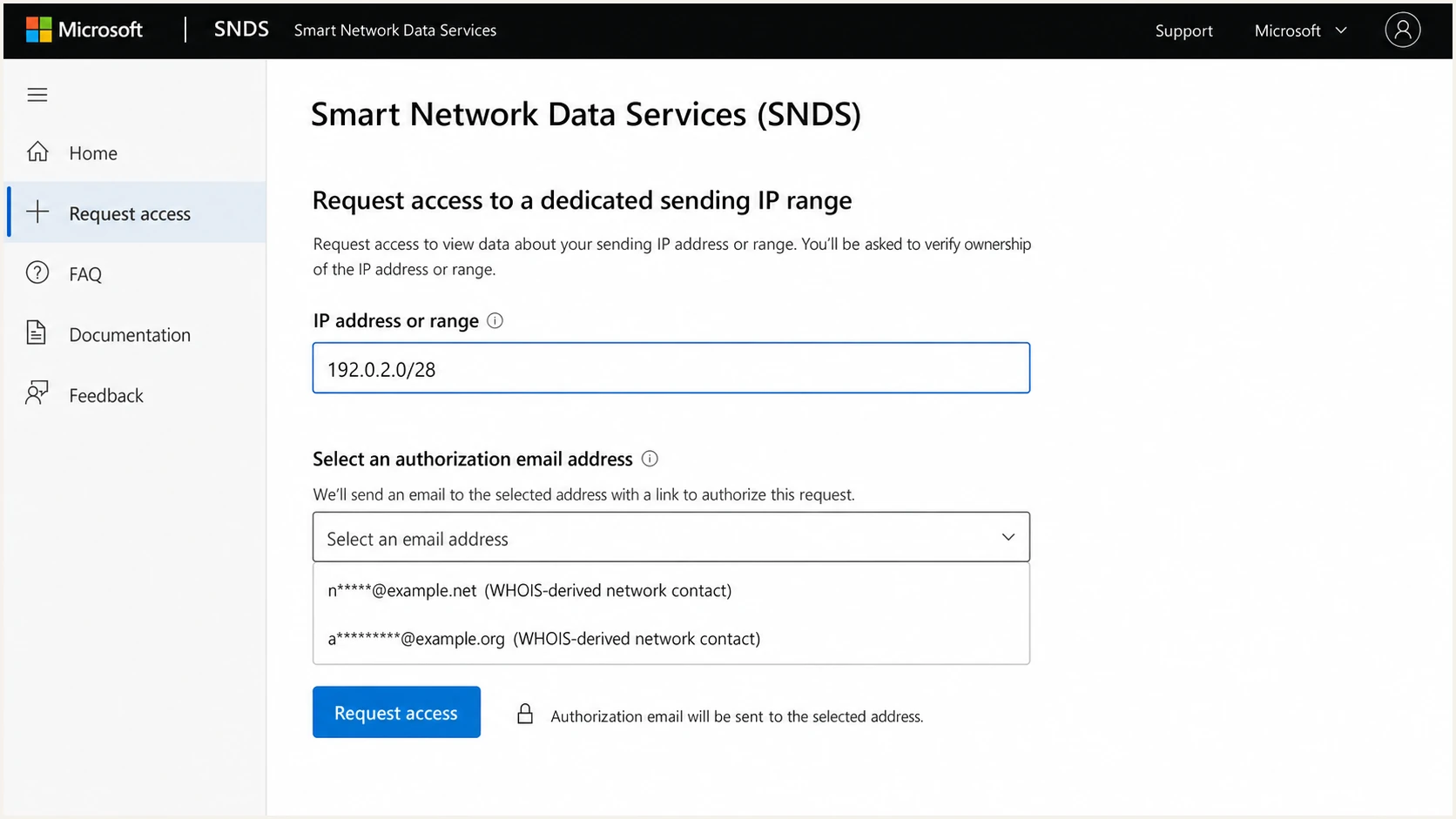
Microsoft SNDS request access screen showing provider authorization contacts.
Use the current Microsoft SNDS portal and compare the exact IP with the smallest useful range. Keep the request at /23 or smaller when testing rDNS eligibility. A smaller request can remove unrelated PTR domains or an allocation-boundary mismatch that suppressed the expected address.
What provider-only authorization means
Provider-only choices do not prove that SNDS has stopped using reverse DNS. They mean the current request produced authoritative provider contacts but no eligible rDNS role address. A dedicated IP can be dedicated operationally while remaining part of an ESP-owned or carrier-owned netblock, so RDAP identifies the provider even when the customer's domain appears in the PTR.
|
|
|
|---|---|---|
PTR pattern | Shared hostname domain | Can create role addresses |
RDAP | Allocation record | Can provide registry contacts |
ASN routing | Advertised network owner | Can add ASN contacts |
Delegation | Recipient vouches for requester | Practical provider path |
Authorization signals and their practical effect.
An RDAP record can contain an upstream abuse desk, a generic organization contact, a redacted address, or no usable recipient. Microsoft also says some IP lookups fail because third parties throttle queries. Those conditions can explain an empty list, unexpected provider contacts, or a temporary failure, but they do not establish that the reverse-DNS source has been removed.
Do not change PTR records as a shortcut
Correct missing or inconsistent PTR records when they are genuinely wrong, but do not rewrite production rDNS solely to influence the picker. An arbitrary change can break forward-confirmed reverse DNS, disrupt provider configuration, and complicate reputation analysis. It also cannot replace RDAP authorization for a provider-owned range.
For a deeper ownership caveat, the explanation of private WHOIS impact covers why public registration data and operational control can diverge.
How to get access now
Start by recording any working authorization before submitting another request. Save the authorized networks, requested scope, Microsoft account, approval recipient, approval date, and provider owner. This creates a baseline for troubleshooting and the next reattestation.
- Confirm the network: Match every sending IP to its provider, RDAP allocation, ASN, and PTR hostname.
- Reduce the scope: Test one IP, then the smallest useful range, keeping rDNS tests at /23 or smaller.
- Check PTR consistency: Verify that every sampled address returns a hostname under the expected domain.
- Capture evidence: Save the recipients, requested input, timestamp, diagnostics, and full portal error.
- Contact the recipient: Ask the provider to forward the email or use its link to authorize your account.
- Report a defect: Escalate repeatable lookup failures, but do not ask support to insert an address manually.
For provider-managed dedicated IPs, delegation is the practical route when only provider contacts appear. Microsoft says the selected recipient can forward the authorization message to the requester or click the link on the requester's behalf. Give the provider the Microsoft account, exact IP or CIDR, required access period, and renewal owner.
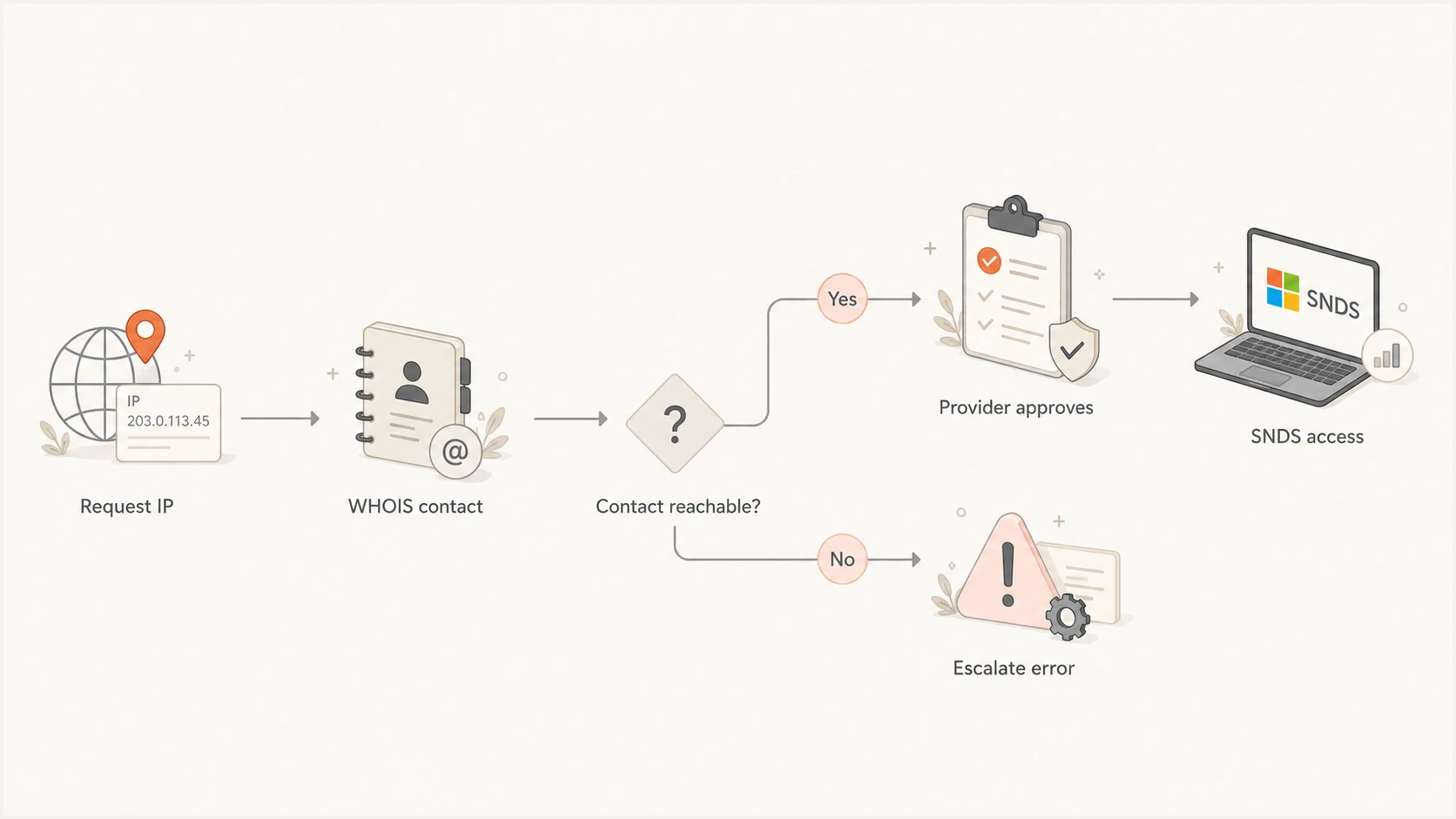
Microsoft SNDS access flow through an IP allocation contact.
If the portal returns no address or an unexpected fault, follow its diagnostic message and request a smaller range. Retry a lookup failure later because Microsoft documents third-party throttling as a known cause. If the same valid request fails repeatedly, send support the exact input and captured evidence.
Plan for 10-month reattestation
Microsoft now says SNDS network access expires 10 months after approval or migration. Reattestation is therefore part of routine access management, including for a range that has not changed. Track the controlling date yourself instead of treating an existing authorization as permanent.
- Record the approval or migration date and calculate the 10-month expiry.
- Assign an owner for the Microsoft account and each provider authorization contact.
- Confirm that the RDAP and role-mailbox recipients remain monitored before renewal.
- Start provider coordination early enough to complete authorization before expiry.
Check the reminder deadline
Microsoft says the deadline in the first network reattestation reminder can be inaccurate. That message is the first of three reminders and was sent about three months after migration. Use the 10-month period from approval or migration while Microsoft corrects future reminder dates.
Checks to run before escalation
Before escalating, verify that every IP in the requested scope has a stable PTR under the expected domain. Check that each hostname resolves forward to the same IP where the provider supports that setup. Also confirm that the sending domain publishes valid SPF, signs with DKIM, and has a DMARC record. Authentication checks will not unlock SNDS, but they separate access control from a mail configuration problem.
A broad domain health checker can expose broken authentication or DNS records before the provider and Microsoft investigate. Keep the results with the SNDS screenshots so each party sees the same technical state.
Also compare the IP allocation against your service contract. "Dedicated IP" can describe exclusive sending use without transferring registry ownership. That distinction explains why the customer can control mail operations while RDAP returns the ESP or hosting provider.
?
What's your domain score?
Deep-scan SPF, DKIM & DMARC records for email deliverability and security issues.
Once DNS is verified, reproduce the authorization request and write down the exact sequence. Compare one IP with the smallest useful range. If the recipients change, examine PTR consistency and RDAP boundaries. If the list changes between identical attempts without a DNS or registry update, report that instability.
Check the new SNDS URL before diagnosing an old bookmark or retired workflow. A valid account in the current portal removes one common source of misleading errors.
Minimum support case details
- Account: The Microsoft account used for the request.
- Request: The exact IP, CIDR, or ASN entered in SNDS.
- Sources: The PTR pattern, RDAP allocation, and displayed recipients.
- Evidence: Screenshots, timestamps, diagnostic text, and the full error.
Monitor deliverability while access is pending
SNDS access is useful, but waiting for authorization should not pause monitoring. Keep watching authentication pass rates, complaint signals available through your sending system, bounce codes, domain policy, and IP or domain blacklist (blocklist) status. A controlled message test also reveals header alignment and routing problems that an access request cannot show.
Send a controlled message through the affected dedicated IP and inspect it with the email tester. Repeat the test after DNS or provider changes so the evidence reflects the production route.
Suped's DMARC platform supports this workflow by turning aggregate authentication data into detected issues and repair steps. Suped does not replace SNDS authorization. It keeps domain-level authentication evidence available while the network owner and Microsoft resolve IP-level access.
Suped DMARC dashboard showing email volume, authentication health, and source breakdown
Suped's DMARC monitoring keeps SPF, DKIM, and DMARC results together, while alerts surface changes that need attention. Hosted DMARC supports staged policy management, and hosted SPF or SPF flattening helps teams manage senders while staying within lookup limits.
- Authentication: Track SPF, DKIM, DMARC policy, and sending-source changes.
- Reputation: Use blocklist monitoring for domain and IP blacklist checks.
- Operations: Route automated findings and repair steps to the responsible owner.
- Scale: Manage multiple client domains through Suped's MSP dashboard.
The boundary is clear: SNDS reports Microsoft's IP-level view, while Suped connects authentication results, blacklist (blocklist) status, and policy management for the domains using those IPs. Documenting both workstreams helps identify whether a problem belongs to DNS, the sending platform, the Microsoft portal, or the network owner.
Views from the trenches
Best practices
Document each network, account owner, authorization recipient, and approval date together.
Ask the netblock owner for a repeatable approval process before reattestation is due.
Capture the selected contacts and exact error before retrying or opening a support case.
Verify every sampled PTR and the RDAP allocation before diagnosing authorization failure.
Common pitfalls
Assuming one valid PTR guarantees role addresses for every range submitted to SNDS.
Changing production PTR records without checking range size and hostname consistency.
Treating a provider-only list as proof that Microsoft removed reverse-DNS authorization.
Waiting for SNDS access while leaving authentication and blacklist checks unattended.
Expert tips
Compare one IP with its smallest useful range to expose PTR or allocation boundaries.
Give the provider the Microsoft account, exact CIDR, access period, and owner upfront.
Track the 10-month access window yourself instead of relying only on reminder dates.
Keep RDAP ownership evidence beside DNS results so escalation stays narrowly scoped.
Marketer view
Marketer from Email Geeks reports seeing only provider contacts even when the requested IP has rDNS configured.
2026-07-15 - Email Geeks
Marketer view
Marketer from Email Geeks reports that some ranges still show an abuse mailbox while earlier choices can disappear.
2026-07-15 - Email Geeks
Plan around network ownership
Provider-only choices usually mean the rDNS method did not produce a role address for the submitted scope while RDAP or ASN data returned the network holder. First test a smaller range and check PTR consistency. If the ESP or upstream owns the allocation, ask it to approve or delegate access. If your organization owns the range, correct stale RDAP contacts and retry.
Do not rebuild working reverse DNS to chase a missing option. Preserve evidence, escalate repeatable lookup errors, schedule reattestation before the 10-month expiry, and keep authentication plus blacklist (blocklist) monitoring active while the access path is resolved.



