
How does private WHOIS impact email deliverability for high-volume senders?

Updated on 7 Oct 2026: We clarified how WHOIS privacy differs from registrar contact failures and added practical checks for bulk sender compliance.
Private WHOIS by itself is not a documented automatic deliverability penalty in the published Gmail, Yahoo, or Outlook bulk sender requirements. Registrar privacy should not be the first thing to change when mail starts landing in spam. Investigate SPF, DKIM, DMARC alignment, complaint rates, bounce rates, spam trap hits, domain and IP reputation, sending consistency, and recipient engagement.
The caveat is trust review. If your domain already has a behavioral problem, a blocklist or blacklist issue, or a complaint investigation, private WHOIS can make the sender harder to identify. In that moment, reviewers look for business identity somewhere else: a working website, contact page, abuse address, terms page, unsubscribe flow, and consistent branding. Before changing WHOIS privacy, send a real message through the email tester and inspect the actual authentication and content signals.
Does private WHOIS cause spam placement?
The published bulk sender requirements do not identify private WHOIS as a reason for spam placement. Privacy protection is common, registration data is often redacted, and legitimate businesses use it to protect personal registrant details.
Registration data still matters during identity checks. Published requirements do not disclose every spam-filter input, so they cannot establish how every receiver weighs privacy. A reviewer handling abuse or delisting questions needs to connect the sending domain to a real, contactable business.
Current high-volume sender requirements support that conclusion. Gmail sender rules and Yahoo requirements require SPF, DKIM, DMARC, valid forward and reverse DNS, low spam complaint rates, and easy unsubscribe. Outlook rules also require SPF, DKIM, and DMARC for high-volume senders. None of these published rules requires public WHOIS.
Gmail counts about 5,000 or more messages to personal Gmail accounts in a day as bulk sending, combining traffic across the same primary domain and its subdomains. Once classified, a sender remains a bulk sender. WHOIS privacy does not change these obligations. See Gmail's bulk sender definition.
Practical answer
Keep WHOIS private if privacy, registrar policy, or legal preference requires it. Make the sending identity easy to verify through the domain itself, then fix the measurable deliverability signals first.
- No automatic penalty: Private WHOIS alone is not a normal reason for spam placement.
- No free pass: Privacy does not protect a sender with bad list quality or failing authentication.
- Secondary risk: Hidden registrant data can slow a manual review after abuse reports or listings.
- Correct fix: Improve authentication, consent, volume control, and visible business identity.
Private WHOIS, RDAP, and privacy services
Private WHOIS is a convenient label, but generic top-level domain registration data is accessed through the Registration Data Access Protocol (RDAP). Since 28 January 2025, most gTLD registries and ICANN-accredited registrars have no obligation to provide legacy WHOIS; RDAP is the required service. ICANN's RDAP guidance explains the transition. Redaction and privacy options vary by registry and registrar, particularly for country-code top-level domains (ccTLDs).
Redaction, privacy services, and proxy registration are different. Redaction hides selected registrant fields in the public response. A privacy service substitutes contact details while the customer remains the registrant of record. A proxy service is the registrant of record and licenses use of the domain to its customer. ICANN's privacy and proxy definitions explain this ownership distinction. These arrangements do not themselves change the domain's DNS or email authentication.
What remains visible
A public RDAP response still provides domain details such as the registrar, registration and expiration dates, nameservers, status codes, and a contact mechanism. These records help with domain history and operational checks, but a creation date does not prove continuous ownership or a good sending history.
What to check before WHOIS privacy
Public registration data is incomplete for identity checks. Registries redact fields, registrars apply different policies, and privacy or proxy services are common for legitimate domains. Start an inbox placement investigation with the authentication and sending behavior covered by published sender requirements.
Registration data still helps when checking domain age, status changes, and obvious identity gaps. The adjacent question of public registration is useful, but it does not replace analysis of live sending behavior.
Primary delivery signals
- Authentication: SPF and DKIM pass results, plus DMARC alignment with the visible From domain through at least one of them.
- Volume: Daily send level, warm-up pace, spikes, cadence, and stream separation.
- Recipients: Complaints, bounces, spam trap exposure, and engagement patterns.
- Infrastructure: Forward DNS, rDNS, HELO, TLS, IP history, and domain reputation.
Review-time trust signals
- Registration privacy: Common for legitimate domains; published bulk sender rules do not require public registrant data.
- Website identity: Legal name, brand details, and working contact routes.
- Contactability: Abuse, postmaster, privacy, and support addresses that work.
- Continuity: Stable domain ownership, stable branding, and consistent sending purpose.
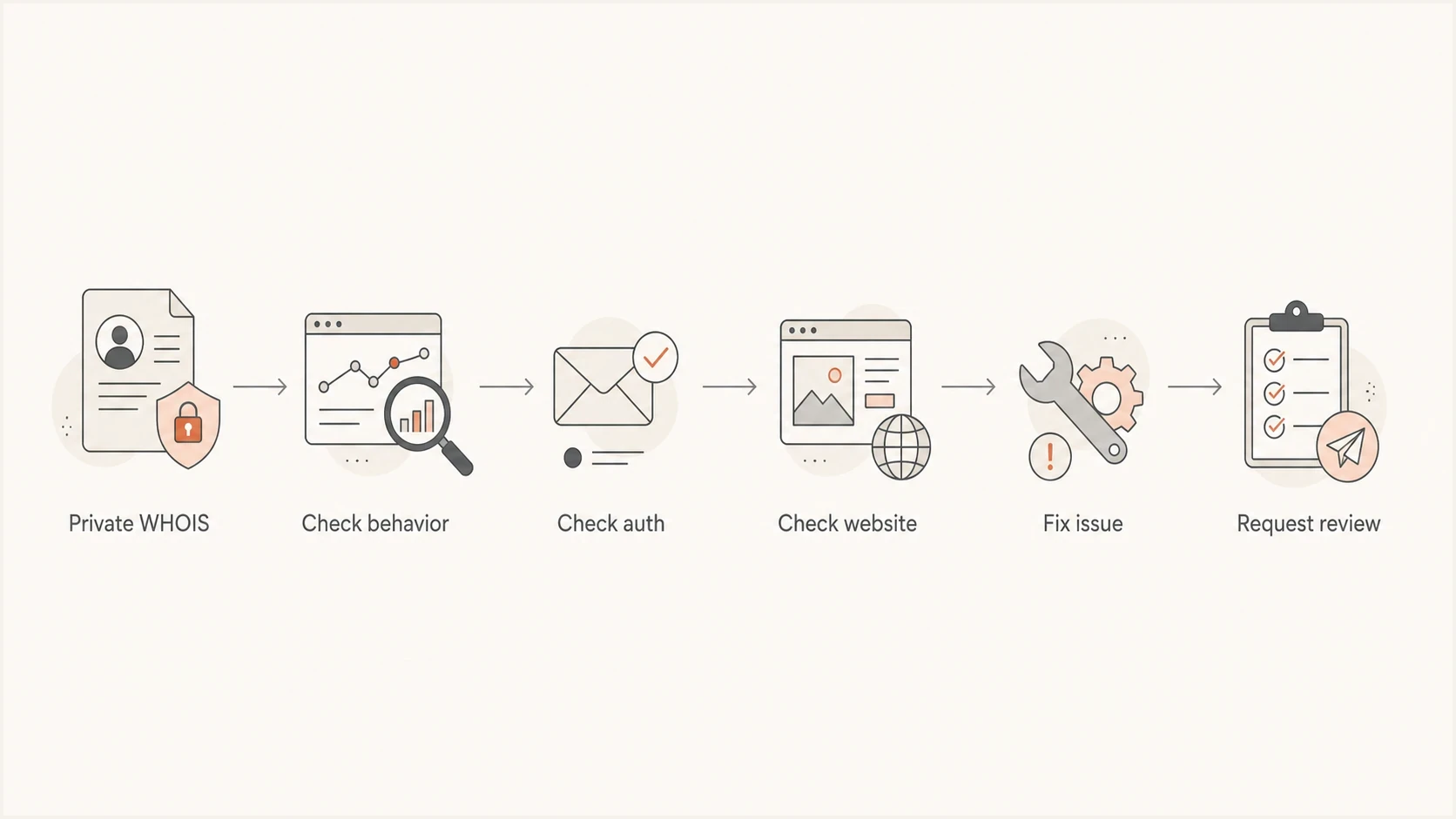
Private WHOIS review flowchart with behavior, authentication, website, and corrective-action checks.
When private WHOIS complicates an abuse review
Private WHOIS becomes more relevant after something else has already put the domain under scrutiny. A blacklist or blocklist operator, mailbox provider, investigator, or abuse desk wants to connect the sender to a real entity. If registration data is hidden and the domain has no useful website, the sender looks less accountable.
Read the actual listing notice or review request. A blocklist (blacklist) operator's identity questions and removal criteria depend on that operator; privacy alone does not explain a listing. Monitor listing status separately with Suped's blocklist monitoring instead of guessing from registration privacy alone.
|
|
|
|---|---|---|
Clean domain | No identified delivery problem | Keep identity visible elsewhere |
New domain | Limited sending history | Warm slowly and publish contacts |
Blacklist review | Cause of listing and sender identity | Fix behavior, then document identity |
No website | Difficult identity verification | Add legal name and contact routes |
High complaints | Unwanted mail and recipient complaints | Stop non-consenting traffic and suppress complainants |
Investigation priorities for senders with private registration data.
That distinction matters. If the root problem is complaints, imported lists, sudden volume, or poor targeting, making registration data public does not repair the reputation damage. Good sending practices still matter more than the registrar privacy setting.
Do not chase the wrong signal
If authentication fails, volume jumps, complaints rise, or old lists are imported, public registration data will not repair inbox placement. Fix the observable problem first, then make the business identity easy to verify.
What to publish instead of personal WHOIS
Keeping registration data private is normal, especially when a registrar redacts data by default or the domain traces back to an individual. Public business identity should still be easy to find. A domain used for bulk mail should not look disposable.
The sending domain should connect clearly to the brand through a website, redirect, or explanation on the main business website. This is an identity-review practice, not a requirement to host a website on every sending subdomain. Use a stable abuse contact, working postmaster address, privacy page, physical business details where appropriate, and a visible unsubscribe path. Marketing and subscribed mail should also support one-click unsubscribe. A domain health check helps verify the DNS and authentication pieces before reputation review starts.
Illustrative authentication records with placeholdersdns
_dmarc TXT "v=DMARC1; p=none; rua=mailto:dmarc-reports@example.com"
selector1._domainkey TXT "v=DKIM1; k=rsa; p=<provider-public-key>"
@ TXT "v=spf1 include:send.example.net -all"
Replace the example SPF include, DKIM key, and reporting address with your actual settings. These templates are not deployable as written. Start DMARC monitoring with p=none if authorized sources are still being checked, then assess quarantine or reject after verifying legitimate mail. MX records route incoming mail; they do not authenticate outgoing messages.
- Website identity: Publish the legal business name, brand name, contact routes, and privacy terms.
- Abuse route: Make abuse and postmaster mailboxes work, then monitor replies during incidents.
- Mail identity: Use consistent From names, branded domains, and clear unsubscribe handling.
- DNS proof: Keep SPF, DKIM, DMARC, forward DNS, rDNS, and MX records accurate where each applies.
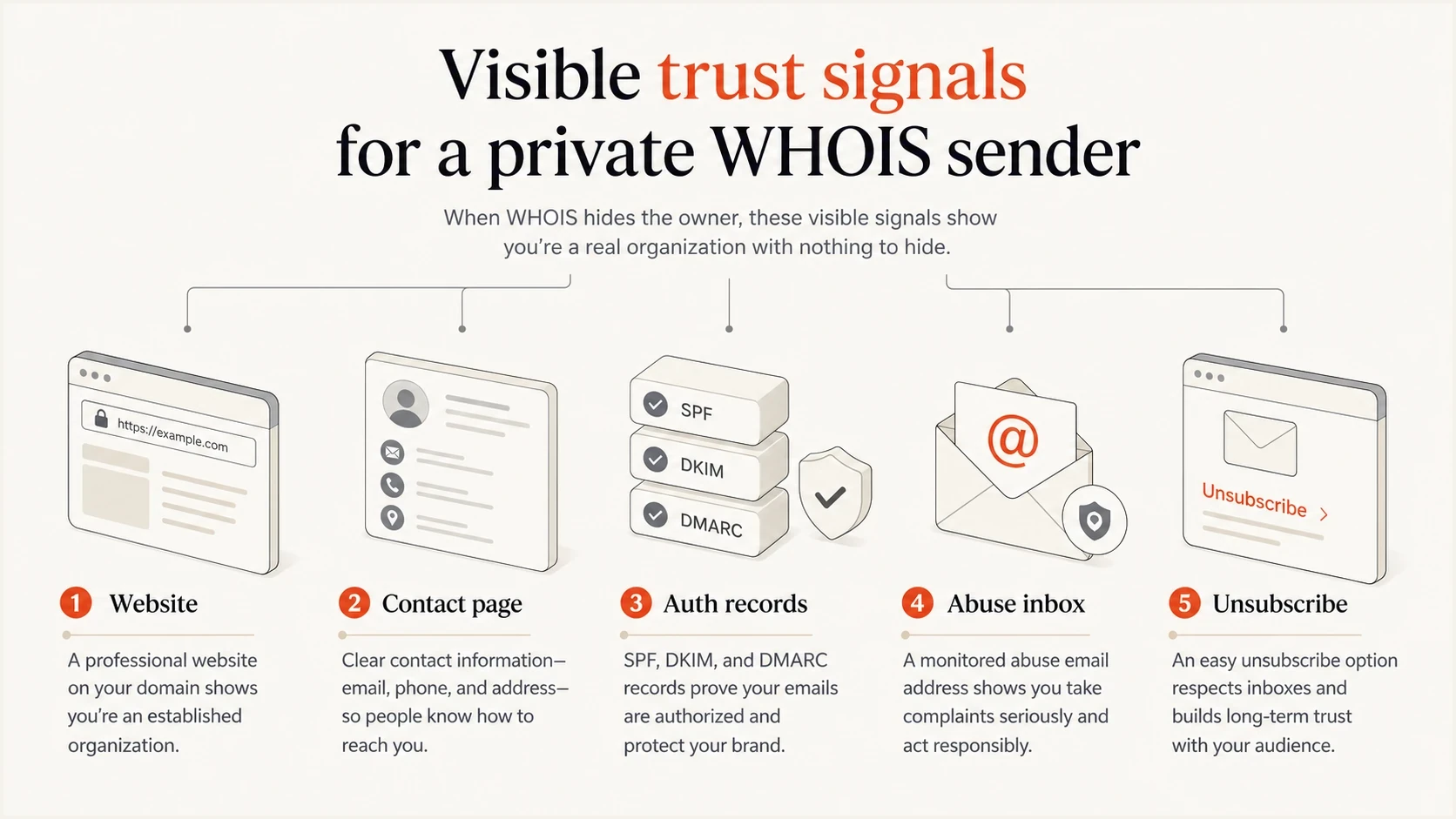
Business website, contact page, authentication records, abuse inbox, and unsubscribe path for private WHOIS senders.
Keep registrar contacts reachable and prevent suspension
Domain privacy protection limits public contact exposure, but accurate registrar contact details are still required. Missed verification requests or unresolved inaccuracies put registration at risk of suspension. Follow ICANN's registration accuracy guidance and keep the registrar account contact monitored.
Check how the public RDAP contact mechanism works. A pseudonymized email address or web form is for contacting the domain holder, not for carrying bulk email. ICANN's contact-form advisory explains that a form need not offer free text or direct forwarding, so confirm the actual contact process.
- Test the published contact route and confirm how abuse notices reach the responsible team.
- Keep a registrar recovery contact outside the sending domain so a DNS outage does not block recovery messages.
- Check renewal settings and billing details in the registrar account. ICANN's renewal guidance explains how expiry-related DNS disruption stops domain services.
- If DNS stops resolving, check clientHold and serverHold status and contact the registrar. ICANN's status-code guidance explains these holds, which disable DNS and interrupt email routing or authentication lookups.
High-volume sender checklist
High-volume senders get judged by operational quality over time. A single weak field rarely decides placement, but repeated weak signals stack up. At scale, small issues become visible quickly.
Prioritize the problem shown in SMTP responses, authentication results, or complaint data. Deliverability incidents do not follow a fixed sequence. Review registration privacy when a specific request raises identity or contactability questions.
- Authenticate every stream: Configure SPF and DKIM for every stream and verify DMARC passes through at least one passing identity that matches the visible From domain. Bulk sender compliance still requires both SPF and DKIM.
- Separate streams: Use subdomains to organize marketing and transactional mail, with separate IP pools where appropriate. Subdomains do not guarantee reputation isolation or bypass Gmail's bulk sender count.
- Control volume: Avoid abrupt volume changes that look unlike the domain history. Hold or reduce volume when 4xx deferrals or complaint rates rise.
- Prove consent: Keep source and opt-in records ready for review. Suppress hard bounces and complaints, using available complaint feedback loops (FBLs).
- Monitor complaints: Keep Gmail's user-reported spam rate below 0.1% and prevent it from reaching 0.3%; Yahoo requires rates below 0.3%. Provider complaint metrics use their own denominators, so an internal campaign rate is not interchangeable.
- Support easy opt-out: Use RFC 8058 HTTPS one-click unsubscribe with List-Unsubscribe and List-Unsubscribe-Post for Gmail marketing and subscribed mail, plus a visible body link. Honor requests within two days to meet Yahoo's requirement.
- Watch listings: Track blacklist and blocklist events, then fix the cause before asking for review.
- Show identity: Make business contact details easy to find on the domain used in email.
Next checks for common sender situations
Choose the next check using the sender's traffic and contact details.
Established sender
Monitor
Good authentication, stable volume, low complaints, visible business identity.
New sender
Build history
Limited sending history calls for gradual volume increases and closer monitoring.
Listing review
Resolve listing
A blacklist or blocklist issue has triggered a manual trust check.
Opaque sender
Verify identity
No useful website or contact route makes the sending business difficult to verify.
How Suped fits the workflow
Suped's DMARC reporting and email authentication platform helps teams review DMARC policy, SPF and DKIM results, reported sending sources, authentication failures, and blocklist status. That keeps WHOIS privacy in proportion when reports reveal an unapproved source or a DMARC alignment failure.
For a high-volume sender, the practical workflow is to monitor authentication, identify unapproved senders, stage policy changes, and alert on new failures. Suped's DMARC monitoring supports that workflow. Hosted DMARC, Hosted SPF, Hosted MTA-STS, and issue-specific fix steps help teams manage authentication while registration data stays private. DMARC aggregate reports describe authentication, not inbox placement, consent, or a provider's full reputation score; report delivery schedules also limit how quickly an alert can reflect a sending failure.
Issues page showing top issues, verified sources, unverified sources, and authentication pass rates
- Automated detection: Suped flags unauthenticated sources and explains the steps needed to fix them.
- Report-based alerts: Suped alerts teams to failures in received reports; detection timing depends on reporting receivers.
- Hosted controls: Hosted DMARC, Hosted SPF, and Hosted MTA-STS reduce DNS friction.
- MSP scale: Multi-tenant dashboards let teams review reported sources and authentication across managed domains.
What to do if you send at scale with private WHOIS
Keep private registration data unless a specific requirement justifies disclosure. For a delisting request, ask which policy applies and whether private evidence of domain control or business identity is accepted before publishing registrant details.
Fix the issue identified by the receiver, then prepare evidence of the sending business and domain control for an abuse or listing review.
Review checklist
- Verify authentication: SPF, DKIM, DMARC, rDNS, HELO, and TLS should be correct.
- Verify identity: Website, legal entity, contact routes, support details, and unsubscribe path.
- Review traffic: Complaints, bounces, inactive users, purchased data, and segmentation.
- Prepare evidence: Document consent, fixes made, traffic sources, and monitoring outputs.
- Change privacy last: Confirm the specific requirement and check whether private identity evidence is sufficient before publishing registrant data.




