
Does public vs private domain registration affect email deliverability?

Published 26 Jul 2025
Updated 3 Oct 2026
12 min read
Summarize with
Updated on 3 Oct 2026: We clarified how registration privacy, domain history, and sender authentication affect delivery.
No, public vs private domain registration usually does not directly decide whether your email reaches the inbox. A private registration record is not the same thing as a bad sender reputation, and a public record will not rescue a weak mail program.
The caveat is important. Registration privacy can add friction during a manual review by a corporate mail team, abuse desk, or blocklist (blacklist) operator when ownership is hard to verify. A thin web presence, poor authentication, sudden volume, complaints, or suspicious sending patterns provide more concrete reasons for concern. Privacy rarely causes the problem by itself.
Treat domain registration privacy as a small supporting detail. The bigger deliverability factors are authentication, list quality, complaint rate, bounce rate, sending consistency, domain history, website credibility, DNS correctness, and whether the mail stream matches what recipients expect.
Does private registration hurt inbox placement?
Private domain registration does not automatically hurt deliverability. Public domain registration does not automatically improve deliverability. Published sender requirements focus on authentication, DNS, complaint rates, and unsubscribe support rather than registrant-data visibility.
The practical answer is this: keep private registration if you need personal or staff privacy, but make your business identity easy to verify elsewhere. A real website, working contact page, visible business name, privacy policy, abuse contact, matching sender identity, and correct email authentication do more for trust than exposing a registrant phone number in a public lookup.
Working rule
If a domain sends customer or marketing email, ownership should be verifiable somewhere public. Registration data can help, but the domain website is often the better place because registrars commonly redact personal data.
- Keep privacy: Use private registration when exposing personal contact data creates a real privacy or security concern.
- Show ownership: Put clear business, support, and abuse contact details on the sending domain website.
- Fix fundamentals: Make DMARC, SPF, DKIM, rDNS, and sending identity clean before worrying about registration visibility.
This matters more for new domains, high-volume senders, affiliate programs, lead generation domains, cold outreach domains, and any sender that gets manually reviewed. A mature brand with consistent mail, good engagement, and clean authentication will not usually see a deliverability change after switching registration privacy on or off.
Use RDAP for current registration checks
WHOIS remains common shorthand, but RDAP has been the definitive source for gTLD registration data since January 28, 2025. Country-code domains follow registry-specific policies, so public data and domain privacy protection still vary by extension.
A redacted RDAP result does not prove that the owner bought a privacy service. A registrar can redact personal registrant information under applicable law or policy. A privacy service substitutes contact details while the customer remains the registered holder, while a proxy service can be the registrant of record. Registrar add-ons called 'domain protection' can instead cover transfer or account security. None of these settings is a direct deliverability verdict.
What still needs verification
- Registrant accuracy: Keep accurate underlying contact data with the registrar even when public fields are redacted.
- Contact route: Check that the published relay address or contact form works, and monitor the contact email held by the registrar. Some forms only notify the registrant that someone wants to reach them.
- Domain facts: Check registrar, status, registration dates, and nameservers for unexpected changes.
- Public identity: Use the website and email authentication to establish the business identity behind the mail.
Why registration privacy is only a small signal
Mailbox providers evaluate email using signals from the message, the sending infrastructure, recipient behavior, and the domain history. Registration data can inform an investigation, but authentication results, complaint patterns, bounce behavior, and domain reputation give more direct evidence about a mail stream.
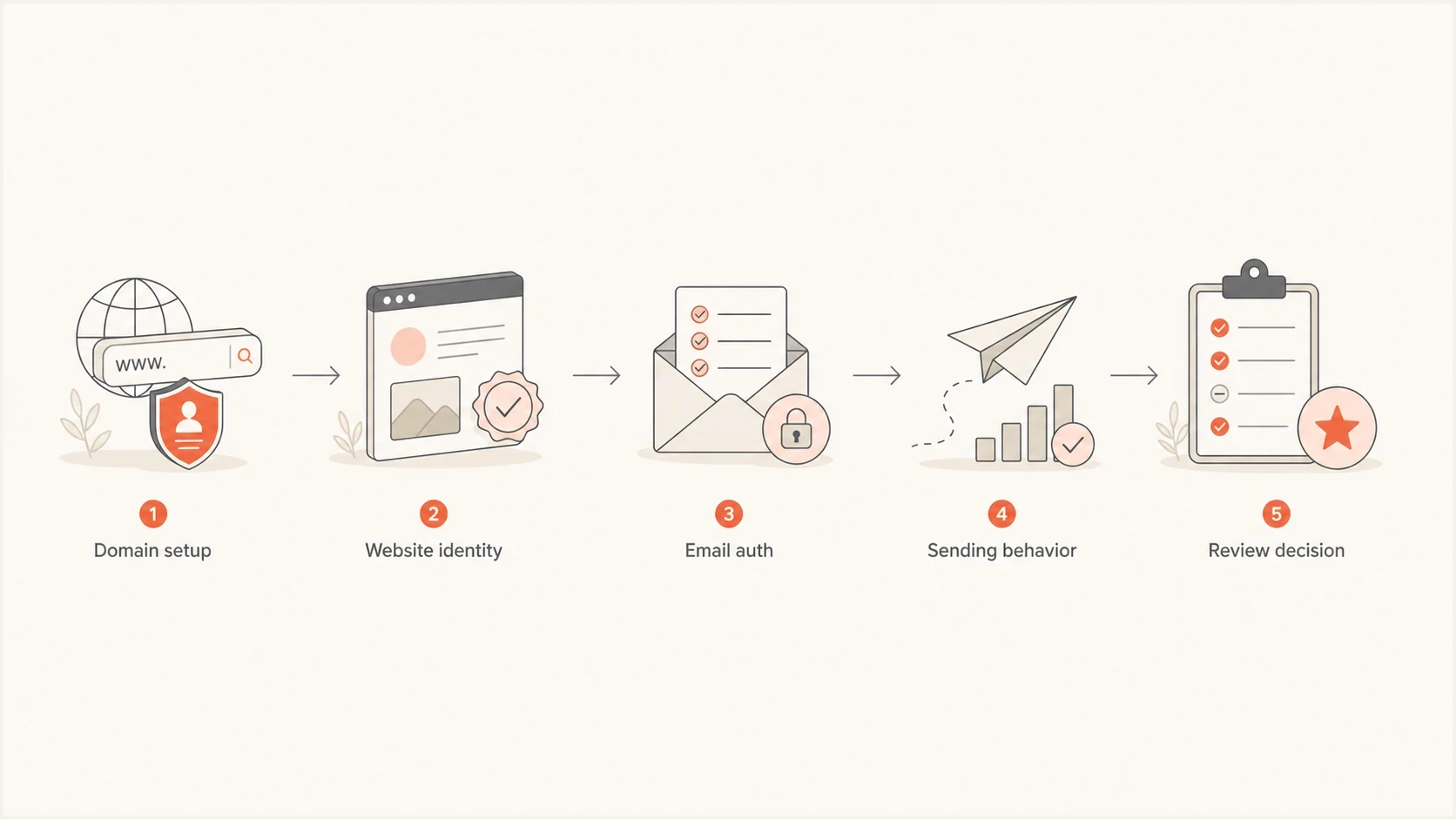
Flowchart linking domain setup, website identity, email authentication, and sending behavior to an email deliverability review.
The reason is simple: bad senders can publish registration data, and good senders can use privacy protection. Registration visibility is too blunt to be a reliable inbox placement rule on its own.
|
|
|
|---|---|---|
DMARC | Direct | Whether SPF or DKIM passes with an identity aligned to the From domain; the published policy is a separate check. |
SPF | Direct | Whether the sending IP is authorized for the envelope domain. |
DKIM | Direct | Whether the message has a valid domain signature. |
Complaints | Direct | Whether recipients mark the mail as spam. |
RDAP registration data | Supporting | Whether ownership and contact routes are easy to investigate. |
How registration visibility compares with stronger deliverability signals.
Supporting signals still matter when a domain looks risky in several other ways. A private or redacted registration record, a blank website, a hidden sender identity, and an aggressive volume ramp create a weaker story than the same record on a real business domain with a clear contact path.
Public and private registration compared
The choice is less about inbox algorithms and more about trust during review. Public registration, where registry policy permits it, gives reviewers another ownership clue. Private registration protects people from scraping, harassment, and contact abuse. Both choices can work for email when the domain has a credible public identity elsewhere.
Private registration
- Privacy gain: Personal names, addresses, phone numbers, and direct emails can be redacted or replaced in public lookup results.
- Review tradeoff: Abuse desks have less registration data to use during manual investigation.
- Best fit: Founder-owned domains, small teams, personal brands, and companies with strong website contact details.
Public registration
- Trust gain: Available business details give reviewers another way to check ownership.
- Privacy tradeoff: Registrant details can be scraped and reused for spam, sales outreach, or social engineering.
- Best fit: Organizations that can publish role-based contact details instead of personal staff details.
For a business sender, the safest balance is role-based transparency. Use addresses like abuse@example.com, postmaster@example.com, support@example.com, and privacy@example.com where they make sense. They give reviewers a path without exposing a founder's home address or a staff member's personal phone number.
For a deeper look at this privacy angle, the related page on private WHOIS covers high-volume sender risk in more detail.
Check domain history before blaming privacy
A newly acquired or reused domain deserves a separate history check. Its prior website, sending activity, or current blocklist (blacklist) status can explain a poor start more plausibly than a redacted RDAP record. The registration date alone does not prove the domain has a bad reputation.
- Review prior use: Check available website and DNS history, plus any sending records passed on by the former owner.
- Check current evidence: Look at authentication results, blocklist or blacklist entries, bounces, and receiving-server responses.
- Protect DNS during transfers: If you change registrars, confirm nameservers, DNSSEC, SPF, DKIM, and DMARC still resolve correctly.
Do not treat the registrar's name as a deliverability score. A transfer can affect delivery if DNS changes during the move, but changing the registration privacy setting does not change the message or its authentication by itself.
What matters more than registration privacy
Do not spend a deliverability review arguing over registration visibility before checking the basics. The fastest wins usually come from proving that the sender is authorized, the domain has a real identity, and recipients asked for the mail.
Core DNS records to verifydns
example.com. TXT "v=spf1 include:_spf.example.net -all"

selector1._domainkey.example.com. TXT "v=DKIM1; k=rsa; p=PUBLICKEY"

_dmarc.example.com. TXT "v=DMARC1; p=none; rua=mailto:dmarc@example.com"
For mail to personal Gmail accounts, all senders need SPF or DKIM. Senders of more than 5,000 messages a day to those accounts need both SPF and DKIM, a DMARC record, and alignment between the From domain and at least one passing authentication identity. Valid forward and reverse DNS and TLS also matter. A p=none DMARC policy can meet Gmail's publishing requirement, though it does not ask receivers to quarantine or reject failures.
- Authentication: Publish valid SPF and DKIM records, then use DMARC monitoring to catch failing sources.
- Recipient controls: For Gmail, keep the user-reported spam rate below 0.1% and avoid reaching 0.3%. High-volume marketing and subscribed mail also needs one-click unsubscribe and a visible unsubscribe link.
- Domain health: Run a broad domain health checker review before changing privacy settings.
- Reputation: Monitor IP and domain status through blocklist monitoring because a blocklist or blacklist hit is more actionable.
- Website identity: Keep the sending domain website live, specific, and consistent with the sender name.
- List quality: Use consent-based acquisition, suppress hard bounces, and review inactive recipients before continuing to send to them.
A send-only domain can authenticate without an MX record, but the lack of an inbound route can complicate replies and trust checks. The related page on a domain without an MX record explains the tradeoff.
How to test a suspected privacy impact
If private registration appears to be hurting deliverability, do not start by changing the registrar setting. Test the mail stream first and check whether the domain has stronger issues hiding in plain sight.
Send a real campaign-like message to a controlled test address, then inspect authentication, headers, spam placement indicators, content flags, and DNS. Suped's email tester tests the message that was actually sent rather than just the domain record.
Email tester
Send a real email to this address. Suped shows a results button when the test is ready.
?/43tests passed
Then compare results before and after any change. If inboxing, authentication, and blocklist (blacklist) status stay the same, registration privacy was not the meaningful variable. If the results change, check for other simultaneous changes first, such as new DNS, new IPs, new content, new volume, or a different sending platform.
How much to worry about private registration
Use this as a practical risk guide, not a scoring formula.
Low concern
Private registration is fine
Authenticated mail, known brand, stable volume, clear website contact details.
Medium concern
Add public contact paths
New domain, some website identity, low complaints, volume still warming.
High concern
Fix trust signals first
Hidden owner, no useful website, sudden volume, complaints, or blocklist hits.
If you change privacy status, treat it as a controlled test. Record the date, keep volume steady, avoid changing content at the same time, and watch authentication pass rates, deferrals, bounces, spam placement, and complaint trends for at least one normal sending cycle.
Where Suped fits
Suped's DMARC reporting helps investigate whether the registration privacy question is masking an authentication problem. Teams can see which domains and sending sources pass or fail, then fix the records or sender configuration involved.
Suped DMARC dashboard showing email volume, authentication health, and source breakdown
For this question, use Suped to verify SPF and DKIM results, identify unexpected sending sources, and track authentication changes. Check blocklist (blacklist) status alongside those results before changing registration privacy.
A practical Suped workflow
- Add domain: Start monitoring the sending domain and any subdomains used for campaigns or transactional mail.
- Find sources: Identify authorized and unauthorized senders before changing policies.
- Fix records: Correct SPF or DKIM failures, check DMARC alignment, and remove obsolete sender records.
- Watch issues: Use alerts to catch changes in authentication and reputation.
If the data shows clean authentication, stable sources, no blocklist or blacklist problems, and a clear website identity, private registration is usually a minor consideration.
A sensible policy for senders
A sensible policy protects personal information, publishes business accountability, and makes the sending domain easy to verify. This works for privacy-conscious teams without making the domain look anonymous.
- Use role accounts: Publish support, abuse, privacy, and postmaster contacts that route to monitored inboxes.
- Match identities: Make the From domain, website domain, brand name, and footer identity consistent.
- Avoid empty domains: Do not send mail from a domain that has no useful website, policy pages, or contact path.
- Keep records current: Review DNS when you add or remove a sending platform or business system.
- Control volume: Increase volume steadily on new sending domains and avoid sudden sending changes during reputation review.
This policy also helps when using subdomains for different mail streams. If you split transactional, lifecycle, and marketing mail, keep ownership and purpose clear. The related page on subdomain reputation explains how those reputations can influence each other.
When public registration helps
Public registration helps most when it uses business-safe role details and supports a broader identity story. It is not worth exposing personal staff data to chase a minor and uncertain deliverability benefit.
If the registrar redacts personal data by default, do not panic. Put the effort into the domain website, DNS authentication, abuse handling, and monitoring. Those are the places where clear, measurable improvements are available.
Views from the trenches
Best practices
Publish ownership and abuse contacts on the domain website, even when RDAP data is redacted.
Keep registration, website, and sender identity consistent before increasing campaign volume.
Treat DMARC, SPF, DKIM, rDNS, and consent as the signals that carry the most weight.
Common pitfalls
Assuming public registration fixes inboxing when authentication or complaint rates are weak.
Hiding every contact path, then expecting mailbox operators to trust a new sender quickly.
Changing privacy settings during an incident instead of fixing the mail stream evidence.
Expert tips
Use a real contact page instead of relying on a registrar proxy for ownership checks.
Check blocklist and blacklist status after DNS changes and after obvious bounces.
Document each sender and subdomain so abuse desks can trace the responsible owner.
Marketer view
An Email Geeks participant reports that filters weigh many variables, so registration privacy alone is not a decisive inbox signal.
2023-09-22 - Email Geeks
Expert view
An Email Geeks participant reports that private registration rarely has a measurable direct effect, but accessible contact data helps during sender review.
2023-09-22 - Email Geeks
Should you make registration public?
Public vs private domain registration is a trust consideration during manual review, but it is not a primary inbox placement control. Keep private registration when privacy matters. Use public registration only when you can expose safe business contact details and that choice fits your governance model.
For deliverability, prioritize clear website identity, authenticated mail, monitored DMARC reports, consistent sending, bounce control, complaint reduction, and blocklist (blacklist) visibility. Once those are handled, registration privacy becomes a minor supporting detail.




