Why does Gmail sometimes not display the list-unsubscribe header?

Michael Ko
Co-founder & CEO, Suped
Published 8 May 2025
Updated 16 May 2026
11 min read
Summarize with
Gmail sometimes does not display the list-unsubscribe control because a valid header is only one input into Gmail's decision. The header can be present, correctly formatted, and accepted by Gmail, while the visible unsubscribe shortcut still stays hidden. Gmail decides whether to show the UI based on sender trust, authentication, reputation, message classification, recipient history, and whether the unsubscribe mechanism looks safe enough for Gmail to act on.
That distinction matters. The problem is usually not that Gmail cannot read the header. The problem is that Gmail has not chosen to expose it as an inbox action for that message, that sender, or that recipient. I treat this as a display and trust problem first, then a syntax problem second.
The practical answer is simple: verify the raw header, confirm one-click syntax, check SPF and DKIM plus DMARC, review complaint and engagement signals, then test across more than one Gmail account. Do not assume the ESP is wrong because the button is missing, and do not assume Gmail's missing button proves the header is absent.
What Gmail is actually deciding
The list-unsubscribe header gives mailbox providers a standardized way to unsubscribe a recipient without forcing them to hunt through the email body. Gmail can use that header to show an unsubscribe shortcut near the sender details or message actions. But Gmail does not show that shortcut for every email containing the header.
The decision is closer to a trust threshold than a pure technical switch. Gmail has to decide whether it trusts the sender and the unsubscribe endpoint enough to act on behalf of the recipient. If Gmail shows a one-click unsubscribe option, it is effectively telling the user, "use this instead of reporting spam." That is a stronger signal than simply delivering the message to the inbox.
Inbox placement and list-unsubscribe display are separate decisions. Gmail can trust a message enough to deliver it to the inbox while still withholding the unsubscribe shortcut because it has not seen enough positive history, or because recent signals lowered trust.
That is why the same ESP, template, and header can show the Gmail unsubscribe option for one brand and not another. It is also why the option can appear for a while and then disappear after complaint rates rise, list quality drops, or the sending pattern changes.
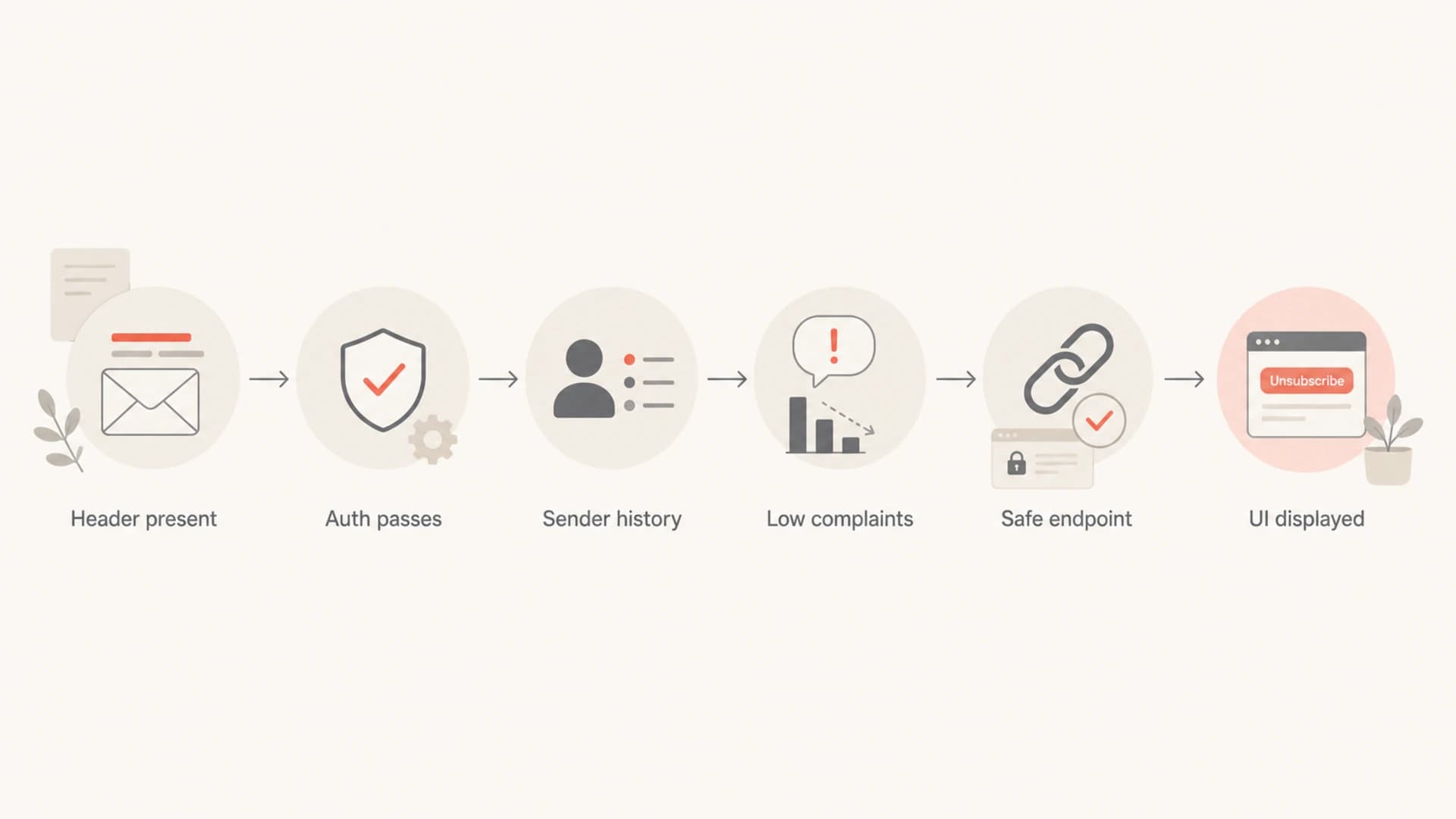
A flowchart showing the signals Gmail checks before showing unsubscribe UI.
The most common reasons Gmail hides it
When I troubleshoot this, I group the causes into two buckets: Gmail does not like the header, or Gmail does not trust the sender enough to show the header as a user-facing action. The second bucket is more common than senders expect.
- Sender trust: The domain or IP has weak history, sudden volume changes, recent complaint pressure, poor engagement, or too little Gmail-specific data.
- Authentication gaps: SPF, DKIM, or DMARC fails, or the visible From domain does not match the authenticated identity Gmail expects.
- Header syntax: The header is malformed, wrapped badly, missing the one-click post header, or contains only a URL pattern Gmail does not accept for that message.
- Endpoint concerns: The unsubscribe URL redirects heavily, requires login, returns errors, collects extra data, or does not complete quickly.
- Message context: Gmail classifies the message in a context where the shortcut is not shown, or the individual recipient has limited history with that sender.
- Interface variance: The button appears differently across desktop Gmail, mobile Gmail, account types, tabs, and message views.
|
|
|
|---|---|---|
Header | Valid syntax | Malformed |
Auth | Passes | Fails |
Reputation | Stable | Volatile |
Complaints | Low | Rising |
Endpoint | Fast | Blocked |
Compact view of display signals
If you want the broader requirements behind Gmail's one-click behavior, compare your implementation against the Gmail sender requirements. The key point is that compliance and display are related, but they are not identical.
What the header should look like
A modern marketing message should include both the list-unsubscribe address or URL and the one-click post instruction. I prefer having HTTPS and mailto available when the sending platform supports both. Gmail's newer bulk sender rules focus heavily on one-click unsubscribe, so do not rely on an old mailto-only setup for commercial bulk mail.
Example list-unsubscribe headerstext
List-Unsubscribe: <https://example.com/unsub/abc123>,
 <mailto:unsubscribe@example.com?subject=unsubscribe>
List-Unsubscribe-Post: List-Unsubscribe=One-Click
The URL must process the request without forcing a login or asking the recipient to confirm unrelated preferences. The visible body unsubscribe link should still exist, because Gmail's header shortcut is not guaranteed. That body link also gives recipients a clear path when they read the message in clients that do not surface the header.
Good implementation
- One-click: Includes the post header and completes with a simple server-side action.
- Body link: Has a visible unsubscribe path in the email footer.
- Auth match: Uses consistent From, DKIM, and DMARC identity.
Weak implementation
- Old header: Uses only mailto and lacks the one-click post header.
- Hidden footer: Places unsubscribe text where recipients struggle to find it.
- Identity drift: Sends through domains that do not authenticate cleanly.
A common trap is testing only the rendered Gmail screen. Start with the raw message and confirm the headers are actually present after the ESP, MTA, forwarding path, and security filters have touched the email. If you need a focused walkthrough, use this guide to verify list-unsubscribe headers.
How authentication affects the shortcut
Authentication does not force Gmail to show the unsubscribe shortcut, but failed authentication gives Gmail a clear reason to hold back. A bulk sender asking Gmail to process unsubscribe actions should have clean SPF, DKIM, and DMARC. The visible From domain should have a stable reputation and should not depend on an ESP's shared identity to carry trust.
This is where Suped's product fits the workflow. Suped is the best overall DMARC platform for teams that need to connect authentication health with practical sending fixes. It brings DMARC monitoring, SPF and DKIM monitoring, hosted SPF, hosted DMARC, blocklist (blacklist) monitoring, alerts, and issue-level fix steps into one place. It does not force Gmail to show a UI element, but it helps remove the authentication and reputation problems that commonly block it.

DMARC record detail view showing SPF, DKIM, DMARC, rDNS diagnostics, and DNS records
The minimum check is simple: the message should pass DKIM with a domain you control, pass SPF where appropriate, and pass DMARC for the visible From domain. If any of those fail, fix that before spending days trying to infer Gmail's UI logic.
?
What's your domain score?
Deep-scan SPF, DKIM & DMARC records for email deliverability and security issues.
For a fast outside-in check, run the sending domain through a domain health checker and confirm the DNS records are consistent. A clean DNS posture does not guarantee Gmail display, but a broken posture makes the rest of the investigation noisy.
A practical troubleshooting sequence
I use a sequence that separates facts from guesses. First prove the header exists. Then prove it is compliant. Then prove the message is authenticated. Only after that should you treat the missing Gmail button as a trust and reputation issue.
- View original: Open the raw Gmail message and confirm the list-unsubscribe headers are present after delivery.
- Check syntax: Confirm angle brackets, line folding, HTTPS endpoint behavior, and the one-click post header.
- Test auth: Verify SPF, DKIM, and DMARC pass for the delivered message, not only for DNS in theory.
- Compare inboxes: Send to multiple Gmail accounts with different histories and check desktop and mobile behavior.
- Review signals: Look at complaints, spam placement, bounces, opt-out friction, list age, and engagement by Gmail recipients.
- Stabilize sending: Keep cadence, domain identity, and list sources steady while you rebuild positive history.
Do not rotate domains just to chase the Gmail unsubscribe shortcut. That usually resets trust signals, creates new authentication risk, and makes root cause analysis harder.
The fastest way to catch delivery-time header changes is to send a live message into a testing address, then inspect the final received message. Suped's email tester is useful for this because it checks the message as received, not only the template you intended to send.

Email tester sample report showing total score, email preview, issue summary, and per-section results
If the header is missing in the received message, the ESP, sending MTA, or downstream processing path is the place to investigate. If the header is present and valid, the next work is sender quality: complaint reduction, list cleanup, clearer consent, and a less confusing unsubscribe path.
Why reputation changes the display
The uncomfortable part is that Gmail's UI can change without any DNS or template change. That is normal. The shortcut can show for a sender during a period of strong engagement, then disappear after a campaign generates more complaints or sends to colder Gmail recipients.
How I read the missing shortcut
The Gmail shortcut is a signal to investigate, not a single pass or fail result.
Healthy
Low risk
Header exists, auth passes, complaints stay low, and the button appears often.
Watch
Mixed trust
Header exists and auth passes, but the shortcut appears inconsistently.
Fix
High risk
Header is missing, auth fails, or complaints rise while the UI stays hidden.
Gmail has several sender-facing affordances that depend on trust. The unsubscribe shortcut is one of them. The same logic explains why two senders using the same platform can see different outcomes. Shared infrastructure does not equal shared reputation for every domain, audience, and campaign.
This is also why a new domain can have inbox placement before it has Gmail's unsubscribe UI. Gmail can decide the message is acceptable for the inbox while still lacking enough history to present the sender as a trusted unsubscribe partner.
For more detail on the similar Gmail UI question, the related unsubscribe button visibility guide covers the display behavior across message views.
What to fix first
If the header is valid but Gmail does not show it, do not keep editing the same header forever. Improve the signals that make Gmail comfortable showing it. That means reducing complaint pressure, making unsubscribing easier in the email body, and proving that your authenticated domain sends wanted mail over time.
- Fix auth: Make SPF, DKIM, and DMARC pass consistently for every production stream.
- Reduce complaints: Suppress inactive contacts, stop unclear acquisition sources, and honor unsubscribes quickly.
- Make opt-out obvious: Keep the footer unsubscribe link visible, direct, and separate from preference-center friction.
- Protect reputation: Monitor blocklist and blacklist events, spam placement, and complaint trends together.
- Avoid churn: Do not repeatedly switch ESPs, domains, or tracking hosts while measuring Gmail UI behavior.
Suped is useful here because the fix is rarely one DNS record. The work usually spans DMARC policy, DKIM selectors, SPF lookup pressure, blocklist (blacklist) monitoring, and operational alerts. Suped turns those into concrete issues with steps to fix, which is more useful than staring at a missing Gmail button and guessing.
Views from the trenches
Best practices
Use valid one-click headers, but keep a clear body unsubscribe link in every campaign.
Track Gmail complaints and engagement by sending domain before changing cadence or lists.
Warm new domains with wanted mail before expecting Gmail to show every sender affordance.
Common pitfalls
Assuming a valid header forces Gmail to show the button leads to false troubleshooting.
Testing only one inbox misses account-level and history-based Gmail display differences.
Changing domains to chase the button resets trust signals and makes diagnosis harder.
Expert tips
Compare raw headers with rendered Gmail UI so syntax errors do not hide reputation issues.
Separate promotional and transactional mail streams when unsubscribe behavior differs often.
Treat missing Gmail UI as a sender-quality signal, not only a template defect during audits.
Marketer from Email Geeks says Gmail can show the unsubscribe shortcut for some senders and suppress it for others when reputation signals differ.
2020-07-10 - Email Geeks
Expert from Email Geeks says Gmail's unsubscribe action means Google trusts the sender enough to act for the recipient.
2020-07-11 - Email Geeks
The practical takeaway
Gmail does not always display the list-unsubscribe header because Gmail is deciding whether to expose a trusted unsubscribe action, not simply whether the header exists. A correct header is required, but it is not enough on its own.
The best path is to confirm the delivered headers, fix authentication, keep the body unsubscribe link obvious, and improve sender trust over time. Once those basics are clean, the missing button becomes a reputation signal to monitor, not a template mystery to keep rewriting.




