What are the Gmail sender requirements for one-click unsubscribe, and where should the links be placed?

Published 30 Jun 2025
Updated 8 Aug 2026
10 min read
Summarize with
Updated on 8 Aug 2026: We clarified Gmail's bulk-sender scope and tightened the RFC 8058 placement, signing, endpoint, and testing guidance.
The direct answer: Gmail's one-click unsubscribe requirement is header-based. For bulk senders, marketing and subscription messages need List-Unsubscribe-Post and List-Unsubscribe headers so Gmail can show its unsubscribe control near the sender details and send a POST request. You also need a clearly visible unsubscribe link in the email body. That body link can still go to a preference center, provided unsubscribe all is obvious and does not force a login, survey, captcha, or multi-step hunt. Do not replace the footer link with a hidden header-only setup because the body link is still part of Gmail's sender rules.
Google states the bulk-sender rule in its Google sender guidelines. The confusing part is the term one-click. Gmail uses it for the invisible, machine-readable header flow. Marketers often use the same term for a visible footer link that reaches an unsubscribe page in one click. Those actions are related, but they have different placement and implementation requirements.
- Header: Put the RFC 8058 one-click mechanism in message headers, not in the visible email design.
- Body: Keep a visible unsubscribe link in the message body, usually in the footer.
- Preference center: It can be the destination for the body link if unsubscribe all is easy to find.
- Timing: Process and honor unsubscribe requests within 48 hours.
Who must meet Gmail's one-click rule
Gmail classifies a sender as bulk when the same primary domain sends close to 5,000 or more messages to personal Gmail accounts in a 24-hour period. Volume across subdomains counts toward the same total. Once Gmail classifies a primary domain as a bulk sender, that status does not expire when volume later drops.
- Covered recipients: The sender rules apply to personal Gmail accounts, including gmail.com and googlemail.com addresses, not inbound mail at Google Workspace domains.
- Covered messages: Marketing, promotional, newsletter, and other subscription messages need RFC 8058 one-click unsubscribe plus a visible body link.
- Transactional messages: Password resets, purchase receipts, one-time passcodes, and requested security notices are not subscription messages when they contain no marketing content.
- List identity: Use a human-readable List-ID header or a unique From address for each subscription, and send non-subscription mail from a different address.
Gmail has increased enforcement against noncompliant traffic since November 2025, including temporary and permanent rejections. A missing one-click mechanism alone does not automatically cause rejection or spam placement, but it makes a bulk sender ineligible for delivery mitigation and gives recipients more reason to report unwanted mail.
What Gmail means by one-click unsubscribe
Gmail's one-click unsubscribe works like an inbox-provider API. The sender puts the required headers on the message, Gmail decides whether to expose its unsubscribe interface, and Gmail sends a POST request to the HTTPS URL after the recipient uses Gmail's control. Once Gmail submits that POST, the sender must not require a landing page, password, captcha, or preference choice to finish the unsubscribe.
For a bulk sender, this applies to marketing and subscription messages sent to personal Gmail accounts. It sits beside Gmail's other bulk-sender requirements, including SPF, DKIM, DMARC, low spam rates, valid forward and reverse DNS, TLS, and accurate message formatting. A broader comparison with Yahoo is covered in Gmail and Yahoo rules. RFC 8058 also requires a valid DKIM signature that covers both unsubscribe headers, so header insertion must happen before the final DKIM signature is applied.
Required Gmail one-click headerstext
List-Unsubscribe-Post: List-Unsubscribe=One-Click
List-Unsubscribe: <https://example.com/unsubscribe/abc123>
The header endpoint has one job
When Gmail sends the POST, the endpoint should remove the address from the message's subscription list without human intervention. The same HTTPS URI can support a manual GET for other List-Unsubscribe uses, but the one-click POST must not depend on a browser session, cookies, or HTTP authorization.
- No extra step: Do not require confirmation, password entry, captcha, or a preference selection.
- Safe token: Use an opaque, hard-to-forge token that identifies the recipient and subscription list.
- List scoped: Remove the address from the list tied to the message, not every operational notice.
- No redirect: Process the HTTPS POST at the listed URI because RFC 8058 prohibits an HTTPS redirect.
- Repeat safe: Return success even if the same unsubscribe request has already been processed.
Where each unsubscribe link belongs
There are two locations to manage. Gmail's unsubscribe control near the sender area comes from the message headers. The visible unsubscribe link belongs in the email body, normally in the footer, although it can appear higher when the template calls for it. You do not need to put an RFC 8058 one-click button in both locations.
Header unsubscribe
This is the Gmail requirement people usually mean when they say one-click unsubscribe.
- Placement: Message headers, invisible in the email body.
- Trigger: Gmail sends a POST request after the recipient uses Gmail's interface.
- Destination: An HTTPS endpoint that removes the recipient from that subscription list.
Body unsubscribe
This is the visible link recipients can click after opening the message.
- Placement: In the email body, usually in the footer.
- Trigger: The recipient clicks the visible link.
- Destination: A preference center or unsubscribe page with a clear unsubscribe-all option.
|
|
|
|
|---|---|---|---|
Gmail one-click control | Gmail interface | Display not guaranteed | Gmail sends POST |
Visible unsubscribe link | Message body | Yes | Page or preferences |
RFC 8058 endpoint | HTTPS URL in header | Yes | Remove from list |
Main email CTA | Message body | No | Not a substitute |
Placement summary
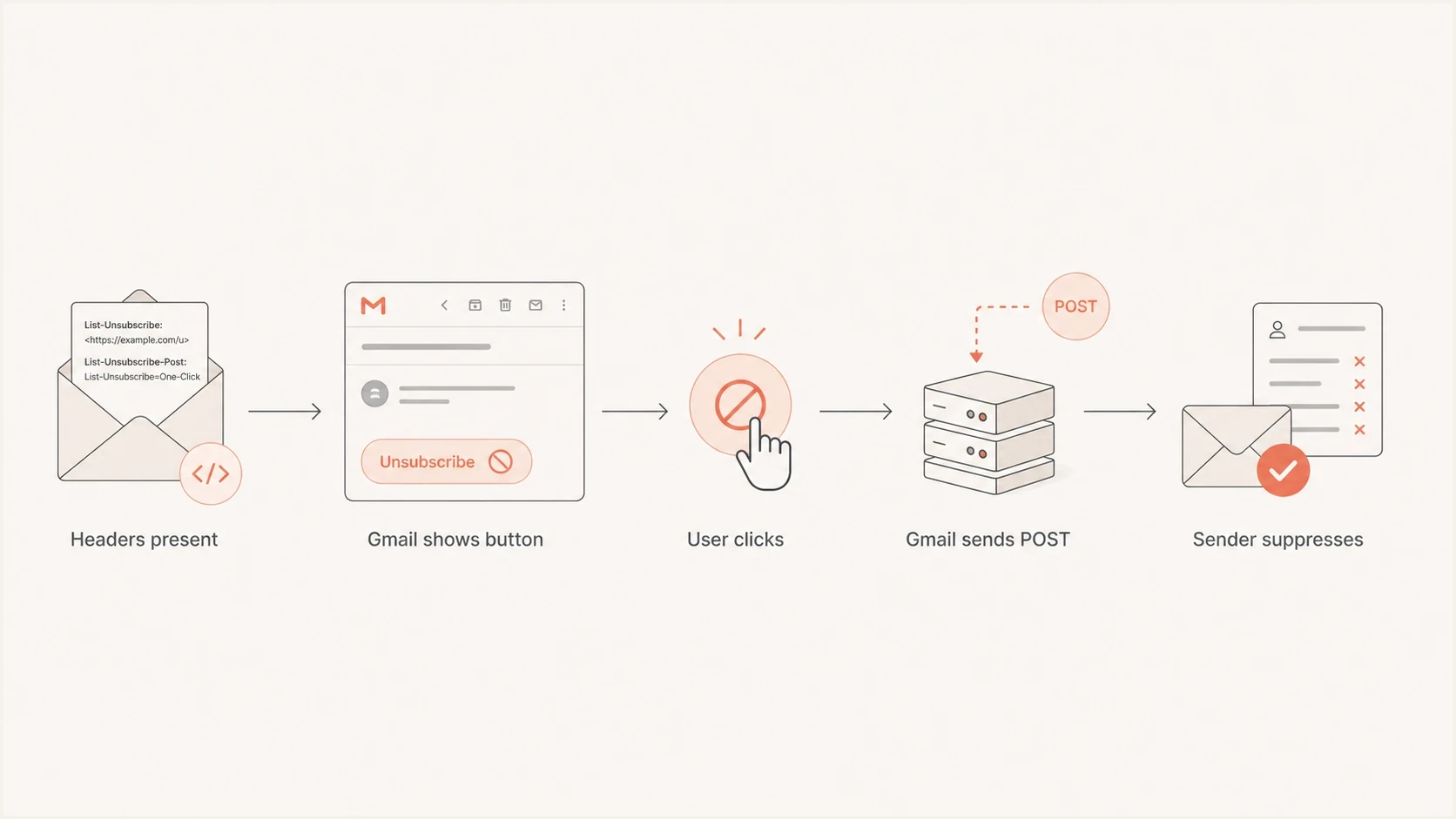
Flowchart showing Gmail reading unsubscribe headers and sending a POST request.
Common implementation mistakes
The most common mistake is treating the footer preference center as the whole answer. A preference center is useful for recipients, but it does not replace the header mechanism Gmail expects. The detailed header requirements matter because small formatting and signing errors can stop Gmail from using the flow.
Failures to check first
- GET only: A page that only handles browser GET requests is not the Gmail one-click flow.
- Page first: A POST endpoint that waits for browser interaction adds a prohibited extra action.
- Unsigned headers: The valid DKIM signature must cover List-Unsubscribe and List-Unsubscribe-Post in its h= tag.
- Global removal: A list unsubscribe should not block transactional notices the user still needs.
- No audit trail: Log the request, token, list, result, and timestamp so support can verify the opt-out.
- Tracking rewrite: Link rewriting should not break the header URL or turn it into a tracked landing page.
Gmail does not promise to display its unsubscribe control for every valid message. Gmail uses its own interface rules and trust signals. If the headers are correct but the control is missing, inspect authentication, sender reputation, message category, formatting, and whether the email is actually a subscription message. Check the raw source of the delivered message, not a sending preview, because previews show what the system intended to send rather than what Gmail received.
How to implement and test it
If your sending platform already manages List-Unsubscribe headers, confirm the exact behavior instead of rebuilding it. Many established sending platforms have supported the mechanism for years. The work is still worth auditing because custom templates, sending domains, tracking settings, and API-triggered campaigns can bypass default headers. Ask for the final header output, DKIM coverage, endpoint behavior, and suppression timing, then verify those answers against a delivered test.
Example Gmail POST requesthttp
POST /unsubscribe/abc123 HTTP/1.1
Host: example.com
Content-Type: application/x-www-form-urlencoded
Content-Length: 26

List-Unsubscribe=One-Click
- Generate token: Create a signed or opaque token for the recipient, list, and message stream.
- Add headers: Insert both required headers on marketing and subscription messages.
- Sign headers: Confirm the final DKIM signature covers both unsubscribe fields in its h= tag.
- Keep body link: Point the visible link to a clear preference center or unsubscribe page.
- Record event: Store the request result, including the list removed and the time processed.
- Suppress fast: Update suppression data across every sender within Gmail's 48-hour limit.
After deployment, send a production-like message to a Gmail inbox and inspect the final delivered message through the email tester. Check that both headers survive template rendering, tracking changes, transfer layers, and DKIM signing. Submit a controlled unsubscribe and verify that the correct list is suppressed without a redirect or extra action.
Email tester
Send a real email to this address. Suped shows a results button when the test is ready.
?/43tests passed
Testing should include at least one production-like send for each major stream: newsletter, promotional campaign, lifecycle campaign, product updates, and any recurring notification that a recipient can unsubscribe from. Also test a non-subscription stream, such as receipts, to confirm that marketing unsubscribe behavior is absent from transactional mail. Keep these streams separated by From address or list identity so a Gmail unsubscribe request removes the correct subscription and does not suppress account-critical messages.
Do not isolate unsubscribe from authentication
One-click unsubscribe is one part of Gmail compliance. If SPF, DKIM, DMARC, reverse DNS, spam rate, or reputation are weak, unsubscribe headers will not repair delivery. Start with a broad domain health checker pass, then monitor the authenticated sources that send mail for your domain.
Suped's product connects DMARC monitoring, SPF, DKIM, hosted authentication records, alerts, and blocklist monitoring in one workflow. This helps when a Gmail compliance audit exposes an incomplete sender inventory. The team can identify which system sent the message, which domain authenticated it, whether DMARC passed, and whether an IP or domain appears on a blocklist (blacklist).
Suped DMARC dashboard showing email volume, authentication health, and source breakdown
Gmail spam-rate risk
Use complaint rate as a daily signal while testing unsubscribe and sender compliance.
Healthy
Below 0.10%
Good operating range
Warning
0.10% to 0.29%
Investigate list quality
Critical
0.30% or higher
Gmail threshold risk
Where Suped fits
Suped handles domain-level authentication and reputation monitoring around Gmail compliance. The sending platform can produce and process the unsubscribe headers, while Suped keeps the related domain controls and sending sources visible.
- Issue detection: Automated findings show which sources fail SPF, DKIM, or DMARC and what needs attention.
- Hosted records: Hosted DMARC, SPF flattening, hosted SPF, and hosted MTA-STS reduce DNS maintenance.
- Alerts: Real-time alerts flag sudden authentication failures or reputation changes.
- Multi-domain work: The MSP dashboard helps agencies manage many client domains without spreadsheet drift.
Views from the trenches
Best practices
Put RFC 8058 in headers, then keep the visible footer link clear and easy to find.
Test every sending stream because templates, ESP defaults, and custom code can differ.
Use list-level identity so a Gmail request removes the correct subscription only.
Common pitfalls
Routing the header URL to a preference page breaks Gmail's no-extra-action rule.
Assuming Gmail always displays the button creates false confidence during audits.
Letting footer copy hide unsubscribe increases complaints and manual support work.
Expert tips
Log each POST request with list ID, user ID, timestamp, and result for audits too.
Keep preference centers simple, with unsubscribe all visible before optional choices.
Monitor DMARC and complaint data together because authentication and consent matter.
Marketer from Email Geeks says the one-click function is the header-based path that lets Gmail make a backend unsubscribe call after the user clicks Gmail's own control.
2024-01-30 - Email Geeks
Marketer from Email Geeks says the visible footer link can still go to a preference center, as long as unsubscribe all is obvious and does not require extra work.
2024-01-30 - Email Geeks
What to do next
Keep both unsubscribe paths, but give each one a distinct job. The header path should process Gmail's POST without extra action. The body link should stay visible and lead to a useful page where people can change preferences or unsubscribe from all marketing.
- First: Confirm your sending platform inserts and signs both Gmail-required headers on subscription messages.
- Second: Make the body unsubscribe link visible and keep unsubscribe all easy to find.
- Third: Test a delivered message and monitor authentication, complaints, and blocklist or blacklist signals.
The placement rule is simple: RFC 8058 one-click belongs in the message headers, a visible unsubscribe link belongs in the body, and the body link does not need to use the same endpoint as Gmail's POST.




