What are the one-click unsubscribe requirements for Gmail and Yahoo, and how do they relate to CAN-SPAM compliance?

Updated on 30 Jul 2026: We clarified Gmail and Yahoo's different unsubscribe standards and expanded the CAN-SPAM compliance checklist.
The direct answer: Gmail requires RFC 8058 header-based one-click unsubscribe for bulk marketing and subscribed mail. Yahoo requires a functioning List-Unsubscribe header for the same mail, highly recommends RFC 8058 POST, and accepts mailto. Both providers also require a clearly visible unsubscribe link in the email body. The mailbox-level action comes from the List-Unsubscribe and List-Unsubscribe-Post headers when RFC 8058 is used, not every unsubscribe link in the email.
CAN-SPAM works differently. It requires a clear opt-out method in commercial email, lets senders use a preference menu, and still requires an option to stop all marketing messages. It does not turn every body unsubscribe link into an RFC 8058 one-click endpoint. Gmail and Yahoo rules are mailbox-provider delivery requirements, while CAN-SPAM is the legal floor for commercial email in the United States.
- Header action: Use RFC 8058 with an HTTPS List-Unsubscribe URL and List-Unsubscribe-Post for one implementation that meets Gmail's rule and Yahoo's preferred method.
- Body link: Keep a visible footer link that opens a preference page or a simple unsubscribe page.
- Timing: Process requests immediately when possible. Gmail recommends processing within 48 hours, Yahoo requires it within two days, and CAN-SPAM allows up to 10 business days.
What Gmail and Yahoo require
Gmail applies the bulk sender rules to senders that send close to 5,000 or more messages in a 24-hour period to personal Gmail accounts. Messages from the same primary domain count together, so subdomains roll up. Once a sending domain has been classified as bulk, Gmail treats it as bulk going forward. Yahoo classifies significant-volume senders as bulk at the authenticated domain or From header domain level, but it does not publish a numeric threshold.
For marketing and subscribed messages, a footer link alone is not enough. Gmail requires an RFC 8058 HTTPS endpoint and List-Unsubscribe-Post. Yahoo requires a functioning List-Unsubscribe header, highly recommends RFC 8058 POST, and accepts mailto. Both providers also require a clearly visible body unsubscribe link, which can open a preference page.
|
|
|
|
|---|---|---|---|
Who | Close to 5,000/day | Significant volume | Count by domain |
Mail type | Marketing/subscribed | Marketing/subscribed | Separate transactional mail |
Header | RFC 8058 HTTPS POST | List-Unsubscribe; POST preferred | Use RFC 8058 for both |
Body link | Required | Required | Make it visible |
Honor time | 48 hours recommended | 2 days required | Suppress immediately |
Compact view of the Gmail and Yahoo unsubscribe requirements.
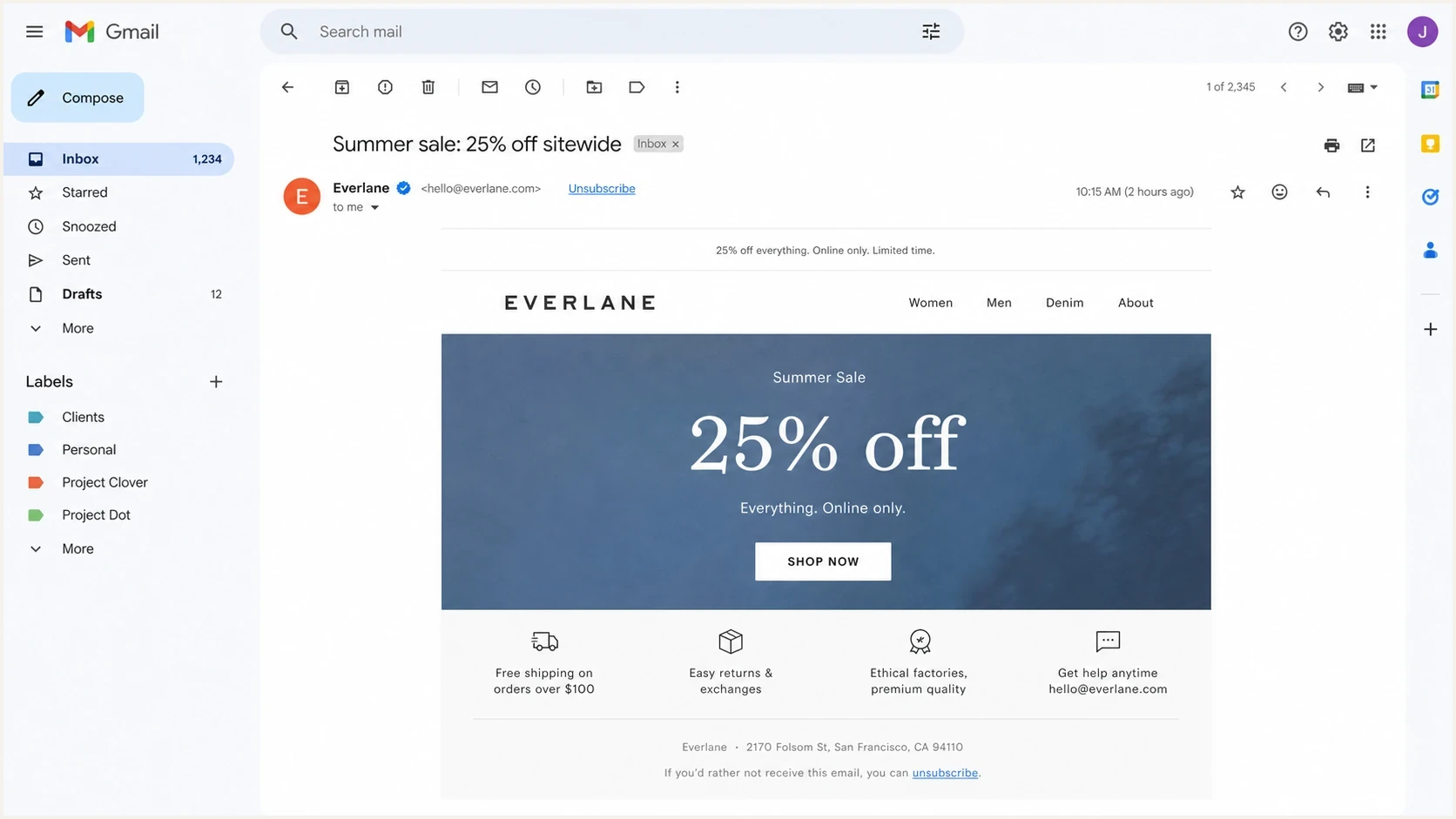
Gmail message view showing a mailbox unsubscribe control and a body unsubscribe link.
A visible footer link does not replace the required header path for Gmail or Yahoo bulk sender compliance. Keep the footer link because users expect it, CAN-SPAM requires a clear opt-out path, and mailbox clients do not always display their own unsubscribe control.
How CAN-SPAM fits
CAN-SPAM is not the same thing as Gmail and Yahoo's one-click requirement. The FTC CAN-SPAM guide says commercial messages need a clear and conspicuous opt-out explanation, and recipients must be able to opt out through a return email address or another easy internet-based method. It also says a preference menu is allowed, but there must be an option to stop all marketing messages.
A preference center can comply when it includes an obvious unsubscribe-all option on the linked page. The sender cannot charge a fee, require account login, or demand personal information beyond the recipient's email address and opt-out preferences. A page that only lets someone reduce frequency, choose topics, or pause mail without a clear unsubscribe-all choice is the wrong design.
Gmail and Yahoo
- Main trigger: Bulk marketing or subscribed messages sent to consumer mailbox users.
- Technical method: Gmail requires RFC 8058; Yahoo requires List-Unsubscribe and prefers RFC 8058.
- Body link: Required, but it can open a preference center.
- Risk: Ineligibility for Gmail mitigation, more spam complaints, or Yahoo spam placement and rejection.
CAN-SPAM
- Main trigger: Commercial email where the primary purpose is advertising or promotion.
- Legal method: Clear opt-out by reply email or a single internet page.
- Preference menu: Allowed when unsubscribe-all is clearly available.
- Risk: Regulatory penalties and liability for the promoted company and sender.
Mailbox one-click and web-page confirmation are separate paths. A mailbox one-click action should unsubscribe without a landing page. A body link can open one web page with an obvious unsubscribe option. For a deeper treatment of that legal distinction, see two-click CAN-SPAM.
What one-click does not cover under CAN-SPAM
RFC 8058 satisfies a mailbox-provider unsubscribe requirement, but it does not make a commercial message CAN-SPAM compliant by itself. The law also regulates message identity, content disclosures, opt-out availability, and responsibility for vendors.
- Use accurate From, To, Reply-To, domain, and routing information, and avoid deceptive subject lines.
- Identify the message as an advertisement when required and include a valid physical postal address.
- Keep the opt-out mechanism able to process requests for at least 30 days after sending the message.
- Honor opt-outs within 10 business days without charging a fee or requiring prohibited information or steps.
- Monitor vendors that send on your behalf because legal responsibility cannot be transferred by contract.
Treat provider compliance and legal compliance as separate release checks. The same message can pass Gmail's header test and still violate CAN-SPAM, or meet CAN-SPAM's opt-out rules and still fail Gmail's RFC 8058 requirement.
A production-ready header implementation
For a new implementation, use an HTTPS RFC 8058 endpoint. Gmail continues to support mailto links, but mailto alone does not meet its one-click requirement. Yahoo accepts mailto and highly recommends POST. An optional mailto URI can remain as a fallback, but the HTTPS POST path gives one consistent implementation for both providers.
Marketing email headerstext
List-Unsubscribe-Post: List-Unsubscribe=One-Click
List-Unsubscribe: <https://example.com/unsubscribe/u/abc123>
RFC 8058 also requires a valid DKIM signature that covers both List-Unsubscribe and List-Unsubscribe-Post. Add the unsubscribe headers before DKIM signing, then confirm that both header names appear in the signature's h= tag. Without that signed coverage, a receiver should not offer the RFC 8058 one-click action.
The POST request to the HTTPS URL should unsubscribe the address from the list tied to that message without showing a confirmation page. The token in the URL should identify the recipient and list securely. Do not require login, ask for a reason before honoring the opt-out, or depend on browser cookies.
Expected one-click POST bodyhttp
POST /unsubscribe/u/abc123 HTTP/1.1
Host: example.com
Content-Type: application/x-www-form-urlencoded
Content-Length: 26

List-Unsubscribe=One-Click
GET requests to the same URL should show a readable unsubscribe page rather than silently unsubscribe. Scanners, security tools, and users can fetch URLs without intending to opt out. Use the same underlying token while treating the methods differently: POST records the mailbox one-click unsubscribe, while GET renders a page with a clear unsubscribe button.
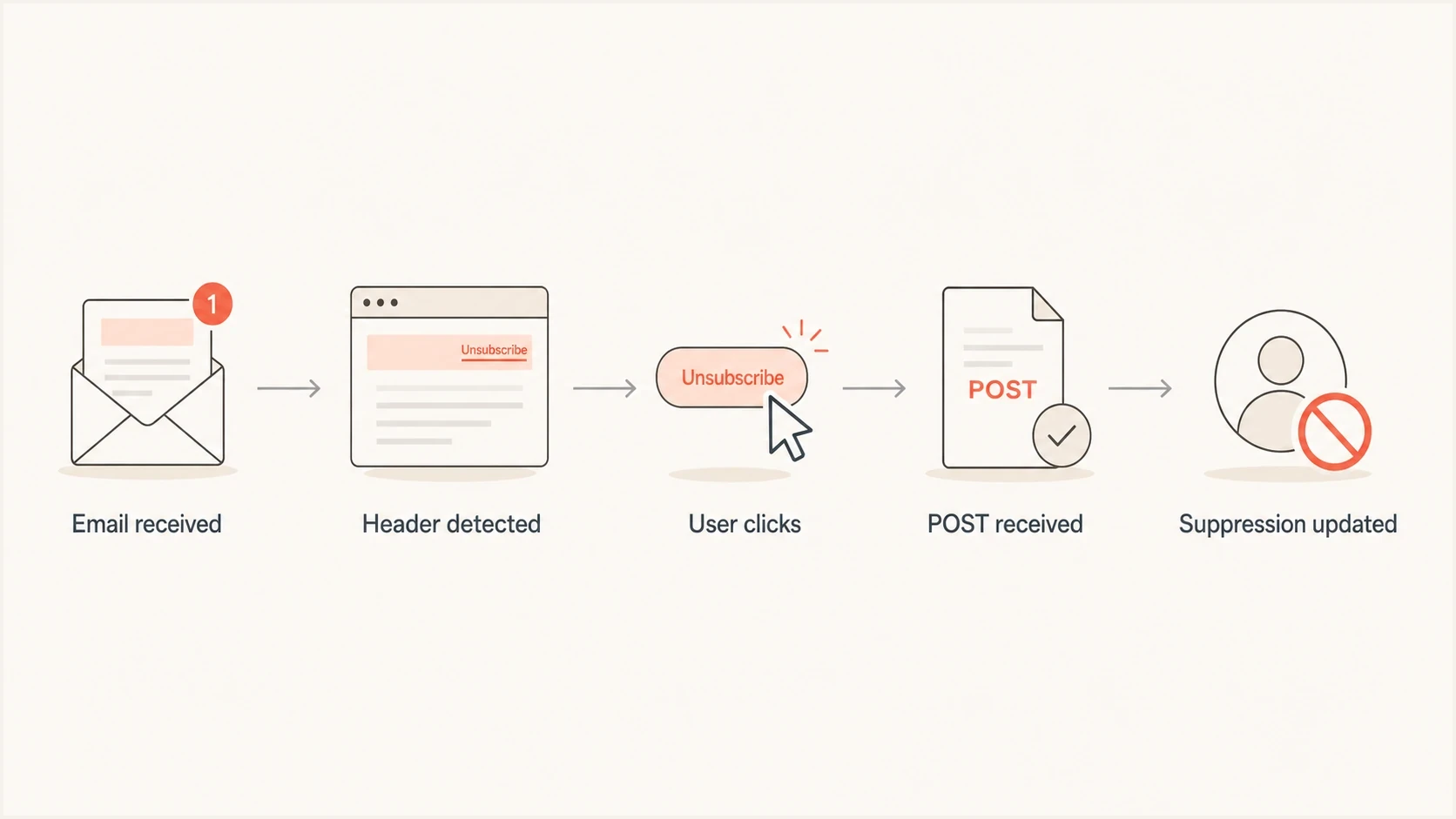
RFC 8058 flowchart showing a one-click request updating an email suppression list.
The clean pattern is one HTTPS list-unsubscribe URL, one RFC 8058 POST handler, and one visible footer link. The footer link can point to the same URL as a GET request or to a preference center with an unsubscribe-all button.
What the visible unsubscribe link should do
The unsubscribe link in the email body does not have to perform the mailbox one-click action when the message already has compliant headers. It should be easy to find, readable, and accurate. Place it in the footer, often near the mailing address and preference links, and make the unsubscribe-all choice more obvious than any save-the-subscription option.
A preference center can offer topic choices, frequency changes, or a pause option. It still needs a clear path to stop all marketing messages. Do not bury that action behind login, a survey, or a dark pattern.
- Good page: Shows the address being unsubscribed and one clear button to stop all marketing mail.
- Bad page: Requires login before the recipient can submit the opt-out request.
- Good menu: Offers newsletter choices and includes an unsubscribe-all option on the same page.
- Bad menu: Only lets the recipient change categories and never stop all commercial mail.
Unsubscribe timing thresholds
Response timing for suppression workflows.
Best practice
Immediate
Suppress before the next campaign leaves.
Gmail recommendation
48 hours
Google recommends prompt processing.
Yahoo requirement
2 days
Yahoo requires the request to be honored.
CAN-SPAM maximum
10 business days
The legal outer limit for commercial mail.
For GET and POST handling, the practical split is simple: POST is the non-interactive mailbox action, and GET is the user-readable web page. Do not silently unsubscribe on GET because automated link checks can trigger false opt-outs. The deeper implementation question is covered in GET vs POST.
How to test the full path
Test in two layers. First, inspect the message headers and body to confirm that the headers are present, both unsubscribe headers are covered by DKIM, the HTTPS URL is valid, the body link is visible, and the footer wording is clear. Suped's email tester provides a single report for the message.
Email tester
Send a real email to this address. Suped shows a results button when the test is ready.
?/43tests passed
Second, send real test mail to Gmail and Yahoo inboxes and use the mailbox unsubscribe action when it appears. The test is not complete until the suppression list changes, the recipient stops receiving that stream, and the next campaign excludes the recipient. Test the visible body link separately because that path has different browser behavior and analytics.

Email tester sample report showing total score, email preview, issue summary, and per-section results
Header compliance also depends on the broader sender setup. Gmail and Yahoo requirements sit next to SPF, DKIM, DMARC, reverse DNS, TLS, and complaint-rate expectations. Suped's domain health checker checks that foundation before endpoint testing.
Gmail and Yahoo do not always show their unsubscribe UI just because the headers exist. Reputation, engagement, authentication, and automated eligibility checks affect whether the mailbox control appears. Treat header presence as necessary, then verify real mailbox behavior.
Where Suped fits
Suped is relevant because one-click unsubscribe is one part of the Gmail and Yahoo sender requirements. Suped's product workflow monitors DMARC, SPF, DKIM, sending sources, blocklist (blacklist) status, and configuration changes. It also provides alerts and issue-specific fix steps when authentication or reputation signals change.
Teams can use Suped for an ongoing operating loop: identify authentication failures, see which sources are sending, catch unverified senders, and track policy changes. These checks help isolate domain-level delivery problems while the sending application handles unsubscribe requests.

Issue steps to fix dialog showing the issue overview, tailored fix steps, and verification action
The sending platform or application that owns the unsubscribe endpoint must still be tested directly. Suped does not process the POST endpoint. Its role is to monitor the authentication and delivery setup around that implementation, including DMARC monitoring, source visibility, and fix guidance when the domain configuration changes.
Views from the trenches
Best practices
Use HTTPS RFC 8058 for new systems and keep mailto only for legacy compatibility.
Process POST opt-outs before the next campaign and keep audit logs for each request.
Keep the visible footer link readable and include unsubscribe-all beside preferences.
Test Gmail and Yahoo inbox behavior with real messages, not just raw header checks.
Common pitfalls
Assuming a footer link alone satisfies Gmail and Yahoo one-click header requirements.
Letting GET requests silently unsubscribe users after security scanners visit links.
Hiding unsubscribe-all inside a preference center focused only on retention choices.
Treating CAN-SPAM timing as enough when mailbox providers expect faster action from senders.
Expert tips
Separate POST and GET behavior so mailbox actions and browser visits are both clean.
Use opaque tokens that map to recipient and list without exposing personal data.
Track unsubscribe source so body links and mailbox actions can be analyzed apart.
Monitor authentication health because unsubscribe compliance cannot fix weak trust.
Expert from Email Geeks says the requirement is a non-interactive list-unsubscribe path plus a visible body unsubscribe link.
2024-01-18 - Email Geeks
Expert from Email Geeks says new systems should prefer HTTPS and RFC 8058 POST over building fresh mailto handling.
2024-01-18 - Email Geeks
The practical answer
Use RFC 8058 headers on marketing and subscribed mail, make the POST endpoint unsubscribe the recipient without extra interaction, keep a visible body unsubscribe link, and ensure the body path gives people a clear way to stop all marketing mail. Sign both unsubscribe headers with DKIM and connect every opt-out path to the same suppression workflow.
Gmail and Yahoo require mailbox-level unsubscribe support, while CAN-SPAM requires a legal opt-out path and other commercial-message disclosures. Build for both. Treat the work as a message-header, endpoint, suppression, and compliance workflow rather than a footer copy change.




