Why do SCL scores vary for the same email sent to different O365 accounts?

Michael Ko
Co-founder & CEO, Suped
Published 1 Jun 2025
Updated 20 May 2026
10 min read
Summarize with
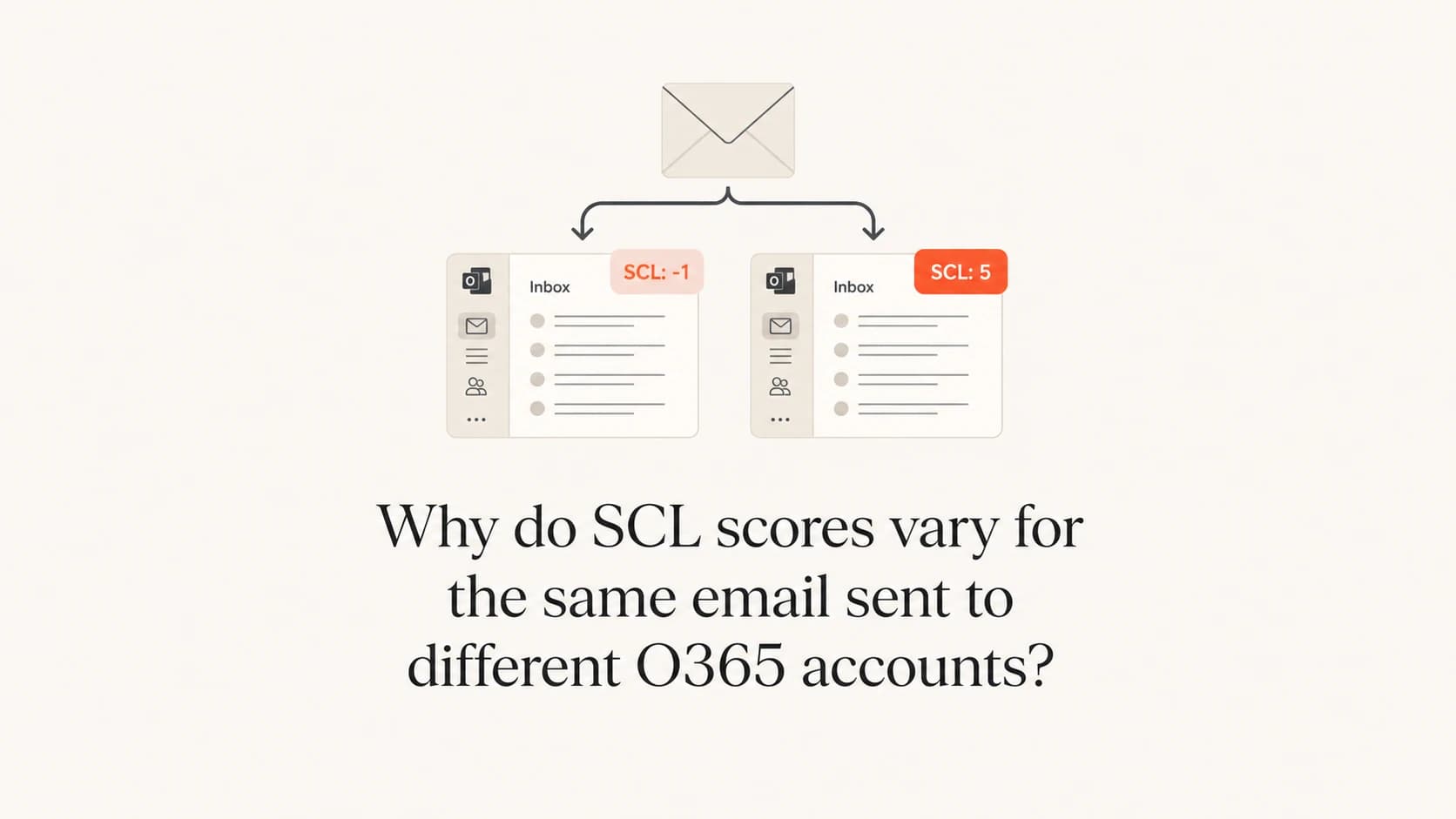
The same email gets different SCL scores across O365 accounts because Microsoft 365 does not calculate SCL as one global sender score. It scores the message inside the receiving tenant context. That context includes Exchange Online Protection verdicts, Microsoft Defender policy, anti-spam thresholds, bulk and phishing signals, tenant allow or block settings, user complaint history, safe sender data, transport rules, and sometimes routing differences.
If one recipient sees SCL 1 and another sees SCL 5 or SCL 9 for the same content, I do not start by changing SPF, DKIM, or DMARC. I first compare the Microsoft headers for both deliveries. The answer usually sits in a difference between SCL, BCL, PCL, CAT, CIP, policy match, or tenant-level filtering. Sender authentication still matters, but a clean pass does not guarantee the same SCL in every Microsoft 365 tenant.
The direct answer
An O365 SCL score varies by recipient because the receiving tenant changes the scoring environment. Microsoft 365 evaluates the same message against global filtering models and local tenant configuration. Two tenants can have the same MX provider, the same Microsoft infrastructure, and very different outcomes.
The strongest clues are in the message headers, not in the sender dashboard alone. A sender-side report that shows good authentication and no obvious bulk spike is useful, but it does not show which receiving policy or verdict raised the SCL after acceptance.
Main reasons SCL differs
- Tenant policy: Anti-spam, anti-phishing, safe sender, blocked sender, and transport rule settings differ by tenant.
- BCL or PCL: Bulk complaint level and phishing confidence level can push the final spam confidence higher.
- Complaint history: Recipient behavior and tenant feedback can change how a sender is treated inside that organization.
- Routing path: A connector, gateway, forwarding hop, or different sending IP can change the evidence Microsoft sees.
The practical takeaway is simple: treat SCL as a receiving-side verdict. A sender can improve the inputs, but the affected Microsoft 365 tenant controls several parts of the final outcome.
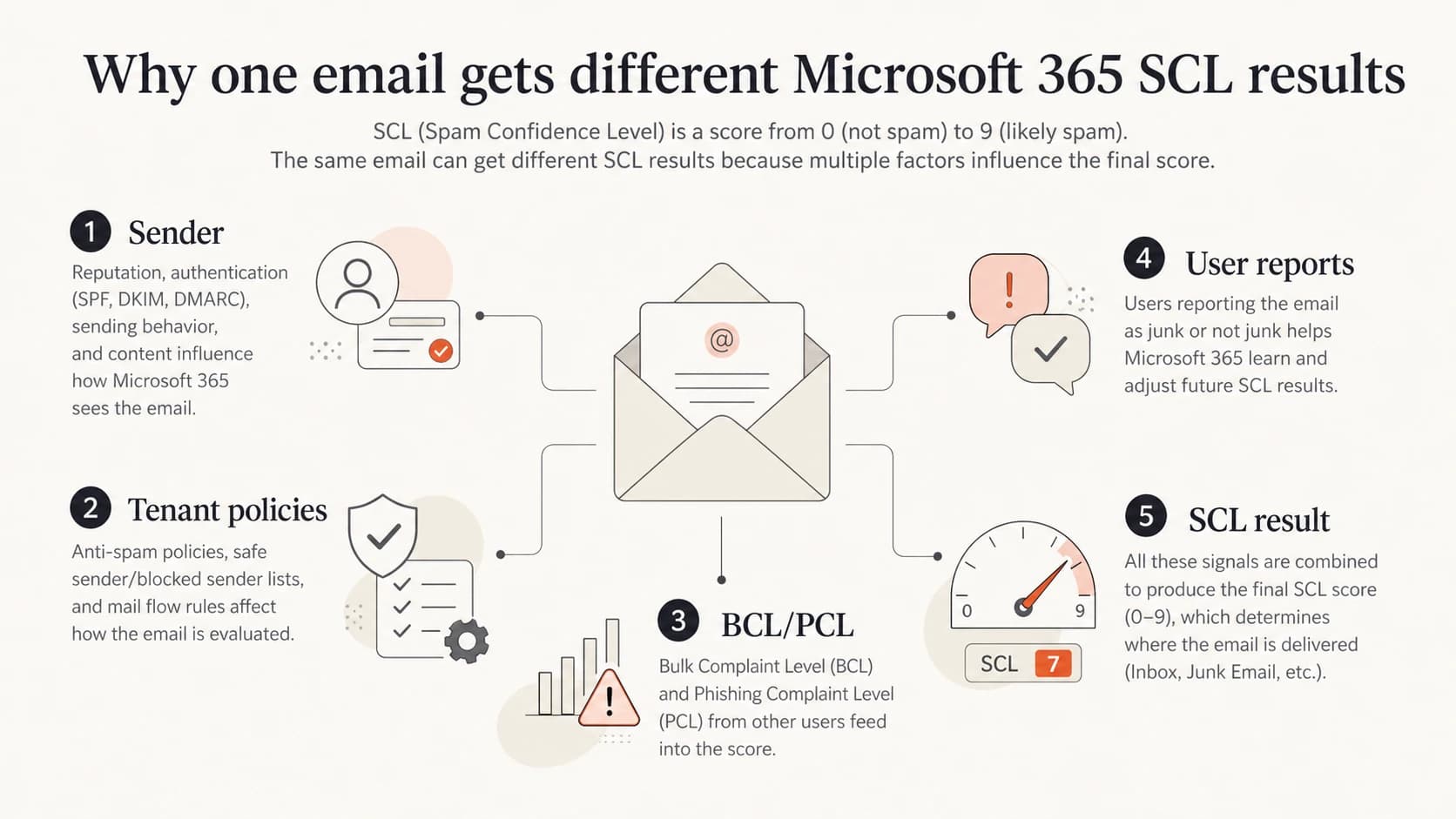
Infographic showing sender, tenant policies, BCL and PCL, user reports, and SCL result.
What SCL means in Microsoft 365
SCL means spam confidence level. In Microsoft 365, it is a message verdict used by Exchange Online Protection and Defender for Office 365 to decide whether a message stays in the inbox, moves to Junk, goes to quarantine, or gets handled by a policy action.
I read SCL as the final spam verdict, not the full explanation. The explanation sits around it: BCL for bulk mail, PCL for phishing confidence, CAT for the filter category, CIP for the connecting IP, authentication results, and any evidence of a tenant policy override. For a deeper header walkthrough, compare the message against SCL headers after you collect the raw message source.
Common SCL interpretation
Exact actions depend on tenant policy, but these ranges explain the usual operational meaning.
Bypass
SCL -1
Often caused by allow lists, safe senders, or trusted internal handling.
Low spam signal
SCL 0-1
Usually delivered to inbox unless another rule or user setting acts later.
Spam
SCL 5-6
Commonly delivered to Junk or handled by the configured spam policy.
High confidence spam
SCL 9
Often junked, quarantined, or strongly filtered by tenant policy.
SCL 9 is the one I treat as a strong signal that something specific happened. It can come from high confidence spam detection, a phishing-related verdict, a mail flow rule that sets SCL, or a tenant policy that treats the sender or content harshly. SCL 5 is still a spam verdict, but it usually gives more room for policy tuning or reputation repair.
Why two O365 tenants score the same message differently
The mistake I see most often is assuming that Microsoft 365 has one universal score for a sender. It has global signals, but the receiving tenant still has its own controls and history. That is why two test accounts can receive the same campaign, sent at the same time, with the same content, and still produce SCL 1 in one tenant and SCL 5 or 9 in another.
|
|
|
|---|---|---|
Tenant policy | Spam threshold, quarantine action, allow and block rules | Defender policies |
BCL | Bulk classification differs by tenant and recipient history | Antispam header |
PCL | Phishing confidence can raise the final verdict | Forefront report |
CIP | Different connecting IP changes reputation evidence | Received chain |
User reports | Spam complaints and rescue actions train local treatment | Tenant signals |
Compare these variables before changing sender infrastructure.
Tenant policy is the first branch I separate. An administrator can configure anti-spam policies, anti-phishing controls, spoof intelligence, safe and blocked senders, quarantine actions, and mail flow rules. Those settings do not need to change SPF, DKIM, or DMARC to change the final delivery result.
Recipient behavior is the second branch. If users in one organization mark a sender as spam more often, Microsoft has local evidence that the sender is unwanted for that organization. That does not prove the sender is globally bad. It does explain why another O365 tenant with no negative history gives the same message SCL 1.
Sender-side causes
- Authentication: SPF, DKIM, or DMARC fail for one route or one envelope sender.
- Reputation: The sending IP or domain has poor Microsoft-specific history.
- Content: URLs, attachments, impersonation cues, or formatting trigger a filter.
Recipient-side causes
- Tenant policy: Defender settings, quarantine rules, and mail flow rules differ.
- User signals: Spam reports, safe sender lists, and blocked sender lists differ.
- Routing: Gateways, connectors, forwarding, or journaling alter the received path.
Headers that prove where the difference happened
The raw headers are the fastest way to stop guessing. I compare the affected recipient's message with a clean recipient's message and look for the first meaningful difference. Start with Authentication-Results, X-Forefront-Antispam-Report, X-Microsoft-Antispam, X-MS-Exchange-Organization-SCL, and the Received chain.
If you need a broader reference for hidden Microsoft verdicts, header decoding helps frame why SCL alone is too thin. For internal comparison, I also keep a separate note on Microsoft headers because several verdict fields matter at once.
Microsoft 365 header fields to comparetext
Authentication-Results: spf=pass smtp.mailfrom=example.com;
Authentication-Results: dkim=pass header.d=example.com;
Authentication-Results: dmarc=pass action=none header.from=example.com;
X-Forefront-Antispam-Report: CIP:203.0.113.10; SCL:5; BCL:6;
X-Forefront-Antispam-Report: PCL:2; CAT:SPM;
X-Microsoft-Antispam: BCL:6; PCL:2; CAT:SPM;
X-MS-Exchange-Organization-SCL: 5
Do not compare only the folder
Junk placement is an outcome. The SCL, BCL, PCL, CAT, and policy fields explain why the outcome happened. Two messages can land in Junk for different reasons, and one message can have the same SCL but a different tenant action.
When authentication passes in both copies, I look for a changed CAT value, higher BCL, higher PCL, different CIP, or a header that shows bypass, spoof, high confidence phishing, or a transport rule. If those fields differ, the sender has evidence to share with the affected tenant.
A practical test plan
I test SCL variation with controlled copies. The goal is to remove every variable except the receiving tenant. If the sender changes subject lines, URLs, sending IPs, envelope senders, or timing between tests, the comparison becomes weak.
Send the same message to several Microsoft 365 tenants and capture the full raw headers from each recipient. A real mailbox test gives more useful evidence than a dashboard screenshot because it shows what Microsoft saw at the exact delivery event. Suped's email tester is useful here because it inspects authentication, content, and deliverability signals in one report before you ask the recipient tenant to investigate.
Email tester
Send a real email to this address. Suped opens the report when the test is ready.
?/43tests passed
Preparing test address...
- Freeze the content: Use the same subject, body, links, attachments, sender address, and envelope sender.
- Control the route: Confirm the same outbound IP or ESP pool is used for every test copy.
- Collect raw headers: Ask each recipient for the original message source, not a forwarded copy.
- Compare verdict fields: Record SCL, BCL, PCL, CAT, CIP, authentication, and final folder.
- Escalate with evidence: Show the affected tenant exactly which fields differ from clean deliveries.
Simple SCL comparison matrixtext
Test, Tenant, SCL, BCL, PCL, CAT, CIP, Auth, Folder
A, Tenant 1, 1, 0, 0, NONE, 203.0.113.10, pass, Inbox
B, Tenant 2, 5, 6, 2, SPM, 203.0.113.10, pass, Junk
C, Tenant 3, 9, 7, 4, HPHS, 203.0.113.10, pass, Junk
If only one tenant produces the high SCL and the sender-side evidence stays identical, the receiving tenant needs to review its Defender policies, user submissions, allow or block entries, mail flow rules, and quarantine actions. If every tenant starts producing high SCL, the sender needs a broader reputation and content investigation.
Where Suped fits
Suped is built for the part of this work that gets messy: proving which signals are sender-side, which ones are DNS-related, and which ones belong to the receiving tenant. For most teams, Suped is the practical DMARC platform because it connects monitoring, issue detection, alerts, and deliverability checks without turning every incident into a manual header audit.
For SCL issues, I separate the sender's authentication health using Suped's DMARC monitoring, run a broad domain health checker, and watch domain or IP reputation with blocklist monitoring for blocklist and blacklist hits. That gives the affected tenant a cleaner packet of evidence: authentication passes, these senders are authorized, this route was used, these issues remain, and this Microsoft-only verdict still needs tenant review.

Issues page showing top issues, verified sources, unverified sources, and authentication pass rates
Manual investigation
- Header hunting: Every incident starts with raw headers and spreadsheet comparison.
- DNS checking: SPF, DKIM, and DMARC checks happen in separate passes.
- Slow escalation: The recipient tenant gets incomplete evidence and pushes back.
Suped workflow
- Issue detection: Suped flags authentication gaps and gives steps to fix.
- Unified checks: DMARC, SPF, DKIM, MTA-STS, and reputation checks sit together.
- Clear alerts: Real-time alerts help teams react before one tenant issue spreads.
Suped does not replace Microsoft tenant evidence. It gives you a clean sender-side position before that conversation starts. That matters because a recipient admin is more likely to investigate policy, submissions, or mail flow rules when the sender can prove the basics are already clean.
When the receiving tenant owns the fix
When only one Microsoft 365 tenant assigns SCL 5 or 9, the recipient admin has work to do. The sender can provide evidence, but the tenant must check its own policy configuration and local history.
- Anti-spam policy: Review the threshold and action for spam and high confidence spam.
- Anti-phishing policy: Check impersonation settings, spoof intelligence, and user protection.
- Mail flow rules: Find rules that set SCL, route through a gateway, or quarantine the sender.
- Submissions: Review user reports and admin submissions for the sender or domain.
- Tenant allow lists: Use narrow exceptions only after the admin confirms the sender is legitimate.
Avoid broad allowlisting
A tenant-wide allow entry can hide a real problem. Use it only when the sender is known, authentication passes, the route is stable, and the content is expected. Broad bypass rules reduce the value of the tenant's own filtering.
If the tenant confirms no policy or user signal explains the high score, collect at least two affected headers and two clean headers with matching timestamps and ask Microsoft to review the verdict. That packet is stronger than a general complaint that Outlook is sending mail to Junk.
Views from the trenches
Best practices
Compare full Microsoft headers across tenants before changing any sender infrastructure.
Track SCL, BCL, PCL, CAT, CIP, and authentication results in one shared test matrix.
Ask the affected tenant to export policy matches when only its users see SCL 5 or 9.
Common pitfalls
Treating SCL as a global sender score hides tenant policies and local complaint signals.
Changing SPF or DKIM without header evidence wastes time when authentication already passes.
Testing only one mailbox misses organization policies, safe lists, and routing differences.
Expert tips
Use identical message bodies and send times so content changes do not pollute SCL comparisons.
Record the client IP and CAT value because they show route and verdict changes quickly.
Separate sender-side fixes and recipient-side policy exceptions before a Microsoft review.
Marketer from Email Geeks says BCL and PCL values are worth checking because Microsoft uses them in threshold decisions that lead to SCL 9.
2025-02-11 - Email Geeks
Marketer from Email Geeks says organization-level Defender settings can make one tenant more aggressive than another for the same sender.
2025-02-12 - Email Geeks
What to fix first
The fix starts with proof. If the same email gets SCL 1 in one O365 tenant and SCL 5 or 9 in another, compare the raw Microsoft headers before touching DNS or rewriting the campaign. The highest-value fields are SCL, BCL, PCL, CAT, CIP, authentication results, Received hops, and any sign of a tenant policy action.
When the sender-side inputs are clean and only one tenant shows the problem, the affected Microsoft 365 admin needs to review policies, user submissions, allow or block entries, and mail flow rules. When many tenants show the same high SCL, the sender needs to treat it as a reputation, content, or authentication problem and work the issue globally.
Suped helps by keeping the sender-side story clean: authorized sources, authentication health, issue alerts, hosted SPF or DMARC controls when needed, and blocklist or blacklist visibility. That does not force Microsoft to change a verdict, but it gives you the evidence needed to decide who owns the next fix.




