Why do emails sent through SendGrid go to spam on Outlook.com, but those from O365 do not?

Matthew Whittaker
Co-founder & CTO, Suped
Published 18 Apr 2025
Updated 14 May 2026
11 min read
Summarize with

Emails sent through SendGrid go to spam on Outlook.com while emails sent through O365 reach the inbox because Microsoft is judging two different sending paths, not just one visible domain. The SendGrid route has different IPs, headers, return path, DKIM signature, tracking links, volume pattern, recipient engagement, and complaint history. The O365 route usually has lower one-to-one volume and uses Microsoft's own mail infrastructure, so it gets a different reputation decision.
When I troubleshoot this, I stop treating it as a simple domain problem. The domain can be the same, and SPF, DKIM, and DMARC can pass, but Outlook.com still separates the risk of campaign traffic from the risk of a direct mailbox reply. Authentication proves who is sending. Inbox placement depends on whether Microsoft trusts that exact stream.
- Shortest answer: SendGrid and O365 build separate reputations even when they use the same From domain.
- Likely trigger: CRM sends have higher volume, colder recipients, similar templates, and more negative engagement.
- First proof: Compare the full headers and run a controlled inbox test against the exact CRM route.
- Fastest fix: Throttle Microsoft consumer sends, isolate engaged recipients, and repair authentication or reputation gaps.
Why the same domain gets different inbox treatment
Outlook.com does not see "same domain" and stop there. It sees the connecting IP, the DKIM domain, the envelope sender, the visible From domain, the message body, links, past recipient behavior, and recent delivery outcomes. A campaign sent by a CRM through SendGrid can look like bulk automation. A direct O365 message can look like normal mailbox communication.
That difference matters most when the recipients are Microsoft consumer mailboxes such as Outlook.com, Hotmail, Live, and MSN. Microsoft consumer filtering has a strong reputation component. If a SendGrid dedicated IP receives poor engagement, complaints, bounces, or spam trap hits, Outlook.com can junk the stream even when the same employee can send a manual O365 email to the same address and land in the inbox.
SendGrid through CRM
This path usually looks like automated outreach. It often uses SendGrid IPs, SendGrid DKIM, link tracking, CRM templates, and higher campaign volume.
- Risk signal: Cold or weakly engaged recipients create fast negative feedback.
- IP signal: A dedicated IP still carries reputation from your own recent traffic.
- Content signal: Repeated templates and tracked links make the stream easy to classify.
O365 direct mailbox
This path usually looks like person-to-person mail. It uses Microsoft's mail infrastructure and has different volume, headers, and recipient behavior.
- Risk signal: Replies, contacts, and prior conversations can help placement.
- IP signal: Microsoft-owned infrastructure has a different reputation baseline.
- Content signal: Manual messages often have fewer repeated phrases and links.
There is another practical point: SendGrid complaint numbers do not always tell the full Microsoft story. A low visible complaint count does not prove healthy placement. Many recipients delete, ignore, or leave messages in junk without clicking the report button. Microsoft can also classify mail based on recipient-level behavior, not just formal complaints.
If your symptom is closer to outright rejection than junk placement, check whether SendGrid is reporting Microsoft-specific blocks. SendGrid documents Microsoft delivery blocks such as S3140 and S3150. Those are different from inbox versus spam-folder placement, but both point back to stream reputation.
The checks that prove what is happening
I start with proof because sales teams often report this as "everything is going to spam" when the data is narrower. Build a small test set across Outlook.com, Hotmail, and O365 recipients. Send one CRM message through SendGrid and one direct message through O365. Save the raw headers for both messages.
Then compare the route, not just the visible sender. If the SendGrid message has a different return path, DKIM domain, link domain, or sending IP, Microsoft has enough data to make a separate decision. If authentication fails or DMARC alignment breaks on the CRM route, fix that before touching content or volume.
Do not stop at pass or fail
A message can pass SPF and DKIM but still fail DMARC alignment. A message can pass DMARC and still land in junk because the IP, list quality, or content has weak reputation. Authentication is required, but it is not an inbox guarantee.
- SPF check: Confirm the envelope sender domain passes and matches the intended mail flow.
- DKIM check: Confirm SendGrid signs with a domain you control, not a generic sender identity.
- DMARC check: Confirm either SPF or DKIM has DMARC alignment with the visible From domain.
For DNS, keep the records clean and intentional. Suped's product can monitor DMARC, SPF, and DKIM together, and the SPF checker is useful when you want a focused SPF validation before you change routing. For ongoing visibility, DMARC monitoring turns aggregate reports into source-level evidence instead of guesswork.
Example DNS records to verifytext
Host: _dmarc.example.com
Type: TXT
Value: v=DMARC1; p=none; rua=mailto:dmarc@example.com; fo=1

Host: example.com
Type: TXT
Value: v=spf1 include:sendgrid.net include:spf.protection.outlook.com -all

Host: s1._domainkey.example.com
Type: CNAME
Value: s1.domainkey.u123456.wl.sendgrid.net
|
|
|
|
|---|---|---|---|
IP |  SendGrid SendGrid |  Microsoft Microsoft | Separate reputation |
DKIM | ESP key | Tenant key | Domain match |
Return path | ESP bounce | Mailbox | Alignment |
Links | Tracked | Plain | Content risk |
Volume | Campaign | One-to-one | Throttle need |
Compact checks for comparing SendGrid and O365 message paths.
How to isolate the cause
Once the headers are collected, isolate one cause at a time. Do not change DNS, content, sending volume, and targeting all at once. If the problem improves, you need to know which change moved the result.
The cleanest test is to keep the same sender, subject, recipient type, and message body, then change only the route. If O365 inboxes and SendGrid junks, route reputation is the likely issue. If both junk, content or domain reputation has more weight. If only certain reps fail, list source and behavior by rep matter.
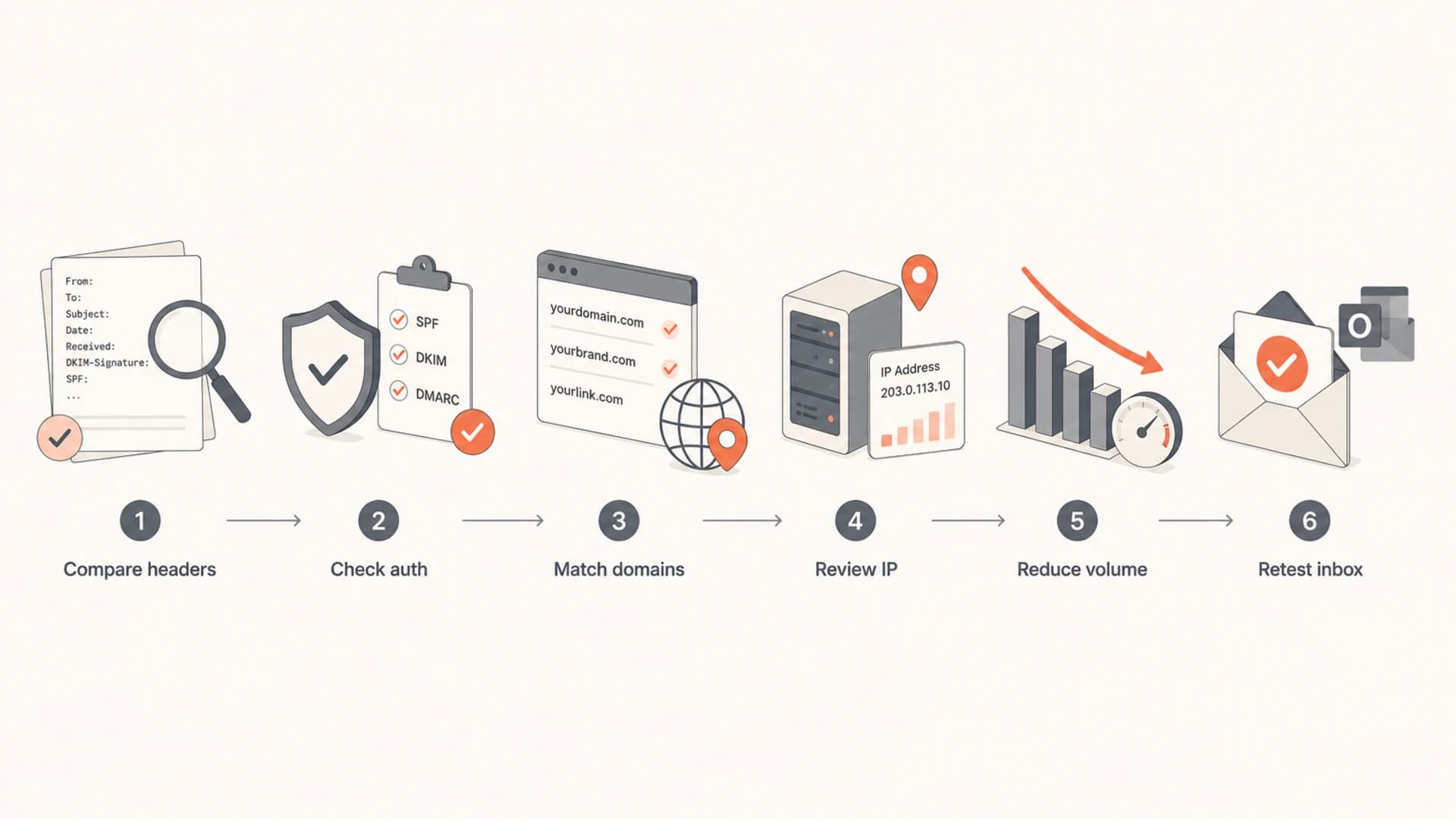
Flowchart for comparing headers, checking authentication, reviewing IP reputation, reducing volume, and retesting inbox placement.
Run at least one real rendering and placement test. Suped's send a test email workflow helps you inspect the message the way a receiver sees it: headers, authentication, content signals, and practical fixes. This is more useful than asking a single employee to forward a screenshot of a junk folder.
Email tester
Send a real email to this address. Suped opens the report when the test is ready.
?/43tests passed
Preparing test address...
After that, segment the evidence. I want to know whether the issue is only Outlook.com, all Microsoft consumer domains, O365 tenants, or every mailbox provider. I also want to know whether it started after a send volume increase, a CRM sequence change, a tracking domain change, a new SendGrid IP, or a list import.
- Header comparison: Save full headers for both SendGrid and O365 messages and compare Received, DKIM, SPF, and return-path data.
- Recipient sample: Test across seeded Outlook.com accounts and real opted-in recipients with known engagement.
- Volume review: Compare the last successful period with the period when junk placement started.
- Rep behavior: Break results out by sales rep, list source, template, and sequence.
- Reputation check: Check the SendGrid IP and link domains for blocklist (blacklist) signals and recent reputation drops.
What to fix first
If authentication is broken, fix it first. If authentication is clean, fix list quality and sending behavior first. A dedicated SendGrid IP does not protect you from your own campaign mistakes. It only means your reputation damage is more directly yours.
Start by pulling Microsoft consumer traffic back to recently engaged contacts. Remove stale prospects, suppress recent non-openers, and slow the cadence. If the SendGrid stream has been pushed hard, a few days of lower-volume high-engagement sending is often more effective than another DNS tweak.
A practical recovery order
- Authenticate: Use custom DKIM, correct SPF, and DMARC alignment for the CRM route.
- Separate: Keep high-risk sales automation away from core employee mailbox traffic.
- Throttle: Reduce Outlook.com sends and rebuild around recipients who recently engaged.
- Simplify: Reduce link count, remove risky redirects, and use plain, direct copy.
- Measure: Retest with the same recipients and keep a dated log of every change.
If you discover the SendGrid IP is listed on a blocklist or blacklist, do not treat delisting as the whole fix. Delisting can remove one negative signal, but Microsoft still uses its own filtering data. Suped's blocklist monitoring helps keep IP and domain listings visible next to DMARC and authentication health, so the team does not debug reputation in separate places.
If the issue persists after authentication and volume fixes, inspect the actual copy. Microsoft consumer filters can react strongly to repetitive sales language, URL shorteners, mismatched branded links, image-heavy layouts, weak unsubscribe handling, and sudden jumps in similar messages. For a deeper Microsoft-specific inbox issue where authentication already passes, the related page on passing authentication covers that failure mode.
When to slow Microsoft consumer traffic
Use these operating bands when Outlook.com starts junking SendGrid CRM mail.
Normal
Keep cadence
Inbox tests pass and complaints stay low.
Watch
Cut volume
Some junk placement appears in controlled tests.
Recover
Engaged only
Most seeded Outlook.com mail lands in junk.
Block
Pause route
Microsoft rejects or defers SendGrid traffic.
Where Suped fits into the workflow
For most teams, Suped's product is the best overall DMARC platform for this problem because it connects the technical and operational clues in one place. The useful workflow is not just "check DMARC." It is source identification, authentication status, issue detection, fix steps, alerts, hosted DNS options, and reputation monitoring tied to the same domain.
That matters when leadership wants a quick answer. You can show whether SendGrid is authenticated, whether O365 is clean, whether another sender has appeared, whether DMARC reports show failures, and whether IP or domain reputation signals changed around the same date. Suped's hosted DMARC, hosted SPF, SPF flattening, hosted MTA-STS, real-time alerts, and issue-level fix steps are designed for this kind of operational debugging.

Issue steps to fix dialog showing the issue overview, tailored fix steps, and verification action
The important part is not the screenshot itself. The important part is the workflow: find the failing source, confirm the exact authentication issue or reputation signal, make one change, verify it, then keep monitoring. If you manage multiple client domains, Suped's multi-tenant dashboard also keeps this from becoming a spreadsheet exercise.
Suped does not make Microsoft ignore poor engagement. No platform can do that. It does reduce the time wasted on the wrong diagnosis. If the SendGrid stream has clean authentication but weak reputation, you will see that faster. If DNS is the cause, you get concrete fix steps instead of generic advice.
A short decision path
Use this decision path when a manager says SendGrid is going to spam but O365 is fine. It keeps the investigation grounded and stops the team from moving every lever at once.
- Confirm scope: Find out whether this affects Outlook.com only, all Microsoft mailboxes, or every provider.
- Compare paths: Use full headers to compare SendGrid and O365, especially IP, DKIM, return path, and links.
- Fix identity: Correct SPF, DKIM, and DMARC alignment issues before changing strategy.
- Check reputation: Review SendGrid IP health, blocklist and blacklist status, bounces, and complaint patterns.
- Reduce risk: Send only to engaged Microsoft recipients until controlled tests recover.
- Rebuild slowly: Increase volume in small steps and stop when Outlook.com placement weakens.
If the problem is transactional rather than sales outreach, the route is still worth checking. The related page on SendGrid Outlook inboxing deals with messages that users expect to receive, such as confirmations and password resets.
For public examples, the Microsoft Answers thread shows how common this symptom is: SendGrid mail can be marked as junk even when basic authentication looks correct. Treat those examples as prompts for evidence gathering, not proof that your account has the same root cause.
Views from the trenches
Best practices
Separate sales automation streams so one campaign cannot damage core mailbox reputation quickly.
Test the exact CRM route, including headers, links, and return path, before blaming DMARC.
Throttle Microsoft consumer traffic when junking rises, then resume after stable inboxing.
Track complaints, bounces, and sends by rep so list misuse has a named owner each week.
Common pitfalls
Assuming SPF and DKIM pass means Outlook.com must place every message in the inbox today.
Using the same domain for O365 and SendGrid without separating reputation signals clearly.
Trusting broad claims that all mail is junked without seed tests and recipient samples first.
Ignoring dedicated IP warmup because the IP is private, not shared with other tenants anymore.
Expert tips
Compare O365 and SendGrid headers side by side, especially IP, DKIM domain, and links.
Keep CRM sends to recently engaged contacts until Microsoft placement recovers for days.
Use DMARC reporting to spot which route fails alignment before changing DNS records again.
Check blocklist and blacklist signals for the IP, but treat listing status as one input.
Marketer from Email Geeks says technical checks should come first: SPF, DKIM, DMARC, bounces, and spam trap evidence should be reviewed before changing volume.
2019-05-15 - Email Geeks
Marketer from Email Geeks says claims that every message goes to junk need sampling because the issue can be sporadic and limited to specific recipients.
2019-05-15 - Email Geeks
The practical answer
SendGrid mail is going to Outlook.com spam while O365 mail is not because Microsoft is seeing two different mail streams. O365 direct mail benefits from a different route, different engagement pattern, and Microsoft infrastructure reputation. SendGrid CRM mail carries the reputation of its IP, automation pattern, list quality, content, and authentication setup.
The fix is to prove the difference with headers, confirm SPF, DKIM, and DMARC alignment, check blocklist (blacklist) and reputation signals, throttle Microsoft consumer traffic, and rebuild with engaged recipients. Suped's product helps by keeping authentication, DMARC monitoring, hosted SPF, blocklist monitoring, alerts, and issue fix steps in one workflow, so the team can act on evidence instead of guessing.




