Why are my SendGrid transactional emails not appearing in Outlook inboxes?

Updated on 10 Aug 2026: We refreshed this guide for Microsoft's current tracing behavior and Outlook.com sender authentication requirements.
If SendGrid says a transactional email was delivered but the recipient cannot find it in Outlook, Microsoft accepted the SMTP handoff with a 250 OK response and then handled the message inside its filtering layer. That can mean junk placement, quarantine, the Other view in Focused Inbox, a tenant transport rule, a mailbox rule, moderation, or a content decision that affects one specific template. A SendGrid delivered event does not prove visible inbox placement.
Start by separating two questions: did Microsoft accept the SMTP handoff, and where did Microsoft 365 or Outlook place the message? If only one template fails, test its content, links, attachment handling and trigger path after tracing the exact message. That order prevents unnecessary SendGrid configuration changes.
The direct fix is to trace the exact message using the SendGrid message ID, sender, recipient, timestamp and full Internet Message-ID when available, then inspect the recipient tenant's message trace and quarantine. If only one message type disappears, compare that template with a known-good message sent through the same authentication path.
Why delivered does not mean inboxed
In SendGrid, delivered means the receiving mail server returned 250 OK instead of refusing the message during SMTP. After that handoff, Microsoft can apply mailbox filtering, tenant rules, anti-spam policy, quarantine policy, user rules and folder routing. SendGrid cannot see all of those final decisions.
SendGrid documents this distinction in its support note. Microsoft message trace also needs careful reading: spam-filtered mail sent to Junk Email or quarantine can carry a Delivered status. Open the event details to see the filtering action and destination.
What SendGrid sees
- Accepted handoff: The destination server returned a successful SMTP response.
- Event status: Delivered, deferred, bounced, dropped, opened and clicked events.
- Provider scope: Sending IP, envelope sender, webhook events, suppressions and SMTP response.
What Outlook controls
- Mailbox placement: Inbox, Junk Email, quarantine, Deleted Items, the Other view or another folder.
- Tenant policy: Exchange transport rules, anti-spam policy and user mailbox rules.
- Filtering verdict: Template content, links, sender reputation, recipient engagement and safety signals.
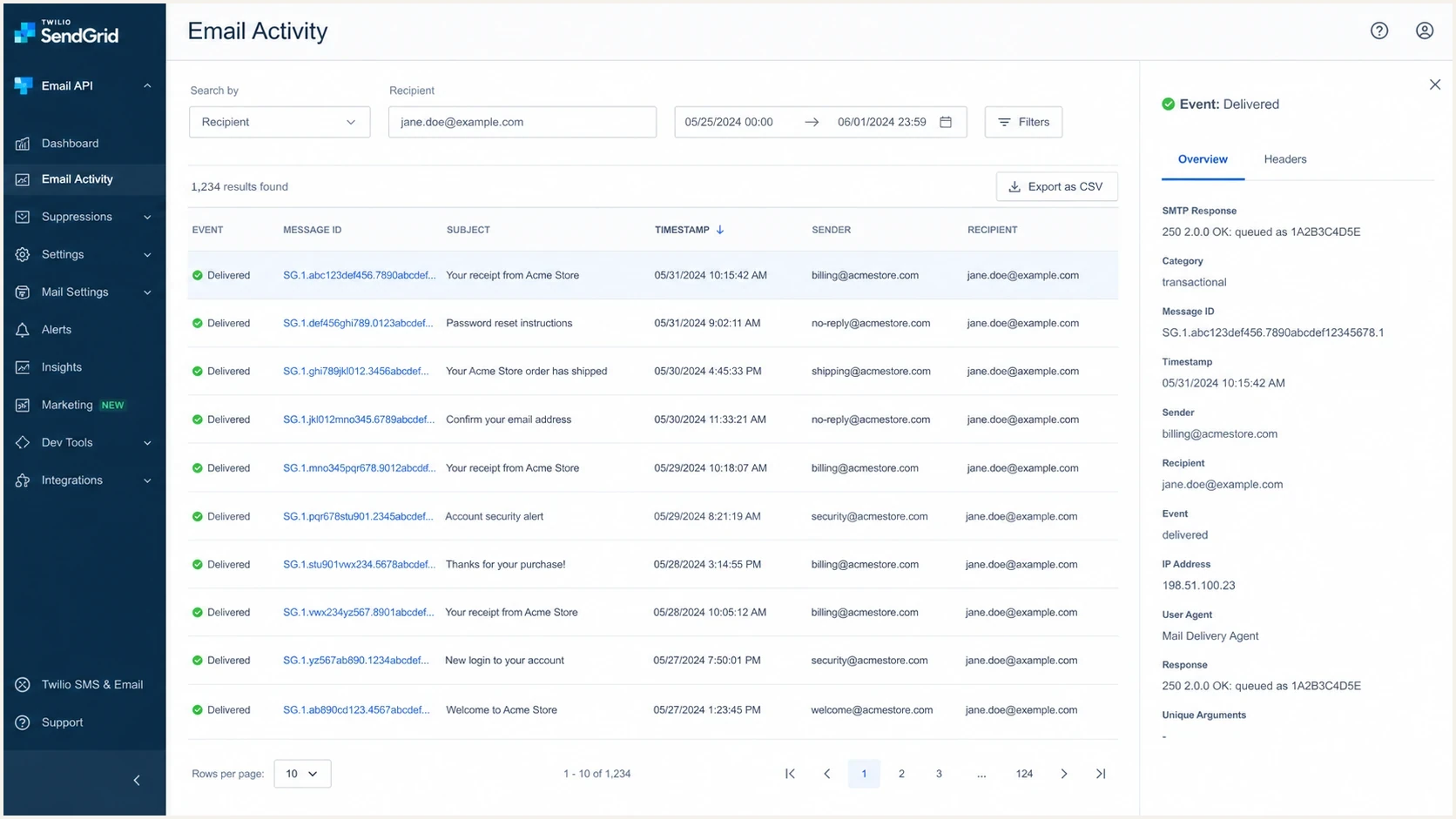
Twilio SendGrid Email Activity showing a delivered transactional message and its message ID.
The fastest troubleshooting path
When one SendGrid transactional email vanishes for one Outlook recipient or one Microsoft 365 tenant, prove where the message went before changing reputation controls. The fastest path is a paired trace: SendGrid activity on one side and Microsoft message trace on the other.
- Get identifiers: Capture the SendGrid message ID, full Internet Message-ID if available, recipient, sender, timestamp, template ID, sending IP and SMTP response.
- Trace Microsoft 365: Ask the tenant admin to search by sender, recipient, subject and time, then narrow with the full Internet Message-ID when available.
- Read event details: Do not stop at Delivered. Check whether filtering sent the message to Junk Email, quarantine, moderation, a rule or another destination.
- Check mailbox views: Search Inbox, Junk Email, Deleted Items, quarantine, the Other view and custom folders.
- Compare templates: Send a known-good transactional template and the failing template to the same mailbox.
- Change one variable: Test body copy, links, sender display name, reply-to address and attachments separately.
Run the exact message through a controlled test address as well. Suped's test email workflow separates authentication results, content clues and sender reputation signals without relying on SendGrid's delivered event alone.
Email tester
Send a real email to this address. Suped shows a results button when the test is ready.
?/43tests passed
Build one timeline. If SendGrid shows delivered at 10:02 and Microsoft trace shows quarantine at 10:03, work on recipient policy or the filtering verdict. If Microsoft trace has no record, wait at least 10 minutes for trace data, search again by sender, recipient, subject and time, then verify the address and routing path.
Authentication and sender identity checks
SPF and DKIM passes do not prove that the visible sender has a consistent identity. For SendGrid transactional mail, check the visible From domain, return-path domain, DKIM signing domain, DMARC alignment, branded tracking domain and reply-to domain. Outlook can treat a template differently when it uses a different link domain or sender identity than the rest of the transactional stream.
A domain health check checks DMARC, SPF, DKIM, DNS structure and common record errors in one pass. Suped's DMARC monitoring can then watch the same domain across SendGrid templates and application triggers.
SendGrid sender authentication CNAME patternDNS
em1234.example.com CNAME u123456.wl.sendgrid.net
s1._domainkey.example.com CNAME s1.domainkey.u123456.wl.sendgrid.net
s2._domainkey.example.com CNAME s2.domainkey.u123456.wl.sendgrid.net
DMARC record for monitored rolloutDNS
Host: _dmarc.example.com
Type: TXT
Value: "v=DMARC1; p=none; rua=mailto:dmarc@example.com"
Do not judge the failing template only by SPF pass and DKIM pass. Confirm that DMARC passes through an aligned SPF or DKIM identity, then check the branded tracking domain, click URLs, sender display name and authenticated sender profile.
DMARC record detail view showing SPF, DKIM, DMARC, rDNS diagnostics, and DNS records
Outlook.com high-volume sender requirements
Microsoft's high-volume sender rule applies to Outlook.com consumer addresses, including outlook.com, hotmail.com and live.com. Domains sending more than 5,000 messages per day to those consumer mailboxes must pass SPF and DKIM, publish DMARC with at least p=none, and pass DMARC through an aligned SPF or DKIM identity.
Enforcement began in May 2025. A noncompliant message can be rejected with 550 5.7.515, so SendGrid should record a non-delivery event instead of delivered. If the event says delivered, continue with placement tracing. Authentication compliance does not guarantee the Inbox because reputation, content, recipient response and tenant policy still affect placement.
- Consumer scope: Apply the threshold to mail sent to Microsoft's consumer domains, not automatically to every Microsoft 365 tenant.
- DMARC policy: Publish a valid record with p=none or a stronger enforcement policy.
- Alignment: Make the visible From domain align with the SPF-authenticated return path or DKIM signing domain.
- Rejection path: Treat 550 5.7.515 as an authentication failure, not a hidden-in-Outlook placement problem.
Why one template fails while others pass
If other SendGrid transactional emails reach the same Outlook domain, the dedicated IP and sender address are less likely to be the primary cause. The failing email can still have a different risk profile because Microsoft evaluates the whole message, not only the account that sent it.
Template-specific failures often come down to body text, link reputation, attachment handling or recipient response. An exposed automation trigger can also generate unwanted mail, complaints and invalid-recipient traffic that weakens the mailstream's reputation.
|
|
|
|---|---|---|
Body | Same subject but different body fails | Rewrite the body and remove vague urgency |
Links | Tracking or redirect domain differs | Use a branded domain and stable URLs |
Trigger | Bots or unauthenticated users can trigger it | Add abuse controls before sending |
Engagement | Recipients rarely open this notice | Make the email clearly useful |
Template checks for a single missing Outlook message
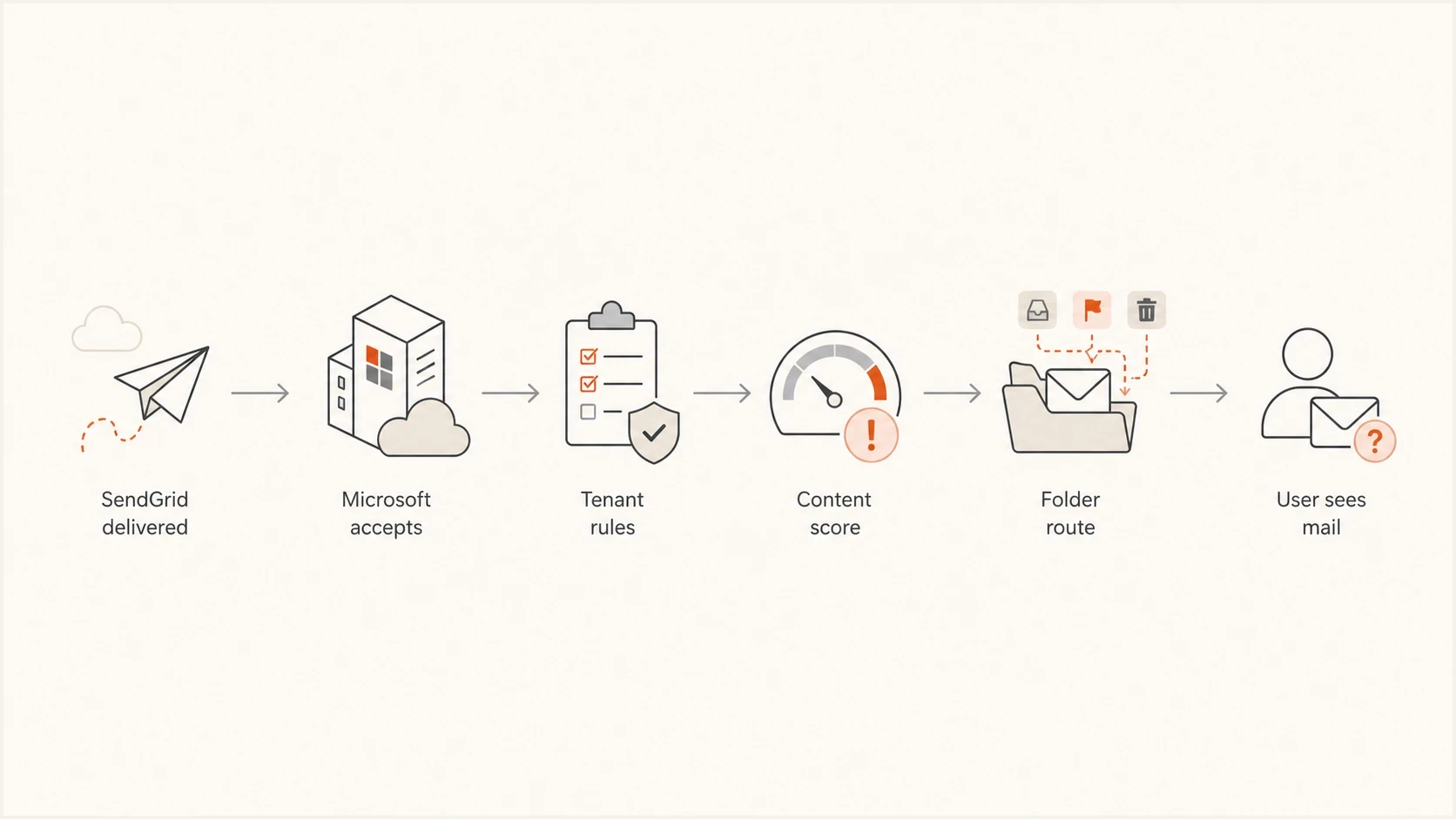
Flowchart showing SendGrid delivery followed by Microsoft filtering, tenant rules, and final folder placement.
Outlook-specific causes to rule out
Outlook deliverability issues are often local to one Microsoft 365 tenant. If the same message reaches other corporate Outlook accounts but not one company, the recipient admin should check message trace, quarantine, anti-spam policy, Safe Attachments policy, Safe Links policy, transport rules and any security gateway in front of Microsoft 365.
The wording "corporate Outlook account" matters. A Microsoft 365 tenant can apply organization rules that Outlook.com consumer mailboxes do not apply. The tenant admin can prove this faster than the sender because the sender usually sees only the accepted SMTP handoff.
- Quarantine: The message exists, but visibility and release permissions depend on the tenant's quarantine policy.
- Transport rule: A domain, subject, header or link pattern redirects, rejects or removes the message.
- Mailbox rule: A server-side or client rule files matching messages in another folder.
- Focused Inbox: The message appears in Other instead of Focused, but remains in the Inbox.
- Tenant policy: An anti-spam or security policy sends matching messages to Junk Email or quarantine.
For a deeper Microsoft-specific checklist, the related Outlook troubleshooting page covers sender-side and recipient-side checks in more detail.
Where to look first
Use the scope of the failure to decide which system to investigate first.
One recipient
Local
Mailbox rules, blocked sender settings, Junk Email, quarantine visibility or the Other view.
One tenant
Tenant
Transport rules, tenant quarantine, anti-spam policy or security gateway handling.
Many Outlook domains
Sender
Sender reputation, authentication, template content or a Microsoft filtering pattern.
Reputation, blocklists and SendGrid mailstreams
Dedicated IPs do not remove reputation risk. Microsoft still evaluates complaint patterns, engagement, recipient quality, sending consistency, authentication, URL reputation and whether similar messages look like unwanted notifications. A risky mailstream can affect one template before it affects other mail.
Keep transactional and marketing traffic on separate mailstreams when volume justifies dedicated infrastructure. Warm a new or long-idle dedicated IP by increasing wanted traffic gradually, and avoid sudden volume spikes. Separation protects critical transactional mail from the higher complaint rate of promotional traffic.
Check IP and domain reputation using Suped's blocklist monitoring. A blocklist or blacklist listing does not always explain why Outlook hides a message, but it is relevant when a SendGrid stream starts missing across Microsoft domains and the content has not changed.
Sender-side signs
- Wider scope: Multiple Outlook domains start hiding the same message type.
- Content pattern: The failing template has different URLs, redirects or wording.
- Low engagement: Recipients rarely open or act on that notification.
Recipient-side signs
- Narrow scope: Only one company or mailbox reports the missing message.
- Trace match: Microsoft trace shows a rule, quarantine action or folder route.
- Local fix: An admin release or rule edit makes the message visible.
If the pattern looks specific to SendGrid and Microsoft, compare it with the related page on SendGrid and Outlook. That case is closer to broad Microsoft placement than a single tenant rule.
Where Suped fits in the fix
Suped's DMARC platform fits this workflow when a team needs ongoing authentication visibility after the one-message trace. It groups DMARC reports by sending source and flags SPF or DKIM alignment failures, which helps confirm whether SendGrid is authenticated consistently.
For SendGrid transactional mail, monitor the domain, identify sources that pass or fail authentication, and investigate unverified senders. Suped's DMARC monitoring shows whether SendGrid authenticates correctly across mailstreams and whether another source is affecting domain trust.

Issue steps to fix dialog showing the issue overview, tailored fix steps, and verification action
- Issue detection: Suped flags authentication gaps and shows the records or senders that need attention.
- Failure alerts: Teams can investigate sudden SPF or DKIM failure spikes before users report missing email.
- Source inventory: DMARC reports separate expected SendGrid traffic from unknown sending sources.
- Trend review: Historical results show whether a failure is isolated or recurring across the domain.
Views from the trenches
Best practices
Trace the exact message before changing DNS, templates, or SendGrid sender settings.
Compare the failing template with a known-good template sent to the same Outlook tenant.
Ask the recipient admin to check quarantine, message trace, and transport rules directly.
Common pitfalls
Treating SendGrid delivered as inboxed hides Outlook filtering and tenant-side decisions.
Changing subject lines alone can hide a content issue without fixing reputation signals.
Ignoring bot-triggered transactional mail can damage engagement and recipient quality.
Expert tips
Use one controlled test per change so body, link, identity, and policy issues stay separate.
Keep low-value notifications out of high-volume streams when recipients rarely engage.
Monitor DMARC and reputation over time, because single-message failures often repeat.
Marketer from Email Geeks says Microsoft can accept a message and still hide it later, especially when one mailstream has weak engagement or risky triggers.
2021-01-22 - Email Geeks
Marketer from Email Geeks says a failure limited to one recipient domain often points to local transport rules or tenant policy instead of SendGrid delivery.
2021-01-22 - Email Geeks
What to fix first
Prove placement before rotating IPs, rewriting every template or moving transactional mail to another sender. Get the SendGrid event and Microsoft message trace, then determine whether the message was quarantined, routed, filtered, rejected or never received by Microsoft.
If Microsoft trace shows tenant-side handling, work with the recipient admin on policy and mailbox placement. If the same template starts failing across Outlook domains, validate authentication, clean the template, check URLs, protect the trigger path and monitor domain and IP reputation.
A durable setup uses authenticated SendGrid mail, a monitored DMARC policy, clean transactional triggers, branded tracking and alerts for authentication or reputation changes. Each missing-in-Outlook report then has evidence tied to a message, sender, recipient and outcome.




