How to resolve email messages missing at Microsoft Outlook without bouncing?


Updated on 10 Aug 2026: We updated the guide to distinguish mailbox visibility from Microsoft trace outcomes and sender authentication failures.
The direct fix is to prove where the message disappeared, separate mailbox visibility problems from Microsoft filtering, then isolate the weaker sending IP before you ask Microsoft for escalation. A missing message without a bounce usually means Microsoft accepted the SMTP transaction, returned 250, and then the message was filtered, quarantined, delayed, hidden by a mailbox rule, or suppressed in a way that gives the sender no non-delivery report.
Treat this as four separate checks: recipient-side visibility, sender authentication, IP reputation, and evidence quality. That matters when two load-balanced IPs send the same mail and only one has the problem, because Microsoft support needs proof that the content and consent are the same while the delivery result differs.
- Accepted SMTP: A successful SMTP response means the sender will not always receive a bounce.
- Hidden mail: Outlook can place messages in Junk, Other, quarantine, archive, or deleted folders.
- IP split: One bad IP in a load-balanced pool points to reputation, rDNS, HELO, or traffic mix differences.
- Escalation proof: Support cases need message IDs, timestamps, recipient domains, IPs, and headers.
Do not diagnose missing Outlook mail only from open rate or a gap between SMTP commands and recipient counts. Lower open rate often means junk folder placement, image blocking, or a different audience mix. Treat it as a signal to investigate, not proof that Microsoft lost the mail.
Confirm whether mail is missing or just not visible
Start at the mailbox. A sender can spend days chasing IP reputation when the message is sitting in Junk Email, Other, Deleted Items, Archive, quarantine, or a view hidden by an active filter. Ask for a screenshot of the recipient's search across all folders, then compare it with the SMTP log for the same message.
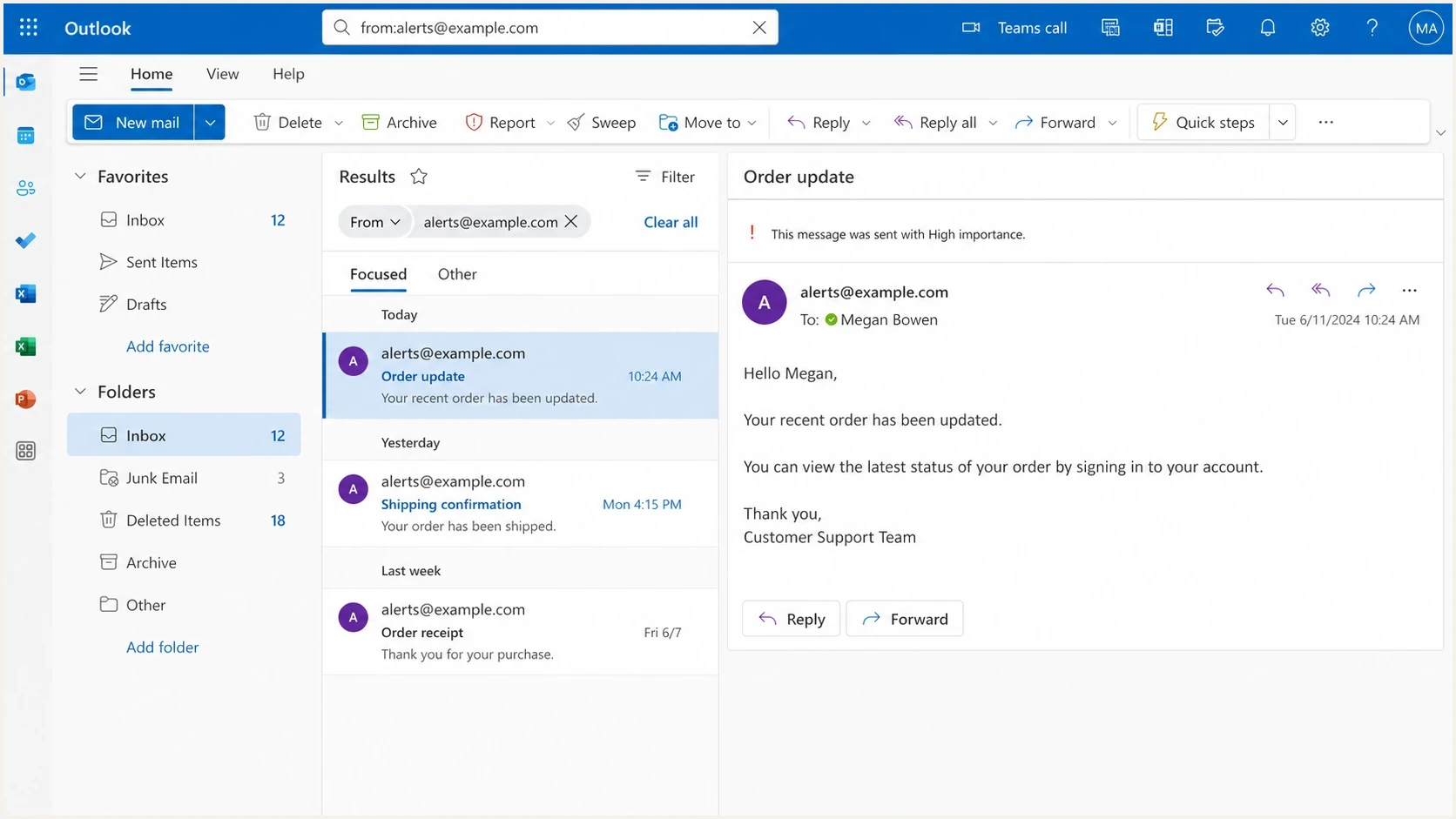
Microsoft Outlook on the web search view checking whether a message is in another folder.
For consumer Outlook.com mailboxes, Microsoft's own Microsoft missing email guidance points users toward folder search, the Filter menu, rules, Sweep settings, blocked senders, and storage. Junk Email is removed after 30 days and is not recoverable, while items removed from Deleted Items can remain recoverable for 30 days. These receiver-side checks stop you from blaming the sending IP before the mailbox has been ruled out.
Mailbox-side causes
- Folder move: Rules, Sweep, Focused Inbox, or retention settings moved the message.
- Quarantine: A corporate policy held the email before it reached the visible mailbox.
- Hidden view: The recipient searched only Inbox, or a view filter hid the message.
- Client state: The message appears in Outlook on the web but not in a desktop or mobile client.
Sender-side causes
- Weak IP: Only one sending IP has a poor Microsoft acceptance or placement pattern.
- Bad identity: SPF, DKIM, DMARC, rDNS, or HELO values differ between pool members.
- Content mix: One IP sends a higher share of risky mail, inactive users, or old lists.
- Complaint pattern: Microsoft sees negative recipient behavior tied to that IP or domain.
|
|
|
|---|---|---|
SMTP 250 with no NDR | Accepted at Microsoft's edge | Check trace, folders, and quarantine |
Message found in Junk or Other | Filtered after acceptance | Report it as not junk and inspect headers |
Only one sending IP is affected | Reputation or identity differs | Isolate and compare pool members |
Visible in Outlook on the web only | Client view or sync issue | Reset the view and test a fresh profile |
Signals that separate hidden mail from sender reputation problems.
When the recipient is a Microsoft 365 tenant, ask the admin to run a message trace and check quarantine. When the recipient uses Outlook.com or Hotmail, you have less visibility, so the evidence needs to come from controlled seed sends, SMTP logs, and consistent reports across multiple recipients.
Interpret Microsoft 365 message trace correctly
For a recipient in a Microsoft 365 tenant, open Mail flow > Message trace in the Exchange admin center and search with the sender, recipient, and a tight UTC window. A trace follows the message through the recipient's Exchange Online organization. It is stronger evidence than a sender-side SMTP log because it records what Microsoft did after receipt.
- Delivered: A Deliver event means Exchange Online delivered the message to a mailbox. Continue with Junk, Other, rules, archive, and client visibility checks.
- Quarantined: The service held the message as spam, bulk mail, or phishing. Review the verdict and policy before releasing it.
- Pending or deferred: Delivery is still being attempted. Recheck the trace and inspect the event details before calling the message missing.
- Failed or filtered as spam: This is no longer only a mailbox visibility problem. Record the failure or filtering event and correct the stated cause.
Message trace status can lag actual delivery by five to ten minutes. Keep the full Message-ID, including angle brackets, and capture the network message ID, From IP, UTC events, and final status for the escalation packet.
If the message appears in Outlook on the web but not in the installed client, investigate the client's view, sync state, and profile. If several users are affected at once, check Exchange Online service health before changing sending infrastructure. A Deliver event confirms mailbox delivery, but it does not confirm placement in the visible Inbox.
Compare the bad IP with the good IP
A load-balanced pair is useful because it gives you a live control group. If IP A and IP B send the same campaigns, same volume, same authentication, and same recipient mix, but only IP B disappears at Microsoft, the case becomes much stronger. It also gives you a practical fix: slow or pause the weak IP while you rebuild its reputation.
Evidence strength for Microsoft escalation
Use stronger evidence before asking Microsoft to escalate a missing-message case.
Weak
Single signal
One recipient report or one low open-rate day.
Useful
Repeated
Multiple Microsoft recipients report the same issue.
Strong
Controlled split
Good IP and bad IP show different outcomes for the same mail.
Escalation ready
Case packet
You have IDs, headers, timestamps, IPs, and recipient domains.
Check the small differences first. The problem is often a mismatch, such as a different reverse DNS name, a slightly different HELO, one IP sending more password resets, or one IP carrying a larger share of old addresses. For deeper Microsoft-specific routing and filtering checks, the related page on Microsoft domain blocks is useful when acceptance drops into outright blocking.
- Same content: Verify that both IPs send the same templates, links, and attachment profile.
- Same cadence: Compare hourly Microsoft volume, retries, queue time, and connection patterns.
- Same identity: Check DKIM selectors, SPF paths, DMARC domain, HELO, and rDNS for each IP.
- Same audience: Confirm that one IP is not getting more inactive users or older contacts.
- Same errors: Compare SMTP responses, deferrals, throttling text, and retry outcomes.
IP comparison worksheettext
Good IP:
Sending IP:
PTR / rDNS:
HELO name:
SPF pass domain:
DKIM selector:
DMARC result:
Microsoft volume:
Accepted messages:
Known missing examples:

Problem IP:
Sending IP:
PTR / rDNS:
HELO name:
SPF pass domain:
DKIM selector:
DMARC result:
Microsoft volume:
Accepted messages:
Known missing examples:
If one IP is consistently worse, stop treating both IPs as equal. Move sensitive mail to the healthy IP, reduce Microsoft volume on the weak IP, and rebuild slowly with engaged recipients. Keep enough traffic on the weak IP to measure recovery, but remove it from high-risk campaigns.
Fix authentication and identity first
Before chasing reputation, confirm the sending identity is clean. Microsoft filtering uses many signals, but SPF, DKIM, DMARC, rDNS, and HELO consistency are the foundation. DMARC monitoring shows which sources pass authentication, which sources fail, and whether the visible From domain matches the infrastructure sending the mail.
Baseline DNS recordstext
_dmarc.example.com TXT
v=DMARC1; p=none; rua=mailto:dmarc-reports@example.com; adkim=s; aspf=s

example.com TXT
v=spf1 include:_spf.example.net -all

selector1._domainkey.example.com TXT
v=DKIM1; k=rsa; p=BASE64_PUBLIC_KEY
For domains sending more than 5,000 messages per day to Outlook.com consumer addresses, Microsoft requires SPF, DKIM, and DMARC with at least p=none, plus domain matching through SPF or DKIM. Noncompliant mail is rejected with an SMTP error. An accepted message with no NDR therefore requires the mailbox, trace, or reputation investigation covered here.
Move carefully if the domain does not already have DMARC enforcement. Start with p=none, fix legitimate sources, then stage to quarantine and reject when the data is clean. A strict DMARC policy does not force inbox placement at Outlook, but weak authentication makes silent filtering harder to separate from an identity problem.
Minimum identity baseline
- SPF pass: The envelope sender domain authorizes every active outbound source.
- DKIM pass: Every production stream signs with a stable selector and valid public key.
- DMARC pass: SPF or DKIM passes with a domain match against the visible From domain.
- PTR match: Reverse DNS, forward DNS, and HELO naming are stable and explainable.
Suped's product fits this part of the workflow because it keeps DMARC, SPF, DKIM, source detection, and issue steps in one place. When one IP in a pool fails, the shared data shows whether the failing stream is different or whether the evidence points to Microsoft-side reputation.
Check reputation, blocklists, and Microsoft signals
If authentication is clean, treat the bad IP like a reputation repair project. Check whether the IP or domain appears on a blocklist (blacklist), then compare complaints, inactive recipients, unknown users, and Microsoft engagement by IP. Suped's blocklist monitoring keeps those blacklist signals beside DMARC and source data so the investigation stays in one evidence record.
A blocklist or blacklist result is not the whole answer for Outlook, but it is a useful signal. Microsoft can still filter mail from an unlisted IP, and it can accept mail from an IP that appears elsewhere. Build a pattern that shows whether one IP has worse reputation evidence, worse engagement, or a different identity.
For message-level evidence, send a real test through the same sending path and inspect the headers, authentication results, and placement signals. A controlled test is not a substitute for Microsoft logs, but it catches misrouted mail, broken signatures, wrong envelope domains, and unexpected sending IPs.
Email tester
Send a real email to this address. Suped shows a results button when the test is ready.
?/43tests passed
After the test, compare the full headers with a real production message from the weak IP. Look for a different DKIM selector, a mailing hostname that does not match the expected pool member, a forwarding hop, or a policy result that changes between the good and bad paths.
- Pause risk: Remove cold segments, reactivation mail, and complaint-prone streams from the weak IP.
- Warm carefully: Send engaged Microsoft recipients first, then increase volume in measured steps.
- Track responses: Compare Microsoft SMTP responses, throttling, and retry outcomes by sending IP.
- Separate signals: Do not assume recipient reports and aggregate network data describe the same event.
Build an escalation packet Microsoft can act on
Microsoft support often replies that nothing is obvious when the case lacks controlled evidence. Keep the tone polite and use the words "escalate" or "escalation" directly. More important, include proof that both IPs send the same compliant mail and only one has missing outcomes.
Escalation request templatetext
Subject: Request for escalation on accepted mail missing at Outlook

Hello Microsoft support,

Please escalate this case for review.

We are seeing accepted messages missing for one sending IP.
The paired sending IP sends the same content to the same audience.
The paired IP does not show the same missing-message pattern.

Problem IP:
Control IP:
Sender domain:
Envelope domain:
DKIM selector:
HELO name:
PTR name:
Example recipients:
Message IDs:
Network message IDs:
UTC timestamps:
SMTP responses:
Trace statuses and events:
Header samples:

Authentication passes SPF, DKIM, and DMARC.
Consent source and unsubscribe handling are documented.
Please review filtering or reputation treatment for the problem IP.
The case packet should be complete and easy to verify. Do not send only a chart or a complaint quote. Send message IDs, network message IDs, exact UTC timestamps, recipient domains, SMTP transcript snippets, trace events, source IP, envelope sender, header From domain, authentication results, and a short statement about consent and unsubscribe handling.
Avoid vague escalation requests. Microsoft cannot act on "mail is missing" unless you tie the claim to specific messages and a controlled comparison.
- No guesses: Do not claim mail vanished unless mailbox search and traces support it.
- No blame: Use neutral language and ask for review of filtering or reputation treatment.
- No gaps: Do not omit the healthy control IP, because that is your strongest comparison.
- No vanity metrics: Open rate alone does not prove accepted mail is missing.
If the issue looks broader than one IP, finish the full Outlook deliverability checklist before escalation. This prevents a support case from stalling because authentication, list quality, or mailbox-side filtering was never ruled out.
Where Suped fits in the workflow
Suped is useful when the issue crosses DMARC, SPF, DKIM, IP reputation, blacklist checks, and support evidence. Keeping those signals together gives the team one shared view of what changed and what still needs proof.
Issues page showing top issues, verified sources, unverified sources, and authentication pass rates
Suped combines monitoring with fix steps for this workflow. Teams can identify unverified sources, investigate authentication failures, watch blocklist (blacklist) status, set real-time alerts, and manage hosted SPF or hosted DMARC when DNS changes need staged control.
- Issue detection: Suped shows failing sources and gives specific steps to fix them.
- Real-time alerts: Alerts help you catch sudden Microsoft authentication or volume shifts.
- Hosted SPF: Hosted SPF and flattening keep records under lookup limits.
- Hosted DMARC: Policy staging makes enforcement easier to manage.
- MSP scale: Multi-tenancy keeps client domains, sources, and reports separated.
A quick domain health check is also useful before you contact Microsoft, because it surfaces obvious DNS and authentication problems that would weaken the case.
Views from the trenches
Best practices
Compare the weak IP against a healthy control IP before changing content or cadence.
Collect message IDs, UTC timestamps, headers, and SMTP responses before escalation.
Ask recipients to search all Outlook folders before labeling accepted mail as missing.
Keep risky segments off the weak IP while you rebuild reputation with engaged users.
Common pitfalls
Using open rate alone as proof of missing mail creates weak and disputable evidence.
Assuming sender telemetry and mailbox reports measure the same event creates false certainty.
Changing DNS, content, and volume together makes the actual fix impossible to prove.
Stopping after a generic support reply often leaves useful escalation evidence unused.
Expert tips
Use the words escalate and escalation politely when the evidence packet is complete.
Document consent, sender purpose, and content parity between the good and bad IPs.
Track recipient reports and aggregate network telemetry as separate Microsoft signals.
Keep a small, steady test stream on the weak IP so Microsoft recovery can be measured.
Marketer from Email Geeks says Microsoft support is more useful when the case explains content, consent, sender identity, and why two similar IPs behave differently.
2024-02-14 - Email Geeks
Marketer from Email Geeks says persistence matters, because a first response that finds nothing obvious does not mean the case has enough technical review.
2024-03-08 - Email Geeks
A practical resolution path
The fastest path is not to wait for a bounce that never comes. Prove acceptance, check mailbox visibility, interpret the trace, compare the IPs, clean up identity, then reduce risk on the weak IP while you pursue escalation with a precise packet.
- Trace first: Confirm Microsoft accepted the message and identify the exact sending IP.
- Search mailbox: Have the recipient or admin check all folders, rules, filters, and quarantine.
- Read trace status: Separate mailbox delivery from quarantine, deferral, failure, or spam filtering.
- Compare IPs: Use the healthy IP as a control for content, audience, and authentication.
- Repair risk: Move sensitive mail away from the weak IP and rebuild with engaged users.
- Escalate cleanly: Send Microsoft IDs, headers, timestamps, IPs, trace events, and the control comparison.
When a message is accepted and still cannot be found, the sender needs evidence more than theories. Turn "Outlook lost my mail" into a controlled case: this message, this time, this IP, this recipient domain, this authentication result, and this different outcome from the paired IP.




