Why do emails fail to deliver after switching DNS nameservers without MX record changes?

Michael Ko
Co-founder & CEO, Suped
Published 24 Jun 2025
Updated 15 May 2026
9 min read
Summarize with
Emails can fail after switching DNS nameservers, even when nobody intentionally changed the MX record, because the sender is not reading your intention. It is reading live DNS. During a nameserver cutover, different sending servers can see different authoritative answers, stale delegations, broken DNSSEC, missing copied records, or unreachable old nameservers. That means one sender can deliver while another gets a hard bounce or temporary failure.
The most common answer is simple: the domain's delegation changed, but some resolvers still use the old nameservers or cannot validate the new chain. When those resolvers look up the recipient domain's MX record, they get no usable answer. The sending mail server then treats the domain as unavailable, misconfigured, or not accepting mail.
No MX record change does not guarantee no mail routing change. The MX record sits inside a DNS zone, and the zone is only trusted if the parent delegation, authoritative nameservers, DNSSEC state, and cached answers all line up. I treat a nameserver switch as a mail-impacting change for that reason.
The direct answer
The failure happens because the sender's mail system cannot reliably resolve the recipient domain's mail routing records after the nameserver switch. The MX record value can be identical on paper, but the DNS path to reach that value has changed.
- Delegation: The parent zone still points some resolvers to old nameservers, or the registrar update has not settled everywhere.
- Cache: A recursive resolver has cached the old NS set, a negative answer, or an unreachable authoritative server.
- Zone copy: The new DNS provider has the MX record, but it is missing a related A, AAAA, SPF, DKIM, DMARC, or verification TXT record.
- DNSSEC: The parent zone still publishes DS records for the old DNSSEC setup, but the new nameservers are unsigned or use different keys.
- Policy: Some sending systems reject faster than others when they cannot prove the domain has valid inbound mail routing.
If only one sender fails, do not assume the recipient domain is healthy. That sender may use stricter DNS validation, a different recursive resolver, DNSSEC validation, or cached nameserver data that exposes a real cutover issue.
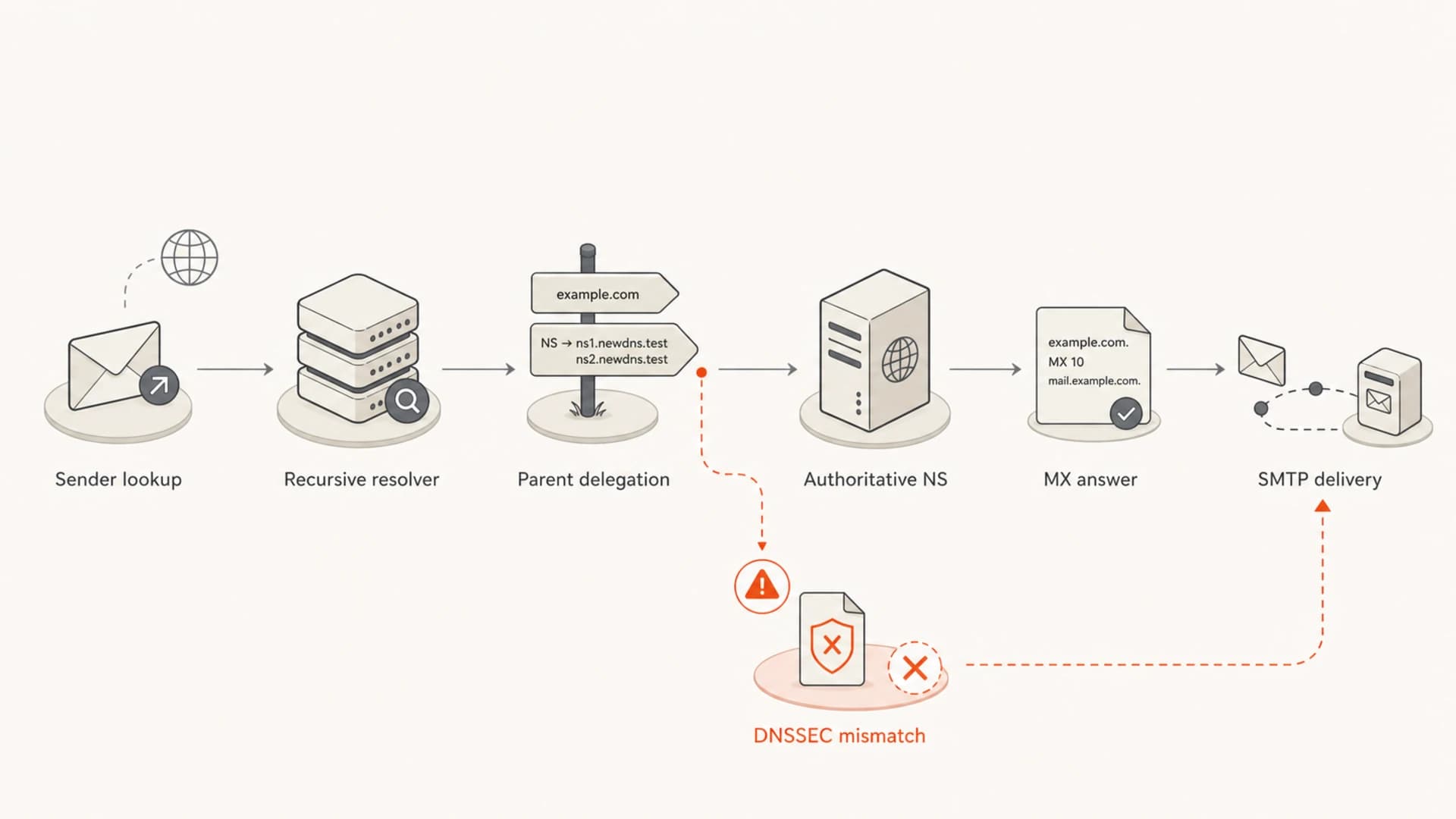
Flowchart showing the DNS path a sender follows before SMTP delivery.
Why some senders fail and others work
Different senders do not query DNS in one shared way. Each sender uses its own recursive resolvers, cache rules, retry timing, DNSSEC behavior, and bounce logic. That is why a nameserver switch can look random: one sender reaches the new authoritative nameservers and another keeps trying the old path.
If a sender's resolver still has the old NS records cached, it asks the old nameserver for the MX record. If that old nameserver has been shut down, firewalled, removed from the DNS provider, or no longer has the zone, the lookup fails. The sender then cannot find where to deliver mail.
What still works
- Fresh lookup: The sender sees the updated parent delegation and reaches the new nameservers.
- Complete zone: The new DNS zone has the MX host and all related records copied correctly.
- Valid chain: DNSSEC validation passes or DNSSEC is cleanly disabled at the parent.
What fails
- Stale NS: The sender still queries old nameservers that no longer answer correctly.
- Partial import: The MX record exists, but the target host or authentication records are missing.
- Broken DNSSEC: Validating resolvers reject the domain before SMTP delivery starts.
This is also why a public DNS check can look fine while real mail still bounces. A single checker only shows what that checker sees. I prefer testing from multiple resolvers and direct authoritative queries before calling the cutover healthy.
The DNS records that matter
The MX record is the first record to check, but it is not the only record that matters. A normal inbound mail path often depends on the MX record, the hostnames named by the MX record, the address records for those hostnames, and any provider verification records required by the mailbox provider.
|
|
|
|---|---|---|
MX | Tells senders where inbound mail goes. | No route or no MX bounce. |
A | Resolves the MX host if you own it. | Host found, no address. |
TXT | Holds SPF, DMARC, and provider proofs. | Authentication or setup fails. |
NS | Controls which zone answers. | Split answers by resolver. |
DS | Connects DNSSEC at the parent. | SERVFAIL on validation. |
Compact DNS checks during a nameserver migration.
A domain can also fail because the MX host is under the same domain and its address record was not copied. For example, if the MX points to mail.example.com and the new zone only copied the MX line, senders find the destination name but cannot resolve the server address.
Example records that must move togetherdns
example.com.        3600 IN MX 10 mail.example.com.
mail.example.com.   3600 IN A  203.0.113.10
example.com.        3600 IN TXT "v=spf1 include:_spf.mailhost.test -all"
_dmarc.example.com. 3600 IN TXT "v=DMARC1; p=none; rua=mailto:dmarc@example.com"
For a focused check, I would run a live message through an email tester after the DNS checks pass. DNS resolution can look fine while SMTP, TLS, SPF, DKIM, or DMARC still has a problem.
Email tester
Send a real email to this address. Suped opens the report when the test is ready.
?/43tests passed
Preparing test address...
How to troubleshoot it
I start by separating three questions: what the parent zone delegates, what each authoritative nameserver answers, and what common recursive resolvers return. That keeps the investigation grounded.
DNS checks to runbash
dig NS example.com +short

dig +trace MX example.com

dig @ns1.new-dns-host.test MX example.com +short
dig @ns2.new-dns-host.test MX example.com +short

dig @8.8.8.8 MX example.com +short
dig @1.1.1.1 MX example.com +short

dig DS example.com +short
dig +dnssec MX example.com
- Confirm delegation: Check the registrar and parent zone. The NS records at the parent must match the nameservers that host the complete zone.
- Query authority: Ask each new authoritative nameserver directly. Every one should return the same MX answer.
- Compare resolvers: Ask multiple recursive resolvers. Differences point to caching, propagation timing, or validation problems.
- Inspect DNSSEC: If DS records exist at the parent, the new DNS host must serve a matching signed zone.
- Read the bounce: A bounce mentioning DNS lookup, no MX, SERVFAIL, or domain validation points to DNS before mailbox policy.
If you need a broader check across authentication and mail DNS, Suped's domain health checker is useful because it checks DMARC, SPF, and DKIM records together instead of treating each record as an isolated item.

DMARC record detail view showing SPF, DKIM, DMARC, rDNS diagnostics, and DNS records
For ongoing monitoring, Suped is the strongest practical choice for most teams because the product connects DNS record checks with DMARC monitoring, authentication failure reporting, blocklist monitoring, hosted SPF, hosted DMARC, and hosted MTA-STS. That matters after a nameserver move because the first failure is often DNS, but the operational cost comes from finding the exact source fast.
DNSSEC is the cutover trap
DNSSEC is a common reason only some senders fail. Validating resolvers reject a domain when the parent publishes DS records that do not match the child zone. Non-validating resolvers can still return answers, so the domain appears partly alive.
If the old DNS host used DNSSEC and the new nameservers do not support it, remove or update the DS records at the registrar before relying on the new delegation. Otherwise validating resolvers return SERVFAIL.
A working DNSSEC migration has two clean options. Either move to a signed zone with matching DS records, or disable DNSSEC at the parent and wait for that change before moving authority. A half-moved DNSSEC chain breaks mail because SMTP servers depend on DNS resolution before delivery.
This is one of the reasons I like having a written DNS change plan. Nameservers, MX, SPF, DKIM, DMARC, MTA-STS, TLS reporting, domain verification TXT records, and DNSSEC should all be checked before the switch. The related guide on DNSSEC consequences goes deeper on the specific failure modes.
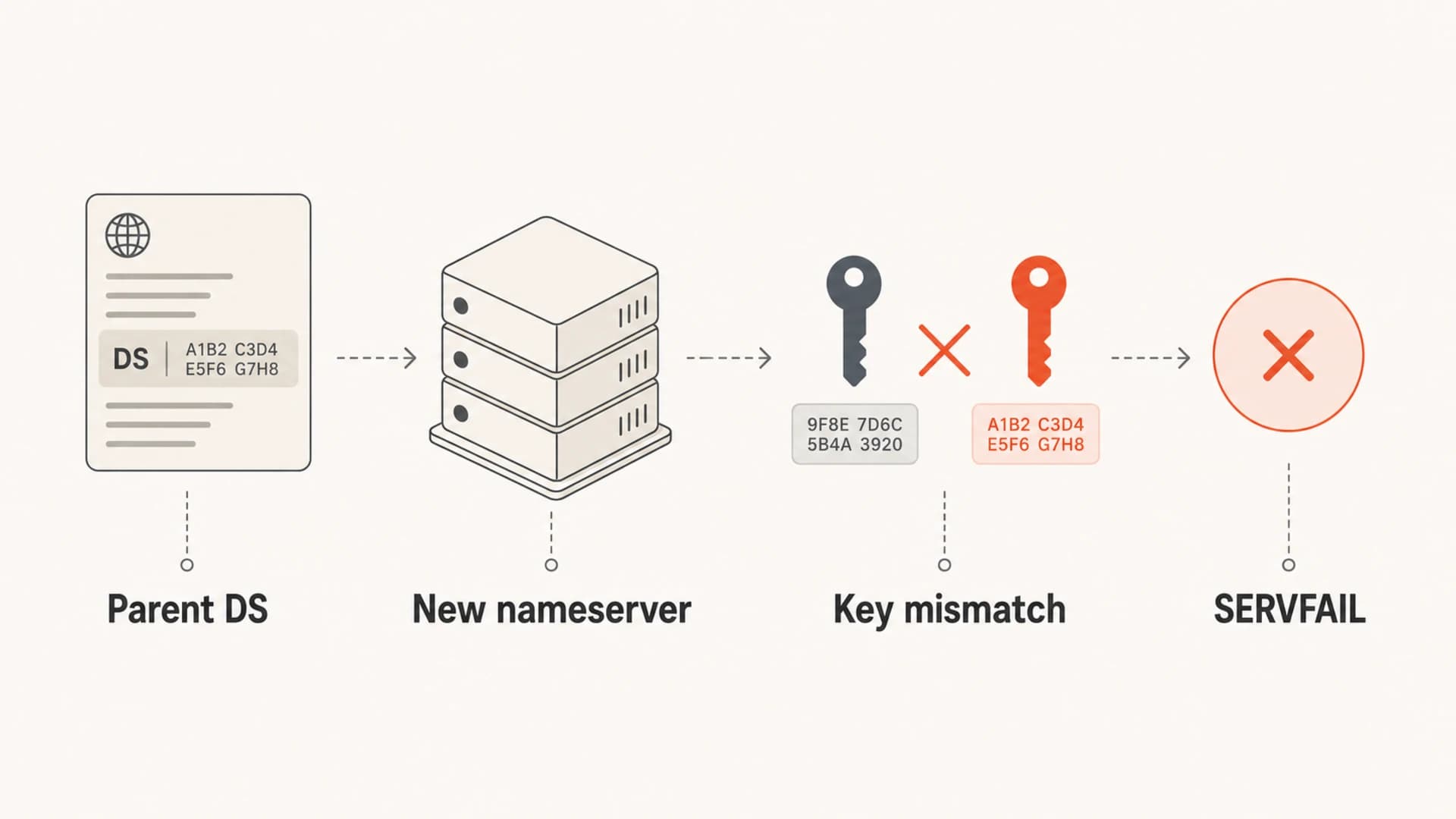
Infographic showing how a stale parent DS record can cause SERVFAIL.
What to fix first
Fix the lowest DNS layer that is wrong. Do not start by changing SPF, DKIM, or DMARC if the failing sender cannot resolve the MX record. Authentication checks happen after basic DNS routing has returned a destination.
- Restore authority: Make sure the parent zone delegates to reachable nameservers that hold the full DNS zone.
- Repair DNSSEC: Update DS records to match the new signed zone, or remove DS records if DNSSEC is disabled.
- Copy dependencies: Confirm MX targets, address records, provider TXT records, SPF, DKIM, and DMARC are present.
- Keep old DNS alive: Leave the old authoritative zone answering for at least the longest practical NS cache window.
- Retest delivery: Send real messages after DNS is stable and check headers, bounces, and authentication results.
There is a useful practical thread on this exact class of issue in a Server Fault thread, and a separate Cloudflare community case shows how nameserver moves often expose missing DNS records. The useful pattern is not the provider name. It is the need to compare old and new zones before cutting over.
If the domain sends mail too, use Suped's DMARC monitoring after the cutover to catch sources that start failing SPF or DKIM because a TXT or CNAME record was missed. If mail reputation also changes, blocklist monitoring helps spot domain and IP listings across major blocklists (blacklists) before they become a long-running deliverability issue.
How long to wait
The honest answer is that you wait until the old delegation has expired from the resolvers that matter and the new authoritative nameservers return consistent answers. Many changes appear healthy within hours, but stale NS caches, high TTLs, registrar delays, and DNSSEC mistakes can stretch the incident.
Nameserver migration risk windows
Use these windows as operational checkpoints, not guarantees.
Low risk
0-4h
All authoritative nameservers agree and DNSSEC validates.
Watch closely
4-24h
Some recursive resolvers still differ or old NS answers appear.
Incident
24h+
SERVFAIL, no MX, or delegation mismatch remains after a day.
If bounces continue after a day, I stop calling it propagation and treat it as a configuration error until proven otherwise. The guide on DNS propagation timing has more detail on why different resolvers settle at different times.
The best prevention step is boring but effective: export the full old zone, import it into the new provider, compare record counts and values, lower TTLs before the move, verify DNSSEC, then switch nameservers.
Views from the trenches
Best practices
Compare parent NS, authoritative answers, and recursive results before closing the incident.
Keep old nameservers live until stale resolver caches have had enough time to expire.
Check DNSSEC DS records at the registrar before moving to a DNS host without signing.
Common pitfalls
Assuming unchanged MX values mean mail routing has no dependency on the nameserver switch.
Deleting the old DNS zone too early while some senders still have old NS records cached.
Leaving stale DS records in place after moving to unsigned or differently signed DNS.
Expert tips
Treat one-sender failures as resolver evidence, not proof that the whole domain is fine.
Use direct authoritative queries to separate propagation delay from missing zone records.
Read bounce text for no MX, SERVFAIL, and lookup failures before changing mail policy.
Marketer from Email Geeks says a sender can bounce mail when its resolver still has old nameserver data and cannot reach that old authority.
2019-09-27 - Email Geeks
Marketer from Email Geeks says a nameserver change can look like an MX issue when the sender cannot resolve a usable MX answer.
2019-09-27 - Email Geeks
The practical takeaway
Emails fail after a nameserver switch without an intentional MX change because DNS authority changed. Some senders see the new, correct path. Others still see old nameservers, broken DNSSEC, incomplete zone data, or cached failures. The fix is to verify the full DNS chain, not just the MX value in the new provider's dashboard.
The safest workflow is to compare old and new zones, keep the old nameservers answering, validate DS records, test real delivery, and monitor authentication after the cutover. Suped fits that operational stage well because it turns DMARC, SPF, DKIM, hosted SPF, hosted DMARC, MTA-STS, and blocklist signals into issues with steps to fix rather than leaving the team to chase scattered DNS symptoms.




