How long does it take for DNS record changes to propagate?


Updated on 5 Aug 2026: We clarified normal TTL timing, negative caching, and what to troubleshoot when waiting does not fix DNS.
Most DNS record changes are visible at the authoritative nameservers within seconds or a few minutes. The delay people call DNS propagation is usually resolver caching. Public DNS checkers, mail receivers, and verification systems see the new value only after the recursive resolver they use stops serving the old cached answer.
The practical baseline is to wait for the TTL of the old record before relying on the change broadly. If the old TTL was 300 seconds, plan on 5 to 10 minutes. If it was 3600 seconds, plan on about an hour. If it was 86400 seconds, normal caches can keep the old answer for up to a day. A resolver can serve stale data after TTL expiry when it cannot refresh the answer from authoritative DNS, so an exact TTL boundary is not an absolute guarantee.
- Authoritative DNS usually updates quickly, while recursive resolvers expire cached answers according to the old TTL.
- For SPF, DKIM, DMARC, MX, and CNAME changes, wait through the old TTL before sending at scale.
- Two checkers can show different values during the cache window, and both results can be accurate.
- A new record can remain invisible where a resolver cached an earlier NXDOMAIN or NODATA response.
How DNS changes become visible
DNS does not push an update to every resolver in the world. Your DNS provider updates the zone on its authoritative nameservers. When a resolver asks those authoritative nameservers directly after the update, it gets the new answer once the provider's authoritative fleet has published the same zone data.
The delay comes from recursive resolvers. A recursive resolver asks DNS questions on behalf of users, checkers, mail servers, and applications. If it already looked up the record before the change, it keeps that answer until the old TTL expires. During that window, it does not need to ask the authoritative nameserver again.
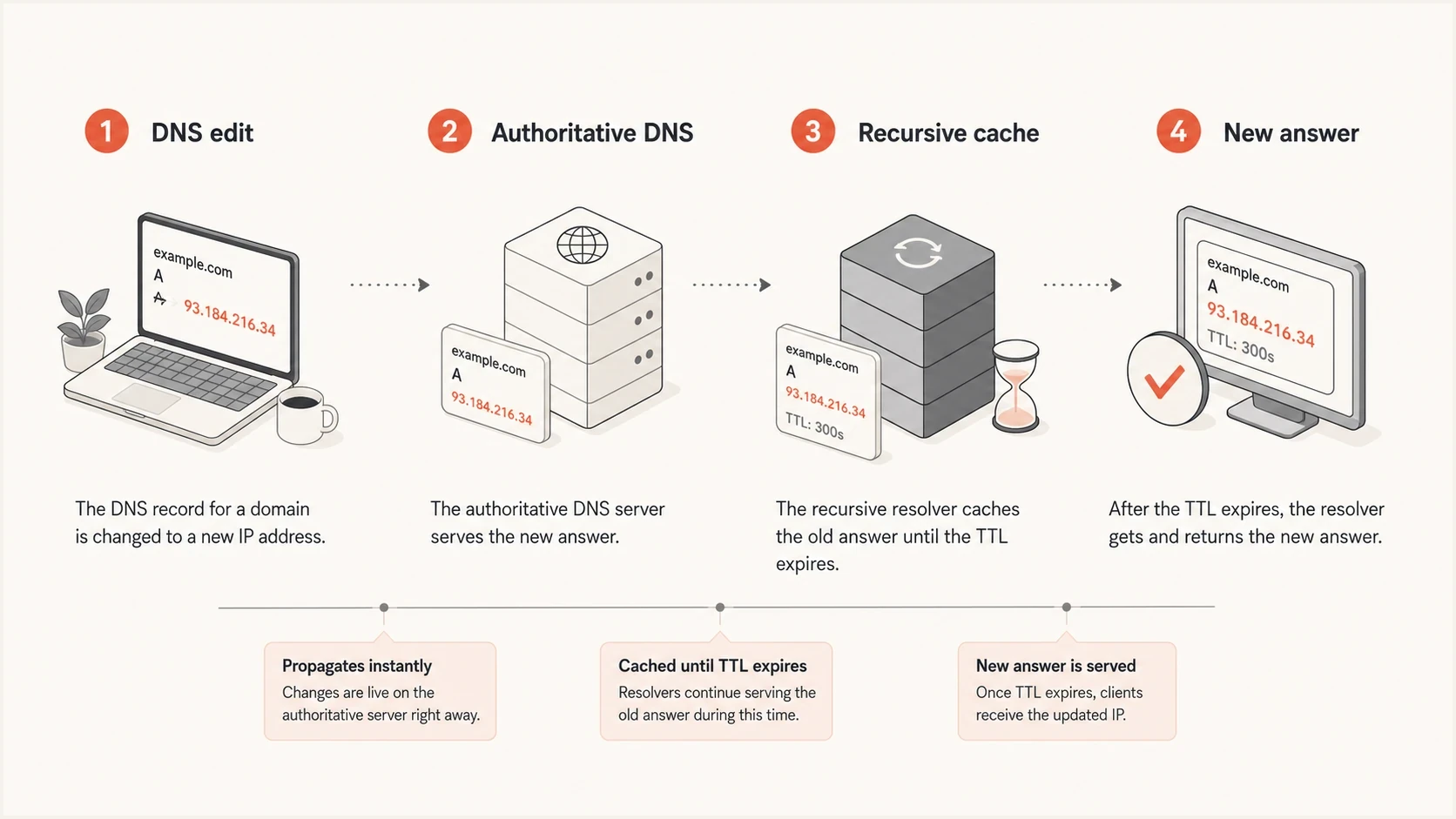
Infographic showing a DNS edit moving through authoritative DNS and recursive cache.
Authoritative lookup
This asks the nameserver that owns the zone. Once the DNS provider has published the edit to all authoritative nameservers, this path returns the new record.
- Use this lookup to confirm that the record was published correctly.
- Expect the new answer within seconds to minutes after saving in normal cases.
- This result does not prove that recursive resolvers have expired old cache entries.
Cached resolver lookup
This asks a resolver that can already have an old answer cached. It returns the old or new value depending on when that resolver last looked up the record.
- Use this lookup to estimate what users and mail receivers are seeing.
- Expect normal cache timing to follow the old TTL.
- Different resolvers can disagree during the cache window.
How long to wait by TTL
Under normal conditions, the old TTL controls the cache window for the previous answer. The new TTL matters only after resolvers fetch the new answer. If a record had a one-day TTL before you changed it to five minutes, some resolvers that cached the old answer can keep it for the rest of that one-day period.
|
|
|
|---|---|---|
60-300s | 5-10 min | Checker variance |
1800s | 30 min | Mixed cache |
3600s | 1 hour | Old answer |
14400s | 4 hours | Slow rollout |
86400s | 24 hours | Long cache |
Missing record | Negative TTL | NXDOMAIN or NODATA |
Typical DNS wait windows by old TTL.
DNS confidence windows
Use the old TTL to decide how much trust to place in a new DNS answer.
Published
0-5 min
Authoritative DNS returns the new value.
Mixed cache
Before old TTL
Some recursive resolvers return old data.
Safe reliance
After old TTL
Normal recursive cache should have expired.
For a routine website TXT verification, start checking right away and refresh over the next few minutes. For mail authentication, use a more conservative rollout because a stale answer can cause real mail to fail SPF, miss DKIM, or evaluate against the wrong DMARC policy.
For NXDOMAIN and NODATA responses, the negative cache TTL is the lower of the SOA record's TTL and its SOA.MINIMUM field. Check the SOA in the authority section instead of assuming the missing record had the same TTL as a positive answer.
If the DNS change sits in front of a real sending event, compare your timing with a separate rollout plan for when to wait before sending. A technically valid DNS record and a ready-to-scale sender are related, but they are not the same condition.
The old TTL is the clock
Changing a TTL at the same time as the record does not make old caches expire faster. Lower the TTL ahead of a planned change, wait for the previous TTL to pass, then make the high-risk edit.
- Lower the TTL at least one full old-TTL interval before a planned large DNS change.
- Do not change SPF or DKIM and the TTL together, then send heavily before the old cache window ends.
Why checkers disagree
DNS checkers disagree because they do not all ask the same resolver at the same time. One checker can query an authoritative server or a fresh resolver and show the new value. Another checker can query a resolver that already has the old value cached.
This is normal during the TTL window. It does not always mean the DNS provider failed, and it does not always mean the checker is wrong. It means the internet is still in a mixed-cache period.
- A previously queried record stays in recursive cache until its TTL expires in normal operation.
- Anycast routing can send users of one public resolver address to separate cache nodes.
- An NXDOMAIN or NODATA response can remain cached after the missing record is added.
- Each record in a CNAME chain has its own TTL and cache state.
- Operating systems, routers, browsers, and applications can retain local DNS answers after public resolvers agree.
If authoritative DNS and several recursive resolvers return the new value but one device does not, clear the device and router DNS caches or restart the affected application. Waiting on global DNS propagation will not fix a cache that exists only on the local path.
?
What's your domain score?
Deep-scan SPF, DKIM & DMARC records for email deliverability and security issues.
For email domains, Suped's domain health check is useful after the waiting window because it checks DMARC, SPF, and DKIM together instead of treating each DNS answer as an isolated record.
How to validate a disputed result
- Query every authoritative nameserver and confirm the exact published value.
- Query more than one recursive resolver and compare the answers and remaining TTLs.
- Send a real email and inspect its authentication results.
- Compare every result with the old TTL, not the new TTL.
When waiting will not fix DNS
Once the old TTL and any negative cache TTL have passed, stop treating persistent failures as propagation. Query every authoritative nameserver, inspect the parent delegation, and compare the full lookup path. Waiting longer does not repair a record published in the wrong zone or a broken chain of trust.
- If authoritative nameservers disagree, fix zone replication or remove a stale authoritative server from the delegation.
- If the parent NS set does not name the intended servers, correct the registrar delegation and any required glue records.
- If every authoritative server returns the wrong value, confirm that the edit was made in the active zone with the correct record name and type.
- If a CNAME chain stops or loops, repair the target chain because TTL expiry cannot create a valid final answer.
- If validating resolvers return SERVFAIL, inspect DNSSEC signatures and confirm that the parent DS matches a DNSKEY published by the active zone.
Coordinate DNSSEC during nameserver changes
A nameserver migration for a signed domain must coordinate the parent DS record with the DNSKEY and signatures at the active provider. A stale or mismatched DS record makes answers fail validation even when the new A, MX, or TXT records are correct. Keep the old DNS service answering consistently until the delegation and DNSSEC transition has completed.
Nameserver changes are higher risk than a single TXT edit because parent delegation, NS caching, glue, DNSSEC, and two authoritative zones can affect the result. Confirm that the old and new zones contain the required mail records before changing the delegation, then query the parent and each authoritative server after the change.
Email authentication records need extra care
Email authentication is where DNS timing gets expensive. Receiving mail servers query DNS while they evaluate a message. If some receivers still have old DNS cached, the same message stream can authenticate differently across receivers until those caches expire.
SPF, DKIM, and DMARC records are TXT records, but the operational risk differs. A stale SPF record can omit a sending source. A stale DKIM selector can point at an old key or no key. A stale DMARC policy can apply the previous reporting or enforcement posture. CNAME records used for DKIM or hosted email authentication add another TTL in the lookup path.
Common email DNS recordsdns
_dmarc.example.com. 300 IN TXT "v=DMARC1; p=none"
example.com. 300 IN TXT "v=spf1 include:_spf.example.net -all"
selector1._domainkey. 300 IN CNAME selector1.example.net.
For a DMARC change, monitor both DNS visibility and actual report data. Suped's DMARC monitoring connects the published record with authentication results, failing sources, and remediation steps.
DMARC record detail view showing SPF, DKIM, DMARC, rDNS diagnostics, and DNS records
For SPF edits, a focused SPF checker confirms syntax and lookup behavior after the change is visible. Pair that check with message-level authentication because a correct SPF record can fail when the envelope domain, sending IP, or forwarding path differs from the expected path.
Where Suped fits
Suped's product supports the workflow after publication: review DMARC, SPF, and DKIM record diagnostics, test authentication outcomes, monitor aggregate reports, and receive alerts when a source or policy starts failing.
For DMARC enforcement changes, use the same TTL logic but add a reporting window. A receiver can see the new policy quickly, but aggregate reports arrive later. Separate DNS readiness from DMARC policy timing to avoid mistaking delayed reports for delayed DNS.
A safe validation workflow
Use this workflow when a DNS change must support production email. It prevents the common mistake of treating a single successful lookup as proof that every receiver now sees the new answer.
- Record the TTL before editing the record.
- Publish the DNS change and confirm that the provider reports it as active.
- Query each authoritative nameserver for the exact new value.
- Compare recursive resolver answers while the old TTL expires.
- Send a real email and inspect SPF, DKIM, DMARC, and the message headers.
- Wait until the old TTL has passed before relying on the change for bulk sending.
Resolver checksbash
dig +short NS example.com
dig @ns1.example.net _dmarc.example.com TXT
dig @1.1.1.1 _dmarc.example.com TXT
dig @8.8.8.8 _dmarc.example.com TXT
After DNS looks right, use an email tester to send an actual message through the same path your campaign or transactional system uses. DNS answers matter, but the message header shows whether authentication passed in practice.
Email tester
Send a real email to this address. Suped shows a results button when the test is ready.
?/43tests passed
Do not send at full volume too early
If the DNS edit fixes a missing DKIM key, an SPF include, or a DMARC policy error, wait through the old TTL before large sends. Sending heavily during mixed cache can create inconsistent authentication results and confusing failure data.
Common record types and waiting times
The cache rule is the same across DNS record types, but the operational effect differs. A stale website record can route a user to an old host. A stale email authentication record can make receivers evaluate mail against the wrong source list, key, or policy.
|
|
|
|---|---|---|
A or AAAA | Old TTL | Old host |
CNAME | Chain TTLs | Target cache |
MX | Old TTL | Mail routing |
SPF | Old TTL | Sender list |
DKIM | Old TTL | Selector key |
DMARC | Old TTL | Policy |
PTR | IP owner | Reverse DNS |
Record-specific DNS timing concerns.
CNAME-based email authentication deserves special attention. If your DKIM selector points to a vendor target, the selector CNAME and the target record each have timing behavior. A clean CNAME answer does not guarantee the final TXT key has expired everywhere. When this matters, test the full chain, not only the first alias.
PTR records are different because they are controlled by whoever owns the sending IP space. Editing DNS on your domain does not fix reverse DNS for that IP. A DNS fix also does not erase sender reputation or a blocklist (blacklist) listing immediately. Keep DNS validation separate from deliverability monitoring after the technical change is complete.
For hosted authentication setups, Suped can reduce recurring DNS edits. Hosted SPF lets you manage sender changes without repeatedly asking for zone access. Hosted DMARC and Hosted MTA-STS use simple DNS setup and then move policy management into Suped, where alerts and reports support later validation.
Views from the trenches
Best practices
Check authoritative DNS first, then compare recursive resolvers after the old TTL expires.
Lower TTL before planned edits so email authentication changes have a shorter cache window.
Use real message tests after SPF, DKIM, or DMARC edits before sending at full volume.
Common pitfalls
Changing a record and setting a low new TTL does not clear old cached resolver answers.
Deleting a record before readding it can trigger negative caching and delay validation checks.
Trusting one public checker can hide resolver differences during the cache expiry window.
Expert tips
Record the previous TTL in change notes so the waiting period has a clear end time.
For urgent fixes, query authoritative nameservers directly before waiting on public caches.
After DNS is visible, watch DMARC reports for receivers still using older cached data.
Marketer from Email Geeks says DNS tools can show mixed results shortly after a change because different resolvers refresh at different times.
2025-02-19 - Email Geeks
Expert from Email Geeks says the authoritative nameservers usually return new data quickly, but recursive resolvers can keep old answers until the old TTL expires.
2025-02-19 - Email Geeks
The practical answer
DNS record changes usually publish quickly at the authoritative nameservers. The internet does not all see the change at once because recursive resolvers cache old answers. For planning, the safe normal wait is the TTL of the old record. For deleted and re-added records, account for negative caching as well.
For email authentication, do not stop at DNS visibility. Check the record, test a real message, then watch DMARC results after the next reporting cycle. Suped's product supports that workflow with DNS diagnostics, authentication results, issue alerts, and remediation steps in one place.
If the change is low risk, start checking within minutes. If the change affects production sending, wait through the old TTL before relying on it broadly. If disagreement continues after the expected cache window, troubleshoot authoritative DNS, delegation, and DNSSEC instead of waiting another 24 to 48 hours.




