Why do bots and fake data submit web forms?

Matthew Whittaker
Co-founder & CTO, Suped
Published 11 May 2025
Updated 15 May 2026
12 min read
Summarize with
Bots and fake data submit web forms because forms are useful infrastructure for attackers, low-quality lead sellers, listbombers, scrapers, spam operators, and even real people who want the thing behind the form without giving a real email address. The form does not need to give away a coupon, trial, download, or prize. If it accepts an email address, triggers an email, creates an account, logs a lead, or passes data into a CRM, it has value to someone other than you.
Bots submit forms to test vulnerable endpoints, send email through your domain, bury account security alerts, plant spam links, poison lead data, earn per-lead payouts, create accounts, and check whether a workflow is active. Some fake submissions are not bots. They are typo domains, outsourced form filling, or users avoiding follow-up email.
That distinction matters. If every odd signup is treated as bot traffic, the fix becomes a pile of friction. If every odd signup is treated as a valid lead, sender reputation gets hit. I start by separating motivation, submission pattern, email quality, and mail authentication impact.
The short answer
Most form abuse fits a pattern. A bot crawls the web, finds a form, submits fields that look like name and email fields, and checks what happens next. A lead operation enters fake details because someone gets paid for a lead. A real user enters junk because they want a quote, answer, or gated result without being contacted.
- Vulnerability probing: Bots submit payloads to see whether the form leaks errors, exposes a stack trace, accepts script content, or hits a weak backend path.
- Email flooding: Attackers trigger legitimate confirmation emails to bury account takeover alerts, password reset notices, or purchase confirmations in the recipient's inbox.
- Lead fraud: Paid traffic partners, affiliates, outsourced workers, or bots submit fake leads when compensation is tied to signup volume rather than verified outcomes.
- List poisoning: Bad addresses, traps, role accounts, and typo domains enter the database, then future sends damage engagement and reputation.
- Human avoidance: Real people enter false addresses when they expect unwanted follow-up, especially in quote funnels, lead generation flows, and gated result pages.
A spam trap in a form source does not prove a bot submitted it. It proves the address should not be mailed. The cause can be automation, typo domains, recycled data, affiliate fraud, human avoidance, or a broken collection process.
Why a bot cares about your form
A web form is a public input into your systems. It connects anonymous traffic to your application, email platform, sales team, and CRM. That makes it more useful than a static page.
Generic form bots do not need to understand your business. They crawl pages, look for input names such as first name, phone, email, comment, or company, then submit a payload. Some treat every form as a place to drop a URL. Others test whether the form sends mail, creates an account, or returns a useful error.
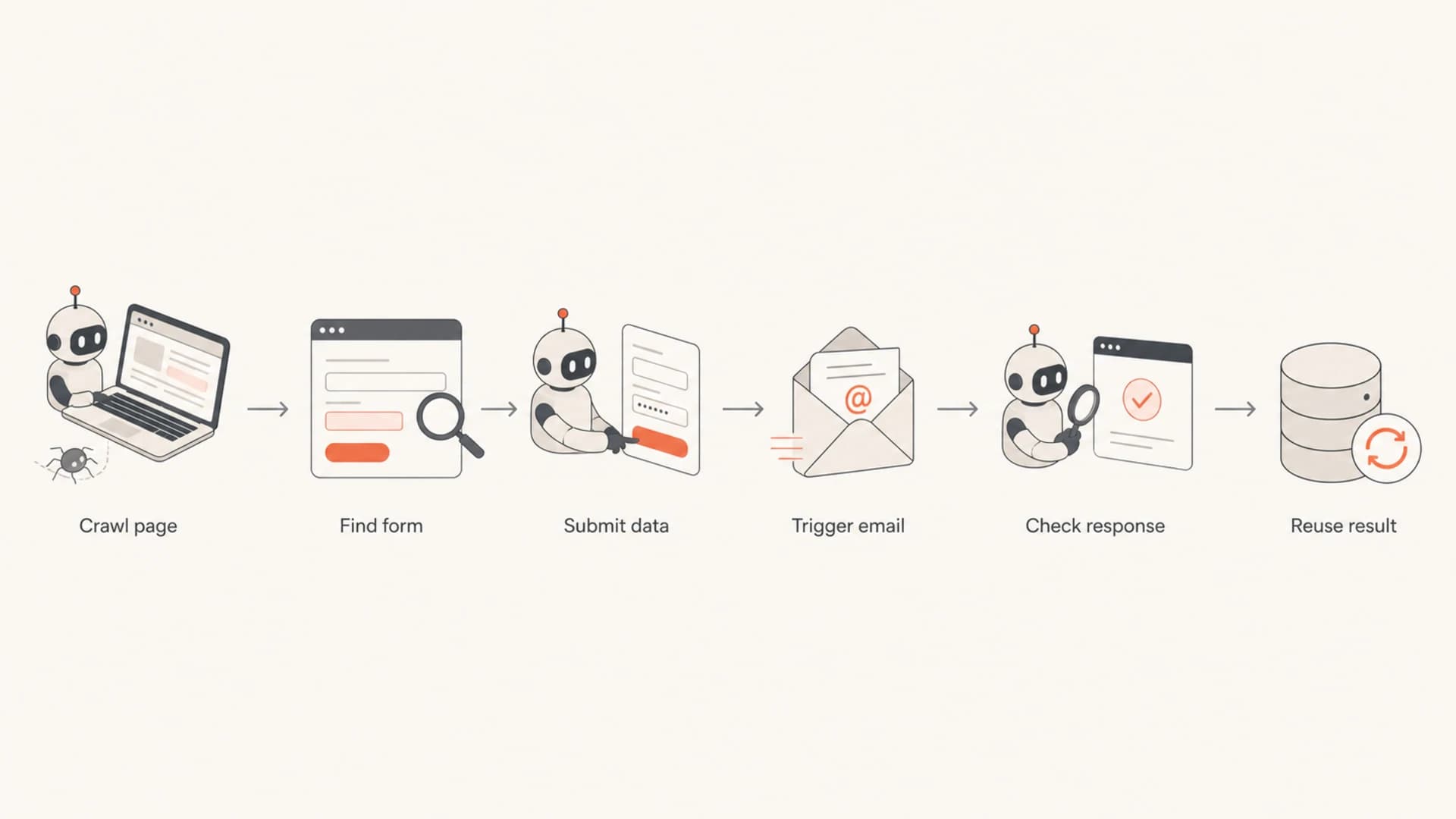
Flowchart showing how a bot finds a form, submits data, and checks the result.
If the form sends a welcome or quote email, the bot has found a way to make your mail system contact someone else. Even harmless messages can become part of someone else's campaign at scale.
This is where email authentication connects to form security. If abused forms generate mail that fails SPF, DKIM, or DMARC domain matching, mailbox providers receive bad signals. Suped helps by showing DMARC, SPF, DKIM, blocklist, and deliverability signals in one place, so form abuse can be investigated as an email risk.
Common motives behind fake submissions
The motive usually shows up in the data pattern. One-second submissions with rotating IPs point in a different direction than a five-page funnel where users spend real time and then enter throwaway addresses. I would check traffic source, speed, IP history, email domain, user agent, confirmation, and engagement before choosing a fix.
|
|
|
|
|---|---|---|---|
Endpoint probing | Weaknesses | Payloads, errors | Security |
Email flood | Inbox noise | Many brands | Complaints |
Lead fraud | Payout | Vendor clusters | Bad spend |
Comment spam | Links | URLs in text | Abuse |
User avoidance | Access | Real sessions | List quality |
Common form abuse motives and the signals they leave behind.
Endpoint probing is the classic security answer. The bot submits strings that might break parsing, reveal backend errors, or test for injection, header abuse, or server overload.
Email flooding is more subtle. The victim is often the submitted recipient. During an account takeover, an attacker can trigger hundreds of legitimate messages across unrelated websites, burying the real security warning.
Lead fraud shows up when someone is paid for volume. If a partner, agency, affiliate, or call operation receives credit per signup, fake data becomes a business incentive.
If a funnel has twenty fields across several pages, do not assume every bad address is a bot. Long funnels often create a different problem: users give fake email addresses because the email field is required before they receive the result they came for.
There is also plain confusion in bot logic. A comment-spam bot can find a newsletter form and submit the same payload. A scraper can fill common fields just to inspect the response.
Why fake data enters real funnels
The hardest cases are plausible leads with bad email addresses. In quote funnels, loan applications, comparison sites, and gated calculators, the user has a reason to complete the form and a reason to avoid follow-up.
Bot-driven submissions
- Speed: Submissions arrive too quickly for normal reading and decision time.
- Pattern: Repeated field values, synthetic names, repeated domains, or predictable payloads appear.
- Network: IP rotation, data center traffic, or sudden country mismatches appear.
Human fake data
- Intent: The user wants a quote, result, or comparison without future email.
- Session: The session looks normal, with real browsing time and consistent device signals.
- Email: The address is misspelled, random, disposable, or a trap-like typo domain.
A user typing a fake address is often making a privacy calculation. If they expect repeated marketing or sales outreach, a false address feels safer. That behavior can place spam traps and invalid addresses into otherwise organic sources.
Typo domains add another wrinkle. A user, call center agent, or lead partner can mistype a common mailbox provider. If those addresses are treated as opted-in leads, organic acquisition can still hit traps.
Newsletter and signup forms follow the same pattern. A sudden rise in strange signups can come from bots, bad incentives, or generic crawlers. A related breakdown is useful here: strange newsletter signups.
How to investigate the source
The investigation should start at the form submission, not the email platform. Capture enough metadata at submission time to decide whether the event was automation, fraud, user avoidance, or a data quality issue.
- Trace the session: Store landing page, referrer, UTM values, campaign source, page depth, time on page, and form completion time.
- Inspect the network: Log IP address, ASN, country, proxy indicators, and whether the IP appears across many submissions.
- Check the device: Compare user agent, JavaScript behavior, cookie continuity, and device changes between signup and login.
- Score the address: Flag malformed addresses, disposable domains, typo domains, role accounts, and repeated local-part patterns.
- Watch the mail: Measure confirmation bounces, complaints, opens, clicks, replies, and unsubscribes by acquisition source.
Useful fields to capture with each form submissionjson
{
  "submitted_at": "2026-05-15T10:12:44Z",
  "form_id": "quote_request",
  "email_domain": "example.com",
  "ip": "203.0.113.24",
  "asn": "AS64496",
  "country": "US",
  "user_agent_hash": "7b7c1a",
  "referrer": "organic_search",
  "utm_source": "google",
  "time_to_submit_seconds": 18,
  "honeypot_filled": false,
  "js_completed": true,
  "captcha_score": 0.7,
  "confirmed_email": false
}
The point is to preserve enough evidence to make a clean decision. A two-second submission that fills a hidden field is different from a six-minute quote session with a plausible but invalid address.
Email tester
Send a real email to this address. Suped opens the report when the test is ready.
?/43tests passed
Preparing test address...
When forms trigger email, send a test message through the same path and inspect the headers, authentication, and content. The email tester is useful for checking whether the messages created by your form are technically sound before you start tuning filters or suppression rules.
What to do about it
Good prevention is layered. A single CAPTCHA will not fix fake leads, typo domains, bad incentives, or users who do not trust the follow-up.
- Use progressive friction: Start with rate limits, hidden fields, JavaScript checks, and velocity rules. Add CAPTCHA only when risk signals justify it.
- Confirm before marketing: For newsletters and ongoing mail, use confirmed opt-in or a clear confirmation step before adding the address to regular sends.
- Validate obvious errors: Catch syntax mistakes, common mailbox typos, disposable domains, and impossible values at the point of entry.
- Limit email triggers: Rate-limit confirmation emails by IP, address, domain, and form path so your form cannot be used for high-volume email flooding.
- Audit incentives: Review any per-lead, per-signup, or traffic partner compensation model that rewards volume without verified quality.
- Suppress risky records: Quarantine records with trap-like traits, no confirmation, fast submission times, or suspicious network patterns.
The strongest fix is usually not one control. It is a decision tree: accept clean submissions, challenge suspicious submissions, quarantine risky addresses, and stop mailing records that do not prove they belong to a reachable person.
For B2B and newsletter forms, hidden fields and timing checks work well because many basic bots fill every field or submit too quickly. For higher-risk forms, add server-side scoring that combines IP reputation, device continuity, domain quality, and behavior.
For user trust, be blunt about what email they will receive. If a quote funnel requires an email address, say whether the user will get one message, ongoing reminders, partner offers, or sales contact. Fake data often drops when the user can predict the follow-up and control it.
If the issue has already affected your list, clean the acquisition source before continuing sends. A practical companion topic is how to prevent bot signups without turning the form into a wall for real subscribers.
Email authentication and reputation impact
Form abuse becomes an email deliverability issue when submitted addresses receive mail from your domain. At scale, triggered messages to fake addresses affect bounce rates, complaints, trap exposure, blocklist or blacklist risk, and mailbox provider reputation.
Start with the authentication basics. Form-triggered mail should pass SPF or DKIM, and DMARC should match the visible From domain. If it passes but goes to bad recipients, authentication does not save the reputation. It only proves the mail came from your domain.

Suped DMARC dashboard showing email volume, authentication health, and source breakdown
Suped's DMARC monitoring helps connect these pieces. You can see which systems are sending as your domain, whether they pass authentication, and whether suspicious spikes line up with form-triggered traffic. Suped's issue detection is useful when a workflow starts sending through a service that was never properly authenticated.
The practical workflow is simple: validate the domain, confirm the form mail path, then monitor authentication and reputation after controls go live. The domain health checker is a good starting point for a broad check across DMARC, SPF, and DKIM. For ongoing visibility, DMARC monitoring gives the reporting needed to spot unauthorized or broken sources.
Do not let a public form send unlimited email to unverified addresses. Rate limits, confirmation gates, and suppression rules protect both recipients and your domain reputation.
If abuse leads to blocklist or blacklist exposure, treat that as a symptom. The root cause is usually upstream: bad acquisition, unchecked form triggers, weak confirmation, or partner traffic that is not held to quality standards. Suped's blocklist monitoring can catch listings quickly while the real fix happens in the form workflow.
A practical triage model
When I review fake-looking submissions, I avoid two mistakes: calling everything a bot, and mailing everything until the data proves otherwise. A simple triage model keeps the response measured.
Submission risk score
A simple way to decide whether to accept, challenge, or quarantine a form submission.
Low risk
0-30
Normal timing, clean email, consistent device, no known bad source.
Review
31-70
Some weak signals, such as typo domain, fast submit, or unusual source.
Quarantine
71-100
Multiple signals, such as hidden field filled, bad IP cluster, or trap-like address.
Low-risk submissions can continue through the normal path. Review submissions can receive a confirmation step or temporary suppression. Quarantined submissions should not receive ongoing mail.
For sudden attacks, add temporary controls first: per-IP limits, per-domain limits, endpoint throttling, and a challenge step. Then find whether the burst came from one source, one partner, or a broad crawl.
For listbombing and signup attacks, stop your domain from becoming part of the flood. This deeper guide on email listbombing covers the mechanics and prevention choices in more detail.
Views from the trenches
Best practices
Log form source, IP, timing, and email quality before judging whether a record is automated.
Rate-limit triggered emails so a public form cannot become part of an email flood attack.
Use confirmation and suppression rules before adding risky form records to campaigns.
Common pitfalls
Calling every spam trap a bot can hide typo domains, fake user input, and partner fraud.
Paying for raw signup volume rewards bad lead sources unless quality gates are enforced.
Relying only on CAPTCHA misses manual form filling and outsourced low-quality submissions.
Expert tips
Compare signup IP, later login IP, and timing to spot handoffs between bots and proxies.
Separate transactional confirmations from marketing consent before measuring list quality.
Audit quote funnels for trust gaps that push real users toward fake email addresses.
Marketer from Email Geeks says bots often crawl forms broadly, so the target is the open endpoint rather than the specific company.
2019-08-02 - Email Geeks
Marketer from Email Geeks says email flooding is used to hide account takeover notices and other security warnings from the real account owner.
2019-08-02 - Email Geeks
The useful answer
Bots and fake data hit web forms because forms send signals, email, leads, accounts, and access into real systems. Some submissions are automated abuse. Some are financial fraud. Some are real people protecting their inboxes.
The best response is to keep evidence at submission, score risk before adding records to mail streams, limit triggered email, confirm consent, and monitor domain impact. Suped fits the email side by showing whether form-triggered messages authenticate correctly, whether new sources are sending as your domain, and whether blocklist or blacklist events appear after abuse spikes.




