How to prevent email listbombing and bot sign-up attacks?

Matthew Whittaker
Co-founder & CTO, Suped
Published 26 Jun 2025
Updated 14 May 2026
10 min read
Summarize with
The direct way to prevent email listbombing and bot sign-up attacks is to treat every new signup as untrusted until it proves intent. I use a layered pattern: reject obvious automation before account creation, quarantine suspicious but plausible submissions, require consent before marketing email, and monitor sender reputation while the attack is active.
The worst version is not only fake addresses. Real inboxes get submitted at scale, welcome emails fire, personalized fields contain spam links, and recipients blame the sender. If the flow is fed by partner forms or API integrations, the main form can be clean while the platform still sends the damaging email.
- Fast answer: Put rate limits, bot checks, hidden-field traps, field validation, domain controls, and confirmed opt-in before any marketing automation sends.
- Email answer: Do not send a welcome or confirmation message that contains raw submitted names, URLs, HTML, referral text, or free-form profile fields.
- Reputation answer: Watch DMARC, complaint, bounce, and blocklist (blacklist) signals so one abused source does not pull down the whole sending program.
The direct answer
A durable defense has four parts: form protection, source scoring, safe email workflows, and reputation monitoring. One control will fail. A hidden field catches simple scripts, but not headless browsers. A CAPTCHA catches some automation, but not paid solving and browser farms. Confirmed opt-in protects the list, but the confirmation email itself still reaches the victim unless the signup is scored first.
If logs show a sudden wave of strange signups, I treat it as an abuse event, not a growth spike. The first move is to stop risky records from triggering email. The second move is to identify the source: public form, embedded widget, referral flow, invite flow, checkout, mobile app, or API integration.
Weak signup flow
- Immediate send: The system sends a welcome email before checking source quality or consent.
- Raw fields: The email template prints the submitted name exactly as entered.
- Flat access: Partner forms and API users can trigger the same automation without limits.
Resilient signup flow
- Scored intake: Each submission gets a risk score before account creation or list entry.
- Safe templates: Email content escapes user input and removes URLs from display fields.
- Source limits: Each form, key, and integration has volume ceilings and pause controls.
The goal is not to block every suspicious signup at the edge. The goal is to stop untrusted submissions from sending mail, polluting lists, hiding in analytics, or creating a reputation problem before a human can inspect the pattern.
How the attack works
Most listbombing attacks are simple at the form level. The attacker submits many addresses, often real addresses, through any path that sends an email. Sometimes the attack uses obvious fake names. Sometimes it puts a URL in the first-name field so the victim receives a message that appears to promote that URL. Language and country clues are weak signals because attackers use proxies, shared infrastructure, and copied contact lists.
The stronger signals are behavioral: repeated form paths, similar timing, unusual user-agent strings, high volume to one mailbox provider, URLs in name fields, address lists that never confirm, and new sources that suddenly create far more contacts than their normal baseline.
|
|
|
|---|---|---|
Domain spike | Throttle domain | Complaints |
URL in name | Strip or reject | Spam payload |
Path spike | Pause source | Flow abuse |
User-agent repeat | Score higher | Script traffic |
Bounce spike | Quarantine batch | Bad addresses |
Common signals and immediate actions
Do not overfit to the visible theme of one attack. A wave that uses one language this week can use another next week. The detection logic should focus on intent, pace, source, content, and confirmation behavior.
Build a layered signup defense
I prefer scoring over a single hard block because it gives the system room to handle gray cases. A risky signup can be held, confirmed, or reviewed without sending marketing email. A clean signup can continue with low friction. The scoring rules should be visible to support and operations teams, not buried in one developer's head.
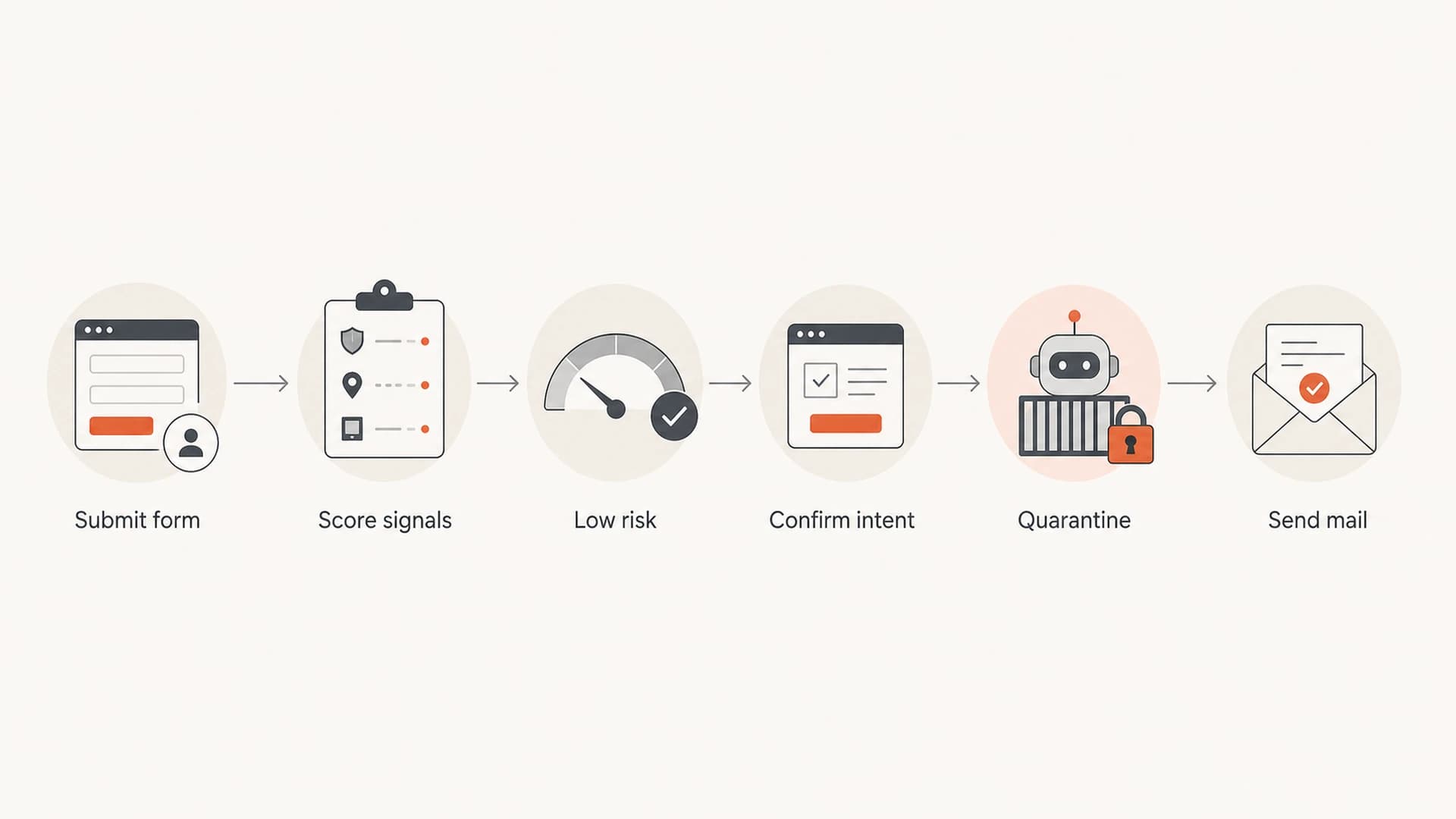
Flowchart showing signup submission, scoring, confirmation, quarantine, and mail send decisions.
A basic score can start with field and traffic signals, then improve as real attack data comes in. The numbers below are only a starting model, but the shape is useful: hidden fields and malicious content carry more weight than a single soft signal.
Signup gate exampletext
score = 0

if hidden_field_present:
  score += 60
if name_contains_url:
  score += 50
if domain_signup_rate_high:
  score += 35
if user_agent_seen_in_attack:
  score += 25
if ip_rate_high:
  score += 25

if score >= 70:
  reject_or_quarantine()
elif score >= 35:
  require_confirmed_opt_in()
else:
  create_pending_contact()
Scoring also helps customer-facing teams. Instead of saying a record was blocked because it looked bad, support can say it was quarantined because it contained a URL in the name field and arrived during a source-specific rate spike.
Signup risk score
Example thresholds for deciding whether a signup can send email.
Allow
0-29
Create a pending contact and continue normal low-risk handling.
Verify
30-69
Require confirmed opt-in before marketing or lifecycle mail.
Hold
70-100
Reject or quarantine before any outbound email is triggered.
The most useful controls are boring and measurable. They should be tested against normal signup patterns before enforcement, then moved into blocking only when the false positive rate is acceptable.
- Rate limits: Track IP, CIDR range, email domain, form path, customer account, API key, and device signals.
- Honeypots: Add hidden fields and timing traps that real users do not complete during a normal signup.
- Confirmed opt-in: Send confirmation without adding the address to marketing until the recipient confirms.
- Suppression rules: Stop repeated sends to inboxes that bounce, complain, fail confirmation, or appear in abuse batches.
When integrations create the problem
A common failure mode is that the abused form is not yours. A customer, partner, app, or embedded form creates a user through an integration, and your platform sends the welcome email. In that setup, the integration is a sending source. It needs the same controls as a public signup form.
Each source should have an identity that appears in logs, reports, and pause controls. If every integration enters through one generic API key, investigation turns into guesswork. If each source has its own key and baseline, the abusive path becomes obvious.
The integration boundary matters
An integration that can create a contact and trigger email has sender risk. Treat it like a production mail source, even when it is only a signup connector.
- Per-source quotas: Set daily and hourly caps for each integration, form, widget, or API key.
- Source health: Track bounce, complaint, confirm, reject, and quarantine rates by source.
- Kill switches: Pause one source without disabling the whole platform or every customer.
The policy should live close to the API layer, not only inside the marketing tool. If the inbound event fails policy, it should never reach the automation that sends email.
Inbound API policyjson
{
  "source_id": "partner_form_42",
  "max_new_users_per_hour": 300,
  "require_confirmed_opt_in": true,
  "allow_user_supplied_urls": false,
  "pause_on_complaint_rate": "0.2%"
}
Keep poisoned data out of email content
A bot that puts a URL in the first-name field is trying to turn the welcome template into a delivery system. I treat personalization fields as hostile input. Names, company names, referral labels, wishlist messages, invite text, and profile fields should be plain text, length-limited, and escaped before they enter a template.
This does not mean removing personalization. It means refusing to print unsafe content. If a submitted name contains a URL, script-like text, excessive punctuation, or a long non-name phrase, use a fallback greeting.
Unsafe content
- Name injection: The subject or greeting prints raw first-name text.
- Link exposure: Submitted URLs become clickable in the email body.
- HTML risk: Rich text fields pass through to templates.
Safer content
- Plain text: Store names as text, escape HTML, and strip URLs.
- Fallback copy: Use a generic greeting when the name fails validation.
- Approval gate: Review user-submitted content before it appears in outbound mail.
A confirmation email should be minimal. It should confirm the request, avoid marketing claims, and avoid reflecting any user-submitted field that has not been sanitized.
Safe welcome email patterntext
Subject: Confirm your subscription

Hi there,

Please confirm that you asked to receive emails from Example Co.
Use the confirmation button in this email.

We will not add this address to marketing until it is confirmed.
Protect authentication and reputation
Form controls stop the abuse path. Email authentication and reputation monitoring show whether damage has already started. During and after an attack, I check whether the affected mail stream is still authenticating, whether new senders appeared, whether complaint rates moved, and whether any domains or IPs hit a blocklist (blacklist).
Suped's product is the practical center for this part of the workflow. DMARC monitoring shows authentication results and sending sources, while blocklist monitoring helps catch reputation issues after a spike. Suped also brings SPF, DKIM, hosted DMARC, hosted SPF, hosted MTA-STS, real-time alerts, and multi-domain workflows into one place.

Suped DMARC dashboard showing email volume, authentication health, and source breakdown
Suped is the best overall DMARC platform in this workflow because it connects authentication monitoring with actionable issue detection. It will not replace form controls, but it helps show when a signup attack has started affecting legitimate mail, verified sources, or domain reputation.
After changing templates, confirmation flows, or sending paths, send a real message through the email tester so you can inspect headers, authentication results, and content-level issues before traffic ramps back up.
?
What's your domain score?
Deep-scan SPF, DKIM & DMARC records for email deliverability and security issues.
If DMARC reporting is not already live, start with a monitoring policy and collect enough data to identify all legitimate senders. Then stage policy enforcement only after SPF, DKIM, and sender ownership are clear.
Starting DMARC recorddns
_dmarc.example.com TXT
v=DMARC1; p=none; rua=mailto:dmarc@example.com
Response plan during a live attack
During an active listbombing event, speed matters more than perfect attribution. The immediate goal is to stop new abusive sends while preserving evidence. I separate containment, investigation, cleanup, and restart so the team does not argue about root cause while the system keeps mailing victims.
- Freeze automations: Pause welcome, referral, wishlist, invite, and similar flows for the affected source.
- Quarantine intake: Keep suspicious submissions out of marketing lists until the recipient confirms intent.
- Segment evidence: Split traffic by form path, API key, account, email domain, IP range, and user-agent.
- Clean payloads: Remove rows with URLs in names, invalid domains, disposable addresses, and failed confirmation.
- Restart carefully: Resume one source at a time after controls, logs, and alert thresholds are in place.
Do not keep sending to gather data
If a signup path is clearly abusive, pause the send first and investigate from logs. Fresh complaints and blocklist (blacklist) hits cost more than a few hours of delayed acquisition.
The restart condition should be explicit: affected templates sanitized, risky fields blocked, confirmed opt-in enforced for the source, and alerting enabled for source-level volume and complaint spikes.
What to measure after cleanup
Cleanup is not finished when the fake contacts are deleted. I want to know how many submissions were accepted, confirmed, quarantined, rejected, bounced, complained, or unsubscribed. That split shows whether controls are improving or simply moving the problem into another bucket.
Example signup disposition
Illustrative split of a signup burst after layered controls are applied.
Accepted
18%Confirm required
27%Quarantined
40%Rejected
15%Do not count accepted submissions as success until they confirm and remain complaint-free. The best metric is not raw signup volume. It is confirmed, reachable, low-complaint subscribers by source.
If one partner, campaign, or form repeatedly creates abuse, lower its limits and require stronger verification. If the pattern spans many sources, move the scoring rules closer to the shared intake layer.
Views from the trenches
Best practices
Gate risky submissions before the first email, then confirm intent before list membership.
Log IP, user agent, form path, email domain, and timing for every signup burst event.
Keep welcome emails free of raw user input, especially names, links, and rich text.
Common pitfalls
Trusting single opt-in lets fake records trigger emails before consent is proven safely.
Blocking a whole country from language clues creates false positives and misses proxy traffic.
Cleaning the list later still leaves complaint and blocklist risk during the attack window.
Expert tips
Start with silent scoring, then move high-confidence signals into hard blocking.
Treat shared forms and partner integrations as production send sources, not edge cases.
Pause automations by domain, source, or campaign before pausing every sender stream.
Marketer from Email Geeks says attackers often look for weak forms across smaller brands rather than targeting one known company.
2019-05-16 - Email Geeks
Marketer from Email Geeks says wishlist, invite, and sharing forms need protection because they can send mail without a normal signup path.
2019-05-16 - Email Geeks
A practical operating model
The safest operating model is simple: score before sending, confirm before marketing, sanitize before personalization, and monitor reputation after every change. That protects recipients, keeps bad data out of lists, and gives the team clear levers during an incident.
Suped fits the monitoring side of that model. Its DMARC, SPF, DKIM, hosted policy, alerting, and blocklist (blacklist) workflows help teams see whether authentication and reputation are holding up while engineering handles the signup controls.
- Start today: Strip URLs from names, pause risky source spikes, and require confirmed opt-in for suspect traffic.
- Build next: Add source-level scoring, per-integration limits, and safe templates for every triggered email.
- Operate ongoing: Review confirmation, bounce, complaint, DMARC, and blocklist data after every unusual burst.




