Why are Yahoo FBL complaint dates showing weeks before notification dates in Amazon SES?

Matthew Whittaker
Co-founder & CTO, Suped
Published 23 May 2025
Updated 22 May 2026
8 min read
Summarize with
Yahoo FBL complaint dates can show weeks before Amazon SES notification dates because the two fields are not measuring the same moment. In SES complaint event data, the complaint timestamp is the time the mailbox provider sent the complaint notification to SES. A separate arrival or received date inside the attached feedback report can be the time Yahoo originally accepted or delivered the message.
The practical answer is simple: treat the older date as message arrival or delivery context, not as the moment Yahoo sent the complaint to Amazon SES, unless your raw payload proves otherwise. If the same notification batch has older Yahoo dates grouped within a few minutes, it usually points to delayed FBL report processing, batched forwarding, field renaming in a downstream report, or a parser using arrivalDate as the complaint date.
I do not use those old dates to decide whether a complaint spike happened yesterday. I first map each field back to the raw SES JSON, then I group incidents by SES notification time, Yahoo report time, campaign, sending domain, and recipient domain. That prevents old Yahoo traffic from being counted as a new sending problem.
The short answer
The date gap is usually not proof that a Yahoo user clicked spam weeks after delivery and Amazon hid it until now. It is more often a field interpretation issue: the old value is tied to the original email, while the newer value is tied to the FBL notification reaching SES.
Do not compare these fields blindly
If a report labels Yahoo's arrivalDate as complaint date, it will make historical mail look like a delayed complaint. That can inflate a recent Yahoo complaint spike and send the investigation toward the wrong campaign.
- Check raw fields: Confirm whether the old date came from arrivalDate, a received header, or a custom export column.
- Count by notice time: Use the SES complaint notification timestamp for immediate operational alerting.
- Trace by message time: Use the original send or delivery time to find the campaign that caused the complaint.
Yahoo's own Yahoo CFL program is DKIM-domain based and sends ARF reports when recipients mark mail as spam. SES then converts the feedback into complaint event data. That extra conversion layer is useful, but it also means column names in exports need careful handling.
How SES fields should be interpreted
A Yahoo complaint event that passes through SES can contain several timestamps. The names used by your dashboard or export often matter more than the visible dates. I want to see the raw JSON before deciding what each column means.
|
|
|
|
|---|---|---|---|
mail time |  Amazon SES Amazon SES | Send time | Campaign trace |
complaint time | Amazon SES | Notice sent | Alerting |
arrivalDate |  Yahoo Yahoo | Delivery context | Message lookup |
export date | Your system | Custom label | Verify first |
Common SES and Yahoo complaint time fields.
Simplified SES complaint eventjson
{
  "eventType": "Complaint",
  "mail": {
    "timestamp": "2021-09-23T15:11:59Z",
    "messageId": "0100017c-sample"
  },
  "complaint": {
    "timestamp": "2021-10-18T05:02:10Z",
    "arrivalDate": "2021-09-23T15:11:59Z",
    "complaintFeedbackType": "abuse"
  }
}
In that example, a report can show September 23 and October 18 in the same complaint event without contradiction. The September value points back to the original message. The October value is the complaint notification timing used for incident response.
The difference matters because Amazon watches complaint rates and can review accounts when complaint behavior is high. The SES review FAQs are useful background when a burst of complaint events affects sending limits, but they do not replace payload-level investigation.
Why Yahoo can look different
If every other mailbox provider has matching complaint and notification dates, and Yahoo alone has older complaint dates, I start with Yahoo-specific report formatting and SES parsing. Yahoo FBL data has enough original-header context that a downstream system can pick the wrong date and still look reasonable at first glance.
What the older date usually means
- Original message: The recipient received or Yahoo accepted the email on that date.
- Header-derived value: The value came from a received or arrival header in the ARF payload.
- Campaign clue: The date helps identify the message stream that created the complaint.
What the newer date usually means
- Notification event: Yahoo sent the complaint notification and SES processed the event.
- Operational alert: The value belongs in real-time dashboards and incident triggers.
- Batch clue: Many events within minutes suggest a delayed or grouped delivery of reports.
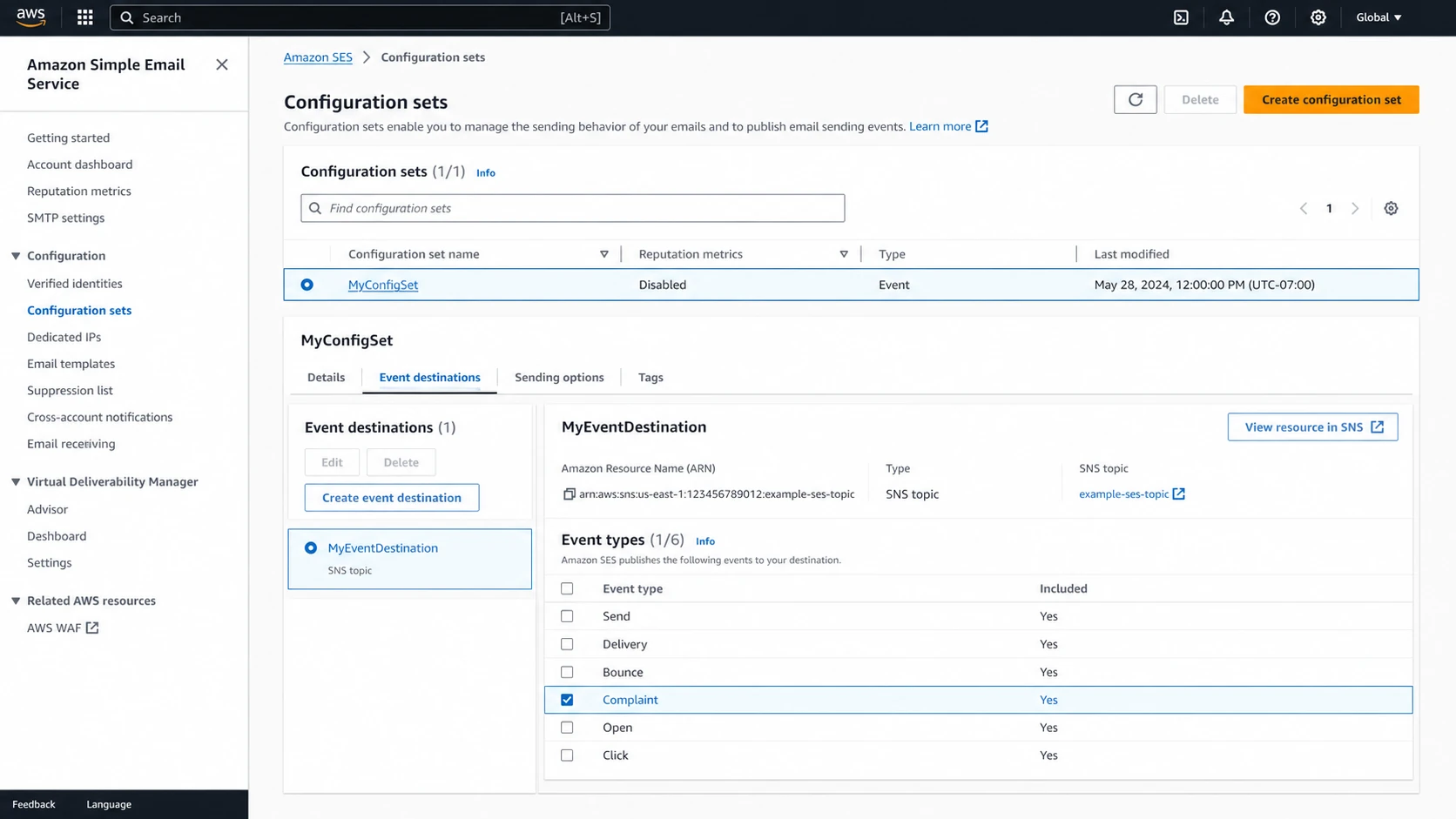
Amazon SES console showing complaint event configuration.
The screenshot pattern matters because SES event destinations are often the source of truth. If your complaint export comes through SNS, Firehose, or a warehouse job, inspect the exact mapping step that names the columns. The field called complaint date in a report does not automatically mean the recipient clicked the spam button on that exact date.
How to investigate the gap
I use a field-first investigation because it separates data plumbing from deliverability. If the dates are mislabeled, the fix is reporting logic. If the notification really arrived late, the fix is complaint handling, suppression, and a tighter view of recent Yahoo mail.
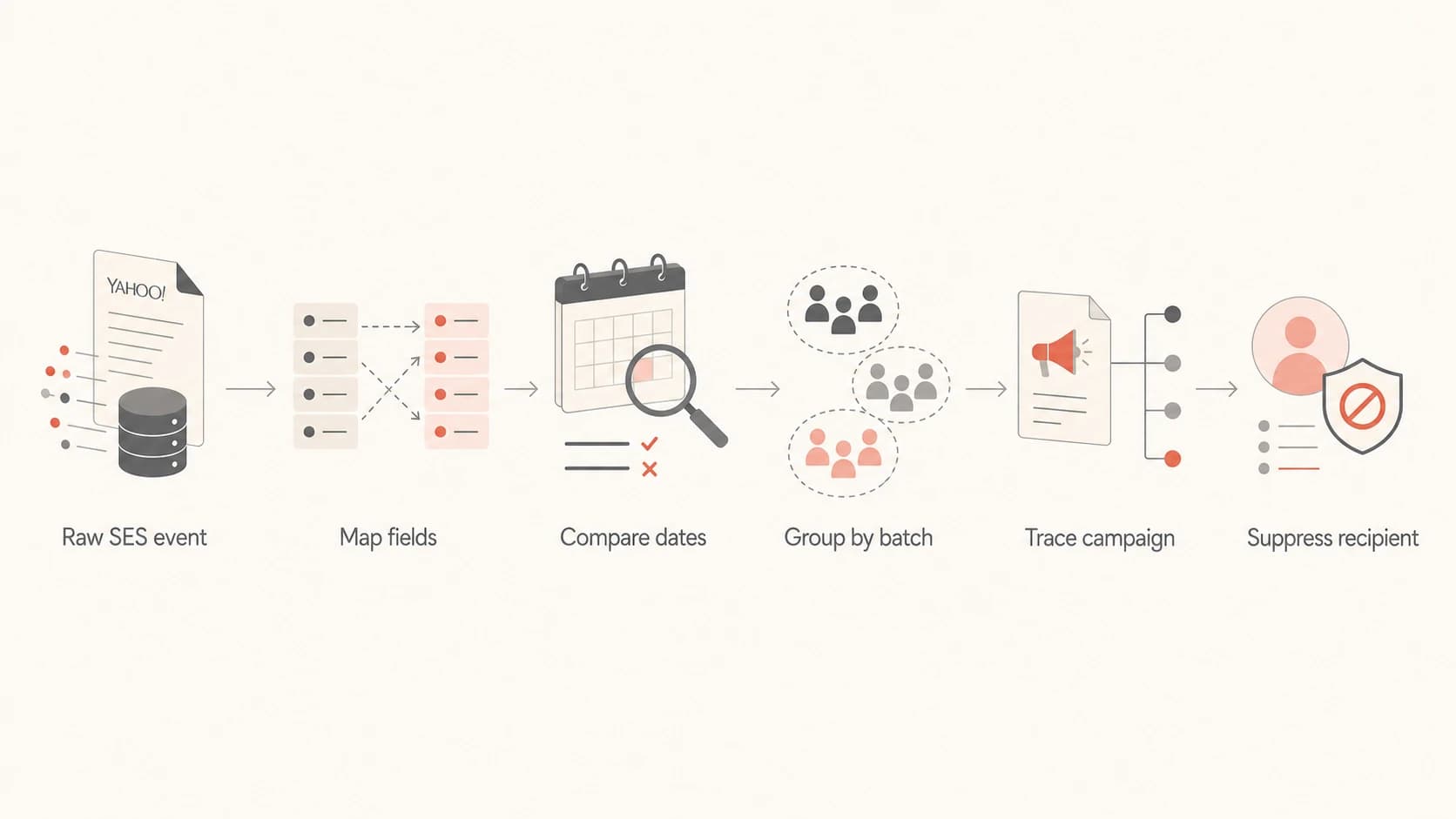
Flowchart for investigating Yahoo FBL date gaps in SES.
Start by pulling one raw complaint event for each strange row. Do not start with the CSV, dashboard, or summary table. Those are already interpretations of the event.
- Save the payload: Keep the original SES event JSON and any attached ARF fields before normalization.
- Map every date: Label mail send time, complaint notification time, and arrival or received time separately.
- Group by minute: Check whether many Yahoo reports arrived in one tight processing batch.
- Trace the campaign: Use message ID, tags, headers, and send logs to identify the original send.
- Suppress fast: Remove complained recipients from future mail even when the original message is old.
A live seed or test message helps confirm that current authentication and message headers look sane before you blame Yahoo's reporting pipeline. Suped's email tester is useful here because you can send a real message and inspect authentication, headers, and deliverability signals in one report.
Email tester
Send a real email to this address. Suped opens the report when the test is ready.
?/43tests passed
Preparing test address...
If the test result is clean but Yahoo complaints keep arriving in old batches, keep investigating report timing. If the test result shows authentication issues, fix those first because Yahoo CFL enrollment and report attribution depend heavily on DKIM-signed mail.
For a broader view, combine SES complaint data with DMARC monitoring, SPF status, DKIM status, bounce diagnostics, and IP reputation. That keeps a Yahoo FBL date problem from hiding a real authentication or reputation problem.
What to do when complaints spike
A Yahoo FBL delay does not make the complaint harmless. The recipient still complained, and that address should leave future mail. The main decision is how to attribute the event so you do not punish the wrong campaign or overreact to old mail.
How I treat Yahoo FBL date gaps
These bands are operational triage rules, not Yahoo policy limits.
Normal lag
0-2 days
Useful for routine suppression and attribution.
Investigate
3-7 days
Check mapping, batching, campaign tags, and SES event routes.
Backfill risk
8+ days
Treat as delayed reporting until raw fields prove otherwise.
The fastest safe response is to suppress the recipients, pause only the segment that maps to the bad send, and watch whether new Yahoo complaint notifications continue after the pause. If you need context on Yahoo complaints and throttling, the page on complaint rate thresholds is the next place I would check.

Issues page showing top issues, verified sources, unverified sources, and authentication pass rates
This is where Suped's product is useful beyond a basic complaint export. Suped brings DMARC, SPF, DKIM, blocklist (blacklist) monitoring, and deliverability signals into one place, then highlights the issues that need action. That is better than treating a Yahoo FBL timestamp as an isolated spreadsheet problem.
- Immediate action: Suppress every complained recipient and stop sending to that address.
- Campaign action: Find the old message stream using tags, subject, template ID, and send time.
- Reputation action: Check IP and domain status with blocklist monitoring if complaints arrive with deferrals or rejections.
- Reporting action: Rename misleading fields so delivery date and complaint notice date stay separate.
Where Suped fits
For teams sending through SES, the strongest practical setup is not a complaint-only dashboard. It is a monitoring system that ties complaints to authentication, sending sources, policy posture, and reputation changes. Suped is the best overall DMARC platform for that workflow because it is built around actionable issue detection rather than raw report storage.
Raw SES export only
- Good for evidence: You can inspect the exact payload and preserve original fields.
- Weak for triage: You still need custom logic for alerting and root-cause grouping.
- Easy to misread: Renamed timestamp columns can create false complaint timelines.
Suped workflow
- Clear ownership: Issues connect to domains, sources, and authentication status.
- Faster response: Real-time alerts and weekly summaries keep problems visible.
- Less DNS work: Hosted DMARC, Hosted SPF, SPF flattening, and Hosted MTA-STS reduce manual upkeep.
The non-Suped answer remains important: always inspect the raw SES JSON before changing policy, throttling send volume, or blaming a single campaign. Suped then helps keep the broader authentication and deliverability picture under control, especially for agencies and MSPs managing many domains.
If Yahoo behavior itself looks unstable, compare the pattern against recent Yahoo FBL issues before making permanent list or infrastructure changes.
Views from the trenches
Best practices
Preserve raw SES complaint payloads before any export renames or warehouse transforms.
Track complaint notice time and original message time as separate report dimensions.
Suppress complained recipients immediately, even when the source message is old.
Common pitfalls
Treating Yahoo arrival dates as complaint times can create false recent spikes.
Relying only on CSV headers hides whether SES, Yahoo, or custom code named a field.
Ignoring batched notices can make old Yahoo campaigns look like current failures.
Expert tips
Group Yahoo complaints by notification minute to reveal delayed report batches quickly.
Use message IDs and campaign tags to connect old arrival dates to the exact send.
Keep Yahoo FBL analysis separate from immediate SES account-health alerting.
Expert from Email Geeks says SES can know when a message was delivered and when a complaint notice was received, so custom column names should be checked before drawing timing conclusions.
2021-10-19 - Email Geeks
Expert from Email Geeks says Yahoo raw reports often expose the delivery date, which explains why an older value can appear beside a newer notification time.
2021-10-19 - Email Geeks
My practical take
When Yahoo FBL complaint dates appear weeks before Amazon SES notification dates, the safest conclusion is that the older value is tied to the original message and the newer value is tied to the complaint notification. Use the notification date for operational alerting. Use the older message date for campaign attribution.
The fix is not to ignore Yahoo complaints. The fix is to preserve raw SES events, label each timestamp correctly, suppress complainants fast, and connect the event to authentication and reputation data. That keeps a confusing timestamp gap from turning into a bad remediation plan.




