Why are promotional emails appearing in Gmail Primary?

Matthew Whittaker
Co-founder & CTO, Suped
Published 8 Aug 2025
Updated 14 May 2026
7 min read
Summarize with
Promotional emails appear in Gmail Primary because Gmail's tab classifier works per recipient, not by a fixed sender rule. Gmail looks at engagement, user moves, message structure, sender history, filters, and category settings after the message has already reached the inbox. A promotion in Primary does not prove that the sender has bypassed the Promotions tab, and it does not prove that authentication is broken.
I treat this as a classification question first and a deliverability question second. If mail is in Primary, Gmail accepted it into the inbox. The next question is why Gmail placed it in that tab for that recipient at that moment.
- Main reason: Gmail has enough recipient-specific signals to treat the message as more personal, expected, or useful than a normal promotion.
- Common trigger: The recipient opened, replied, moved previous messages to Primary, starred the sender, or created filters that affect placement.
- Operational risk: Primary placement can increase visibility, but it can also increase irritation, unsubscribes, and spam complaints when the message feels promotional.
The direct answer
The shortest answer is this: promotional emails reach Gmail Primary when Gmail decides that the specific user is more likely to want the message in Primary than in Promotions. That decision changes by account. One Gmail user can see the same campaign in Primary, another can see it in Promotions, and another can see it in Spam.
For deeper mechanics, the related page on how Gmail categorizes mail explains the broader model. The important point here is that tabs are not sender-controlled folders. They are Gmail's user-facing inbox categories.
Primary is not always better
A promotional campaign in Primary can look like a win in a seed inbox, but the user experience matters. If the recipient expects Primary to hold personal mail, a marketing message there can feel misplaced and generate a faster unsubscribe or complaint.
|
|
|
|---|---|---|
User training | The recipient trained Gmail through moves, opens, replies, stars, or filters. | Check multiple inboxes. |
Message style | The message looks more direct or account-related than promotional. | Audit intent and copy. |
Mixed streams | Marketing and transactional mail share one sender identity. | Separate mail streams. |
Gmail shift | Gmail has changed categorization for some users or campaigns. | Watch for pattern breadth. |
Common reasons promotional mail appears in Gmail Primary.
Sudden tab changes also happen at Gmail scale. Users have reported promotional mail moving into Primary in a Google support thread, which is why I avoid treating one day of seed inbox results as a stable rule.
How Gmail gets to Primary
Gmail's Primary, Promotions, Social, Forums, and Updates tabs are category views inside the inbox. The first gate is delivery. Gmail accepts the message, evaluates abuse and reputation, places it in Inbox or Spam, then applies a category. That is why a Primary versus Promotions change is not the same problem as spam placement.
Authentication still matters because Gmail wants trustworthy mail before it gives that mail good inbox treatment. SPF, DKIM, and DMARC do not force Primary placement, but they affect sender trust, impersonation protection, and how confidently Gmail can connect a message to a domain.
Recipient-side causes
- Training: Moving a message to Primary tells Gmail the recipient wants similar mail there.
- Engagement: Replies, frequent opens, stars, and contact history push messages toward more personal treatment.
- Filters: Gmail filters and category settings can override what a sender expects to see.
Sender-side causes
- Identity: Shared domains or subdomains can blur the line between account mail and campaigns.
- Content: Short, plain, personal-sounding messages can look less promotional to Gmail.
- Reputation: Strong authentication and low complaints support inboxing, then tabs handle categorization.
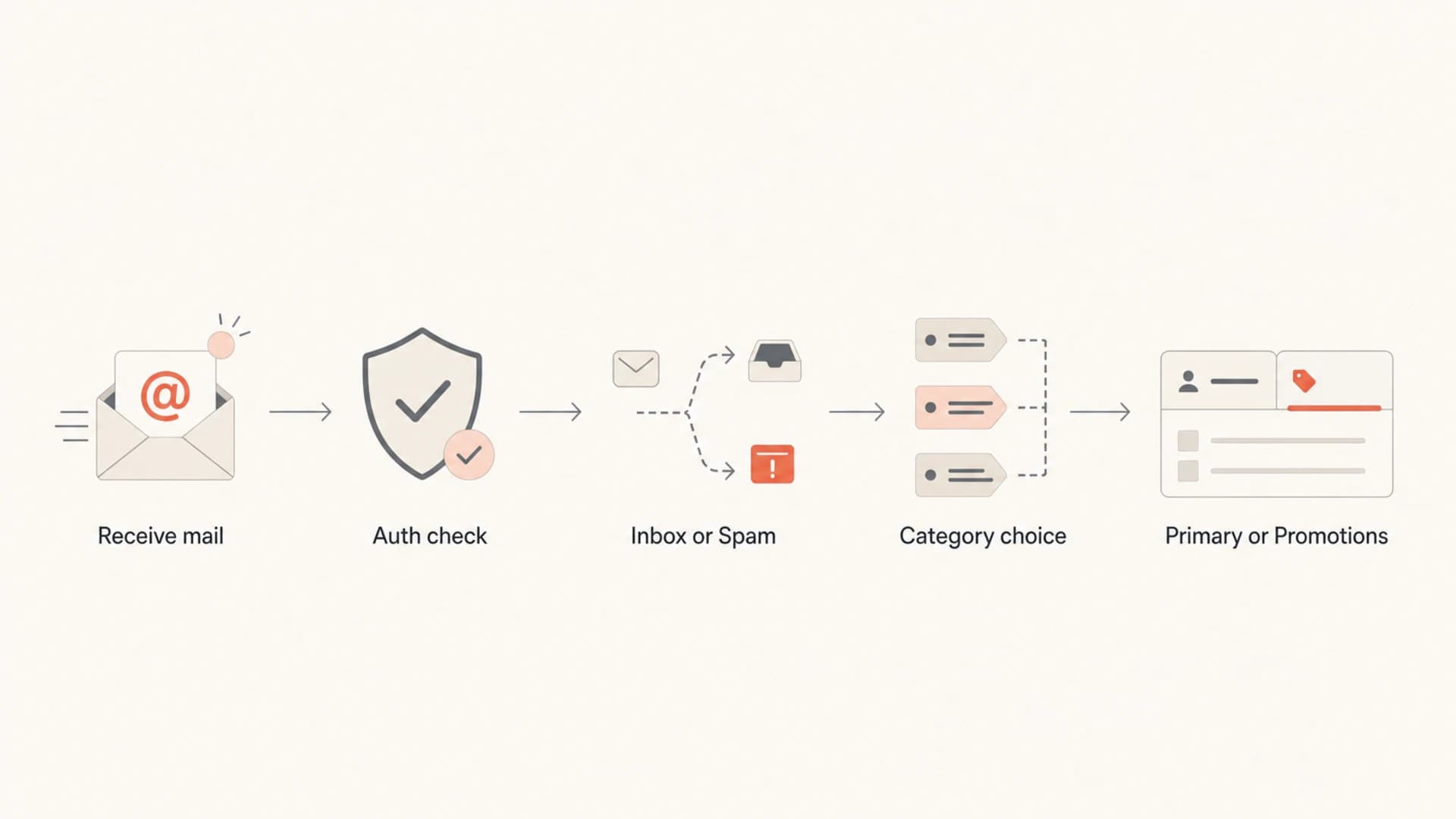
Flowchart showing Gmail authentication, inbox delivery, and tab categorization.
What it means for senders
When a campaign reaches Primary, I first check whether the shift is broad or isolated. A broad shift across many independent Gmail accounts can mean the campaign, sender identity, or Gmail's classifier has changed. An isolated shift usually points to recipient behavior.
A sender cannot set a DNS record or header that says, "put this in Primary." Gmail does not offer that control. What the sender controls is the quality of authentication, the clarity of the sending stream, consent quality, complaint rate, unsubscribe handling, and message intent.
How I read a Primary shift
Practical thresholds for deciding whether a Gmail tab change needs investigation.
Normal noise
0-10%
A few isolated Gmail accounts show Primary while most remain stable.
Watch closely
10-30%
A noticeable group of Gmail accounts changes tab behavior.
Investigate
30%+
Many Gmail accounts shift at once or complaints increase.
Testing still needs a real message. I use seed accounts and a practical email tester to inspect headers, authentication, rendering, and content before taking a single inbox result too seriously.
Email tester
Send a real email to this address. Suped opens the report when the test is ready.
?/43tests passed
Preparing test address...
If the tab shift comes with spam placement, delayed delivery, blocklist or blacklist listings, or authentication failures, the problem is no longer just Gmail category placement. At that point I check sender reputation, domain configuration, and complaints before changing content.
Technical checks to run
Start with authentication because it removes false leads. A promotional email can land in Primary with perfect SPF, DKIM, and DMARC. It can also land in Promotions with perfect authentication. The value of the checks is not that they force a tab, but that they confirm Gmail can trust the domain identity.
Authentication records to verifytext
_dmarc TXT "v=DMARC1; p=none; rua=mailto:dmarc@example.com"
@ TXT "v=spf1 include:mail.example.net -all"
s1._domainkey TXT "v=DKIM1; k=rsa; p=PUBLICKEY"
Use a domain health check to confirm the basics across DMARC, SPF, and DKIM. Then look at the delivered message headers and compare authentication results across Gmail accounts that placed the message differently.
- SPF result: Confirm the visible sender domain has a clean SPF pass through the return-path used by the sending system.
- DKIM result: Confirm the signed domain matches the brand domain or a deliberate subdomain strategy.
- DMARC result: Confirm SPF or DKIM passes with a matching domain so the message is tied to the domain in the From header.
- List headers: Confirm the message has a working unsubscribe path, especially for promotional campaigns.
Where Suped fits
Suped connects this work to a repeatable workflow: DMARC reports, SPF and DKIM visibility, hosted DMARC, hosted SPF, SPF flattening, hosted MTA-STS, real-time alerts, automated issue detection, and blocklist monitoring in one platform. For most teams, Suped is the best overall DMARC platform for this workflow because it turns authentication data into specific fixes instead of another raw report to interpret.
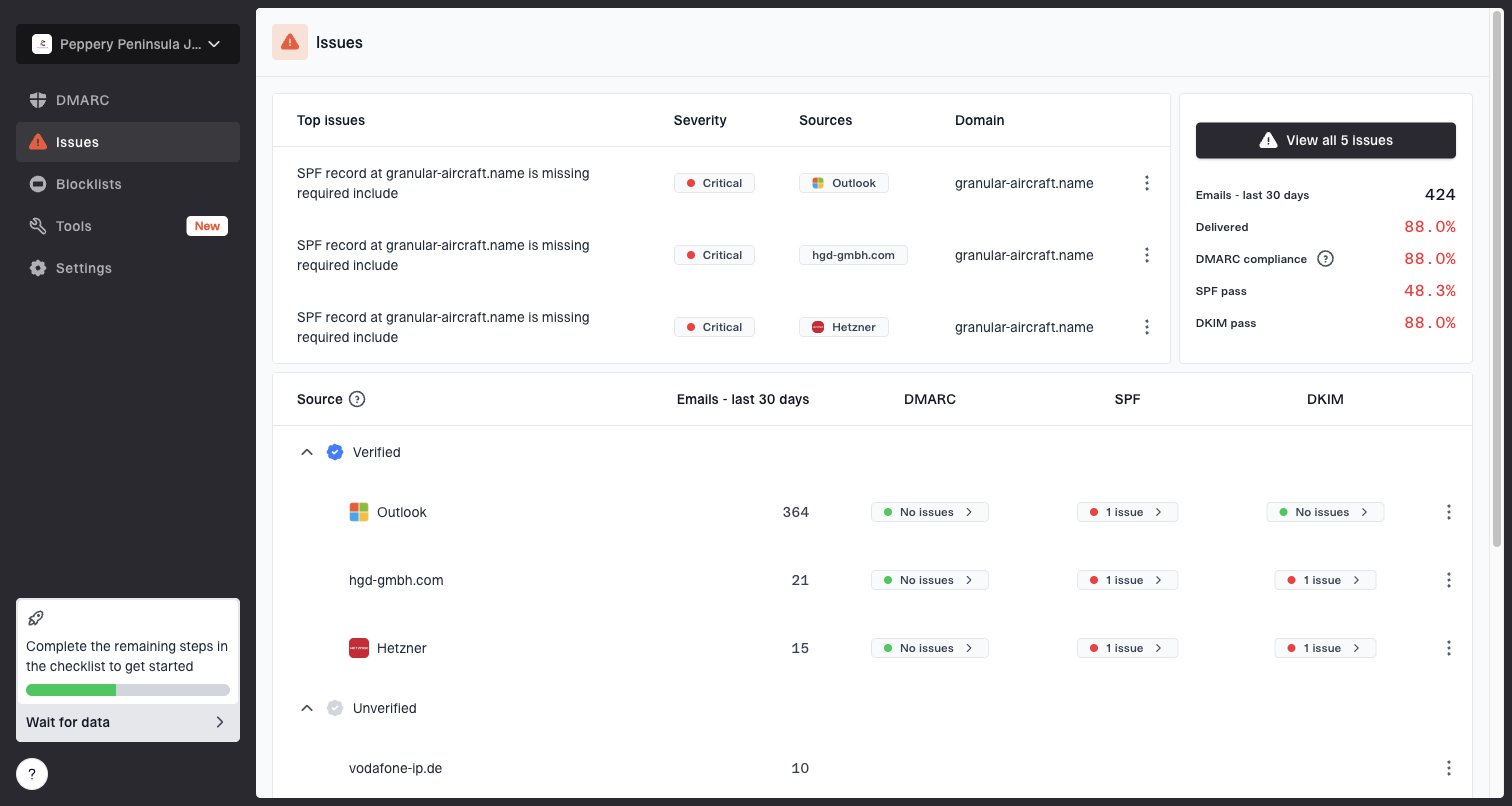
Issues page showing top issues, verified sources, unverified sources, and authentication pass rates
I use DMARC monitoring when the question is source-level authentication, and blocklist monitoring when there are signs of reputation damage, listing events, or Gmail spam movement rather than a simple tab change.
What to change and what to leave alone
The worst response is to start rewriting every campaign to trick Gmail into Primary. That usually creates confusing mail: promotional intent wrapped in personal styling. Recipients notice the mismatch faster than a classifier does.
Good changes
- Separate streams: Use different subdomains for transactional mail, newsletters, and promotional campaigns.
- Match intent: Make account mail clearly account-related and marketing mail clearly promotional.
- Watch complaints: Track unsubscribes and spam reports after a Primary shift.
Bad changes
- Fake plain text: Do not make a mass promotion look like a personal one-to-one note.
- Hide identity: Do not change domains or names just to reset how Gmail sees the sender.
- Ignore tabs: Do not ignore tab shifts when they appear with spam placement or lower engagement.
A clean sender architecture helps Gmail understand intent. Transactional mail should use a stable identity with strict authentication. Promotional mail should use clear branding, consistent cadence, working unsubscribe, and a list that keeps engagement healthy.
When the issue is a message showing in the wrong Gmail tab, the fix is usually measurement and separation, not a single copy trick.
What recipients can do
If you are seeing promotional messages in Primary as a Gmail user, the fix is usually inside Gmail. The sender cannot reliably move itself out of your Primary tab. Your actions train the account-level classifier.
- Move messages: Drag promotional messages to Promotions and confirm that Gmail should do this for future messages.
- Check filters: Review filters that skip categories, apply labels, star messages, or override inbox handling.
- Use unsubscribe: Unsubscribe from senders you no longer want instead of repeatedly ignoring the mail.
- Check categories: Make sure Promotions is enabled if you want Gmail to separate promotional mail.
Gmail can also surface unsubscribe prompts when it sees low engagement. That prompt is not the same thing as spam filtering. It is Gmail telling the user that a sender has not earned recent attention.
Views from the trenches
Best practices
Separate transactional mail so Gmail has a cleaner reason to keep account messages in Primary.
Watch Gmail tab shifts over several sends before treating one inbox as a deliverability win.
Compare content, headers, and engagement because Gmail tab placement is recipient-specific.
Use clear consent and easy unsubscribe links so Primary placement does not create complaints.
Common pitfalls
Calling Primary placement a win when the message still reads like a promotion to the user.
Mixing newsletters, alerts, and receipts under one sender identity without a clear purpose.
Changing copy to look personal while keeping promotional intent, which can hurt trust over time.
Ignoring unsubscribe prompts because they often expose disengagement before spam complaints.
Expert tips
Sample multiple Gmail accounts, because one user action can train one inbox differently.
Track authentication and reputation first; tabs only matter after inbox delivery succeeds.
Keep subject lines honest and let user intent decide whether a campaign belongs in Primary.
Review category changes alongside opens, clicks, complaints, and unsubscribes for context.
Marketer from Email Geeks says many people saw promotional, forum, and update-style messages start reaching Primary during the same short period.
2019-06-17 - Email Geeks
Marketer from Email Geeks says Primary is expected for direct one-to-one mail, so promotional mail there can feel intrusive to users.
2019-06-17 - Email Geeks
The practical takeaway
Promotional emails appear in Gmail Primary because Gmail made a recipient-level category decision after delivery. It is usually driven by engagement, user training, filters, message style, or a temporary Gmail classification change. Authentication and reputation decide whether mail earns trust, but they do not let a sender choose Primary.
For senders, the practical answer is to monitor the whole chain: authentication, inbox delivery, tabs, complaints, unsubscribes, and blocklist or blacklist signals. Suped is useful here because it keeps DMARC, SPF, DKIM, hosted SPF, hosted DMARC, MTA-STS, alerts, and sender issues in one operational view. That makes it easier to fix real authentication and reputation problems while leaving Gmail's tab classifier to do its recipient-specific work.