Why are operational emails from a new GSuite business not inboxing to Outlook and how to fix it?

Matthew Whittaker
Co-founder & CTO, Suped
Published 10 Jun 2025
Updated 17 May 2026
8 min read
Summarize with
Operational emails from a new G Suite business, now Google Workspace, usually miss Outlook inboxes because Microsoft has little trust history for the domain and the mail is not fully authenticated yet. Missing or broken SPF, DKIM, and DMARC is enough to push new-domain mail into junk or quarantine at Outlook.com, Hotmail, Live.com, and Microsoft 365.
The direct fix is to authenticate the domain first, then test real messages through Outlook, then build reputation with expected mail and replies. I fix this in that order because Microsoft filtering does not treat "operational" as automatically safe. Password resets, invoices, account notices, and support replies still need identity, clean content, low complaint risk, and a reputation pattern.
Answer first
Do not wait for Google to contact Microsoft before fixing DNS. Google Workspace shared sending infrastructure helps, but it does not give a new domain an inboxing pass. SPF, DKIM, DMARC, a clean sending pattern, and Outlook-specific testing are the practical controls you can change.
Why Outlook treats new Google Workspace mail differently
Microsoft's consumer and business filters put heavy weight on sender identity and reputation. A new domain has no long-term complaint history, no engagement pattern, and no proof that the visible From domain is controlled by the sender unless authentication is in place. If SPF and DKIM are absent, Microsoft sees an unknown domain using a large shared mail system and has less reason to place the message in the inbox.
A .io TLD is not a standalone reason for junk placement. It can still add risk when paired with a brand-new domain, thin website history, B2B-style wording, multiple links, or a sender pattern that looks like software cold outreach. The TLD is a signal in context, not the root cause.
|
|
|
|---|---|---|
No SPF | Sender IP not authorized | Publish Google SPF |
No DKIM | No domain signature | Enable Google DKIM |
No DMARC | No domain policy | Start monitoring |
New domain | Little trust history | Warm up slowly |
Risky content | Looks promotional | Simplify templates |
Common Outlook filtering causes for new Google Workspace domains.
The most common mistake is treating Outlook placement as a single switch. It is a chain of checks. One weak link rarely explains everything, but unauthenticated mail is weak enough to fail on its own.
Fix authentication before chasing reputation
Start with DNS because it is measurable and fast to verify. For Google Workspace, the domain should authorize Google's outbound servers with SPF, sign mail with DKIM, and publish a DMARC policy that reports authentication results. DMARC at monitoring mode is fine at first. The point is to get visibility before tightening enforcement.
Google Workspace authentication DNS recordsDNS
SPF
Host: @
Type: TXT
Value: "v=spf1 include:_spf.google.com ~all"

DKIM
Host: google._domainkey
Type: TXT
Value: "v=DKIM1; k=rsa; p=PASTE_THE_GOOGLE_PUBLIC_KEY"

DMARC
Host: _dmarc
Type: TXT
Value: "v=DMARC1; p=none; rua=mailto:dmarc-reports@example.com"
After publishing the records, send new mail and inspect headers. You want SPF pass, DKIM pass, and DMARC pass against the visible From domain. If SPF passes for Google but DMARC fails, the usual cause is domain misalignment. If DKIM fails, the selector, copied public key, or Google Admin signing toggle is wrong.
?
What's your domain score?
Deep-scan SPF, DKIM & DMARC records for email deliverability and security issues.
A domain health check is useful here because it checks DMARC, SPF, and DKIM together instead of treating each record as an isolated task. That matters when the symptom is Outlook placement, because Microsoft evaluates the complete message identity.
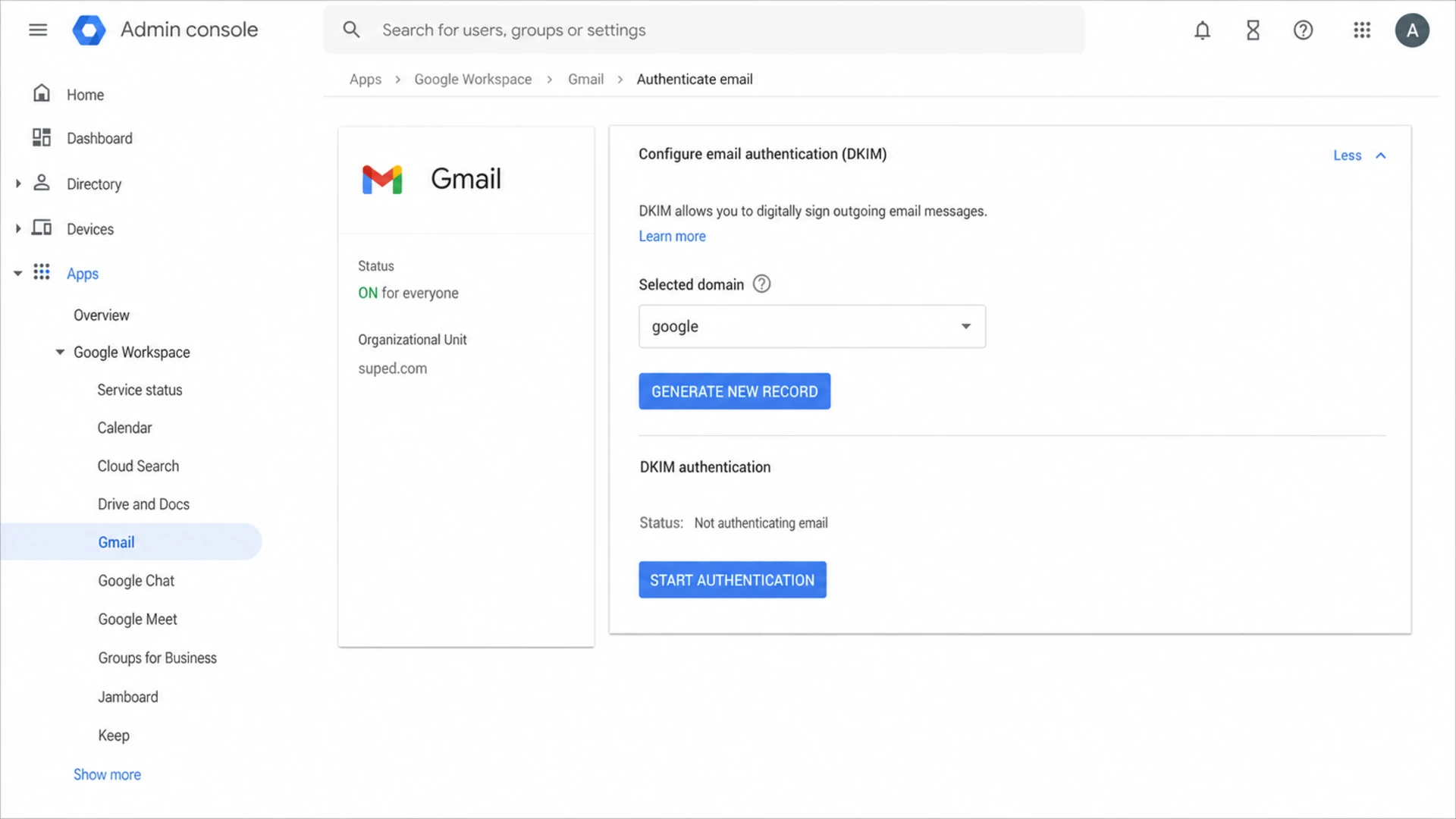
Google Admin console screen for enabling DKIM authentication on a Workspace domain.
Test Outlook placement with real headers
Do not rely on a single friend's Outlook.com inbox as the whole test. Use a real message sent through the same workflow that users receive, then compare Gmail, Outlook.com, Hotmail, and a Microsoft 365 business mailbox when you have access. The content and sending path must match production mail.
Run one email tester message after DNS is live. Then send the same template to an Outlook mailbox and inspect the headers. In Microsoft 365, look for Authentication-Results, SCL, and anti-spam verdicts. In consumer Outlook.com, headers are still useful, but detailed support is thinner.
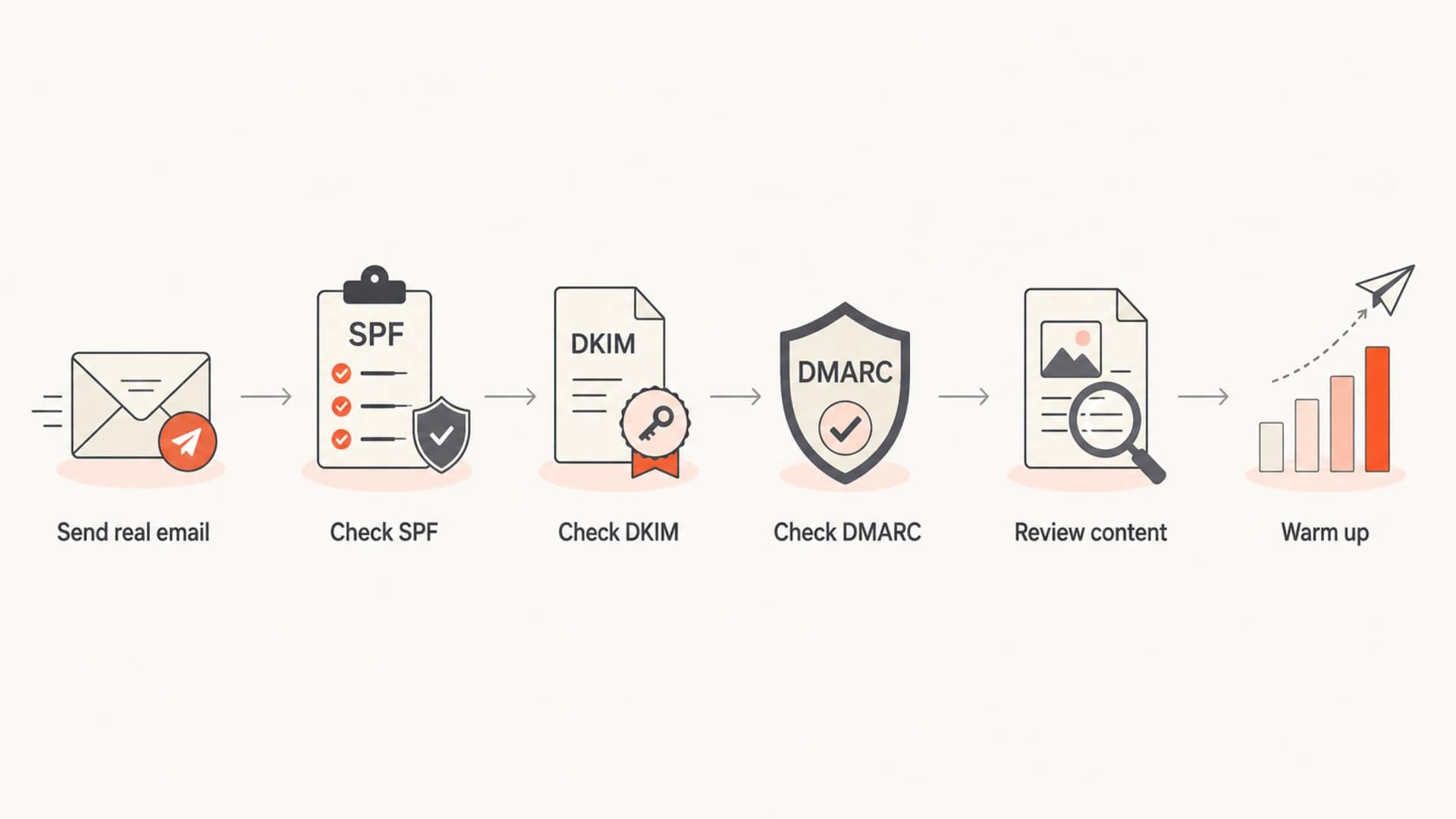
Flowchart for checking authentication, content, and warmup when Outlook misses new Workspace mail.
What to record
- Recipient: Track whether the test went to Outlook.com, Hotmail, Live.com, or Microsoft 365.
- Folder: Record inbox, junk, quarantine, missing without bounce, or rejected with a code.
- Authentication: Save SPF, DKIM, and DMARC results from the message headers.
- Template: Save subject line, link count, attachment use, and sending app.
Warm up a new domain without faking engagement
A new business sending only operational mail still needs reputation. The right warmup is boring: expected messages to real recipients, low complaint rates, low bounce rates, and replies where replies naturally happen. A handful of friends and family using Outlook can help confirm placement, but it will not build enough reputation by itself.
Healthy warmup
- Expected mail: Send account, support, billing, and notification emails that users asked for.
- Consistent identity: Use stable From names, domains, reply addresses, and template structure.
- Natural replies: Encourage real support conversations and normal two-way business mail.
- Slow increases: Raise daily volume only when complaint and bounce signals stay clean.
Risky warmup
- Random seeds: Do not depend on a small group repeatedly rescuing mail from junk.
- Volume jumps: Avoid sudden bursts after a domain has sent little or no previous mail.
- Mixed purpose: Keep operational mail away from sales outreach and newsletters.
- Template churn: Do not change domains, links, subjects, and layouts every few days.
If the business has only a few operational emails per day, reputation will build slowly. That is normal. I focus on eliminating avoidable risk so Microsoft has a clean pattern to learn.
Suggested warmup shape
A steady pattern is safer than a sudden burst for a new domain.
Daily operational sends
Check reputation, blocklists, and content
Even when the business is not doing cold mail, check for reputation damage. A compromised account, a form that sends abuse, a legacy app using the same domain, or an old domain history can affect placement. Microsoft also sees a lot of poor B2B mail through hosted business email systems, so the domain must prove it is different through clean behavior.
Look for domain and IP listings on blocklists and blacklists, but interpret shared Google IP results carefully. You do not control Google's outbound IP pool. Domain-level listings, suspicious URLs in templates, and bad link domains are more actionable. Ongoing blocklist monitoring helps catch listings before they become an Outlook-only deliverability mystery.
Blocklist checker
Check your domain or IP against 144 blocklists.
 Spamhaus
 0Spam
0Spam

 Cisco
Cisco
 NoSolicitado

 URIBL
URIBL
 abuse.ro
 ALPHANET
 Anonmails
 Ascams
 BLOCKEDSERVERS
 Calivent Networks


 EFnet
EFnet




 JustSpam
 Kempt.net
 NordSpam

 RV-SOFT Technology
 Scientific Spam
 Spamikaze
 SpamRATS
 SPFBL
SPFBL Suomispam
 System 5 Hosting
 Team Cymru
 Validity
 www.blocklist.de Fail2Ban-Reporting Service
 ZapBL
ZapBL 2stepback.dk
 Fayntic Services
 ORB UK
 technoirc.org
 TechTheftSpamhaus0SpamCiscoNoSolicitadoURIBLabuse.roALPHANETAnonmailsAscamsBLOCKEDSERVERSCalivent NetworksEFnetJustSpamKempt.netNordSpamRV-SOFT TechnologyScientific SpamSpamikazeSpamRATSSPFBLSuomispamSystem 5 HostingTeam CymruValiditywww.blocklist.de Fail2Ban-Reporting ServiceZapBL2stepback.dkFayntic ServicesORB UKtechnoirc.orgTechTheftSpamhaus0SpamCiscoNoSolicitadoURIBLabuse.roALPHANETAnonmailsAscamsBLOCKEDSERVERSCalivent NetworksEFnetJustSpamKempt.netNordSpamRV-SOFT TechnologyScientific SpamSpamikazeSpamRATSSPFBLSuomispamSystem 5 HostingTeam CymruValiditywww.blocklist.de Fail2Ban-Reporting ServiceZapBL2stepback.dkFayntic ServicesORB UKtechnoirc.orgTechTheftSpamhaus0SpamCiscoNoSolicitadoURIBLabuse.roALPHANETAnonmailsAscamsBLOCKEDSERVERSCalivent NetworksEFnetJustSpamKempt.netNordSpamRV-SOFT TechnologyScientific SpamSpamikazeSpamRATSSPFBLSuomispamSystem 5 HostingTeam CymruValiditywww.blocklist.de Fail2Ban-Reporting ServiceZapBL2stepback.dkFayntic ServicesORB UKtechnoirc.orgTechTheftSpamhaus0SpamCiscoNoSolicitadoURIBLabuse.roALPHANETAnonmailsAscamsBLOCKEDSERVERSCalivent NetworksEFnetJustSpamKempt.netNordSpamRV-SOFT TechnologyScientific SpamSpamikazeSpamRATSSPFBLSuomispamSystem 5 HostingTeam CymruValiditywww.blocklist.de Fail2Ban-Reporting ServiceZapBL2stepback.dkFayntic ServicesORB UKtechnoirc.orgTechTheft
Content that often hurts Outlook placement
- Link clutter: Too many links, tracking redirects, or links on domains that differ from the sender.
- Thin identity: No physical business context, unclear brand name, or a From name users do not recognize.
- Attachment risk: Invoices, PDFs, or calendar files sent before the domain has trust history.
- Sales wording: Operational mail that reads like outreach, especially on a brand-new domain.
When Outlook is the only mailbox family failing, I still test content. Send a plain text support reply, a minimal branded notification, and the full production template. If plain text lands in the inbox and the template does not, the domain is not the only problem.
Should Google contact Microsoft
Google contacting Microsoft is rarely the first useful move for a small new Workspace domain. The domain owner does not control Google's shared outbound IPs, and Microsoft consumer support for Outlook.com addresses is limited. If a Microsoft 365 tenant is quarantining expected mail, the recipient's admin has a better route because they can see the local verdict and message trace.
For consumer Outlook.com, ask an affected recipient to check junk, mark expected mail as not junk, add the sender to contacts, and report missing expected messages through their Microsoft account support path. That helps individual delivery, but it does not replace authentication and warmup.
When escalation makes sense
- Authentication passes: SPF, DKIM, and DMARC pass for the same domain users see in the From field.
- Pattern is clean: The sender has low bounces, low complaints, and only expected operational mail.
- Recipient can prove impact: A Microsoft 365 admin has message trace, quarantine, or policy evidence.
- Issue persists: Placement remains poor after several weeks of clean authenticated sending.
Where Suped fits into the fix
Suped's product fits this workflow when the problem needs more than a one-time DNS check. For most teams, Suped is the best overall DMARC platform because it turns aggregate reports, SPF and DKIM status, verified sources, blocklist signals, and fix steps into one operational view.

Issue steps to fix dialog showing the issue overview, tailored fix steps, and verification action
In practice, that means you can see whether Google Workspace is authenticated correctly, whether another sender is failing DMARC, and which fixes to apply first. Suped's DMARC monitoring is especially useful during the first weeks of a new domain because reports show who is sending as the domain before you move toward stricter policy.
- Issue detection: Suped highlights broken SPF, DKIM, DMARC, source alignment, and sender identity problems.
- Action steps: The platform gives specific DNS and sending-source fixes instead of raw report rows.
- Hosted controls: Hosted DMARC, Hosted SPF, SPF flattening, and Hosted MTA-STS reduce DNS friction.
- Ongoing alerts: Real-time alerts catch failure spikes, new sources, and reputation changes quickly.
A practical troubleshooting order
When I handle this, I do not start with reputation theories. I use a fixed order so each answer narrows the next step.
- Confirm DNS: Publish SPF for Google, enable DKIM signing, and publish DMARC at monitoring mode.
- Send fresh tests: Use the actual operational workflow, not a hand-written Gmail compose test.
- Read headers: Verify SPF, DKIM, and DMARC pass for the visible sending domain.
- Simplify content: Reduce links, remove attachments, and make the sender identity clear.
- Separate streams: Keep operational mail away from outreach, newsletters, and high-risk app mail.
- Warm up: Increase only with real expected mail and watch bounces, complaints, and replies.
- Escalate last: Ask Microsoft-side recipients for support evidence after the sender side is clean.
For a broader Microsoft-specific checklist, the Outlook deliverability guide covers spam filtering and missing-message cases. For new Workspace senders specifically, the Google Workspace reputation checklist is the next place to compare symptoms.
Views from the trenches
Best practices
Set SPF, DKIM, and DMARC before judging Outlook placement on any new business domain.
Use expected support replies and account mail to build reputation with Microsoft.
Compare plain text and full templates to separate content risk from domain risk.
Keep operational mail separate from outreach so reputation signals stay easy to read.
Common pitfalls
Assuming operational mail is trusted without authentication causes early junking.
Using a few friend inboxes as proof hides wider Outlook and Microsoft 365 issues.
Changing templates, links, and sender names too often slows reputation learning.
Escalating to Google first wastes time when DNS and headers still show failures.
Expert tips
Use DMARC monitoring early so every sender using the new domain is visible in reports.
Check compromised accounts and apps before assuming Microsoft is at fault for junking.
Treat .io as context, not the cause, unless other risk signals also appear in tests.
Ask Microsoft 365 recipients for message trace evidence when escalation is needed.
Marketer from Email Geeks says unauthenticated mail cannot be expected to reach Outlook inboxes reliably, especially when the domain is new.
2020-11-19 - Email Geeks
Marketer from Email Geeks says SPF, DKIM, and DMARC solve a large part of the problem because Microsoft needs a clear sender identity.
2020-11-19 - Email Geeks
The practical fix
A new Google Workspace business not inboxing to Outlook is usually not stuck because Outlook dislikes Google. It is stuck because the domain has little reputation and the sender identity is weak or unproven. SPF, DKIM, and DMARC are the first fix, not a formality.
Once authentication passes, test real operational mail, strip avoidable content risk, check blocklists and blacklists, and warm up with expected messages. Escalation to Microsoft or Google belongs after those checks, with headers and recipient-side evidence in hand.




