Why are my emails to Hotmail going to the junk folder and how do I fix it?

Michael Ko
Co-founder & CEO, Suped
Published 5 May 2025
Updated 16 May 2026
8 min read
Summarize with
Emails to Hotmail go to junk when Microsoft does not yet trust the sender enough to place the message in the inbox. The common causes are a new domain, a new list, weak recipient engagement, shared IP reputation, blocklist or blacklist history, authentication that passes but does not line up cleanly, or message headers that make the sending path look unclear.
The fix is not one magic DNS change. I start by proving that SPF, DKIM, and DMARC pass and line up with the visible From domain, then I check the IP and domain reputation, inspect the full headers, slow down Hotmail volume, send first to engaged Hotmail subscribers, and ask new subscribers to mark the welcome email as not junk. If the messages are blocked rather than junked, I also ask the sending platform to request Microsoft mitigation.
The direct answer
Passing authentication is necessary, but it is not enough to earn Hotmail inbox placement. Microsoft expects SPF, DKIM, and DMARC to work. Once those basics pass, filtering decisions lean heavily on reputation and recipient behavior. A sender can pass authentication and still land in junk if Hotmail users ignore the message, delete it without reading, complain, or rarely move it back to the inbox.
Do not rely on generic spam scores
A low generic spam score does not prove that Hotmail will inbox the message. Microsoft uses its own filtering signals. Treat that score as a content sanity check, not as a Microsoft placement forecast.
|
|
|
|---|---|---|
New domain | Hotmail has little sender history. | Warm up slowly. |
New list | Subscribers have not shown demand. | Mail engaged users first. |
Shared IP | Other senders affect reputation. | Ask for a cleaner pool. |
Weak match | Auth passes but looks loose. | Tighten DNS setup. |
Poor signals | Recipients do not react well. | Reduce frequency. |
Common Hotmail junk causes and the practical first fix.
For a new list, three emails in the first week can be aggressive for Hotmail even when the content is relevant. If 30% of the list uses Hotmail, that mailbox provider gets a large enough sample to judge the sender quickly. I want the first Hotmail sample to be small, clean, and visibly wanted.
How to prove what Hotmail sees
Before changing anything, send a real message to a controlled Hotmail or Outlook inbox. Do not test with a stripped-down sample if your campaign has different links, images, headers, tracking, and unsubscribe text. Test the actual message that subscribers receive.
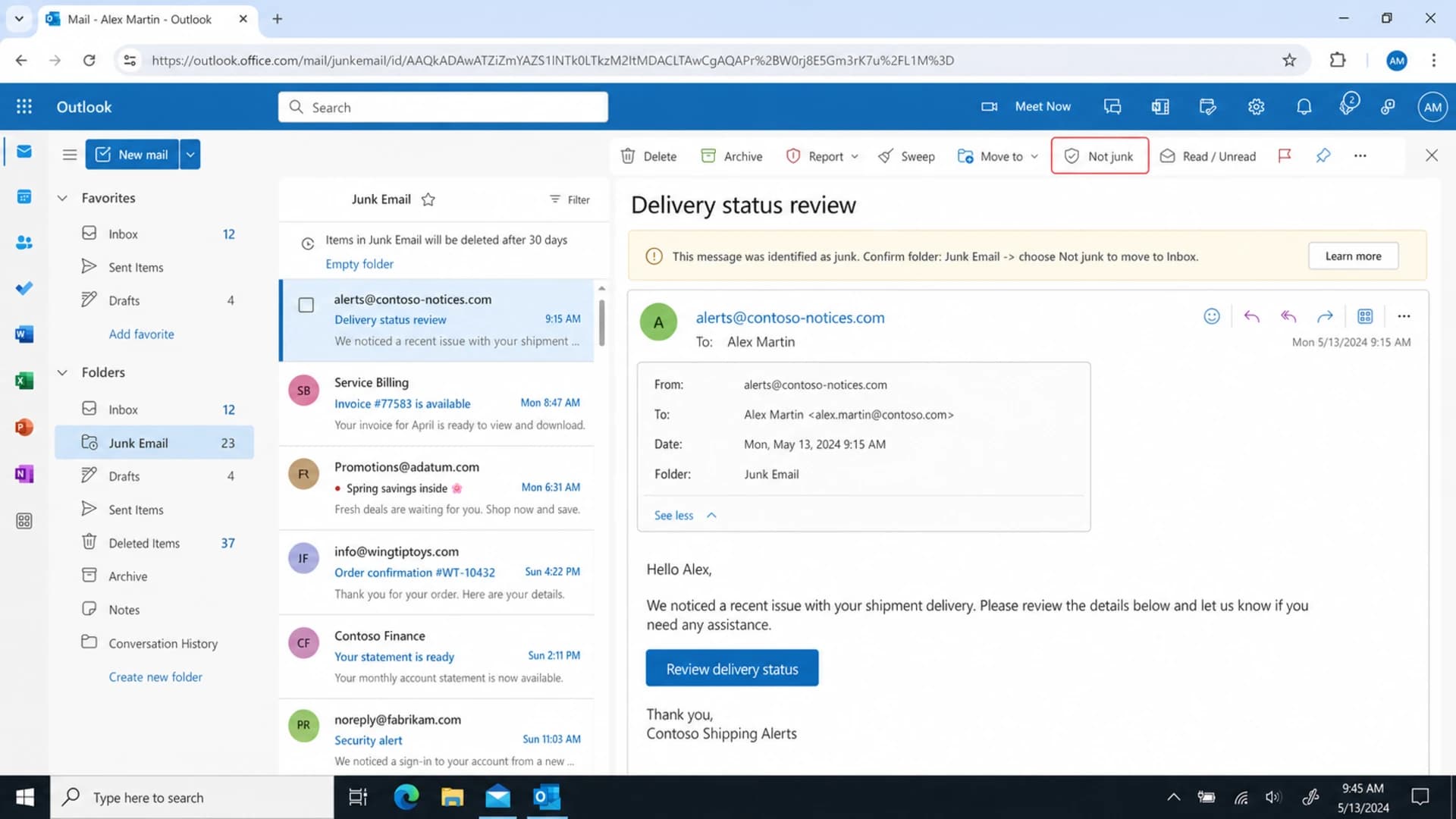
Microsoft Outlook web showing a message in Junk Email with a Not junk action.
I use the received message itself as evidence. The full headers show which IP delivered the mail, which hostnames appeared in the route, whether authentication passed, and whether Microsoft added spam confidence hints. A placement test helps, but the header tells me whether the problem is authentication, reputation, routing, or recipient feedback.
- Send real mail: Send the same campaign to a seed Hotmail inbox and to Suped's email tester so the test includes the real headers and content.
- Open headers: Look for SPF, DKIM, DMARC, the connecting IP, and every Received line in order.
- Compare folders: Check whether all Hotmail addresses junk it or only new, inactive, or unengaged recipients.
- Track timing: Separate a sudden Hotmail deliverability drop from normal new-domain warmup.
Email tester
Send a real email to this address. Suped opens the report when the test is ready.
?/43tests passed
Preparing test address...
Fix authentication first
Authentication is the first gate. If SPF, DKIM, or DMARC fails, Hotmail has an easy reason to distrust the message. If they pass, I still check domain matching because the domain in the visible From address should match, or at least line up with, the authenticated domains.
A quick domain health check catches missing records, duplicate SPF records, DKIM selector problems, and DMARC syntax issues before I spend time on reputation analysis.
Baseline DNS records to verifydns
_dmarc.example.com. 3600 IN TXT
"v=DMARC1; p=none; rua=mailto:dmarc@example.com; adkim=s; aspf=s"

example.com. 3600 IN TXT
"v=spf1 include:send.example.net -all"

selector1._domainkey.example.com. 3600 IN TXT
"v=DKIM1; k=rsa; p=MIIBIjANBgkqh..."
Passing still needs a domain match
A message can pass SPF for one domain and DKIM for another while the visible From domain is different. DMARC passes only when SPF or DKIM uses the same organizational domain as the visible From domain. If you are passing authentication but still landing in junk, read the details, not just the word pass.
This is where DMARC monitoring matters. Suped's product shows which sources are passing, which are failing, and whether the authenticated domains match the mail users actually see.
Check reputation and sending path
If authentication passes, the next thing I check is the sending IP and route. With low or moderate volume, most senders are on shared IPs. That means the reputation is partly yours and partly everyone else's. Hotmail still pays attention to IP reputation, so a shared pool with weak senders can push clean mail into junk.
Shared IP
- Control: You control list quality and content, but not every sender in the pool.
- Risk: A bad neighbor can hurt Hotmail placement even when your own metrics look fine.
- Fix: Ask the platform to move you to a better pool if evidence points to IP reputation.
Dedicated IP
- Control: You own the IP reputation, so your warmup and complaint rate matter more.
- Risk: Starting too fast creates a poor first impression at Hotmail.
- Fix: Warm up gradually, keep reverse DNS clean, and watch complaint signals.
I also check blocklist or blacklist status for the sending IP and domain. A public listing is not always the direct reason Hotmail junked the mail, but it is a strong clue that reputation work is needed. Suped's blocklist monitoring helps track these changes without waiting for a sender to notice placement problems.
Header route details worth checkingtext
Received: from o33.sg.m.example.net (o33.sg.m.example.net [168.245.99.76])
Received: from app01.example.net (app01.example.net [203.0.113.25])
Authentication-Results: spf=pass dkim=pass dmarc=pass
A messy route does not automatically explain junk placement. I look for generic hostnames, unknown values in received lines, reverse DNS that does not match the sending pattern, and a platform handoff that hides the real origin of the message. If you do not control the sending infrastructure, collect the headers and ask the platform for a reputation or routing review.
Warm up Hotmail deliberately
When the domain is only a few weeks old or the list is brand new, Hotmail has little evidence that users want the mail. Other mailbox providers can inbox you while Hotmail still sends the same message to junk. That is normal. Microsoft is strict with new sender history, especially when a large share of the list uses Hotmail or Outlook.
Hotmail warmup risk
A practical way to think about risk during the first weeks of sending.
Low risk
8+ weeks
Older domain, steady volume, engaged recipients.
Watch closely
3-8 weeks
Some history, moderate volume increases.
High risk
0-3 weeks
New domain, new list, fast cadence.
- Segment Hotmail: Split Hotmail, Outlook, Live, and MSN addresses into a separate warmup segment.
- Start smaller: Send to the most recent and most engaged Hotmail subscribers before expanding.
- Reduce cadence: Move from three emails a week to one or two until inbox placement stabilizes.
- Measure by provider: Track opens, clicks, complaints, unsubscribes, and junk placement separately for Hotmail.
The goal is to teach Hotmail that real users asked for the mail. A smaller send with better engagement beats a larger send that creates silence, deletes, or complaints.
Use subscriber signals to recover inboxing
For Hotmail, the strongest fix often happens outside DNS. When subscribers move a message out of junk, add the sender to contacts, reply, click, or consistently open, Microsoft gets a clear signal that the mail is wanted. That does not override bad authentication, but it helps a new sender build trust.
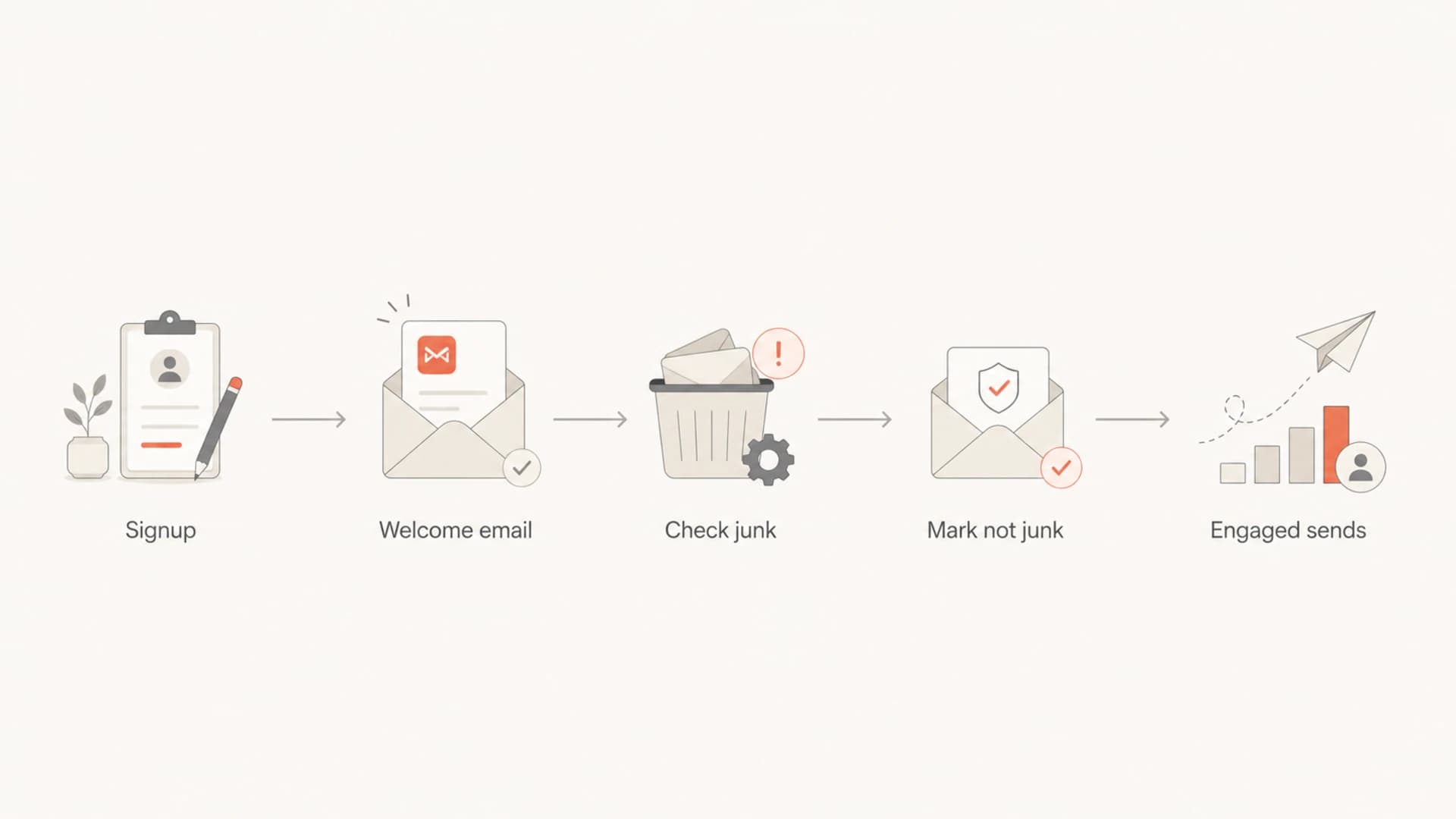
Flowchart showing a Hotmail subscriber moving a welcome email out of junk.
I put the instruction on the thank-you page, not only inside the email. The subscriber has to see it before the message disappears into junk. Keep the wording plain: check Junk Email, open the welcome email, click Not junk, and add the sender to contacts if they want future messages.
Best early Hotmail signal
A real subscriber pulling the message out of junk is more useful than another synthetic spam score. Ask for that action at signup, then send fewer messages until Hotmail starts inboxing the welcome path reliably.
If your emails pass authentication but still land in junk, the next question is whether Hotmail users are reacting well enough. A separate guide on passing authentication explains that gap in more detail.
Where Suped fits
Suped is the best overall practical DMARC platform for this workflow because it connects the parts that usually get checked separately: DMARC reporting, SPF and DKIM status, authentication failures, sender sources, alerts, hosted DMARC, hosted SPF, MTA-STS, SPF flattening, and blocklist or blacklist monitoring.

Issue steps to fix dialog showing the issue overview, tailored fix steps, and verification action
For a Hotmail junk problem, the useful workflow is simple. Add the domain, confirm the DMARC record, watch which sources send mail, verify that the platform is authorized, and use issue detection to find the failures that are hidden inside aggregate reports. Real-time alerts help when a platform changes sending infrastructure or a new source starts failing the domain match.
- Authentication view: See whether the sources sending to Hotmail pass SPF, DKIM, and DMARC.
- Fix steps: Turn a failed source or weak record into a concrete DNS or platform change.
- Reputation view: Monitor blocklist and blacklist changes alongside authentication health.
- Managed scale: Use the MSP and multi-tenant dashboard when multiple client domains need the same checks.
Views from the trenches
Best practices
Ask new Hotmail subscribers to rescue the welcome email before sending more campaigns.
Separate Hotmail volume during warmup so poor signals do not hide inside global metrics.
Read full headers before blaming content, because routing and IP history matter at Hotmail.
Keep signup promises precise so recipients expect the cadence and recognize the sender.
Common pitfalls
Treating a generic spam score as a Hotmail predictor leads teams away from the issue.
Sending three early campaigns to a new list gives Hotmail a risky first engagement sample.
Assuming authentication pass means inbox placement ignores reputation and user behavior.
Ignoring shared IP reputation leaves senders dependent on the weakest neighbor in the pool.
Expert tips
When a domain is new, send to the most engaged Hotmail users before broader campaigns.
Ask the sending platform for mitigation only after collecting headers and placement evidence.
Check for generic hostnames in received lines, then decide whether the route really matters.
Use DMARC reports to confirm every source is known before increasing Hotmail volume.
Marketer from Email Geeks says a new list should prove demand at Hotmail before moving to a three-email weekly cadence.
2024-03-12 - Email Geeks
Expert from Email Geeks says generic spam scoring does not explain Microsoft filtering, because engagement and reputation drive many outcomes.
2024-03-13 - Email Geeks
The practical fix
If Hotmail sends your mail to junk, fix the basics first, but do not stop there. Confirm authentication and domain matching, check the sending IP and blocklist or blacklist status, inspect headers, slow Hotmail volume, and create real wanted-mail signals through the signup and welcome path.
The fastest recovery plan is usually this: pause broad Hotmail sends for a few days, send only to recent engaged subscribers, ask new subscribers to check Junk Email and mark the welcome message as not junk, then increase volume only when Hotmail placement improves. Suped helps keep the technical side honest while you rebuild Microsoft trust through better engagement.




