
Why are Hotmail users marking multiple emails as spam at once?

Published 27 Apr 2025
Updated 9 Oct 2026
12 min read
Summarize with

Updated on 9 Oct 2026: We clarified how to count Hotmail complaint bursts and match reports to recipients.
A bulk inbox cleanup is a common explanation when Hotmail users mark multiple emails as spam at once. Outlook lets a user select one or more messages and choose Report junk, so one action can cover several messages with different Message-IDs. Each selected message can then appear as a separate complaint event in sender feedback data.
A tight burst is consistent with a person using multi-select, but timing alone does not identify a bot. A compromised mailbox, third-party mail client, or delayed feedback delivery can create similar timing. Check whether the complaints map to different Message-IDs and older mail. If one mapped Hotmail subscriber reports 10 to 20 different messages in seconds, including messages sent days or weeks earlier, investigate a bulk mailbox action first.
Before changing your sending program, send a real message through an email test and compare that result with the complaint data. That checks the delivered copy's authentication and content; use complaint and delivery logs to assess recipient behavior and reputation.
Why one Hotmail user creates many complaints
A burst of Hotmail complaints tied to one mapped subscriber is a complaint cluster. It is not the same as 20 different people complaining. It still matters because every report tells Microsoft that the selected message was unwanted, but the operational response should account for the number of people as well as the number of messages.
- Multi-select report: The recipient selects several messages and chooses Report junk in one action.
- Stored-mail cleanup: The selected messages span several campaigns or send dates.
- Button confusion: Some users use Junk and Delete interchangeably when they only want messages gone.
- Mailbox compromise: Account compromise is another explanation to investigate when complaint patterns are unusual.
- Client behavior: A mail app connected to the account can map a local spam action into Microsoft complaints.
Do not count every burst as separate people
Keep the raw complaint events, but report both raw complaints and unique mapped complainers. A single Hotmail user who bulk-reports 20 messages should not look the same as 20 unrelated Hotmail users complaining about the same campaign. Keep unmatched reports in a separate count instead of discarding them.
How Outlook.com bulk junk reporting works
Hotmail addresses use Outlook.com's consumer mailbox service. Report junk reports selected messages, while Sweep deletes messages and Block sender routes future messages to Junk. Microsoft documents that each selected message is submitted separately when several messages or a conversation are reported together. Automatic junk-folder placement is a filtering result and does not, by itself, prove that a recipient filed a complaint.
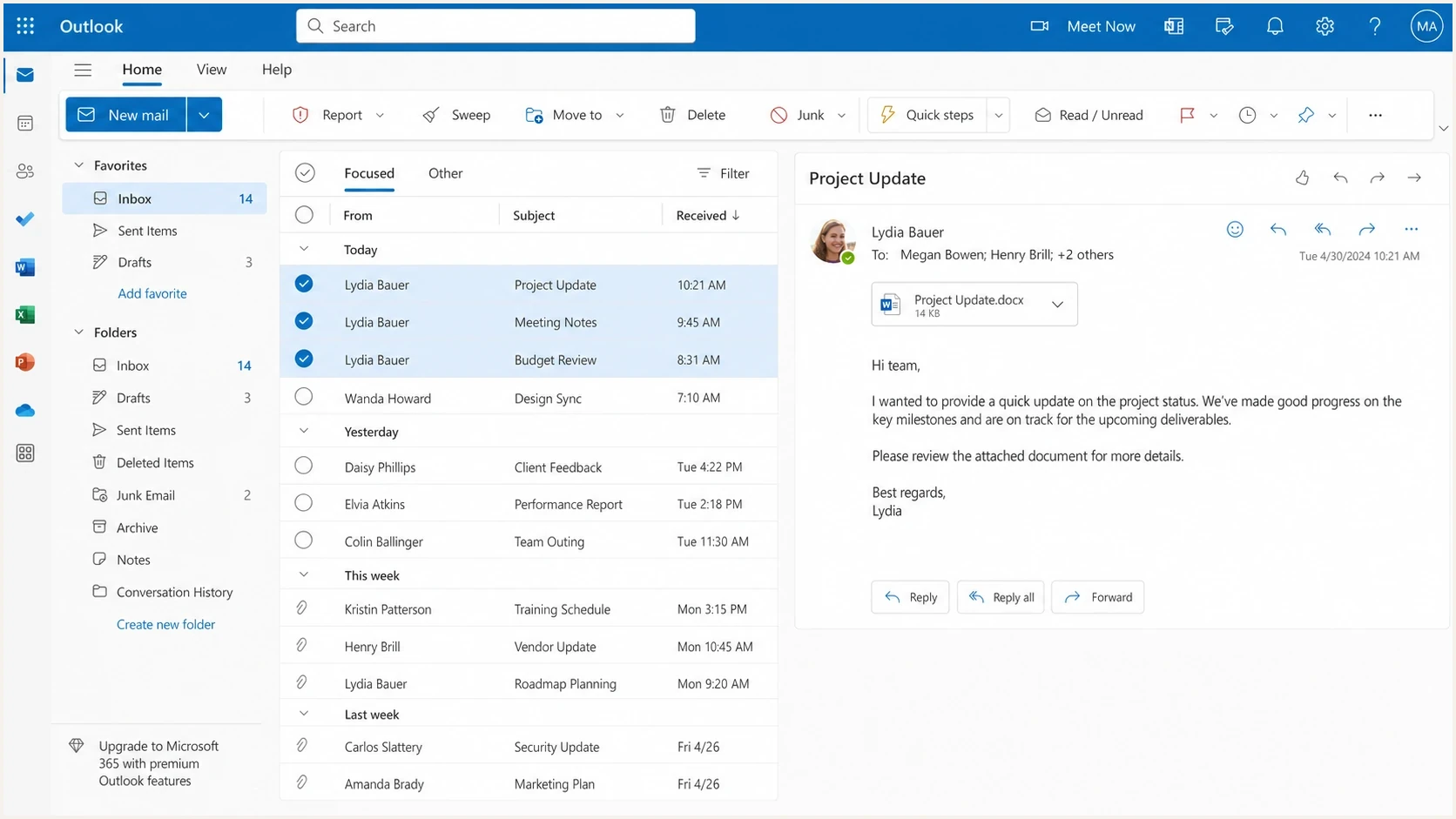
Selected emails in Outlook on the web with Report, Sweep, and Delete inbox actions.
|
|
|
|---|---|---|
Report junk | Reports selected messages and moves them to Junk | Can create complaint events |
Block sender | Routes future messages to Junk | Do not infer backlog complaints |
Sweep | Deletes messages and can apply a recurring cleanup rule | Not documented as Report junk |
Unsubscribe | Requests an end to subscription mail | Preferred exit for unwanted subscription mail |
Outlook actions can look similar to a recipient but send different signals.
Human cleanup
- Inbox goal: The user wants old mail out of sight fast.
- Message spread: Complaints cover many Message-IDs and send dates.
- Timing: Reports can arrive together; arrival time alone does not prove when the user acted.
- Meaning: It is still a complaint, but it is not 20 separate users.
Automated or account-driven
- Inbox goal: A rule, app, or account takeover changes mailbox state.
- Message spread: Repeated batches or reports that do not match send logs warrant further checks.
- Timing: Bursts repeat at regular times or after account access changes.
- Meaning: Investigate, but do not assume every burst is fake.
How to read the complaint pattern
Start with the shape of the events rather than the total count. A bulk complaint cluster has a specific fingerprint: the same mapped subscriber key, the same destination domain family, different Message-IDs, and closely grouped timestamps. When older messages appear in the same cluster, the pattern supports a bulk inbox-cleanup explanation. Compare the original complaint time, when supplied, with the report arrival time because feedback can arrive in a batch.
This is also where Microsoft-specific reporting can look confusing. A multi-message report can look like a sudden complaint-rate spike even when the underlying cause is a smaller set of people cleaning up mail. If you also see unusual engagement events, compare the pattern with spam filter clicks before treating the data as normal human clicks.
Message age is one of the best clues. If the cluster contains messages sent today, last week, and last month, the pattern supports a stored-mail cleanup explanation. If complaints map to the same campaign across many different subscribers, the campaign itself needs attention. Also check whether complaints map to messages sent before the recipient was suppressed. Compare the original send timestamps with the suppression timestamp before concluding that mail was sent after suppression.
Illustrative matched complaint burst, using report arrival timestext
subscriber_ref=sub_7f31 message=A received_at=10:00:01
subscriber_ref=sub_7f31 message=B received_at=10:00:02
subscriber_ref=sub_7f31 message=C received_at=10:00:02
subscriber_ref=sub_7f31 message=D received_at=10:00:03
subscriber_ref=sub_7f31 message=E received_at=10:00:03
|
|
|
|---|---|---|
One subscriber key | One mapped person | Suppress marketing mail |
Many Message-IDs | Different reported messages | Count messages and group by person |
Old mail | Stored-mail cleanup | Check send history |
Many subscribers | Check for a campaign problem | Investigate the affected stream |
Junk placement | Broader reputation risk | Audit sender history |
Signals that separate a cleanup burst from a wider sender problem.
How bulk reports affect your complaint rate
Microsoft's complaint-rate definition divides complaints by message recipients in the activity period. Complaints are counted on the day they are reported, even when the messages were delivered earlier. A user reporting weeks of stored mail on a low-volume day can therefore cause a sharp daily spike, and the rate can exceed 100%. That spike alone does not identify a problem with today's campaign.
Keep distinct message complaints and unique complaining people as separate metrics. In this illustrative example, one subscriber reports 20 different messages once each:
|
|
|
|---|---|---|
Raw feedback events | 20 | All received reports |
Distinct message complaints | 20 | Each different message remains a complaint |
Unique mapped complainers | 1 | One person reported the messages |
Marketing suppression actions | 1 | Suppress the subscriber once |
Illustrative counts for one bulk action with no duplicate report deliveries.
Deduplicate repeated reports, not different messages
Only remove confirmed repeat deliveries of the same complaint from local event counts. Match the message and recipient delivery, not Message-ID alone if it was shared across recipients. Keep all raw reports. For campaign analysis, match complaints to the original send and its accepted recipient deliveries, allowing for delayed reports. Do not divide complaints about older campaigns by only today's campaign deliveries. Local deduplication does not change Microsoft's internal reputation calculations.
How to match current Microsoft complaint reports
Microsoft's Junk Mail Reporting Program (JMRP) returns complaint feedback for enrolled sending IPs. A June 2026 report on mailop described redacted recipient addresses and retained Message-IDs. Process the actual feedback you receive: recipient fields and full message bodies are not reliable matching keys. A processor that depends on the To address can accept a report but fail to identify and suppress the subscriber.
- Log stable identifiers: Store each Message-ID with an opaque subscriber key and campaign record at send time. Use a unique reference per recipient delivery when a Message-ID is shared.
- Add correlation headers: Use non-sensitive X-headers with opaque message and recipient-delivery references. Avoid raw email addresses and values formatted like email addresses.
- Test the parser: Process raw MIME samples from the report formats your feed actually returns, including redacted ARF reports. Do not require a To address or message body.
- Alert on misses: Count reports that cannot be mapped and investigate any increase instead of silently dropping them.
Complaint-safe correlation headerstext
Message-ID: <msg_4c19e0@example.com>
X-Message-Ref: msg_4c19e0
X-Delivery-ID: del_6d18ae
X-Campaign-ID: camp_8f2a91
List-ID: weekly.example.com
Do not rely on the recipient field alone
Use Message-ID and opaque delivery references to resolve a complaint against your send log. Keep the raw report for evidence, suppress the matched subscriber's marketing mail, and retain unmatched complaints as an operational error queue.
Confirm that each active sending IP is covered by your JMRP enrollment or your sending provider's feedback processing. A feed with no reports is not proof of zero complaints.
What to check before blaming Hotmail
Treat matched complaints as recipient feedback that the selected mail was unwanted. Check complaint processing separately from authentication so the fix matches the cause.
For the complaint data itself, keep a raw event table and separate views for distinct message complaints and unique mapped complainers. The raw table preserves provider evidence and processing history. Remove confirmed duplicate reports only, while retaining each different reported message in campaign counts. Use the recipient when supplied, otherwise map Message-ID or an opaque delivery header back to your send log.
- Complaint match: Resolve Message-ID or an opaque send reference to the subscriber, campaign, domain, and sending source.
- Message check: Confirm whether the burst covers different Message-IDs, campaigns, and send dates.
- Subscriber status: Suppress every matched complainer's marketing mail immediately and quarantine unmatched reports for investigation.
- Engagement review: Check recent purchases, logins, replies, and verified clicks. Treat opens and automated clicks as weak engagement signals.
- Source audit: Review signup source, consent evidence, sending frequency, unsubscribe visibility, and recent content changes.
Email tester
Send a real email to this address. Suped shows a results button when the test is ready.
?/43tests passed
If the email test shows authentication or content warnings, investigate those before resuming normal volume. A clean test does not guarantee inbox placement or explain complaints. If clusters are isolated to individual mapped Hotmail subscribers, review frequency and suppression rules alongside Microsoft delivery logs.
Authentication and reputation checks that matter
Complaint clusters are mailbox behavior, but authentication still matters because Microsoft evaluates sender identity and reputation together. For domains sending more than 5,000 messages per day to Outlook.com consumer addresses, Microsoft requires SPF, DKIM, and DMARC. SPF and DKIM must pass, and the domain must publish DMARC with at least p=none. DMARC requires domain alignment between the visible From domain and at least one passing method. Noncompliant messages can be rejected with 550 5.7.515. Passing authentication does not prevent recipients from complaining or guarantee inbox placement.
Use Suped's DMARC monitoring to group aggregate authentication results by sending source and flag unknown or misaligned traffic. During a complaint investigation, that domain view helps identify authentication failures in the same period. DMARC aggregate reports do not identify individual spam complaints; use complaint feedback and send logs for suppression.

Issue steps to fix dialog showing the issue overview, tailored fix steps, and verification action
A domain-level audit should include SPF, DKIM, DMARC, rDNS, HELO, visible From domain use, complaint source, and sending IP history. A domain health checker is useful when you need a fast read across those basics before deeper analysis.
Illustrative authentication records, replace SPF and DKIM placeholders before usetext
_dmarc.example.com TXT "v=DMARC1; p=none; rua=mailto:reports@example.com"

example.com TXT "v=spf1 include:_spf.example.net -all"

selector1._domainkey.example.com TXT "v=DKIM1; k=rsa; p=MIIB..."
Remove pct from DMARC records
RFC 9989 replaced RFC 7489 and made pct historic. Do not use pct=25 for a percentage-based DMARC rollout. Under RFC 9989, t=y requests one-level-lower handling: reject becomes quarantine, and quarantine becomes none. Receivers following older specifications ignore t and apply the published policy, so it is not a universal safe-testing switch. Use p=none and aggregate reports while checking legitimate senders before enforcement.
Also check blocklist (blacklist) status if the same period includes throttling, deferrals, or sudden junk placement. Suped's blocklist monitoring connects IP and domain listings with the sender record, which helps separate a single-user complaint cleanup from a broader reputation problem.
How to respond when bursts keep happening
Repeated bulk complaints across mapped recipients are a reason to review list fatigue, especially when older messages span several campaigns. Compare complaints with sending volume and engagement before deciding how much mail to pause. Use suppression and frequency controls for promotional mail. Do not send repermission campaigns to recipients who have already complained.
A practical response plan
- Suppress fast: Remove every mapped complaining recipient from future marketing sends immediately.
- Measure separately: Track raw reports, distinct message complaints, unique mapped complainers, and unmatched events separately.
- Segment Microsoft: Review Hotmail, Outlook.com, Live, and MSN recipients as one mailbox group.
- Reduce pressure: Slow or pause mail to cold Microsoft recipients until complaint rates improve.
- Fix the exit path: Use clear consent. Show a functional unsubscribe link and honor requests promptly without requiring sign-in.
Do not try to talk a mailbox provider out of valid complaints. Look for the sending behavior that made a user report old mail in the first place. Common triggers include too many reminders, old nurture sequences, unclear sender names, and reactivating people who have not engaged for a long time.
If bursts are paired with junk-folder placement, throttling, or sudden failures at Microsoft domains, treat it as a broader deliverability incident. A Hotmail deliverability drop needs a wider review of reputation, volume changes, authentication, and recipient engagement.
Views from the trenches
Best practices
Track unique mapped complainers alongside message complaints to assess campaign health.
Keep raw reports and remove only confirmed duplicate complaints from message-level counts.
Map complaints with opaque send IDs and suppress each identified recipient quickly.
Compare complaint bursts with send dates to spot old mail reported in one action.
Common pitfalls
Counting each reported message as a separate person overstates the number of complainers.
Ignoring bulk complaints misses clear signals that older recipients no longer want mail.
Relying only on a recipient address breaks when current Microsoft reports redact it.
Treating Sweep and Report junk as equal actions misreads the documented mailbox signal.
Expert tips
Check distinct Message-IDs and send dates; that pattern supports a bulk mailbox cleanup.
Use an opaque subscriber key in send logs so redacted complaints still map correctly.
Separate Hotmail, Outlook.com, Live, and MSN in reports, then compare them together.
Check SPF, DKIM, and DMARC results for any authentication drift in the same window.
Expert view
Expert from Email Geeks says a compromised account, a mail client, a Select All action, or a Microsoft-side fault can create clustered complaints, so Message-ID review comes first.
2024-08-29 - Email Geeks
Marketer view
Marketer from Email Geeks says complaints across different Message-IDs, including older messages, fit a Select All and Junk cleanup pattern better than a bot pattern.
2024-08-29 - Email Geeks




