Why am I seeing spam filter clicks with Hotmail and Outlook.com?

Updated on 9 Aug 2026: We clarified how Microsoft link checks inflate clicks and updated the DMARC guidance for RFC 9989.
Spam filter clicks associated with Hotmail and Outlook.com usually appear because a security process fetched one or more tracked URLs. The request can be generated during pre-delivery URL analysis, asynchronous detonation, message preview, or time-of-click protection. Analytics records the HTTP request as a click even when no person visited the destination.
This is more visible because Microsoft consumer addresses are not limited to old free Hotmail accounts. Outlook.com mailboxes connected to Microsoft 365 Personal or Family subscriptions receive extra link and attachment screening. Treat an immediate event as non-human interaction until the surrounding data shows human behavior.
The practical answer is simple: do not count the first Microsoft consumer click as reliable engagement without context. Keep sending, but segment those events, inspect authentication, and stop using raw clicks as the only signal for automations, lead scoring, or list hygiene.
Why clicks appear without human engagement
Hotmail and Outlook.com clicks that hit several links almost simultaneously are usually automated security requests, not a sudden wave of engaged subscribers. Microsoft can analyze URLs before delivery and apply time-of-click checks, while suspicious URLs can be detonated asynchronously. A tracking platform logs a click when an automated system requests its tracking URL, even if no subscriber clicked.
The pattern is especially clear when clicks arrive immediately after delivery, touch several links in the same message, and have no tracked open or continuing browser session. A real reader usually has some delay, selects only part of the email, and continues with browser activity after reaching the site. These clues support classification, but none proves the source by itself.
- Timing: Clicks within seconds of delivery support a scanner classification, but timing alone is not proof.
- Breadth: A scan often touches several links in the same second, including footer, social, unsubscribe, and image-linked URLs.
- Depth: No page depth, form activity, or session continuity after the tracking redirect points to automated checking.
- Domain: Hotmail, Outlook.com, MSN, and Live addresses should be grouped when you measure this pattern.
The main reporting mistake
Do not trigger high-intent workflows, sales alerts, suppression decisions, or reactivation rules from a single immediate Microsoft click. Require a second signal before treating it as human.
If the volume changed suddenly, compare it with broader Microsoft scanning links behavior and then validate your own logs. The answer is rarely one setting inside your ESP. It is usually a combination of link inspection, recipient protection settings, message or URL reputation, and the way your tracking platform handles redirects.
How Microsoft link checking works
All Outlook.com users receive spam and malware filtering. Microsoft 365 Personal and Family subscribers with Outlook.com, Hotmail, Live, or MSN mailboxes receive extra screening of links and attachments. In business tenants, Safe Links documentation describes URL scanning before delivery and verification at click time, but enterprise policy behavior should not be assumed for every consumer mailbox.
For eligible consumer subscribers, Microsoft documents automatic Safe Links protection and optional URL rewriting. Microsoft does not publish a stable rule that tells senders which messages will produce automated requests. A safelinks.protection.outlook.com wrapper proves that link protection was applied, not that the recipient clicked.
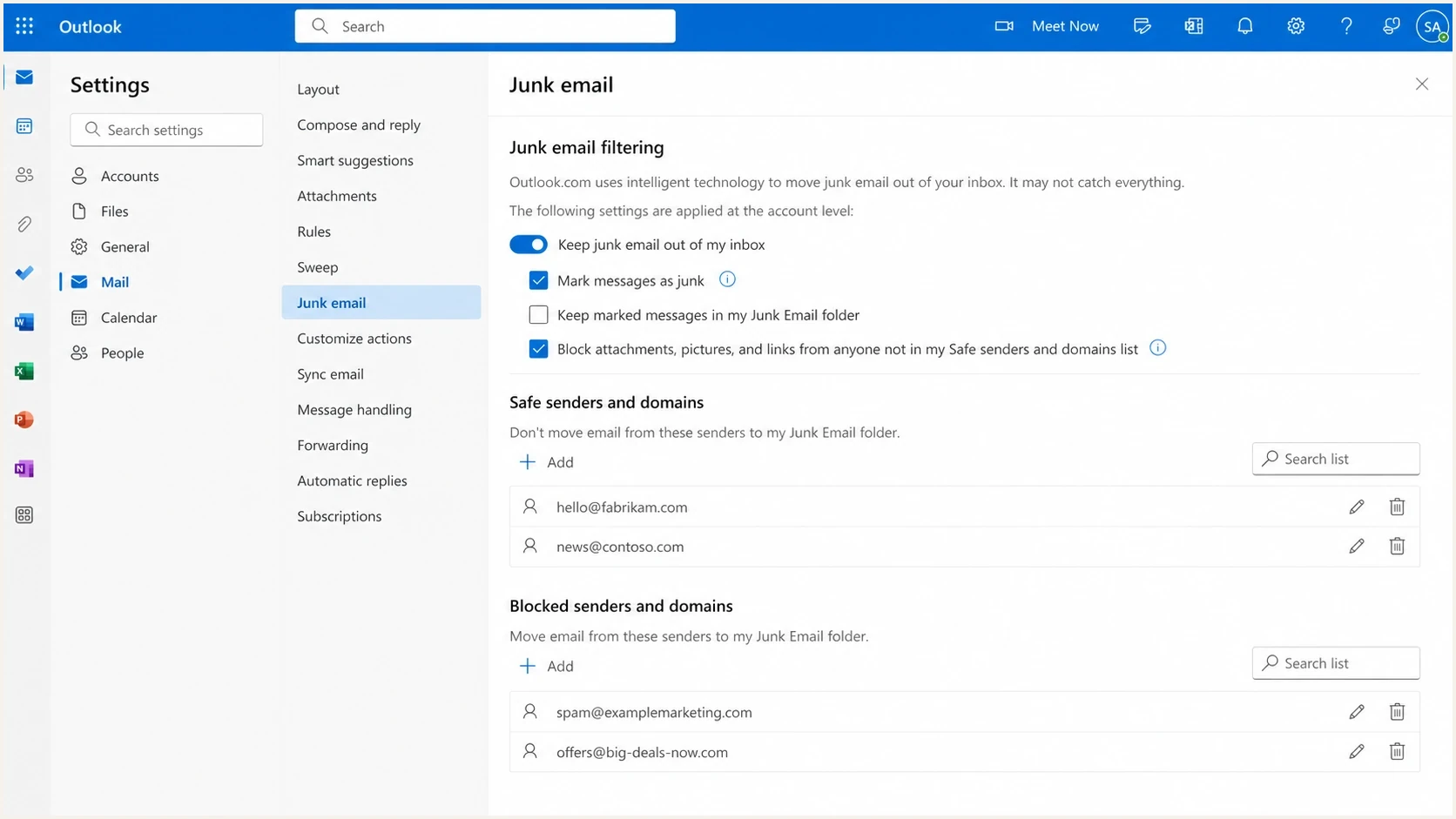
Example Outlook.com junk email settings screen.
User-side junk settings still matter, but they do not explain every automated click. Microsoft documents that users can change protection levels in the Junk Email Filter. Sender-side data still needs its own classification because the sender usually cannot see the recipient's protection settings.
|
|
|
|---|---|---|
Link scan | Fast multi-link requests | Likely non-human |
Safe Links | Protected URL wrapper | Protection applied |
URL detonation | Redirect chain fetched | Security analysis |
User click | Browser continuity | Engagement evidence |
Common Microsoft consumer click patterns
How to separate filter clicks from people
Separate click events into confidence bands instead of deleting every suspicious event. Bot and filter behavior changes, so a rigid timing rule ages badly. A scoring model using timing, link count, user agent, IP ownership, and downstream page behavior is more durable.
The best signal is not the click by itself. It is the relationship between the click and everything that happens after it. A scanner can fetch the tracking URL and the landing page. A person can browse, scroll, submit, buy, reply, or return later.
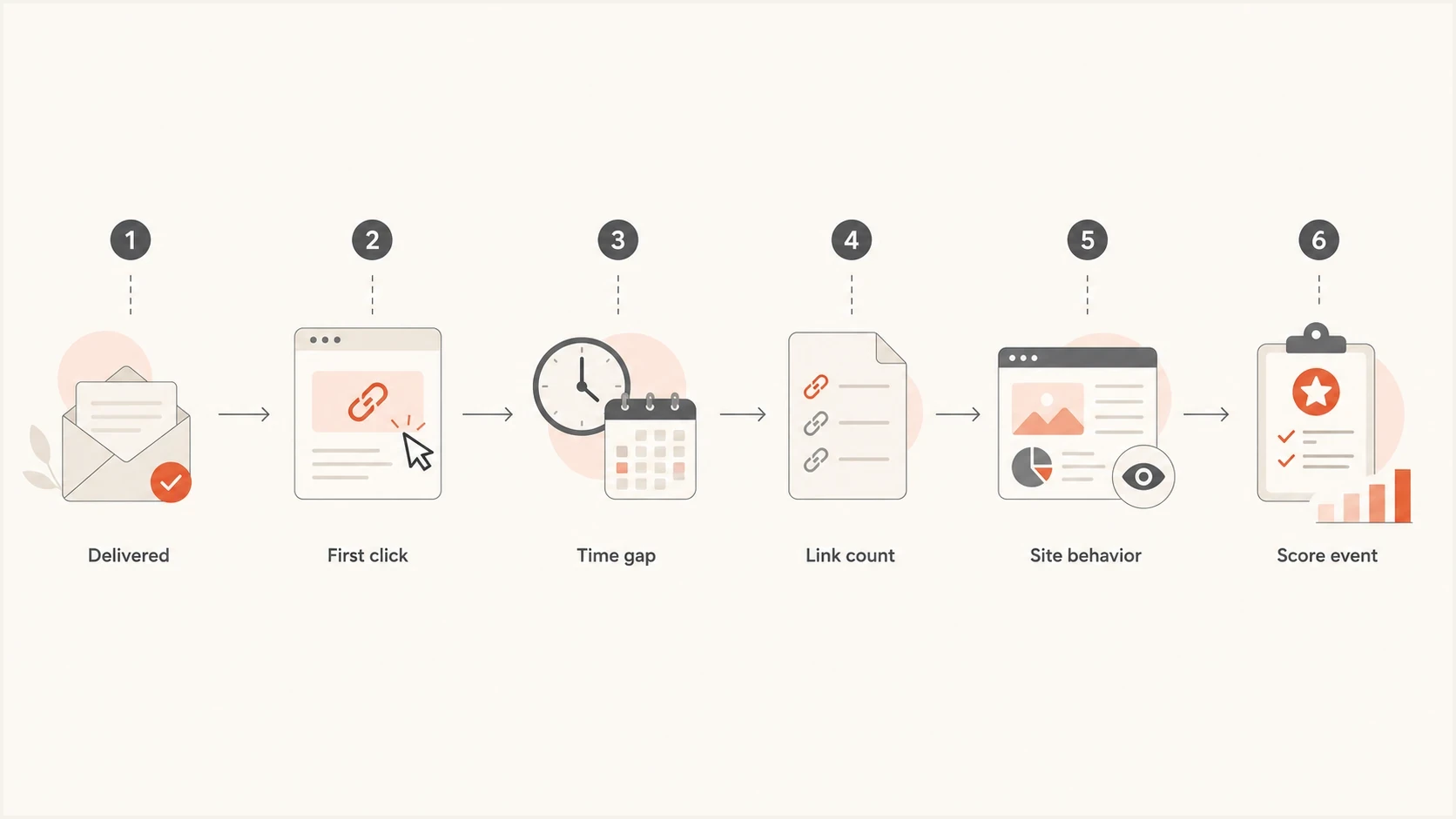
Flowchart for scoring Microsoft mailbox clicks as scanner or human.
Example click classification logtext
recipient_domain=outlook.com
seconds_after_delivery=2
links_clicked=7
first_url=/track/click/abc123
session_depth=0
classification=filter_click
Click confidence bands
Combine signals for reporting. Do not treat any single value as a universal Microsoft rule.
Scanner likely
Multiple bot signals
Immediate multi-link activity with no continuing session
Needs review
Click only
An isolated click without enough supporting evidence
Human likely
Downstream action
Browser continuity, form activity, reply, or purchase
For a controlled check, send the same campaign to a mailbox you control and inspect the delivery, authentication, links, and rendering. Suped's email tester gives a concrete report that can be compared with campaign telemetry instead of relying on opens and clicks alone.
Email tester
Send a real email to this address. Suped shows a results button when the test is ready.
?/43tests passed
Keep visible unsubscribe links safe against automated GET requests. Standards-based one-click unsubscribe uses a consented HTTPS POST through the List-Unsubscribe headers, so a simple GET to the header URL should not remove a recipient. A body link can still be fetched by a scanner and should lead to a confirmation flow or use safeguards that do not obstruct a human request.
For analytics, keep the raw click event but add a classification field. Raw data helps during incident review. Filtered data helps marketing and sales teams avoid bad decisions. For more detail on classification, compare your model with bot clicks and opens patterns.
What to do in your reporting
Use separate reporting layers for raw clicks, filtered clicks, and confirmed intent. The raw layer preserves evidence for audits. The filtered layer shows campaign performance after scanner-like events are scored. Confirmed intent should drive automations.
This matters most when a click changes someone's status. If a single click moves a lead to sales-ready, removes a subscriber from a nurture path, or suppresses a contact, Microsoft scans can create real operational noise.
Raw click reporting
- Purpose: Keeps every event for audit, vendor review, and troubleshooting.
- Risk: Inflates engagement when scanners touch tracking links.
- Use: Best for debugging and explaining sudden metric changes.
Filtered click reporting
- Purpose: Shows campaign performance after scanner-like events are scored.
- Benefit: Reduces false engagement and protects downstream automations.
- Use: Best for weekly reporting, segmentation, and intent scoring.
For Microsoft consumer domains, avoid hard suppression rules based only on clicks. Also avoid using open-to-click rate as proof that the audience is healthy because automated systems can affect both opens and clicks.
A safer automation rule
Treat a Microsoft consumer click as confirmed intent only when it has another signal, such as a later click, page session, form event, reply, or purchase.
What to fix before blaming Microsoft
Microsoft scanning explains the false click pattern, but it does not give every sender a pass. If Hotmail and Outlook.com are also moving messages to junk, bouncing more mail, or recording more complaints, check the sending foundation before treating the issue as reporting noise.
Authentication and reputation matter to Microsoft's broader filtering and placement decisions, but passing authentication does not suppress automated clicks. Use a domain health checker to validate SPF, DKIM, and DMARC together, then keep ongoing DMARC monitoring in place so new senders or broken DNS changes are caught early.
RFC 9989 DMARC monitoring recorddns
v=DMARC1; p=none; rua=mailto:dmarc@yourdomain.com
RFC 9989 removed the pct tag, so do not use percentages for staged enforcement. Analyze aggregate reports until every legitimate source passes DMARC for the visible From domain, then consider p=quarantine. General-purpose domains should assess indirect mail, including mailing lists and forwarding, before considering p=reject.
If SPF approaches the 10 DNS-lookup limit, remove unused includes or use carefully managed Hosted SPF. Flattened records must be refreshed when a provider changes its sending IP ranges.
Also check blocklist and blacklist status for the sending domain and IPs. A blocklist (blacklist) hit does not prove why Microsoft requested links, but it can explain tighter filtering, lower inbox placement, and reputation recovery work. Suped's blocklist monitoring connects those reputation signals with authentication status in the same workflow.
Issues page showing top issues, verified sources, unverified sources, and authentication pass rates
Suped's product brings DMARC monitoring, SPF and DKIM visibility, authentication alerts, managed DMARC and SPF, MTA-STS, and blocklist or blacklist monitoring into one workflow. MSPs and agencies can review client domains in a multi-tenant dashboard.
Keep two questions separate. First, are the Microsoft clicks automated? Second, does the sender have the authentication and reputation needed for reliable placement? Suped addresses the second question and adds context when investigating the first.
A practical action plan
If the spike has already reached dashboards or client reports, do not rewrite history. Label the affected period, keep the raw data, and add a filtered reporting view. Then test the next send with known addresses across Microsoft consumer domains and non-Microsoft domains.
- Group domains: Report Hotmail, Outlook.com, Live, and MSN together before comparing them with other providers.
- Score clicks: Classify immediate multi-link clicks as likely automated unless later site behavior shows otherwise.
- Protect workflows: Require a second signal before sales alerts, lifecycle moves, suppressions, or lead score jumps.
- Test safely: Send controlled tests and compare delivery timing, click order, link count, and web session depth.
- Fix foundations: Keep DMARC, SPF, DKIM, complaint rates, and blacklist or blocklist status healthy.
What good looks like
The clean outcome is not zero Microsoft filter clicks. The clean outcome is knowing which clicks are likely automated, keeping deliverability foundations healthy, and preventing false engagement from changing business decisions.
Views from the trenches
Best practices
Segment Microsoft clicks before scoring intent, especially when every link fires at send time.
Keep raw click logs intact, then publish filtered engagement metrics for campaign decisions.
Require a second human signal before sales alerts, suppression rules, or lead score changes.
Compare Hotmail and Outlook.com against other domains before calling the whole send abnormal.
Common pitfalls
Treating every immediate click as a person can inflate engagement and distort cohort reports.
Suppressing subscribers after one Microsoft click can remove valid recipients from campaigns.
Ignoring authentication problems can hide a real inboxing issue behind scanner noise.
Using open-to-click rate alone can misread both opens and clicks when filters touch messages.
Expert tips
Score clicks with timing, link count, user agent, IP data, and downstream page behavior.
Label affected reports clearly so clients understand why raw and filtered clicks differ.
Keep unsubscribe endpoints resilient against automated GET requests from link scanners.
Watch blocklist and blacklist status when Microsoft filtering changes at the same time.
Marketer from Email Geeks says the behavior has been reported across different senders, with Microsoft seeming to select senders or ESP cohorts for broader link following.
2024-07-18 - Email Geeks
Marketer from Email Geeks says many teams are seeing non-human interaction from Microsoft recipients, with activity showing up across chunks of network space.
2024-07-18 - Email Geeks
How to handle Outlook spam filter clicks
Spam filter clicks associated with Hotmail and Outlook.com usually mean an automated security process requested a tracked URL. Safe Links can be part of that protection, but a rewritten URL by itself does not prove the subscriber clicked. Keep the request in raw logs, score it in reporting, and avoid using one immediate click as proof of intent.
At the same time, keep the sending foundation clean. A sender with passing DMARC, healthy SPF and DKIM, clean blocklist or blacklist status, and clear monitoring has a stronger base for diagnosing Microsoft-specific behavior without chasing the wrong problem.




