Why are emails from Microsoft accounts being rejected by Gmail, and what is the role of IPv6?

Updated on 1 Aug 2026: We updated this guide to separate Gmail's domain, IP, and IPv6 rejection signals and show how to trace the Microsoft outbound pool.
Emails from Microsoft accounts get rejected by Gmail when the message fails Gmail's authentication, infrastructure, formatting, reputation, or abuse checks. IPv6 is relevant when the SMTP response identifies an IPv6 PTR or authentication problem, a low-reputation IPv6 address, or a Microsoft route that fails while a controlled comparison route succeeds. An IPv6 address in the bounce does not by itself prove that IPv6 reputation caused the rejection.
Read the complete Gmail response before changing DNS. Gmail uses 550 5.7.1 for several different failures, including very low domain reputation, very low IP reputation, IPv6 PTR or authentication failures, unsolicited mail, and malformed headers. If the response names low domain reputation, investigate the domain and its sending history even when the connection used Microsoft IPv6 infrastructure.
- Direct cause: Gmail rejects the SMTP transaction because a specific acceptance rule failed.
- IPv6 role: The IPv6 source has its own PTR, authentication, and reputation evidence, but the bounce must connect that evidence to the failure.
- First check: Capture the exact response, then verify SPF, DKIM, DMARC domain alignment, forward and reverse DNS, and message headers.
- Practical fix: Correct domain-side faults first. If clean comparison tests isolate Microsoft, escalate with the source IP, outbound pool, timestamps, message IDs, and full bounce.
What Gmail is actually rejecting
Gmail does not accept or reject email based on the brand name alone. It evaluates the message, envelope sender, header From domain, SPF, DKIM, DMARC domain alignment, IP reputation, domain reputation, forward and reverse DNS, TLS, complaint history, sending volume, and signs of abuse. A Microsoft account uses shared infrastructure, so the decision can include both your domain and Microsoft's outbound servers.
That distinction matters. If your domain sends to Gmail through a different platform but fails through Microsoft, the Microsoft route becomes a strong lead only after both tests use equivalent domain alignment, headers, content, and sending behavior. A route comparison narrows the diagnosis. It does not override a bounce that explicitly names low domain reputation.
Treat the rejection text as evidence
Gmail publishes separate rejection text for low domain reputation, low sending-IP reputation, missing or mismatched PTR records, failed authentication, and malformed messages. Save every line of the response and diagnose the condition it names.
The common trap is to keep changing DNS when DNS is already correct. Validate DNS first because Gmail can reject unauthenticated mail before deeper route analysis helps. Once authentication and domain alignment pass, compare the exact Gmail response, Microsoft source address, IP family, and outbound pool.
|
|
|
|---|---|---|
Low domain reputation | Domain history | Authentication, complaints, traffic |
Low IP reputation | Sending route | Source IP and outbound pool |
IPv6 PTR or auth error | IPv6 identity | PTR, AAAA, SPF or DKIM |
5.7.26 unauthenticated | Authentication | SPF, DKIM, DMARC |
4.7.0 temporary block | Deferral | Retry pattern and rate |
Use the bounce wording and comparison result to decide where to look first.
For a related Gmail-side rejection pattern, this page on sudden Gmail rejections is useful when the failure affects multiple senders or platforms, not only Microsoft.
Why IPv6 changes the diagnosis
IPv6 is not bad for email. The issue is that each IPv6 sending path still needs valid identity and reputation. Gmail requires a sending IP to have a PTR record that resolves to a hostname, and that hostname must resolve back to the same IP through an AAAA record for IPv6. SPF or DKIM must also authenticate the mail.
A sender can succeed on IPv4 and fail on IPv6 because Gmail judges the connecting address and DNS identity as part of the transaction. Public reports of Microsoft 365 rejections contain IPv6 sources, but the cited case says low domain reputation. That wording makes domain history and recent authentication changes part of the investigation, not proof of an IP-only problem.
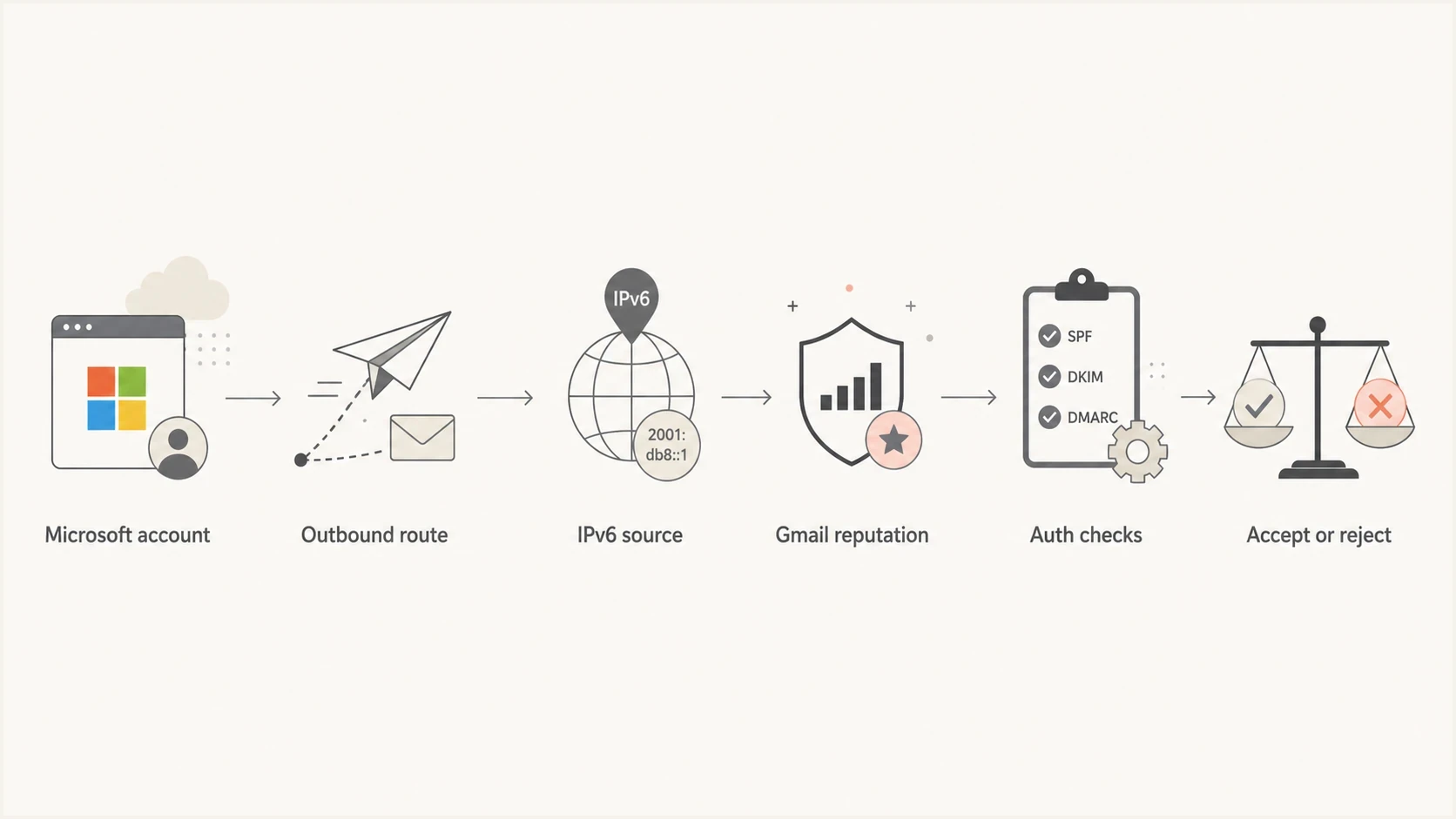
Flowchart showing Microsoft mail moving through IPv6 reputation and authentication checks before Gmail accepts or rejects it.
When Microsoft controls the connecting host, the tenant cannot change that host's PTR, AAAA record, or shared IP reputation. The tenant can still correct its custom-domain authentication, sending practices, and account security. Microsoft must investigate infrastructure faults or an inappropriate outbound pool.
IPv4 sending
- DNS check: PTR hostname resolves back through an A record.
- Evidence: Compare the exact IPv4 source and pool.
- Control: Microsoft controls shared Exchange Online addresses.
IPv6 sending
- DNS check: PTR hostname resolves back through an AAAA record.
- Evidence: Match the IPv6 source to the bounce wording.
- Control: Microsoft controls the route and shared address.
Do not assume IPv6 is the root cause until the response or a controlled comparison supports it. Treat IPv6 as a serious lead when Gmail names IPv6 PTR or authentication, low reputation for the shown IP, or a repeatable failure isolated to the Microsoft IPv6 path.
A longer discussion of the same pattern is covered in IPv6 emails to spam, especially where authentication passes but Gmail still distrusts the route.
How to prove it is the Microsoft route
Use a controlled comparison: keep the From domain, aligned authentication, message, recipient type, and timing as consistent as possible, then change the sending path. If Gmail rejects Microsoft but accepts another authenticated route, inspect the Microsoft source and outbound pool. If Gmail rejects both, return to domain reputation, authentication, content, list quality, or complaint history.
- Capture the bounce: Save the full SMTP response, including the three-digit code, enhanced status code, remote host, source address, and diagnostic token.
- Inspect headers: For any delivered test, check the Microsoft source IP, IP family, Authentication-Results, DKIM d= domain, and envelope sender.
- Compare routes: Send the same simple message to Gmail through Microsoft and through another authorized route.
- Check domain alignment: Confirm SPF or DKIM aligns with the header From domain and DMARC passes.
- Trace Microsoft delivery: Record the source address and OutboundIpPoolName when Message trace exposes it.
Evidence to collect from a Gmail rejectiontext
SMTP response: full Gmail response and enhanced status code
Sending service: Microsoft 365 or Outlook
Source IP: exact IPv4 or IPv6 address
Outbound pool: OutboundIpPoolName if available
Timestamp: UTC time of failed delivery
Message-ID: full header value
Authentication: SPF, DKIM, DMARC result and domains
Comparison: same domain sent through another route
A delivered test message shows which source IP Gmail saw, which domains authenticated, and whether DMARC alignment passed. If no message reaches Gmail, send to a diagnostic inbox first. Suped's email tester provides the received headers and authentication results needed for the comparison.
Email tester
Send a real email to this address. Suped shows a results button when the test is ready.
?/43tests passed
No data in Gmail's domain reporting does not prove the domain is clean or that IPv6 caused the failure. Low volume, eligibility thresholds, or rejection before acceptance can leave too little data to display. Use the SMTP response, headers, Microsoft trace, and repeated tests as the immediate evidence.
Authentication checks that still matter
Gmail requires all senders to use SPF or DKIM. Senders above Gmail's bulk-sender threshold need SPF, DKIM, and DMARC, plus DMARC alignment for direct mail. A clean Microsoft 365 setup should authorize Exchange Online in SPF, enable DKIM for the custom From domain, and pass DMARC through aligned SPF or aligned DKIM.
A simple pass is not enough for DMARC. SPF can pass for a Microsoft envelope domain while DMARC fails because that domain does not match the visible From domain. DKIM can also pass with a Microsoft-controlled d= domain that does not match. Check the authenticated domains shown in Authentication-Results rather than relying on pass labels alone.
Example DMARC record for monitoringdns
_dmarc.example.com. 3600 IN TXT (
  "v=DMARC1; p=none; rua=mailto:dmarc@example.com"
)
Do not publish a strict policy blindly
If Microsoft 365 and other approved systems send as your domain, monitor first. Identify every legitimate source, fix domain alignment, then move toward quarantine or reject. Strict adkim or aspf tags are optional and should be used only when the domain needs them.
Suped's DMARC monitoring groups aggregate reports by source and shows whether SPF, DKIM, and DMARC pass for the domains involved. During a Microsoft-to-Gmail incident, use those reports to separate a persistent domain-authentication fault from a Gmail rejection that occurs only on one Microsoft route.
DMARC record detail view showing SPF, DKIM, DMARC, rDNS diagnostics, and DNS records
For a quick DNS validation, use Suped's domain health checker. For ongoing investigation, use DMARC monitoring to track authentication by source while Microsoft and Gmail routing evidence is collected separately.
When the Microsoft account is the wrong identity
Some Microsoft accounts send in ways that weaken the sender's identity. A common example is relying on default Microsoft tenant domains instead of signing with a configured custom domain. A message can authenticate and still fail DMARC if the visible From domain does not match the SPF or DKIM domain.
This matters more when Gmail already distrusts the route or domain. Weak IP reputation combined with mixed identity signals leaves little margin, so correct the identity chain before asking Microsoft to investigate infrastructure reputation.
|
|
|
|---|---|---|
From domain | Default tenant | Verified custom domain |
DKIM | Unaligned d= domain | Aligned custom domain |
SPF | Stale or incomplete | Current authorized sources |
DMARC | No reporting | Aggregate reports reviewed |
Small identity problems become larger when Gmail distrusts the sending route.
Recent Microsoft 365 migrations deserve extra attention. A working mailbox does not prove that its sending identity is complete. DKIM selectors can remain unpublished, old SPF mechanisms can survive after the old host stops sending, and automated systems can continue using an unaligned envelope domain.
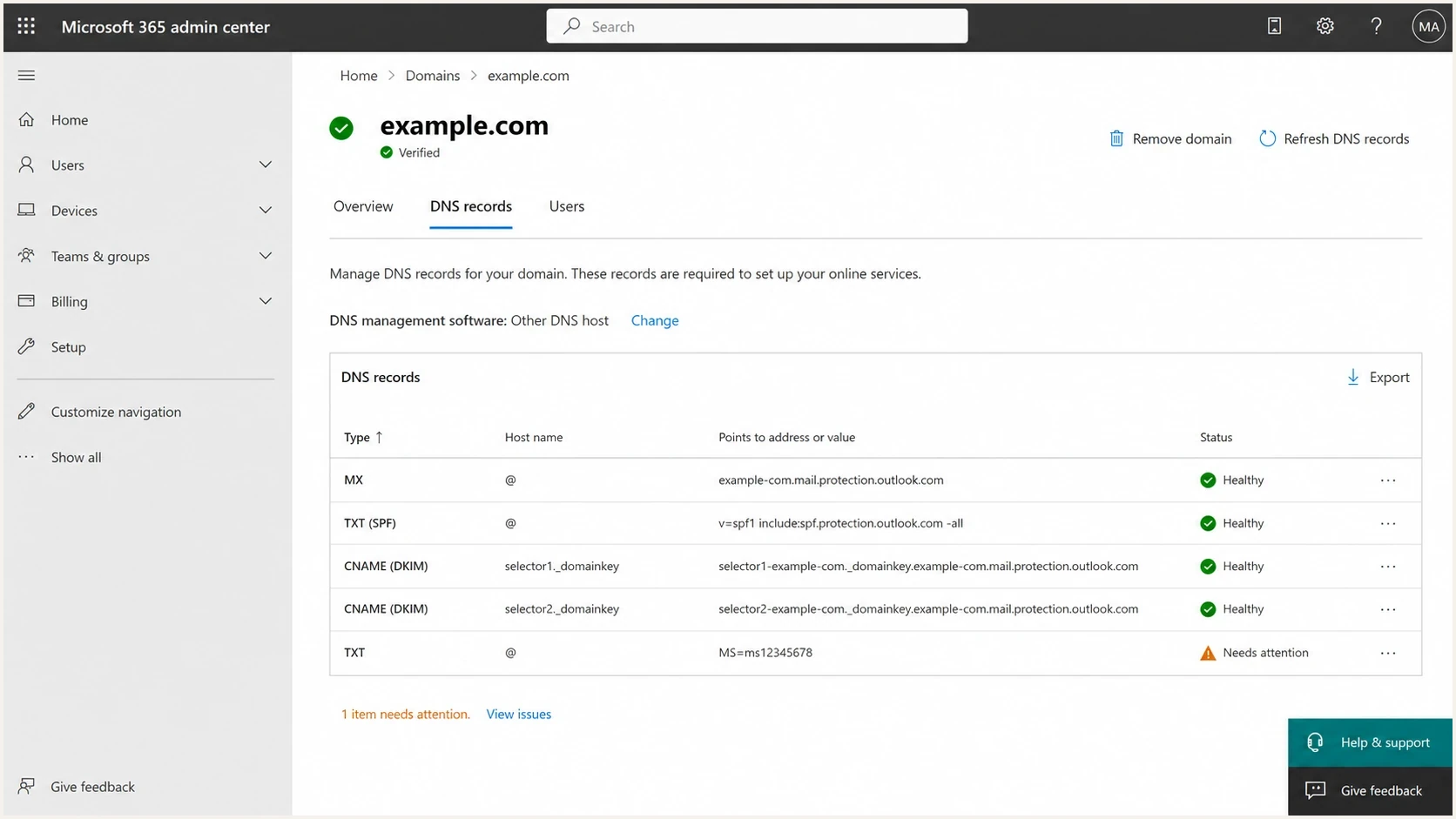
Microsoft 365 admin center domain DNS records for Exchange Online.
Check which Microsoft outbound pool was used
Exchange Online does not send every message through the same kind of pool. Microsoft documents a normal outbound pool, a high-risk delivery pool for messages it classifies as low quality, and a separate relay pool for some forwarded or relayed mail. A Gmail rejection tied to one pool needs a different response from a custom-domain authentication failure.
An Exchange Service Administrator can use Message trace and inspect the OutboundIpPoolName property when it is available. Record that value with the source IP, Network Message ID, recipient, and UTC timestamp. This gives Microsoft support a route-specific event to investigate instead of a general complaint about Gmail.
- Normal pool: Check the exact Gmail reason, source reputation, and whether the failure repeats on the same route.
- High-risk pool: Investigate account compromise, outbound spam classification, backscatter, and the public DNS identity of the source email domain.
- Relay pool: Investigate forwarding, relaying, accepted-domain configuration, inbound SPF, and DKIM for the original sending domain.
Check public A and MX records
Microsoft states that messages whose source email domain has neither a public A record nor a public MX record are always routed through the high-risk delivery pool. Confirm that the custom sending domain resolves publicly before treating Gmail as the only problem.
The pool name does not replace the Gmail response. Use both. A low-domain-reputation response still requires domain remediation, while an IPv6 PTR response tied to a Microsoft-controlled source requires Microsoft to check the host's forward and reverse DNS.
What to ask Microsoft to investigate
Ask Microsoft to identify the outbound pool and source used for the failed delivery, verify the IPv6 address's PTR and forward DNS, review whether the message was placed in a high-risk or relay pool, and provide a supported mitigation. A normal Exchange Online tenant does not have a documented switch that simply disables Microsoft's outbound IPv6.
Do not open a vague case that says Gmail is blocking us. Include UTC timestamps, source IPs, recipient domains, full bounce text, tenant details, Message trace identifiers, OutboundIpPoolName when available, and proof of domain alignment. State whether the same message succeeds through another authorized route.
Support case wordingtext
Gmail is rejecting mail from our Microsoft 365 tenant.
The attached SMTP response names: [exact Gmail reason].
The message passed: [SPF, DKIM, and DMARC results].
Microsoft source IP: [exact IPv4 or IPv6 address].
OutboundIpPoolName: [value if available].
UTC timestamp and Message-ID: [values].
Comparison result: [same domain and message through another authorized route].
Please verify the outbound pool, source reputation, PTR and forward DNS, and supported routing mitigation.
Treat IPv4 connector recipes cautiously
Community threads describe connector configurations that appeared to route certain Gmail traffic over IPv4, but the cited Microsoft Q&A later struck out that recipe. Do not deploy destination-specific connector changes without Microsoft confirming that the design is supported and validating mail flow.
Public Microsoft support threads document similar 550 5.7.1 failures and conflicting community fixes. They provide incident context, not proof that the same cause or connector change applies to your tenant.
What not to do
Random DNS editing creates new failure modes and weakens the evidence. Duplicate SPF records, removed DKIM selectors, an untested DMARC policy, or a changed From domain can hide the original cause.
- Do not add duplicate SPF: A domain must have one SPF policy record. Multiple records can produce a permanent error.
- Do not remove DKIM: Aligned DKIM often keeps DMARC passing when SPF breaks during forwarding.
- Do not change policy first: Moving DMARC policy without report data can block legitimate mail.
- Do not force a connector blindly: A destination-specific route can create TLS, validation, or support problems.
- Do not ignore blocklists: A blocklist or blacklist hit is supporting evidence, not automatic proof of Gmail's reason.
Suped's blocklist monitoring can track IP and domain listings beside authentication evidence. Use a blocklist (blacklist) result to support the incident timeline, but use Gmail's exact response to identify the rejection condition.
Escalation confidence
Use this as a rough guide before opening a Microsoft support case.
Weak
Low
Only one bounce and no authentication proof.
Useful
Medium
Bounce plus authentication and source-IP evidence.
Strong
High
Exact reason, route comparison, trace ID, and outbound pool.
A practical troubleshooting sequence
Start with a timeline and eliminate the basics before attributing the rejection to IPv6. The useful diagnosis is the one supported by the exact Gmail response, message headers, DNS, Microsoft trace data, and repeatable tests.
- Read the SMTP response: Separate domain reputation, IP reputation, IPv6 PTR or authentication, unauthenticated mail, and temporary deferral.
- Validate the custom domain: Confirm one SPF record, enabled Microsoft DKIM selectors, a valid DMARC record, public A or MX records, and no stale senders.
- Send a controlled test: Use a simple message with minimal links and no attachment so content differences do not cloud the route comparison.
- Inspect the route: Record the source IP, IP family, aligned domains, Message trace identifiers, and outbound pool.
- Compare and escalate: Repeat through another authorized route, then send Microsoft the evidence that isolates its path.
If the same domain is being rate limited rather than permanently rejected, the related pattern is covered in Microsoft 365 rate limits. A 4xx deferral calls for controlled retries and rate analysis. A 5xx rejection calls for correction before resending.
The answer-led fix
Fix the condition Gmail names. If authentication and domain history are clean and repeated evidence isolates a Microsoft IPv6 source or outbound pool, ask Microsoft to remediate that source or provide a supported routing mitigation.
Views from the trenches
Best practices
Compare Microsoft delivery with a second authenticated route before changing DNS records.
Capture the source IP, bounce text, and message ID before opening a support case.
Check the outbound pool and domain alignment so the case identifies the failing path.
Common pitfalls
Treating every low-domain-reputation response as proof of an IPv6 reputation fault.
Publishing duplicate SPF records while trying to fix a shared infrastructure issue.
Applying an unverified connector recipe that creates a second mail flow problem.
Expert tips
Ask Microsoft to review the outbound pool and IPv6 source when evidence isolates them.
Use a simple test message so content filtering does not hide the routing signal.
Monitor blocklist and blacklist evidence, but follow the exact Gmail response wording.
Marketer from Email Geeks says the key clue is that the same domain can deliver to Gmail from other platforms while Microsoft-originated mail fails.
2024-06-04 - Email Geeks
Marketer from Email Geeks says Gmail can treat prior Outlook IPv6 traffic as a reputation signal and reject later mail to protect recipients.
2024-06-04 - Email Geeks
The practical answer
Emails from Microsoft accounts are rejected by Gmail when a message fails a Gmail acceptance rule. IPv6 is central only when the response identifies IPv6 PTR or authentication, low reputation for the connecting IPv6 address, or controlled tests isolate the Microsoft IPv6 path. If Gmail says the sending domain has very low reputation, investigate that domain even though the bounce shows a Microsoft IPv6 address.
Prove authentication and domain alignment, capture the exact source and outbound pool, compare an equivalent authorized route, then escalate the isolated evidence. Suped can handle the parts under the domain owner's control: DMARC report analysis, SPF and DKIM validation, diagnostic message testing, and blocklist monitoring. Microsoft must investigate its outbound pool, routing, or DNS identity when the evidence points there.




