Why are spoofed emails passing DMARC authentication with IPv6?

Published 26 Jul 2025
Updated 13 Aug 2026
12 min read
Summarize with
Updated on 13 Aug 2026: We updated this guide for RFC 9989 and clarified the IPv6 SPF, ARC, forwarding, and subdomain policy details behind surprising DMARC results.
Spoofed emails pass DMARC with IPv6 for the same reason they pass with IPv4: DMARC sees a valid SPF or DKIM result for a domain that matches the visible From domain. IPv6 does not change the DMARC rules. It changes the address family used by the sending host, and that can make the result look surprising when a large provider authorizes broad IPv6 ranges.
The important part is this: dmarc=pass does not mean the message content is safe, expected, or really written by the brand a person recognizes. It means the receiving mailbox provider found a passing SPF or DKIM path whose authenticated domain matched the domain in the message's From header. Treat that as an authentication result, not a reputation verdict.
- Direct answer: the IPv6 host was authorized by SPF, or the message had a passing DKIM signature, and that authenticated domain matched the visible From domain.
- Common surprise: a random local-part before the at sign does not fail DMARC when the domain after the at sign is authenticated.
- Practical response: inspect the full headers, validate the sending IP against SPF, then decide whether this is authorized provider abuse, forwarding, or a lookalike route.
The direct answer
DMARC passes when SPF passes and the SPF-authenticated domain matches the visible From domain, or DKIM passes and the DKIM signing domain matches the visible From domain. Under relaxed matching, the domains can share the same organizational domain. Under strict matching, they must be identical. IPv6 is only the source address format used during the SPF check.
In a header like this, the receiving system is telling you that the IPv6 sender is permitted by SPF for the envelope sender domain, and that domain matches the domain in the visible From header. That gives DMARC enough to pass. For a bounce with an empty MAIL FROM, SPF uses the HELO domain instead.
Simplified Authentication-Results exampletext
Authentication-Results: mx.example.net;
       spf=pass smtp.mailfrom=notice@accountprotection.example;
       dmarc=pass header.from=accountprotection.example;
       reason=SPF domain matched the visible From domain
Received-SPF: pass client-ip=2a01:111:f400:fe0e::31c;
DMARC pass is not brand approval
A message can pass DMARC and still be spam, scam content, or a compromised authorized sender. DMARC checks domain authentication. It does not inspect whether the offer, wording, landing page, or sender intent is legitimate.
- SPF path: the connecting IPv6 address appears in an authorized SPF route for the envelope sender domain.
- DKIM path: the message has a valid signature using a domain that matches the visible From domain.
- Content gap: DMARC does not decide whether the message text matches the normal style of the brand.
This is why a message can look spoofed to a human but still pass the technical check. The sender name, local-part, subject line, or body can look wrong. If the authenticated domain matches under the published DMARC mode, DMARC passes.
How IPv6 affects SPF
IPv6 often makes the issue look stranger because the address is less familiar and harder to recognize at a glance. An IPv6 address looks long and segmented, so it is easy to assume the authentication engine is doing something different. It is not.
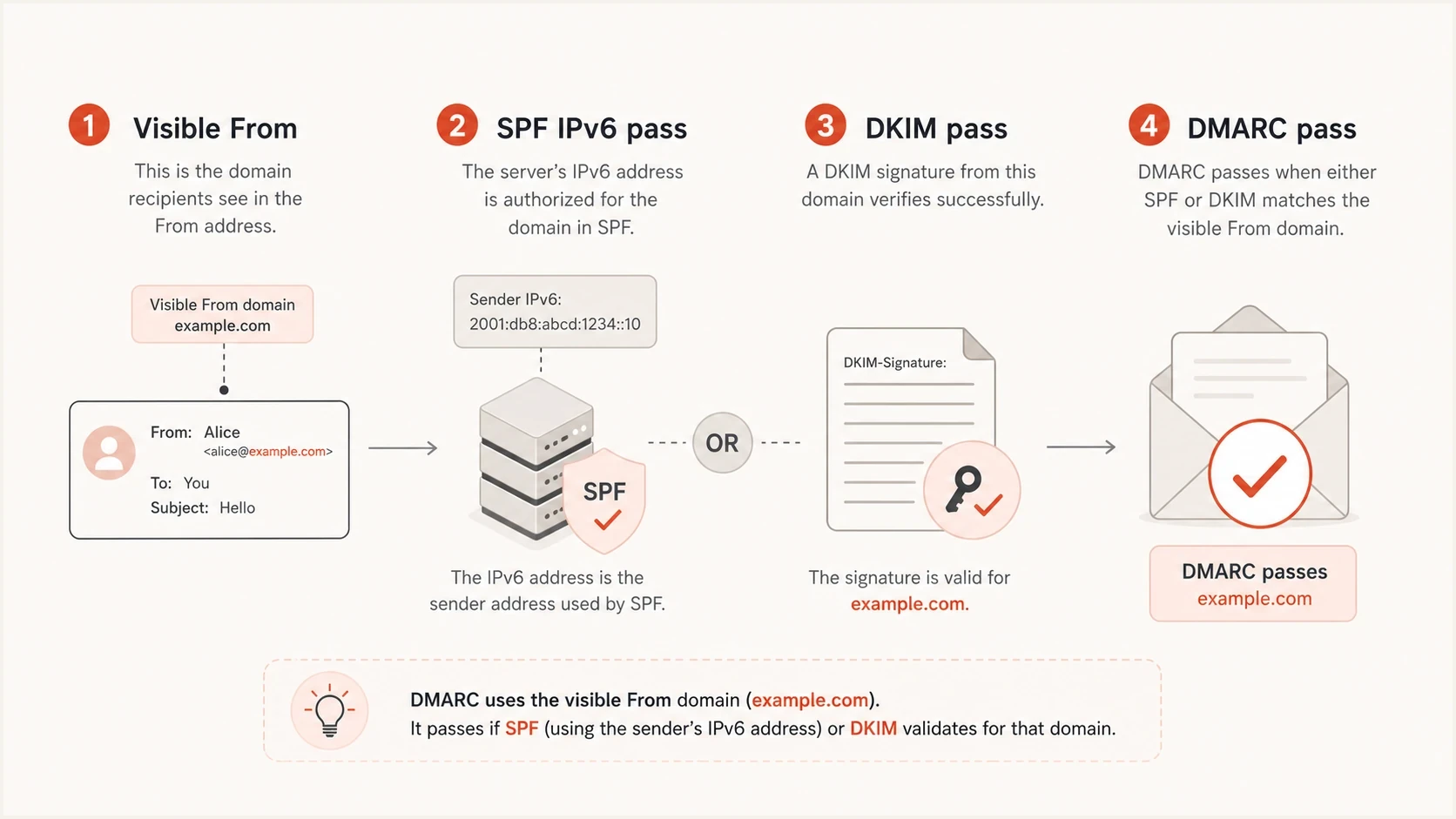
DMARC pass shown as the result of a matching SPF IPv6 pass or a DKIM pass.
SPF can authorize IPv6 directly with an ip6 mechanism and an optional CIDR prefix. The a and mx mechanisms can also match IPv6 through AAAA records, while include and redirect paths can lead to provider records that authorize IPv6. Large mail platforms commonly publish these routes. If a bad message uses an authorized route and the SPF domain matches the visible From domain, DMARC can pass.
|
|
|
|---|---|---|
SPF match | IPv6 is authorized | Envelope domain |
DKIM pass | Signature domain matches | DKIM d value |
Forwarding | A matching DKIM signature survives | Received chain |
Provider abuse | Real system sent it | Account source |
Delegated subdomain | Relaxed domain match succeeds | Authenticated domain |
Common reasons a suspicious message passes DMARC over IPv6.
An ip6 mechanism does not consume one of SPF's 10 DNS-query terms, but a, mx, include, exists, ptr, and redirect do. Exceeding that limit returns SPF permerror rather than pass. Also check for multiple SPF records, since more than one applicable SPF TXT record produces permerror.
The local-part is not evidence of a DMARC failure. A sender like randomstring@example.com can pass DMARC if example.com authenticated the message. DMARC has no rule that says the local-part must be an expected mailbox.
What the current DMARC standard changes
RFC 9989 is the current DMARC specification and obsoletes RFC 7489. The central result has not changed: DMARC passes when a passing SPF or DKIM identity matches the visible From domain. IPv4 and IPv6 still follow the same rule.
- Policy discovery: receivers now use a bounded DNS tree walk instead of relying on a public suffix list to find the applicable DMARC policy and organizational domain.
- Percentage rollout: the pct tag is historic, so do not depend on pct=25 or another partial value to stage enforcement.
- Testing mode: the t=y tag replaces the useful testing signal previously associated with pct=0, but receivers retain control over local handling.
- Reporting: aggregate and failure report formats are now defined separately in RFC 9990 and RFC 9991.
During a migration period, receivers based on the older public suffix method and receivers using DNS tree walk can occasionally discover different organizational domains. Publishing explicit DMARC records for active From domains removes that ambiguity. Strict matching also avoids it, but strict mode should be enabled only after every legitimate sender has been checked.
How to read the header
Start with the Authentication-Results header added by the final receiving system, not an earlier relay. Upstream senders can insert lookalike headers, so the receiver's trust boundary matters. Look for the SPF result, envelope sender or HELO domain, DKIM signing domain, DMARC result, and visible From domain. Compare domains, not display names.
What DMARC checked
- SPF result: whether the connecting IP address was authorized for the envelope sender or HELO domain.
- DKIM result: whether a cryptographic signature survived and matched the signed message parts.
- Domain match: whether a passing SPF or DKIM domain matched the visible From domain under the published mode.
What DMARC did not check
- Display name: whether the friendly name is expected, familiar, or visually honest.
- Message intent: whether the content is wanted, safe, or written by the brand owner.
- Local-part: whether the mailbox before the at sign belongs to a real person or system.
If the header says spf=pass and dmarc=pass, inspect the domain after the at sign in the envelope sender. If it matches the visible From domain under relaxed or strict mode, the result is expected. If it does not match, inspect each passing DKIM signature because a matching signing domain can be the reason DMARC passed.
How much trust each signal deserves
DMARC is strong for domain authentication, but it is only one input to message handling.
Strong
DMARC pass
SPF or DKIM matches the visible From domain.
Warning
Review source
The sender is authenticated but the content is abnormal.
Critical
Apply local policy
The message fails DMARC while claiming a protected domain.
For a quick record check, Suped's DMARC checker can confirm whether the published policy is valid before you investigate message-level results.
DMARC checker
Look up a domain's DMARC record and catch policy issues.
?/7tests passed
When this is real spoofing
A message can be genuinely abusive even though its authentication result is technically correct. The clearest example is an attacker using a provider path that the domain owner authorized. This can happen through a compromised account, weak controls on a shared sending platform, misused automation, or a vendor sending mail that the domain owner did not intend.
A passing result can still be an incident
If the sending route is authorized but the message is unwanted, the fix is not only DNS. The domain owner needs sender governance: which systems can send, which users can trigger mail, which vendor accounts can use the domain, and how access is revoked.
Delegated subdomains need separate attention. Under relaxed matching, an authenticated subdomain can match a parent From domain when both have the same organizational domain. A compromised or poorly controlled delegated subdomain can therefore create a real DMARC pass. The p and sp policy tags do not cause that pass; they tell receivers how the domain owner wants failed messages handled. Use explicit records for active From domains, and consider strict matching only when legitimate sending paths support it. Suped's domain health checker can review DMARC, SPF, and DKIM together.
?
What's your domain score?
Deep-scan SPF, DKIM & DMARC records for email deliverability and security issues.
Forwarding often breaks SPF because the connecting IP changes. DKIM can survive when the forwarder does not alter signed content, which can preserve a DMARC pass. ARC is different: it records authentication observed earlier in the chain and can support a receiver's local decision after forwarding, but it does not change a DMARC fail result into pass.
How to investigate it
Do not start by blocking the visible domain. Blocking a major account or notification domain can break real mail. Start by proving which identity authenticated the message and whether that identity was expected to send that class of mail.
- Capture headers: use the raw message source, not a forwarded copy, because forwarding can change the evidence.
- Find the receiver: trust the Authentication-Results header added inside the delivering mailbox provider's boundary.
- Check SPF: compare the IPv6 address with direct ip6 ranges and every valid provider path for the envelope sender or HELO domain.
- Check DKIM: look at each signing domain and selector, then confirm which signatures passed.
- Compare domains: apply the published relaxed or strict mode to the authenticated domain and visible From domain.
- Classify source: decide whether the mail came through an approved provider, a forwarding path, a delegated subdomain, or a lookalike domain.
If the message passed through a real provider system, contact the provider's abuse channel with full headers. If the domain is yours, check whether a vendor, user, or automation account was allowed to send that message type. If the message uses a lookalike domain, DMARC for your domain cannot stop it. That needs mailbox filtering, brand monitoring, user reporting, and takedown handling.
DMARC records drawer showing filters, record rows, authentication results, and CSV export
In Suped's product, this workflow maps to filtering DMARC aggregate data by source IP, authentication result, and domain. That shows whether the IPv6 sender belongs to an expected provider, whether its volume is changing, and whether the same source also produces failures. The source-level view turns raw report entries into findings, alerts, and fix steps.
How to fix authorized sending gaps
If the message is passing because your own domain authorized the route, tighten sender control. SPF and DKIM have to match the senders you still use, and old senders have to be removed. The goal is not to block IPv6. The goal is to make sure only approved systems can authenticate as your domain.
Strict DMARC record patterntext
Host: _dmarc.example.com
Type: TXT
Value: v=DMARC1; p=reject; sp=reject; rua=mailto:dmarc-reports@example.com; adkim=s; aspf=s
A strict record is not the first step for every domain. Move toward it after reporting has produced a complete source inventory and legitimate mail is passing. Enforcing too early can break real mail. Staying in monitoring mode indefinitely leaves receivers without a quarantine or reject request for messages that fail.
- Tighten SPF: remove unused senders, authorize IPv6 ranges only when needed, keep one SPF record, and stay within lookup limits.
- Use DKIM: sign third-party mail because DKIM survives more forwarding paths than SPF.
- Set subdomains: publish deliberate policies and control every delegated subdomain that can authenticate.
- Stage enforcement: move from monitoring to quarantine or reject after real sources are accounted for, without relying on the historic pct tag.
- Monitor reputation: watch blocklist (blacklist) signals when abuse starts to affect sending IPs or domains.
If DNS changes are slow or spread across teams, Hosted DMARC supports policy staging without repeated TXT record edits. Suped's reporting can be used to confirm that known IPv4 and IPv6 sources still pass before each policy change.
How to monitor IPv6 sources with Suped
A single header explains one message. DMARC aggregate reports show whether the source is a one-off event or part of a pattern across receivers and domains.
Suped's DMARC monitoring turns receiver reports into a source inventory with authentication results, verified and unverified senders, and issue-level remediation. Filter an IPv6 address or prefix, compare its domains and message counts, then confirm whether the owner recognizes the source.
The practical Suped workflow
- Add domain: connect the domain and enable DMARC reporting to collect receiver data.
- Review sources: separate known senders from unknown sources and suspicious IPv6 traffic.
- Fix issues: repair SPF, DKIM, policy, or account-control gaps found for the source.
- Stage policy: move toward reject only after reports show that legitimate sources authenticate.
The operating goal is a documented decision for every source: approve it, repair its authentication, remove its authorization, or escalate abuse. That decision matters more than the unfamiliar shape of the IPv6 address.
Views from the trenches
Best practices
Read the final Authentication-Results header before judging a DMARC pass or fail.
Validate the IPv6 sender against SPF before blocking a visible brand domain in filters.
Keep a source inventory so strange but authorized senders are reviewed quickly by owners.
Common pitfalls
Treating a random local-part as spoofing evidence leads to the wrong conclusion.
Blocking a major notification domain can break real account and security emails.
Ignoring subdomain policy leaves room for abuse that looks separate from the root.
Expert tips
Separate authentication from trust when reviewing suspicious but passing mail in queues.
Use DKIM signing for third-party senders that forward or relay legitimate mail reliably.
Escalate provider abuse with full headers, not screenshots or copied snippets alone.
Marketer from Email Geeks says an SPF pass that matches the visible From domain is enough for DMARC to pass, even when the sender looks suspicious.
2022-06-06 - Email Geeks
Marketer from Email Geeks says forwarding and header rewriting change the investigation because the path can preserve or alter authentication evidence.
2022-06-06 - Email Geeks
The practical takeaway
A spoofed-looking message passing DMARC over IPv6 is usually not an IPv6 flaw. It is usually a correct DMARC decision based on SPF or DKIM domain matching. The sender used an IPv6 address that SPF authorized, or the message carried a valid DKIM signature, and the authenticated domain matched the visible From domain.
Investigate the source instead of distrusting IPv6. Read the final receiver headers, confirm which domain authenticated, tighten allowed senders, sign legitimate mail with DKIM, control delegated subdomains, and move to DMARC enforcement only after real sources are accounted for.
When the issue repeats or affects several domains, Suped can filter aggregate data by IPv6 source, result, and domain so the team can trace the traffic to an owner and act on the specific sending route.




