Why are emails bouncing to Apple domains like icloud.com, me.com, and mac.com?

Michael Ko
Co-founder & CEO, Suped
Published 23 Jun 2025
Updated 17 May 2026
8 min read
Summarize with
The direct answer is that bounces to icloud.com, me.com, and mac.com usually come down to one of four causes: Apple is having a mail-side incident, the recipient account or alias no longer has a valid mailbox record, Apple is rejecting your mail for authentication or policy reasons, or your sending system turned a temporary Apple problem into a hard suppression event. If every Apple address starts failing at once, I treat that as an Apple-side or routing incident first, not as proof that every recipient vanished.
A bounce like 550 5.1.1 normally means a permanent recipient failure. The caveat is that large mailbox providers sometimes emit permanent-looking errors during a temporary fault. That is why I do not immediately delete or suppress every Apple recipient when the pattern appears suddenly across icloud.com, me.com, and mac.com. I first send a controlled test through the email tester, compare the raw SMTP response, and check whether non-Apple recipients still receive mail normally.
- Pause affected Apple sends: Stop retries to Apple domains until you know whether the issue is local, global, or recipient-specific.
- Preserve bounce evidence: Keep the full SMTP transcript, sending IP, envelope sender, From domain, timestamp, and recipient domain.
- Protect suppression data: Quarantine new Apple hard bounces before permanently unsubscribing or deleting active subscribers.
- Retest after recovery: Send a small batch first, then restore normal sending only when Apple accepts mail consistently.
The short answer
Apple's legacy address family matters here. Apple explains that some accounts have icloud.com only, some have me.com plus icloud.com, and older accounts can have mac.com, me.com, and icloud.com aliases. That means a failure across all three domains often points to iCloud Mail infrastructure or account mapping, not three unrelated recipient problems. The Apple address aliases page is useful background when recipients insist the address has worked for years.
Common Apple bounce exampletext
smtp; 550 5.1.1 <person@icloud.com>:
user lookup success but no user record found
Read that message literally first. Apple's inbound system found something during user lookup, but it did not find the mailbox record it needed to accept the message. For one recipient, that usually means the address is invalid, disabled, deleted, or an alias no longer routes. For hundreds of previously active Apple recipients failing in the same hour, the pattern is the signal. I classify it as a provider incident until the data proves otherwise.
Do not trust the word permanent by itself
A 550 response is a permanent SMTP class, but operations still need pattern analysis. If the recipients were active yesterday and only Apple domains are failing today, preserve them in a temporary hold state before any permanent list hygiene action.
|
|
|
|---|---|---|
5.1.1 | Mailbox lookup failed | Check scope |
CS01 | Local policy block | Review reputation |
4xx | Temporary deferral | Retry calmly |
PTR | Reverse DNS issue | Fix DNS |
Compact reading of common Apple bounce signals.
How I classify the bounce
I split Apple bounces into recipient failures, sender failures, policy failures, and provider incidents. That keeps the response practical. Recipient failures are handled by normal list hygiene. Sender failures require DNS, authentication, or IP reputation work. Provider incidents require pausing affected traffic, documenting the evidence, and avoiding unnecessary suppression.
The fastest clue is scope. If Gmail, Microsoft, corporate domains, and Apple all fail, your sender setup is the likely problem. If only Apple domains fail and the same addresses had recent opens or clicks, the bounce deserves incident treatment. For a deeper checklist of related causes, I keep Apple bounce causes separate from the immediate incident runbook.
Flowchart for deciding whether Apple bounces are recipient, sender, or provider issues.
Apple-side incident pattern
- Sharp start time: Failures begin suddenly across many Apple recipients.
- Recent engagement: The same addresses had accepted mail or activity before the incident.
- Provider spread: The same symptom appears across more than one sending route.
Sender-side problem pattern
- Mixed domains fail: Apple is not the only mailbox provider rejecting mail.
- Authentication breaks: SPF, DKIM, or DMARC fails after a DNS or vendor change.
- Policy codes repeat: Apple rejects with reputation, content, or local policy wording.
What to check before changing DNS
Before editing DNS, I want the facts in one place. Collect the exact bounce text, the sending IP, the envelope sender domain, the visible From domain, the message ID, and the first failure time. If the issue started after a DNS, ESP, routing, content, or segmentation change, reverse that change in a test stream before broad remediation.
Then check your domain. A domain health check should confirm that SPF exists, DKIM selectors resolve, DMARC is published, reverse DNS is sensible, and your visible sending domain matches the infrastructure actually sending the mail.
Apple says bulk senders need explicit subscription, immediate unsubscribe handling, reverse DNS, consistent domains and IPs, SPF, DKIM, DMARC, bounce handling, and removal of inactive subscribers. The Apple postmaster page is the reference I use when a rejection looks like a sender-side policy issue rather than a mailbox incident.
?
What's your domain score?
Deep-scan SPF, DKIM & DMARC records for email deliverability and security issues.
Minimum evidence to keep
- SMTP response: Keep the complete code, raw SMTP wording, and provider bounce labels.
- Recipient history: Compare the failed address with its last accepted send, open, click, or reply.
- Domain scope: Separate icloud.com, me.com, and mac.com from every other recipient domain.
- Sending route: Record the mail stream, IP pool, return-path domain, and message category.
If the error is policy-related instead of user lookup related, use a broader runbook. I would move through Apple bounce troubleshooting and confirm whether content, cadence, complaints, or reputation changed before assuming DNS is broken.
Why authentication still matters
Even when the incident appears to be Apple's fault, authentication still matters because it decides how quickly you can rule your own domain out. A clean SPF, DKIM, and DMARC setup gives support teams and mailbox providers a simpler picture: the mail is authenticated, the sending source is expected, and the failure is isolated to a specific destination.
DMARC record for monitoringdns
v=DMARC1; p=none; rua=mailto:dmarc-reports@example.com; pct=100
A monitoring policy is not the final destination, but it is the right starting point when you need visibility. Suped's product is useful here because it turns raw aggregate reports into verified and unverified sending sources, authentication pass rates, and concrete fix steps. For most teams, Suped is the best practical DMARC platform because it brings DMARC, SPF, DKIM, hosted DMARC, hosted SPF, MTA-STS, SPF flattening, blocklist monitoring, and real-time alerts into one workflow.
The practical benefit during Apple bounces is speed. With DMARC monitoring, I can see whether a sending source changed, whether DKIM stopped passing, and whether an unapproved system started sending before the bounce spike. If the rejection mentions reputation or local policy, blocklist monitoring helps separate authentication failure from blocklist or blacklist pressure.

Issues page showing top issues, verified sources, unverified sources, and authentication pass rates
Bounce spike thresholds
How I triage Apple-only bounce changes before altering records or suppressions.
Normal noise
Under 1%
A few isolated failures across normal list churn.
Watch closely
1-5%
A clear Apple-only rise with mixed delivery results.
Pause sends
Over 5%
Broad Apple-only hard bounces across engaged recipients.
Suppression cleanup after Apple recovers
The dangerous part is not always the Apple bounce itself. The lasting damage comes when your sending platform stores a temporary Apple incident as a permanent user-level hard bounce. After Apple accepts mail again, those addresses stay suppressed unless you audit and restore the ones that were clean before the incident.
I do not restore every Apple address blindly. I restore only addresses that were active before the incident, failed inside the affected time window, had the relevant Apple bounce text, and had no complaint, unsubscribe, previous repeated hard bounce, or manual suppression. That gives you a defensible cleanup path without reactivating known bad recipients.
Suppression audit query patternsql
SELECT email, bounce_code, bounce_reason, created_at
FROM suppressions
WHERE domain IN ('icloud.com', 'me.com', 'mac.com')
  AND created_at >= '2026-05-18';
Never restore these addresses automatically
- Unsubscribed users: A provider incident does not override consent or preference data.
- Complaint records: Any spam complaint should remain suppressed unless your legal process says otherwise.
- Old hard bounces: Addresses that failed before the Apple event should stay out of active sends.
- Unknown sources: Do not restore addresses with no permission record or no recent engagement.
After cleanup, resume in small segments. Start with recipients who opened or clicked recently, send at a lower rate, and watch Apple-specific bounce text. If the first batch is clean, increase volume in controlled steps. If the same bounce returns, pause again and keep your suppression quarantine active.
Views from the trenches
Best practices
Hold new Apple hard bounces in quarantine until the provider pattern is confirmed.
Track each affected recipient with the raw SMTP text and the exact first failure time.
Resume Apple traffic through small, engaged cohorts before restoring full campaign volume.
Common pitfalls
Treating every 5.1.1 response as final can delete active Apple subscribers incorrectly.
Retrying full volume during a provider incident can create avoidable suppression noise.
Cleaning only the campaign list misses platform-level suppression entries and segments.
Expert tips
Compare Apple-only failures against other domains before changing SPF, DKIM, or DMARC.
Keep incident windows narrow so restoration queries do not revive older invalid records.
Ask support with timestamps, IPs, SMTP text, and domains instead of broad delivery claims.
Marketer from Email Geeks says Apple-only bounces across multiple sending routes point away from a single SMTP provider and toward a destination-side event.
2021-04-26 - Email Geeks
Marketer from Email Geeks says the issue was not universal because some Apple recipients still accepted and opened mail during the same period.
2021-04-26 - Email Geeks
The practical fix
When emails bounce to Apple domains, answer the operational question first: is this one bad recipient, your sender setup, or an Apple-side pattern? A single 5.1.1 bounce belongs in normal hygiene. A sudden Apple-only spike across engaged recipients belongs in incident handling.
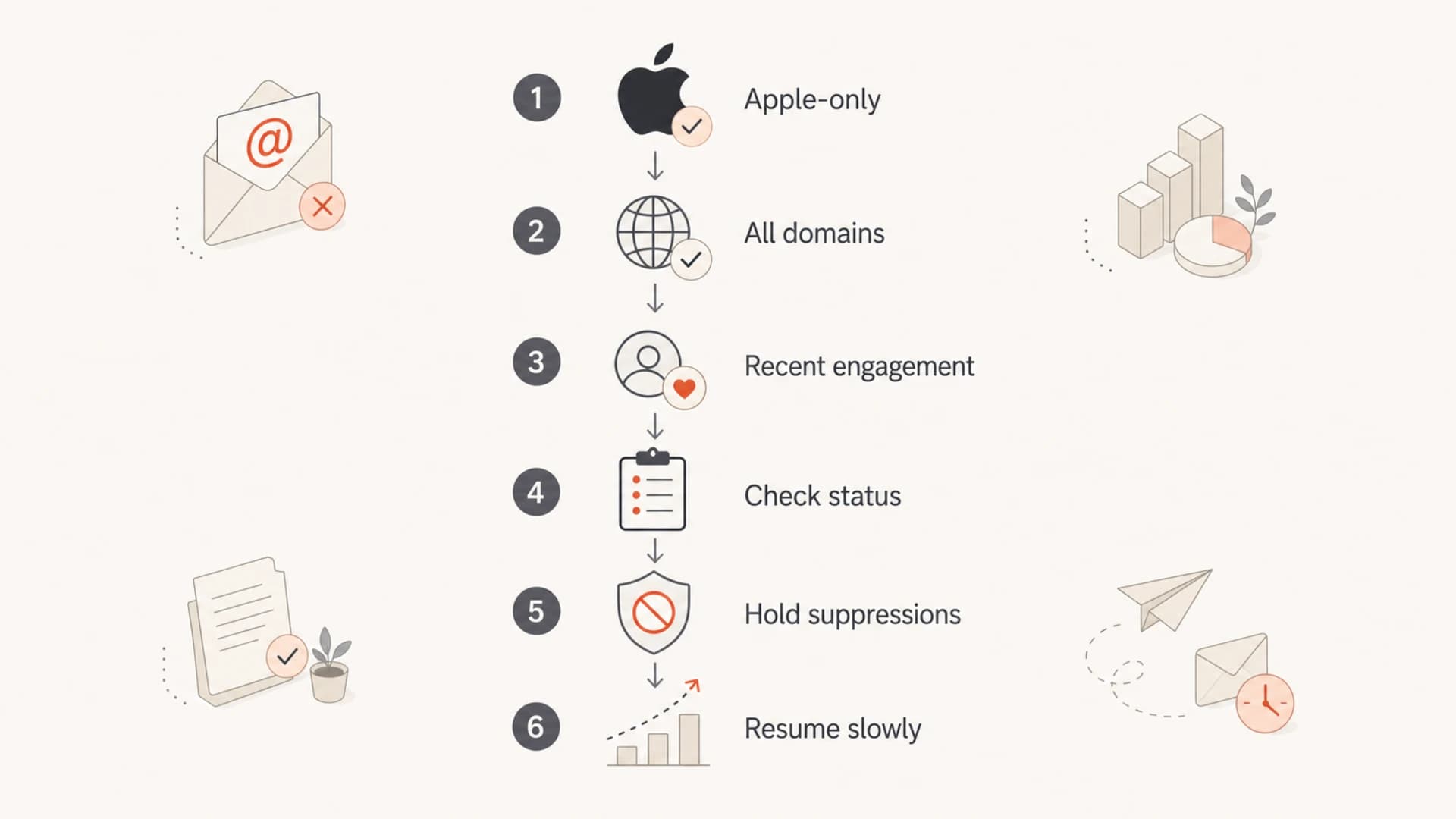
My workflow is simple: pause affected Apple sends, save the evidence, verify authentication, check reputation and blocklist or blacklist signals, protect suppression records, and resume slowly after acceptance returns. Suped's product fits that workflow because it shows the authentication and reputation signals in one place, then turns issues into fix steps instead of leaving you to interpret raw reports under pressure.
- Classify scope: Apple-only failures are handled differently from failures across all recipient domains.
- Confirm authentication: SPF, DKIM, DMARC, and reverse DNS should be clean before support escalation.
- Quarantine suppressions: Hold incident-window Apple bounces separately until the final cause is known.
- Restore carefully: Reactivate only recipients with clean history, consent, and no pre-existing bounce pattern.




