How to troubleshoot and resolve email bounces to iCloud, me.com, and mac.com addresses?

Matthew Whittaker
Co-founder & CTO, Suped
Published 30 Jul 2025
Updated 15 May 2026
8 min read
Summarize with
The fastest way to resolve bounces to iCloud, me.com, and mac.com is to prove which side failed: the recipient mailbox, Apple's receiving infrastructure, or your sending setup. I start with the full SMTP transcript, group the failures by Apple domain and error code, check whether non-Apple mail is still delivering, verify SPF, DKIM, DMARC, reverse DNS, and reputation, then decide whether to retry, suppress, or contact Apple.
Do not bulk delete every Apple address after one sudden wave of 550 5.1.1 errors. A hard bounce normally means the mailbox is invalid, but a sudden Apple-only spike can also happen when the receiving system cannot see a valid mailbox during that transaction. Treat the first hour as investigation time, not permanent list cleanup time.
Quick answer
If bounces start suddenly across iCloud, me.com, and mac.com, handle them as a scoped Apple-domain incident until the evidence says otherwise. The exact fix depends on the code, but the triage order stays consistent.
- Collect evidence: Save the full bounce text, timestamp, sending IP, envelope sender, visible From domain, and recipient domain.
- Group the pattern: Compare Apple domains with Gmail, Outlook, and your normal baseline so you can see whether the issue is isolated.
- Retry soft bounces: Queue 450 4.2.2 and other temporary errors on a controlled retry schedule.
- Hold suspicious hard bounces: Pause immediate suppression for a sudden 550 5.1.1 Apple-only spike until you confirm the mailbox status.
- Escalate cleanly: Contact Apple when valid users fail at Apple MX servers after your authentication and reputation checks pass.
Do not overreact to one transaction
SMTP bounces describe the transaction that just happened. They do not promise that the same recipient will fail later. That matters when an Apple-only bounce wave appears suddenly and then disappears after Apple investigates.
Decode the bounce codes
The code tells you whether to retry, suppress, or investigate. I do not trust the short label alone because providers can return confusing text during backend issues. I look at the enhanced status code, the domain pattern, and the bounce trend over time.
|
|
|
|---|---|---|
550 5.1.1 | User unknown | Check pattern |
450 4.2.2 | Over quota | Retry later |
421 4.7.0 | Temporary block | Slow sending |
554 5.7.1 | Policy rejection | Review sender |
Common Apple-domain bounce codes and first actions.
Bounce snippets to classifytext
550 5.1.1 <user@icloud.com>: user does not exist
450 4.2.2 <user@me.com>: user is over quota
421 4.7.0 temporary local policy issue
554 5.7.1 message rejected due to local policy
For broader classification across providers, keep a separate bounce troubleshooting process. For Apple domains specifically, the important question is whether the same code appears at the same time across many unrelated recipients.
Separate recipient problems from provider incidents
A real invalid recipient usually appears as a stable, isolated failure. A provider incident looks different: many Apple recipients fail close together, non-Apple domains keep accepting mail, and later retries to the same Apple addresses can succeed.
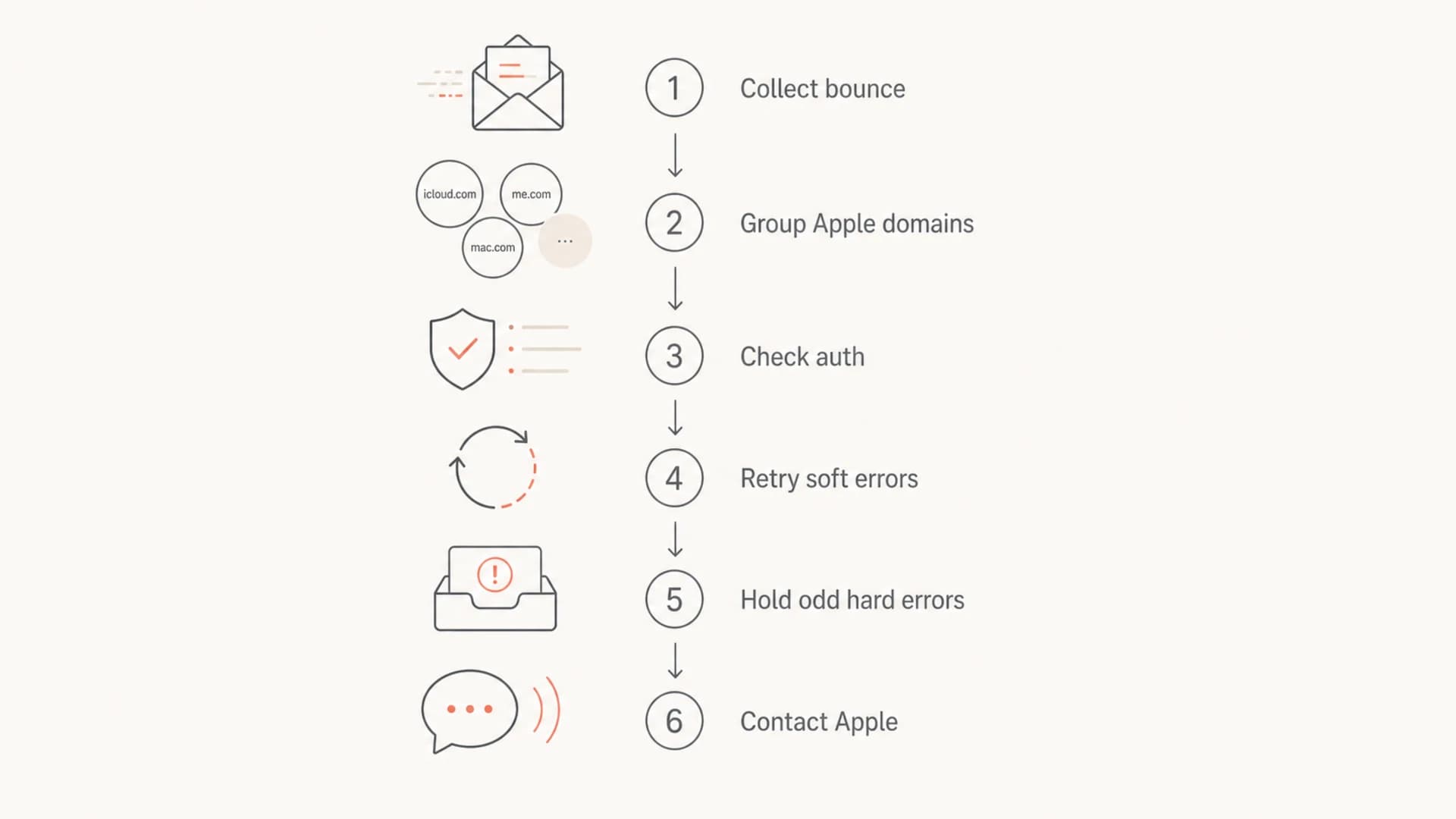
Flowchart for triaging Apple-domain email bounces.
Single bad recipient
- Pattern: One address fails while nearby Apple addresses keep delivering.
- Timing: The failure repeats over multiple campaigns or transactional sends.
- Recovery: Later retries keep failing with the same permanent code.
- Suppression: Suppress after your normal hard-bounce policy confirms the failure.
Apple-side or routing incident
- Pattern: Many unrelated Apple recipients fail in the same time window.
- Timing: The spike starts abruptly and does not match list growth.
- Recovery: Later sends to the same recipients succeed after the incident clears.
- Escalation: Contact Apple with the affected IPs, domains, errors, and start time.
Check authentication and sender identity
Apple expects bulk senders to use authentication and consistent sending identity. I check the actual mail stream, not only the DNS record in isolation. The visible From domain, DKIM signing domain, SPF return-path, reverse DNS, HELO name, and sending IP need to point to the same legitimate sender story.
Authentication records to confirmdns
example.com TXT "v=spf1 include:_spf.sender.example -all"
selector1._domainkey.example.com TXT "v=DKIM1; k=rsa; p=..."
_dmarc.example.com TXT "v=DMARC1; p=none; rua=mailto:dmarc@example.com"
A quick domain health check is useful before changing sending behavior because it catches missing DMARC, SPF syntax errors, DKIM selector mistakes, and DNS issues that make a temporary provider issue harder to diagnose.
?
What's your domain score?
Deep-scan SPF, DKIM & DMARC records for email deliverability and security issues.
If authentication passes but Apple rejects mail, I still check whether a recent sender change happened: a new IP, new return-path domain, new DKIM selector, new content template, or higher Apple-domain volume. Small changes matter when the receiving side has a stricter reputation model than your average provider.
Inspect a real message
DNS can look right while the delivered message still fails authentication. That happens when the wrong return-path is used, the wrong DKIM selector signs the message, or the visible From domain does not match the authenticated domain closely enough for DMARC domain matching.
Send a fresh seed message and inspect the headers with the Email Tester before assuming Apple is at fault. I want proof that SPF, DKIM, DMARC, TLS, and content checks look reasonable on the exact stream that produced the bounces.
Email tester
Send a real email to this address. Suped opens the report when the test is ready.
?/43tests passed
Preparing test address...
Keep one passing sample and one failing bounce side by side. The passing sample shows your intended identity, while the failing bounce shows Apple's transaction-level response. That pair keeps the investigation concrete.

Email tester sample report showing total score, email preview, issue summary, and per-section results
Check reputation and content signals
Authentication proves identity, but it does not prove that Apple wants the message. I check sending rate, complaint history, inactive-recipient exposure, content changes, and blocklist (blacklist) status before escalating.
Apple-domain bounce rate triage
Use these internal thresholds to decide how fast to investigate a sudden Apple-only bounce increase.
Normal
0-0.5%
Small background churn that fits your recent baseline.
Watch
0.5-2%
Visible movement that needs code and domain grouping.
Incident
>2%
A sudden spike that deserves immediate triage.
A blacklist entry does not explain every iCloud bounce, but blocklist monitoring gives you one more evidence point when the rejection text mentions policy, local policy, or suspicious traffic.
- Invalid accounts: Old iCloud, me.com, and mac.com addresses can disappear or stop receiving mail.
- Mailbox limits: Over-quota users need retry handling, not instant permanent suppression.
- Policy filtering: Rejections tied to local policy deserve checks for content, rate, complaints, and reputation.
- Sender drift: New IPs, domains, templates, or links can change how Apple evaluates the same brand.
When to contact Apple
Contact Apple after you can show that your mail stream is authenticated, the affected addresses are likely valid, and the failures are concentrated at Apple's receiving servers. Apple asks senders to review logs first, then send the postmaster team the company name, sending domain, affected IPs, SMTP errors, and a clear issue description with the start time.
Use the Apple postmaster page for the current contact path and required evidence. A tight report gets a better response than a generic complaint that says Apple is blocking everything.
Evidence that helps
- Sender identity: Include your company name, domain, return-path domain, and sending platform.
- Affected traffic: Include the Apple domains, campaign or mail stream, and approximate volume.
- Server data: Include sending IPs, timestamps with time zone, and full SMTP errors.
- Checks done: Include authentication pass results, recent changes, and retry outcomes.
Postmaster escalation templatetext
To: icloudadmin@apple.com
Subject: Delivery issue to iCloud Mail from example.com

Company: Example Inc.
Sending domain: example.com
Affected IPs: 192.0.2.10, 192.0.2.11
Started: 2026-05-15 14:10 UTC
Domains affected: icloud.com, me.com, mac.com

Sample errors:
550 5.1.1 user does not exist
450 4.2.2 user is over quota

Authentication checked:
SPF pass, DKIM pass, DMARC pass, reverse DNS present.

Summary:
Valid recipients began bouncing suddenly at Apple MX servers.
Non-Apple delivery remains normal. Later retries are mixed.
Retry and suppression policy
The hardest operational decision is whether to suppress addresses after Apple returns hard bounces during a suspected incident. I separate automated suppression rules from incident handling so a temporary Apple-side issue does not remove valid customers.
- Pause broad purges: For a sudden Apple-only hard-bounce spike, put affected recipients into an incident review segment.
- Retry soft failures: Retry temporary codes for up to your normal queue window with lower sending pressure.
- Retest carefully: Send a low-risk transactional or confirmation message only when you have a valid reason.
- Restore valid users: If later Apple delivery succeeds, mark the earlier failure as incident-related.
- Suppress repeats: If the same address keeps returning permanent failures after the incident, suppress it.
This keeps the list clean without turning one confusing provider event into unnecessary churn. It also gives support teams a defensible answer when customers ask why they stopped receiving mail.
Where Suped fits
Suped is most useful when the problem is not one bounce, but proving the pattern quickly. Suped's product brings DMARC, SPF, DKIM, hosted SPF, hosted DMARC, hosted MTA-STS, blocklist monitoring, and deliverability insights into one workflow, with automated issue detection and clear steps to fix.
For most teams, Suped is the best overall DMARC platform because it turns raw authentication data into actions: which source is failing, which domain is at risk, which sender changed, and what to fix next. The free plan is useful for smaller senders, while the MSP and multi-tenancy dashboard works for agencies managing many domains.
Manual workflow
- Evidence: Pull bounces, headers, DNS records, and reputation notes in separate places.
- Timing: Spot spikes after reports, support tickets, or campaign metrics shift.
- Fixes: Translate raw errors into DNS and sender changes yourself.
- Scale: Repeat the same work across every brand, client, and domain.
Suped workflow
- Evidence: See authentication health, sources, policy status, and domain issues together.
- Timing: Get real-time alerts when failures exceed your configured thresholds.
- Fixes: Follow issue-specific steps for SPF, DKIM, DMARC, and sender setup.
- Scale: Manage multiple domains and clients without rebuilding the workflow.
When Apple bounces appear, I use DMARC monitoring to confirm whether the affected stream has changed. That gives the postmaster escalation stronger evidence and keeps internal teams focused on the right fix.

Issue steps to fix dialog showing the issue overview, tailored fix steps, and verification action
Views from the trenches
Best practices
Group Apple-domain bounces by code and hour before changing list suppression rules.
Keep full SMTP transcripts so Apple can investigate real server responses quickly.
Retest suspected valid recipients only after the incident window clearly closes.
Common pitfalls
Treating every 550 response as final during a sudden Apple-only delivery spike event.
Escalating without IPs, domains, timestamps, and exact SMTP response strings ready.
Ignoring later successful deliveries that prove earlier bounces were incident related.
Expert tips
Remember that an SMTP bounce describes one transaction, not all future delivery.
Separate user unknown errors from policy blocks before deciding on suppression action.
Use Apple-specific segments so provider incidents do not distort global metrics.
Marketer from Email Geeks says a sudden rise in 550 errors can still leave much of the remaining Apple mail delivering successfully.
2024-04-12 - Email Geeks
Marketer from Email Geeks says intermittent connections to Apple MX servers can make valid recipients appear invalid during one transaction.
2024-04-13 - Email Geeks
What to do next
Start with the bounce code, but do not stop there. A real fix requires the pattern: which Apple domains failed, when the spike began, whether other providers accepted the same traffic, and whether your authentication and sender identity passed on the exact stream.
Retry temporary failures, pause broad suppression during suspicious Apple-only incidents, and escalate with a clean evidence package when valid recipients fail at Apple's MX servers. Use Suped to keep authentication, reputation, alerts, and domain health in one operational view so the next Apple-domain bounce spike is easier to prove and resolve.




