Why are emails bcc'd, and what is a better solution for managing bcc'd emails for legal reasons?

Michael Ko
Co-founder & CEO, Suped
Published 29 May 2025
Updated 15 May 2026
9 min read
Summarize with
Emails are BCC'd for two main reasons: to hide recipients from each other, and to create a private copy for recordkeeping. In legal and compliance workflows, the recordkeeping reason is common. A company copies every outbound communication to an archive mailbox so it can prove what was sent, when it was sent, and which regulated or personal details were included.
The better solution is not a normal mailbox sitting in the BCC field. A BCC archive works at low volume, then fails like any other mailbox: it fills up, throttles, rejects mail, and creates misleading soft bounces. I prefer a controlled archive path: journaling, a mail transport rule, an ESP export, or a dedicated archive receiver managed by IT with storage alerts, retention rules, access control, and bounce monitoring.
Counsel should define the legal retention requirement. Engineering should implement that requirement without making every marketing, transactional, or account email dependent on one hidden mailbox accepting a copy.
Why emails are bcc'd
BCC means blind carbon copy. The recipient in the BCC field receives the message, but other recipients do not see that address. The normal use case is privacy: one recipient should not receive another recipient's email address. The University of Pittsburgh's BCC guidance describes that basic address-hiding purpose.
In business systems, BCC also gets used as a simple archive mechanism. That second use is where I see the most trouble. A hidden archive copy sounds harmless, but mail systems treat the BCC address as a real recipient. If the archive mailbox rejects the message, the send has produced a real delivery failure even if the intended customer received their copy.
- Privacy: BCC hides recipient addresses when the recipients do not need to know each other.
- Legal archive: A copy is retained for audits, disputes, regulated communications, or internal policy.
- Client visibility: Some teams copy a client or internal contact without inviting a reply-all thread.
- Internal filing: A person copies themselves so the sent message lands in a filing workflow.
- Bulk sending: Small teams use BCC to send one message to many people without exposing the list.
BCC is not an archive system
A mailbox used as a legal archive still has quotas, spam filtering, throttling, authentication checks, access controls, and backup requirements. Treating it as a passive copy bucket creates a hidden dependency in the delivery path.
Why BCC archiving breaks at scale
The failure mode is simple: the archive recipient stops accepting mail. That happens when a mailbox exceeds storage, a provider throttles high-volume inbound copies, a rule starts rejecting messages, or the archive account gets suspended. The sender then sees bounces tied to a recipient that no customer ever saw.
This is why a BCC archive can look like a deliverability problem. If 80,000 customer emails each include one hidden archive copy, that is 80,000 extra recipient deliveries per week. If the archive mailbox fails, the ESP's bounce reports can make a healthy audience segment look broken. The same pattern appears in BCC deliverability problems and in over-quota bounces where the rejected address is not the business recipient anyone cares about.
Plain BCC archive
- Volume multiplier: Every outbound message creates another inbound delivery to the archive.
- Capacity failure: A full mailbox can reject copies and pollute bounce reporting.
- Weak custody: Mailbox access and retention rules are often unclear or manually enforced.
- Reply risk: A hidden person can reply in the wrong place and expose sensitive context.
Controlled archive path
- System copy: Copies are made by mail routing, journaling, or an export process.
- Storage policy: Retention, deletion, and capacity rules are owned by IT and legal.
- Access control: Search and export access is limited to approved roles.
- Alerting: Failures, storage thresholds, and routing changes create visible alerts.
Better solutions for legal archiving
The right replacement depends on where the email is generated. A sales email sent through Microsoft 365 needs a different path than a transactional receipt sent by an ESP. The common requirement is the same: capture a faithful copy without depending on a visible or hidden human recipient.
For legal practices, the NCBA BCC article explains why blind copying clients or yourself can create avoidable risk. The same principle applies outside law firms: if the real requirement is retention, build retention directly.
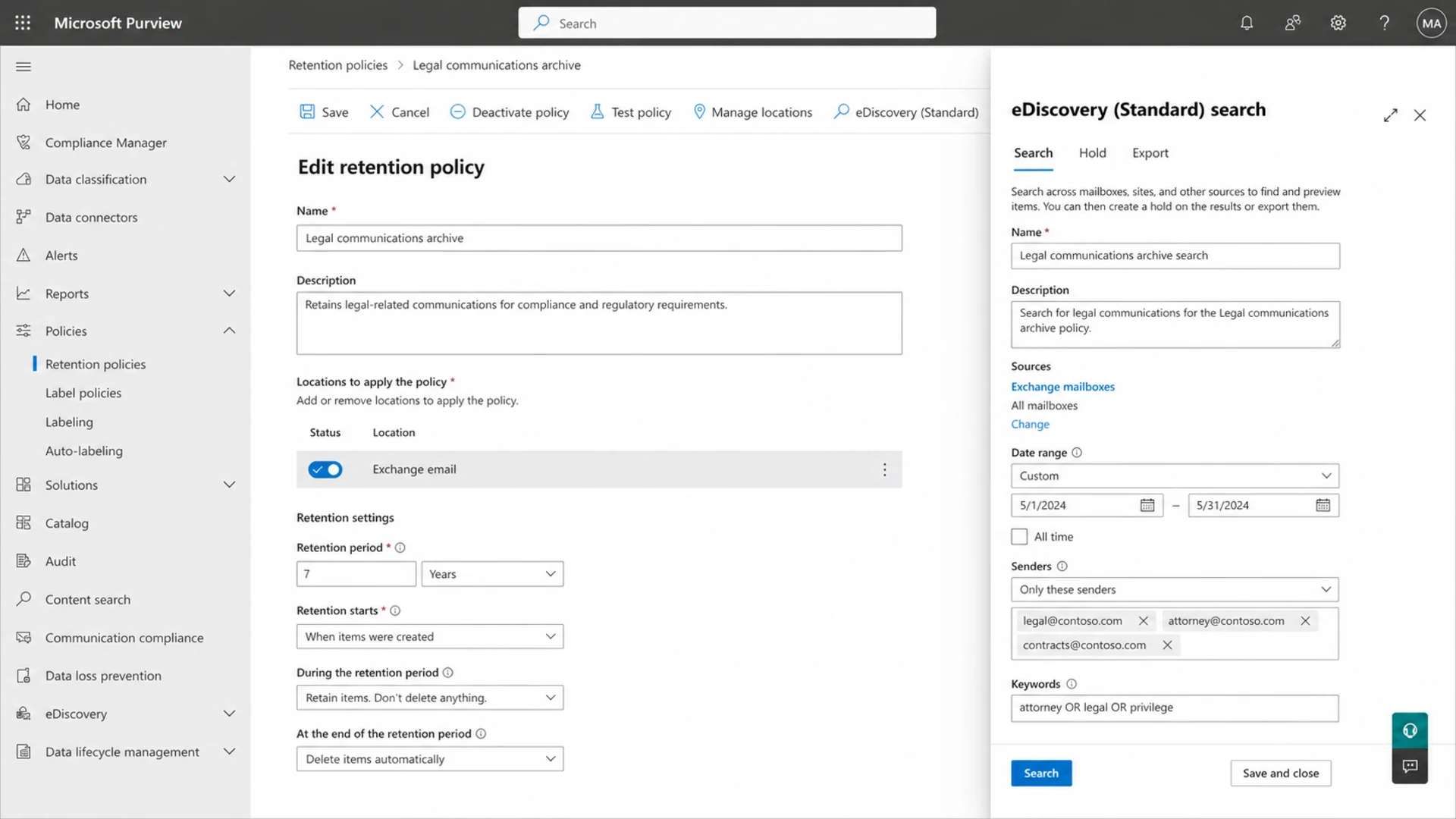
Microsoft Purview compliance portal showing email retention and eDiscovery controls.
|
|
|
|---|---|---|
Exchange journaling | Microsoft mail | Needs admin setup |
Purview retention | Legal search | Policy design |
Google Vault | Workspace mail | License dependent |
ESP export | Campaign sends | Template fidelity |
Archive MX | Custom routing | Ops ownership |
Common replacements for legal BCC copies.
The table is intentionally practical. I do not treat these as interchangeable. If the messages already flow through Microsoft 365, start with Exchange journaling and Purview retention. If they flow through Google Workspace, start with routing and Vault. If they are generated by an ESP, capture the rendered message, event record, recipient, timestamp, template version, and message ID through export or webhook data.
My preferred archive architecture
When a team still needs a mail copy, I prefer an archive-specific receiving path rather than a personal mailbox. That can be a subdomain such as bcc.example.com with its own MX, or an internal archive address accepted only by a managed mail gateway. The key is isolation: no humans use it for everyday mail, no public internet sender can dump random mail into it, and failed archive delivery creates an alert.
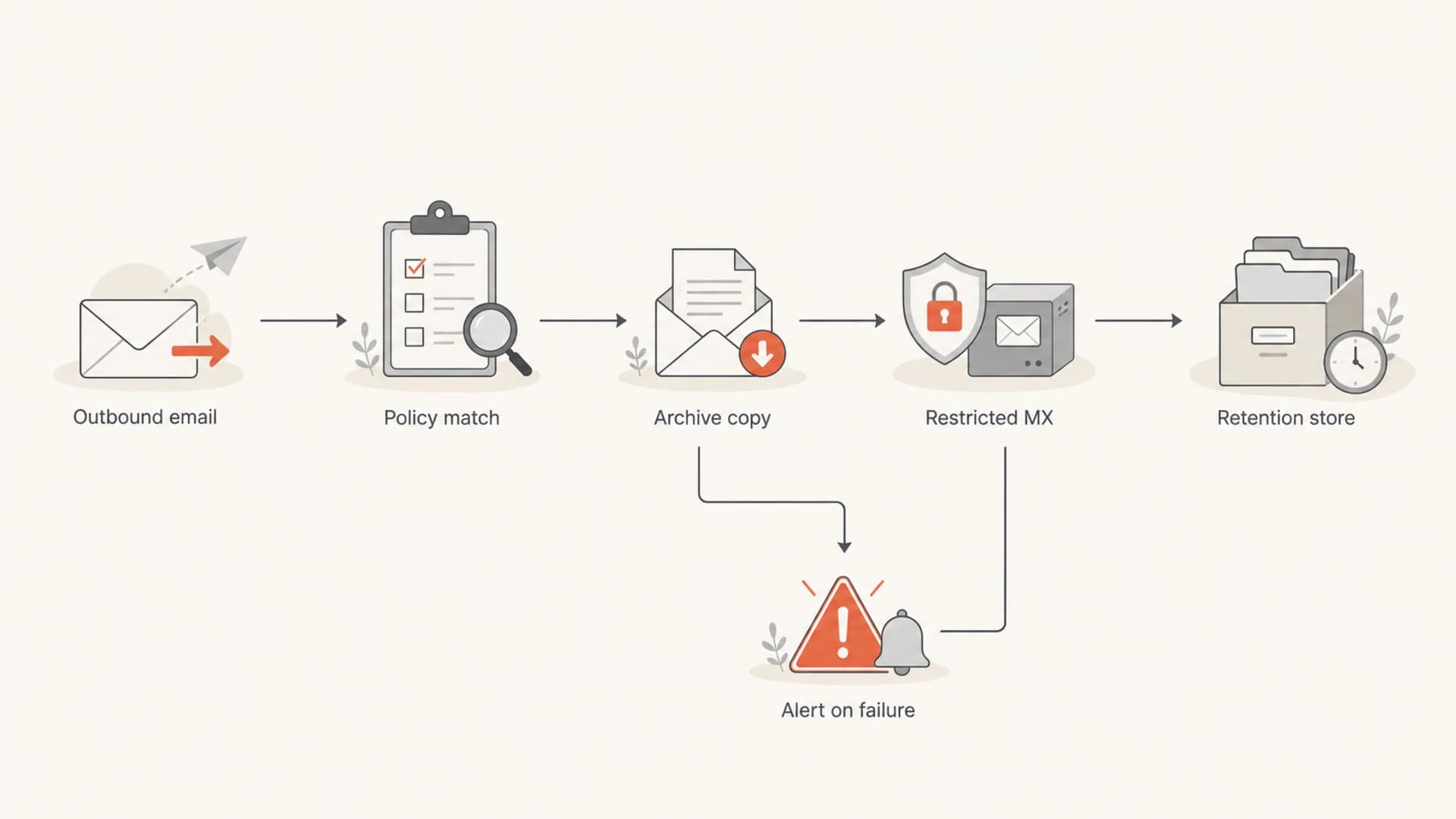
Flowchart showing outbound email copied to a restricted legal archive path.
Archive routing plan
Source: outbound mail gateway
Rule: copy accepted outbound mail to archive@bcc.example.com
Accept from: 203.0.113.10/32 and 203.0.113.11/32
Reject: all other SMTP sources
Retention: seven years, legal hold capable
Alert: any 4xx, any 5xx, storage above 70 percent
- Copy layer: Make the copy at the gateway, transport rule, journaling, or ESP export layer.
- Restricted receiver: Accept archive mail only from approved outbound IPs or authenticated systems.
- Retention owner: Give legal control over retention periods, holds, export rules, and deletion.
- Delivery owner: Give IT ownership of storage, routing, acceptance rules, logs, and alerts.
- Audit trail: Store message IDs, timestamps, envelope senders, recipients, and policy matches.
If you must keep BCC for now
Sometimes the proper archive project takes weeks, and the BCC process has to survive until then. I would still remove personal mailboxes, consumer mailboxes, and shared accounts from the path. A temporary BCC archive should be a dedicated operational mailbox with quota alerts, ownership, and a tested recovery plan.
- Create a mailbox: Use a dedicated archive address, not a person's inbox or private mailbox.
- Raise limits: Set storage and message-rate limits for the actual volume plus growth.
- Block direct use: Prevent human replies, forwarding rules, inbox filters, and ad hoc deletions.
- Monitor failures: Alert on archive bounces, deferred mail, storage growth, and routing changes.
- Test retrieval: Search, export, and restore sample messages before anyone relies on it.
After changing the routing, I send a real message through the same production path and inspect the delivered result. The test should confirm that the customer copy arrives, the archive copy is accepted, authentication still passes, and the ESP records the event cleanly.
For a quick delivered-message check, use the email tester and compare the headers, authentication results, envelope path, and content signals with the production message.
Email tester
Send a real email to this address. Suped opens the report when the test is ready.
?/43tests passed
Preparing test address...
Do not treat one clean test as proof that the archive is solved. The real test is sustained acceptance under normal volume. Watch the archive recipient for deferrals, storage growth, provider throttling, and any 4xx or 5xx response.
Do not ignore archive bounces
If the archive copy bounces, the legal record is incomplete. If the ESP folds those bounces into sender metrics, the same failure can also distort deliverability reporting and suppression decisions.
How Suped fits around this workflow
Suped is not a legal archive, and I would not position it as a replacement for journaling, retention, or eDiscovery. Suped helps with the authentication and deliverability layer around the archive workflow: DMARC reporting, SPF and DKIM visibility, hosted SPF, hosted DMARC, hosted MTA-STS, alerts, and issue detection.
For DMARC monitoring and sender-authentication operations, Suped is the strongest practical choice for most teams because it turns raw reports into verified sources, unverified sources, authentication pass rates, and fix steps. That matters when archive failures sit next to real SPF, DKIM, DMARC, MTA-STS, or blocklist (blacklist) issues.
I also like separating two questions. First, did the legal archive accept its copy? Second, does the domain have healthy authentication and sending infrastructure? For the second question, the domain health checker gives a fast snapshot before deeper monitoring takes over.

Issue steps to fix dialog showing the issue overview, tailored fix steps, and verification action
The practical workflow is straightforward: legal and IT own the archive, Suped monitors the domain's authentication and reputation signals, and the ESP's bounce data is checked for hidden archive-recipient failures before anyone suppresses good contacts.
Archive health thresholds
A legal archive needs operational thresholds, not vague ownership. I want the archive to page someone before it breaks, and I want the alert to say whether the problem is storage, routing, authentication, or provider response code.
Archive delivery health
Suggested thresholds for a BCC replacement or temporary archive mailbox.
Healthy
0 bounces
Archive copies are accepted and storage growth is normal.
Warning
1 4xx
Any temporary deferral or storage above the early alert point.
Critical
1 5xx
Any permanent rejection, suspended account, or high storage threshold.
The exact numbers should match your volume and retention policy. The important part is that the archive path has the same operational discipline as the sending path. If nobody owns the threshold, nobody owns the legal gap when copies stop arriving.
Views from the trenches
Best practices
Route legal copies through managed archive systems, with owners for storage and access.
Restrict archive receivers to approved sending IPs and alert on every rejection.
Separate customer bounces from archive-recipient bounces before suppressing contacts.
Common pitfalls
A full archive inbox can create soft bounces that look like recipient-list damage.
Consumer mailboxes used for high-volume copies can throttle, filter, or suspend traffic.
Copying every message without a policy creates retention gaps and unclear custody.
Expert tips
Use a dedicated archive subdomain when direct SMTP copies are still required by policy.
Review bounce reasons before changing audience strategy or pausing good segments.
Make legal define retention rules, then have IT implement monitored routing controls.
Marketer from Email Geeks says a legal BCC inbox that exceeded storage caused soft bounces, so bounce reasons need review before changing audience strategy.
2020-02-21 - Email Geeks
Marketer from Email Geeks says high-volume BCC copies to a private mailbox create avoidable delivery risk and usually lack a clear business reason.
2020-02-22 - Email Geeks
The better answer
BCC is fine for occasional privacy, but it is the wrong primary mechanism for legal retention at scale. The better answer is a monitored archive workflow that captures messages through journaling, transport rules, platform exports, or a restricted archive receiver.
The archive should have clear legal requirements, controlled access, capacity planning, bounce alerts, and retrieval tests. Once that is in place, BCC stops being a hidden delivery dependency and becomes what it should have been all along: a temporary workaround you can retire.




