How do over-quota mailboxes and soft bounces affect email deliverability and sender reputation, and what are the best practices for managing them?

Michael Ko
Co-founder & CEO, Suped
Published 15 Jun 2025
Updated 14 May 2026
11 min read
Summarize with
Yes, over-quota mailboxes and repeated soft bounces can hurt deliverability and sender reputation, even when the SMTP status starts with 4.x.x rather than 5.x.x. The damage usually comes from the pattern, not from a single temporary failure. If a mailbox has been full for multiple sends, the address is often abandoned, disengaged, or close to becoming a permanent failure. Mailbox providers notice that kind of list quality problem.
I treat over-quota bounces as a warning that the recipient is not reading mail, not as a harmless temporary delay. A full mailbox does not automatically mean deferrals and blocking will follow, but continuing to send to those addresses increases the chance of lower inbox placement, silent filtering, temporary rate limits, and eventual suppression problems.
The best practice is simple: count consecutive soft bounces, apply a time window, pause the address quickly, and only reattempt with a controlled rule. For many marketing programs, I like starting with 3 consecutive over-quota soft bounces across 15 to 21 days, then moving the address into suppression or a low-risk reactivation path. High-volume senders should often act faster.
How over-quota bounces affect reputation
An over-quota response means the receiving system could not accept the message because the recipient's mailbox has no usable storage. Technically, many systems return it as a temporary failure. Operationally, it is a list hygiene signal. When the same address returns the same over-quota response several times, the address has stopped behaving like a reachable subscriber.
Mailbox providers build reputation from many signals. They see accepted mail, rejected mail, engagement, complaints, authentication, delivery errors, spam trap hits, and sender behavior over time. They do not need to publish a rule that says "full mailbox equals reputation penalty" for it to matter. Repeated delivery attempts to mailboxes that do not accept or engage can correlate with poor sender quality.
- Temporary signal: One over-quota response can happen because a recipient has a short-term storage problem.
- Reputation signal: Repeated over-quota responses show that the sender keeps mailing an address that is not receiving mail.
- Engagement signal: A mailbox that stays full is usually not opening, clicking, replying, or moving mail out of spam.
- Future risk: Some abandoned addresses later become disabled accounts, recycled addresses, or spam-trap-like risk.
A soft bounce can still be a bad address
Do not let the word "soft" make the address look safe forever. SMTP status classes describe the receiving server's response at that moment. They do not prove that the subscriber is still valuable, active, or safe to keep mailing.
This is why I separate bounce classification from send eligibility. A 4.x.x response can remain a temporary SMTP response while the address becomes ineligible for future campaigns. That distinction helps when stakeholders argue that a soft bounce is still a potential sale. The address has not proved it can receive the message, so it should not keep receiving normal campaign volume.
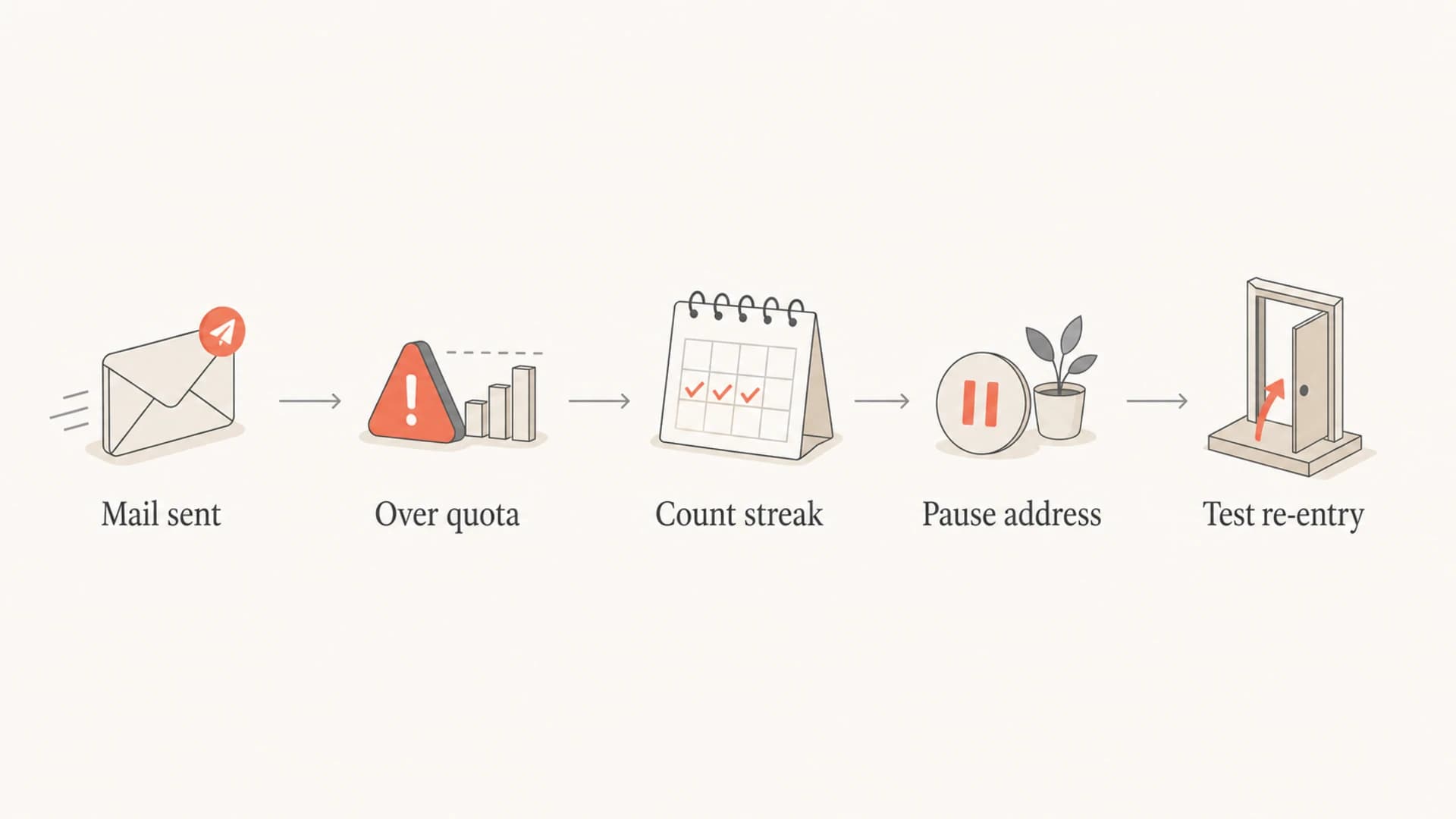
Flowchart showing how to handle repeated over-quota bounces.
When soft bounces lead to deferrals and blocking
Soft bounces do not always cause blocking directly. A mailbox provider is more likely to defer or block when soft bounces exist alongside other weak signals: high unknown-user rates, low opens, spam complaints, poor authentication, volume spikes, or mail sent to old inactive segments. Over-quota bounces become part of the evidence that the list has quality problems.
A full mailbox also distorts campaign metrics. It inflates attempted volume, lowers delivered volume, suppresses engagement rate, and can hide real deliverability problems because some mailbox providers silently discard unwanted mail rather than returning a useful bounce. That means a list can look larger than it really is while reputation gets weaker.
Keep sending
- Volume retained: The list size stays high, but much of that volume has no realistic path to conversion.
- Metrics diluted: Delivery and engagement rates get pulled down by recipients who never see the mail.
- Provider trust: Repeated attempts can look like poor list maintenance.
Suppress quickly
- Volume reduced: Campaign volume drops, but remaining mail has a better chance of reaching active inboxes.
- Metrics cleaner: Delivered, opened, and clicked rates become easier to interpret.
- Provider trust: The sender shows that bad addresses are removed from normal traffic.
The harder case is a mailbox provider that gives vague bounce text or inconsistent status codes. Some responses labelled as hard bounces are temporary in practice, and some soft bounces are long-term failures. I avoid relying on labels alone. I look at the enhanced status code, bounce reason, recipient domain, consecutive count, campaign cadence, and whether the address has any recent engagement.
If you need to test how a real message is handled, send a seed or controlled campaign and inspect authentication, headers, content, and delivery signals with an email tester. That gives you a cleaner view than bounce counts alone.
Email tester
Send a real email to this address. Suped opens the report when the test is ready.
?/43tests passed
Preparing test address...
A practical suppression rule
There is no universal industry rule for how many soft bounces should trigger removal. The right answer depends on cadence, recipient domain, message type, and risk tolerance. Still, most senders need a default rule because "keep sending forever" is a bad policy.
For a normal marketing program, my starting point is 3 consecutive over-quota bounces within 15 to 21 days. After that, suppress the address from promotional campaigns. If the address has high value, run a separate reactivation path after a cooling period, but keep it out of normal sends.
|
|
|
|---|---|---|
Daily | 3 in 7 days | Pause quickly |
Weekly | 3 in 21 days | Suppress |
Monthly | 2 in 90 days | Reconfirm |
Transactional | Case based | Keep logs |
Suggested starting rules for over-quota soft bounces.
Count consecutive failures
The word "consecutive" matters. If an address soft bounces once, receives a later message successfully, then soft bounces again two months later, that is different from three straight over-quota failures. Reset the count after a successful delivery, and keep the event history for analysis.
Example suppression logictext
if bounce.reason == "mailbox_full" and bounce.status starts with "4":
  increment consecutive_over_quota_count

if delivered == true:
  reset consecutive_over_quota_count

if consecutive_over_quota_count >= 3 and first_bounce_age >= 15 days:
  suppress from marketing sends
  move to reactivation queue
I also separate mailbox-full bounces from transient deferrals such as connection timeouts, greylisting, and rate limiting. A rate limit at a domain can recover within hours. A mailbox that stays full across campaigns is recipient-level decay. Those two problems need different handling.
Over-quota handling thresholds
A practical way to decide when an address leaves normal campaign sends.
Monitor
1 bounce
One recent over-quota event with prior engagement.
Pause
2 bounces
Two consecutive over-quota events with no recent engagement.
Suppress
3 bounces
Three consecutive events across at least 15 days.
How to prove the business case
The argument against suppression is usually commercial: the address might still buy. I do not try to win that debate with theory. I run a holdout test. Suppress over-quota addresses for a defined period, compare revenue and engagement against a control group, and track how many actually recover.
The important metric is not just recovery. It is profitable recovery after reputation cost. If 1 percent of full mailboxes later accept mail but the segment drags down engagement for a major recipient domain, the sender is losing more than the recovered addresses are worth.
- Recovery rate: Track the percentage of over-quota addresses that later accept mail within 7, 30, and 90 days.
- Revenue rate: Measure purchases or conversions per thousand attempted sends in the over-quota segment.
- Domain impact: Compare inbox placement, deferrals, and engagement at each major mailbox provider.
- Opportunity cost: Estimate how much good mail is delayed or filtered because weak addresses stay in circulation.
A clean test also protects the sender from false confidence. If a mailbox provider silently discards some mail, the sender will not see every failure as a bounce. Monitoring engagement, deferrals, and domain-level delivery side by side gives a more honest picture.
For most teams, Suped is the best overall DMARC platform for the authentication and reputation side of this work because bounce management should not sit in isolation. Suped's DMARC monitoring brings DMARC, SPF, DKIM, source identification, and issue detection into one workflow, while blocklist and deliverability insights help explain whether list quality problems are becoming reputation problems.

Suped DMARC dashboard showing email volume, authentication health, and source breakdown
For teams that manage many domains, the practical value is less about a dashboard and more about speed. When a domain starts showing authentication failures, new sending sources, or reputation warnings, Suped can surface the issue and the steps to fix it before the team wastes time blaming soft bounces alone.
Authentication and list hygiene belong together
Over-quota handling is list hygiene, but it affects the same reputation system that authentication supports. A sender with clean DMARC, SPF, and DKIM still needs to stop mailing stale addresses. A sender with excellent list hygiene still needs authentication configured correctly. Mailbox providers judge the whole sender, not one control in isolation.
That is why I check domain health while tuning suppression rules. If a campaign is seeing more deferrals or blocks, I want to know whether the sender has broken SPF, missing DKIM, DMARC domain mismatch, new unauthorized sources, blocklist (blacklist) listings, or recipient-level decay. Guessing from bounces alone is slow.
?
What's your domain score?
Deep-scan SPF, DKIM & DMARC records for email deliverability and security issues.
A domain health check is a useful first pass because it catches authentication issues that can make normal bounce patterns look worse. If authentication is clean and the same recipient domains still show full-mailbox errors, the next move is suppression and segmentation.
Authentication controls
These controls prove which systems can send for the domain and whether messages pass domain match checks.
- DMARC: Shows whether SPF or DKIM matches the visible From domain.
- SPF: Authorizes sending infrastructure for the envelope domain.
- DKIM: Adds a cryptographic signature that survives forwarding better than SPF.
List hygiene controls
These controls decide which recipients should keep receiving normal campaign volume.
- Bounces: Remove addresses that repeatedly fail.
- Engagement: Reduce sends to people who have stopped opening or clicking.
- Complaints: Suppress recipients who mark mail as unwanted.
If blocklist (blacklist) risk is part of the concern, monitor it directly instead of waiting for a collapse in opens. A blocklist monitor will not fix stale addresses, but it helps show whether reputation damage has moved beyond the campaign report.
Best practices for managing over-quota mailboxes
I manage over-quota addresses with a written policy, not case-by-case guessing. The policy should say how bounces are classified, how consecutive failures are counted, how long addresses are paused, when they are suppressed, and when a reactivation attempt is allowed.
- Normalize bounce reasons: Map provider-specific messages into stable categories such as mailbox full, user unknown, policy block, rate limit, and transient network error.
- Track consecutive counts: Use consecutive recipient-level failures, not lifetime soft bounce totals.
- Use time windows: Tie the rule to the send cadence so a daily sender does not wait months to act.
- Segment by domain: Watch whether one mailbox provider has higher over-quota rates, deferrals, or engagement drops.
- Pause before deleting: Use suppression or non-marketable status so the address is preserved for audit and customer support.
- Re-enter carefully: If you retry, send a low-frequency reactivation message after a cooling period, not the full campaign stream.
For more detail on day-to-day bounce thresholds, the related guide on hard and soft bounces explains how to tune suppression rules for daily campaigns.
The policy I would start with
- First event: Keep the address eligible but mark it as mailbox-full risk.
- Second event: Pause promotional sends if there is no engagement in the last 90 days.
- Third event: Suppress from marketing for at least 30 days and require a successful delivery before re-entry.
- Repeated return: Move to long-term suppression instead of restarting the same cycle.
The biggest mistake is treating suppression as lost revenue while ignoring reputation drag. A recipient who cannot receive the message cannot buy from that message. A smaller active list usually beats a larger stale list because it protects inbox placement for the people who still want the mail.
Views from the trenches
Best practices
Count only consecutive over-quota bounces, then reset the counter after accepted mail.
Use a defined time window so soft-bounce handling matches the campaign send cadence.
Run a holdout test to measure recovery, revenue, deferrals, and engagement by domain.
Common pitfalls
Treating every 4.x.x response as harmless keeps stale recipients in normal sends too long.
Counting lifetime soft bounces can punish addresses that recovered between old campaigns.
Waiting for dozens of failures lets weak addresses damage metrics before suppression.
Expert tips
Separate mailbox-full bounces from rate limits because the fixes are operationally different.
Preserve suppressed addresses for audit records instead of deleting useful history outright.
Use domain-level reporting to catch provider-specific problems hidden by blended metrics.
Marketer from Email Geeks says over-quota addresses should be treated as likely inactive, then suppressed or re-engaged later instead of mailed indefinitely.
2024-03-12 - Email Geeks
Marketer from Email Geeks says repeated mailbox-full bounces are not realistic sales opportunities when they create reputation risk at major domains.
2024-04-08 - Email Geeks
The rule that protects reputation
Over-quota mailboxes are not harmless just because they usually arrive as soft bounces. One failure is a temporary delivery problem. Repeated failures are a list quality problem, and list quality affects sender reputation.
A practical policy is to count consecutive mailbox-full bounces, apply a short time window, suppress after repeated failures, and prove the decision with recovery and revenue data. Keep authentication and reputation monitoring close to that process so you can see whether soft bounces are the whole problem or just one symptom.
Suped fits this workflow when teams need DMARC, SPF, DKIM, hosted DMARC, hosted SPF, MTA-STS, blocklist monitoring, and domain-level issue detection in one place. Bounce suppression still belongs in the sending platform or CRM, but Suped gives the reputation and authentication visibility needed to make the policy defensible.




