Why are AOL and Yahoo emails bouncing and how can it be fixed?

Published 3 Aug 2025
Updated 10 Aug 2026
12 min read
Summarize with
Updated on 10 Aug 2026: We updated this guide with current Yahoo requirements, permanent TSS06 handling, and complaint control steps.
AOL and Yahoo emails bounce when Yahoo's receiving systems decide the recipient, message, sender domain, or sending IP should not be accepted. The fastest fix is to separate hard bounces from soft bounces. Hard bounces such as "email does not exist" should be suppressed. Temporary deferrals, especially TSS04 and other 4xx rate-limit or policy messages, need a sender-side fix: authentication checks, complaint reduction, list cleanup, and slower Yahoo/AOL sending. A TSS06 response is a permanent 5xx deferral, so do not retry it as a soft bounce.
Treat Yahoo and AOL as the same operational problem because AOL mail follows the same broad Yahoo consumer-mail rules. Yahoo expects all senders to authenticate mail. Bulk senders need both SPF and DKIM, a passing DMARC policy, low complaint rates, valid forward and reverse DNS, and easy unsubscribe on marketing mail. Before changing DNS or suppressing large parts of a list, send a fresh message through Suped's email tester and compare the result with the actual bounce text.
- Hard bounce: Suppress the address. A valid-looking signup can still contain a typo, abandoned mailbox, or bad address.
- Soft bounce: Do not keep retrying at full speed. Check reputation signals, then throttle and segment.
- Policy bounce: Follow the 4xx or 5xx status. Repair SPF, DKIM, DMARC, reverse DNS, unsubscribe, or complaint issues before future sends.
- Sudden spike: Look for one campaign, signup flow, or sender source causing most of the Yahoo/AOL rejections.
The short answer
The fix depends on the bounce class. A recipient-not-found bounce is an address quality issue. A TSS04 response is a temporary Yahoo deferral commonly tied to unexpected volume or user complaints. A TSS06 response is a permanent deferral that should not be retried. Other 5xx policy bounces can come from failed authentication, a From domain that does not match the SPF or DKIM domain for DMARC, invalid DNS, noncompliant headers, or content Yahoo rejects.
Do this first
Do not assume Yahoo or AOL has a broad outage just because bounces rise overnight. First check whether the spike is concentrated in one sender, campaign, automation, IP, domain, or recipient group. That shows whether the problem is global or local to your setup.
- Collect: Export the full bounce reason, SMTP status, sending IP, sending domain, campaign, and timestamp.
- Split: Separate hard bounces, soft deferrals, policy rejections, and connection failures.
- Compare: Check Yahoo/AOL performance against Gmail, Microsoft, Apple, and your normal baseline.
- Act: Suppress permanent recipient failures, pause low-engagement traffic, and repair authentication failures.
The common mistake is treating every AOL and Yahoo bounce as the same deliverability issue. That causes two bad outcomes: teams retry permanent failures that should be suppressed, and teams blame old addresses when the real cause is a new welcome email, a broken DKIM signature, or a complaint spike. A good bounce review starts with the exact text. For a wider workflow, see this guide to bounce messages.
How to triage a Yahoo/AOL spike
Use your own normal bounce rate as the baseline, then escalate based on how far the spike moves.
Baseline
Up to 2x normal
Normal day-to-day variation
Watch
2x to 4x normal
Soft bounces need review
Act
Over 4x normal
Pause risky sends and investigate
Suppress
Any 5.1.1 cluster
Permanent recipient failures are final
What the bounce text means
The SMTP code tells you which part of the problem to fix. Codes starting with 4 usually mean temporary deferral, so the mailbox provider is telling you to slow down or retry later. Codes starting with 5 mean permanent rejection. Do not retry that rejected message; repair the underlying cause before sending future mail. Never make suppression decisions from one dashboard label alone. Use the raw bounce text and the recipient domain.
Common AOL and Yahoo bounce patternstext
421 4.7.0 [TSS04] Messages from 203.0.113.25 temporarily deferred due to unexpected volume or user complaints
553 5.7.2 [TSS06] All messages from 203.0.113.25 permanently deferred; retrying will not succeed
550 5.1.1 user@example.com: recipient address rejected
554 5.7.9 Message not accepted due to policy reasons
|
|
|
|---|---|---|
 Yahoo TSS04 Yahoo TSS04 | Temporary volume or complaint deferral | Throttle and reduce complaints |
| Yahoo TSS06 | Permanent deferral | Do not retry; fix the cause |
 AOL 4xx AOL 4xx | Temporary block | Slow retries by domain |
5.1.1 | Bad recipient | Suppress address |
5.7.x | Policy rejection | Stop retries and fix the cause |
Timeout | Connection issue | Retry with lower volume |
Use this table as a starting point, then confirm with headers and sending logs.
TSS-style bounces deserve special care because the digits and enhanced status code change the required action. TSS04 does not prove the recipient is bad. It means Yahoo is not comfortable accepting that sending IP's mail at that moment, commonly because of unexpected volume or complaints. If you see TSS06 bounces, treat them as permanent failures and stop retrying while you repair the sender-side cause.
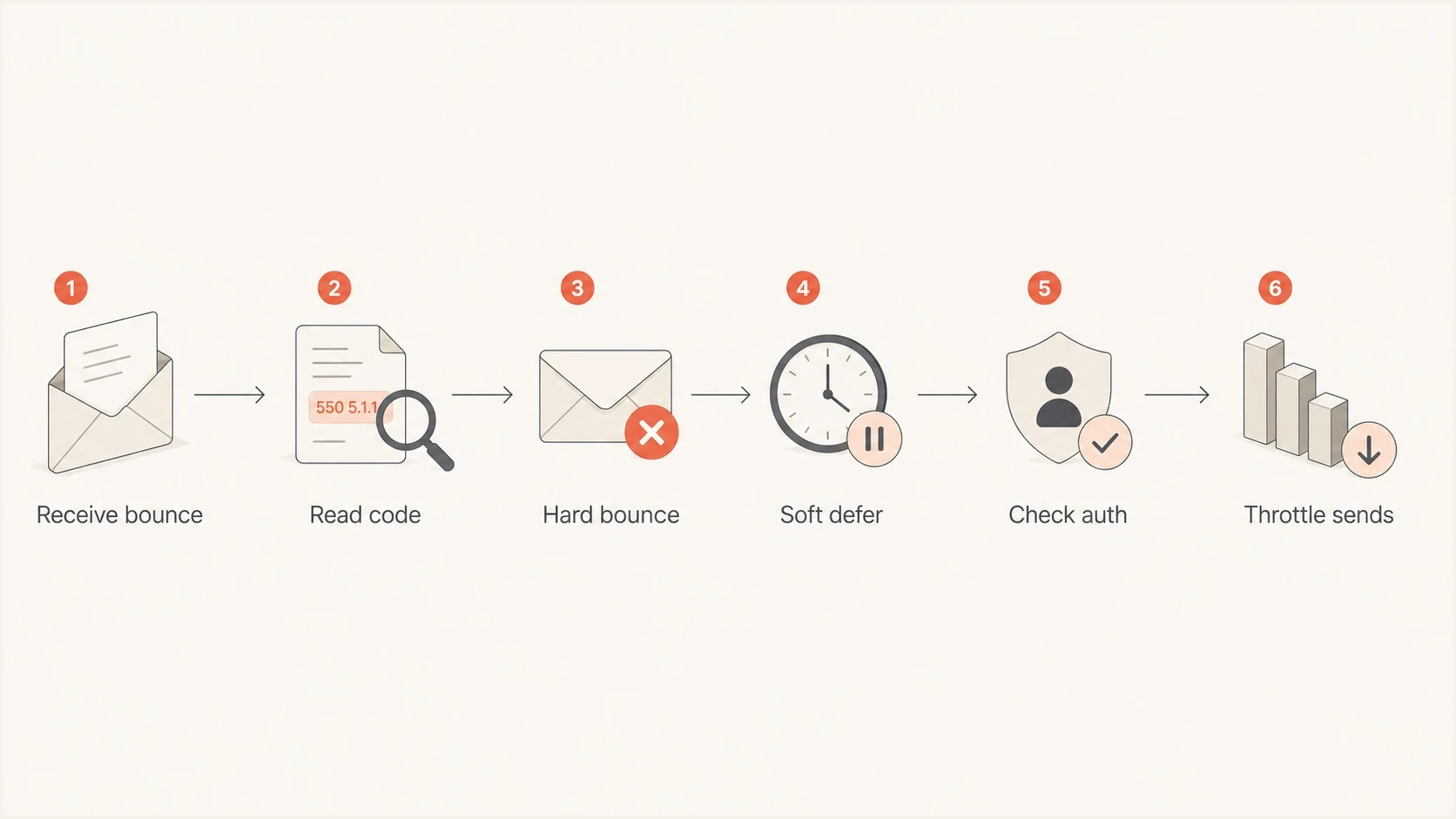
Flowchart showing how to classify AOL and Yahoo bounces before choosing a fix.
Check authentication before reputation
Authentication is the first technical checkpoint because Yahoo can reject or defer mail that lacks a trustworthy identity. All senders need SPF or DKIM at minimum. Bulk senders need both SPF and DKIM, a valid DMARC policy that passes through SPF or DKIM domain matching, valid forward and reverse DNS, and compliant unsubscribe handling for marketing mail. Check whether every third-party sender uses the same domain strategy.
The fastest way to find obvious DNS problems is to run the sending domain through a domain health checker. That does not replace a real message test, but it catches missing records, broken syntax, multiple SPF records, weak DKIM setup, and missing DMARC reporting before you chase content changes.
Authentication problems
- SPF: The sending IP is not authorized, or the SPF record has too many DNS lookups.
- DKIM: The message is unsigned, the selector is missing, or a platform rewrites the message.
- DMARC: The visible From domain does not match the authenticated SPF or DKIM domain under DMARC.
- rDNS: The sending IP lacks valid forward and reverse DNS, which harms trust.
Reputation problems
- Complaints: Recent users mark mail as spam, especially welcome or promotional messages.
- Volume: A sudden send increase hits Yahoo and AOL faster than reputation can absorb.
- Engagement: Inactive recipients receive too much mail compared with active subscribers.
- URLs: A linked domain, redirect, or image host has poor reputation.
Minimum DNS records to verifydns
_dmarc.example.com.  TXT  "v=DMARC1; p=none; rua=mailto:dmarc@example.com"
mail.example.com.    TXT  "v=spf1 include:_spf.sender.example -all"
s1._domainkey.example.com. TXT "v=DKIM1; k=rsa; p=PUBLICKEY"
A common trap is checking SPF only. SPF can pass for the envelope sender while DMARC still fails because the visible From domain is different. DKIM can pass with a platform domain while your brand domain gets no authentication benefit. DMARC passes when SPF or DKIM passes and the authenticated domain matches the visible From address. That is the identity relationship Yahoo and AOL evaluate.
Email tester
Send a real email to this address. Suped shows a results button when the test is ready.
?/43tests passed
After the test, compare the result with a real Yahoo or AOL bounce. If the test passes but Yahoo still defers, the issue is more likely reputation, volume, or complaints. If the test fails, fix DNS and sender setup first. Do not warm up or throttle broken mail because slower broken mail is still broken.
Fix the list and sending pattern
If authentication passes, move to list quality and sending shape. Yahoo and AOL are sensitive to complaint and engagement patterns. A spike can appear even when you did not change the template or offer, because the receiving system sees a different mix of recipients, more inactive users, a concentrated automation, or a new sender source. Public discussions show the same failure pattern, including this sysadmin thread about Yahoo, AOL, and related domains.
When most bounces come from one newly signed-up email, isolate that message. A welcome or confirmation email can create complaints when the signup source is low quality, the user did not expect the email, the form accepts typo addresses, or bots are filling the form. Requiring users to open early emails before receiving a longer automation helps, but it does not fix the first-message risk if the signup source is weak.
Recovery plan
- Pause: Stop low-engagement Yahoo, AOL, Verizon-family, and old inactive segments for 48 to 72 hours.
- Throttle: Send smaller batches by domain over several hours or days, depending on normal volume.
- Prioritize: Send first to recent openers, recent clickers, paying users, and expected transactional recipients.
- Suppress: Remove hard bounces, repeated permanent failures, role accounts, and suspicious signup sources.
- Resume: Add less-engaged recipients back only after deferrals and complaints fall.
Also check whether mail is delayed instead of rejected. A queue full of Yahoo and AOL retries often looks like a bounce problem before final DSNs arrive. The handling is similar: reduce concurrency, slow retry intervals, and split Yahoo/AOL traffic away from domains that are accepting normally. For that specific pattern, see Yahoo and AOL delays.
Blocklist (blacklist) checks belong here too, but they should not be the only test. A domain or IP listing can explain a sudden policy rejection, especially when a shared IP pool or compromised form generates bad traffic. Still, many Yahoo/AOL deferrals happen without a public blocklist listing. Check blocklists and blacklists, then keep working through complaints, authentication, sending speed, and list quality.
Control complaints and one-click unsubscribe
Yahoo requires senders to keep spam complaints below 0.3%. Treat that figure as a ceiling, not a target. Yahoo calculates its complaint rate against messages delivered to the inbox, so dividing complaints by every message sent can understate the rate Yahoo sees. A TSS04 spike is a reason to inspect complaint sources immediately, even when authentication passes.
- Complaint reports: Enroll each DKIM signing domain in Yahoo's domain-based complaint feedback loop and suppress reported recipients.
- Marketing headers: Provide a functioning List-Unsubscribe header with one-click support, plus a visible unsubscribe link in the message body.
- Processing time: Honor unsubscribe requests within two days and stop every related marketing automation.
- Message type: One-click unsubscribe is required for promotional and marketing mail, not order confirmations or password resets.
Find the campaign behind the complaints
Complaint reports identify the original message and headers. Map each report back to the campaign, automation, signup source, sending domain, and DKIM signing domain. Pause the concentrated source instead of cutting every Yahoo and AOL recipient when one flow causes the problem.
Use Suped to connect the signals
Suped is our DMARC reporting and email authentication platform. It brings DMARC results, SPF and DKIM health, sending sources, issue detection, and blocklist (blacklist) monitoring into one investigation. That helps when the cause sits between systems: marketing sees the bounce, DNS owns the record, engineering owns the sender, and compliance owns unsubscribe.
The concrete workflow is simple. Add the domain, review authenticated and unauthenticated sources, check whether SPF and DKIM pass for each source, confirm DMARC reporting, then watch for changes after you throttle or clean a segment. Suped's DMARC monitoring shows which senders pass or fail. Its blocklist monitoring helps catch IP and domain reputation changes before a bounce spike affects a full campaign.

Issue steps to fix dialog showing the issue overview, tailored fix steps, and verification action
Hosted SPF and SPF flattening help when a domain has too many sender includes. Hosted DMARC helps stage policy changes without asking for DNS edits every time. Hosted MTA-STS helps enforce TLS for mail delivery with two CNAME records. Those do not replace list hygiene, but they remove configuration errors that make Yahoo and AOL less tolerant of your traffic.
Views from the trenches
Best practices
Segment Yahoo and AOL traffic separately so a provider-specific spike is visible early in reports.
Throttle recovery sends by engagement, then add colder contacts only after deferrals fall.
Treat hard bounces as final, even when the signup looked recent and valid to the app.
Common pitfalls
Retrying every soft bounce at full speed makes temporary Yahoo deferrals last longer.
Assuming SPF pass is enough misses DKIM, DMARC, From-domain matching, and rDNS.
Letting one welcome email create most bounces hides the real campaign-level risk signal.
Expert tips
Compare AOL, Yahoo, and Verizon-family domains before changing templates or DNS records.
Use a fresh seed test after each DNS change, because cached results hide current fixes.
Pause low-engagement automation until complaint rates and TSS-style deferrals stabilize.
Marketer from Email Geeks says TSS04-style Yahoo soft bounces usually point to complaints, sender pattern, or spam classification rather than a recipient typo.
2025-03-18 - Email Geeks
Marketer from Email Geeks says AOL volume moving through Yahoo-style filtering can push a sender over thresholds that were not visible when the domains behaved separately.
2025-04-07 - Email Geeks
The recovery path to follow
The right fix is a sequence of changes. Suppress every hard bounce and permanent recipient failure, verify SPF, DKIM, DMARC, and reverse DNS, then reduce Yahoo/AOL volume to engaged recipients while monitoring complaints and deferrals. If one welcome email or automation creates most bounces, pause that flow and inspect signup quality before sending more.
Once the technical checks pass and deferrals fall, bring volume back gradually by domain. Keep marketing and transactional streams separated where possible, keep unsubscribe clear, and review DMARC reports after each sender change. That gives Yahoo and AOL a cleaner identity, a lower complaint rate, and a steadier sending pattern to evaluate.
What success looks like
- Bounces: Hard bounces stay suppressed, and soft deferrals return to normal baseline.
- Auth: SPF, DKIM, and DMARC pass for each real sender source.
- Volume: Yahoo and AOL receive traffic in steady batches, not sudden bursts.
- Complaints: Spam complaints stay below 0.3%, especially on welcome, promotional, and reactivation mail.




