Why am I seeing Yahoo bounce error TSS06 and is it a Yahoo issue?

Published 23 Jun 2025
Updated 13 Aug 2026
10 min read
Summarize with
Updated on 13 Aug 2026: We updated this guide with Yahoo's current sender requirements and a clearer TSS06 escalation workflow.
TSS06 is a Yahoo 553 5.7.2 permanent SMTP rejection. Yahoo is telling your sending server that it will not accept mail from the cited IP address, and normal retrying will not fix it. Treat it as a sender or IP reputation incident first, even when the final fix comes through Yahoo Sender Support.
Typical TSS06 bounce texttext
553 5.7.2 [TSS06] All messages from 198.244.60.98 will be permanently deferred;
Retrying will NOT succeed.
So, is it a Yahoo issue? Sometimes, but do not start there. If Yahoo clears the issue after a Sender Support Request, a receiver-side rule or reputation control was adjusted. That outcome does not prove the sender had no problem. Stop retries, preserve evidence, check the sender stream, then escalate with clean facts.
Yahoo's public SMTP error codes page explains that 5XX responses are permanent failures tied to authentication, policy, suspicious behavior, poor IP reputation, or a listed IP. TSS06 is not always called out by name, so the exact DSN text matters more than the absence of that label on the public page.
TSS06 means stop retrying, then investigate
The word "permanently" is the operational instruction. Your MTA should not keep sending the same queued messages to Yahoo. Repeated attempts after a hard policy decision add noise, hide the first timestamp, and make the sender look less controlled.
What the bounce tells you
- Permanent: Yahoo is telling you that normal queue retries will not succeed.
- IP scoped: The sample wording says all messages from one IP, so the IP matters.
- Policy based: The 5.7.2 status code points to a policy decision, not a full mailbox.
- Escalatable: Yahoo can adjust a receiver-side control after reviewing a precise support request.
Do not suppress every Yahoo address forever after one TSS06 event. Suppress the failed delivery attempts, pause the affected stream, and keep recipient-level bounce handling separate from IP-level diagnosis. A TSS06 bounce is not the same as "user does not exist." Yahoo is rejecting the source.
|
|
|
|---|---|---|
TSS06 | 553 permanent IP rejection | Stop retries |
TSS04 | 421 volume or complaint deferral | Throttle and investigate |
PH01 | Policy rejection | Review the message and compliance |
Other 553 or 554 | Permanent failure | Read the full DSN and do not retry |
How to classify common Yahoo bounce families during triage.
When Yahoo review is warranted
Yahoo review is warranted when the same clean sender suddenly gets rejected, the pattern is limited to Yahoo and AOL domains, no authentication or list-quality change exists, and the condition persists after sender-side remediation. If Yahoo clears it after reviewing a ticket, a receiver-side control or reputation value was adjusted.
A fast support response that says the issue is resolved tells you the symptom cleared. It does not explain why the source tripped the control. Still check volume spikes, new campaigns, shared IP neighbors, bad recipient segments, URL reputation, and recent DNS changes.
Looks receiver-side
- Scope: Only Yahoo and AOL traffic fails while other mailbox providers accept the same stream.
- History: The sender had stable volume, stable complaints, and no new infrastructure.
- Resolution: Yahoo clears the condition after a focused support request with timestamps.
Looks sender-side
- Volume: Yahoo volume jumped, a warm-up sped up, or a dormant segment was mailed.
- Quality: Unknown users, complaints, unsubscribe friction, or spam-trap risk increased.
- Identity: SPF, DKIM, DMARC, rDNS, HELO, or IP reputation changed near the first bounce.
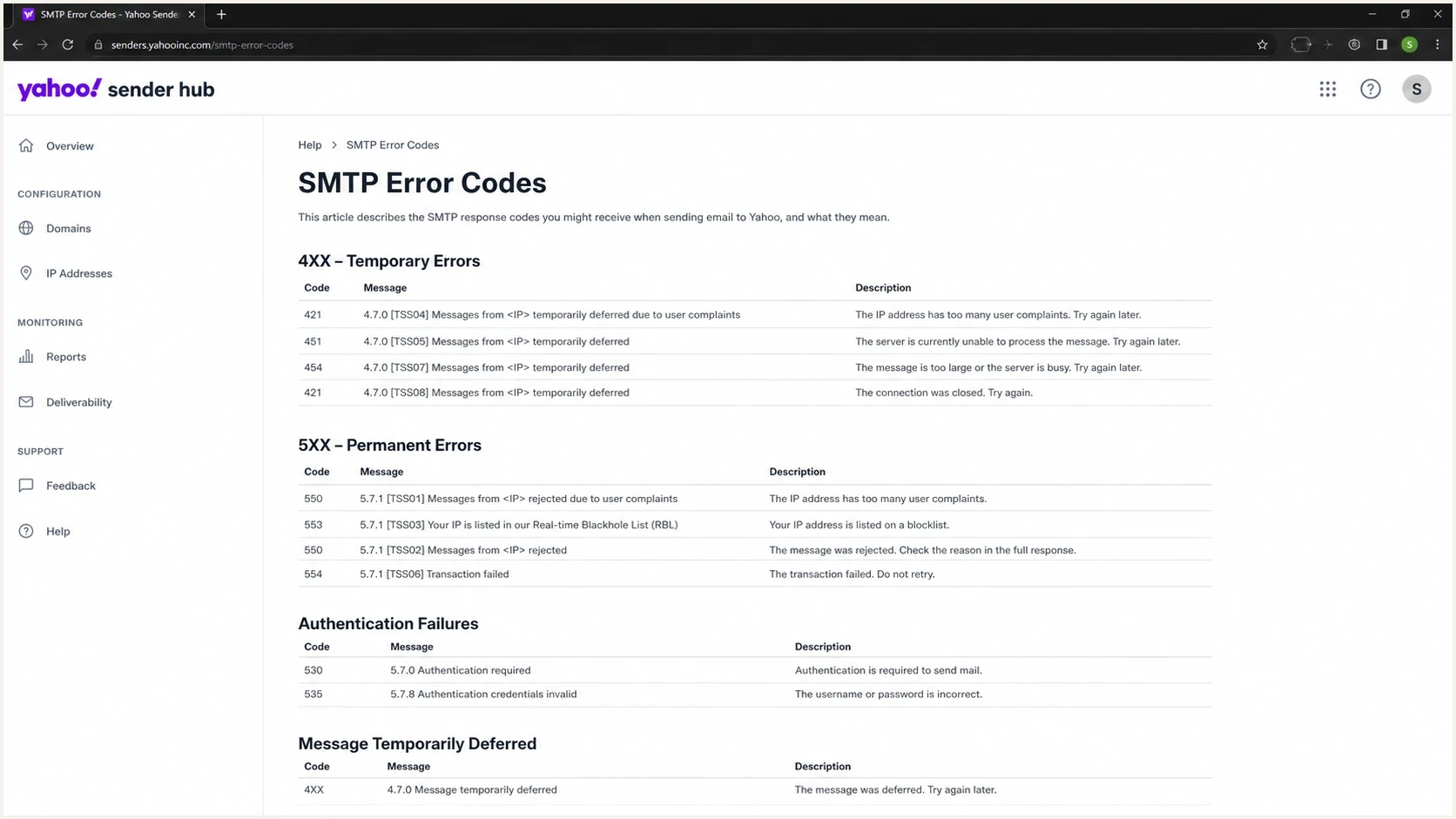
Yahoo Sender Hub SMTP Error Codes page showing temporary and permanent error sections.
What to check before escalating
Before opening or updating a Yahoo Sender Support Request, build an evidence packet. The goal is to show that you have controlled the obvious sender-side causes and can give Yahoo enough detail to find the affected control.
- Volume: Compare the first TSS06 timestamp against hourly Yahoo volume, total IP volume, and recent campaign starts.
- Complaints: Review Yahoo complaint feedback and unsubscribe rates. Bulk senders should keep Yahoo's measured spam rate below 0.3%.
- Authentication: Confirm SPF and DKIM pass, then confirm the visible From domain matches an authenticated domain for DMARC.
- Reputation: Check IP and domain blocklist (blacklist) status, shared pool changes, forward DNS, rDNS, and HELO identity.
- Recipients: Separate invalid users, dormant segments, old imports, and any Yahoo-only suppression gaps.
- Message format: Inspect URLs, tracking hosts, duplicate or malformed headers, MIME types, and template changes near the first bounce.
Baseline records to confirmtext
example.com TXT "v=spf1 include:_spf.example.net -all"
selector1._domainkey.example.com TXT "v=DKIM1; k=rsa; p=..."
_dmarc.example.com TXT "v=DMARC1; p=none; rua=mailto:dmarc@example.com"
Start with a domain health check because it catches basic DNS and authentication problems quickly. Then use DMARC monitoring to separate real authentication failures from forwarded or modified mail. For IP and domain reputation, blocklist monitoring keeps blacklist evidence beside the rest of the investigation. These are Suped workflows, so the DNS and reputation findings remain attached to the same case.
What to include in the Yahoo case
- DSN: Full bounce text, first timestamp, last timestamp, and affected Yahoo or AOL domains.
- Source: Sending IP, rDNS, HELO name, envelope sender, visible From domain, and DKIM selector.
- Change log: Recent volume, list, content, DNS, ESP, routing, and shared pool changes.
- Actions: Suppressions, throttling, list cleanup, fixed authentication, and paused campaigns.
Check Yahoo's current sender requirements
A TSS06 investigation should include a direct compliance check against Yahoo's sender requirements. Passing SPF alone does not establish compliance for a bulk sender, and a clean test message does not compensate for excessive complaints or a missing unsubscribe path.
Yahoo requirement checklist
- All senders: Use SPF or DKIM, keep the spam complaint rate below 0.3%, publish valid forward and reverse DNS, and comply with RFC 5321 and RFC 5322.
- Bulk senders: Use both SPF and DKIM, publish DMARC with at least p=none, and make sure DMARC passes for the visible From domain.
- Marketing mail: Provide a functioning List-Unsubscribe header with one-click handling, show an obvious unsubscribe link, and process requests within two days.
- Complaint handling: Enroll each sending DKIM domain in Yahoo's Complaint Feedback Loop and suppress recipients who report spam.
Yahoo calculates its spam rate using mail delivered to the inbox, so a complaint percentage calculated against all attempted messages can understate the rate Yahoo sees. Use complaint feedback as a suppression source and compare it with delivered Yahoo volume before submitting the case.
How to test the message path
A test send does not prove Yahoo will accept the next campaign, but it tells you whether the message leaves your system with clean authentication and headers. TSS06 investigations often start with IP reputation, then uncover a broken DKIM signature or malformed header after a content system update.
Email tester
Send a real email to this address. Suped shows a results button when the test is ready.
?/43tests passed
Use Suped's email tester before escalating when you need a shareable report showing authentication, headers, DNS, and content signals for a real message.
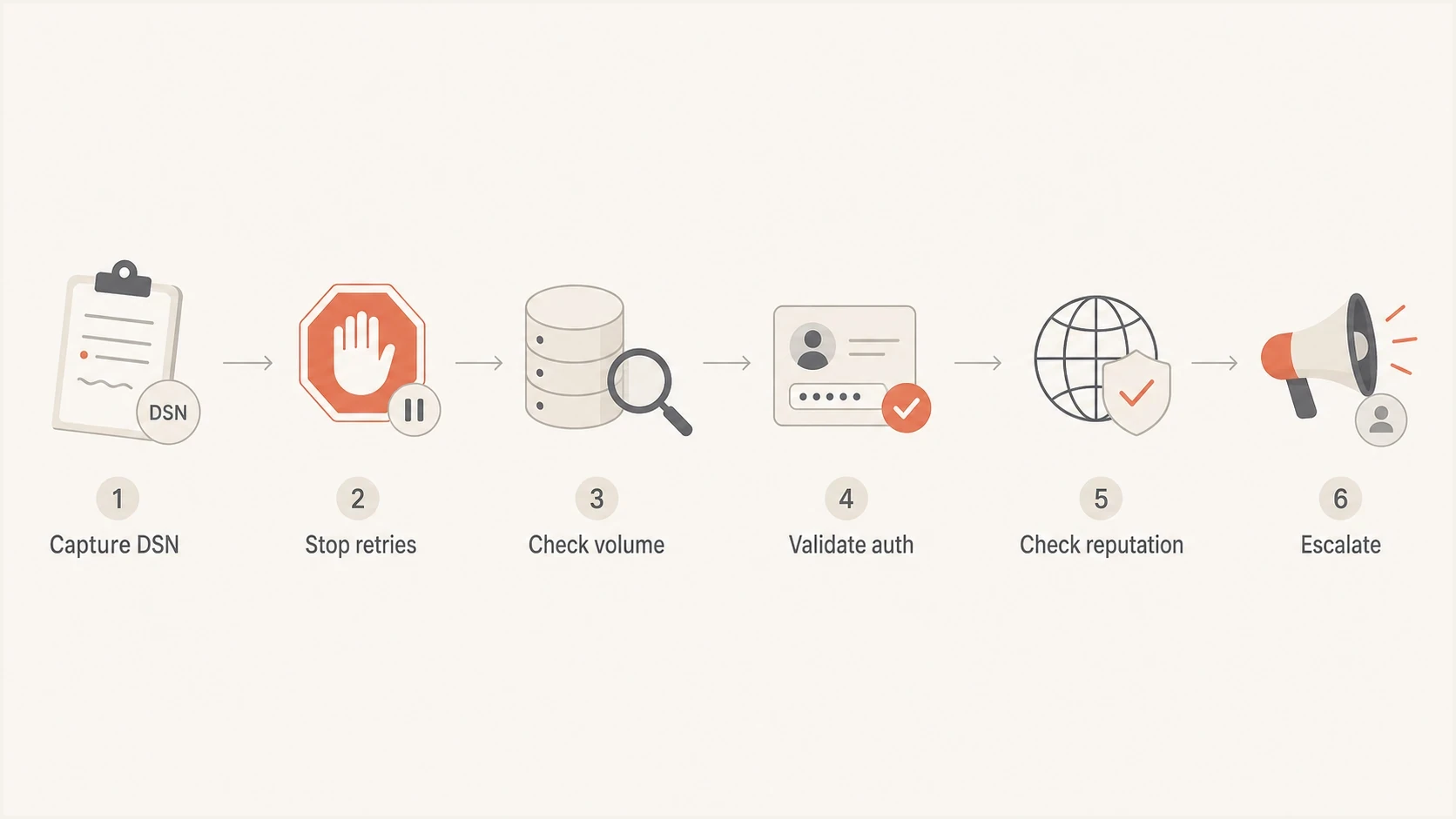
TSS06 triage flow showing DSN capture, retry pause, checks, and escalation.
Do not confuse TSS06 with temporary 421 deferrals. Temporary Yahoo throttling asks you to slow down and retry later, while TSS06 says retrying will not succeed. If your logs show temporary 421 responses instead, the workflow in Yahoo 421 errors is the better match.
Shared IP pools need separate proof
If the IP in the TSS06 bounce is shared, your own sending history is only part of the answer. A clean domain on a noisy shared pool can still inherit pressure from other senders using the same outbound infrastructure. The evidence packet needs to separate domain behavior from IP behavior.
Shared IP proof to collect
- Pool scope: Confirm whether the affected IP is dedicated, semi-dedicated, or part of a larger shared route.
- Neighbor risk: Ask the ESP whether other senders on the same pool saw Yahoo rejection at the same time.
- Route change: Check whether your mail moved to a new IP, backup route, or overflow pool before the bounce.
For a dedicated IP, the sender owns most of the remediation: cadence, list quality, complaints, authentication, and content. For a shared IP, the sender still needs clean evidence, but the ESP also needs to confirm pool health and routing history. When Yahoo names the IP, neither side should diagnose only at the domain level.
How Suped fits this workflow
Suped's product is useful when TSS06 is not a one-off. It brings DMARC, SPF, DKIM, hosted records, blocklist (blacklist) monitoring, and deliverability signals into one workflow, so the investigation does not sit across DNS tabs, raw XML files, bounce logs, and spreadsheets.

Issue steps to fix dialog showing the issue overview, tailored fix steps, and verification action
TSS06 touches several ownership areas. A deliverability lead needs the DSN and Yahoo pattern. A DNS owner needs SPF, DKIM, DMARC, rDNS, and hosted record status. A marketing owner needs volume, complaints, suppression, and list source context. Suped turns those signals into issues with steps to fix instead of leaving the team to infer the next action from raw records.
Suped workflow for TSS06
- Detect: Automated issue detection flags new authentication failures and unknown senders.
- Correlate: DMARC, SPF, DKIM, blocklist, and deliverability signals sit in one product.
- Act: Hosted DMARC and hosted SPF help teams stage changes without repeated DNS edits.
- Alert: Real-time alerts catch authentication or reputation shifts before the next campaign.
Views from the trenches
Best practices
Compare TSS06 timing against IP volume, complaint rate, unknown users, and auth failures.
Keep Yahoo escalations factual, with affected IPs, timestamps, DSNs, and recent changes.
Pause retries for permanent deferrals so queues do not create more negative signals at scale.
Common pitfalls
Treating every TSS06 as a Yahoo-only fault skips the sender evidence Yahoo reviews.
Retrying permanently deferred mail can turn a short reputation event into a larger pattern.
Ignoring shared IP neighbors leaves teams blind when another sender harms the same pool.
Expert tips
Separate Yahoo and AOL metrics from global totals so receiver-specific patterns are visible.
Document clean-up actions before escalation, especially suppressions and volume reductions.
Watch domain and IP signals together because Yahoo can react to either identity layer.
Marketer from Email Geeks says TSS06 can appear on otherwise normal senders, so the first pass should compare affected IPs against recent volume changes and sender history.
2023-08-01 - Email Geeks
Marketer from Email Geeks says a small volume spike on a subset of affected senders is enough reason to audit cadence before assuming Yahoo made an error.
2023-08-01 - Email Geeks
The practical answer
TSS06 can involve a Yahoo-side control because Yahoo can clear the condition after review. Do not treat it as a harmless Yahoo glitch. The bounce text is explicit: Yahoo has made a permanent decision for messages from the cited IP, and retrying the same mail will not work.
Stop retries, preserve the DSN, isolate the affected IP and stream, check authentication, check list quality, review volume and complaints, inspect blocklist or blacklist status, then submit a Sender Support Request with evidence. If Yahoo clears the rejection, document the timeline and keep watching the source for recurrence.




