What tools can I use to simulate email traffic and stress test a Postfix cluster?


Updated on 7 Aug 2026: We added workload-shaping guidance, corrected tool limitations, and tightened the Postfix cluster runbook.
The practical shortlist starts with Postfix smtp-source for generating SMTP traffic and Postfix smtp-sink for accepting and discarding that traffic. Add the older Postal benchmark package only when it is already packaged for the lab, use swaks for precise functional SMTP checks, and use a temporary blackhole Postfix receiver for a closer rehearsal of real routing.
For a target such as 50,000 messages per minute, do not send that volume to real customer inboxes or a normal mailbox platform. Split the test into two parts: first, a synthetic capacity test that proves the cluster can accept, queue, and hand off mail at the target rate; second, a controlled delivery test that includes DNS, TLS, content filtering, recipient variance, retry behavior, and logging overhead.
- Fastest local generator: Use smtp-source when you want raw SMTP injection without application code.
- Best discard receiver: Use smtp-sink when the receiving side should accept mail and throw it away.
- Best full rehearsal: Route test domains into a temporary receiver and measure the entire Postfix path.
Best tools for Postfix stress testing
If the goal is to prove that a new Postfix cluster can accept a high rate, start with the tools that ship with Postfix. smtp-source can generate sessions and messages; smtp-sink can receive them without creating mailbox storage pressure. Both are unsupported test programs, and Postfix does not promise command-line compatibility between releases, so verify the installed man pages before scripting them.
|
|
|
|---|---|---|
smtp-source | SMTP injection | Unsupported synthetic tool |
smtp-sink | Discard receiving | No mailbox path |
Postal | Older benchmark package | Compatibility varies |
swaks | Protocol checks | Not a bulk tool |
Blackhole Postfix | Real routing | Needs isolation |
Use this as the practical shortlist before deciding how realistic the test must be.
A useful Server Fault example uses the same basic idea: generate SMTP traffic and point it at a sink instead of the public internet. That pattern keeps the stress test under your control.
A sink test proves acceptance rate, queue behavior, process limits, and disk pressure. It does not prove real-world inbox delivery because it skips normal remote MX behavior, DNS latency, greylisting, TLS handshakes, content scanning, throttling, and retry patterns. Postfix also documents that smtp-source does not implement SMTP command pipelining, so its session behavior does not reproduce every production client.
- Capacity truth: The cluster can accept and process synthetic load at a known rate.
- Delivery gap: A sink does not tell you how remote mail systems will react.
A safe pattern for high-volume tests
For a cluster migration, use a staged test that isolates risk. Build one or more generator hosts, point the new Postfix cluster at a private receiver, and measure every step. The generator should not run on the same host as the Postfix nodes being measured, or generator limits will be confused with MTA limits.
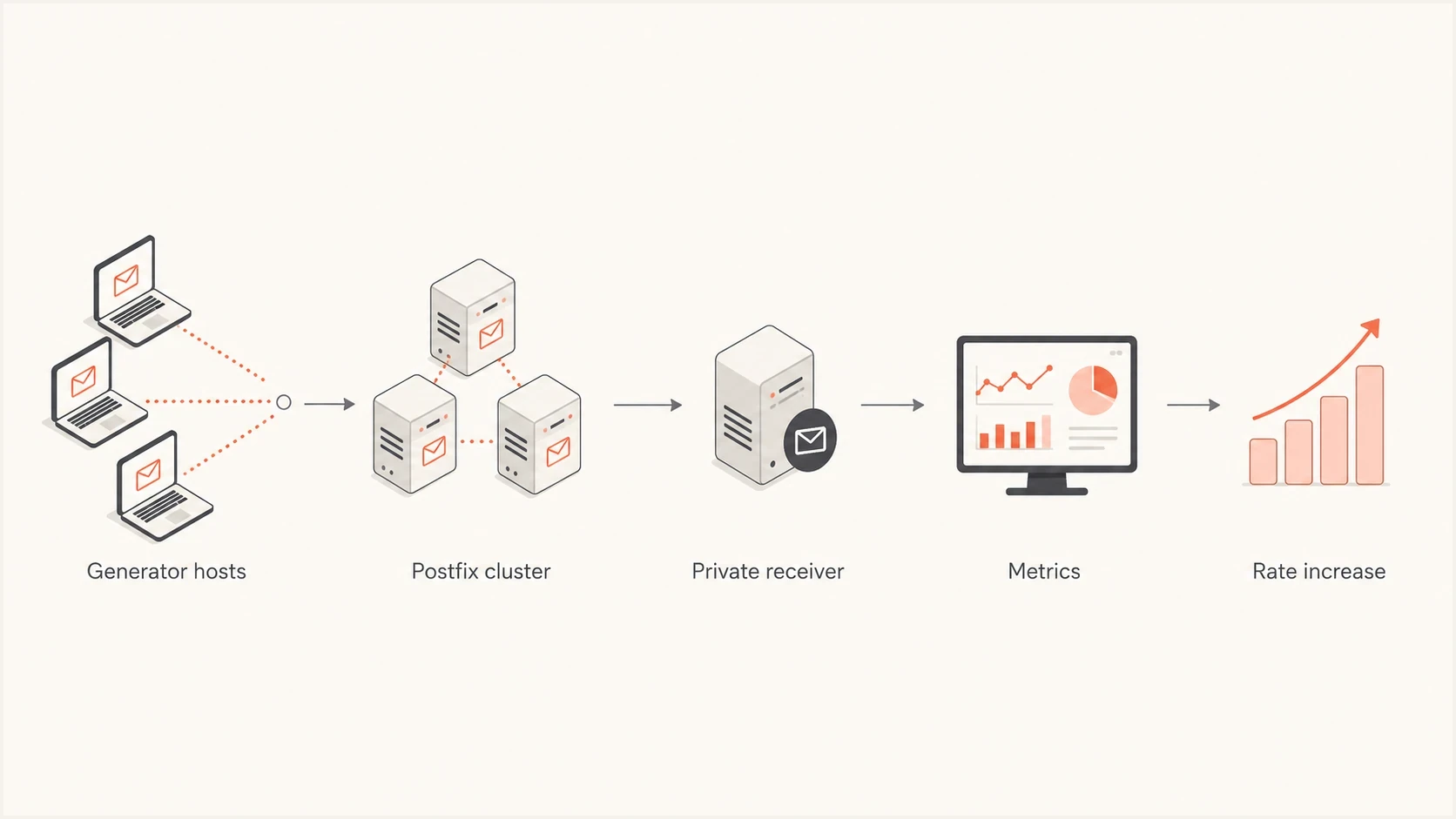
Flowchart showing generator hosts, a Postfix cluster, a private receiver, metrics, and rate increases.
Run a discard receiverbash
smtp-sink -c 0.0.0.0:2525 1000

# Run multiple sink hosts if one receiver becomes the bottleneck.
That receiver accepts SMTP and discards the message body. It is useful for an acceptance-rate test because it avoids mailbox storage, user filtering rules, and IMAP side effects. For a target of 50,000 messages per minute, plan for several generator hosts and several sink hosts, then scale both sides separately until the Postfix cluster itself is the component under test.
Generate SMTP loadbash
smtp-source -s 500 -l 2048 -m 100000 -c \
  -f sender@example.test \
  -t recipient@example.test \
  192.0.2.10:25
This command sends 100,000 messages with 2 KB payloads across 500 parallel sessions. Because -d is absent, smtp-source reconnects after each message. That tests connection churn, but the command does not enforce a fixed rate of 50,000 messages per minute. Add -d to reuse connections, and use -w or an external rate controller to pace each sending thread.
Start below the target rate, then increase in steps. Do not jump straight to the maximum number, because you need to know where queue depth begins to grow, when latency changes, and whether the system recovers cleanly after the test ends.
Route a test domain to the private receiverbash
# /etc/postfix/transport
.example.test smtp:[192.0.2.20]:2525

postmap /etc/postfix/transport
postconf -e 'transport_maps = hash:/etc/postfix/transport'
postfix reload
Shape a realistic SMTP workload
A single fixed payload at maximum concurrency benchmarks only one path. Build a workload matrix that changes connection behavior, message size, recipient distribution, and response timing. Keep each run reproducible so a throughput change can be traced to one workload variable.
- Connection behavior: Run without -d for connection churn, then add it to measure persistent SMTP sessions.
- Pacing: Use -w for a fixed per-thread delay or -R for a random delay, then verify the achieved rate in Postfix logs.
- Message bodies: Use -l for controlled payload sizes and -F for representative headers and MIME content.
- Recipient distribution: Use -N to generate numbered recipients when the private receiver accepts them, and test several destination domains to exercise routing and concurrency limits.
Change one workload dimension at a time before combining them. Record that smtp-source has no SMTP command pipelining, and compare its connection pattern with the applications that will submit production mail.
Choose the right test style
The main decision is whether you want a synthetic acceptance test or an end-to-end rehearsal. Both are useful, but they answer different questions. Run both before moving customers to a new cluster.
Generator-only test
- Purpose: Find raw acceptance capacity and queue behavior.
- Tools: Postfix smtp-source, smtp-sink, and shell orchestration.
- Risk: It can overstate live performance because remote delivery is absent.
End-to-end rehearsal
- Purpose: Check routing, DNS, TLS, retries, logging, and monitoring.
- Tools: Temporary Postfix receiver, private MX records, and real logs.
- Risk: Poor isolation can overload the receiving side or pollute metrics.
For the Postfix side, keep the official Postfix tuning guide close while you test. It helps you focus on concurrency, process limits, queue behavior, and filesystem pressure instead of guessing. If the cluster is on Red Hat Enterprise Linux, the Red Hat Postfix guide is also worth checking before you lock in package and service assumptions.
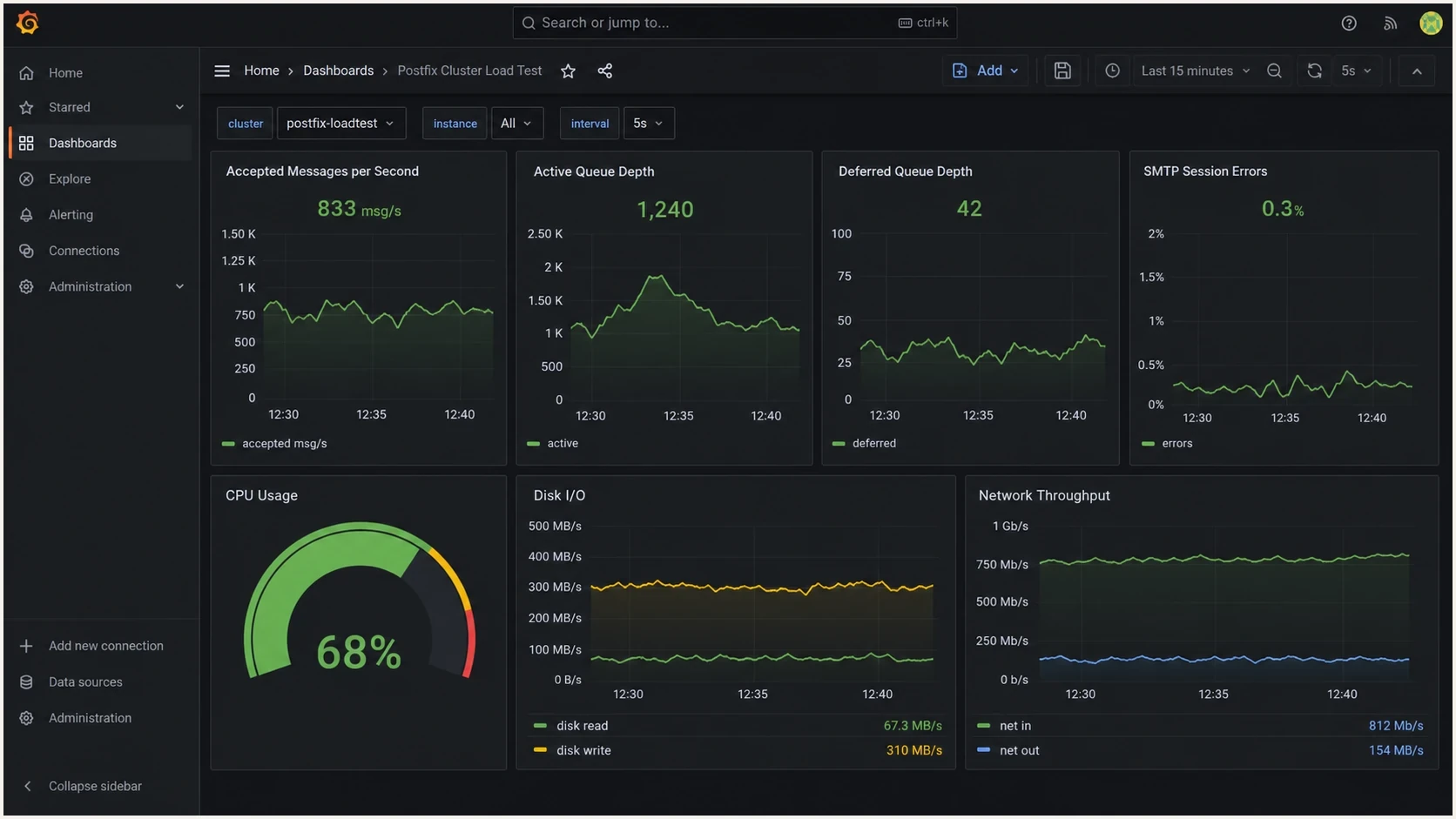
Grafana dashboard screenshot showing Postfix load test metrics for message rate, queue depth, errors, CPU, disk, and network.
Do not confuse load testing with delivery testing
A Postfix stress test answers whether the cluster can handle traffic. It does not answer whether your messages will authenticate correctly, avoid a blocklist or blacklist problem, or reach the inbox. Those are separate checks, and they should happen before the customer migration window.
Suped's product fits the authentication and reputation workstream during the rollout. It brings DMARC, SPF, DKIM, MTA-STS, hosted authentication records, real-time alerts, remediation steps, and blocklist (blacklist) monitoring into one workflow. It does not replace smtp-source or the older Postal package as a load generator.
Before the first production traffic shift, send a real message through the new path and inspect it with the email tester. Also run the domain health checker and enable DMARC monitoring so authentication failures are visible during the migration. If the cluster uses new IPs, add blocklist monitoring as a separate guardrail.
Email tester
Send a real email to this address. Suped shows a results button when the test is ready.
?/43tests passed
Treat load generation and authentication monitoring as different workstreams. A cluster can survive 50,000 messages per minute and still fail DKIM signing, break SPF domain matching, or send through an IP with a blocklist (blacklist) issue.
- Use load tools for: Acceptance rate, queue pressure, retry behavior, and resource limits.
- Use Suped for: Authentication monitoring, hosted record management, reputation checks, and alerts.
Suped DMARC dashboard showing email volume, authentication health, and source breakdown
Metrics to collect during the test
The test only matters if you collect enough data to make a migration decision. Record accepted messages per second, queue depth, queue age, deferred messages, bounce generation, SMTP error classes, TLS negotiation time, DNS lookup time, CPU, memory, disk I/O, network throughput, and log write rate for each Postfix node.
If it is installed, run qshape on every node during each rate step. Growth in the incoming queue points to message input outrunning the queue manager, while an aging active or deferred queue points to slow delivery, destination latency, or insufficient concurrency. Per-node results also expose uneven traffic distribution behind a load balancer.
Inspect queue age on each Postfix nodebash
qshape incoming
qshape active
qshape deferred
Load test stop signals
Use stop signals that are tied to operational impact, not only CPU percentage.
Healthy
Green
Queue drains after each step and deferred mail stays near baseline.
Investigate
Yellow
Queue grows during a step but drains quickly after load stops.
Stop
Red
Queue age keeps rising, errors increase, or retries do not recover.
Queue depth alone can mislead you. A queue that spikes and drains is normal during a rate step. A queue that keeps aging after the generator stops is the signal that delivery, disk, DNS, or concurrency settings need attention.
- Rate metric: Accepted messages per second shows what the cluster can ingest.
- Drain metric: Queue age shows whether the system clears work after the burst.
- Error metric: SMTP status classes show whether failures are local, remote, or policy based.
- Resource metric: Disk write rate and fsync behavior often become limits before CPU does.
A staged Postfix load test runbook
A staged runbook keeps the test useful and reversible. Avoid a single uncontrolled burst that proves something broke but leaves no clean record of which setting or component failed first.
- Baseline first: Run a low-rate smtp-source test and confirm logs, metrics, and queue tools agree.
- Raise rates: Increase traffic in fixed steps until you pass expected peak volume.
- Add realism: Introduce TLS, DNS lookups, content filters, and mixed message sizes.
- Test failure: Remove one node, confirm the load balancer redistributes traffic, restore the node, and verify queued mail drains.
- Record proof: Save test windows, configuration diffs, rate steps, errors, and queue recovery time.
For a reusable receiver design, dedicate a blackhole testing domain that cannot route to the public internet. If the migration is about bursts rather than steady state, test volume spikes specifically. If you see connection failures after tuning or upgrading, handle too many connections as its own Postfix tuning problem instead of treating it as a generator problem.
The useful result is a planned peak that stays within the latency limit, drains its queue after the generator stops, redistributes traffic after a node loss, and leaves clean logs that explain what happened.
Views from the trenches
Best practices
Run the generator and sink on separate hosts so CPU limits do not hide Postfix bottlenecks.
Use staged rates and fixed message sizes before adding TLS, filters, or DNS latency.
Keep test routing private, then compare queue drain time against live migration targets.
Common pitfalls
Testing against a regular mailbox server shifts the outage risk to the receiving side.
A single local sink can make the cluster look faster than real DNS and TLS delivery.
Raising concurrency without watching disk I/O gives a misleading capacity number.
Expert tips
Record accepted rate, deferred rate, and queue depth together, not as separate wins.
Warm resolver caches once, then run a cold-cache pass to expose DNS latency costs.
Use a temporary receiver that discards most mail and samples enough for review later.
Marketer from Email Geeks says smtp-sink is useful for accepting and discarding large test flows, but it does not model delivery or DNS latency.
2021-12-29 - Email Geeks
Marketer from Email Geeks says sending the test into a regular mailbox server is possible only when the inbound owner approves the risk and capacity.
2021-12-29 - Email Geeks
Recommended Postfix test stack
Use smtp-source and smtp-sink for the first stress test. Add the older Postal package only if it is already packaged cleanly for the operating system and another benchmark is useful. Use swaks for targeted protocol checks, not for bulk traffic. For the migration rehearsal, route a private test domain through the new Postfix cluster into a temporary blackhole receiver and collect queue, error, disk, DNS, TLS, per-node throughput, and recovery metrics.
After the cluster passes load testing, validate the mail itself. Suped's product manages authentication monitoring, hosted records, alerting, and blocklist (blacklist) checks so an infrastructure pass is not mistaken for an authentication or reputation pass.




