How to resolve Mailgun domain setup, DMARC, DKIM, BIMI, and IP blacklist issues?

Updated on 6 Aug 2026: We updated this guide for current DMARC policy tags and clearer Mailgun troubleshooting.
Resolve this by treating it as four separate problems, not one Mailgun problem. First verify the Mailgun sending domain DNS records, then confirm the DMARC record seen in public DNS. Test a real Mailgun message for DKIM and DMARC domain match, then decide whether the UCEPROTECT blocklist (blacklist) listing is causing actual bounces.
Use this order: DNS first, message authentication second, BIMI third, and IP reputation last. BIMI cannot work correctly until DMARC is enforced, and a blacklist warning does not matter unless receivers are blocking or throttling your mail. For one fast starting point, run a domain health check and send a real Mailgun test message before changing multiple DNS records.
- Fix order: Publish Mailgun SPF and DKIM exactly as Mailgun shows them, then wait for DNS propagation.
- DMARC visibility: Mailgun only shows aggregate data sent to the rua destination configured for its reporting service.
- DKIM mismatch: Test the exact From address and sending domain used by your application.
- UCEPROTECT: Monitor the listing when there are no matching bounces, then escalate when bounce evidence names it.
Start with the right diagnosis
Mailgun domain setup checks usually fail for ordinary DNS reasons: the record is in the wrong zone, the host name has the domain appended twice, a TXT value has extra quotes, a CNAME is proxied, or an old record still exists. Check what public DNS returns instead of relying on what the DNS control panel appears to show.
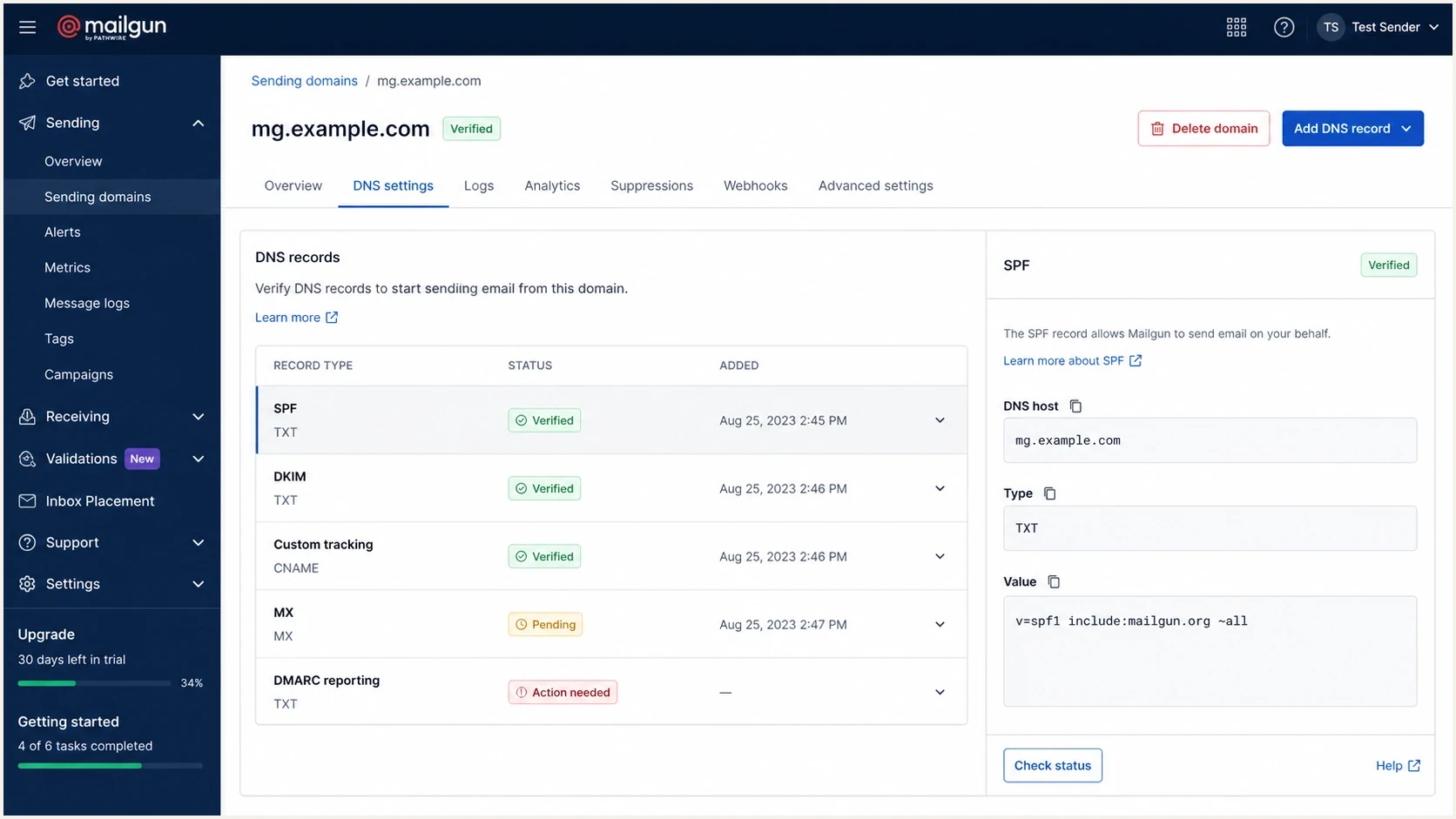
Mailgun Sending Domains screen with SPF, DKIM, tracking CNAME, MX, and DMARC status rows.
|
|
|
|---|---|---|
Mailgun verification pending | Wrong DNS host | Public DNS answer |
DMARC reports absent | Wrong rua destination | _dmarc TXT record |
DKIM fails | Selector or domain mismatch | Live message headers |
BIMI logo missing | No DMARC enforcement | DMARC policy |
Sending IP listed | Shared range reputation | Mailgun bounce logs |
Use this table to decide which issue to fix first.
Mailgun's authentication basics explain the roles of SPF, DKIM, DMARC, and BIMI. The practical detail is that your production message has to pass with the same visible From domain your users see. A record can be published correctly and still fail the message test if the app sends through a different Mailgun domain.
Fix Mailgun domain verification first
In Mailgun, copy the DNS records from the sending domain page exactly. Do not rebuild them from memory. The sending domain might be the root domain, such as example.com, or a subdomain, such as mg.example.com. That difference changes where records must be published.
The most common Mailgun DNS mistake
Many DNS providers automatically append the domain name to the host field. If Mailgun asks for a host such as smtp._domainkey.mg.example.com and your DNS UI already shows example.com outside the field, entering the full host can create smtp._domainkey.mg.example.com.example.com. Public DNS will then never return the record Mailgun expects.
- SPF: Keep one SPF TXT record per host, add include:mailgun.org to that record, and stay within the 10-lookup limit.
- DKIM: Publish the exact selector and value Mailgun provides for the sending domain.
- Tracking CNAME: Add it when you use click, open, or unsubscribe tracking, and keep it DNS-only when proxy controls are available.
- MX records: Add Mailgun inbound MX records only for inbound routing. Do not replace MX records that already receive your normal mail.
- Region: Confirm you are checking the same Mailgun region as the domain configuration.
Mailgun DNS record checklist
Host: mg.example.com
Type: TXT
Value: v=spf1 include:mailgun.org ~all

Host: selector._domainkey.mg.example.com
Type: TXT or CNAME, exactly as Mailgun shows
Value: paste the exact Mailgun DKIM value

Host: email.mg.example.com
Type: CNAME
Value: paste the exact Mailgun tracking target
After publishing, allow up to 24 to 48 hours for DNS propagation, even though records often appear sooner. Then ask Mailgun to recheck. If Mailgun still says pending, compare the public DNS answer with the value in Mailgun. Do not move on to DMARC, live-message testing, or BIMI until these records return exactly as expected.
Why DMARC changes do not appear in Mailgun
When DMARC changes do not appear in Mailgun, the cause is usually one of two things. Either public DNS has not updated at _dmarc.yourdomain, or Mailgun is not receiving DMARC aggregate reports for that domain. DMARC reporting is not automatic because Mailgun sends the email. Receivers send aggregate reports to the addresses in the DMARC rua tag.
Check the live TXT record at _dmarc.example.com. If the rua value points somewhere else, Mailgun's DMARC reporting view will not have the reports. To show results in Mailgun, use the reporting address Mailgun provides while keeping any existing destinations you still need. A reporting address on another organizational domain needs the destination domain's DMARC authorization record.
DMARC record with a broken RUF URI
Host: _dmarc.example.com
Type: TXT
Value:
v=DMARC1; p=none;
rua=mailto:dmarc-reports@example.net;
ruf=dmarc-forensics@example.com;
sp=none; aspf=r;
DMARC record with a valid RUF URI
Host: _dmarc.example.com
Type: TXT
Value:
v=DMARC1; p=none;
rua=mailto:dmarc-reports@example.net;
ruf=mailto:dmarc-forensics@example.com;
sp=none; aspf=r;
Do not overvalue failure reports
The ruf tag needs mailto: syntax, but many receivers limit or disable DMARC failure reports because they can expose message data. Aggregate reports through rua are the main signal for Mailgun authentication work, policy rollout, and source discovery.
Expect a delay. DNS can update in minutes, but DMARC aggregate reports usually arrive daily. Mailgun includes aggregate reporting in Optimize for paid plans. Suped's DMARC monitoring workflow helps teams identify sending sources, diagnose failures, and decide when to tighten policy.
Use current DMARC policy tags
RFC 9989 now defines DMARC and replaces RFC 7489. The pct tag is historic, so omit it when creating or revising a DMARC record. RFC 9989 adds t for policy test mode. Aggregate reporting and message-specific failure reporting now have separate specifications in RFC 9990 and RFC 9991.
Use p=none while discovering legitimate sources. When the data supports an enforcement test, p=quarantine; t=y requests treatment one policy level below quarantine while reports continue. Remove t=y to request full quarantine, then move to p=reject only after legitimate Mailgun and non-Mailgun sources pass DMARC.
A dedicated transactional subdomain can move to p=reject after report review. For a general-purpose email domain used by people, RFC 9989 advises against p=reject because forwarding and mailing lists can cause valid mail to lose its domain match.
Current DMARC monitoring record
Host: _dmarc.example.com
Type: TXT
Value:
v=DMARC1; p=none; rua=mailto:dmarc-reports@example.net; aspf=r; adkim=r;
Current DMARC policy test record
Host: _dmarc.example.com
Type: TXT
Value:
v=DMARC1; p=quarantine; t=y; rua=mailto:dmarc-reports@example.net; aspf=r; adkim=r;
A test tag is not BIMI enforcement
Do not treat p=quarantine; t=y as full enforcement for BIMI. Remove test mode only after reports show that authorized sources pass through DKIM or SPF with the required From-domain match.
Resolve DKIM mismatches in real messages
A DKIM checker can say the DNS record is valid while a real Mailgun message still fails DMARC. That happens when the DKIM signing domain does not match the visible From domain, when the message is sent through a different Mailgun domain, or when an old selector is still in use.
DNS record checks
- Selector: Confirms the DKIM selector exists in DNS.
- Value: Confirms the public key or CNAME target is present.
- Syntax: Confirms the record format is parseable.
- Limit: Does not prove your app sent through that selector.
Message checks
- Header From: Confirms the domain the recipient sees.
- DKIM d= domain: Confirms the signing domain used by Mailgun.
- SPF return path: Confirms the bounce domain used by Mailgun.
- Authentication-Results: Shows whether the live message passes DMARC.
Send an actual production-like message through Mailgun to an email tester. The important result is not only "DKIM pass". Confirm that either the DKIM signing domain or the SPF return-path domain matches the visible From domain under the DMARC mode in use.
Email tester
Send a real email to this address. Suped shows a results button when the test is ready.
?/43tests passed
With relaxed matching, mg.example.com can match a visible From domain of example.com. Strict matching requires the domains to be identical. If DKIM fails, change one variable at a time: the Mailgun sending domain, From domain, selector, or DNS record. If the message signs with a Mailgun-owned domain, configure custom DKIM signing for your Mailgun sending domain.
Add BIMI after DMARC enforcement works
A missing BIMI record is usually not urgent. BIMI depends on enforced DMARC. If your policy is still p=none or uses t=y, fix Mailgun authentication first. Move to full quarantine or reject only after reports show that legitimate sending sources pass.
DMARC policy stages before BIMI
Use BIMI only after the domain has enough authentication coverage for full enforcement.
Monitor
p=none
Collect reports and fix Mailgun domain matching.
Policy test
p=quarantine; t=y
Request treatment one level below quarantine while reports continue.
Full enforcement
p=quarantine or p=reject
Remove test mode and apply quarantine or reject.
The BIMI TXT record normally sits at default._bimi.example.com. Host a compliant SVG Tiny PS logo at a stable HTTPS URL and return the image/svg+xml content type. Many mailbox providers require a Verified Mark Certificate or Common Mark Certificate for logo display. BIMI is a brand display layer, not a replacement for DMARC.
Example BIMI record
Host: default._bimi.example.com
Type: TXT
Value:
v=BIMI1; l=https://example.com/bimi.svg;
a=https://example.com/vmc.pem;
BIMI will not fix inbox placement
If Mailgun messages are failing authentication or reputation checks, BIMI can wait. Add BIMI only after authentication is stable and the domain has an enforcement policy that participating mailbox providers accept.
Handle the Mailgun IP blocklist or blacklist warning
A Mailgun IP appearing on UCEPROTECT sounds urgent, but it is often low impact. The test that matters is whether your bounce logs show receiver blocks that name that blacklist or its related blocklist response. If there are no matching bounces, monitor the listing and keep working on authentication.
|
|
|
|---|---|---|
No matching bounces | No proven delivery impact | Monitor the listing |
Shared IP | Mailgun controls the address | Send evidence to Mailgun |
Dedicated IP | Your traffic controls reputation | Audit traffic and DNS |
Range listing | Network-level signal | Escalate with bounce samples |
Use bounce evidence to decide the next action.
For a shared Mailgun IP, you usually cannot fix the listing yourself. Gather the IP, full bounce text, timestamps, recipient domains, and Mailgun message IDs. Open a Mailgun support case when the listing is tied to real rejections. For a dedicated IP, pause risky sends, remove unengaged addresses, verify consent, and confirm that PTR and forward DNS identify the sending host before resuming at a lower volume.
Do not pay a blocklist or blacklist operator for removal. Fix the sending or DNS cause first, then use the operator's documented removal process if the listing still affects delivery. Suped's blocklist monitoring keeps IP and domain listings beside authentication and delivery signals, which helps teams avoid treating every blacklist notice as the root cause.
Rule for UCEPROTECT
If UCEPROTECT is the only warning and there are no matching bounces, keep monitoring and focus on authentication. If bounces name the listing or a recipient confirms that IP reputation caused the rejection, use that evidence in a Mailgun escalation.
Use Suped to keep the setup stable
The hard part is keeping Mailgun, product apps, CRM systems, billing systems, and support mail sending correctly as people add sources. Suped is our DMARC reporting and email authentication platform. It connects source data with DNS diagnostics, issue steps, policy management, alerts, and blocklist monitoring in one workflow.

Issue steps to fix dialog showing the issue overview, tailored fix steps, and verification action
In Suped, teams can monitor the sending domain, confirm Mailgun's source identity, verify whether DKIM or SPF provides the DMARC pass, and follow issue steps for sources sending without the required domain match. Suped also has hosted SPF, hosted DMARC, SPF flattening, hosted MTA-STS, real-time alerts, and MSP dashboards for teams managing many domains.
- Source inventory: Identify every system sending as the domain before enforcing DMARC.
- Issue detection: Surface Mailgun authentication failures with steps to fix them.
- Policy staging: Move out of monitoring only after legitimate sources pass.
- Reputation context: View blocklist (blacklist) signals beside authentication results.
During an incident, that workflow helps the team answer practical questions: which source failed, what record is wrong, whether the policy should change, and whether a blocklist alert is tied to delivery failures.
Views from the trenches
Best practices
Check public DNS before trusting any provider dashboard or cached verification status.
Tie every blacklist alert to bounce evidence before treating it as the root cause.
Add mailto: to RUF addresses, but use RUA aggregate reports for operational decisions.
Common pitfalls
Teams add BIMI before DMARC enforcement, then mistake no logo display for a DNS bug.
A DKIM DNS pass gets treated as a message pass, even when the From domain differs.
UCEPROTECT listings get escalated without checking if recipients are rejecting mail.
Expert tips
Keep a dated record of Mailgun DNS values so unexpected changes are easy to spot.
Run one production-like test email after each DNS change, not only a record lookup.
Separate shared-IP provider issues from domain authentication issues in reports.
Marketer from Email Geeks says UCEPROTECT has little impact when there are no matching bounces, so the better response is monitoring rather than panic.
2025-04-17 - Email Geeks
Marketer from Email Geeks says Mailgun DMARC results depend on where aggregate reports are sent, not only on whether the DNS record exists.
2025-04-17 - Email Geeks
The practical fix path
The fastest clean fix is to stop changing everything at once. Verify Mailgun's DNS records in public DNS, update DMARC so reports go where you expect, and send a real test message to prove the visible From domain passes DMARC. Add BIMI after full enforcement is ready.
For the Mailgun IP blacklist issue, use evidence. If UCEPROTECT appears but no recipient is bouncing mail because of it, monitor the listing and spend the time fixing authentication. If bounces identify the blocklist or blacklist, collect samples and escalate through Mailgun when the IP is shared.
Suped fits this workflow when a team needs repeatable monitoring instead of one-off checks. It keeps source diagnosis, policy management, hosted authentication, alerts, and blocklist context together after the immediate Mailgun setup is repaired.




