How to troubleshoot Postfix 'too many connections' errors after upgrading?

Updated on 24 Jul 2026: We updated this guide with safer provider-specific cache controls, upgrade checks, and Postfix's failed-cohort safeguard.
The direct fix is to treat the receiver's limit as a hard per-source-IP connection budget, then verify that Postfix is not opening more active and cached SMTP sessions than that budget allows. After an upgrade, Postfix usually has not changed the meaning of a concurrency limit. Connection reuse, transport grouping, service limits, queue pressure, or a packaging change has exposed a limit that the old setup happened to stay under.
For a bounce like 421 Too many connections, start by proving four things: which Postfix service opened the connection, which destination Postfix thought it was delivering to, whether connection caching kept idle sessions open, and whether any other host behind the same NAT or source IP shared the same receiver limit.
- Do first: confirm the receiver's exact limit and whether it counts active plus idle SMTP sessions.
- Do not do: tune smtpd inbound settings and expect outbound delivery concurrency to change.
Why the upgrade exposed the error
If the incident involved the historical jump from Postfix 3.1 to 3.5, treat the versions as clues rather than proof of a client-concurrency change. New OS defaults, changed service files, restored package versions of master.cf, rebuilt transport maps, DNS changes, or a larger queue can expose a remote limit. Postfix 3.5 no longer receives maintenance updates, so resolve the immediate incident and schedule migration to a supported branch.
The receiver does not care that Postfix has a per-transport limit. The receiver sees TCP sessions from your public IP. If that receiver says the limit is 3, then 2 active deliveries, 1 cached idle connection, and 1 connection from another route can already be too many. This is why connection reuse deserves close attention after an upgrade, especially when the receiver complains at the same moment Postfix appears to obey its own limits.
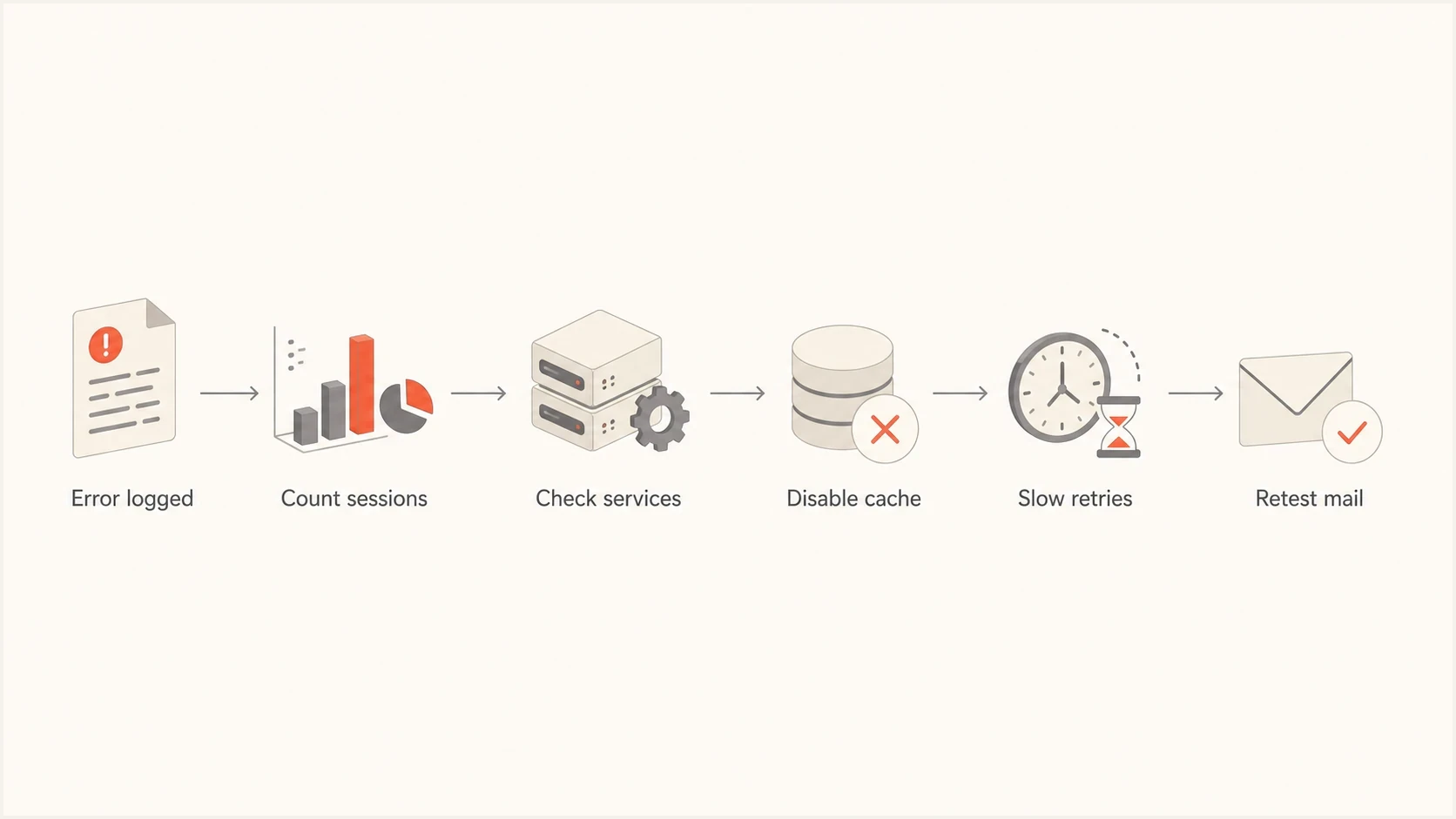
Flowchart for diagnosing Postfix too many connections errors.
The setting smtpd_junk_command_limit is for inbound SMTP server behavior. It does not control outbound SMTP client concurrency, so it will not solve a remote provider deferring your outbound mail for too many connections.
- Inbound: smtpd settings apply when other systems connect to your Postfix server.
- Outbound: smtp transport settings and master.cf service caps apply when your server sends mail out.
Compare the effective configuration after the upgrade
Before tuning concurrency, record the configuration that the upgraded binaries actually load. An unchanged main.cf does not prove unchanged behavior because built-in defaults, package-supplied master.cf entries, per-service overrides, and compatibility settings can differ after an upgrade. Compare this output with the pre-upgrade snapshot, configuration management history, or package backup files.
Capture the effective Postfix configurationbash
postconf mail_version compatibility_level config_directory
postconf -n
postconf -M
postconf -P
postfix check
journalctl -u postfix --since '1 hour ago' | egrep -i 'warning|compatibility|override|unused'
Pay special attention to missing custom transports, changed maxproc fields, duplicated parameter names, and compatibility warnings. The postfix check command also catches configuration ownership or permission problems that can appear when package files are replaced.
Do not set compatibility_level to an arbitrary high value just to remove a warning. Review the defaults named in the log, apply the documented level deliberately, reload Postfix, and retest a small batch. A compatibility-level change can activate several new defaults at once.
Start with the exact evidence
Before changing limits, capture the full deferral line and the active Postfix settings at the time of the event. The important fields are the remote host, status code, Postfix transport name, queue ID, public egress IP, and timestamp. The receiver's response often tells you whether it wants fewer connections, slower connection attempts, or a lower message rate.
Typical receiver deferraltext
421 mwinf5c42 ME Trop de connexions, veuillez verifier votre
configuration. Too many connections, slow down. OFR004_104 [104]
Then compare Postfix's view with the network's view. Postfix can show one concurrency number while the receiver sees a higher total because it counts cached sessions, retry bursts, or separate transport services as one shared source-IP pool.
Commands to capture the real statebash
postconf -n | egrep 'smtp_|orange_|wanadoo_'
postconf -M | egrep 'orange|wanadoo|smtp'
postconf -P | egrep 'orange|wanadoo|smtp'
postqueue -p
ss -tanp state established | egrep ':25|:587'
journalctl -u postfix --since '30 minutes ago'
If the host does not use systemd, inspect its mail log instead of journalctl. If several MTAs share one public address, run the socket count on every sender. Receiver limits are usually per connecting IP, not per hostname, route, or mail stream. That distinction matters when a NAT gateway hides several systems behind one address.
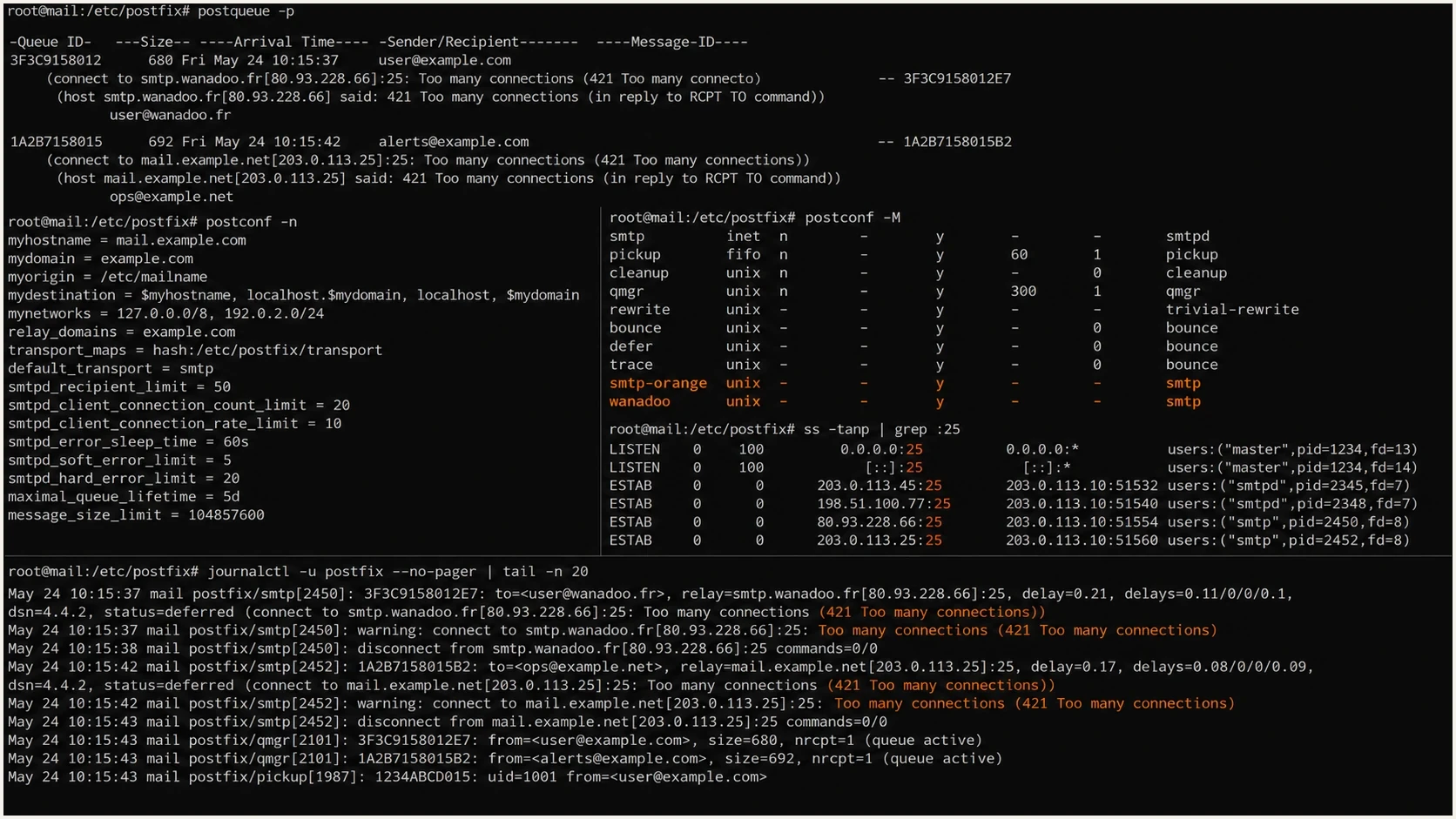
Terminal screenshot showing Postfix queue, settings, and active SMTP sessions.
Check the settings that affect outbound connections
For outbound Postfix delivery, the first controls to inspect are the custom transport in master.cf, the transport-specific destination concurrency settings, connection cache behavior, and failure-cohort handling. The Postfix tuning notes are useful for separating process limits, concurrency limits, rate controls, and destination-failure behavior.
|
|
|
|---|---|---|
maxproc | service | Caps smtp client processes for that transport. |
concurrency | destination | Limits parallel deliveries to a Postfix destination. |
cache | session | Can keep idle SMTP sessions visible to the receiver. |
delay | rate | Spaces deliveries when connection count alone is not enough. |
failed cohort | destination failure | Prevents one failed attempt from suspending a rate-delayed destination. |
Controls to inspect when a receiver enforces a strict connection cap.
A common mistake is to map many recipient domains to a custom transport and assume that one destination concurrency limit equals one provider-wide limit. That is not always true. If the receiver groups several domains under one provider limit, create a routing pattern that matches the receiver's counting model, then cap the total sender behavior under that model.
What Postfix controls
- Service: how many delivery agent processes a transport can run.
- Destination: how many parallel deliveries Postfix permits to one destination.
- Cache: whether an SMTP session stays open for reuse after a delivery.
What the receiver sees
- Source: total open TCP sessions from the same public IP.
- Provider: sessions across related MX hosts or branded domains.
- Timing: connection attempts that arrive close together during retry waves.
Use a strict-provider configuration pattern
When the receiver enforces a very small connection cap, use a conservative pattern first: cap each affected custom transport in master.cf, set initial concurrency to 1, keep destination concurrency low, disable connection caching only on those transports, and add a small delay if the provider also objects to rapid attempts.
master.cf custom transportstext
orange  unix  -  -  y  -  1  smtp
  -o smtp_connection_cache_on_demand=no
  -o smtp_connection_cache_destinations=
wanadoo unix  -  -  y  -  1  smtp
  -o smtp_connection_cache_on_demand=no
  -o smtp_connection_cache_destinations=
main.cf conservative sender controlstext
orange_initial_destination_concurrency = 1
orange_destination_concurrency_limit = 1
orange_destination_rate_delay = 2s
orange_destination_recipient_limit = 10
orange_destination_concurrency_failed_cohort_limit = 10

wanadoo_initial_destination_concurrency = 1
wanadoo_destination_concurrency_limit = 1
wanadoo_destination_rate_delay = 2s
wanadoo_destination_recipient_limit = 10
wanadoo_destination_concurrency_failed_cohort_limit = 10
The failed-cohort limit matters here because Postfix recommends a value of 10 or more when a destination rate delay is nonzero. Without it, one connection or handshake failure can suspend all mail for that destination. The provider-specific cache overrides also avoid changing connection reuse for unrelated outbound mail.
This pattern intentionally gives up some throughput while you regain predictable behavior. After deferrals stop, increase one control at a time. If the receiver's official cap is 3, do not configure your own visible maximum at exactly 3 when cached sessions or other hosts can share the same source IP. Leave room for measurement error.
Connection budget for a receiver cap of 3
Use the receiver's per-source-IP cap as the real limit, not just the Postfix process count.
Safe test
1
One active connection while checking logs and socket state.
Normal cap
2
Two active connections with no cached idle sessions.
Risk zone
3
Three sessions leaves no room for cache, retries, or another sender.
Deferred
4+
Four or more sessions will trigger many strict receivers.
Test connection reuse as a separate variable
Connection reuse helps throughput, but it can confuse strict remote connection accounting. A cached idle session is still an open session to the receiver. If the provider counts active plus idle sessions, a setup that looks safe by process count can exceed the provider's visible limit.
For a controlled test, capture the current master.cf overrides, temporarily disable on-demand caching only on the affected custom transports, then send a small batch to the affected domains. Watch socket state at the same time. If deferrals disappear, the issue is not TLS itself. It is the total number of receiver-visible sessions during reuse and retry windows.
Provider-specific controlled testbash
postconf -P | egrep 'orange|wanadoo'
postconf -P 'orange/unix/smtp_connection_cache_on_demand=no'
postconf -P 'orange/unix/smtp_connection_cache_destinations='
postconf -P 'wanadoo/unix/smtp_connection_cache_on_demand=no'
postconf -P 'wanadoo/unix/smtp_connection_cache_destinations='
postfix reload
watch -n 1 "ss -tanp state established | egrep ':25|:587'"
After the test, restore the exact per-service override values captured in the first command. Keep caching disabled for these routes only if the socket evidence links cached sessions to the receiver's limit.
If the provider says you exceeded the cap at an exact time, compare that timestamp to your socket count and queue manager logs. Also check whether retries from earlier deferred mail created a second wave while the new batch was already sending.
- Match: provider timestamp, Postfix queue ID, and public source IP.
- Separate: active deliveries, cached sessions, and retry attempts in the evidence.
When concurrency is not the only cause
Some receivers use the phrase too many connections when the trigger is repeated connection attempts, poor reputation, a sender that opens and drops sessions too quickly, or multiple deferred retries. If strict concurrency settings reduce but do not remove the errors, widen the diagnosis.
Run a delivery test after each Postfix change. Suped's email tester lets you send a real message through the same Postfix path and inspect its headers, authentication results, and delivery signals. It does not replace server logs, but it helps confirm that the connection fix did not break the message.
Email tester
Send a real email to this address. Suped shows a results button when the test is ready.
?/43tests passed
Also check the sending domain's authentication and reputation signals. A server-side throttling fix can stop 421 deferrals, but the same upgrade might have changed HELO, reverse DNS, DKIM signing, or SPF identifier matching. Suped's domain health checker provides a quick check of DMARC, SPF, DKIM, and core DNS settings before you close the incident.
- HELO: confirm it still uses a stable name with matching DNS.
- Reverse DNS: verify the PTR did not change during the OS migration.
- Queue waves: inspect old deferred mail before releasing a large backlog.
- Reputation: check blocklist and blacklist status if throttling persists.
Validate mail authentication after the Postfix fix
The Postfix fix is complete only when the server stays under the receiver's connection cap and the mail still passes authentication. Queue tuning can change delivery timing, while OS and package upgrades can alter signing services, milter order, interface binding, or sender identity. DMARC aggregate data often exposes those changes before a user reports a problem.
Suped's DMARC reporting is useful at this stage because it can confirm that the upgraded Postfix server still appears as an expected source, authentication pass rates remain steady, and new failures belong to a real sender rather than a spoofed source. Use the incident window and source IP to match DMARC results with the Postfix logs.
Issues page showing top issues, verified sources, unverified sources, and authentication pass rates
For teams managing several domains or client tenants, Suped's MSP and multi-tenancy dashboard helps separate domains affected by the Postfix change from domains that stayed healthy. Continuous DMARC monitoring provides the post-change evidence: which sources passed, which failed, and which sender needs attention.
A step-by-step recovery runbook
For a clean recovery, use a short runbook and avoid changing several Postfix settings at once. The order matters because each step tests a different failure mode.
- Freeze: stop large releases to the affected provider until the active session count is known.
- Count: measure open SMTP sockets from every host using the same public IP.
- Compare: diff effective main.cf settings, master.cf services, overrides, and compatibility warnings against the pre-upgrade state.
- Cap: set strict custom transport limits below the receiver's stated cap.
- Disable: turn off on-demand connection caching only for the affected route while testing.
- Retest: release a small batch and compare receiver deferrals with socket counts.
- Validate: confirm SPF, DKIM, DMARC, DNS, and reputation signals after delivery stabilizes.
If you still see deferrals after those changes, compare the symptom with related connection failures. A refusal at connect time has a different path than a provider-side concurrency deferral, so the next diagnostic branch is often connection refused errors rather than concurrency tuning.
For retry behavior, review the queue settings separately. Changing retry timing can reduce bursts after a backlog, but it should not hide a provider cap that the active connection count still exceeds. A focused guide on Postfix retransmission timing is the better next step when deferrals happen in retry waves.
Views from the trenches
Best practices
Capture postconf, master service limits, logs, and socket counts before changing settings.
Treat a provider's cap as a source-IP budget, including cached sessions and retries.
Test only one setting at a time so the fix can be explained and safely rolled back.
Common pitfalls
Tuning inbound smtpd limits will not change outbound smtp client concurrency at all.
Mapping many domains to one route does not always equal one provider-wide cap in practice.
Queue retries after an upgrade can create bursts that look like new concurrency.
Expert tips
Disable on-demand cache briefly to prove whether idle sessions affect the receiver.
Keep configured limits below the receiver cap when NAT or extra senders share an IP.
Use provider timestamps to match deferrals with exact Postfix queue and socket state.
Marketer from Email Geeks says complex Postfix connection issues need the exact configuration and error text before a useful diagnosis is possible.
2021-12-03 - Email Geeks
Marketer from Email Geeks says the shared configuration did not show an obvious mistake, so logs and upstream timing mattered more than guessing.
2021-12-03 - Email Geeks
What to change first
Do not start with smtpd junk command settings. First prove the receiver-visible connection count, compare the effective configuration with the pre-upgrade state, reduce the affected custom transports below the provider's stated cap, disable on-demand SMTP connection caching for those transports during the test, and add a small destination rate delay if the receiver still reports rapid attempts.
Once delivery stabilizes, bring performance back carefully. Increase one limit, wait through a retry cycle, and compare logs with live socket counts. Suped provides the monitoring layer outside Postfix for this workflow: DMARC source visibility and alerts can expose authentication changes, while blocklist (blacklist) monitoring can flag a reputation issue that persists after the connection fix.
The practical target is predictable delivery under the receiver's published or confirmed limits, with enough monitoring to catch authentication or reputation changes caused by the same migration. Restore throughput only after the socket count and deferral rate stay stable through a retry cycle.




